Settlement rules
An order becomes eligible for settlement after the payment is complete, delivery is confirmed, and the escrow period has passed. If the buyer is a credit control customer, the order can be settled only after the corresponding bill is paid in full. Alibaba Cloud Marketplace processes settlements monthly, settling the previous month's bills by mid- to late the following month. This topic describes the settlement rules and procedures.
Alibaba Cloud Marketplace transaction flow
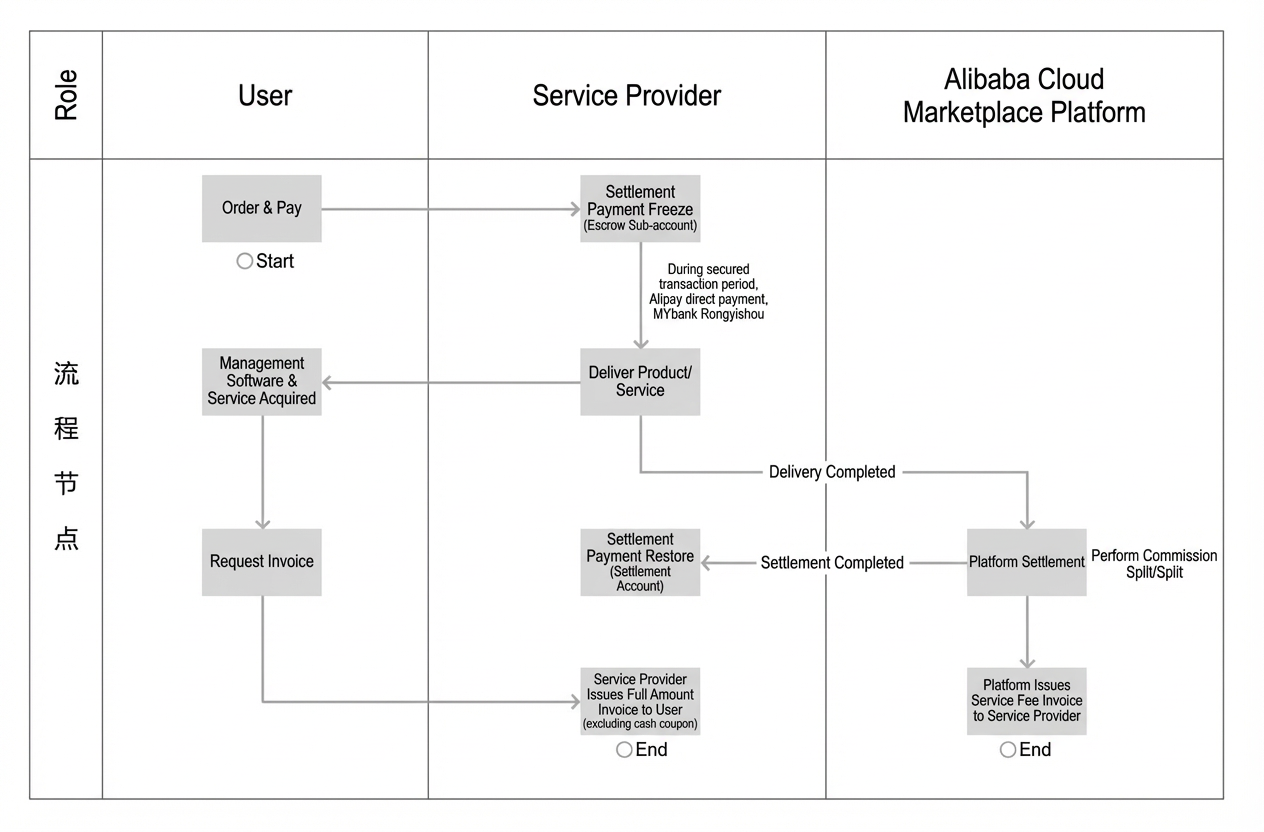
After a customer places an order, the payment is processed into the service provider's custody sub-account (Alipay/MYbank channels) or completed through the Alibaba Cloud online payment system (regular channels).
The service provider must deliver the product or service as specified in the order.
Customers can request an invoice after the payment is successful. The service provider must issue an invoice for the full amount to the customer.
Alibaba Cloud coupons cannot be used for payments in Alibaba Cloud Marketplace.
Alibaba Cloud Marketplace deducts the applicable platform service fee and settles the remaining amount to the service provider's account. Payments from Alipay/MYbank channels are disbursed to a corporate Alipay account, while payments from regular channels are disbursed to a bank account.
After the settlement is complete, the service provider can apply for an invoice for the platform service fee from Alibaba Cloud Marketplace.
Settlement cycle
The settlement cycle for Alibaba Cloud Marketplace is one calendar month, running from the first to the last day of the month. Alibaba Cloud Marketplace retrieves and summarizes the details of all orders that become eligible for settlement within that month. For example, an order placed on January 31 is settled in March. To determine the settlement period for your order, see When does an order become eligible for settlement?.
The settlement cycle refers to the settlement period, not the order payment date.
Due to data verification, summarization for each service provider, and financial approval processes, payments are typically disbursed by mid-month. This timeline may be affected by public holidays and the pace of financial approvals.
Settlement eligibility
A paid order becomes eligible for settlement after the service provider completes the delivery and the product's escrow period has passed. The escrow period varies depending on the product delivery method as described below:
Images
For new subscription purchases, the order is added to the settlement bill after the 5-day unconditional refund period ends following successful activation.
For subscription renewals, if the new purchase order has a "Settled" status, the renewal order is added to the settlement bill on the day after payment is successful.
For pay-as-you-go products, paid bills are consolidated by product for settlement. Unpaid bills are not settled.
Software applications
For new purchases, the order is added to the settlement bill after the 5-day unconditional refund period ends following successful activation.
For renewals, when the new purchase order becomes eligible for settlement, all its renewal orders also become eligible.
Downloads
The order is added to the settlement bill on the day after the service is successfully activated.
API products
The order is added to the settlement bill on the day after the service is successfully activated.
Services
For new purchases, the order is added to the settlement bill on the day after the service is marked as complete.
For renewals, when the new purchase order becomes eligible for settlement, all its renewal orders also become eligible.
If the new purchase order has a "Settled" status, the renewal order is added to the settlement bill on the following day.
If the service is not completed but the instance has expired and been closed, the order is added to the settlement bill on the day after the instance is closed.
To check the settlement status or the date an order is added to a settlement bill:
Log on to the Seller Portal.
In the left-side navigation pane, choose .
Find the target order in the order list and click View in the Actions column.
On the Order Details page, check the settlement status in the Order Information section. The Settlement Time field indicates whether the order has been settled. A status of Unsettled means the order has not yet been added to a settlement bill.
Additionally, if the buyer is a credit control customer, the order can be included in a settlement bill only after the corresponding bill is paid in full. You can view the repayment due date and status in Orders > Billing Management > Billing Overview to track the settlement progress:
Log on to the Alibaba Cloud Marketplace Seller Portal.
In the left-side navigation pane, choose Orders > Billing Management.
Select a bill month to query or export the corresponding details, and verify the settlement status as follows:
If "Repayment Status" is "Paid": Use the "Repayment Due Date" to determine the settlement period, then check the settlement bill details for that period using the customer's account ID.
If the corresponding details are not in the settlement bill: Verify whether the order's delivery flow is complete, the escrow period has passed, and the settlement account is correct.
Service provider settlement account
For regular channels, the settlement account is the corporate bank account you provided when you registered with Alibaba Cloud Marketplace. If this information is missing, settlement will be delayed.
For new settlement channels (Alipay/MYbank), the settlement account is the corporate Alipay or MYbank account you provided during the application process. You can verify this by logging in to the Seller Portal and navigating to Settlement > Settlement Account Management. To enable settlement, see Notice on Upgrading the Alibaba Cloud Marketplace Settlement System.
The Custody Sub-account section on this page shows two authorization steps: authorizing the custody sub-account and authorizing Alibaba Cloud deductions. It also lists your activated custody sub-accounts and their statuses.
Settlement failure
Verify that the bank account information linked to your Alibaba Cloud Marketplace account is correct. To modify it:
Log on to the Seller Portal.
In the left-side navigation pane, choose .
Click Edit in the upper-right corner and update your account information in the Settlement Information section.
NoteThe bank account information must match the registered company name.
Send an email to yscsh@list.alibaba-inc.com to notify Alibaba Cloud Marketplace of the change. The email must include your service provider account ID and full company name.
Platform service fee models
Percentage of order amount (platform service fee model): Alibaba Cloud Marketplace charges a platform service fee based on a percentage of the total order price. The remaining amount is paid to the service provider after the fee is deducted.
For platform service fee rates across different markets, see Alibaba Cloud Marketplace Platform Service Fee Rules.
Fixed platform service fee rate by product (fixed platform service fee rate model): Alibaba Cloud Marketplace pays the service provider based on the fixed platform service fee rate specified for the product.
Settlement for refunded orders
Within the escrow period, customers can submit refund requests online. If a refund is processed successfully, a corresponding debit is recorded. This debit appears on the settlement bill for the following month.
View settlement details
Log on to the Seller Portal.
In the left-side navigation pane, choose . You can view details by settlement period.
View by Settlement Period tab: This tab summarizes the order amount, cash received, and settlement amount for all settled orders within each settlement period.
On the Settlement Bill Management page, you can filter bills by the Billing Cycle date range and search by criteria such as Bill Status (Pending Approval, Pending Payment, Payment in Progress, Payment Successful, Payment Failed), Bill ID, and Settlement Channel.
View by Order Billing Cycle tab: This tab summarizes the settlement status of all successfully created orders within each calendar month, including the settlement channel, customer payable amount, and settlement amount.
Click Billing Details in the Actions column to view the detailed settlement information for the corresponding bill. Clicking the billing details in the Actions column allows you to view specific details. You can also click in the upper-right corner to export the settlement details to a local file.
The bill details panel includes fields such as Detail ID, Transaction Time, Customer Paid Amount, Customer Payable Amount, Revenue Share Ratio, and Settlement Amount. You can filter by Payment Type and Order ID/Pay-As-You-Go Bill ID.
Track settlement progress
After the settlement amount is calculated, service providers can track the settlement progress for each month.
Log on to the Seller Portal.
In the left-side navigation pane, choose .
Click the View by Order Settlement Period tab. In the Data List, you can click Search in the Actions column of the target settlement period to view the bill status. On the Settlement Bill Management page, the Bill Status column in the Bill Details table displays the settlement progress. Statuses include Pending Approval, Pending Payment, and Payment Failed.
Inquiries about settlement exceptions
If you encounter any settlement exceptions, please report them by sending an email to yscsh@list.alibaba-inc.com.
Subject: Settlement issue inquiry for third-party store in [Month]
Body: Include the number(s) of the affected order(s) and a description of the issue.
After receiving your email, Alibaba Cloud Marketplace will investigate the issue. If confirmed, the discrepancy is corrected in the next settlement cycle.
Platform service fee invoice
How do service providers submit invoicing information?
Log in to the Seller Portal and navigate to Partner Information to edit or update your "Invoice Information". If this information is not provided, a consolidated invoice for all past platform service fees will be issued once you update the details. The invoice recipient must match the registered service provider name; otherwise, the invoice will not be issued.
The Alibaba Cloud Marketplace platform service fee invoice will list "Software Service Fee" as the line item and include the note "Alibaba Cloud Marketplace service fee".
How often does Alibaba Cloud Marketplace issue platform service fee invoices?
If the service provider's invoicing information is complete and accurate, Alibaba Cloud Marketplace mails the invoice after the settlement payment is disbursed in the following month.
What should I do if the information on my platform service fee invoice is incorrect?
Please refer to the invoice return and exchange process: View Now
Credit control payment
Alibaba Cloud offers credit control payment to select key customers. This payment method allows customers to use a credit line from Alibaba Cloud to pay for purchases and then repay Alibaba Cloud later to restore their credit line.
By default, all products in Alibaba Cloud Marketplace can be purchased using credit control payment.
For orders paid with this method, Alibaba Cloud Marketplace settles the payment with the service provider only after the customer has repaid the credit amount to Alibaba Cloud. Therefore, the settlement payout to the service provider may occur later than the initial purchase date.
Disable credit control payment
By default, Alibaba Cloud Marketplace products support credit control payment. If you do not wish to offer this option to customers, you can disable it for prepaid products:
Log on to the Seller Portal.
In the left-side navigation pane, choose .
Find the target product in the list and turn off the toggle in the Credit Control Payment column.
Troubleshoot unsettled orders
Reason 1: Outdated account information
If you have not received any settlement payments from Alibaba Cloud Marketplace since January 2019, your settlement account information may be outdated or contain errors, such as extra spaces.
Solution: See Why does my bill show "Settlement Failed"? to update your account information. After updating, you do not need to contact support. The system will automatically settle any outstanding historical balances within 60 days.
Reason 2: Extended settlement period due to a credit control customer
Check in Orders > Billing Management to see if the order was placed by a credit control customer. If so, the system settles the order based on the customer's payment schedule. This means the service provider is paid only after the customer repays Alibaba Cloud.
Solution: You can disable credit control payment for prepaid products in the Seller Portal to avoid this issue.
Reason 3: Service period not expired or service flow not complete
An order cannot enter settlement if its service period has not expired or, for service-based products, if the service delivery process is not complete.
Solution: Wait for the service period to expire. If the service flow is incomplete, contact the customer to confirm delivery and advance the process. The order will then enter the settlement process automatically.
Reason 4: The 5-day unconditional refund period has not passed
If a product is eligible for a 5-day unconditional refund, it enters the settlement process after this five-day period, not on the day of the sale.
Solution: No action is required. The order will be settled automatically after the 5-day unconditional refund period expires.
Reason 5: End-of-month orders are deferred to the next settlement cycle
An order placed on the last day of a month may become eligible for settlement on the first day of the next month. This defers its settlement to the next month's cycle, and the payout is consequently delayed.
Example: For an order placed on January 31 that becomes eligible for settlement on February 1, the payout will occur around mid-March.
Settlement and order amount discrepancy
The settlement amount may differ from the order amount for the following reasons:
Platform service fee deduction: The Alibaba Cloud Marketplace platform service fee is deducted during each settlement. First, check if the difference equals the platform service fee.
Split settlement across channels: Settlements are processed through three channels based on the customer's payment method: Alipay, MYbank, and regular channels. When reconciling amounts, you must sum the funds received from all three channels before comparing with the bill. Note that each channel disburses funds to a different account: Alipay/MYbank channel payments go to your corporate Alipay account, while regular channel payments go to your bank account. Ensure you check both accounts.
Missing current month's bill
You may not be able to view the current month's bill for the following reasons:
Settlement bill is pending approval: Alibaba Cloud Marketplace finalizes bills after 12:00 PM on the 3rd of the following month. The bill then enters the settlement approval process, which typically concludes with payment disbursal around the 10th of the month. This timeline may be delayed by holidays or the financial approval process. Once approved, you can view the bill details in Settlement > Settlement Bill Management by selecting the corresponding period.
Prepaid order payment was not successful: After a prepaid order is paid successfully, it can be viewed in Orders > Billing Management. If you cannot find the bill, first confirm that the order payment was successful.
Pay-as-you-go bill has not been generated: First, pay-as-you-go billing is charged on a per-minute, hourly, or daily basis, and bill generation requires some time (for the specific time frame, see PushMeteringData); second, the customer may not have generated any actual usage. You are advised to contact the customer to confirm their usage.
For specific reconciliation steps, see Service Provider Bill Inquiry.
Service fee invoice and settlement bill discrepancy
The invoice amount for the platform service fee may differ from the settlement bill for the following reasons:
Service fee rounding rule: If the calculated service fee for a single bill is less than CNY 0.01, it is rounded down to zero and not included in the actual amount charged. You can calculate the actual service fee by subtracting the total settlement amount from the total customer payment and verify if it matches the invoice amount.
Different invoicing times for prepaid and pay-as-you-go: The platform service fee invoice for prepaid orders can be requested in the month of payment. For pay-as-you-go orders, the invoice can only be requested after the bill is generated in the following month. If you are checking the invoice in the current month, the service fee invoice for the pay-as-you-go portion may not have been generated yet, causing a discrepancy.
Settlement channels
The settlement channels for third-party service provider orders in Alibaba Cloud Marketplace include regular channels, Alipay, and MYbank (new channels).
The settlement channel for an order depends mainly on two factors: the buyer's payment method and the order's payment model.
a. If the customer pays with Alipay or a bank card, the order is settled through the new channels (corporate Alipay/MYbank custody sub-account).
b. If the customer pays with their account balance or through credit control payment, the order is settled through the regular channel.
c. If the order uses the pay-as-you-go model, it is also settled through the regular channel.
To check settlement channels and order details, navigate to: Alibaba Cloud Marketplace > Seller Portal > Settlement > Settlement Bill Management
On this page, you can filter bills by conditions such as Bill Status (Pending Approval, Pending Payment, Payment in Progress, Payment Successful, Payment Failed) and Settlement Channel. The bill details table displays information for each bill, including the billing cycle, status, service provider, and settlement channel.
Invoicing
Customers can submit invoice requests, and the service provider must issue an invoice for the full amount to the customer.
After settlement is complete, Alibaba Cloud Marketplace issues an invoice for the platform service fee to the service provider. Apply for a Platform Service Fee Invoice