Hide a product or product specification
Updated at:
Copy as MD
If you do not want a product or product specification to appear on Alibaba Cloud Marketplace, or if your product is being tested, you can hide the product or product specification. This topic describes how to hide a product or a product specification.
Hide a product
If your product is being tested or you need to change its information, you can hide the product.
Note A hidden product does not appear in Alibaba Cloud Marketplace search results, category lists, or your store's product list. Customers can access it only using the product's preview URL. They can still place orders for the product.
- Log on to the ISV portal of Alibaba Cloud Marketplace.
- In the navigation pane on the left, choose .
- In the product list, find the target product and click Manage in the Actions column.
- Click the Sales Information tab, and then click Edit in the upper-right corner.
- In the Sales Model section, set Product Visibility to No.
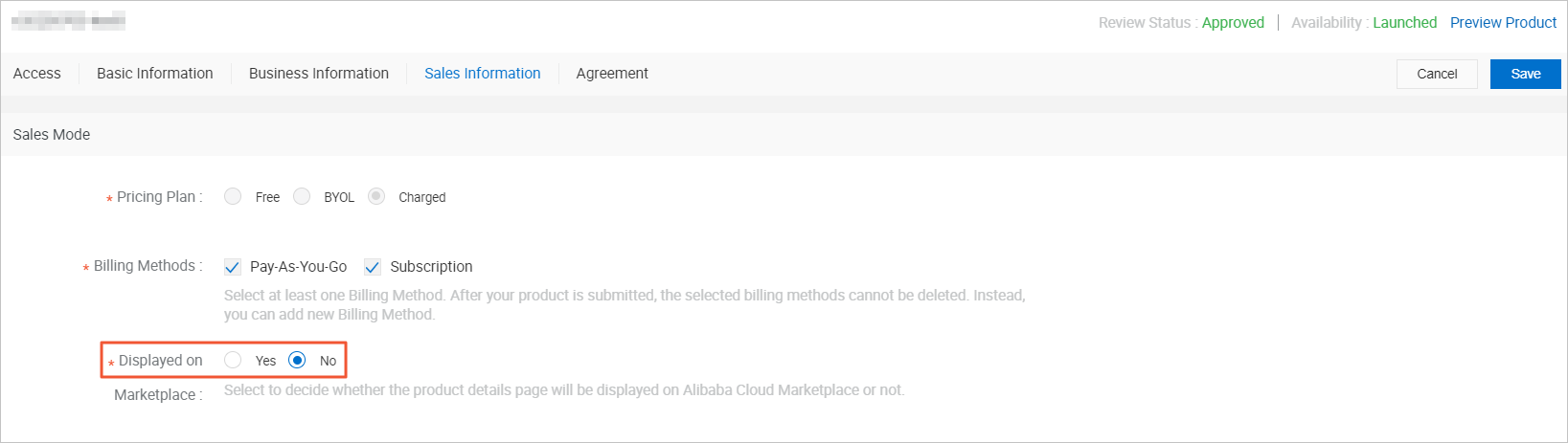
- Click Save.
Hide a product specification
If a specification is no longer for sale or has incorrect configuration information, you can hide it. A hidden specification no longer appears on the product details page. You must keep at least one specification visible.
- Log on to the ISV portal of Alibaba Cloud Marketplace.
- In the navigation pane on the left, choose .
- In the product list, find the target product and click Manage in the Actions column.
- Click the Sales Information tab, and then click Edit in the upper-right corner.
- In the Product Specifications section, find the specification that you want to hide and click the hide icon.
After you hide the specification, the hide icon changes to a show icon. The message Not visible on front-end appears next to the specification name.
- Click Save.
Is this page helpful?