IoT Platform migration solutions
Solution overview
Tuya offers low-cost migration solutions to help customers migrate from other IoT platforms or self-developed platforms to the Tuya IoT Platform for Alibaba Cloud. These solutions are designed to minimize the cost of migrating from your original IoT platform.
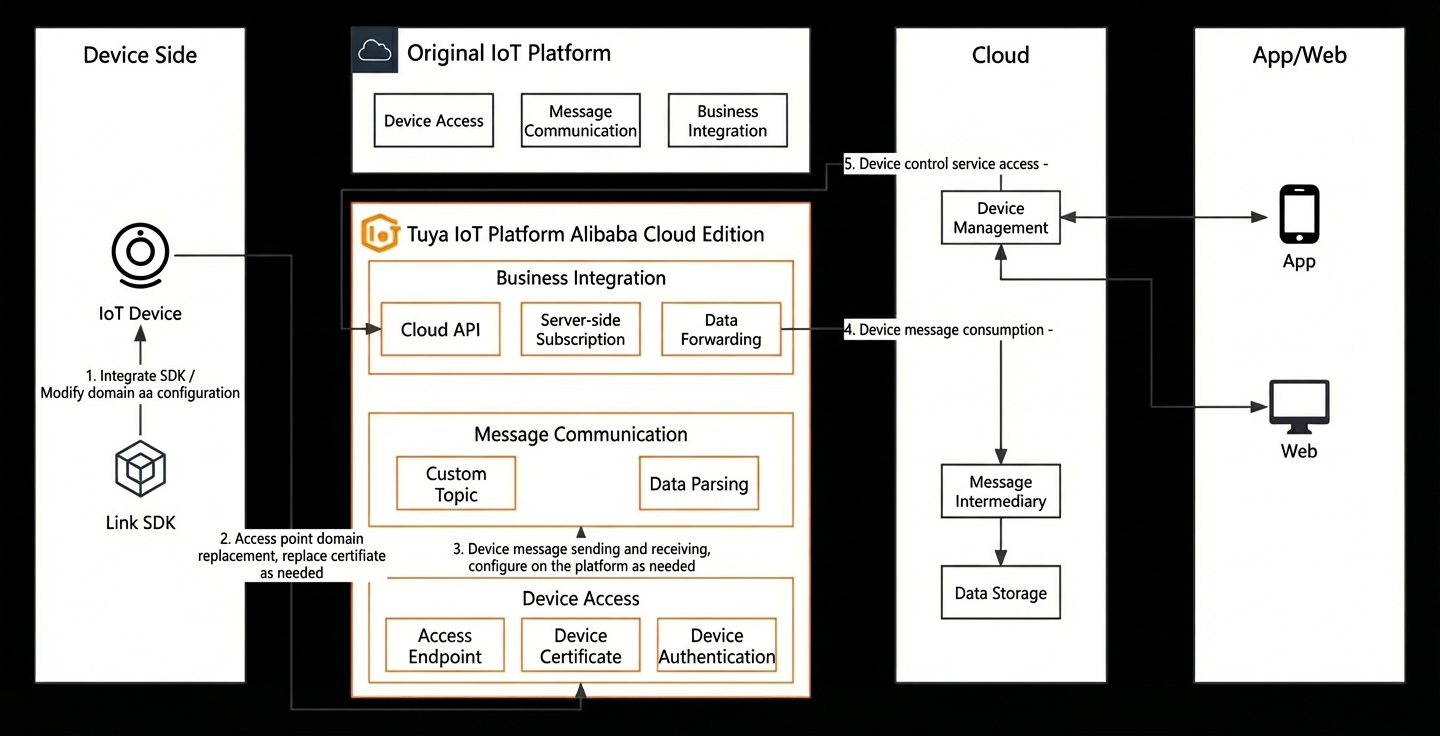
Figure 1.1. Overview of customer migration solutions
Customer migration steps:
1. Determine the appropriate device-side (firmware update) and cloud-side (data migration) modification plan based on your specific scenario.
2. The device-side and cloud-side modifications can be performed concurrently. This process usually takes one to four weeks, depending on the number of device products and interfaces that need to be connected.
3. After development, begin the proof of concept (POC) validation, which includes functional and performance testing and takes about one week.
4. Migrate historical data from the original platform to the Tuya IoT Platform. This process takes about one week.
5. Begin the grayscale over-the-air (OTA) update for device firmware. This phase typically lasts for about one week, depending on your business needs.
6. Perform a full OTA update for all devices. After all devices are upgraded, you can take the services on the original IoT platform offline.
Breakdown by Customer Scenarios
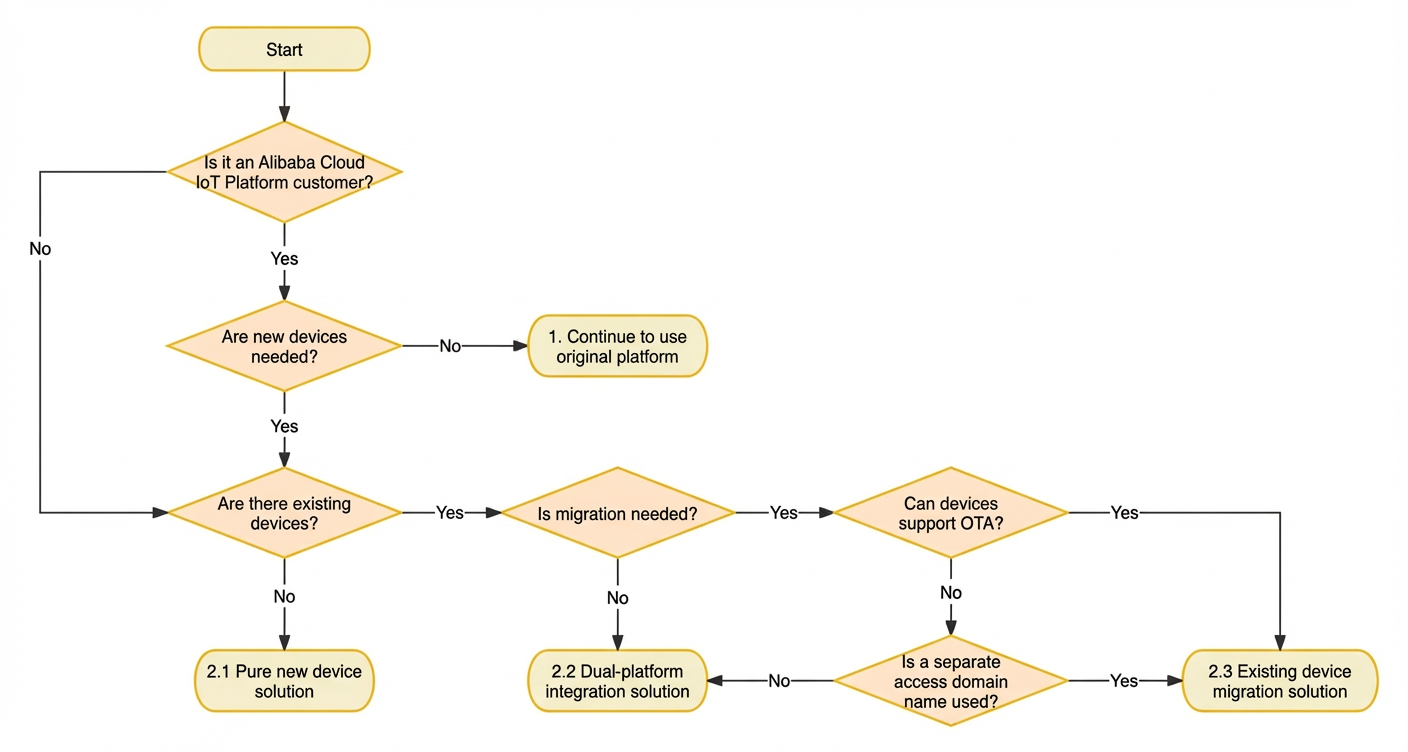
Figure 2.1. IoT Platform customer solution decision tree
2.1 New devices only
2.2.1 Device side
New devices require new firmware. You can develop the new firmware using the Alibaba Cloud IoT Platform Link SDK. Use the private service endpoints provided by the Tuya IoT Platform for the domain name and certificate.
2.2.2 Cloud
Follow the Application Development Guide for the Tuya IoT Platform for Alibaba Cloud to integrate with cloud APIs. This integration implements device management and control features. Use server-side subscriptions to connect device uplink data with your business systems.
2.2 Dual-platform integration
Some customers may not be able to perform OTA updates. This can happen because legacy device firmware has not been maintained, factory or supplier support is unavailable, or there are concerns about the stability of firmware upgrades. In these situations, legacy devices should continue to use the original IoT platform until they are phased out. Only new devices should be connected to the Tuya IoT Platform for Alibaba Cloud (Tuya). The following solution can be used:
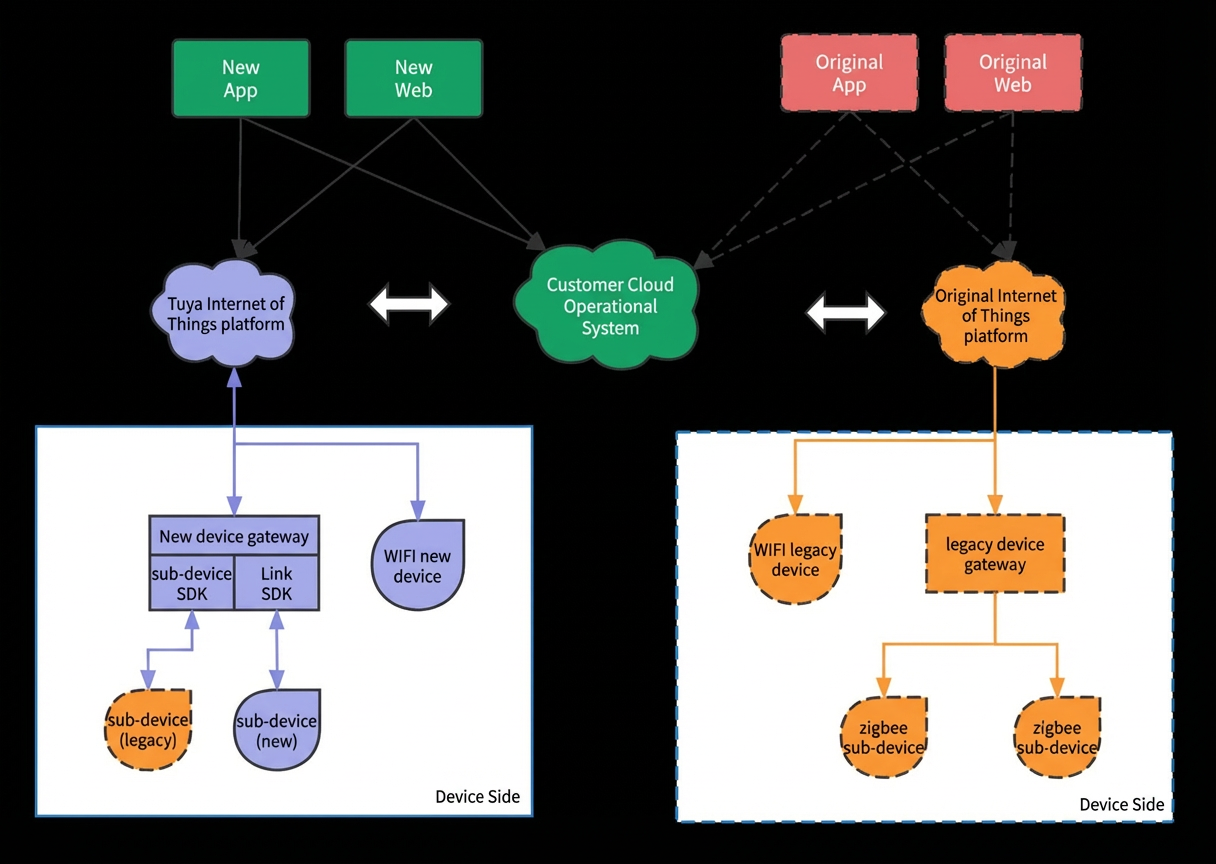
Figure 2.2. Dual-platform integration solution
2.2.1 Device side
New devices require new firmware. You can develop the new firmware using the Alibaba Cloud IoT Platform Link SDK. Use the private service endpoints provided by the Tuya IoT Platform for the domain name and certificate.
If the legacy devices were developed on the Alibaba Cloud IoT Platform, most of the base code can be reused. You only need to modify the business function code that is different.
2.2.2 Cloud
Follow the Application Development Guide for the Tuya IoT Platform for Alibaba Cloud to integrate with cloud APIs. This integration implements device management and control features. Use server-side subscriptions to connect device uplink data with your business systems.
Device services must run in parallel with the original IoT platform. You must implement dual-platform integration on the cloud side to merge business-side data.
If the original platform was developed on the Alibaba Cloud IoT Platform, you can implement cloud API calls quickly. Add a new set of domain name and certificate configurations. Re-integration development is not required.
2.3 Legacy device migration
2.3.1 For customers on Alibaba Cloud IoT Platform
2.3.1.1 Device side
Device connection
Develop new firmware. Change the `mqtt_host` in the original Alibaba Cloud IoT Platform Link SDK to the MQTT endpoint of the Tuya IoT Platform for Alibaba Cloud. Then, upload the device CA certificate. This step is not required if you use Basic Auth.
Use the OTA update feature of the Alibaba Cloud IoT Platform to upgrade the firmware for legacy devices. After the upgrade, the devices reconnect to the Tuya IoT Platform for Alibaba Cloud.
Before the upgrade, confirm that the product's Thing Specification Language (TSL) model and the device trituple information have been imported into the Tuya IoT Platform for Alibaba Cloud.
Example code:
/* MQTT endpoint of Tuya IoT Platform for Alibaba Cloud */
const char  *mqtt_host = "${instance ID}.aliyun.tuyacloud.com";

/* MQTT endpoint port of Tuya IoT Platform for Alibaba Cloud. MQTT: 1883, MQTTS: 8883 */
const uint16_t port = 8883;
Message sending and receiving: The Tuya IoT Platform for Alibaba Cloud is compatible with the Alink protocol. No changes are needed for this part.
2.3.1.2 Cloud side
Metadata migration: Query the product information, device trituple information, and other data to be migrated from the IoT Platform instance using the Alibaba Cloud IoT Platform cloud API. Then, write the information using the cloud API of the Tuya IoT Platform for Alibaba Cloud. Alternatively, you can export the data and provide it to the Tuya R&D team. The Tuya R&D team can help with the initial import of platform data.
Application modification: The cloud API of the Tuya IoT Platform for Alibaba Cloud uses the same interface naming and signing methods as the Alibaba Cloud IoT Platform. To migrate, you can simply replace the domain name and certificate (if needed) as described in the appendix. However, you must check if any interfaces are not yet implemented in the Tuya IoT Platform for Alibaba Cloud. You can submit a request to the Tuya R&D team to add them.
2.3.2 For customers with self-developed IoT platforms
2.3.2.1 Device side
Device connection:
Device connection: The domain name and certificate for device connection are customer-owned. No changes are needed on the device side. You can upload the device CA certificate to the Tuya IoT Platform for Alibaba Cloud. This step is not required if you use Basic Auth. Then, modify the original MQTT domain name through Domain Name System (DNS) resolution to point to the MQTT endpoint provided by the Tuya IoT Platform for Alibaba Cloud. This completes the connection migration.
Message sending and receiving: The preferred solution is to develop new firmware using the Alibaba Cloud IoT Platform Link SDK and complete the upgrade. If the device firmware is not suitable for large-scale changes, you can use custom topics and the data parsing feature on the cloud to support the logic of the historical firmware.
2.3.2.2 Cloud side
Metadata migration:
Product information: For devices on the self-developed IoT platform, you must create and import the product's TSL model. For more information, see the product feature definitions on the Tuya IoT Platform.
Authentication adaptation: You can batch import and register the device trituple information from the self-developed IoT platform using the device management feature of the Tuya IoT Platform for Alibaba Cloud. Alternatively, you can use a custom authentication solution. In this case, you must implement third-party authentication logic. This allows the reuse of the original device authentication logic, but this solution may be less stable than first-party permission integration.
Application modification: Follow the Application Development Guide for the Tuya IoT Platform for Alibaba Cloud to integrate with cloud APIs. This integration implements device management and control features. You can use server-side subscriptions to connect device uplink data with your business systems.
2.3.3 For customers on other cloud provider platforms
2.3.3.1 Device side
Develop new firmware for the devices using the Alibaba Cloud IoT Platform Link SDK. Then, use the OTA capabilities of the original platform to upgrade the firmware. After the upgrade, the devices connect to the Tuya IoT Platform for Alibaba Cloud.
2.3.3.2 Cloud side
For more information, see the solution for self-developed IoT platforms in section 2.3.2.
2.4 Considerations for different development roles
1. [Client] IoT platforms from various vendors do not include client features or app software development kits (SDKs). Customer apps or web applications typically call their own cloud services directly. If an app or web application needs to implement a direct MQTT connection, refer to the device-side logic. You can use the Android Link SDK, iOS Link SDK, or Node.js Link SDK.
2. [Device side] For devices that cannot receive firmware OTA updates, the only available method is to modify the DNS resolution. This requires cooperation from the original platform provider.
3. [Cloud side] The device trituple refers to `product_key`, `device_name`, and `device_secret`. These are the authentication credentials required for a device to connect to the cloud platform. If these credentials are incorrect, the device cannot connect to the platform.
4. [Cloud side] For the server-side subscription feature, you must configure a VPC peering connection in advance. This enables data communication between different VPCs.
Appendix
1. Alibaba Cloud IoT Platform instance endpoint information
Public instances:
MQTT: ${ProductKey}.iot-as-mqtt.${RegionID}.aliyuncs.com
Cloud API: iot.${RegionID}.aliyuncs.com
Enterprise instances:
MQTT: ${InstanceID}.mqtt.iothub.aliyuncs.com
Cloud API: iot.${RegionID}.aliyuncs.com
2. Tuya IoT Platform instance endpoint information
Premium Edition
MQTT: ${InstanceID}.aliyun.tuyacloud.com, port 1883/8883
Cloud API: ${InstanceID}.aliyun.tuyacloud.com, port 8686
3. Service guarantees
Product service guarantees
Product Service-Level Agreement (SLA) guarantee: The Tuya IoT Platform for Alibaba Cloud is deployed and delivered in a fully managed mode using Alibaba Cloud Compute Nest. It supports Alibaba Cloud's global data center nodes and provides a high reliability guarantee with a 99.95% SLA.
Joint Alibaba Cloud product: The Tuya IoT Platform for Alibaba Cloud is sold through the Alibaba Cloud Marketplace. Alibaba Cloud and Tuya jointly provide comprehensive service guarantees for product use, technical iterations, and daily pre-sales and after-sales support.
Technical support: The Tuya team provides full technical guidance and assistance during the migration process. The team promptly handles any technical issues that arise to ensure the migration is completed on time and to a high standard. After migration, the team responds to customer issues immediately and provides 7×12 technical support services. This ensures normal operation and provides reliable service guarantees for customers.
Service migration guarantee plan
Tuya offers a one-month free trial of the product for customers on the China site. Based on your business needs, Tuya provides 7x12 technical support services. Technical experts help you design and implement migration plans and jointly ensure long-term, stable after-sales support.
Based on your business needs, Tuya provides technical experts to help you design and implement migration plans. They also jointly ensure long-term, stable after-sales support services.