MaxCompute MCP service
Built on the Model Context Protocol (MCP), MaxCompute MCP Server (MCMCP) exposes MaxCompute metadata, compute, and table management capabilities as structured tools that AI agents can invoke. MCMCP enables AI agents to perform large-scale data analytics, multimodal data transformation, and intelligent operations and maintenance (O&M).
This topic describes the hosted Remote MCP Server (recommended) and the Local MCP Server.
To ensure security, review and follow the security precautions before you start.
If you have questions or suggestions, you can provide feedback through the following channels.
Overview
Agents directly call the structured tools provided by MCMCP using the standard MCP protocol. No additional SDKs or drivers are required. MCMCP covers the entire data operation workflow, from metadata browsing and SQL analysis to table management.
Core capabilities
Catalog metadata browsing and search: Browse projects, schemas, tables, fields, and partitions hierarchically. Natural language search is supported.
Table management and metadata maintenance: Create tables (with options for lifecycle, primary key, and partial column updates), insert small amounts of data, and update table comments, tags, or column descriptions.
Identity and permission checks: View the current account identity and use MaxCompute authorization information to troubleshoot access issues.
Authentication and authorization:
Remote MCP uses Alibaba Cloud OAuth for authorization.
Local MCP supports AccessKey/SecretKey (AK/SK), Security Token Service (STS), Credentials URI, ECS RAM Role, and the default Alibaba Cloud credential chain.
Server-side client registration (Client ID Metadata Documents, CIMD):
In environments where this feature is enabled, server-side or self-hosted clients can use an HTTPS metadata document URL as the
client_idto bypass Dynamic Client Registration (DCR). However, explicit consent is still required on the authorization confirmation page after you log in. For more information, see Configure server-side clients (Client ID Metadata Documents).SQL analysis and execution:
Supports statement validation, estimation of scanned data volume and Compute Unit (CU) usage, execution of read-only or write SQL queries, instance status queries, and result retrieval. Write SQL queries and metadata changes require user confirmation.
Intelligent analysis:
Generates read-only SQL drafts from natural language, diagnoses job issues, and analyzes compute quota usage. The results indicate the scope of evidence and provide recommended actions.
Table metadata analysis:
Checks table structures and partition metadata without scanning table data.
SemanticSpec management:
Create and maintain SemanticSpec drafts that describe data semantics, view published versions, and use DataScan to generate and apply recommendations discovered from semantic metadata.
Knowledge base search and Q&A:
Remote MCP includes a built-in MaxCompute documentation knowledge base that supports keyword searches and natural language Q&A, and returns answers with citations.
Skill discovery and reading: Remote MCP includes built-in MCP Skill resources. Clients use tools/list to discover available tools, maxcompute_skill_list to retrieve the Skill index, and maxcompute_skill_read to read the required Skill files. The capability can be applied for Information Schema semantic analysis and feedback guidance.
Information Schema O&M and governance analysis:
Remote MCP includes a built-in Information Schema semantic package.
Local MCP requires the corresponding Skill to be installed separately.
Multilingual tool information: Remote MCP provides tool titles and descriptions in Simplified Chinese, Traditional Chinese, and English in the
tools/listoutput, and indicates whether a tool depends on a model.
Architecture overview
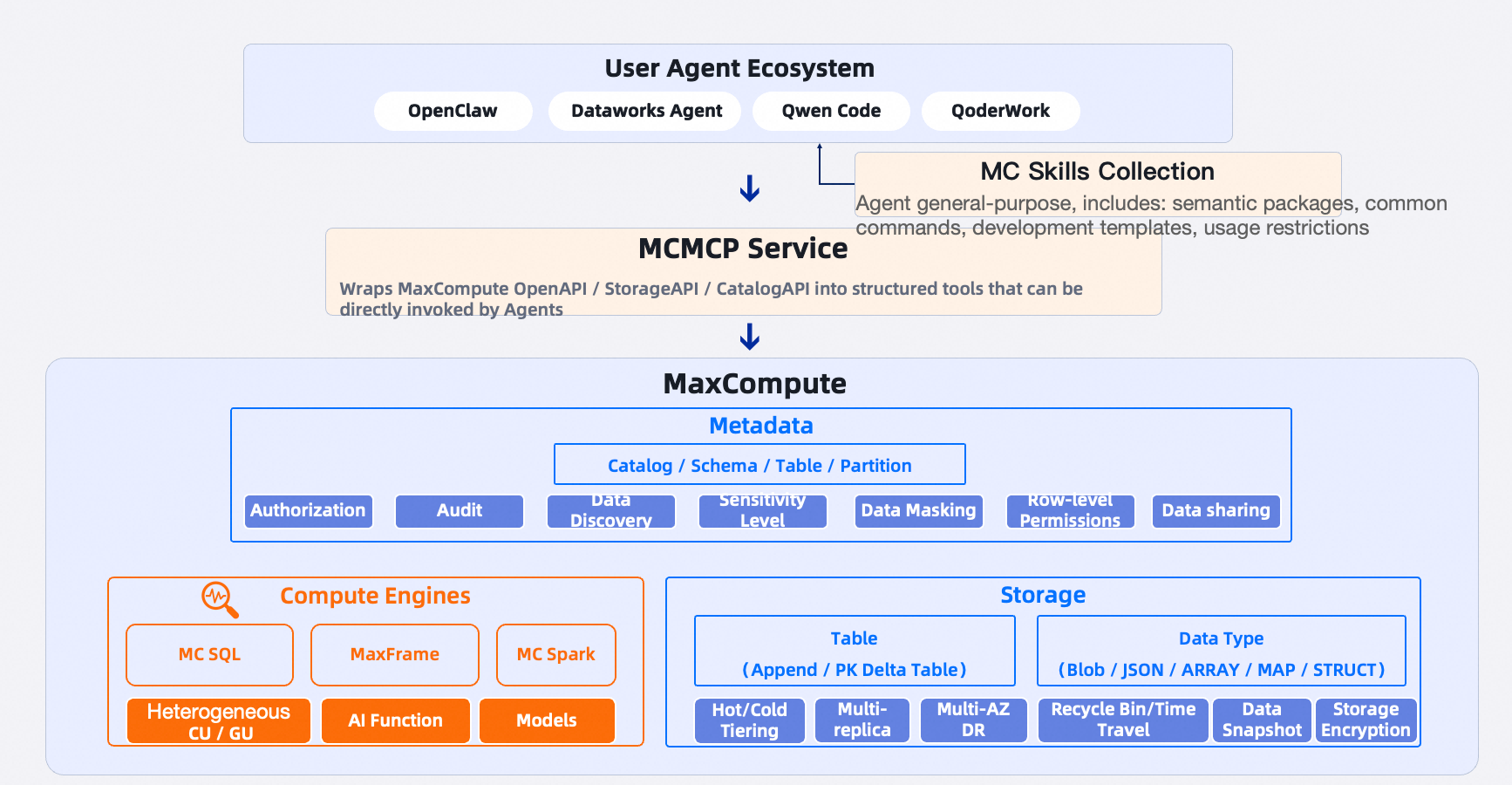
MCMCP has a layered architecture with the following layers from top to bottom:
User agent ecosystem: Supports connections from MCP clients such as Claude Code, Codex, Qwen Code, Cursor, and Qoder.
MaxCompute Skills collection: Agents can complete more complex tasks by combining semantic packages, common commands, development templates, and usage limits.
MCMCP service: Wraps capabilities such as MaxCompute OpenAPI, StorageAPI, and CatalogAPI into MCP tools.
Underlying MaxCompute capabilities: Includes product capabilities such as metadata, compute engines, and storage.
Connection methods
The Remote MCP Server is the recommended connection method. This method does not require a local server or storing an access key in a local process.
The Local MCP Server is intended for self-hosting, standard input/output (stdio), local development and debugging, or scenarios in which you need to control credentials directly.
Use case | Connection method | Description |
MCP client supports Streamable HTTP and browser-based OAuth. | Direct connection to Remote MCP | Does not require installing a local service or configuring an access key. |
Requires an access key, STS temporary credential, credentials URI, ECS instance RAM role, or the default credential chain. |
| Uses Remote MCP by default and falls back to local SDK tools if Remote MCP is unavailable. |
Must exclusively use the hosted service and cannot fall back to local tools upon failure. |
| Exclusively uses Remote MCP. Returns an error if Remote MCP is unavailable. |
Self-hosting, local development and debugging, or scenarios that require the original SDK tools. |
| Requires installation of the |
If your MCP client supports browser-based OAuth, connect directly to Remote MCP. If you use an access key or STS temporary credentials, install the Local MCP Server and use default mode.
Connect using browser-based OAuth
Remote MCP provides services using Streamable HTTP, an MCP transport method based on HTTP. To connect directly, your client must support Streamable HTTP and browser-based OAuth.
Select an endpoint
Select an endpoint based on your client's network and Alibaba Cloud account website. The MCP endpoint must be consistent within a single client configuration. Do not mix public network and Virtual Private Cloud (VPC) endpoints.
Public endpoint
If you do not need to pin the service to a specific region, select the default endpoint that matches your account website:
Account website
MCP endpoint
Alibaba Cloud China Website
https://mcp.maxcompute.aliyun.com/mcpAlibaba Cloud International Website
https://mcp-intl.maxcompute.aliyun.com/mcpIf you need to pin the service to a specific region, generate the endpoint by using your account website and region ID:
Account website
Region-pinned public MCP endpoint
Alibaba Cloud China Website
https://mcp.<regionId>.maxcompute.aliyun.com/mcpAlibaba Cloud International Website
https://mcp-intl.<regionId>.maxcompute.aliyun.com/mcp
The domain name rules are only for generating endpoints and cannot be used to verify whether the service is available in a specific region. Select a region where the service is available. To access projects in other regions, you must specify the target region ID in the conversation or tool parameters.
The account website selection applies only to direct connections using browser-based OAuth. The local server does not require account website configuration. You only need to configure the region and network type.
VPC endpoint
In regions where the VPC service is available, generate the endpoint based on your account website:
Account website | Region-pinned VPC MCP endpoint |
Alibaba Cloud China Website |
|
Alibaba Cloud International Website |
|
Whether you use a public or VPC endpoint, the service uses the region of the current endpoint when no region is specified in the conversation or tool parameters. For example, when you connect to the cn-hangzhou endpoint, the default region is cn-hangzhou. If you connect to the cn-hongkong endpoint, the default region is cn-hongkong.
Prerequisites
A network environment that can access the preceding endpoint domain names.
An MCP client that supports MCP Streamable HTTP and browser-based OAuth authorization.
An Alibaba Cloud account with permissions to access MaxCompute.
Limitations
Permission scope: Your MaxCompute and Resource Access Management (RAM) permissions determine the projects, schemas, tables, and instances that you can access.
Write operation confirmation: Write operations require explicit confirmation from the user on the client side. The gateway does not provide a second confirmation prompt.
Client configuration
Different MCP clients may use different names for configuration fields. Set the MCP endpoint to your chosen endpoint. The following example uses the China (Hangzhou) public MCP endpoint for the Alibaba Cloud China Website.
For another service region or account website, select the matching address from the public endpoint table.
If your client runs in a VPC environment, use the
/mcpaddress from the VPC endpoint section.
The general configuration is as follows.
{
  "mcpServers": {
    "maxcompute-mcp": {
      "type": "streamable-http",
      "url": "https://mcp.cn-hangzhou.maxcompute.aliyun.com/mcp"
    }
  }
}
If your client uses field names such as endpoint, server_url, or transport, configure them according to the client documentation. Continue to use the /mcp address from the preceding tables as the URL.
Claude Code
We recommend that you add the HTTP MCP server from the command line:
claude mcp add --transport http --scope user maxcompute-mcp \
  https://mcp.cn-hangzhou.maxcompute.aliyun.com/mcp
After adding the server, check the connection status:
claude mcp list
claude mcp login maxcompute-mcp
You can also enter /mcp in a Claude Code session to view the connection status and trigger sign-in. To use this server only in the current project, change --scope user to --scope local or use the project scope required by your team.
Codex
We recommend that you add the Streamable HTTP MCP server from the command line:
codex mcp add maxcompute-mcp \
  --url https://mcp.cn-hangzhou.maxcompute.aliyun.com/mcp
After adding the service, view the service list and initiate logon:
codex mcp list
codex mcp login maxcompute-mcp
To configure it manually, add the following to ~/.codex/config.toml:
[mcp_servers."maxcompute-mcp"]
url = "https://mcp.cn-hangzhou.maxcompute.aliyun.com/mcp"
Qwen Code
We recommend that you add the HTTP MCP server from the command line:
qwen mcp add --transport http --scope user maxcompute-mcp \
  https://mcp.cn-hangzhou.maxcompute.aliyun.com/mcp
If your client distribution uses a different command name, replace qwen with the actual command name. After adding the server, start Qwen Code and enter /mcp in a session to check the connection status and available tools. You can also add it manually in ~/.qwen/settings.json:
{
  "mcpServers": {
    "maxcompute-mcp": {
      "httpUrl": "https://mcp.cn-hangzhou.maxcompute.aliyun.com/mcp"
    }
  }
}
If the file already contains other settings, merge only the mcpServers section. Do not overwrite existing settings.
Unless your client or enterprise environment has additional requirements, you do not need to configure the Authorization header manually. The client completes the logon process through the OAuth flow during the first connection.
First-time connection and OAuth authorization
On the first connection, the MCP client automatically starts the OAuth authorization flow and opens the Alibaba Cloud authorization page in a browser.
Authorization flow
Authorize the third-party application on the first connection.
Authorization scope: This authorization is for the
maxcompute-mcpOAuth application. It does not grant access to MaxCompute data.Authorizing account: This must be done by a root account or a RAM administrator with the
AliyunRAMFullAccesspermission. Administrative permission is used only to authorize the third-party application and should not be used as the runtime identity for daily access to MaxCompute data. The projects, schemas, tables, and instances that each logged-on identity can access are still determined by their own MaxCompute and RAM permissions.After a root account authorizes the application, other RAM users under that account can sign in and complete their own OAuth authentication. Individual RAM users do not need the
AliyunRAMFullAccesspermission.
Add the MaxCompute MCP Server in your MCP client and initiate a connection. This happens on the first connection to
/mcp, or the first call to a tool such astools/list.The client detects the need to log on and automatically opens a browser to the Alibaba Cloud OAuth page.
Confirm that the account and authorization information on the page are correct, and then click Agree or Authorize.
The browser completes the callback. The client saves the token and automatically reconnects to the MCP service. You typically do not need to authorize again within the same session.
Usage notes
Verify page source: The OAuth page must come from an official Alibaba Cloud domain. If the domain name, account, or authorization information seems unusual, do not proceed.
Use the correct account: Complete the authorization with the Alibaba Cloud account that has permission to access the target MaxCompute data. This account determines which projects and tables are accessible. Results may differ if you switch accounts.
Protect sensitive information: Do not share your access token, refresh token, authorization code, or parameters from the callback URL with others.
If the authorization page shows a "Call not authorized" message and states that the current authorization requires an administrator with
AliyunRAMFullAccesspermission, it means the current RAM user cannot authorize third-party applications for the root account. In this case, ask the root account owner or a RAM administrator with this permission to log on to the MaxCompute MCP Server again and click Authorize. If the page still shows the previous failed authorization status, the administrator must delete the application in the OAuth application management section of the Resource Access Management (RAM) console and then initiate the logon and authorization again from the MCP client. Do not grant theAliyunRAMFullAccesspermission to a daily-use account long-term just to bypass this prompt.
Account selection for shared enterprise systems
When you connect Remote MCP to an internal enterprise agent or other multi-user shared system, first determine whether to preserve the end-user identity:
To isolate data by employee permissions and retain user-level auditing, have each user complete OAuth sign-in separately.
MCP calls use each user's Alibaba Cloud identity, and their MaxCompute and RAM permissions determine the data they can access.If the system can use only a single shared logon identity, create a dedicated RAM user and grant only the minimum required MaxCompute permissions. In this case, all requests share this identity's permissions and audit principal. The system itself is responsible for user authentication, session isolation, and operation auditing.
Do not use a root account or an administrator account with the
AliyunRAMFullAccesspermission as the long-term runtime identity for an LLM, internal enterprise agent, or shared MCP client. The initial application authorization and daily data access should use different permission boundaries.
Configure server-side clients (Client ID Metadata Documents)
Internal enterprise agent platforms, web services, and other server-side MCP clients typically cannot receive a local browser callback and are not suitable for dynamic client registration (DCR) for every deployment instance. In environments that support Client ID Metadata Documents (CIMD), these clients can use an HTTPS metadata document URL directly as client_id:
Host a client metadata document at a public HTTPS address that the client can access consistently. The document's
client_idfield must exactly match this URL, andredirect_urismust list every callback URL in use:{ "client_id": "https://client.example.com/oauth/client.json", "client_name": "Sample Enterprise Agent", "redirect_uris": ["https://client.example.com/oauth/callback"] }In the MCP client's OAuth configuration, set the document URL as the
client_id(the field name may vary depending on the client).Clients that support CIMD will skip DCR and initiate authorization directly with the document URL.
Clients that do not support CIMD will operate using their original registration method.
When a user initiates a connection, they still complete the Alibaba Cloud OAuth logon in a browser. After logging on, the service displays an authorization confirmation page that lists the application name,
client_idURL, and callback domain declared in the document. The service issues an authorization code only after the user explicitly clicks Agree.The service revalidates the document during each authorization attempt. The document must be accessible over HTTPS,
client_idmust match the request URL, and the callback URL must exactly match one of theredirect_urisvalues. If any of these conditions are not met, the service rejects the authorization.
Constraints and notes:
This capability is available on a per-environment basis. A client can check the
client_id_metadata_document_supportedfield in the/.well-known/oauth-authorization-serverresponse to determine if the current entry point supports it. If the field does not exist, the client automatically falls back to DCR or manual registration.This method supports only public clients. The document must not contain confidential configurations such as
client_secret, and the client must use PKCE.In an open participation model, the authorization confirmation page is the trust boundary. Do not click Agree on behalf of others or forward the confirmation page or callback URL to others.
The metadata document is public information. Do not include tokens, keys, internal domain names, or internal network addresses in the document.
Verify the connection
After authorization is complete, we recommend that you verify the connection and permissions by following these steps.
In your AI agent, enter the following prompts in order:
"Check the status of the MaxCompute MCP connection."
"List the MaxCompute projects visible to the current identity. Return the first 10."
"Check what schemas and tables are under the
<project>project."
If the project list is empty or you receive a permission error, check whether your Alibaba Cloud account has the required permissions for the target MaxCompute project.
Connect using the local server
The local server is suitable for MCP clients that support only standard input/output (stdio), scenarios that require a local Streamable HTTP service, or scenarios where you need to use an access key, STS temporary credential, credentials URI, an ECS instance RAM role, or the Alibaba Cloud default credential chain.
Running modes
Mode | Behavior | Use case |
| Uses Remote MCP by default. Falls back to local SDK tools if Remote MCP is unavailable. | Most scenarios that use an access key or STS temporary credential. |
| Exclusively uses Remote MCP. Returns an error if unavailable. | Scenarios that must not fall back to local tools. |
| Exclusively uses local SDK tools. | Self-hosting and local development and debugging. |
All three modes support stdio and Streamable HTTP.
You can select a mode by using the --mode CLI option, the MAXCOMPUTE_MCP_MODE environment variable, or the top-level mode field in the JSON configuration. If you do not configure a mode, the server uses default.
Installation
Requires Python 3.10 or later.
Use
piporuvto install the base package from the Python Package Index (PyPI).To install by using
pip, run the following command:python -m pip install alibabacloud-maxcompute-mcp-serverTo install into an isolated environment by using
uv, run the following command:uv tool install alibabacloud-maxcompute-mcp-server
Verify the command-line entry point:
alibabacloud-maxcompute-mcp-server --helpTo use the
localmode or the local fallback capability of thedefaultmode, you must install thelocaloptional dependencies.To install by using
pip, run the following command:python -m pip install "alibabacloud-maxcompute-mcp-server[local]"To install into an isolated environment by using
uv, run the following command:uv tool install "alibabacloud-maxcompute-mcp-server[local]"
Configure region, network, and credentials
Minimal configuration
Specify only the region and network type.
{
  "maxcompute": {
    "region": "cn-hangzhou",
    "network": "public"
  }
}
The network parameter supports public and vpc. The defaultProject parameter specifies an optional default project. To connect to Remote MCP, you do not need to configure protocol, namespaceId, or the Remote MCP address.
Configuration file
Save the configuration to a protected path on your local machine. Specify the file by using the --config option or the MAXCOMPUTE_CATALOG_CONFIG environment variable. Alternatively, you can use environment variables instead of creating a JSON file: MAXCOMPUTE_REGION, MAXCOMPUTE_NETWORK, and the optional MAXCOMPUTE_DEFAULT_PROJECT.
Credential configuration
Provide credentials from the MCP process environment or the Alibaba Cloud default credential chain. Use static access keys for development and debugging purposes only:
export ALIBABA_CLOUD_ACCESS_KEY_ID="<accessKeyId>"
export ALIBABA_CLOUD_ACCESS_KEY_SECRET="<accessKeySecret>"

# If using STS, also set the following variable
export ALIBABA_CLOUD_SECURITY_TOKEN="<securityToken>"

# A dynamic credentials service can be used instead of the preceding static environment variables
export ALIBABA_CLOUD_CREDENTIALS_URI="<credentialsUri>"
For environments such as ECS instance RAM roles, you can directly use the Alibaba Cloud default credential chain.
Security reminder
Do not put access keys, STS temporary credentials, credentials URI, or access tokens in the args of the MCP client, and do not commit these credentials to a code repository.
Backward compatibility with previous configurations
Previous top-level MaxCompute configurations, top-level ODPS configurations, configs named configurations, and pure environment variable configurations remain valid. The local server can identify the region and network type from the standard Front End (FE) or CatalogAPI endpoints:
A public endpoint corresponds to a public network MCP in the same region.
A VPC endpoint corresponds to a VPC MCP in the same region.
If the region or network type in the configuration does not match the actual environment, the local server returns a configuration error.
Region and domain name rules: When you configure the region and network, the Local MCP Server automatically generates the FE, CatalogAPI, and MCP endpoints for the specified region.
Regions on the Chinese mainland use the mcp domain.
The China (Hong Kong) region and other regions outside the Chinese mainland use the mcp-intl domain. You do not need to manually configure the account website.
Note: You cannot use the domain name rules to verify whether the service is available in a specific region. Select a region where the service is available.
Configure the MCP client
To start the default mode by using a configuration file:
{
  "mcpServers": {
    "maxcompute-mcp": {
      "command": "alibabacloud-maxcompute-mcp-server",
      "args": [
        "--config",
        "/path/to/config.json"
      ]
    }
  }
}
If the executable file is not in the PATH of the MCP client, change the command parameter to the actual installation path.
Switch the running mode
In the args parameter, specify the running mode by using the --mode option:
--mode remote: Forces the use of Remote MCP.--mode local: Forces the use of local SDK tools. You must first install thelocaloptional dependency group.
Streamable HTTP transport
alibabacloud-maxcompute-mcp-server \
  --config /path/to/config.json \
  --mode default \
  --transport streamable-http \
  --host 127.0.0.1 \
  --port 8000
After startup, set the MCP client's endpoint to http://127.0.0.1:8000/mcp. By default, the local server listens on the local loopback address 127.0.0.1. Change the listening address only if other trusted hosts need to access this process.
MCP tool capabilities
You typically do not need to specify tool parameters manually. Instead, describe your goal in natural language.
Direct browser-based OAuth connections and the Remote MCP mode of the local launcher publish the same tools. Only local mode publishes the original local SDK tools. Although the tool sets have different names, their capabilities and use cases largely overlap.
Use the following table to select a tool. For detailed parameters, complete result fields, and advanced workflows, see the tool definitions returned by tools/list and the descriptions later in this topic.
Capability | Remote MCP tool | Local MCP tool | Key usage boundaries |
Connection check |
| Verify with | The |
Gateway capabilities |
| Not applicable | View the gateway version, supported MCP protocol versions, and available plug-ins and tools. |
View projects and schemas |
|
| The MaxCompute and RAM permissions of the current identity determine the visible scope. For traditional two-level projects, you can usually omit the |
Table and partition metadata |
|
| First, search for candidate tables, and then read their field and partition information. For catalog searches, you must specify the object In To find the largest top-level partition that contains data, use |
SQL analysis and instances |
|
| Before you run a query, validate or estimate the scanned data volume and CU usage.
Internal MaxCompute failures, such as a failed resource usage estimation task, return categorized tool errors and are not misreported as invalid SQL. A Remote MCP must explicitly use In Local MCP,
|
Natural language SQL drafts |
| Not applicable | You must pass the original The Model analysis may consume MaxAgent Credits. |
Job diagnosis |
| Not applicable | Specify a job by using its The tool provides diagnostic suggestions based on the job's status, execution details, and logs. It does not execute, retry, or cancel the job. If evidence is incomplete, the tool returns |
View quotas |
| Not applicable | This tool returns the list and details of compute quotas that the current identity can view through its associated FE endpoint. This tool does not modify quotas. |
Quota analysis |
| Not applicable | Analyzes quota and job resource consumption over the last 7 days in the selected region. Only Subscription secondary quotas with fixed capacity return capacity utilization. Pay-As-You-Go and Spot quotas do not return a capacity percentage. This tool is read-only. Model analysis may consume MaxAgent Credits. |
Table metadata health analysis |
| Not applicable | Reads only the table and partition metadata that the current identity can access. It does not scan table data, call the model, or consume MaxAgent Credits. Conclusions that cannot be proven by metadata are listed in |
Account and permission checks |
|
| Checks only the current identity and existing authorizations. It does not grant or modify permissions. |
SemanticSpec CRUDL |
| No corresponding tool | The namespace is set to the MaxCompute Create, update, and delete are write operations. Draft content updates use revisions for concurrency control. |
SemanticSpec suggestions and publishing |
| No corresponding tool | Refresh only triggers DataScan and does not automatically apply or publish. Apply and publish require explicit calls and must be confirmed by the user as write operations. |
Table management and metadata maintenance |
|
| These operations modify MaxCompute resources or metadata. Before you call them, display the target project and table, summarize the changes, and get explicit user confirmation. |
Knowledge base search and Q&A |
| Not applicable | Search for MaxCompute documentation snippets, or retrieve information from documents to answer questions. You can specify an optional |
Skill discovery and reading |
| Not applicable | Skill availability depends on the current service configuration and the response from |
Information Schema semantic analysis | Built-in Information Schema semantic package | Requires separate installation of the | Requires tenant-level Information Schema permissions and an executable project in the same region. Historical views have latency and query scope limitations and should not be used to determine real-time status. |
Local session configuration | Not applicable |
| Configuration switching affects the Local MCP process and is better suited for stdio or single-client use. |
Tool list display information
Multilingual tool display information
Remote MCP provides multilingual display information for each tool object in the
tools/listresponse. Clients that support this extension can read_meta["com.aliyun.maxcompute/display"]and display the title and description in Simplified Chinese (zh-CN), Traditional Chinese (zh-TW), or English (en), based on the interface language.Clients should rely on the tool set returned by each
tools/listcall rather than maintaining a separate tool catalog. If the selected language is missing or the extension version is unsupported, fall back to the standardtitle,name, anddescriptionfields. To indicate a model dependency, mark a tool as MaxAgent-backed only when_meta["com.aliyun.maxcompute/model_backed"]istrue. The display information is for UI presentation only and must not be used for permission, billing, or security decisions.Intelligent analysis capabilities
Natural language SQL, job diagnosis, and quota analysis are the three intelligent analysis tools of Remote MCP. All are read-only. They do not automatically execute the generated SQL, rerun or cancel jobs, or modify quota capacity and scheduling configurations.
Model analysis may consume MaxAgent Credits, and a single tool call may trigger multiple model calls. When model capabilities or required evidence are unavailable, the tool may return a
partialresult. Use thewarningsandmissing_evidencefields to assess what conclusions you can trust.
Prerequisites for intelligent analysis
The MCP client is connected to Remote MCP through browser-based OAuth or the local launcher.
The current authenticated identity has the required permissions for the target MaxCompute project, job, or quota.
The region in the request matches the region where the target resources are located.
When you use MaxAgent model capabilities, the current identity has a valid MaxAgent quota and sufficient MaxAgent Credits in the selected region.
To query tenant metadata or historical jobs by using the Generate SQL tool, the current identity must meet the Information Schema requirements.
If you need historical quota capacity utilization or job consumption data, the corresponding historical observation capabilities must be available in the target service region.
Quota analysis does not require Information Schema permissions or an executable project.
If model capabilities are unavailable, the tool may return a
partialresult but will preserve any deterministic evidence it has already collected.
Typically, you just need to state your goal in the conversation, and the agent selects the tool and populates its parameters. You can also call the MCP tool directly by using the JSON examples in this topic.
Intelligent analysis results
All three tools return structured MCP results. Pay particular attention to the following fields:
ok: Indicates whether the tool call protocol completed successfully.ok=truedoes not guarantee that the evidence is complete.data: Contains business data, such as SQL drafts, diagnostic results, or quota observations.meta.outcomeormetadata.outcome: Indicates the business-result status.warnings: Describes non-fatal limitations, degradations, or fallback behaviors.missing_evidence: Lists any evidence that could not be obtained and the reasons why.usage: Shows the number of model calls and the token usage reported by the model.
Common outcome values include:
Status | Description |
| The tool obtained sufficient evidence and completed the analysis. |
| The tool completed successfully, but some evidence, such as execution plans, logs, historical data, or permission details, was unavailable. You can still use the facts that were returned. |
| The question or data scope is too broad and requires more information from the user. |
| The input, authorization scope, or generated content violates read-only security constraints. |
| The model or MaxCompute query timed out. |
| A backend or model call failed, and no usable result was generated. |
Do not treat a partial outcome as a failed API call. Use the missing_evidence field to determine what questions the current conclusions can answer and whether you need to supplement permissions, scope, or perform deeper diagnosis. When troubleshooting, do not copy authentication information or full backend responses.
Generate SQL
Use cases
Generate a query SQL based on a business question.
Generate a SQL query that joins tables across multiple projects or schemas.
Check field and table references, read-only properties, and MaxCompute dialect before execution.
Perform backend SQLCost validation and resource usage estimation at the same time when the execution project is known.
Generate tenant-level Information Schema SQL queries based on metadata, job history, quota usage, or permission and governance issues.
Parameters
Parameter | Required | Description |
| Yes | The user's original question, with a maximum of 2,000 characters. Do not concatenate DDL statements, table schemas, or additional prompts. |
| No | A MaxCompute region. If omitted, the service's default region is used. |
| No | A hard scope for data discovery, with a maximum of 16 items. You can scope it to a project, a project/schema, or specific tables. Across all sources, you can specify a maximum of 20 exact tables in total. |
| No | The execution context where the caller has permission to create a query instance. For business table SQL, it is used for backend SQLCost validation. For Information Schema SQL, it is used to form reusable parameters for subsequent execution. It does not define the data discovery scope. |
The sources parameter is a scope constraint, not a retrieval hint. When sources is provided, the tool queries only within the specified projects, schemas, or tables and will not search for data outside these boundaries. If a question might span multiple projects or schemas, you can provide multiple sources, but they must all be in the same region.
If sources is omitted, the tool automatically determines whether to discover business tables or read supported tenant-level Information Schema views based on the question's semantics. The tool does not automatically grant access to system views based on keyword matches or caller parameters.
Example: Known data scope
Natural language prompt:
In sales_dw.dwd in the China (Shanghai) region, generate an SQL query to count the number of paid orders and the total payment amount for each channel over the last 30 days, sorted by payment amount in descending order. Only generate and validate the SQL, do not execute it yet.Equivalent tool arguments:
{
  "question": "Count the number of paid orders and the total payment amount for each channel over the last 30 days, sorted by payment amount in descending order",
  "region": "cn-shanghai",
  "sources": [
    {
      "project": "sales_dw",
      "schema": "dwd"
    }
  ],
  "analysis_context": {
    "project": "sales_dw",
    "schema": "dwd"
  }
}
Example: Restrict to specific tables
{
  "question": "Find the team with the highest points in each race and calculate their cumulative season points",
  "region": "cn-shanghai",
  "sources": [
    {
      "project": "analytics",
      "schema": "formula_1",
      "tables": ["constructors", "constructorresults", "races"]
    }
  ]
}
Example: Historical job analysis SQL
{
  "question": "Query the 20 jobs with the highest CU consumption in the last 7 days. Return the instance ID, project, submitter, and CU hours",
  "region": "cn-shanghai",
  "analysis_context": {
    "project": "<A project where the current identity can create query instances in this region>"
  }
}
In this scenario, do not pass sources. The tool loads the built-in Information Schema Skill and the field documentation for the target views. It generates a query against SYSTEM_CATALOG.INFORMATION_SCHEMA.TASKS_HISTORY and enforces a ds partition window of no more than 14 days and a LIMIT clause (range: 1 to 100).
The generated SQL must pass a whitelist check (system view whitelist, read-only, single statement, fully qualified name, and scope restrictions). If the validation is successful, an SQL draft and the optional execute_args are returned.
Since MaxCompute SQLCost does not currently support tenant-level Information Schema, this mode explicitly skips resource usage estimation. During actual execution, maxcompute_sql_execute performs the same security checks again.
Results and subsequent execution
The tool returns the following: query_domain, a structurally validated read-only SQL statement, the physical tables or system views used, assumptions, warnings, and an optional resource usage estimate. The tool does not execute the SQL. If the result includes execute_args, you can pass it unmodified to maxcompute_sql_execute after user confirmation.
The client does not need to construct or interpret internal execution settings for Information Schema. The execution tool automatically recognizes system views, adds the necessary server-side settings, and independently validates the SQL again. The OBO policy in the SQL request defines the upper bound of delegated authorization. All queries are still submitted under the MaxCompute identity of the current MCP caller, and MaxCompute validates them based on actual permissions.
Recommended workflow
First, generate and review the SQL. Check the assumptions, the rationale for table selection, and the validation results.
For queries that are resource-intensive or have a large scope, check the estimated scanned data volume and CU usage.
Execute the query only after explicit user consent.
FAQ
No SQL was generated for a business table question
The query is too broad and the
sourcesparameter is not provided. Specify the project, schema, or a specific table. For Information Schema queries, do not add a business table as a source to bypass a discovery failure. Instead, you must specify the object to be analyzed, the metrics, and the time window.Multiple similar datasets were found
Do not let the agent guess. Explicitly select the correct data scope.
SQLCost did not run
In business table mode, this is usually because no
analysis_contextwas provided. In Information Schema mode, the tool always skips it because MaxCompute SQLCost does not currently support tenant-level system views. The resource usage estimation result will beunavailable.The tool returned
rejected:The generated content contains write operations, multiple statements, or table references that bypass
sources.Information Schema SQL was rejected:
The query uses unknown or mixed physical tables, does not use the full system view name, lacks a
LIMITclause, or runs on a historical view that lacks the standard 1- to 14-daydswindow.
Job diagnosis
Scenarios
Identify SQL compilation errors, missing columns, or syntax errors.
Analyze failed jobs, long-running jobs, or jobs with unusual resource usage.
Review execution plans, stage progress, resource usage summaries, and error signals in the timeline.
Drill down into failed worker logs or other evidence if the initial analysis is inconclusive.
Inputs
For each call, specify the job by using one of the following methods:
The
instance_idandprojectparameters.A supported HTTPS Logview URL.
Parameter | Required | Description |
| Conditionally | The ID of the MaxCompute instance. If you use this parameter, also specify |
| Conditionally | The project that contains the instance. You can omit this parameter if the Logview URL includes the project name. |
| Conditionally | A supported Logview URL. The service parses this URL locally. It does not send requests to or redirect to the URL. |
| No | The schema for job execution. This is typically omitted for traditional two-level projects. |
| No | The region where the job runs. |
| No | The time window for historical comparison. The default is 7 days. The value can range from 1 to 30 days. |
| No |
|
Do not include raw logs, execution plans, existing diagnostic results, or Logview tokens as separate parameters. The temporary token in a Logview URL is sensitive information. Do not copy it into tickets, documentation, or chat logs.
Example: Diagnosing a failed job
{
  "instance_id": "<INSTANCE_ID>",
  "project": "sales_dw",
  "region": "cn-shanghai",
  "depth": "standard"
}
Natural language prompt:
Diagnose job <INSTANCE_ID> in sales_dw. First, identify the failed stage and the most likely cause.
Provide actionable recommendations for a fix. Do not rerun or cancel the job.
Example: Performing a deep dive
Perform a deep dive on this job. The initial analysis did not explain the root cause.
Check the available logs from failed workers and stage evidence.
Distinguish between confirmed facts, inferences, and missing evidence.
In the next call, the agent should use the same job reference and set depth=deep. The deep dive analysis is still subject to limits on read counts, log size, and timeouts. It will not read logs indefinitely.
How to interpret the results
root_cause.kind: The primary cause category, such as SQL syntax error, data skew, full table scan, slow UDF, resource contention, long-running job, or execution overhead.root_cause.confidence: The level of confidence based on the available evidence. This is not a probability of success.findings: The identified issues and their severity levels.recommendations: Read-only recommendations for fixes, such as modifying the SQL, checking data distribution, or adjusting the execution schedule.evidence: The supporting evidence from status, plan, stage, log, and timeline data.missing_evidence: An explicit statement indicating that the plan, stage progress, worker logs, or historical comparison data is unavailable.
A successful job does not mean there are no issues. The cost of a small, successful job might be dominated by compilation, scheduling, and startup overhead. In this case, the tool can report that "execution overhead is dominant" instead of fabricating a resource bottleneck.
Quota analysis
Scenarios
View the current CPU usage and historical capacity utilization of Subscription level-2 quotas.
Find compute quotas with active jobs in the last 7 days, including Subscription, Pay-As-You-Go, and Spot quotas.
Compare quotas based on actual job consumption and find jobs with high CPU usage.
Analyze the capacity level of Subscription quotas. For Pay-As-You-Go and Spot quotas, analyze only job consumption and abnormal jobs.
Perform further job diagnostics on high-consumption or abnormal jobs.
Input parameters
Parameter | Required | Description |
| No | The region where the quota is located. |
| No | The exact, user-visible nickname of the compute quota. If you omit this parameter, the tool finds quotas with active jobs in the selected region from the last 7 days. |
| No | The resource issue to analyze. If you omit this parameter, the tool finds the jobs with the highest resource consumption. |
The tool accepts only the three optional parameters listed above. It does not accept projects, users, table structures, pre-generated SQL, thresholds, or diagnostic contexts. The tool does not submit Information Schema SQL queries. It does not require the current identity to have Information Schema permissions or permissions to execute projects.
The job analysis window is a maximum of 7 days. The results cover only the scope of jobs returned in the response. If evidence is incomplete, the tool indicates the missing information using partial, warnings, or missing_evidence. Historical capacity utilization applies only to Subscription level-2 quotas that have a fixed capacity. Pay-As-You-Go and Spot quotas do not have a fixed capacity denominator. Therefore, the tool does not return capacity percentages or capacity planning recommendations for them.
Quota Name and Nickname
MaxCompute quotas have two identifiers:
Nickname: The user-visible name. This is the value used for the
quota_nicknameparameter and for selecting a quota during SQL execution, such asteam_etl_quota.Name: The internal physical name returned by the quota API. It identifies the quota object and cannot be used as the value for
quota_nickname.
When you specify quota_nickname, pass the exact Nickname. If you omit this parameter, the tool finds the quotas that were used by jobs in the last 7 days. If the scope of the results is limited, the output clearly states what is not covered.
Example: Analyze a quota
{
  "region": "cn-shanghai",
  "quota_nickname": "team_etl_quota",
  "question": "Analyze the 10 jobs with the highest CPU usage in the last 7 days and describe any verifiable abnormal signals"
}
Natural language query:
Analyze team_etl_quota in cn-shanghai. Find the jobs with the highest CPU consumption in the last 7 days. Attribute a job as abnormal only if there are direct abnormal signals for the job. Otherwise, state that the cause is unknown. Provide only recommendations. Do not modify quotas or jobs.Example: Compare active quotas in the window
Omit quota_nickname:
{
  "region": "cn-shanghai",
  "question": "Compare compute quotas with active jobs in the last 7 days, sorted by job CPU usage. List capacity utilization separately for Subscription quotas, but do not calculate capacity percentages for Pay-As-You-Go and Spot quotas"
}
Natural language query:
Compare my compute quotas in cn-shanghai that had active jobs in the last 7 days, including Subscription, Pay-As-You-Go, and Spot.
Sort them by job CPU usage and list high-consumption jobs. Add capacity utilization only for Subscription quotas.
Current snapshot, historical consumption, and historical utilization
Do not confuse these three concepts:
Data | Meaning | Current support |
| The current CPU usage. This is not a percentage from 0 to 1. | Applies only to Subscription quotas and is valid only when |
High-consumption jobs | The cumulative CPU and memory consumption of jobs in the last 7 days. | Supports Subscription, Pay-As-You-Go, and Spot quotas. Unknown values are not included in sorting or aggregation. |
Historical quota utilization | The average, peak, and P90 levels of a fixed capacity over time. | Applies only to Subscription level-2 quotas that have a fixed capacity. |
The cumulative CPU and memory consumption of jobs is not the same as the historical utilization of a quota. If a quota has no fixed capacity or historical data, the tool does not infer the average level, peak, or P90 from job consumption. The tool also does not generate capacity planning recommendations for Pay-As-You-Go or Spot quotas.
Information Schema requirements
Generate SQL can use tenant-level Information Schema views. Quota analysis for capacity utilization and job evidence does not use Information Schema. Generate SQL only allows views that are on the server-side allowlist, such as:
SYSTEM_CATALOG.INFORMATION_SCHEMA.TASKSSYSTEM_CATALOG.INFORMATION_SCHEMA.TASKS_HISTORY
When Generate SQL uses these views, it must meet the following conditions:
The current authenticated identity must have read permissions for the tenant-level Information Schema. Root accounts usually have this access by default. Access for RAM users or RAM roles depends on the configuration set by the tenant administrator.
The current identity must have at least one visible MaxCompute project in the target region. This project is used to submit read-only Information Schema SQL queries. The identity must also have the permissions required to create query instances.
The target region must provide the tenant-level views mentioned above and their backend dependencies.
Security and scope limitations:
Generate SQL reads tenant-level views recorded by built-in Skills, but it cannot query unknown system views or mix queries with physical tables.
Before the model selects a system view, Generate SQL loads the root Skill of the Information Schema. It uses the view's data granularity, timeliness, and columns to determine the required source of facts. After a view is selected, Generate SQL loads the complete column documentation for that view.
System view drafts for Generate SQL must include a time range and a
LIMITclause.Queries are always read-only. They do not modify quotas, scheduling configurations, or jobs.
Data latency
TASKS_HISTORY is not a real-time interface. It typically has a data synchronization delay of about 5 minutes. Jobs that have just completed may not be immediately available. Try again later. The delay may be longer depending on the region, view, and data volume. Therefore, do not use historical views to check real-time status at the second level. To check the real-time status of a job, use the SQL Instance status or a job diagnostic tool.
Permission and view errors
Caller lacks tenant-level permissions: Generate SQL explicitly returns an Information Schema permission error.
No execution project in the same region: Generate SQL returns a message indicating that a caller-visible project is missing to run the Information Schema query.
Backend dependency for a system view is unavailable: The result indicates that the view is unavailable. The error text may show that the system view owner is not the same as the current authenticated identity. Do not misattribute the problem to the caller's account based on this information.
Use cases for intelligent analysis tools
From business problem to execution and diagnosis
1. Use maxcompute_generate_sql to generate and validate the SQL for channel revenue over the last 30 days.
2. After reviewing and confirming the SQL, use maxcompute_sql_execute to run execute_args.
3. If the job fails or slows down significantly, use maxcompute_diagnose_job to analyze the instance.
From quota hotspots to job root causes
1. Omit quota_nickname and use maxcompute_analyze_quota_usage to find compute quotas that have had jobs in the last 7 days.
2. Find high-consumption jobs based on actual job consumption. Check capacity utilization only for Subscription quotas.
3. Call maxcompute_diagnose_job for instances with abnormal signals.
4. Optimize the SQL or scheduling based on job evidence. Do not automatically scale up based only on historical consumption.
Analyzing historical jobs for a known quota
Analyze the owner distribution and CPU consumption of failed jobs for team_etl_quota over the last 7 days.
Investigate the cause for the failed instance with the highest CPU consumption.
Quota analysis does not generate or run Information Schema SQL. The results may only cover some high-consumption jobs and cannot be used to calculate the total number of failed jobs. To further analyze an instance, call the job diagnosis tool.
Recommendations for using the intelligent analysis tool
Provide only the scope fields supported by the current tool. For SQL generation, use
region,sources, and the optionalanalysis_context. For job diagnostics, use the project and Instance ID or a Logview URL. For quota analysis, useregionand the exact quota nickname. Do not include context fields from other tools in the current call.To generate SQL for a known data scope, provide
sources. This avoids a broad discovery process that might yield zero candidates or multiple ambiguous datasets.For job diagnostics, use
standardfirst. Usedeeponly when the results are inconclusive or when further investigation is required.For quota analysis, first compare the returned job consumption data. Then, investigate a few high-demand quotas and instances in detail. Do not treat partial results as a complete list.
Always distinguish between confirmed facts, model judgments, and
missing_evidence.Users must separately confirm any scaling, scheduling, migration, SQL execution, rerun, or cancellation operations.
General calling rules
Tools can access only the MaxCompute resources that the current identity is authorized to access. Do not equate tool visibility with resource authorization.
After discovering candidate tables, read the accurate table structure before generating or executing SQL. Do not guess columns, partitions, or the schema based on the table name.
The client must obtain explicit user confirmation before performing write operations. These operations include writing SQL, creating tables, inserting data, updating metadata, and modifying SemanticSpec. The gateway does not perform interactive secondary confirmation for the client.
For large result sets, use pagination, narrow the query scope, or read from an asynchronous instance. Local MCP can also write to a file using the local
file://output_uri. This path refers to the machine where Local MCP is located, not the MCP client machine.The
execution_modeformaxcompute_sql_executedefaults towlm. When using MaxQA (MCQA v2), explicitly passexecution_mode=maxqaand the interactivequota_name. Do not passsettings.odps.task.wlm.quotaat the same time. For subsequent status, result, or cancellation calls, pass only theprojectandinstance_id. Do not pass or save the server-side MaxQA connection or cookie.
Use cases
Browse projects and tables
List the MaxCompute projects I can access, and see what schemas are in my_project.
View the columns, partition keys, and table comment for the user_info table in the default schema of my_project.
Safely run SQL queries
First, view the structure of the orders table, and then estimate the scanned data volume and CU usage for this SQL query:
SELECT COUNT(*) FROM orders WHERE dt='2026-05-01'
Run a read-only query in my_project: SELECT * FROM default.orders WHERE dt='2026-05-01' LIMIT 100Process large queries asynchronously
Run this query asynchronously. After the instanceId is returned, poll its status and read the first 100 rows of the result upon completion.Export large results (Local MCP only)
Run this query synchronously and write the full result to file:///tmp/maxcompute-result/orders.jsonl;
In the response, return only a preview and the final outputPath.
The
output_uriwrites to the local file system of the machine running Local MCP, not the client machine. Remote MCP does not support writing to local files on the server. Use the paging parameters ofmaxcompute_sql_fetch_resultto read the results in pages.Check identity and permissions
View the current MaxCompute identity used by MCP, and list my permissions in my_project.Search metadata
Search for tables in my_project whose names contain 'orders'.View quotas
List the MaxCompute quotas available to my current identity, and view the details of the default quota.Knowledge base search and Q&A
How do I use dynamic partition inserts in MaxCompute? Search the documentation and provide an answer with citations.What is the difference between ODPS clustered tables and regular tables? When is it appropriate to use a clustered table?Use Information Schema for governance and O&M analysis
Analyze the top 10 tables that consume the most storage in the current tenant.Which tasks consumed the most compute resources in the last week? Summarize by owner and project.Remote MCP includes a built-in Information Schema semantic package, so you can use prompts like these directly. For Local MCP, you must first install the corresponding Skill in your client or agent environment to enable these scenarios.
Maintain table business metadata
First, read the current structure of default.orders, then change the table comment to "Orders fact table",
and change the comment for the buyer_id column to "Buyer ID".
The
update_tabletool supports the following changes:Table comment:
description.Labels:
labels.Lifecycle:
expiration.days,expiration.partitionDays.Column comments:
columns.setComments.Change a top-level column from NOT NULL to NULL:
columns.setNullable.Add new columns:
columns.add.
This tool cannot be used to drop columns, change column types, reorder columns, insert columns in the middle, change a nullable column to NOT NULL, or modify the nullability of nested columns.
Create a table and insert a small amount of data
Create a test table demo_user in my_project.default, with columns id BIGINT and name STRING, a partition column dt STRING, and a 7-day lifecycle.Insert two rows of test data into the demo_user table, in the dt='2026-05-18' partition.These operations modify MaxCompute resources. Grant permissions only on a test project or a controlled project.
Manage SemanticSpec
Create a SemanticSpec named sales_metrics that references my_project.default.orders.
Set the description to "Sales metrics semantic layer" and add a "certified" label.
Read the dataReferences, semanticModel, and metricDefinitions from the USER_DRAFT of sales_metrics. Then, use the returned revision_id as the expected_draft_revision_id to update the metric definitions.To update the content of a SemanticSpec, use the current revision from the read result to prevent overwriting concurrent modifications. We recommend generating, applying, and publishing changes in three separate steps. The refresh action only triggers a DataScan and does not automatically apply or publish changes.
The
maxcompute-semantic-specSkill in Remote MCP provides rules for the complete section format, revision conflict handling, and DataScan status polling. If the client does not automatically load Skill resources, first callmaxcompute_skill_listto check if the Skill is available, and then callmaxcompute_skill_readto read the entry point and reference files. The response fromtools/listconfirms the actual availability of a Skill.
Troubleshooting
If an error message includes a Request ID, record the Request ID, tool name, timestamp with time zone, and sanitized error code for troubleshooting. Do not record or distribute tokens, authorization codes, sensitive business SQL, sensitive account information, or any Logview content that should not be shared externally.
MCP client cannot find tools
For direct browser-based OAuth connections, ensure that the Remote MCP service endpoint includes
/mcpand that the same client configuration does not mix public network and VPC endpoints.Ensure that the client used for the browser OAuth direct connection supports Streamable HTTP, OAuth, and
tools/list.Verify that the local launcher's
commandpoints to the installedalibabacloud-maxcompute-mcp-serverexecutable. In the same runtime environment, verify thatalibabacloud-maxcompute-mcp-server --helpruns successfully.Verify that
MAXCOMPUTE_CATALOG_CONFIGpoints to a readable configuration file, or that bothMAXCOMPUTE_REGIONandMAXCOMPUTE_NETWORKare set.Check whether
defaultmode selectedlocalmode because Remote MCP is unavailable. If local dependencies are missing, installalibabacloud-maxcompute-mcp-server[local]as prompted by the error message.Check whether the list of available tools includes the target tool. Remote MCP uses
maxcompute_*tool names, while thelocalmode uses the original SDK tool names. The two are not directly interchangeable.After modifying the configuration, restart Cursor, Claude Code, or the corresponding MCP client.
Authentication, connection, or permission failures
For browser-based OAuth direct connections, verify that the user has completed the Alibaba Cloud OAuth authorization. If the OAuth page does not open, check whether the client supports MCP OAuth and if the local browser or callback port is blocked.
If you receive a 401 error with a browser-based OAuth direct connection, re-authorize and verify that the client's saved access token is valid.
Verify that the local launcher has obtained a valid AccessKey, STS temporary credential, credential URI, or a credential from the default credential chain. Ensure that the STS security token has not expired. The local launcher does not require browser-based OAuth.
Verify that the
regionandnetworkare consistent with the target MaxCompute environment and that the FE and CatalogAPI service addresses in the original configuration point to the same region and network type.Verify that your VPC environment can access the CatalogAPI VPC endpoint and the MCP VPC endpoint in the same region. A VPC configuration cannot be used to connect to a public network MCP endpoint.
The
remotemode returns an error when the Remote MCP is unavailable. Thedefaultmode attempts to use the local SDK tool.If a 403 error occurs, ensure the current Alibaba Cloud account has MaxCompute and RAM permissions for the target project.
Verify that the target region ID in the conversation or tool parameters is correct. If not explicitly specified, the service uses the default region of the current entry point.
When you use a credential URI, make sure that the machine that runs the launcher can access
ALIBABA_CLOUD_CREDENTIALS_URI.Use Remote MCP's
maxcompute_access_checkorlocalmode'scheck_accessto verify your current identity before you troubleshoot the specific tool.
Metadata search failures
The Remote MCP tool maxcompute_schema_search_metadata and the Local MCP tool search_meta_data in local mode use the same Catalog query syntax. Common causes of errors include:
You are using
search_meta_datainlocalmode, butnamespaceIdorMAXCOMPUTE_NAMESPACE_IDis not configured. Remote MCP does not require this configuration.The query statement is missing
type=TABLE,type=RESOURCE, ortype=SCHEMA.The query uses incompatible project and region conditions.
SQL parsing, execution, or result fetching failures
If SQL table name resolution fails, first use Remote MCP's maxcompute_schema_describe_table or Local MCP's get_table_schema to read the table schema, so the agent can use the accurate table reference that is returned. The common table name formats are schema.table or project.schema.table for a 3-layer model, and table or project.table for a 2-layer model.
If Remote MCP rejects an SQL statement as a write operation, confirm that the user intends to perform the write, and explicitly use mode=write after you receive confirmation. Do not modify the mode to bypass the read-only check.
If an SQL execution times out or the result is truncated:
Prioritize asynchronous execution.
Remote MCP uses
maxcompute_sql_get_statusandmaxcompute_sql_fetch_resultto continue querying.Local MCP performs follow-up queries by using
get_instance_statusandget_instance.
Remote MCP uses
limitandcursorto paginate and narrow the query scope. Local MCP can also useoutput_uri=file:///path/to/result.jsonlto write to the machine where Local MCP is located.Before you run the operation, call the corresponding resource usage estimation tool and limit resource consumption based on the parameter definitions in
tools/list.
Semantic packages
The Information Schema semantic package supports system operations and governance scenarios. It is built on MaxCompute tenant-level INFORMATION_SCHEMA metadata views and transforms low-level metadata into metrics, entities, and runbooks that an agent can understand and query directly.
Remote MCP
MaxCompute Remote MCP supports reading and managing semantic packages (SemanticSpec). A semantic package stores business terms, metric definitions, table relationships, and query examples, which an agent references to understand business questions and generate SQL.
Remote MCP includes a built-in Information Schema semantic package. After Remote MCP is connected, governance and operations questions about storage, cost, permissions, and jobs can be asked directly in the agent, without installing additional Skills.
Data owners can also generate semantic suggestions through conversation, review them, and then update and publish the semantic package.
Quota analysis uses a separate, read-only data path and does not execute Information Schema SQL.
Prerequisites
Before using semantic packages, activate MaxAgent, and then connect to Remote MCP and complete authentication as described in MaxCompute MCP service guide. For the permissions required to manage semantic packages and access data, see semantic package overview.
Semantic package tools
The following tools apply to Remote MCP. The
localmode of the local launcher does not provide these tools. The tools available on the current connection are determined by the tool list (tools/list) that the client retrieves.In most cases, describing the goal in the conversation is enough. The agent selects the tools.
Tool
Purpose
maxcompute_semanticspec_listFinds semantic packages visible to the current identity
maxcompute_semanticspec_getViews semantic package information and reads the draft, system suggestions, or currently published content
maxcompute_semanticspec_createCreates a semantic package and specifies its data scope
maxcompute_semanticspec_updateUpdates semantic package information or draft content
maxcompute_semanticspec_refresh_suggestionsStarts a semantic scan to generate or refresh system suggestions
maxcompute_datascan_get_latest_job_statusChecks the status of a semantic scan job
maxcompute_semanticspec_apply_suggestionsApplies selected system suggestions to the draft
maxcompute_semanticspec_publishPublishes reviewed semantic content
maxcompute_semanticspec_deleteDeletes a semantic package
Examples
To analyze data with a published semantic package, enter a prompt such as:
List the semantic packages visible in <region_id> and find the order analysis semantic package of the <project_name> project.
Read its published content, explain how "valid order count" is defined, and then generate SQL that summarizes the last 7 days by channel. Do not execute it yet.
Check whether the generated SQL uses the expected metric definition, and then run the query according to the client workflow. Reading a semantic package does not grant query permissions on tables.
To maintain a semantic package, enter a prompt such as:
Prepare to refresh the system suggestions for <semantic_spec_name>. First show the data scope and the planned operations, and start the scan only after I confirm.
When the scan is complete, show the suggestions for my review.
After the system suggestions are refreshed, review the content before deciding whether to apply it to the draft and publish it. Refreshing does not automatically apply or publish suggestions.
ImportantA semantic scan may submit MaxCompute queries and consume compute resources. Updating a draft or applying suggestions replaces the entire selected content section. Before updating or applying, read and retain any manual definitions that are still needed, and then verify the result. Perform create, modify, scan, publish, and delete operations only after the target and impact are confirmed in the client.
Local MCP
Local MCP only provides local MaxCompute MCP tools. To use the following semantic scenarios with Local MCP, install the Information Schema Skill in the client or agent environment:
Scenario | Capability |
Storage pressure diagnosis | Identifies top storage-consuming tables, partition bloat risks, and data freshness issues. |
Cost pressure diagnosis | Breaks down compute consumption by owner, project, and job type to pinpoint high-consumption jobs. |
Job failure surge analysis | Drills down into failed jobs by type, owner, and project to help identify root causes. |
Permission exposure audit | Audits table-level grant distributions to identify high-privilege accounts and over-granting risks. |
Hot table monitoring | Identifies frequently accessed tables and pinpoints stale tables based on their last access time. |
Metadata governance gap analysis | Measures table and column comment coverage to identify governance gaps. |
Job performance analysis | Analyzes average and P99 job durations to identify long-tail slow jobs and queuing anomalies. |
Data tunnel audit | Tracks Tunnel upload and download volumes to check for abnormal transfer behavior. |
User role audit | Reviews user-to-role mappings to verify administrator role assignments. |
Partition lifecycle analysis | Monitors partition count growth trends and verifies that lifecycle policies are enforced. |
Security precautions
Use the Remote MCP Server whenever possible. Do not configure a long-term AccessKey in a Local MCP Server merely for evaluation.
Use trusted clients
Configure and access production endpoints only through trusted MCP clients. Do not make MCP requests from untrusted pages.
Complete OAuth authorization yourself
Complete the steps on the OAuth confirmation page yourself. Do not allow others to do it on your behalf.
Use an account with least privilege
An account's permissions determine which MaxCompute resources MCP can access. Use an account with only the permissions that it requires.
Do not leak sensitive credentials
Do not share tokens, refresh tokens, authorization codes, keys, or callback URLs in chats, tickets, documents, or screenshots.
Do not commit your AccessKey, STS token,
config.json, or Credentials URI to Git.
Explicitly confirm write operations
Before running a write operation, confirm that the client displays the target project, table, SQL, or a summary of the changes. Verify that the information is correct before proceeding.
Feedback channels
To provide feedback on the Remote MCP service, client compatibility, tool errors, documentation issues, or feature suggestions, use the following channels:
You can also instruct the agent to read skill://maxcompute-mcp-feedback/SKILL.md for the issue template link, suggested diagnostic fields, and sanitization rules. This resource does not create a GitHub issue, upload logs, or save your feedback.
Before you submit, ensure the issue does not contain any of the following: tokens, cookies, AccessKeys, OAuth callback URLs with query parameters, sensitive SQL, customer data, or sensitive Logview content.
For account-level permission issues, billing, Service-Level Agreements (SLAs), production failures, security vulnerabilities, or confidential data, contact official Alibaba Cloud support or security channels. Do not report these issues in a public issue.