MaxFrame elastic memory
When data contains outliers, most user-defined function (UDF) tasks can process the data with less memory, while a small number of tasks require more memory. The MaxFrame elastic memory feature is designed for scenarios in which only a small amount of data requires substantial memory. After elastic memory is enabled, CPU UDFs in the Distributed Python Engine (DPE) automatically request more memory and retry when the system detects insufficient memory, up to the configured limit.
Use cases
-
Most data can be processed with a small amount of memory, and only a small amount of data consumes more memory.
-
File sizes, text lengths, or group sizes vary significantly, making peak memory usage difficult to estimate in advance.
-
Automatic recovery from occasional out-of-memory errors is required.
If almost every task encounters insufficient memory, directly increase the initial memory setting memory, or reduce the amount of data processed in each attempt. This avoids having most UDF tasks fail once before being retried.
Usage notes
Configure elastic memory
In the UDF's with_running_options, add memory_limit to specify the maximum memory available for retries:
from maxframe.udf import with_running_options

@with_running_options(engine="dpe",
                      memory="",  # Initial memory size, in GiB
                      memory_limit="" # Maximum memory available for retries, in GiB
                     )
def process_batch(batch):
  # Add data processing logic here
return batch -
UDF limitations
The following CPU-based UDF APIs in DPE support elastic memory:
Processing method
API
Apply a function to DataFrame rows or columns
DataFrame.applyApply a function to a Series
Series.applyApply a function to each element of a DataFrame
DataFrame.mapApply a function to each element of a DataFrame
DataFrame.applymapProcess a DataFrame in chunks
DataFrame.mf.apply_chunkProcess a Series in chunks
Series.mf.apply_chunkProcess groups in chunks
GroupBy.mf.apply_chunkProcess a Tensor in chunks
Tensor.apply_chunk -
memoryis optional-
If the default configuration has not been changed by using
options.function.default_running_options, UDF tasks start with 4 GiB of memory. -
If the default memory has been changed, the configured default value is used.
memory_limitmust be greater than the initial memory. If the values are equal, elastic memory is not enabled. If the limit is less than the initial memory, a parameter error is returned.NoteThe actual maximum available memory is also subject to platform resource limits.
The following example sets the initial memory to 4 GiB and the maximum memory available for retries to 16 GiB:
@with_running_options( engine="dpe", memory="4GiB", # Memory used initially memory_limit="16GiB" # Maximum memory used for retries ) def process_batch(batch): # Add data processing logic here return batch -
Runtime behavior
With an initial memory of 4 GiB and a limit of 16 GiB, retries occur in the following sequence when memory is insufficient:
If 4 GiB is insufficient, the task retries with 8 GiB. If 8 GiB is still insufficient, the task retries with 16 GiB. The task completes when any retry succeeds. If memory remains insufficient at the limit, the task fails. Actual retries are also subject to platform resources and protection rules.
For other errors, such as errors in business logic, the system follows the standard retry rules and does not increase memory.
Retain the default three standard retries (substep.max_retries) to prevent occasional network or disk errors from causing the entire task to fail.
Limits
-
The feature supports only the preceding DPE CPU UDF APIs.
If a UDF uses GUs (
gu_quotaorgu_type), or if the UDF'soptions.dpe.settingssetsstep.skip_task_resources=True, elastic memory is not triggered. -
Only the memory of the target UDF task is increased.
-
The system continues to retry and increase the memory requested by an individual worker until the worker encounters an OOM error at the maximum memory limit. These retries are not subject to the three-retry limit.
-
GPU nodes are not supported. A GPU worker has exclusive access to all memory, so elastic memory does not take effect on GPU nodes.
-
A retry runs the task again. If the function writes files, appends data, or invokes external services, account for repeated execution to prevent duplicate writes.
-
Reaching the memory limit does not guarantee task success. If the data processed by the UDF is too large, a memory leak exists, or platform resources are insufficient, the task may still fail or wait. Increasing memory and rerunning the task may also increase the runtime and resource consumption.
Example
import os
import maxframe.dataframe as md
import numpy as np
import pandas as pd
from maxframe.config import options
from maxframe.dataframe.utils import parse_index
from maxframe.session import new_session
from maxframe.udf import with_fs_mount, with_running_options
from odps import ODPS


@with_running_options(engine="dpe", cpu=1, memory="4GiB",memory_limit="16GiB")
@with_fs_mount(
  path="oss://oss-cn-hangzhou-internal.aliyuncs.com/<bucket_name>/",
  mount_path="/mnt/maxframe_oss",
  storage_options={
    "role_arn": "acs:ram::<uid>:role/<ramrole_name>"
  },
)
def mc2oss(batch):
  import os
  import uuid

  import pandas as pd

  if batch.empty:
    return pd.DataFrame(
      {"name": pd.Series(dtype="object")},
      index=pd.Index([], dtype="int64", name="_row_id"),
    )

  relative = (
    "athangzhou_wide_100m_memray_20260911/"
    + uuid.uuid4().hex
    + ".txt"
  )
  path = "/mnt/maxframe_oss/" + relative
  os.makedirs(os.path.dirname(path), exist_ok=True)

  with open(path, "w") as stream:
    stream.write("ok")
  with open(path) as stream:
    stream.read()

  return pd.DataFrame(
    {"name": ["oss://<bucket_name>/" + relative]},
    index=pd.Index([0], name="_row_id"),
  )


options.dag.settings = {
  "engine_order": ["DPE"],
  "unavailable_engines": ["MCSQL", "SPE"],
  "python_tag": "cp311",
}
o = ODPS(
)
session = new_session(o)
input_df = md.read_odps_table(
  "mf_journal_wide_100m_20260911_at",
  columns=["journal_name", "name", "payload"],
  index_col="_row_id",
  nrows=100_000_000,
  chunk_size=100_000,
)
input_df["journal_name"] = input_df["journal_name"].fillna("---")
l = list(input_df.dtypes.index)
result_df = input_df.groupby("journal_name")[l].mf.apply_chunk(
  mc2oss,
  index=parse_index(
    pd.MultiIndex.from_product(
      [[""], [0]], names=["journal_name", "row_id"]
    )
  ),
  batch_rows=15_000,
  output_type="dataframe",
  dtypes={"name": np.str},
  prepend_index_group_keys=False,
  skip_infer=True,
)
result_df = result_df.reset_index(drop=True)
result_df.execute(session=session)
View the results
In LogView, view the retry records and memory changes for the same task. If no OOM error occurs, the task completes directly, and enabling elastic memory does not cause extra retries.
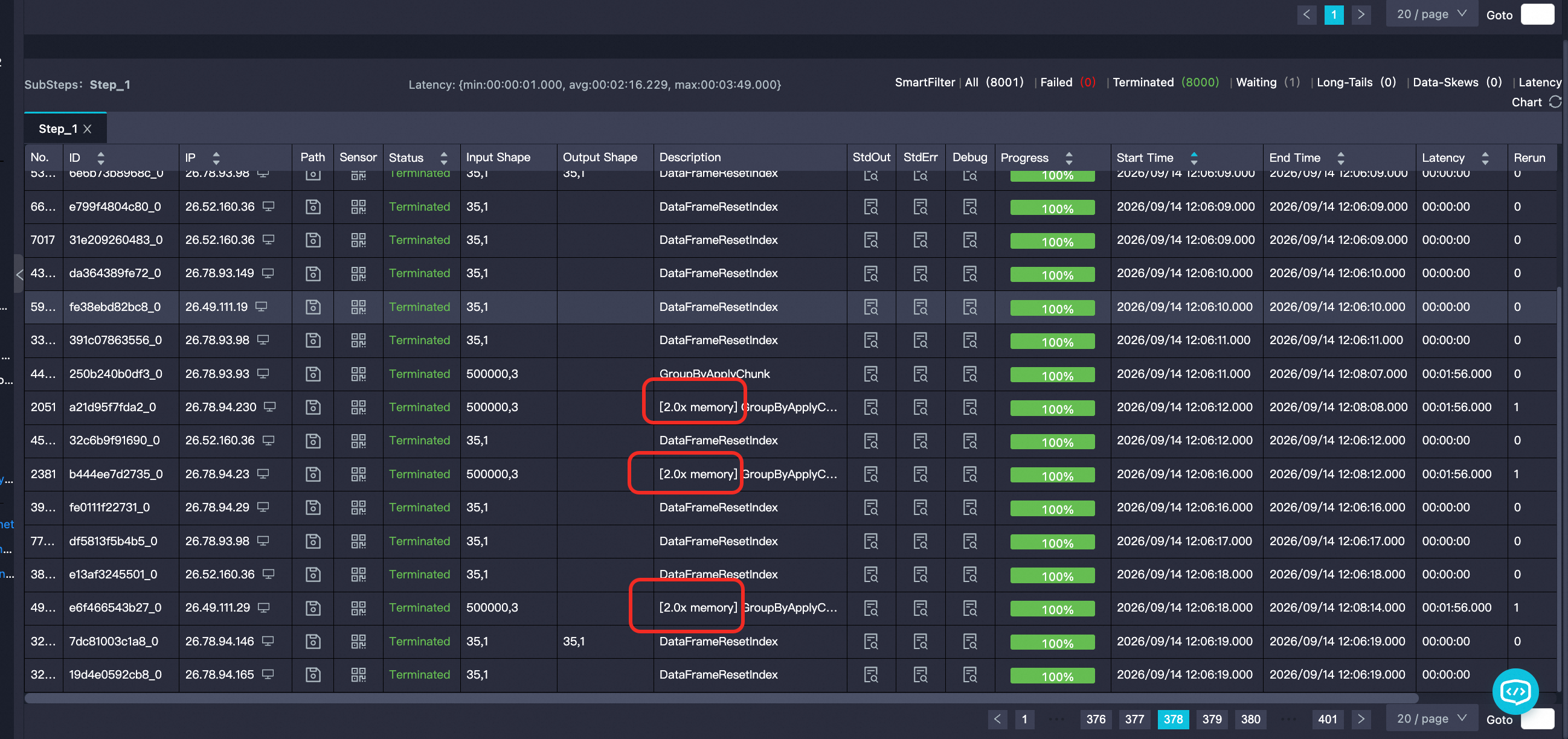
After an OOM error triggers an elastic memory retry, LogView adds a memory multiplier tag to the corresponding substep. For example, [2.0x memory] in the following figure indicates that twice the memory is used.