Network connection process
This topic describes the network architecture between MaxCompute and target services and the supported network connectivity solutions.
Overview
By default, MaxCompute cannot connect to target services on the public network or in a VPC. Configure an allowlist or establish a network connection to access these services, such as specified IP addresses or domain names, RDS, HBase clusters, and Hadoop clusters.
Network architecture
The following diagram shows the network architecture between MaxCompute and target services.
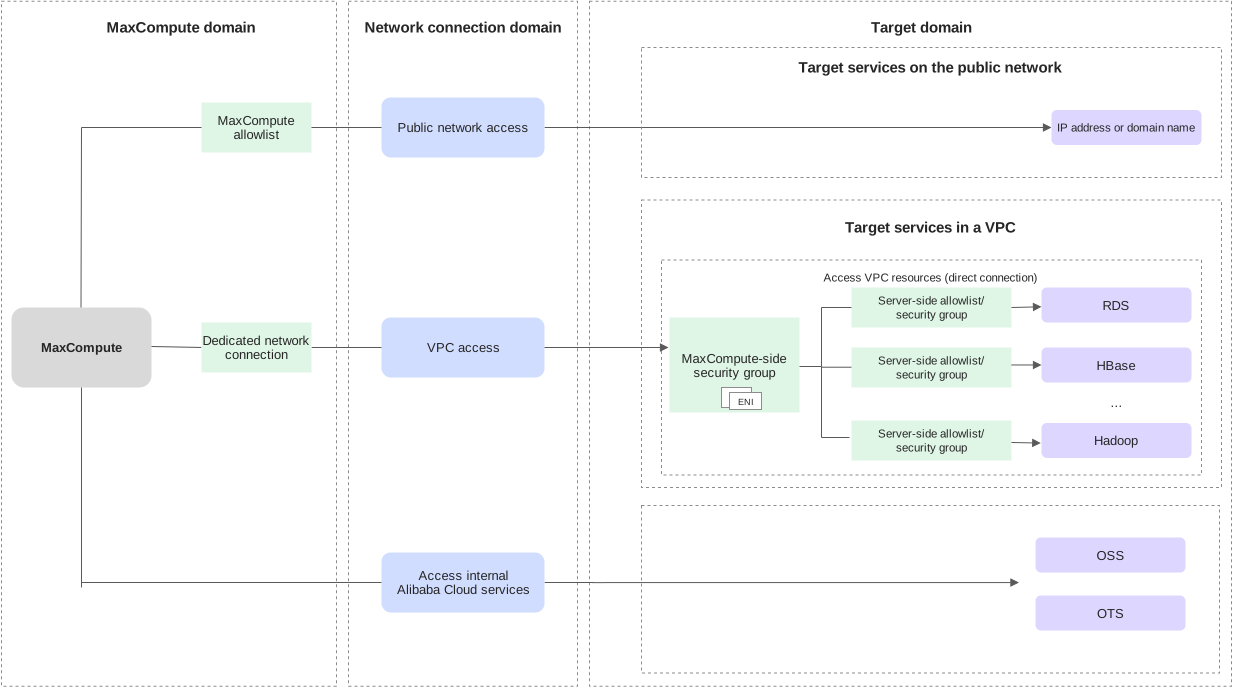
Network connectivity solutions
MaxCompute public network access
Use cases
Access target IP addresses or domain names on the public network through MaxCompute user-defined functions (UDFs), Spark, MR, or PyODPS/Mars.
Setup overview
Add or remove commonly used public IP addresses or domain names, such as aliyun.com, directly in the Manage projects section of the MaxCompute console.
For public IP addresses or domain names that fail automatic validation, submit an application for review. The review is completed within three business days. After approval, access is available if the target IP address or domain name has no security restrictions.
If the target public IP address or domain name has security restrictions, contact the person responsible for the target service to meet its access requirements and ensure that MaxCompute is not blocked.
MaxCompute VPC access (direct connection)
Use cases
Access services in a VPC, such as RDS, HBase clusters, and Hadoop clusters, through MaxCompute SQL, UDFs, Spark, PyODPS/Mars, external tables, or a lakehouse architecture.
Setup overview
Log on to the VPC console and authorize MaxCompute. Then create a connection between MaxCompute and the VPC in the MaxCompute console.
After the connection is created, view the elastic network interface (ENI) created by MaxCompute in the MaxCompute console. The security group specified when the VPC connection was created controls the access rules for this ENI.
If the target service uses access control, add the ENI IP address or the vSwitch CIDR block to the service allowlist.
When accessing a VPC, MaxCompute establishes connectivity only to the VPC identified by the specified VPC ID. To access services in another region or in another VPC in the same region, use existing cloud VPC connectivity solutions to connect the VPC configured for the direct connection to the other VPCs.
Use cases
Access Alibaba Cloud services such as OSS, DLF, OTS (Tablestore), and Hologres through MaxCompute SQL, UDFs, Spark, PyODPS/Mars, external tables, or a lakehouse architecture. Connections use the internal network addresses provided for connectivity between Alibaba Cloud services.
Setup overview
OSS and OTS external tables must use the internal endpoints of OSS and OTS.
External tables can access Hologres only through its classic network domain name. For details, see the Classic Network address in Endpoints.
VPC peering connection solution
Access MaxCompute in another region from a VPC.
Connect VPCs across regions by using CEN
Interconnect VPCs across regions through Cloud Enterprise Network (CEN).
Supported scope
MaxCompute supports the public network and VPC access solutions only in the following regions.
Access the public network
Supported regions: China (Hangzhou), China (Shanghai), China (Beijing), China (Zhangjiakou), China (Ulanqab), China (Shenzhen), China (Hong Kong), Japan (Tokyo), Singapore, Malaysia (Kuala Lumpur), Indonesia (Jakarta), Germany (Frankfurt), US (Silicon Valley), US (Virginia).
Supported targets: Public IP addresses or domain names.
Access a VPC via direct connect
Supported regions and zones: China (Hangzhou)—Zones H, I, J, K; China (Beijing)—Zones F, G, H, I, L; China (Shanghai)—Zones B, E, G, M, N; China (Zhangjiakou)—Zones A, B, C; China (Ulanqab)—Zones B, C; China (Shenzhen)—Zones C, D, E, F; China (Hong Kong)—Zones B, C; China East 2 Finance—Zone F; Japan (Tokyo)—Zones A, B; Singapore—Zones A, B, C; Malaysia (Kuala Lumpur)—Zones A, B; Indonesia (Jakarta)—Zones A, B; Germany (Frankfurt)—Zones A, B, C; US (Silicon Valley)—Zones A, B; US (Virginia)—Zones A, B.
Supported targets: VPC IP addresses or domain names, RDS, HBase clusters, Hadoop clusters.
Disclaimer
Public network and VPC access provided by MaxCompute are currently free services with the following limitations:
Network connectivity is guaranteed. However, failover may cause nodes to rerun when code triggers network operations. The code must handle these reruns. Read-only operations are recommended. For write operations, prevent dirty data caused by repeated writes.
Access goes through proxies with limited forwarding capacity. Use persistent connections and control the number of nodes. Excessive concurrency or too many connections may cause network requests to fail.
Bandwidth is not guaranteed, so tasks may run slowly. The platform assumes no liability for this.
The number of proxy egress IP addresses is limited. Contact Alibaba Cloud technical support to investigate abnormal connection behavior.
Egress IP addresses may change. The target service should not enable access control. If an IP allowlist is configured for proxy egress addresses, the platform does not guarantee that these addresses will remain unchanged.
If access still fails when running MaxCompute jobs after network connectivity has been established, the tool used to run the jobs may have network restrictions. For example, when using DataWorks for data synchronization or data cleansing, ensure that the DataWorks resource group can connect to the data source and that the DataWorks sandbox allowlist permits access to it. For resource group connectivity and sandbox configuration, see Network connectivity solutions.
FAQ
DNS resolution fails due to high concurrency
Problem: UDF or Spark jobs send a large number of concurrent requests to a target domain name, causing DNS resolution to fail.
Solution: Resolve the domain name to an IP address during job initialization, then use the resolved IP address during execution. For details, see DNS resolution fails due to high concurrency.
Access an HTTPS service by IP address
Problem: Spark or UDF jobs access remote VPC services, such as KMS or OSS, over HTTPS. Accessing these services directly by IP address causes errors.
Solution: Add the domain name to the request host to resolve errors when accessing an HTTPS service directly by IP address. For details, see Access an HTTPS service by IP address.