Object table
MaxCompute introduces the object table feature, which allows the data warehouse compute engine to access unstructured data and its metadata in data lake storage. This topic describes the command syntax and provides usage examples for object tables.
Background
In many AI workflows, data warehouse developers who are familiar with the data and business logic must preprocess or process unstructured data for large models. These tasks leverage the low-cost, large-scale computing power of big data platforms. The processes and their results interact with data in the data warehouse or data lake.
Using SQL to process unstructured data presents the following challenges:
Big data SQL engines are not aware of object sizes when reading files from object storage. This makes it difficult to optimize the execution plan, control concurrency, or automatically launch an appropriate number of concurrent tasks. Additionally, without effective predicate pushdown, computing power cannot be fully utilized, especially in cases of data skew.
Reading metadata from object storage introduces high latency because each query requires a remote call to the storage service.
File lists from object storage can be retrieved only serially in a single-process user-defined table function (UDTF), which results in poor data read performance.
You must implement authorization logic and network connectivity logic within a user-defined function (UDF) to connect to storage services.
UDFs have limited capabilities for processing unstructured data. Traditional data warehouses lack features to flexibly and securely upload custom images and do not provide a secure execution environment for UDFs. Furthermore, remote calls require complex concurrency integration with distributed computing services.
Features
The object table feature provides the following capabilities:
Provides tabular access to the metadata of Object Storage Service (OSS) files.
Caches versioned metadata of OSS files in a metadata table, which the SQL engine uses for query optimizations like data filtering and predicate pushdown.
Provides built-in document functions to read the content of unstructured data files in various ways.
Enables the MaxCompute SQL engine to create concurrent splits from object table metadata, unlocking large-scale distributed computing for more efficient data reading and processing.
Lets you upload custom images to build UDFs for processing unstructured data.
Supports processing unstructured data to generate structured results and write them to internal tables or external tables in the data warehouse. Future versions will also support generating unstructured results and writing them back to Object Storage Service (OSS) through object tables.
Supports the Maxframe engine from the Python ecosystem.
Limitations
You must enable the schema feature for your MaxCompute project. For more information, see Enable the schema feature.
MaxCompute must support Type System 2.0.
Object tables do not currently support partitions.
Billing
You are charged for the metadata stored in the object table. For more information, see Storage pricing. While MaxCompute does not charge for storing the actual OSS files, standard OSS charges for data storage and access apply. For more information, see OSS storage pricing.
For tasks that extract and refresh OSS metadata, the
inputsizefor each scanned file is based on its metadata size, not its actual file size. Therefore, the total cost of the refresh job depends on the number of files, not their actual sizes. For more information, see Pay-as-you-go billing for external tables.Computing fees apply when you use an object table to analyze and extract unstructured data from OSS.
With pay-as-you-go billing, analyzing object table metadata is billed the same as for an internal table. For more information, see Pay-as-you-go computing for standard tables. Processing unstructured data content from OSS is billed as an external table. For more information, see Pay-as-you-go billing for external tables.
In the subscription model, computations use your prepaid resources. For more information, see Computing fees (subscription).
Create an object table
Syntax
CREATE OBJECT TABLE [IF NOT EXISTS] <object_table_name> (
  <col_name> <data_type>,
  ...
)
WITH SERDEPROPERTIES ('<key>' = '<value>')
LOCATION '<location>'
TBLPROPERTIES (
  'ot.version'='2',
  'metadata.origin'='list_object',
  'metadata.cache.mode'='manual'|'periodic'|'crontab' ,
  '...' = '...')
[COMMENT '<comment>']
;Object tables can only be used in projects where the schema feature is enabled. You must also enable the schema syntax.
Metadata columns in an object table are system-provided. Custom columns and generated custom columns can be added based on business requirements.
Parameters
Parameter type | Parameter | Required | Description |
Basic syntax parameters | object_table_name | Yes | The name of the table. |
col_name | No | The name of a custom column. Note:
| |
data_type | No | The data type of a custom column. | |
location | Yes |
| |
WITH SERDEPROPERTIES attributes | odps.properties.rolearn | Yes | Specifies the ARN of a Resource Access Management (RAM) role that has permissions to access OSS. The ARN is available on the role details page in the RAM console. Example: If The |
TBLPROPERTIES attributes | ot.version | Yes | The object table version. Set ot.version=2. Version 1.0 will no longer be supported. |
metadata.origin | Yes | The data source used for refreshes. The default is list_object.
| |
metadata.cache.mode | Yes | The cache refresh mode. The default is manual.
| |
metadata.staleness.seconds | No | The refresh interval. This parameter must be set when metadata.cache.mode is set to periodic.
| |
metadata.crontab.expression | No | The cron expression for scheduled refreshes. This parameter must be set when metadata.cache.mode is set to crontab. To trigger a refresh once at 2:00 PM every day, set the expression to Note An overly short refresh interval may incur unnecessary costs. Each refresh sends a large number of OSS requests and incurs request charges, even if the objects have not changed. |
Example
-- Enable schema-level (three-layer) syntax.
SET odps.namespace.schema=true;

CREATE OBJECT TABLE assets_list (
    label STRING,
    score BIGINT,
    size_double BIGINT GENERATED ALWAYS AS (size * 2) STORED
)
WITH SERDEPROPERTIES (
    'odps.properties.rolearn'='acs:ram::<uid>:role/<role-name>'
)
LOCATION 'oss://oss-cn-<region>-internal.aliyuncs.com/your-bucket/assets/'
TBLPROPERTIES (
    'ot.version'='2',
    'metadata.origin'='list_object',
    'metadata.cache.mode'='manual'
);
View object table properties
Syntax
DESC <object_table_name>Parameters
object_table_name: Required. The name of the table.
Example
SET odps.namespace.schema=true;
DESC ot_demo_day;
The following result is returned:
+------------------------------------------------------------------------------------+
| Owner:                    ALIYUN$****@test.aliyunid.com                        |
| Project:                  test_objecttable                                         |
| Schema:                   default                                                  |
| TableComment:                                                                      |
+------------------------------------------------------------------------------------+
| CreateTime:               2024-09-02 20:01:56                                      |
| LastDDLTime:              2024-09-02 20:01:56                                      |
| LastModifiedTime:         2024-09-02 20:01:56                                      |
+------------------------------------------------------------------------------------+
| InternalTable: YES      | Size: 0                                                  |
+------------------------------------------------------------------------------------+
| Native Columns:                                                                    |
+------------------------------------------------------------------------------------+
| Field           | Type       | Label | Comment                                     |
+------------------------------------------------------------------------------------+
| key             | varchar(2048) |       | The name of the object.                     |
| size            | bigint     |       | The size of the returned object in bytes.   |
| type            | varchar(32) |       | The type of the object and valid values: Normal, Multipart, Appendable, and Symlink. |
| last_modified   | timestamp  |       | The last modified time of the object.       |
| storage_class   | varchar(32) |       | The storage class of the object.            |
| etag            | varchar(64) |       | The entity tag (ETag). When an object is created, an ETag is created to identify the content of the object. |
| restore_info    | varchar(256) |       | The restoration status of the object.       |
| owner_id        | bigint     |       | The ID of the bucket owner.                 |
| owner_display_name | varchar(256) |       | The display name of the bucket owner.       |
+------------------------------------------------------------------------------------+
The following table describes key columns in the result.
Column name | Type | Nulls allowed | Description |
key | VARCHAR(2048) The key can be up to 1,023 characters long. For more information, see OSS object naming rules and examples. | False | The relative path of the object in the object table. |
size | BIGINT | False | The size of the object in bytes. |
type | VARCHAR(32) | False | The type of the object in OSS: Normal, Multipart, Appendable, or Symlink. |
last_modified | TIMESTAMP_NTZ | False | The time when the object's data was last modified in OSS. |
storage_class | VARCHAR(32) | False | The storage class of the object in OSS. For more information, see Storage classes. |
etag | VARCHAR(64) | False | An ETag (entity tag) is created when an object is generated. It is used to identify whether the content of an object has changed between updates but is not a unique identifier. |
restore_info | VARCHAR(256) | True | Information about an object's restoration status from cold storage. |
owner_id | BIGINT | True | The ID of the object's owner. |
owner_display_name | VARCHAR(256) | True | The display name of the object's owner. |
View the CREATE TABLE statement
Syntax
SHOW CREATE TABLE <object_table_name>;Parameters
object_table_name: Required. The name of the table.
Example
SET odps.namespace.schema=true;
SHOW CREATE TABLE ot_demo_day;
The following result is returned:
CREATE OBJECT TABLE IF NOT EXISTS yunqi_object_****.`default`.ot_demo_day
WITH SERDEPROPERTIES (
  'serialization.format'='1',
  'odps.properties.rolearn'='acs:ram::139699392458****:role/aliyunodpsdefaultrole')
LOCATION
  'oss://oss-cn-hangzhou-internal.aliyuncs.com/odps-external-****/ottest/'
TBLPROPERTIES (
  'last_modified_time'='1731478307',
  'transient_lastDdlTime'='1731478307',
  'metadata.cache.mode'='manual',
  'metadata.staleness.seconds'='3600');
Refresh object table metadata
The actual data for an object table is stored in OSS. MaxCompute caches the metadata of these objects and uses this cached metadata for queries and computations. Therefore, you must refresh the cache before you use an object table. You can refresh metadata manually or configure periodic refreshes when you create the table.
Both manual and periodic refreshes are full refreshes.
Manual refresh
Each refresh performs a full synchronization of the metadata. You can control the timing and frequency of these refreshes.
Syntax
ALTER TABLE <objecttable_name> REFRESH METADATA;Parameters
objecttable_name: Required. The name of the table.
Example
SET odps.namespace.schema=true;
ALTER TABLE ot_demo_day REFRESH METADATA;
Periodic refresh
If files in the OSS directory mapped to the object table change frequently, you can configure periodic metadata refreshes. To reduce maintenance costs, specify the refresh parameters when you create the table.
Syntax
SET odps.namespace.schema=true;
SET odps.sql.type.system.odps2 = true;

CREATE OBJECT TABLE ot_demo_day
WITH serdeproperties (
 'odps.properties.rolearn'='acs:ram::xxxxxx:role/aliyunodpsdefaultrole'
)
location 'oss://oss-cn-hangzhou-internal.aliyuncs.com/odps-external-****/ottest/'
tblproperties (
  'metadata.cache.mode' = 'periodic',
  'metadata.staleness.seconds' = '3600'
);
Parameters
metadata.staleness.seconds: The refresh interval. This parameter is required for theperiodicmode. The value must be within the range of[1, 604800], which represents a range from 1 second to 1 week.metadata.cache.mode: The refresh mode. Choose one of the following options:periodic: Triggers the refresh periodically.crontab: Triggers the refresh on a schedule.manual: Triggers the refresh manually (default). You can control the trigger timing.
Scheduled refresh
If files in the OSS directory mapped to the object table change frequently, you can schedule metadata refreshes. To reduce maintenance costs, specify the scheduling parameters when you create the table.
Syntax
SET odps.namespace.schema=true;
SET odps.sql.type.system.odps2 = true;

CREATE OBJECT TABLE ot_demo_day
WITH SERDEPROPERTIES (
 'odps.properties.rolearn'='acs:ram::xxxxxx:role/aliyunodpsdefaultrole'
)
LOCATION 'oss://oss-cn-region-internal.aliyuncs.com/odps-external-****/ottest/'
TBLPROPERTIES (
  'metadata.cache.mode' = 'crontab',
  'metadata.crontab.expression' = 'your_timed_expression'
);
Parameters
metadata.crontab.expression: The cron expression for the scheduled task. For example, to trigger a task once at 2:00 PM every day, you can set the expression to0 0 14 * * ?, which means0seconds,0minutes, the14th hour (14:00 or 2:00 PM),*for every day,*for every month, and?for an unspecified day of the week (mutually exclusive with the day-of-month field to avoid conflicts).metadata.cache.mode: The refresh mode. Choose one of the following options:crontab: Triggers the refresh on a schedule.periodic: Triggers the refresh periodically.manual: Triggers the refresh manually (default). You can control the trigger timing.
View refresh tasks
You can run the following command to view the history of refresh tasks.
SHOW refresh task history FOR object TABLE <object_table_name>;Parameters
<object_table_name> must be an object table.
Return values: The instance ID (
InstanceId), creation time (CreateTime), end time (EndTime), and execution status (Status) of the refresh task.When the Status is Failed, you can run
wait InstanceId;to print the log view and check the error details.
Example
-- View the historical refresh tasks for the object table.
SET odps.namespace.schema=true;
SHOW refresh task history for object table ot_demo_day04;

-- The following result is returned.
ID = 20260105*******f
+---------------------------------------------------------------------------------------------------+
| Project:                  test_project                                                                              |
| Schema:                   default                                                                                           |
| Task:                     ***                        |
+---------------------------------------------------------------------------------------------------+
| History:                                                                                          |
+---------------------------------------------------------------------------------------------------+
| InstanceId                       | CreateTime             | EndTime                | Status       |
+---------------------------------------------------------------------------------------------------+
| 20260105******************ks     | 2026-01-05 14:12:00    | 2026-01-05 14:12:04    | Terminated   |
| 20260105******************y3     | 2026-01-05 14:10:00    | 2026-01-05 14:10:03    | Terminated   |
+---------------------------------------------------------------------------------------------------+

OK
Query an object table
After an object table fetches the metadata of files from an OSS directory, you can query the table to browse this metadata. You can also use SQL statements to perform calculations on the metadata, such as aggregation, join, window functions, ORDER BY, and LIMIT.
Syntax
SELECT * FROM <object_table_name>;Parameters
object_table_name: Required. The name of the table.
Example
-- Query the data uploaded to the specified OSS directory. If the amount of data is large, you can limit the result to five rows.
SET odps.namespace.schema=true;
SELECT * FROM  ot_demo_day [limit 5];
Add business annotations to Object Table by using custom columns
Object Table supports adding custom columns to Object Tables to provide additional attribute descriptions for objects. Two types of custom columns are supported:
Regular custom columns
For rows added by a refresh, regular custom column values are NULL and must be updated by using UPDATE statements.
Generated columns
Generated columns use expressions to define how values are calculated. The values are automatically updated during refreshes and cannot be updated by using UPDATE statements.
Usage notes
Before adding or deleting custom columns for an Object Table, enable Schema Evolution at the project level. The command is shown below. For more information, see Schema evolution.
setproject odps.schema.evolution.enable=true;Generated columns have the following restrictions:
Values cannot be assigned directly.
Cannot be declared as
NOT NULL.New generated columns cannot specify
DEFAULT.Currently, only
STOREDis supported, notSTORED ASYNC.
Syntax
Add regular custom columns to an Object Table
-- Define regular custom columns when creating a table
SET odps.namespace.schema=true;

CREATE OBJECT TABLE [IF NOT EXISTS] <object_table_name> (
  <col_name> <data_type>,
  ...
)
WITH SERDEPROPERTIES ('<key>' = '<value>')
LOCATION '<location>'
TBLPROPERTIES (
  'ot.version'='2',
  'metadata.origin'='list_object',
  'metadata.cache.mode'='manual'|'periodic'|'crontab' ,
  '...' = '...')
[COMMENT '<comment>']
;

-- Add regular custom columns to an existing table
SET odps.namespace.schema=true;

ALTER TABLE <object_table_name> ADD COLUMNS (<col_name> <data_type>);
Add generated columns to an Object Table
-- Define generated columns when creating a table
SET odps.namespace.schema=true;

CREATE OBJECT TABLE [IF NOT EXISTS] <object_table_name> (
  <col_name> <data_type> GENERATED ALWAYS AS <expression> STORED,
  ...
)
WITH SERDEPROPERTIES ('<key>' = '<value>')
LOCATION '<location>'
TBLPROPERTIES (
  'ot.version'='2',
  'metadata.origin'='list_object',
  'metadata.cache.mode'='manual'|'periodic'|'crontab' ,
  '...' = '...')
[COMMENT '<comment>']
;

-- Add generated columns to an existing table
SET odps.namespace.schema=true;

ALTER TABLE <object_table_name> ADD COLUMNS (<col_name> <data_type> GENERATED ALWAYS AS <expression> STORED);
Parameters
object_table_name: Required. The table name.
col_name: The name of a regular custom column or generated column.
data_type: The data type of a regular custom column or generated column.
GENERATED ALWAYS AS <expression> STORED: Specifies the expression used to define a generated column.Expressions support arithmetic operations and built-in scalar functions, but not UDFs, aggregate functions, or window functions. The result type must match the declared type. If necessary, use
CAST.When using nondeterministic built-in functions such as
RAND(), recalculated results may differ even if the input remains unchanged.
Examples:
--  Define the generated column file_ext: extract the file extension from key and convert it to lowercase by using the following expression
file_ext STRING GENERATED ALWAYS AS (
    TOLOWER(REGEXP_EXTRACT(CAST(key AS STRING), '[.]([^.]+)$', 1))
  ) STORED

--  Define the generated column size_group: classify by size as small if less than 1 MiB, or large otherwise, by using the following expression
size_group STRING GENERATED ALWAYS AS (
    CASE WHEN size < 1048576 THEN 'small' ELSE 'large' END
  ) STORED
Example
The following example uses an Object Table with both regular custom columns and generated columns to demonstrate how custom columns work.
Assume that the following .txt files already exist in the
assetsdirectory in OSS.readme.txtoverwrite.txt, delete.txt
| File | Content (excluding quotation marks in the table) | Bytes |
|-----|---|---:|
| readme.txt | `object-table-v2` + newline | 16 |
| overwrite.txt | `old` + newline | 4 |
| delete.txt | `delete-me` + newline | 10 |
Create an Object Table 2.0 table with the custom columns
label,score, andsize_double.-- Enable schema-level (three-level) syntax SET odps.namespace.schema=true; CREATE OBJECT TABLE assets_list ( label STRING, score BIGINT, size_double BIGINT GENERATED ALWAYS AS (size * 2) STORED ) WITH SERDEPROPERTIES ( 'odps.properties.rolearn'='acs:ram::<uid>:role/aliyunodpsdefaultrole' ) LOCATION 'oss://oss-cn-<region>-internal.aliyuncs.com/<oss_bucket_file_path>/' TBLPROPERTIES ( 'ot.version'='2', 'metadata.origin'='list_object', 'metadata.cache.mode'='manual' );Manually refresh the Object Table and check the data.
-- Enable schema-level (three-level) syntax
SET odps.namespace.schema=true;

ALTER TABLE assets_list REFRESH METADATA;
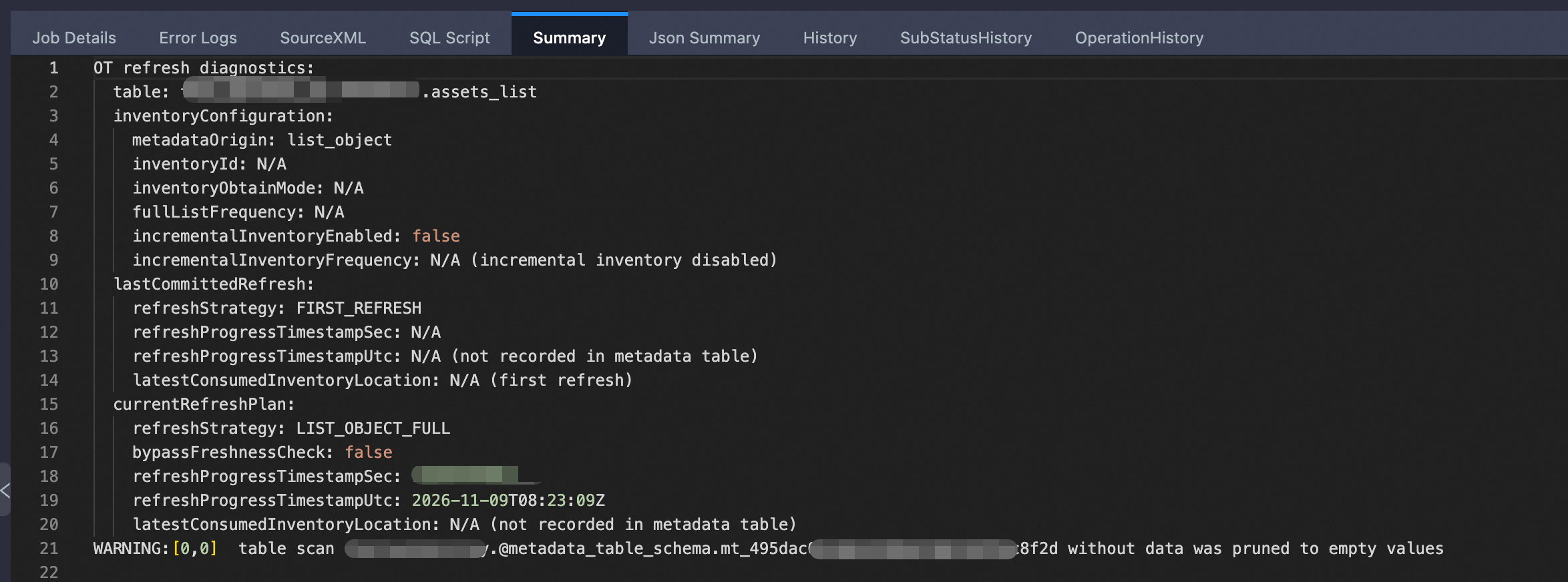
Refresh details are returned in the Summary section of LogView:
-- Query the table
-- Enable schema-level (three-level) syntax
SET odps.namespace.schema=true;

ALTER TABLE assets_list REFRESH METADATA;
SELECT
    key, size, label, score, size_double
FROM assets_list
ORDER BY key
LIMIT 100;

-- The result is as follows:
+------+------------+-------+------------+-------------+
| key  | size       | label | score      | size_double |
+------+------------+-------+------------+-------------+
| delete.txt    | 10     | NULL  | NULL  | 20          |
| overwrite.txt | 4      | NULL  | NULL  | 8           |
| readme.txt    | 16     | NULL  | NULL  | 32          |
+------+------------+-------+------------+-------------+
Add business annotations and query the annotation results.
-- Set label='reviewed', score=5 for readme.txt
UPDATE assets_list SET label='reviewed', score=5 WHERE key='readme.txt';

-- Add the custom column reviewer
ALTER TABLE assets_list ADD COLUMNS (reviewer STRING);

-- Set reviewer='alice' for readme.txt
UPDATE assets_list SET reviewer='alice' WHERE key='readme.txt';

-- Query the annotation results.
-- Enable three-level syntax
SET odps.namespace.schema=true;

SELECT
    key, label, score, reviewer
FROM assets_list
WHERE key='readme.txt'
LIMIT 1;

-- The result is as follows:
+------+-------+------------+----------+
| key  | label | score      | reviewer |
+------+-------+------------+----------+
| readme.txt | reviewed | 5 | alice    |
+------+-------+------------+----------+
Delete a custom column if it is no longer needed for business purposes.
-- Delete the generated column size_double
ALTER TABLE assets_list DROP COLUMNS size_double;
Custom columns and data behavior after a refresh
Object change | System metadata columns | Regular custom columns | Generated columns |
New key | A row is added | NULL | Calculated based on the expression |
Existing key overwritten | Size, ETag, and other metadata are updated | Original values are retained | Recalculated |
Key deleted | Row removed after a refresh processes the deletion | Removed with the row | Removed with the row |
Same key recreated after its deletion has been reflected by a refresh | Added as a new object | NULL; previous annotations are not restored | Recalculated |
If label, score, or other processing results depend on file content, also save the ETag at the time of processing. Compare it with the current ETag when querying to determine whether reprocessing is required. Overwriting the same key does not automatically clear previous annotations.
UPDATE writes only to the business columns of an OT and does not modify OSS files. System columns and pseudo columns cannot be updated by using UPDATE. Custom columns can store processing results, but this does not imply support for other features such as vector indexes.
Refresh an object table by using OSS inventories
When an object storage system contains a massive number of objects, retrieving OSS metadata by using the ListObjects API has the following limitations:
Performance bottleneck: Each request returns at most 1,000 objects.
High cost: Frequent API calls incur high request costs.
Slow updates: Listing all objects takes a long time.
An object table integrates with OSS Inventory to retrieve metadata more efficiently:
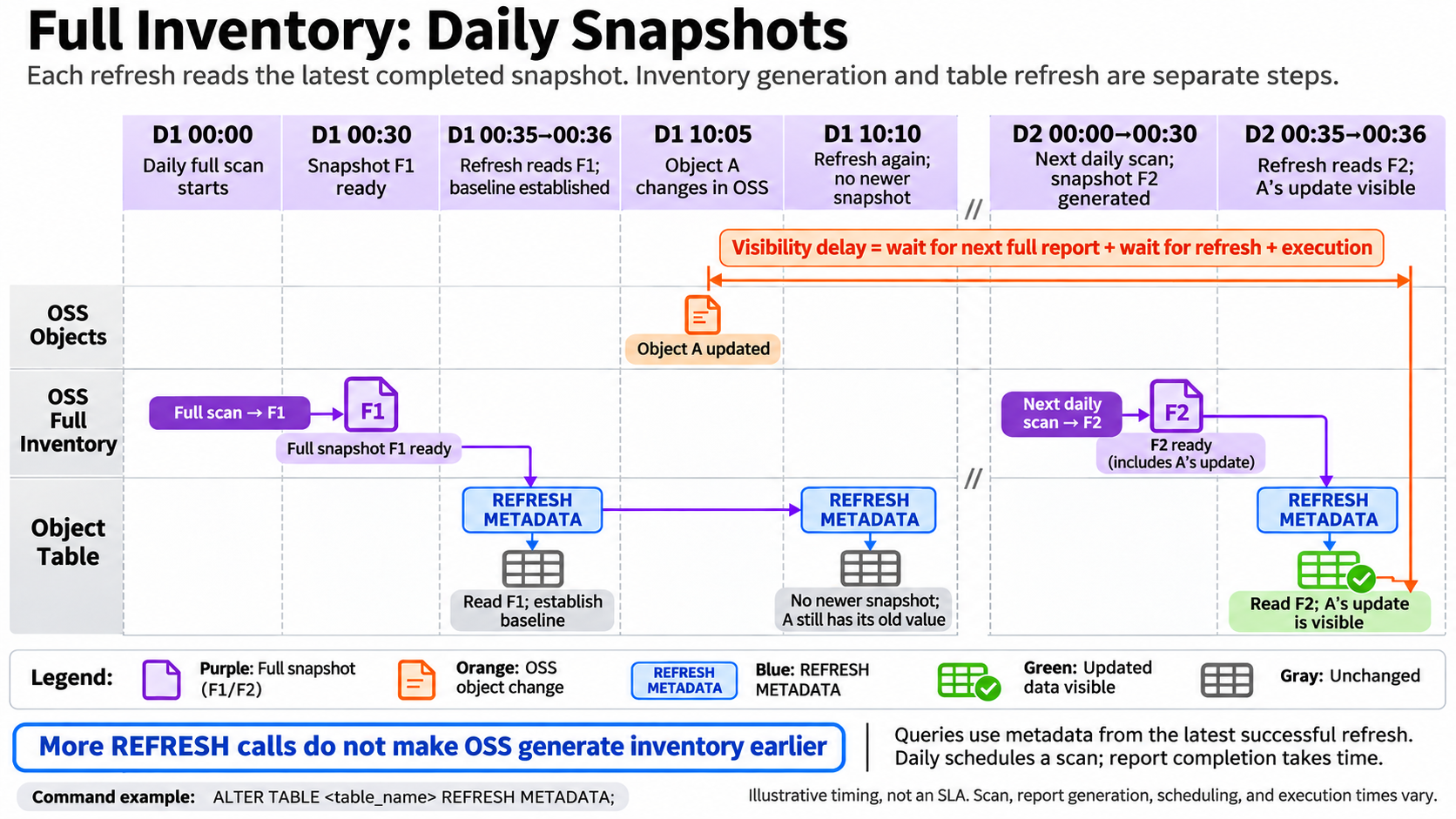
Full inventories: Generate full snapshots of objects in a bucket periodically on a daily, weekly, or monthly basis. When an object table is read, the snapshot contents are read directly.
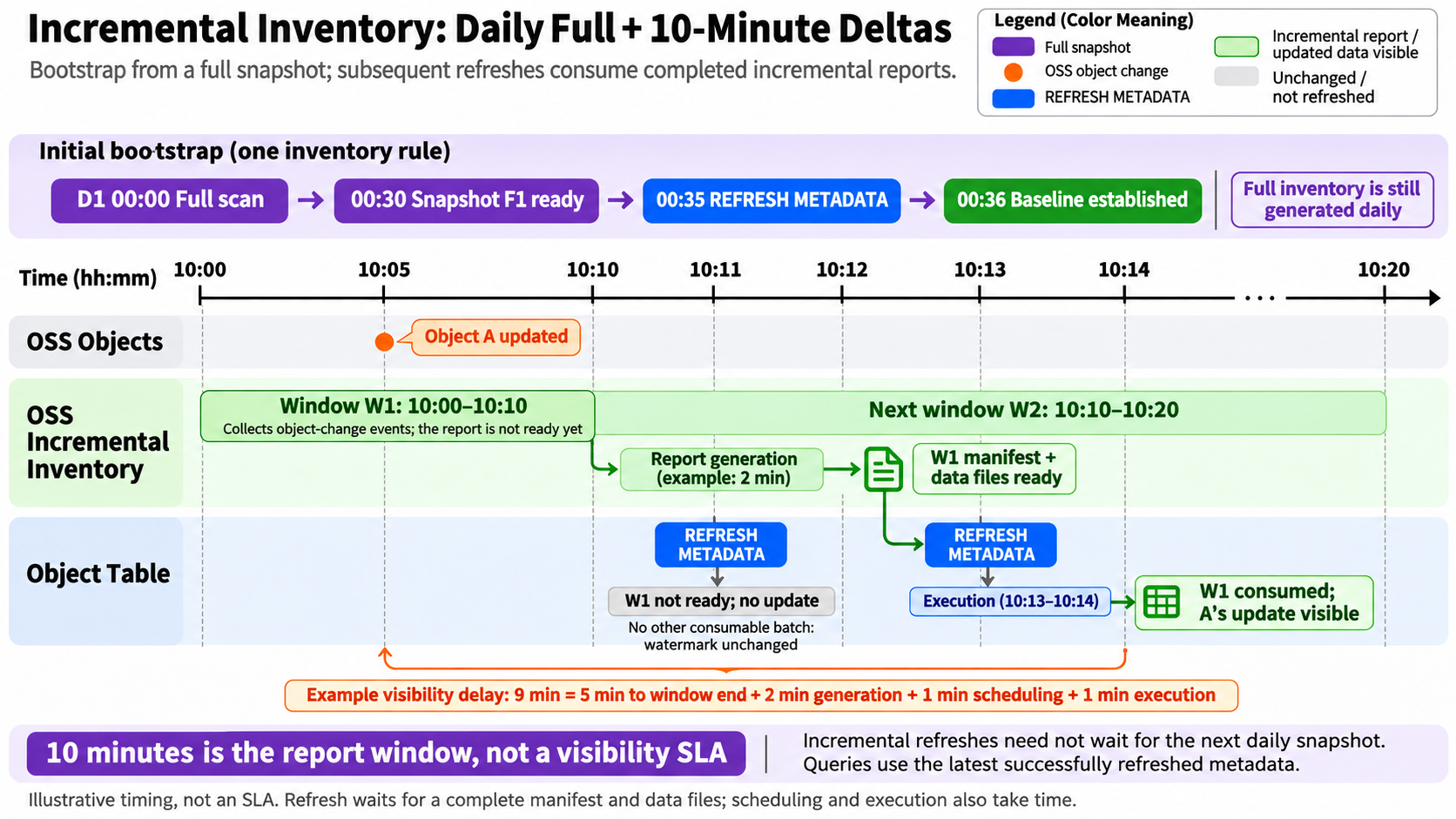
Incremental inventories: In addition to full inventories, incremental inventories can be optionally configured. Incremental inventories capture object change events in 10-minute windows and synchronize only changed files, without scanning all objects. This significantly reduces resource consumption and synchronization costs.
An object table maps OSS objects to metadata rows in a MaxCompute table, supports custom business annotations and generated columns, and provides a unified SQL query interface. This approach improves metadata synchronization timeliness from days to minutes and is suitable for scenarios such as data lake metadata management, ETL pipeline triggering, and data asset auditing. It provides a low-cost, timely, and traceable system for managing data lake metadata.
Prerequisites
Grant permissions: An object table accesses OSS data by using the permissions associated with a RAM role. Configure inventory-related permission policies for the RAM role. For more information, see Inventory permissions.
Prepare inventory rules:
Configure inventory rules in OSS in advance. For more information, see Configure full inventories and Configure incremental inventories.
The OSS inventory configuration must also meet the following requirements:
Configuration item
Requirement
Object versions
Current
Scan scope
The inventory Prefix must cover the data directory specified by the object table LOCATION
Export format
CSV
Export destination
Use the same bucket as the data and a separate directory for inventory reports
Full inventory fields
Include at least Size. The following field set is recommended: Size, ObjectType, LastModifiedDate, StorageClass, ETag,
ObjectAcl, Crc64, EncryptionStatus, IsMultipartUploaded.
Incremental inventory fields
Enable these fields for incremental refreshes. The window is fixed at 10 minutes. Also configure the following fields for incremental inventories: SequenceNumber, RecordTimestamp, RecordType.
Full and incremental inventory fields
Keep the object attribute field sets consistent. Incremental inventories also include event fields.
Creating an inventory starts the initial full scan, but the first report is not generated immediately. Incremental reports are generated in fixed 10-minute windows, and writing the files to storage involves an additional delay.
Syntax
CREATE OBJECT TABLE object_table_name_inventory (
  <col_name> <data_type>,
  ...
)
WITH SERDEPROPERTIES ('<key>' = '<value>')
LOCATION '<location>'
TBLPROPERTIES (
  'ot.version'='2',
  'metadata.origin'='inventory',
  'metadata.inventory.obtain'='specify',
  'metadata.inventory.id'='your-inventory-id',
  'metadata.inventory.incremental'='true',
  'metadata.cache.mode'='manual'|'periodic'|'crontab'
);
Parameters
Parameter | Required | Description |
metadata.origin | Yes | Set this parameter to inventory to use OSS inventories. During a refresh, MaxCompute scans the results of the associated OSS Inventory to synchronize metadata. For 10 million objects or more, performance is significantly better than list_object. |
metadata.inventory.obtain | No | This parameter is required when metadata.origin is set to inventory. It specifies how an existing inventory rule is associated with the table. The value is fixed at specify, which indicates that the inventory rule is created manually. |
metadata.inventory.incremental | No | This parameter is required when metadata.origin is set to inventory. It specifies the OSS inventory type.
|
metadata.inventory.id | No | This parameter is required when metadata.origin is set to inventory. It specifies the OSS inventory name.
|
Refresh behavior after configuring full or incremental inventories
Full inventories
Assume that an object table is associated with a full inventory generated on a Daily schedule. The following diagram shows inventory generation and refresh execution:
Incremental inventories
Assume that an object table is associated with an incremental inventory configured with a Daily schedule (OSS generates an incremental inventory every 10 minutes; Daily applies only to full inventory exports). The following diagram shows inventory generation and refresh execution:
Examples
Assume that the following .txt files already exist in the
assets_inventorydirectory in OSS.readme.txtoverwrite.txt, delete.txt
| File | Content (excluding quotation marks in the table) | Bytes |
|-----|---|---:|
| readme.txt | `object-table-v2` plus a newline | 16 |
| overwrite.txt | `old` plus a newline | 4 |
| delete.txt | `delete-me` plus a newline | 10 |
Log on to the OSS console and create full and incremental inventories. For details about each configuration item, see OSS Inventory.
Full inventory configuration
Configuration item
Example configuration
Rule name
full-list3.
Inventory report destination
Bucket: The current bucket name.
Bucket path:
full-list/. Use a path separate from the data storage path to avoid repeated scans later.Inventory scan scope
Select prefix-based matching and specify the data storage path:
assets_inventory/.Note: A path copied directly from OSS may contain newline characters or spaces. Remove these characters from the path.
Object versions to include
Current versions.
Inventory report encryption
None.
Inventory report export frequency
Weekly.
Metadata fields
Select all.
Incremental metadata updates
Disabled.
Incremental inventory configuration
Configuration item
Example configuration
Rule name
increment-list4.
Inventory report destination
Bucket: The current bucket name.
Bucket path:
incremental-list/. Use a path separate from the data storage path to avoid repeated scans later.Inventory scan scope
Select prefix-based matching and specify the data storage path:
assets_inventory/.Note: A path copied directly from OSS may contain newline characters or spaces. Remove these characters from the path.
Object versions to include
Current versions.
Inventory report encryption
None.
Inventory report export frequency
Weekly.
Metadata fields
Select all.
Incremental metadata updates
Enabled.
Incremental metadata fields
Select all.
Create a table for incremental refreshes.
-- Enable schema-level syntax.
SET odps.namespace.schema=true;

CREATE OBJECT TABLE assets_inventory (
    label STRING,
    score BIGINT,
    size_double BIGINT GENERATED ALWAYS AS (size * 2) STORED,
    label_upper STRING GENERATED ALWAYS AS (toupper(label)) STORED
)
WITH SERDEPROPERTIES (
    'odps.properties.rolearn'='acs:ram::<uid>:role/aliyunodpsdefaultrole'
)
LOCATION 'oss://oss-cn-<region>-internal.aliyuncs.com/<oss_bucket_file_path>'
TBLPROPERTIES (
    'ot.version'='2',
    'metadata.origin'='inventory',
    'metadata.inventory.obtain'='specify',
    'metadata.inventory.id'='<incremental-list-name>', -- Specify the incremental inventory name.
    'metadata.inventory.incremental'='true', -- Perform incremental refreshes after initialization with a full refresh.
    'metadata.cache.mode'='manual' -- Refresh manually.
);
Initialize the table with the first full refresh.
Confirm that OSS has exported the first full manifest and the corresponding data files. On the right side of the incremental inventory rule, use the option to view inventory results and open the directory to confirm that the first full snapshot has been generated.
Confirm that the inventory actually contains the required objects, rather than only a directory. Open the
datadirectory of the full snapshot and check for generated CSV files.Run a manual refresh. Refresh details are available in the Summary section of LogView.
ALTER TABLE assets_inventory REFRESH METADATA;Query the results of initialization with the first full refresh.
-- Enable schema-level syntax.
SET odps.namespace.schema=true;
-- When running this SQL in a DataWorks SQL node, add this parameter to disable query acceleration (MCQA).
SET odps.mcqa.disable=true;

SELECT
    key, size, etag, label, score, size_double
FROM assets_inventory
ORDER BY key LIMIT 100;

-- The results are as follows:
+------+------------+------+-------+------------+-------------+
| key  | size       | etag | label | score      | size_double |
+------+------------+------+-------+------------+-------------+
| delete.txt | 10   | C7FF35E2945FC83BB7F350D39A2ADAFF | NULL  | NULL       | 20          |
| overwrite.txt | 4 | 814FA5CA98406A903E22B43D9B610105 | NULL  | NULL       | 8           |
| readme.txt | 16   | E784F2DBD38A7439FCB776286516D780 | NULL  | NULL       | 32          |
+------+------------+------+-------+------------+-------------+
Apply subsequent incremental updates.
In the
assets_inventorydirectory in OSS, delete delete.txt and add append1.txt and append2.txt-- append1.txt conetent: appended-first -- append2.txt conetent: appended-secondConfirm that OSS has exported an incremental snapshot. On the right side of the incremental inventory rule, use the option to view inventory results and open the
incremental_inventory/directory to confirm that an incremental snapshot for a recent date has been generated. The timestamps in snapshot directory names are in UTC.Run a manual refresh. Refresh details are available in the Summary section of LogView.
ALTER TABLE assets_inventory REFRESH METADATA;Query the incremental data in the table.
-- Enable schema-level syntax.
SET odps.namespace.schema=true;
-- When running this SQL in a DataWorks SQL node, add this parameter to disable query acceleration (MCQA).
SET odps.mcqa.disable=true;

SELECT
    key, size, etag, label, score, size_double
FROM assets_inventory
ORDER BY key LIMIT 100;

-- The results are as follows: delete.txt is deleted, and append1.txt and append2.txt are added.
+------+------------+------+-------+------------+-------------+
| key  | size       | etag | label | score      | size_double |
+------+------------+------+-------+------------+-------------+
| append1.txt | 14         | 433FAC56B7F76EB637B7C9AE0EC1F2E5 | NULL  | NULL       | 28          |
| append2.txt | 15         | 3FF7CA88B9DC2FC652662F7F32026B3D | NULL  | NULL       | 30          |
| overwrite.txt | 4          | 814FA5CA98406A903E22B43D9B610105 | NULL  | NULL       | 8           |
| readme.txt | 16         | E784F2DBD38A7439FCB776286516D780 | NULL  | NULL       | 32          |
+------+------------+------+-------+------------+-------------+
Query object binary data by using Pseudo Column
Pseudo columns are generated automatically by the system and do not need to be defined when an object table is created. SELECT * does not return pseudo columns by default. Specify column names such as _data, _blob, or _signed_url explicitly in a query to retrieve their values.
Object binary data can be queried directly through pseudo columns in the following three ways:
_data column
Description
The _data column returns the complete binary data of an object, such as the binary stream of an image. Its data type is BINARY.
The binary data of a single object should not be too large, as this may cause an out-of-memory error.
The _data column is simple to use and works with many existing functions.
The functions corresponding to the _data column can also be used in SQL. For more information, see GET_DATA_FROM_OSS.
Syntax
SET odps.namespace.schema=true;
SELECT _data FROM <table_name>;
Example
Download the test file and upload it to OSS: ot_test.txt.
Create an object table.
SET odps.namespace.schema=true;
SET odps.sql.type.system.odps2=true;
SET odps.mcqa.disable=TRUE;

DROP TABLE IF EXISTS test_ot1;

CREATE OBJECT TABLE test_ot1
LOCATION 'oss://oss-cn-<region>-internal.aliyuncs.com/<bucket name>/<file path>/';

-- Refresh the table cache.
ALTER TABLE test_ot1 REFRESH METADATA;

SET odps.mcqa.disable=TRUE;
SET odps.namespace.schema=true;
SELECT * FROM test_ot1;

-- The following result is returned:
+------+------------+------+---------------+---------------+------+--------------+------------+--------------------+
| key  | size       | type | last_modified | storage_class | etag | restore_info | owner_id   | owner_display_name |
+------+------------+------+---------------+---------------+------+--------------+------------+--------------------+
| ot_test.txt | 286 |Normal|2026-07-21 06:49:59| Standard  | 3*01 | NONE         | 1***279014 | 1***279014         |
+------+------------+------+---------------+---------------+------+--------------+------------+--------------------+
Read the _data column.
SET odps.namespace.schema=true;
SELECT _data FROM test_ot1;

-- The following result is returned:
+-------+
| _data |
+-------+
| {=0A=20=20"id":=20**1,=0A=20=20"title":=20"Hello=20World",=0A=20=20"description":=20"=E8=BF**E4=BE=8B=20JSON=20=**82",=0A=20=20"tags":=20[=0A*=20"=E7**=8B",=0A=20=20=20=20"JSON",=0A=20=20=20=20"Example"=0A=20=20],=0A=20=20"metadata":=20{=0A=20=20=20=20"author":=20"AI=20Assistant",=0A=20=20=20=20"created_at":=20"2023-10-01T12:00:00Z",=0A=20=20=20=20"is_active":=20true=0A=20=20}=0A} |
View the text content.
SET odps.namespace.schema=true;
SELECT CAST(_data AS STRING) FROM test_ot1;

-- The following result is returned:
+-----+
| _c0 |
+-----+
| {
  "id": 1001,
  "title": "Hello World",
  "description": "这是一个包含中英文的示例 JSON 数据。",
  "tags": [
    "编程",
    "JSON",
    "Example"
  ],
  "metadata": {
    "author": "AI Assistant",
    "created_at": "2023-10-01T12:00:00Z",
    "is_active": true
  }
} |
+-----+
_blob column
Description
The _blob column returns a reference link for downloading binary data rather than the binary data itself. This defers reading the actual data to control memory consumption as it passes through SQL operators. Its data type is Blob. For more information, see Blob data type and multimodal storage.
The functions corresponding to the _blob column can also be used in SQL. For more information, see GET_BLOB_FROM_OSS.
Compared with the _data column, the _blob column offers advantages in computation stability and resource consumption.
For smaller objects (less than 1 MB on average), the _data column is recommended.
For larger objects, the _blob column is recommended. The _blob column supports deferred consumption and uses less memory as data passes through SQL operators. Data is consumed as a stream only when it reaches an operator or function that can process the BLOB type, enabling deferred consumption and controlled memory usage.
Syntax
SET odps.namespace.schema=true;
SELECT _blob FROM <table_name>;
Example
The following example reads the _blob column from the
test_ot1test table used in the _data column example.SET odps.namespace.schema=true; SELECT _blob FROM test_ot1; -- The results are as follows: +-------+ | _blob | +-------+ | CAEQAxruAgEAAAANA**AAEb2svMjAy3CIAKhR5WVBc/0S4GmxSm4psPJ5CV3k4STIeCgl***FyYTQ1ZXEx | +-------+ -- View the text content. SET odps.namespace.schema=true; SELECT CAST(read_blob(_blob) AS STRING) FROM test_ot1; -- The results are as follows: +-----+ | _c0 | +-----+ | { "id": 1001, "title": "Hello World", "description": "这是一个包含中英文的示例 JSON 数据。", "tags": [ "编程", "JSON", "Example" ], "metadata": { "author": "AI Assistant", "created_at": "2023-10-01T12:00:00Z", "is_active": true } } | +-----+
_signed_url column
Description
The _signed_url column provides a URL for uploading or downloading binary data without logging in. The _signed_url column is recommended for access across systems, programs, or heterogeneous environments. The following three forms are supported:
_signed_url: Uses the endpoint type specified by LOCATION in the object table creation statement. The generated URL is an internal URL. Download the file by using the URL in an internal network environment, such as an ECS instance.
_signed_url_internal: Explicitly uses an internal endpoint to generate an internal URL. Download the file by using the URL in an internal network environment, such as an ECS instance.
_signed_url_public: Explicitly uses a public endpoint to generate a public URL. The file can be downloaded directly on a local machine.
The generated signed URL is valid for 3600 seconds by default.
The functions corresponding to the _signed_url column can also be used in SQL. For more information, see GET_SIGNED_URL_FROM_OSS.
Syntax
SET odps.namespace.schema=true;
SELECT
  _signed_url,
  _signed_url_internal,
  _signed_url_public
FROM <table_name>;
Example
The following example reads the _signed_url column from the
test_ot1test table used in the _data column example.SET odps.namespace.schema=true; SELECT _signed_url, _signed_url_internal, _signed_url_public FROM test_ot1; -- The results are as follows: +-------------+----------------------+--------------------+ | _signed_url | _signed_url_internal | _signed_url_public | +-------------+----------------------+--------------------+ | http://bucket.oss-cn-beijing-internal.aliyuncs.com/object_table%2Fdata%2Fceshi4.txt?Expires=1794305507&OSSAccessKeyId=STS.NZRLuYNLaPGKeVyzkL81Rrgfm&Signature=ZiT8fXTTGDiXG%2FmVQfKE%2FLtSI1U%3D&security-token=CAIS3QJ1q6Ft5B2yfSjIr5nnB8%2Fto5NA54WgZ3DInmsZNL5%2BnaLNjzz2IHBMfHNrB%2BoYtPwznG5U6fodlrQpE8UbHBWdNZMht80LrV%2F5MoXM69yq7bIE1Y%2BoRDBQyblwKJOADd%2FiRfbxJ92PCTmd5AIRrJL%2BcTK9JS%2FHVbSClZ9gaPkOQwC8dkAoLdxKJwxk2qR4XDmrQpTLCBPxhXfKB0dFoxd1jXgFiZ6y2cqB8BHT%2FjaYo603392rfsj1MpIzYsgiD4nugbxMG%2FCfgHIK2X9j77xriaFIwzDDs%2ByGDkNZixf8aLqMqoc0clUnPPBmQ%2FAY86Sjj4Bxvu3CioLwxw5WMexbWjnbWJqnxMbUsQRN2Tijt9wRUlW6MbDnXvGd22tM6kJOsY7wKpQLHt5h2z3tuwArOy6dgiTuSC2N5Qb7Hm84X%2FT7MSuW09T02abtJ5fd5UIyXvmYB2dNynhLtQSJGoABrBnk0CsE4kemAaj0ViM3kLI8Hh5kx%2F6BEVr0a0tGSVsMiZSmieURpkmdCuc%2F6EftouDE8jlO%2B5e7OIbl6oUGnMFZr7ZVl45IRaqYq8K7AP%2B4lt8m2Q8wA7cq7sD2%2FDoJprCJXIljfiw0JzcTfshLNgi%2BhshDw0rits%2FIhYObyoYgAA%3D%3D | http://bucket.oss-cn-beijing-internal.aliyuncs.com/object_table%2Fdata%2Fceshi4.txt?Expires=1794305507&OSSAccessKeyId=STS.NZRLuYNLaPGKeVyzkL81Rrgfm&Signature=ZiT8fXTTGDiXG%2FmVQfKE%2FLtSI1U%3D&security-token=CAIS3QJ1q6Ft5B2yfSjIr5nnB8%2Fto5NA54WgZ3DInmsZNL5%2BnaLNjzz2IHBMfHNrB%2BoYtPwznG5U6fodlrQpE8UbHBWdNZMht80LrV%2F5MoXM69yq7bIE1Y%2BoRDBQyblwKJOADd%2FiRfbxJ92PCTmd5AIRrJL%2BcTK9JS%2FHVbSClZ9gaPkOQwC8dkAoLdxKJwxk2qR4XDmrQpTLCBPxhXfKB0dFoxd1jXgFiZ6y2cqB8BHT%2FjaYo603392rfsj1MpIzYsgiD4nugbxMG%2FCfgHIK2X9j77xriaFIwzDDs%2ByGDkNZixf8aLqMqoc0clUnPPBmQ%2FAY86Sjj4Bxvu3CioLwxw5WMexbWjnbWJqnxMbUsQRN2Tijt9wRUlW6MbDnXvGd22tM6kJOsY7wKpQLHt5h2z3tuwArOy6dgiTuSC2N5Qb7Hm84X%2FT7MSuW09T02abtJ5fd5UIyXvmYB2dNynhLtQSJGoABrBnk0CsE4kemAaj0ViM3kLI8Hh5kx%2F6BEVr0a0tGSVsMiZSmieURpkmdCuc%2F6EftouDE8jlO%2B5e7OIbl6oUGnMFZr7ZVl45IRaqYq8K7AP%2B4lt8m2Q8wA7cq7sD2%2FDoJprCJXIljfiw0JzcTfshLNgi%2BhshDw0rits%2FIhYObyoYgAA%3D%3D | http://bucket.oss-cn-beijing.aliyuncs.com/object_table%2Fdata%2Fceshi4.txt?Expires=1794305507&OSSAccessKeyId=STS.NZRLuYNLaPGKeVyzkL81Rrgfm&Signature=ZiT8fXTTGDiXG%2FmVQfKE%2FLtSI1U%3D&security-token=CAIS3QJ1q6Ft5B2yfSjIr5nnB8%2Fto5NA54WgZ3DInmsZNL5%2BnaLNjzz2IHBMfHNrB%2BoYtPwznG5U6fodlrQpE8UbHBWdNZMht80LrV%2F5MoXM69yq7bIE1Y%2BoRDBQyblwKJOADd%2FiRfbxJ92PCTmd5AIRrJL%2BcTK9JS%2FHVbSClZ9gaPkOQwC8dkAoLdxKJwxk2qR4XDmrQpTLCBPxhXfKB0dFoxd1jXgFiZ6y2cqB8BHT%2FjaYo603392rfsj1MpIzYsgiD4nugbxMG%2FCfgHIK2X9j77xriaFIwzDDs%2ByGDkNZixf8aLqMqoc0clUnPPBmQ%2FAY86Sjj4Bxvu3CioLwxw5WMexbWjnbWJqnxMbUsQRN2Tijt9wRUlW6MbDnXvGd22tM6kJOsY7wKpQLHt5h2z3tuwArOy6dgiTuSC2N5Qb7Hm84X%2FT7MSuW09T02abtJ5fd5UIyXvmYB2dNynhLtQSJGoABrBnk0CsE4kemAaj0ViM3kLI8Hh5kx%2F6BEVr0a0tGSVsMiZSmieURpkmdCuc%2F6EftouDE8jlO%2B5e7OIbl6oUGnMFZr7ZVl45IRaqYq8K7AP%2B4lt8m2Q8wA7cq7sD2%2FDoJprCJXIljfiw0JzcTfshLNgi%2BhshDw0rits%2FIhYObyoYgAA%3D%3D | +-------------+----------------------+--------------------+ -- Download the file by using the internal URL in an internal network environment, such as an ECS instance. curl -o ceshi.txt "<internal-url>" -- Download the file by using the public URL. Run the command directly on a local machine. curl -o ceshi.txt "<public-url>"
Delete an object table
An object table caches file metadata, which consumes storage and incurs costs. If you no longer need the cached data, delete the object table. You can recreate it later if needed.
Syntax
DROP TABLE [IF EXISTS] <object_table_name>; Parameters
object_table_name: Required. The name of the table.
Example
SET odps.namespace.schema=true;
DROP TABLE IF EXISTS ot_demo_day;
FAQ
ODPS-0010000:System internal error
Symptom
You receive the following error message:
ODPS-0010000:System internal error -
ActionHandler job failed with failinfo	storage service worker error occured:
common/io/oss/oss_file_system_cppsdk.cpp(919):
OSSRequestException: Status: -50, RequestId: ,
ErrorCode: ClientError:-50, Message: E_HTTP_ERROR_CONN_REFUSED
Cause
You used a public endpoint for OSS when you created the object table.
Solution
When you create an object table, the
oss_endpointin thelocationparameter must be an internal endpoint. For information about how to obtain an internal endpoint, see Parameters. If the error persists after you switch to an internal endpoint, contact the MaxCompute technical support team by submitting a ticket.
Periodic refresh fails
Symptom
You set periodic refresh parameters when you created the object table. However, the refresh does not run at the specified interval.
Solution
Ensure that the location parameter you configured when creating the object table specifies an OSS internal endpoint. For more information about how to create an object table, see Parameters.
No data is returned after configuring an inventory rule and refreshing the table
Possible causes:
The full snapshot has not been generated. Click View Inventory Results to the right of the inventory rule, open the directory, and check whether the first full snapshot has been generated.
The full or incremental inventory path is incorrectly configured.
Inventory report destination: The bucket path specifies where inventory reports are generated. It can be left blank or set to a separately created directory, but must differ from the data storage path.
Inventory scan scope: When filtering by prefix, specify the data storage path. Check the path for special characters such as spaces and line breaks.
The "Inventory filter prefix must be a prefix of OT location" error occurs when creating an incremental refresh table
Error message
ODPS-0010000:System internal error - Inventory filter prefix must be a prefix of OT location,
inventory prefix:   object_table/ OT_v2/ assets_list/,
OT location prefix: object_table/OT_v2/assets_list/

DebugingInfo amF2YS5sYW5nLlJ1bnRpbWVFeGNlcHRpb246IEludmVudG9yeSBmaWx0ZXIgcHJlZml4IG11c3QgYmUgYSBwcmVmaXggb2YgT1QgbG9jYXRpb24sIGludmVudG9yeSBwcmVmaXg6IG9iamVjdF90YWJsZS8gT1RfdjIvIGFzc2V0c19saXN0LywgT1QgbG9jYXRpb24gcHJlZml4OiBvYmplY3RfdGFibGUvT1RfdjIvYXNzZXRzX2xpc3QvCglhdCBjb20uYWxpeXVuLm9kcHMuY29tcGlsZXIub2JqZWN0dGFibGUuaW52ZW50b3J5Lk9zc0ludmVudG9yeS52YWxpZGF0ZUludmVudG9yeUNvbmZpZyhPc3NJbnZlbnRvcnkuamF2YTo0NDApCglhdCBjb20uYWxpeXVuLm9kcHMuY29tcGlsZXIub2JqZWN0dGFibGUuT2JqZWN0VGFibGVDb21waWxlSGVscGVyLmJpbmRJbnZlbnRvcnkoT2JqZWN0VGFibGVDb21waWxlSGVscGVyLmphdmE6NDUwKQoJYXQgY29tLmFsaXl1bi5vZHBzLmNvbXBpbGVyLlR5cGVDaGVja2VyLnByb2Nlc3NJbnZlbnRvcnlCaW5kaW5nKFR5cGVDaGVja2VyLmphdmE6MzI5NCkKCWF0IGNvbS5hbGl5dW4ub2Rwcy5jb21waWxlci5UeXBlQ2hlY2tlci52aXNpdChUeXBlQ2hlY2tlci5qYXZhOjU4NDUpCglhdCBjb20uYWxpeXVuLm9kcHMuY29tcGlsZXIuVHlwZUNoZWNrZXIudmlzaXQoVHlwZUNoZWNrZXIuamF2YTo0NDcpCglhdCBjb20uYWxpeXVuLm9kcHMuY29tcGlsZXIubm9kZXMuYXN0LkNyZWF0ZU9iamVjdFRhYmxlU3RhdGVtZW50LmFjY2VwdChDcmVhdGVPYmplY3RUYWJsZVN0YXRlbWVudC5qYXZhOjE3NCkKCWF0IGNvbS5hbGl5dW4ub2Rwcy5jb21waWxlci5UcmVlU2Nhbm5lci5zY2FuKFRyZWVTY2FubmVyLmphdmE6MjQzOCkKCWF0IGNvbS5hbGl5dW4ub2Rwcy5jb21waWxlci5UeXBlQ2hlY2tlci52aXNpdChUeXBlQ2hlY2tlci5qYXZhOjYyNzcpCglhdCBjb20uYWxpeXVuLm9kcHMuY29tcGlsZXIuVHlwZUNoZWNrZXIudmlzaXQoVHlwZUNoZWNrZXIuamF2YTo0NDcpCglhdCBjb20uYWxpeXVuLm9kcHMuY29tcGlsZXIubm9kZXMuYXN0LkNvbXBvdW5kU3RhdGVtZW50LmFjY2VwdChDb21wb3VuZFN0YXRlbWVudC5qYXZhOjM1KQoJYXQgY29tLmFsaXl1bi5vZHBzLmNvbXBpbGVyLlRyZWVTY2FubmVyLnNjYW4oVHJlZVNjYW5uZXIuamF2YToyNDM4KQoJYXQgY29tLmFsaXl1bi5vZHBzLmNvbXBpbGVyLlR5cGVDaGVja2VyLnZpc2l0KFR5cGVDaGVja2VyLmphdmE6NjI3NykKCWF0IGNvbS5hbGl5dW4ub2Rwcy5jb21waWxlci5UeXBlQ2hlY2tlci52aXNpdChUeXBlQ2hlY2tlci5qYXZhOjQ0NykKCWF0IGNvbS5hbGl5dW4ub2Rwcy5jb21waWxlci5ub2Rlcy5hc3QuQ29tcG91bmRTdGF0ZW1lbnQuYWNjZXB0KENvbXBvdW5kU3RhdGVtZW50LmphdmE6MzUpCglhdCBjb20uYWxpeXVuLm9kcHMuY29tcGlsZXIuVHJlZVNjYW5uZXIuc2NhbihUcmVlU2Nhbm5lci5qYXZhOjI0MzgpCglhdCBjb20uYWxpeXVuLm9kcHMuY29tcGlsZXIuVHlwZUNoZWNrZXIudmlzaXQoVHlwZUNoZWNrZXIuamF2YTo4NjcpCglhdCBjb20uYWxpeXVuLm9kcHMuY29tcGlsZXIuVHlwZUNoZWNrZXIudmlzaXQoVHlwZUNoZWNrZXIuamF2YTo0NDcpCglhdCBjb20uYWxpeXVuLm9kcHMuY29tcGlsZXIubm9kZXMuYXN0LlNjcmlwdC5hY2NlcHQoU2NyaXB0LmphdmE6OTQpCglhdCBjb20uYWxpeXVuLm9kcHMuY29tcGlsZXIuVHJlZVNjYW5uZXIuc2NhbihUcmVlU2Nhbm5lci5qYXZhOjI0MzgpCglhdCBjb20uYWxpeXVuLm9kcHMuY29tcGlsZXIuVHlwZUNoZWNrZXIuY2hlY2soVHlwZUNoZWNrZXIuamF2YTo4MTEpCglhdCBjb20uYWxpeXVuLm9kcHMuY29tcGlsZXIuT2Rwc1FsQ29tcGlsZXIuY29tcGlsZShPZHBzUWxDb21waWxlci5qYXZhOjM5NykKCWF0IGNvbS5hbGl5dW4ub2Rwcy5jb21waWxlci5PZHBzUWxDb21waWxlci5jb21waWxlKE9kcHNRbENvbXBpbGVyLmphdmE6MTc3KQoJYXQgY29tLmFsaXl1bi5vZHBzLnNxbHRhc2suT2Rwc0NvbXBpbGVyV3JhcHBlci5wYXJzZShPZHBzQ29tcGlsZXJXcmFwcGVyLmphdmE6MjUyKQoJYXQgY29tLmFsaXl1bi5vZHBzLnNxbHRhc2suT2Rwc0NvbXBpbGVyV3JhcHBlci5wYXJzZShPZHBzQ29tcGlsZXJXcmFwcGVyLmphdmE6MTk3KQoJYXQgY29tLmFsaXl1bi5vZHBzLnNxbHRhc2sudGFzay5TcWxUYXNrQmFzZS5kb0NvbXBpbGUoU3FsVGFza0Jhc2UuamF2YToxNTMpCglhdCBjb20uYWxpeXVuLm9kcHMuc3FsdGFzay50YXNrLlNxbFRhc2tCYXNlLmNvbXBpbGUoU3FsVGFza0Jhc2UuamF2YToxMzcpCglhdCBjb20uYWxpeXVuLm9kcHMuc3FsdGFzay50YXNrLkRETFRhc2suaGFuZGxlSW50ZXJuYWwoRERMVGFzay5qYXZhOjUyKQoJYXQgY29tLmFsaXl1bi5vZHBzLnNxbHRhc2sudGFzay5TcWxUYXNrQmFzZS5oYW5kbGUoU3FsVGFza0Jhc2UuamF2YToxMTEpCglhdCBjb20uYWxpeXVuLm9kcHMuc3FsdGFzay5TcWxUYXNrRHJpdmVyLmV4ZWN1dGUoU3FsVGFza0RyaXZlci5qYXZhOjI0NikKCWF0IGNvbS5hbGl5dW4ub2Rwcy5zcWx0YXNrLlNxbFRhc2tEcml2ZXIucnVuKFNxbFRhc2tEcml2ZXIuamF2YTozMDMpCg==
Solution
Check the directory path specified in the Inventory scan scope field for the incremental inventory. Remove any spaces from the path.