OSS-HDFS external table
MaxCompute allows you to access data stored in OSS-HDFS by using external tables. OSS-HDFS external tables support authentication through RAM policies and Security Token Service (STS) and are compatible with major data formats, making it easy to aggregate data from different source systems into a data warehouse.
Usage notes
You have created an OSS bucket and enabled the OSS-HDFS service for it.
(Optional) To allow a RAM user to create an OSS-HDFS external table, you must grant the RAM user permissions to access the OSS-HDFS service.
The MAX_PT function is not supported.
Writing data to a dynamic partition is not supported.
When you read data from OSS-HDFS, if a file has fewer columns than the number of columns defined in the DDL statement for the external table, the missing columns are populated with NULL. If a file has more columns, the extra columns are ignored.
Permission description
When you access OSS external tables, data is accessed through the role specified in the
odps.properties.rolearnparameter, regardless of whether you use an Alibaba Cloud account, a RAM user, or a RAM role. Therefore, you must create a RAM role and grant it permissions to access the target OSS bucket, then configure the ARN of the role in theodps.properties.rolearnparameter. For more information, see Parameters.You can authorize same-account or cross-account access based on your business requirements. We recommend that you use a custom authorization policy for more fine-grained access control. For more information, see Authorization for external data sources.
Syntax
CREATE EXTERNAL TABLE [IF NOT EXISTS] <mc_oss_extable_name>
(
<col_name> <data_type>,
...
)
[PARTITIONED BY (<col_name> <data_type>, ...)]
[ROW FORMAT SERDE 'serde_class'
  [WITH SERDEPROPERTIES (
    ['<property_name>'='<property_value>',...])
  ]
]
STORED AS file_format
LOCATION 'oss://<oss_hdfs_endpoint>/<bucket>/<path_data>'
[TBLPROPERTIES (
  'odps.oss-hdfs.state'='on',
  '<tbproperty_name>'='<tbproperty_value>',...)
];
LOCATION specifies the OSS-HDFS directory path. You can obtain the oss_hdfs_endpoint as follows:
Log in to the OSS console.
On the Buckets page, click Create Bucket.
On the Buckets page, click the target Bucket Name to open its Objects page.
On the Objects page, click Overview on the left side of the page to go to the Overview page.
In the Port area on the Overview page, obtain the Endpoint for the OSS-HDFS.
To create OSS-HDFS external tables in other formats, such as Parquet, ORC, Paimon, CSV, TSV, TEXTFILE, and JSON, see OSS external table.
Parameters
For common parameters, see Basic syntax parameters.
The following table describes the parameters specific to OSS-HDFS external tables.
Parameter
Required
Description
odps.oss-hdfs.state
Yes
The value is fixed to
on.When the external table endpoint is of the OSS-HDFS type (such as
cn-beijing.oss-dls.aliyuncs.comin the China (Beijing) region), you must add thistblpropertyparameter to enable the table to read data from and write data to OSS-HDFS.ImportantIf you do not add
tblproperties('odps.oss-hdfs.state'='on')when you create a table, the table is created as an OSS external table instead of an OSS-HDFS external table, and all written data is stored in OSS.For format-specific parameters, see the parameter sections for each format under OSS external table.
Example
The following example shows how to create a Parquet-formatted OSS-HDFS external table, write data to it, and read the data. For other formats, see OSS external table.
Log on to the OSS console, create an OSS bucket, and enable the OSS-HDFS service for the bucket.
Assume that the OSS Bucket created in the China (Hangzhou) region is named
oss-mc-test, and the new directory is namedoss_hdfs_tbl_parquet_pt.Create an OSS-HDFS external table in MaxCompute.
NoteIn the following code, replace
<uid>with the actual Alibaba Cloud account ID or the UID of a RAM user.CREATE EXTERNAL TABLE oss_hdfs_tbl_parquet_pt ( id INT, dt STRING ) PARTITIONED BY (ds STRING) ROW FORMAT SERDE 'org.apache.hadoop.hive.ql.io.parquet.serde.ParquetHiveSerDe' WITH SERDEPROPERTIES( 'odps.properties.rolearn' = 'acs:ram::<uid>:role/aliyunodpsdefaultrole' ) STORED AS PARQUET LOCATION 'oss://cn-hangzhou.oss-dls.aliyuncs.com/oss-mc-test/oss_hdfs_tbl_parquet_pt/' TBLPROPERTIES('odps.oss-hdfs.state'='on');Write data to the OSS-HDFS external table and then read the data.
INSERT OVERWRITE oss_hdfs_tbl_parquet_pt PARTITION (ds='2025-0609') VALUES(1, '0106'), (2, '0107');

SELECT * FROM oss_hdfs_tbl_parquet_pt WHERE ds = '2025-0609';
The following result is returned:
+------------+------------+------------+
| id         | dt         | ds         |
+------------+------------+------------+
| 1          | 0106       | 2025-0609  |
| 2          | 0107       | 2025-0609  |
+------------+------------+------------+
Go to the
oss_hdfs_tbl_parquet_pt/ds=2025-0609/directory in the target Bucket and click the HDFS tab to view the data files generated in the OSS-HDFS directory.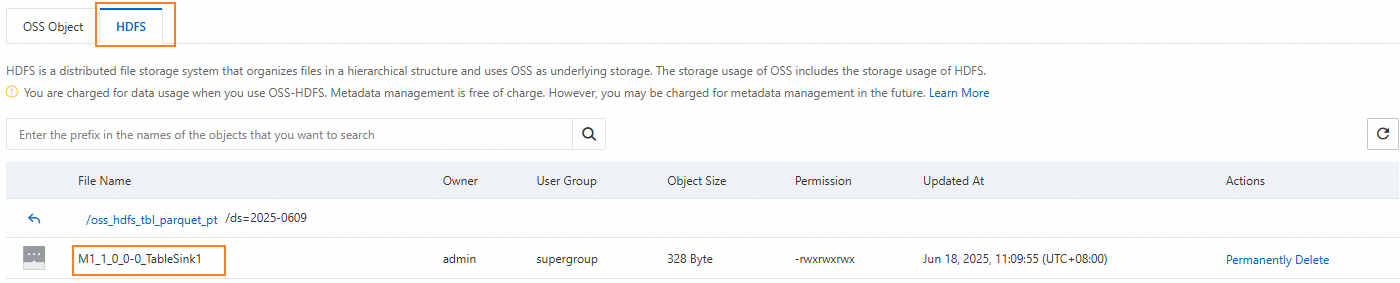
FAQ
Problem 1: "Data lake storage is disabled" error
Error message
FAILED: ODPS-0130071:[0,0] Semantic analysis exception - physical plan generation failed:
common/io/jindo/jindo_file_system.cpp(348): RuntimeError: JindoFS failed to GetFileStatus:
/xxx/xxx/test_csv/.odps/.meta. Error Message: get status failed:
Caused by error 6403: 403 Forbidden <?xml version="1.0" encoding="UTF-8"?><Error>
<Code>AccessDenied</Code>  <Message>Data lake storage is disabled.</Message>
Cause
The OSS-HDFS service is not enabled for the OSS bucket used by the external table.
Solution
Enable the OSS-HDFS service for the specified OSS bucket.
Problem 2: "The bucket you access does not belong to you" error
Error message
FAILED: ODPS-0130071:[0,0] Semantic analysis exception - physical plan generation failed:
common/io/jindo/jindo_file_system.cpp(348): RuntimeError: JindoFS failed to GetFileStatus:
/xxx/xxx/test_invalid_rolearn/.odps/.meta. Error Message: get status failed:
Caused by error 6403: 403 Forbidden <?xml version="1.0" encoding="UTF-8"?><Error>
<Code>AccessDenied</Code>  <Message>The bucket you access does not belong to you.</Message>
Cause
The RAM role specified for the OSS-HDFS external table does not have permissions to access OSS-HDFS.
Solution
Grant the RAM user permissions to access OSS-HDFS. Alternatively, you can attach the AliyunEMRDlsFullAccess policy to the RAM role.