Spot Edition
MaxCompute offers the Spot Edition, a lower-priced, pay-as-you-go computing resource to reduce costs for latency-insensitive scenarios. This topic describes the use cases, resources, billing, usage, and key considerations for the Spot Edition.
Use cases
The Spot Edition is suitable for jobs that require extremely low costs but are not sensitive to completion time. For example, in analysis scenarios for low-value, massive data such as user behavior logs and system logs, these tasks typically consume a large amount of computing resources but are not sensitive to output time. In this situation, using subscription resources can result in significant idle time for dedicated resources, while using the pay-as-you-go Standard Edition is too costly. The less sensitive a job is to its completion time, the more suitable it is for the Spot Edition to save on computing costs. However, the Spot Edition is not suitable for production jobs that require long-term stability and guaranteed resources. This is because resource competition can cause job resources to be squeezed or preempted, which can lead to long wait times, extended runtimes, or even forced termination, and in turn affect your business operations.
Resources
Activating the MaxCompute Spot Edition allows you to use MaxCompute idle-time computing resources (os_SpotQuota), a type of shared, pay-as-you-go computing resource, to run spot jobs. Compared to pay-as-you-go standard jobs, spot jobs have a lower unit price and are designed to reduce your costs for using MaxCompute in delay-insensitive scenarios, such as development and testing.
Resource | Description | Billing |
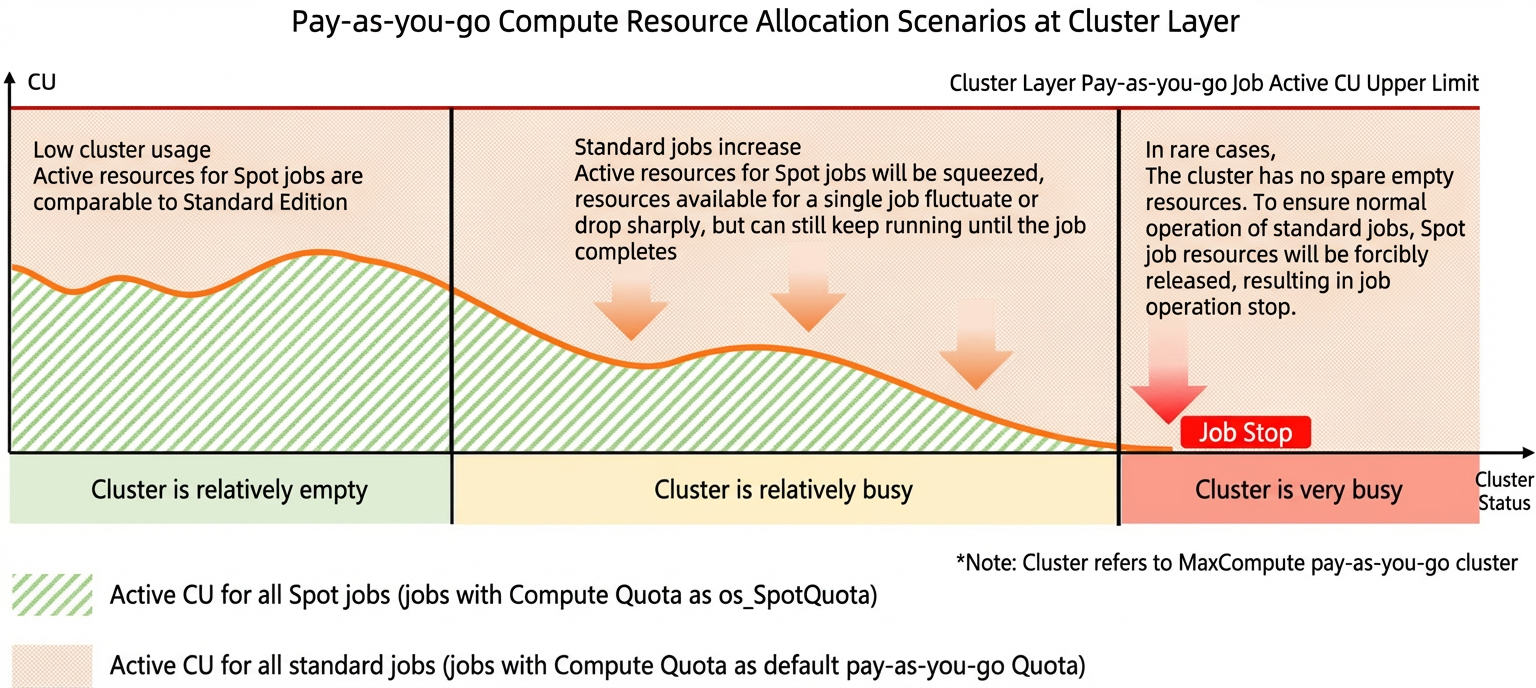
Computing resource | Idle-time computing resource pools share computing resources with pay-as-you-go Standard Edition computing resources, are isolated from subscription computing resources, and do not allow you to specify a usage amount. If the overall resource pool is heavily utilized, resource contention may occur. When this happens, resources allocated to spot jobs (jobs that use the
| You are charged based on the actual usage of each type of computing job. For detailed billing rules, see Billing. |
Supported regions
The Spot Edition is available in the following regions:
China (Hangzhou), China (Shanghai), China (Beijing), China (Zhangjiakou), China (Shenzhen), China (Chengdu), China (Hong Kong), Singapore, UK (London), Japan (Tokyo), Malaysia (Kuala Lumpur), Germany (Frankfurt), Indonesia (Jakarta), US (Virginia), and US (Silicon Valley).
Billing
Job type | Billing formula | Price |
SpotSQL job (An SQL or MaxCompute Query Acceleration (MCQA) SQL job that uses the | Total daily fee for SpotSQL jobs = Data scanned × SQL complexity × Unit price | Unit price:
|
SpotSQL job that queries external tables (An SQL job that uses the os_SpotQuota computing quota and queries external tables in Tablestore (OTS), Object Storage Service (OSS), Hologres, HBase, JDBC (such as ApsaraDB RDS), HDFS, or OSSHDFS, or queries object tables.) | Total daily fee for SQL jobs = Input logical data size × SQL complexity × Unit price | Unit price:
|
SpotMapReduce job (A MapReduce job that uses the | Daily computing fee for a SpotMapReduce job = Total daily CU hours × Unit price | Unit price:
|
SpotSpark job (A Spark job that uses the | Daily computing fee for a SpotSpark job = Total daily CU hours × Unit price | Unit price:
|
SpotMars job (A Mars job that uses the | Daily computing fee for a SpotMars job = Total daily CU hours × Unit price | Unit price:
|
For more information about billing and the billing rules for pay-as-you-go Standard Edition, see Pay-as-you-go billing.
To learn how to switch between the Spot Edition and other billing methods, see Switch billing methods.
Considerations
You must activate the pay-as-you-go Standard Edition before you can activate the Spot Edition. For more information about the pay-as-you-go Standard Edition, see pay-as-you-goStandard Edition.
The Spot Edition only covers computing resources, and storage and download fees are charged according to the pay-as-you-go Standard Edition.
Instructions
Activate MaxCompute pay-as-you-go Standard Edition.
For the steps to activate the pay-as-you-go Standard Edition, see Activate MaxCompute.
Activate the MaxCompute Spot Edition.
Go to the Alibaba Cloud MaxCompute Spot Edition activation page. For Product Type, select Spot Edition. Configure the Region, read and agree to the Terms of Service, and then click Activate Now.
ImportantThe Spot Edition cannot be deactivated after it is activated. However, you are charged only when you run jobs that use the spot computing resource (
os_SpotQuota).View the Spot Edition computing resources.
Log on to the MaxCompute console. In the upper-left corner, select the region where you activated the Spot Edition.
-
In the left-side navigation pane, choose .
On the Quota Management page, you can view the level-1 quota
os_SpotQuota_pand the level-2 quotaos_SpotQuota. The presence of these quotas confirms that you can use spot computing resources.
Bind spot computing resources to a project.
For a new project, you can set the Default Quota to
os_SpotQuotaduring project creation.For an existing project, go to the Project Management page. Find the target project and click Manage in the Actions column. On the Project Settings page, go to the Parameter Configuration tab and change the Default Compute Quota to
os_SpotQuota.
Run a spot job.
By default, a job initiated in a project bound to the
os_SpotQuotaquota is a spot job. However, if you specify a different quota, such as theDefault Pay-as-you-go Quota, before your query, the job runs as a standard job.Similarly, in a project that is not bound to
os_SpotQuota, you can run a job as a spot job by adding the following command before your query to specify the computing quota asos_SpotQuota:set odps.task.wlm.quota=os_SpotQuota;For more information, see Specify a quota at the job level.
ImportantJobs that successfully use Query Acceleration (MCQA) cannot use this command to specify a computing Quota, and their consumption will still be charged to the default computing quota bound to the project in which they are executed. This includes, but is not limited to, query acceleration jobs that are initiated in the MaxCompute console by using an SQL analysis connection, or in DataWorks by creating a temporary query.
View the job running status and resource consumption.
In the MaxCompute console, use the Job O&M feature to view historical and running jobs (see Job O&M) and the Quota Management feature to view the consumption of spot computing resources (see View quota consumption).
NoteViewing the resource consumption of MCQA jobs is not supported.
View the billing details of the Spot Edition.
To view the billing and usage details of the MaxCompute Spot Edition, see View your bill details.
Related documents
For information about how to use the pay-as-you-go Standard Edition, see Pay-as-you-goStandard Edition. For information about the billing rules, see Calculate Fees (Pay-as-you-go).