Python 2 UDAF
MaxCompute uses Python 2.7. This topic describes how to write a user-defined aggregate function (UDAF) in Python 2.
UDAF code structure
- Encoding declaration: Optional.
The declaration format is
#coding:utf-8or# -*- coding: utf-8 -*-. The two formats are equivalent. If your Python 2 code contains Chinese characters, an error is reported when the program runs. Add an encoding declaration at the beginning of the code. - Import modules: Required.
You must import at least
from odps.udf import annotateandfrom odps.udf import BaseUDAF. Thefrom odps.udf import annotatestatement imports the function signature module, which allows MaxCompute to recognize the function signature defined in the code.from odps.udf import BaseUDAFimports the base class for Python UDAFs. You must implement methods such asiterate,merge, andterminatein the derived class.If the UDAF code needs to reference file or table resources, include
from odps.distcache import get_cache_filefor file resources orfrom odps.distcache import get_cache_tablefor table resources. - Function signature: Required.
The format is
@annotate(<signature>).signaturedefines the data types of the input parameters and the return value. For more information about function signatures, see Function signature and data types. - Custom Python class (derived class): Required.
This is the main structure of the UDAF code. It defines the variables and methods that implement your business logic. You can also reference built-in third-party libraries or resources such as files and tables in your code. For more information, see Third-party libraries or Referencing resources.
- Implement Python class methods: Required.
The Python class implementation includes the following methods. You can implement the methods as needed.
Method definition Description BaseUDAF.new_buffer()Returns a buffer for the intermediate value of the aggregate function. The buffermust be a Marshal object, such as a LIST or DICT. The size of thebuffermust not increase with the data volume. In extreme cases, the size of thebufferafter object serialization must not exceed 2 MB.BaseUDAF.iterate(buffer[, args, ...])Aggregates argsinto the intermediate valuebuffer.BaseUDAF.merge(buffer, pbuffer)Merges the intermediate values bufferandpbufferand stores the result inbuffer.BaseUDAF.terminate(buffer)Converts the bufferto a primitive data type of MaxCompute SQL.
#coding:utf-8
# Import the function signature module and the base class.
from odps.udf import annotate
from odps.udf import BaseUDAF
# Function signature.
@annotate('double->double')
# Custom Python class.
class Average(BaseUDAF):
# Implement the methods of the Python class.
    def new_buffer(self):
        return [0, 0]
    def iterate(self, buffer, number):
        if number is not None:
            buffer[0] += number
            buffer[1] += 1
    def merge(self, buffer, pbuffer):
        buffer[0] += pbuffer[0]
        buffer[1] += pbuffer[1]
    def terminate(self, buffer):
        if buffer[1] == 0:
            return 0.0
return buffer[0] / buffer[1]avg).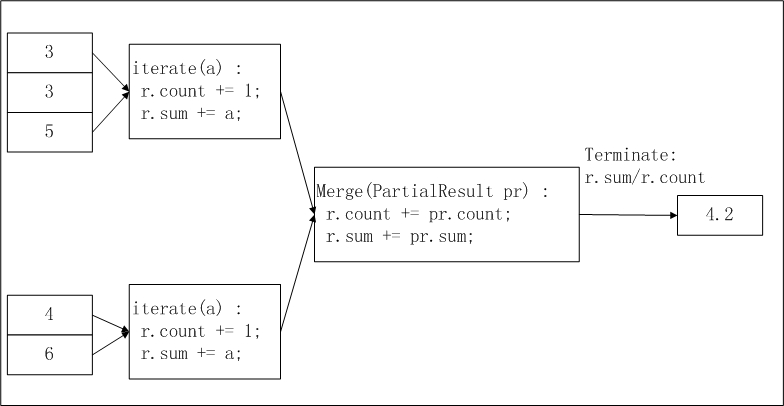
pbuffer corresponds to pr in the figure, and buffer corresponds to r.Limits
Read data from and write data to local files.
Start subprocesses.
Start threads.
Enable socket communication.
Use other systems to call Python 2 UDFs.
Due to these limits, the code that you upload must be written by using Python standard libraries. If modules or C extension modules in Python standard libraries are involved in the preceding operations, these modules cannot be used. Take note of the following points about modules in Python standard libraries:
All the modules that are implemented based on Python standard libraries and do not depend on extension modules are available.
The following C extension modules are available:
array and audioop
binascii and bisect
cmath, _codecs_cn, _codecs_hk, _codecs_iso2022, _codecs_jp, _codecs_kr, _codecs_tw, _collections, and cStringIO
datetime
_functools and future_builtins
_heapq and _hashlib
itertools
_json
_locale and _lsprof
math, _md5, and _multibytecodec
operator
_random
_sha256, _sha512, _sha, _struct, and strop
time
unicodedata
_weakref
cPickle
When you run UDF code in a sandbox environment, the maximum size of data that can be written to the standard output (sys.stdout) or standard error output (
sys.stderr) is 20 KB. If the size exceeds 20 KB, extra characters are ignored.
Third-party libraries
Third-party libraries, such as NumPy, are installed in the Python 2 environment of MaxCompute as supplements to standard libraries.
The use of third-party libraries is subject to some limits. For example, when you use a third-party library, you are not allowed to access local data and you can use only limited network I/O resources. The related APIs in the third-party libraries are disabled.
Function signature and data types
@annotate(<signature>)signature is a string that identifies the data types of the input parameters and the return value. When you run a UDAF, the data types of its input parameters and return value must match the types specified in the function signature. During the query parsing phase, the system validates the function call against the function signature. If a type mismatch is found, an error is reported. The specific format is as follows.'arg_type_list -> type'-
arg_type_list: Represents the data types of the input parameters. Multiple input parameters can be specified, separated by commas (,). Supported data types are BIGINT, STRING, DOUBLE, BOOLEAN, DATETIME, DECIMAL, FLOAT, BINARY, DATE, DECIMAL(precision,scale), CHAR, VARCHAR, complex data types (ARRAY, MAP, STRUCT), and nested complex data types.arg_type_listalso supports an asterisk (*) or an empty string ('').-
If
arg_type_listis an asterisk (*), it indicates that the function accepts any number of input parameters. -
If
arg_type_listis an empty string (''), it indicates that the function has no input parameters.
For more information about the extended syntax of the Resolve annotation, see Dynamic parameters for UDAFs and UDTFs.
-
-
type: Represents the data type of the return value. A UDAF returns only one column. Supported data types include BIGINT, STRING, DOUBLE, BOOLEAN, DATETIME, DECIMAL, FLOAT, BINARY, DATE, DECIMAL(precision,scale), complex data types (ARRAY, MAP, STRUCT), and nested complex data types.
The following are valid function signatures.
| Function signature example | Description |
@annotate('bigint,double->string') | The input parameter types are BIGINT and DOUBLE, and the return value type is STRING. |
@annotate('*->string') | The function accepts any number of input parameters, and the return value type is STRING. |
@annotate('->double') | The function has no input parameters, and the return value type is DOUBLE. |
@annotate('array<bigint>->struct<x:string, y:int>') | The input parameter type is ARRAY<BIGINT>, and the return value type is STRUCT<x:STRING, y:INT>. |
To ensure that the data types in your Python UDAF are consistent with the data types supported by MaxCompute, you must use the correct data type mappings. The following table describes these mappings.
MaxCompute SQL data type | Python 2 data type |
BIGINT | INT |
STRING | STR |
DOUBLE | FLOAT |
BOOLEAN | BOOL |
DATETIME | INT |
FLOAT | FLOAT |
CHAR | STR |
VARCHAR | STR |
BINARY | BYTEARRAY |
DATE | INT |
DECIMAL | DECIMAL.DECIMAL |
ARRAY | LIST |
MAP | DICT |
STRUCT | COLLECTIONS.NAMEDTUPLE |
The DATETIME type supported in MaxCompute SQL is mapped to the Python data type INT. A value of the INT type follows the UNIX format, which is the number of milliseconds that have elapsed since 00:00:00 Thursday, January 1, 1970. You can process data of the DATETIME type by using the DATETIME module in Python standard libraries.
The
silentparameter is added toodps.udf.int(value). If thesilentparameter is set to True and the data type ofvaluecannot be converted into the INT type, None is returned, and no error is returned.NULL in MaxCompute SQL is mapped to None in Python 2.
Referencing resources
Python UDAFs can reference file and table resources using the odps.distcache module.
odps.distcache.get_cache_file(resource_name): Returns a file-like object for the specified file resource.resource_nameis of the STRING type and corresponds to the name of an existing file resource in the current MaxCompute project. If the file resource name is invalid or the resource does not exist, an exception is raised.Note To access a resource from a UDAF, you must declare the referenced resource when you create the UDAF. Otherwise, an error is reported.- The return value is a file-like object. After you finish using this object, call the
closemethod to release the open resource file.
odps.distcache.get_cache_table(resource_name): Returns a generator object for the specified table resource.resource_nameis of the STRING type and corresponds to the name of an existing table resource in the current MaxCompute project. If the table resource name is invalid or the resource does not exist, an exception is raised.- The return value is of the GENERATOR type. The caller traverses the generator to retrieve the table content. Each iteration returns a record from the table as an array.
For more information about how to use resources, see Reference resources (Python 2 UDFs) and Reference resources (Python 2 UDTFs).
Usage notes
Use a UDF in a MaxCompute project: The method is similar to that of using built-in functions. You can use a user-defined function in the same way that you use a built-in function.
Use a UDF across projects: Use a UDF of Project B in Project A. The following statement shows an example:
select B:udf_in_other_project(arg0, arg1) as res from table_t;. For more information about cross-project sharing, see Cross-project resource access based on packages.
For more information about how to develop and call a Python 2 UDAF in MaxCompute Studio, see Develop a Python UDF.