MaxCompute security white paper
Legal disclaimer
Alibaba Cloud reminds you to carefully read and fully understand the terms of this legal disclaimer before you read or use this document. Your use of this document is deemed to be an acknowledgment and acceptance of this legal disclaimer.
-
You must obtain this document from the Alibaba Cloud website or other authorized channels and use it only for your own lawful and compliant business activities. The content of this document is considered confidential information of Alibaba Cloud, and you must strictly comply with your confidentiality obligations. Without the prior written consent of Alibaba Cloud, you must not disclose any content of this document to, or allow its use by, any third party.
-
No part of this document shall be excerpted, translated, reproduced, transmitted, or disseminated by any organization, company, or individual in any form or by any means without the prior written consent of Alibaba Cloud.
-
The content of this document may change due to product version upgrades, adjustments, or other reasons. Alibaba Cloud reserves the right to modify the content of this document without notice and to release updated user documents at any time through authorized Alibaba Cloud channels. You should periodically check for and download the latest version from authorized Alibaba Cloud channels.
-
This document serves only as a reference guide for your use of Alibaba Cloud products and services. Alibaba Cloud provides this document on an Current State, with all faults, and as available basis. Alibaba Cloud makes its best effort to provide relevant introductory information and operational guidance based on existing technology but expressly disclaims any warranties, express or implied, regarding the accuracy, completeness, applicability, or reliability of the content of this document. Alibaba Cloud shall not be liable for any errors or financial losses incurred by any party as a result of downloading, using, or relying on this document. In no event shall Alibaba Cloud be liable for any indirect, consequential, exemplary, incidental, special, or punitive damages, including lost profits, arising from the use of or reliance on this document, even if Alibaba Cloud has been advised of the possibility of such damages.
-
All content on the Alibaba Cloud website, including but not limited to works, products, images, archives, information, materials, website architecture, website layout, and web page design, is the intellectual property of Alibaba Cloud and/or its affiliates. This includes, but is not limited to, trademark rights, patent rights, copyrights, and trade secrets. Without the written consent of Alibaba Cloud and/or its affiliates, no one may use, modify, reproduce, publicly disseminate, alter, distribute, or publish the Alibaba Cloud website, product programs, or content. Furthermore, without the prior written consent of Alibaba Cloud, no one may use, publish, or reproduce the Alibaba Cloud name for any marketing, advertising, promotional, or other purposes. This includes, but is not limited to, brands of Alibaba Cloud and/or its affiliates that contain AliCloud, Aliyun, or HiChina, whether used alone or in combination; their associated marks and logos; or any similar company name, trade name, trademark, product or service name, domain name, logo, or mark that could cause a third party to identify it with Alibaba Cloud and/or its affiliates.
-
Please contact Alibaba Cloud directly if you discover any errors in this document.
Overview of data security and compliance
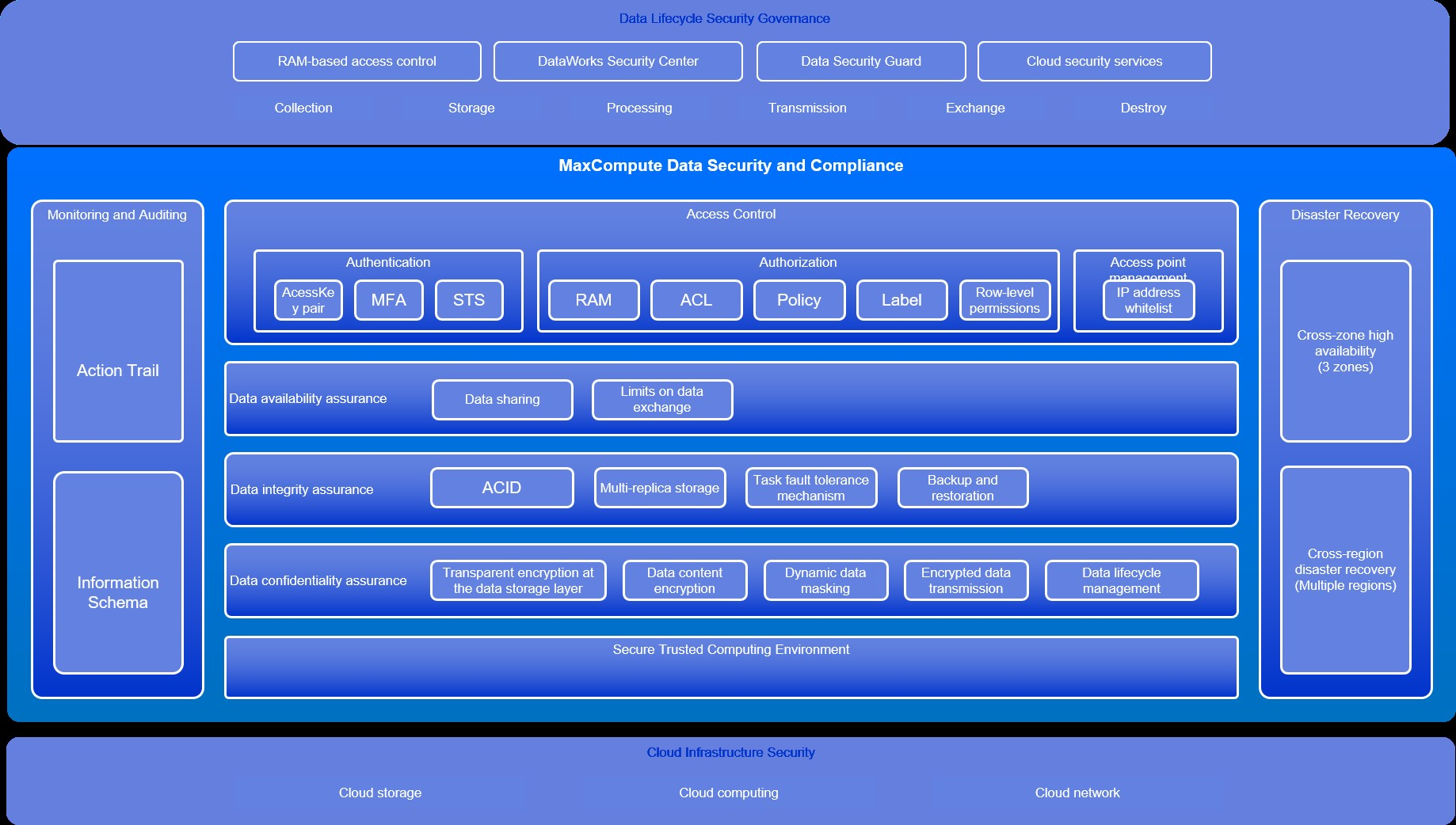
MaxCompute builds a data security system based on confidentiality, integrity, and availability, providing comprehensive access control and a secure computing environment. High-availability and disaster recovery solutions ensure business continuity. MaxCompute records detailed user operation logs and task runtime logs for in-process O&M monitoring and post-event security auditing. Built on Alibaba Cloud Infrastructure as a Service (IaaS), MaxCompute leverages cloud infrastructure security capabilities and integrates with platform security products such as Resource Access Management (RAM), Security Center of DataWorks, and Data Security Guard of DataWorks to enable additional security controls.
Access control
Authentication
MaxCompute supports Alibaba Cloud accounts, RAM users, and RAM roles, with authentication methods including AccessKey pairs, multi-factor authentication (MFA), and Security Token Service (STS) authorization.
You can create an AccessKey pair in the RAM console. An AccessKey pair consists of an AccessKey ID and an AccessKey secret. The AccessKey ID is public and uniquely identifies a user, whereas the AccessKey secret is private and used to authenticate a user. Before sending a request to MaxCompute, the client generates a string to sign in the required format and creates a signature using the AccessKey secret. After receiving the request, MaxCompute locates the AccessKey secret based on the AccessKey ID and generates a signature. If the signatures match, the request is valid. Otherwise, MaxCompute rejects the request and returns an HTTP 403 error.
For more information, see User authentication.
Authorization.
MaxCompute provides fine-grained access control through access control list (ACL)-based access control, policy-based access control, download control, LabelSecurity, and row-level permissions. Authorization objects include projects, quotas, network connections, tables, functions, resources, instances, external tables, and external volumes.
RAM-based authorization
MaxCompute supports RAM-based authorization to grant access and management permissions on MaxCompute resources to RAM users and RAM roles. You can assign minimum permissions based on business requirements, reducing information security risks for enterprises. For more information, see RAM permissions.
ACL-based access control
An ACL implements object-based authorization by specifying permissions as a subresource of the object. An ACL takes effect only when the object exists and is deleted along with the object. ACL-based access control uses GRANT and REVOKE statements defined in SQL-92. To manage permissions, you specify the effect (grant or revoke), object (such as a table or resource), subject (user or role), and action (such as read, write, or delete). For more information, see ACL-based access control.
Policy-based access control
A policy defines role permissions that take effect when the role is assigned to a user. Unlike ACL-based access control, policy-based access control supports both allow and deny rules. You can specify a policy to allow or deny a role from performing operations on specified objects. When both allow and deny rules apply to the same object, deny takes precedence. For more information, see Policy-based access control.
LabelSecurity
LabelSecurity controls user access to column-level sensitive data using sensitivity level labels. Data in tables or columns is classified by sensitivity level, and users are classified by data access level. You can set the sensitivity level from 0 to 9 to adapt to different data classification standards. The following security policies are supported:
-
No-ReadUp: Users cannot read data that has a higher data sensitivity level than their data access level, unless the users are explicitly granted permissions.
-
Trusted-User: Users are allowed to write data of all sensitivity levels. The default sensitivity level of newly written data is 0.
For more information, see Label-based access control.
Access modes
MaxCompute provides multiple endpoint-based access modes, including the Internet, virtual private cloud (VPC), and PrivateLink. You can enable endpoints for network isolation based on your business requirements. You can configure an IP address whitelist for each endpoint to limit connections from clients.
Secure and trusted computing environment
MaxCompute provides secure computing containers and Java and Python sandboxes to isolate task processes and prevent malicious code from affecting cluster computing tasks.
MaxCompute provides hybrid computing modes for flexibility and extensibility, supporting user-defined functions (UDFs) in SQL engines and third-party computing frameworks such as Spark and Python. However, these features may introduce untrusted code that could cause system damage or enable malicious attacks. MaxCompute uses lightweight secure computing containers and language-level sandboxes to achieve process-level security isolation for untrusted code.
MaxCompute secures network communication for internal data synchronization and external data access within computing tasks. An overlay virtual network is built for each computing task to isolate it from the host network. Task nodes communicate through private IP addresses and cannot access the host network. If a computing task needs to access data service APIs over the Internet or in a VPC, MaxCompute supports task-level networking through network connections. You must declare the destination network and meet permission requirements when starting a job. For more information, see Network connection process.
The code runtime environment belongs to users, who bear all legal liability arising from code execution.
Confidentiality
MaxCompute provides data security measures for data at rest, in processing, and in transit.
Transparent encryption at the data storage layer
MaxCompute integrates Key Management Service (KMS) and Bring Your Own Key (BYOK) to automatically encrypt and decrypt data files in storage media. Applications can meet ciphertext storage requirements without modification and use keys to encrypt or decrypt persistent data in tables and partitions. Supported features include AES256 encryption and automatic key rotation. If you disable the key service, encrypted data cannot be decrypted or accessed, meeting data confidentiality and regulatory compliance requirements. For more information, see Storage encryption.
Data content encryption
MaxCompute supports column-level content encryption for sensitive data, such as personally identifiable information (PII), financial information, accounts, and passwords. Applications call encryption functions to encrypt sensitive data before writing and decrypt it during reading, preventing leaks from SQL injection or data breaches. MaxCompute integrates with KMS to encrypt data using keysets that contain multiple keys. Supported encryption algorithms include AES-GCM-256, AES-SIV-CMAC-128, and AES-SIV-CMAC-256, providing high encryption reliability to prevent data cracking. For more information, see Encryption and decryption functions.
Dynamic data masking
MaxCompute supports dynamic data masking to protect sensitive data such as PII during development, testing, data sharing, and O&M. Data masking policies include masking, hashing, character replacement, numeric value rounding, and date rounding. These policies integrate with the data classification feature of Data Security Guard to address masking requirements for identity information, bank card numbers, addresses, and phone numbers. MaxCompute applies data masking at the layer closest to storage reads, ensuring data is masked during queries, downloads, joins, and UDF computations to prevent sensitive data exposure. For more information, see Dynamic data masking.
Encrypted transmission
Connections to MaxCompute through the client, SDK, or API use HTTPS with TLS v1.2 encryption, preventing data interception or tampering during transmission.
Data lifecycle management
MaxCompute allows you to specify a data retention period and automatically cleans up expired data to reduce data leak risks and storage costs. You can set the lifecycle of a table based on your business requirements and data usage frequency. MaxCompute compares the latest update time (LastModifiedTime) of each table or partition against the lifecycle setting. If the elapsed time exceeds the lifecycle, MaxCompute reclaims the data. For more information, see Lifecycle management operations.
MaxCompute also supports tiered storage. Infrequent Access (IA) and long-term storage tiers help limit access frequency for historical data and reduce storage costs. For more information, see Configure storage tiers for storage resources.
Integrity
MaxCompute protects data integrity throughout data processing.
ACID
MaxCompute supports atomicity, consistency, isolation, durability (ACID) for large-scale data processing jobs. Delta tables use multiversion concurrency control (MVCC) for read/write snapshot isolation and optimistic concurrency control (OCC) for transaction concurrency. Row-level or file-level transaction concurrency control is not supported. Instead, each batch data processing operation is managed as a separate transaction. Transaction conflict logic for frequently performed operations is optimized based on operation semantics to improve concurrency while ensuring correctness. MaxCompute uses cyclic redundancy check (CRC) codes to verify data integrity during storage and transmission. For more information, see ACID semantics.
Multi-replica data storage
MaxCompute uses a distributed file system that automatically creates three replicas of stored data, distributed across different physical machines and racks to prevent data loss from single points of failure (SPOFs) and ensure durability and integrity.
MaxCompute stores data in the Apsara Distributed File System, which provides a flat linear storage space divided into shards called chunks. Each chunk has three replicas stored on different cluster nodes based on distribution policies. This prevents data unavailability from the failure of a single chunk server or rack. Add, modify, and delete operations are synchronized across all three replicas to ensure data integrity and consistency. After data is deleted, the file system reclaims the storage space, prohibits other users from accessing it, and erases the data to ensure it cannot be restored.
Task fault tolerance
The MaxCompute task scheduling system provides high fault tolerance with automatic task retries. When an SQL job runs, the system builds a directed acyclic graph (DAG) to allocate computing resources and optimize execution. This eliminates unnecessary shuffles, mitigates network jitter, and prevents partial node faults from affecting the overall job, ensuring accurate results and efficient execution.
MaxCompute Tunnel supports resumable transmission for batch uploads and downloads, with configurable error row limits and buffer sizes to ensure data integrity.
Backup and restoration
By default, backup and restoration is enabled for MaxCompute tables to prevent data loss from misoperations. MaxCompute automatically backs up data each time it is modified or deleted, or when a table is dropped. Historical versions are retained for up to 30 days and can be restored by version number.
Delta tables support time travel queries, allowing you to query data snapshots from the previous seven days or retrieve incremental data within a specified time or version range.
For more information, see Backup and restoration.
Availability
MaxCompute provides mechanisms to ensure data availability while maintaining security.
Data sharing
MaxCompute provides package-based access control for cross-project data sharing. This mechanism packages data resources and related permissions of a project. After a package is installed in a target project, that project can access the authorized data resources. The administrator of Project A creates a package and authorizes Project B to install it. The administrator of Project B can then manage whether package permissions are further granted to individual users. For more information, see Cross-project resource access based on packages.
Limits on data exchange
MaxCompute provides a project protection mechanism for scenarios where data can be imported but not exported. For example, users with access to multiple projects can normally transfer data between them. If data in a project is sensitive, the administrator can enable project protection to allow data imports while preventing exports. For more information, see Project data protection.
Disaster recovery
MaxCompute supports zone-disaster recovery and cross-region disaster recovery to ensure business continuity.
Cross-zone high availability
Zone-disaster recovery extends data storage and computing services across three zones in the same city to improve business resilience. This feature is suitable for industries such as finance and critical infrastructure, ensuring service continuity despite single data center failures. It provides data redundancy to reduce downtime and meet industry compliance requirements.
Project-level data availability extends from a single zone to three physically isolated zones with low-latency network connections. This enables fault isolation and real-time data synchronization across data centers, ensuring data integrity and availability during disasters.
Cross-region disaster recovery
For cross-region disaster recovery, MaxCompute allows you to select a region more than 1,000 kilometers away from your primary region to serve as a disaster recovery cluster. This establishes a complete, geographically remote backup of your project-level data, protecting it from regional natural disasters. For more information, see Cross-region disaster recovery.
Monitoring and auditing
MaxCompute provides real-time monitoring and post-event auditing for activities such as data authorization and data usage.
Audit logging
MaxCompute provides detailed ActionTrail logs that record operations related to jobs (instances), tables, users, roles, and permissions. These logs meet compliance requirements for log retention and support real-time monitoring and retrospective analysis.
MaxCompute records all user-triggered operations. You can view and retrieve behavior logs in ActionTrail and store them in Simple Log Service projects or specified OSS buckets for long-term retention. For more information, see Audit logging.
Information schema
MaxCompute allows you to query project metadata and job history based on the ANSI SQL-92 Information Schema. You can analyze data in real time and periodically export user information, role information, table partition authorization data, historical job records from the previous 14 days, and batch upload/download task records for security auditing. For more information, see Information schema.