Spark-2.x examples
This topic describes how to configure dependencies for Spark-2.x and provides examples.
Configure Spark-2.x dependencies
When you submit an application using the Spark client provided by MaxCompute, add the following dependencies to the pom.xml file. For the complete pom.xml file, see pom.xml.
<properties>
    <spark.version>2.3.0</spark.version>
    <cupid.sdk.version>3.3.8-public</cupid.sdk.version>
    <scala.version>2.11.8</scala.version>
    <scala.binary.version>2.11</scala.binary.version>
</properties>
<dependency>
    <groupId>org.apache.spark</groupId>
    <artifactId>spark-core_${scala.binary.version}</artifactId>
    <version>${spark.version}</version>
    <scope>provided</scope>
</dependency>
<dependency>
    <groupId>org.apache.spark</groupId>
    <artifactId>spark-sql_${scala.binary.version}</artifactId>
    <version>${spark.version}</version>
    <scope>provided</scope>
</dependency>
<dependency>
    <groupId>org.apache.spark</groupId>
    <artifactId>spark-mllib_${scala.binary.version}</artifactId>
    <version>${spark.version}</version>
    <scope>provided</scope>
</dependency>
<dependency>
    <groupId>org.apache.spark</groupId>
    <artifactId>spark-streaming_${scala.binary.version}</artifactId>
    <version>${spark.version}</version>
    <scope>provided</scope>
</dependency>
<dependency>
    <groupId>com.aliyun.odps</groupId>
    <artifactId>cupid-sdk</artifactId>
    <version>${cupid.sdk.version}</version>
    <scope>provided</scope>
</dependency>
<dependency>
    <groupId>com.aliyun.odps</groupId>
    <artifactId>hadoop-fs-oss</artifactId>
    <version>${cupid.sdk.version}</version>
</dependency>
<dependency>
    <groupId>com.aliyun.odps</groupId>
    <artifactId>odps-spark-datasource_${scala.binary.version}</artifactId>
    <version>${cupid.sdk.version}</version>
</dependency>
<dependency>
    <groupId>org.scala-lang</groupId>
    <artifactId>scala-library</artifactId>
    <version>${scala.version}</version>
</dependency>
<dependency>
    <groupId>org.scala-lang</groupId>
    <artifactId>scala-actors</artifactId>
    <version>${scala.version}</version>
</dependency>
The Scope in the code is specified as follows:
For all packages released by the Spark community, such as spark-core and spark-sql, set Scope to provided.
For odps-spark-datasource, set Scope to compile.
WordCount example (Scala)
Code example
Submission method
cd /path/to/MaxCompute-Spark/spark-2.x
mvn clean package

# For information about how to configure the spark-defaults.conf environment variable, see Set up the development environment.
cd $SPARK_HOME
bin/spark-submit --master yarn-cluster --class \
    com.aliyun.odps.spark.examples.WordCount \
    /path/to/MaxCompute-Spark/spark-2.x/target/spark-examples_2.11-1.0.0-SNAPSHOT-shaded.jar
MaxCompute table read and write example (Scala)
Code example
Submission method
cd /path/to/MaxCompute-Spark/spark-2.x
mvn clean package
# For information about how to configure the spark-defaults.conf environment variable, see Set up the development environment.
cd $SPARK_HOME
bin/spark-submit --master yarn-cluster --class com.aliyun.odps.spark.examples.sparksql.SparkSQL \
    /path/to/MaxCompute-Spark/spark-2.x/target/spark-examples_2.11-1.0.0-SNAPSHOT-shaded.jar
GraphX PageRank example (Scala)
Code example
Submission method
cd /path/to/MaxCompute-Spark/spark-2.x
mvn clean package
# For information about how to configure the spark-defaults.conf environment variable, see Set up the development environment.
cd $SPARK_HOME
bin/spark-submit --master yarn-cluster --class com.aliyun.odps.spark.examples.graphx.PageRank \
    /path/to/MaxCompute-Spark/spark-2.x/target/spark-examples_2.11-1.0.0-SNAPSHOT-shaded.jar
Mllib K-means on OSS example (Scala)
For information about how to configure spark.hadoop.fs.oss.ststoken.roleArn and spark.hadoop.fs.oss.endpoint, see the Oss-Access documentation.
Code example
Submission method
# Edit the code.
val modelOssDir = "oss://bucket/kmeans-model" // Specify the path of the OSS bucket.
val spark = SparkSession
  .builder()
  .config("spark.hadoop.fs.oss.credentials.provider", "org.apache.hadoop.fs.aliyun.oss.AliyunStsTokenCredentialsProvider")
  .config("spark.hadoop.fs.oss.ststoken.roleArn", "acs:ram::****:role/aliyunodpsdefaultrole")
  .config("spark.hadoop.fs.oss.endpoint", "oss-cn-hangzhou-zmf.aliyuncs.com")
  .appName("KmeansModelSaveToOss")
  .getOrCreate()

cd /path/to/MaxCompute-Spark/spark-2.x
mvn clean package
# For information about how to configure the spark-defaults.conf environment variable, see Set up the development environment.
cd $SPARK_HOME
bin/spark-submit --master yarn-cluster --class com.aliyun.odps.spark.examples.mllib.KmeansModelSaveToOss \
    /path/to/MaxCompute-Spark/spark-2.x/target/spark-examples_2.11-1.0.0-SNAPSHOT-shaded.jar
OSS unstructured data example (Scala)
For information about how to configure spark.hadoop.fs.oss.ststoken.roleArn and spark.hadoop.fs.oss.endpoint, see the Oss-Access documentation.
Code example
Submission method
# Edit the code.
val pathIn = "oss://bucket/inputdata/" // Specify the path of the OSS bucket.
val spark = SparkSession
  .builder()
  .config("spark.hadoop.fs.oss.credentials.provider", "org.apache.hadoop.fs.aliyun.oss.AliyunStsTokenCredentialsProvider")
  .config("spark.hadoop.fs.oss.ststoken.roleArn", "acs:ram::****:role/aliyunodpsdefaultrole")
  .config("spark.hadoop.fs.oss.endpoint", "oss-cn-hangzhou-zmf.aliyuncs.com")
  .appName("SparkUnstructuredDataCompute")
  .getOrCreate()

cd /path/to/MaxCompute-Spark/spark-2.x
mvn clean package
# For information about how to configure the spark-defaults.conf environment variable, see Set up the development environment.
cd $SPARK_HOME
bin/spark-submit --master yarn-cluster --class com.aliyun.odps.spark.examples.oss.SparkUnstructuredDataCompute \
    /path/to/MaxCompute-Spark/spark-2.x/target/spark-examples_2.11-1.0.0-SNAPSHOT-shaded.jar
SparkPi example (Scala)
Code example
Submission method
cd /path/to/MaxCompute-Spark/spark-2.x
mvn clean package

# For information about how to configure the spark-defaults.conf environment variable, see Set up the development environment.
cd $SPARK_HOME
bin/spark-submit --master yarn-cluster --class com.aliyun.odps.spark.examples.SparkPi \
    /path/to/MaxCompute-Spark/spark-2.x/target/spark-examples_2.11-1.0.0-SNAPSHOT-shaded.jar
Spark Streaming LogHub example (Scala)
Code example
Submission method
# For information about how to configure the spark-defaults.conf environment variable, see Set up the development environment.
cd $SPARK_HOME
bin/spark-submit --master yarn-cluster --class com.aliyun.odps.spark.examples.streaming.loghub.LogHubStreamingDemo \
    /path/to/MaxCompute-Spark/spark-2.x/target/spark-examples_2.11-1.0.0-SNAPSHOT-shaded.jar
Spark Streaming LogHub to MaxCompute example (Scala)
Code example
Submission method
# For information about how to configure the spark-defaults.conf environment variable, see Set up the development environment.
cd $SPARK_HOME
bin/spark-submit --master yarn-cluster --class com.aliyun.odps.spark.examples.streaming.loghub.LogHub2OdpsDemo \
    /path/to/MaxCompute-Spark/spark-2.x/target/spark-examples_2.11-1.0.0-SNAPSHOT-shaded.jar
Spark Streaming DataHub example (Scala)
Code example
Submission method
# For information about how to configure the spark-defaults.conf environment variable, see Set up the development environment.
cd $SPARK_HOME
bin/spark-submit --master yarn-cluster --class com.aliyun.odps.spark.examples.streaming.datahub.DataHubStreamingDemo \
    /path/to/MaxCompute-Spark/spark-2.x/target/spark-examples_2.11-1.0.0-SNAPSHOT-shaded.jar
Spark Streaming DataHub to MaxCompute example (Scala)
Code example
Submission method
# For information about how to configure the spark-defaults.conf environment variable, see Set up the development environment.
cd $SPARK_HOME
bin/spark-submit --master yarn-cluster --class com.aliyun.odps.spark.examples.streaming.datahub.DataHub2OdpsDemo \
    /path/to/MaxCompute-Spark/spark-2.x/target/spark-examples_2.11-1.0.0-SNAPSHOT-shaded.jar
Spark Streaming Kafka example (Scala)
Code example
Submission method
# For information about how to configure the spark-defaults.conf environment variable, see Set up the development environment.
cd $SPARK_HOME
bin/spark-submit --master yarn-cluster --class com.aliyun.odps.spark.examples.streaming.kafka.KafkaStreamingDemo \
    /path/to/MaxCompute-Spark/spark-2.x/target/spark-examples_2.11-1.0.0-SNAPSHOT-shaded.jar
For more information, see MaxCompute-Spark.
Spark Structured Streaming DataHub example (Scala)
Code example
Submission method
# For information about how to configure the spark-defaults.conf environment variable, see Set up the development environment.
cd $SPARK_HOME
bin/spark-submit --master yarn-cluster --class com.aliyun.odps.spark.examples.structuredstreaming.datahub.DatahubStructuredStreamingDemo \
    /path/to/MaxCompute-Spark/spark-2.x/target/spark-examples_2.11-1.0.0-SNAPSHOT-shaded.jar
Spark Structured Streaming Kafka example (Scala)
Code example
Submission method
# For information about how to configure the spark-defaults.conf environment variable, see Set up the development environment.
cd $SPARK_HOME
bin/spark-submit --master yarn-cluster --class com.aliyun.odps.spark.examples.structuredstreaming.kafka.KafkaStructuredStreamingDemo \
    /path/to/MaxCompute-Spark/spark-2.x/target/spark-examples_2.11-1.0.0-SNAPSHOT-shaded.jar
Spark Structured Streaming LogHub example (Scala)
Code example
Submission method
# For information about how to configure the spark-defaults.conf environment variable, see Set up the development environment.
cd $SPARK_HOME
bin/spark-submit --master yarn-cluster --class com.aliyun.odps.spark.examples.structuredstreaming.loghub.LoghubStructuredStreamingDemo \
    /path/to/MaxCompute-Spark/spark-2.x/target/spark-examples_2.11-1.0.0-SNAPSHOT-shaded.jar
MaxCompute table read and write PySpark example (Python)
Code example
Submission method
# For information about how to configure the spark-defaults.conf environment variable, see Set up the development environment.
cd $SPARK_HOME
bin/spark-submit --master yarn-cluster --jars /path/to/odps-spark-datasource_2.11-3.3.8-public.jar \
    /path/to/MaxCompute-Spark/spark-2.x/src/main/python/spark_sql.py
PySpark write to OSS example (Python)
Code example
Submission method
# For information about how to configure the spark-defaults.conf environment variable, see Set up the development environment.
# For information about OSS configurations, see OSS Access documentation.

cd $SPARK_HOME
bin/spark-submit --master yarn-cluster --jars /path/to/spark-examples_2.11-1.0.0-SNAPSHOT-shaded.jar \
    /path/to/MaxCompute-Spark/spark-2.x/src/main/python/spark_oss.py
# You can obtain spark-examples_2.11-1.0.0-SNAPSHOT-shaded.jar by compiling Spark-2.x.
Spark SQL example (Java)
For the Spark SQL Java example code, see JavaSparkSQL.java.
Read data from MaxCompute and write to HBase
You can write code in IntelliJ IDEA to read data from MaxCompute and write it to HBase.
Code example
object McToHbase {
  def main(args: Array[String]) {
    val spark = SparkSession
      .builder()
      .appName("spark_sql_ddl")
      .config("spark.sql.catalogImplementation", "odps")
      .config("spark.hadoop.odps.end.point","http://service.cn.maxcompute.aliyun.com/api")
      .config("spark.hadoop.odps.runtime.end.point","http://service.cn.maxcompute.aliyun-inc.com/api")
      .getOrCreate()
      val sc = spark.sparkContext
      val config = HBaseConfiguration.create()
      val zkAddress = ""
      config.set(HConstants.ZOOKEEPER_QUORUM, zkAddress);
      val jobConf = new JobConf(config)
      jobConf.setOutputFormat(classOf[TableOutputFormat])
      jobConf.set(TableOutputFormat.OUTPUT_TABLE,"test")

    try{
      import spark._
      spark.sql("select '7', 'long'").rdd.map(row => {
        val id = row(0).asInstanceOf[String]
        val name = row(1).asInstanceOf[String]
        val put = new Put(Bytes.toBytes(id))
        put.addColumn(Bytes.toBytes("cf"), Bytes.toBytes("a"), Bytes.toBytes(name))
        (new ImmutableBytesWritable, put)
    }).saveAsHadoopDataset(jobConf)
  } finally {
    sc.stop()
  }

  }
}
Submission method: You can submit and run the example code in IntelliJ IDEA. For more information, see How Spark runs on MaxCompute.
Read and write OSS files
You can read and write OSS files using IntelliJ IDEA or DataWorks.
Code examples
Example 1: Code for local mode.
package com.aliyun.odps.spark.examples import java.io.ByteArrayInputStream import org.apache.spark.sql.SparkSession object SparkOSS { def main(args: Array[String]) { val spark = SparkSession .builder() .config("spark.master", "local[4]") // To run the code directly, you must set spark.master to local[N], where N is the number of concurrent operations. .config("spark.hadoop.fs.oss.accessKeyId", "") .config("spark.hadoop.fs.oss.accessKeySecret", "") .config("spark.hadoop.fs.oss.endpoint", "oss-cn-beijing.aliyuncs.com") .appName("SparkOSS") .getOrCreate() val sc = spark.sparkContext try { // Read the OSS file. val pathIn = "oss://spark-oss/workline.txt" val inputData = sc.textFile(pathIn, 5) // Write the RDD. inputData.repartition(1).saveAsTextFile("oss://spark-oss/user/data3") } finally { sc.stop() } } }NoteBefore you run this code, make sure that you have added the
hadoop-fs-ossdependency. Otherwise, an error occurs.Example 2: Code for local mode.
package com.aliyun.odps.spark.examples
import java.io.ByteArrayInputStream
import com.aliyun.oss.{OSSClientBuilder,OSSClient}
import org.apache.spark.sql.SparkSession

object SparkOSS {
  def main(args: Array[String]) {
    val spark = SparkSession
      .builder()
      .config("spark.master", "local[4]") // To run the code directly, you must set spark.master to local[N], where N is the number of concurrent operations.
      .config("spark.hadoop.fs.oss.accessKeyId", "")
      .config("spark.hadoop.fs.oss.accessKeySecret", "")
      .config("spark.hadoop.fs.oss.endpoint", "oss-cn-beijing.aliyuncs.com")
      .appName("SparkOSS")
      .getOrCreate()

    val sc = spark.sparkContext
    try {
      // Read the OSS file.
      val pathIn = "oss://spark-oss/workline.txt"
      val inputData = sc.textFile(pathIn, 5)
      val cnt = inputData.count
      inputData.count()
      println(s"count: $cnt")

      // Write the OSS file.
      // An AccessKey pair of an Alibaba Cloud account has full permissions on all API operations. This poses a high security threat. We strongly recommend that you create and use a RAM user to make API calls or perform routine O&M. To create a RAM user, log on to the RAM console.
		  // This example shows how to save the AccessKey ID and AccessKey secret in environment variables. You can also save them to a configuration file as needed.
			// We strongly recommend that you do not hard-code the AccessKey ID and AccessKey secret in your code. Otherwise, the keys may be leaked.
      val ossClient = new OSSClientBuilder().build("oss-cn-beijing.aliyuncs.com", System.getenv("ALIBABA_CLOUD_ACCESS_KEY_ID"), System.getenv("ALIBABA_CLOUD_ACCESS_KEY_SECRET"))
      val filePath="user/data"
      ossClient.putObject("spark-oss",filePath , new ByteArrayInputStream(cnt.toString.getBytes()))
      ossClient.shutdown()
    } finally {
      sc.stop()
    }
  }
}
Example 3: Code for cluster mode.
package com.aliyun.odps.spark.examples
import java.io.ByteArrayInputStream
import com.aliyun.oss.{OSSClientBuilder,OSSClient}
import org.apache.spark.sql.SparkSession

object SparkOSS {
  def main(args: Array[String]) {
    val spark = SparkSession
      .builder()
      .appName("SparkOSS")
      .getOrCreate()

    val sc = spark.sparkContext
    try {
      // Read the OSS file.
      val pathIn = "oss://spark-oss/workline.txt"
      val inputData = sc.textFile(pathIn, 5)
      val cnt = inputData.count
      inputData.count()
      println(s"count: $cnt")

      // inputData.repartition(1).saveAsTextFile("oss://spark-oss/user/data3")
      // Write the OSS file.
      // An AccessKey pair of an Alibaba Cloud account has full permissions on all API operations. This poses a high security threat. We strongly recommend that you create and use a RAM user to make API calls or perform routine O&M. To create a RAM user, log on to the RAM console.
			// This example shows how to save the AccessKey ID and AccessKey secret in environment variables. You can also save them to a configuration file as needed.
			// We strongly recommend that you do not hard-code the AccessKey ID and AccessKey secret in your code. Otherwise, the keys may be leaked.
      val ossClient = new OSSClientBuilder().build("oss-cn-beijing.aliyuncs.com", System.getenv("ALIBABA_CLOUD_ACCESS_KEY_ID"), System.getenv("ALIBABA_CLOUD_ACCESS_KEY_SECRET"))
      val filePath="user/data"
      ossClient.putObject("spark-oss",filePath , new ByteArrayInputStream(cnt.toString.getBytes()))
      ossClient.shutdown()
    } finally {
      sc.stop()
    }
  }
}
Submission method:
You can develop, test, and submit the code for local mode in IntelliJ IDEA. For more information, see How Spark runs on MaxCompute.
You can submit and run the code on an ODPS Spark node in DataWorks. For more information, see Develop an ODPS Spark task.
Read from MaxCompute and write to OSS
You can read data from MaxCompute and write it to OSS using IntelliJ IDEA or DataWorks.
Code examples
Code example for local mode.
package com.aliyun.odps.spark.examples.userpakage

import org.apache.spark.sql.{SaveMode, SparkSession}

object SparkODPS2OSS {
  def main(args: Array[String]): Unit = {
    val spark = SparkSession
      .builder()
      .appName("Spark2OSS")
      .config("spark.master", "local[4]")// To run the code directly, you must set spark.master to local[N], where N is the number of concurrent operations.
      .config("spark.hadoop.odps.project.name", "")
      .config("spark.hadoop.odps.access.id", "")
      .config("spark.hadoop.odps.access.key", "")
      .config("spark.hadoop.odps.end.point", "http://service.cn.maxcompute.aliyun.com/api")
      .config("spark.sql.catalogImplementation", "odps")
      .config("spark.hadoop.fs.oss.accessKeyId","")
      .config("spark.hadoop.fs.oss.accessKeySecret","")
      .config("spark.hadoop.fs.oss.endpoint","oss-cn-beijing.aliyuncs.com")
      .getOrCreate()

    try{

      // Query the table using Spark SQL.
      val data = spark.sql("select * from  user_detail")
     // Display the queried data.
      data.show(10)
      // Store the queried data in an OSS file.
      data.toDF().coalesce(1).write.mode(SaveMode.Overwrite).csv("oss://spark-oss/user/data3")
    }finally {
      spark.stop()
    }

  }
}
Code example for cluster mode.
package com.aliyun.odps.spark.examples.userpakage
import org.apache.spark.sql.{SaveMode, SparkSession}

object SparkODPS2OSS {
  def main(args: Array[String]): Unit = {
    val spark = SparkSession
      .builder()
      .appName("SparkODPS2OSS")
      .getOrCreate()

    try{

      // Query the table using Spark SQL.
      val data = spark.sql("select * from  user_detail")
     // Display the queried data.
      data.show(10)
      // Store the queried data in an OSS file.
      data.toDF().coalesce(1).write.mode(SaveMode.Overwrite).csv("oss://spark-oss/user/data3")

    }finally {
      spark.stop()
    }

  }
}
Submission method:
You can develop, test, and submit the code for local mode in IntelliJ IDEA.
You can submit and run the code on an ODPS Spark node in DataWorks. For more information, see Develop an ODPS Spark task.
NoteFor information about how to configure the Spark development environment, see How Spark runs on MaxCompute.
Read OSS external tables
Spark on MaxCompute supports reading OSS external tables in PARQUET, TEXTFILE, ORC, AVRO, and SEQUENCEFILE formats. For more information about how to create an OSS external table, see ORC external tables.
If you use Spark 2.x, add the following parameters:
spark.sql.odps.enableExternalTable=true
spark.sql.odps.enableExternalProject=true
If you use Spark 3.x, add the following parameters:
spark.sql.catalog.odps.enableExternalTable=true
spark.sql.catalog.odps.enableExternalProject=true
The following examples of reading an OSS external table use data from the MaxCompute table mc_table.
1,1,51,1,46.81006,-92.08174,9/14/2014 0:00,S
1,2,13,1,46.81006,-92.08174,9/14/2014 0:00,NE
1,3,48,1,46.81006,-92.08174,9/14/2014 0:00,NE
1,4,30,1,46.81006,-92.08174,9/14/2014 0:00,W
1,5,47,1,46.81006,-92.08174,9/14/2014 0:00,S
1,6,9,1,46.81006,-92.08174,9/15/2014 0:00,S
1,7,53,1,46.81006,-92.08174,9/15/2014 0:00,N
1,8,63,1,46.81006,-92.08174,9/15/2014 0:00,SW
1,9,4,1,46.81006,-92.08174,9/15/2014 0:00,NE
1,10,31,1,46.81006,-92.08174,9/15/2014 0:00,N
Example of reading an OSS external table in PARQUET format
In MaxCompute, run the following command to create an OSS external table in PARQUET format using the built-in open source resolver.
create external table if not exists mc_oss_parquet_external(
    vehicleId STRING ,
    recordId STRING,
    patientId STRING,
    calls STRING,
    locationLatitute STRING,
    locationLongtitue STRING,
    recordTime string,
    direction string)
stored as parquet
location '<oss_location>' ;
Import data.
insert into table mc_oss_parquet_external select * from mc_table;Query the data using Spark on MaxCompute.
import org.apache.spark.sql.SparkSession
object externalTable_rds {
    def main(args: Array[String]): Unit = {
        val spark = SparkSession
          .builder()
          .appName("external_TableL-on-MaxCompute")
          .getOrCreate()
// Access the Parquet external table
print("=====Read Parquet table=====")
spark.sql("select * from <project_name>.mc_oss_parquet_external").show(1000)
  }
}
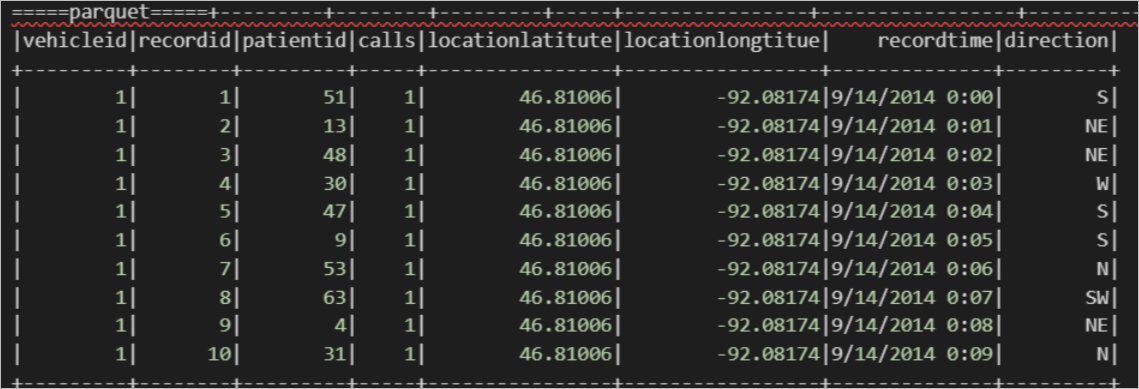
The following result is returned.
Example of reading an OSS external table in TEXTFILE format.
Associate data in TEXT format.
In MaxCompute, run the following command to create an OSS external table in TEXTFILE (TEXT) format using the built-in open source resolver.
create external table if not exists mc_oss_textfile_external(
    vehicleId STRING ,
    recordId STRING,
    patientId STRING,
    calls STRING,
    locationLatitute STRING,
    locationLongtitue STRING,
    recordTime string,
    direction string)
stored as textfile
location '<oss_location>' ;
Import data.
insert into table mc_oss_textfile_external select * from mc_table;Query the data using Spark on MaxCompute.
import org.apache.spark.sql.SparkSession
object externalTable_rds {
    def main(args: Array[String]): Unit = {
        val spark = SparkSession
          .builder()
          .appName("external_TableL-on-MaxCompute")
          .getOrCreate()
// Access the external table stored as textfile;
print("=====Read external table - textfile=====")
spark.sql("select * from <project_name>.mc_oss_textfile_external").show(1000)
  }
}
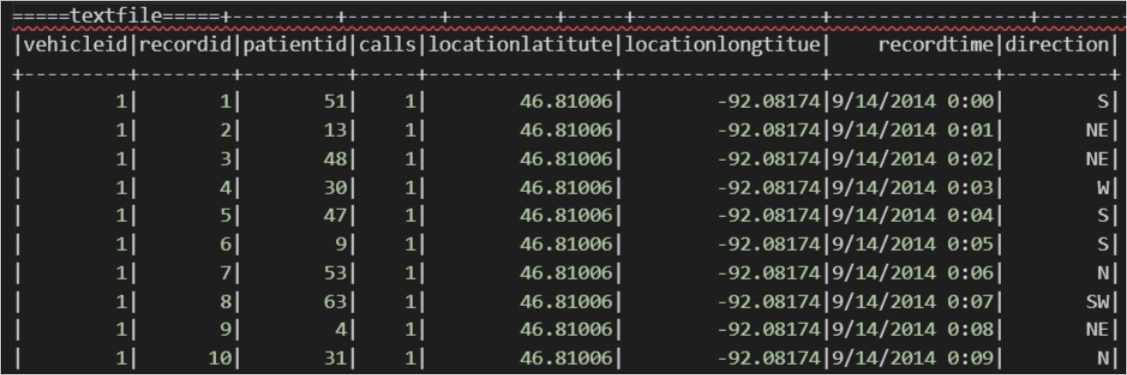
The following result is returned.
Associate data in CSV format.
In MaxCompute, run the following command to create an OSS external table in TEXTFILE (CSV) format using the built-in open source resolver.
create external table if not exists mc_oss_csv_external(
    vehicleId STRING ,
    recordId STRING,
    patientId STRING,
    calls STRING,
    locationLatitute STRING,
    locationLongtitue STRING,
    recordTime string,
    direction string)
row format serde 'org.apache.hadoop.hive.serde2.OpenCSVSerde'
with serdeproperties (
  "separatorChar" = ",",
  "quoteChar"= '"',
  "escapeChar"= "\\"
)
stored as textfile
location '<oss_location>'
tblproperties (
  "skip.header.line.count"="1",
  "skip.footer.line.count"="1"
)
;
Import data.
insert into table mc_oss_csv_external select * from mc_table;Query the data using Spark on MaxCompute.
import org.apache.spark.sql.SparkSession
object externalTable_rds {
    def main(args: Array[String]): Unit = {
        val spark = SparkSession
          .builder()
          .appName("external_TableL-on-MaxCompute")
          .getOrCreate()
// Access the CSV external table
print("=====Read CSV external table=====")
spark.sql("select * from <project_name>.mc_oss_csv_external").show(1000)
  }
}
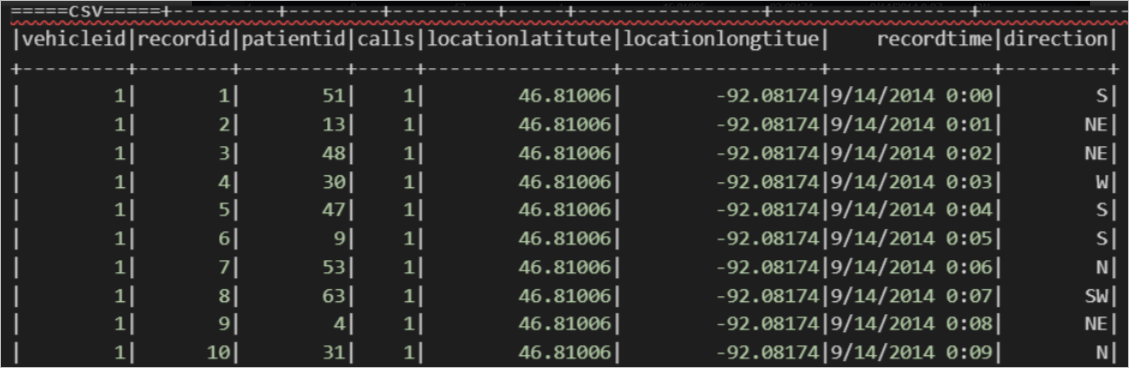
The following result is returned.
Associate data in JSON format.
In MaxCompute, run the following command to create an OSS external table in TEXTFILE (JSON) format using the built-in open source resolver.
create external table if not exists mc_oss_json_external(
    vehicleId STRING ,
    recordId STRING,
    patientId STRING,
    calls STRING,
    locationLatitute STRING,
    locationLongtitue STRING,
    recordTime string,
    direction string)
row format serde 'org.apache.hive.hcatalog.data.JsonSerDe'
stored as textfile
location '<oss_location>'
;
Import data.
insert into table mc_oss_json_external select * from mc_table;Query the data using Spark on MaxCompute.
import org.apache.spark.sql.SparkSession
object externalTable_rds {
    def main(args: Array[String]): Unit = {
        val spark = SparkSession
          .builder()
          .appName("external_TableL-on-MaxCompute")
          .getOrCreate()
// Access the external table stored as textfile;
print("=====Read external table - json=====")
spark.sql("select * from <project_name>.mc_oss_json_external").show(1000)
  }
}
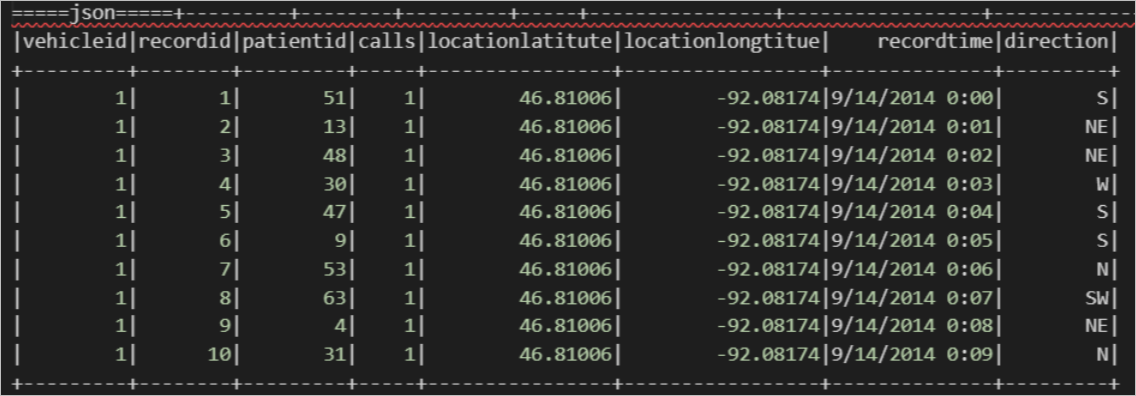
The following result is returned.
Example of reading an OSS external table in ORC format.
In MaxCompute, run the following command to create an OSS external table in ORC format using the built-in open source resolver.
create external table if not exists mc_oss_orc_external(
    vehicleId STRING ,
    recordId STRING,
    patientId STRING,
    calls STRING,
    locationLatitute STRING,
    locationLongtitue STRING,
    recordTime string,
    direction string)
stored as orc
location '<oss_location>' ;
Import data.
insert into table mc_oss_orc_external select * from mc_table;Query the data using Spark on MaxCompute.
import org.apache.spark.sql.SparkSession
object externalTable_rds {
    def main(args: Array[String]): Unit = {
        val spark = SparkSession
          .builder()
          .appName("external_TableL-on-MaxCompute")
          .getOrCreate()
// Access the ORC external table;
print("=====Read ORC external table=====")
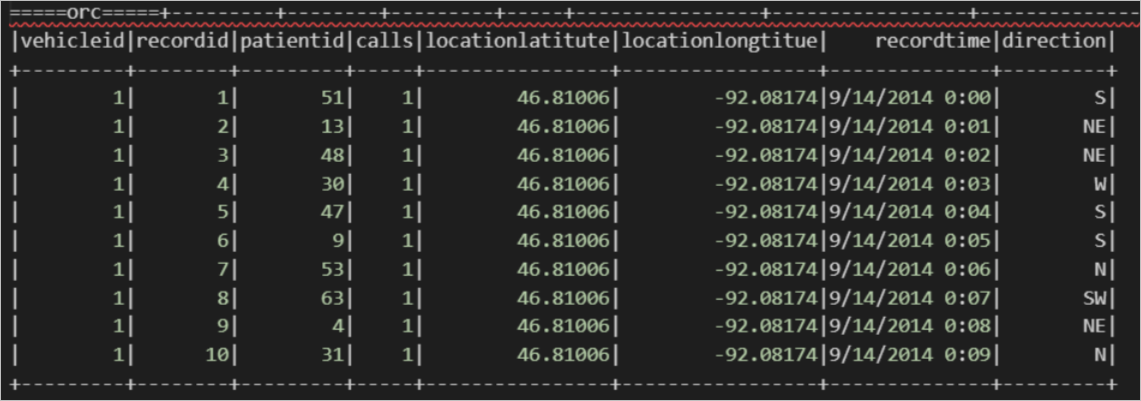
spark.sql("select * from <project_name>.mc_oss_orc_external").show(1000)
  }
}
The following result is returned.
Example of reading an OSS external table in AVRO format.
In MaxCompute, run the following command to create an OSS external table in AVRO format using the built-in open source resolver.
create external table if not exists mc_oss_avro_external(
    vehicleId STRING ,
    recordId STRING,
    patientId STRING,
    calls STRING,
    locationLatitute STRING,
    locationLongtitue STRING,
    recordTime string,
    direction string)
stored as avro
location '<oss_location>' ;
Import data.
insert into table mc_oss_avro_external select * from mc_table;Query the data using Spark on MaxCompute.
import org.apache.spark.sql.SparkSession
object externalTable_rds {
    def main(args: Array[String]): Unit = {
        val spark = SparkSession
          .builder()
          .appName("external_TableL-on-MaxCompute")
          .getOrCreate()
// Access the Avro external table;
print("=====Read Avro external table=====")
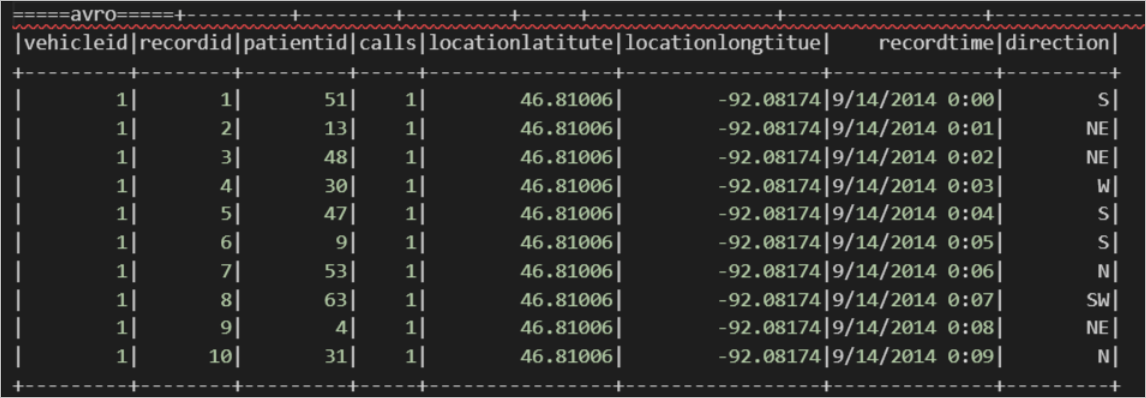
spark.sql("select * from <project_name>.mc_oss_avro_external").show(1000)
  }
}
The following result is returned.

Example of reading an OSS external table in SEQUENCEFILE format.
In MaxCompute, run the following command to create an OSS external table in SEQUENCEFILE format using the built-in open source resolver.
create external table if not exists mc_oss_sequencfile_external(
    vehicleId STRING ,
    recordId STRING,
    patientId STRING,
    calls STRING,
    locationLatitute STRING,
    locationLongtitue STRING,
    recordTime string,
    direction string)
stored as sequencfile
location '<oss_location>' ;
Import data.
insert into table mc_oss_sequencfile_external select * from mc_table;Query the data using Spark on MaxCompute.
import org.apache.spark.sql.SparkSession
object externalTable_rds {
    def main(args: Array[String]): Unit = {
        val spark = SparkSession
          .builder()
          .appName("external_TableL-on-MaxCompute")
          .getOrCreate()
// Access the sequencefile external table;
print("=====sequencefile=====")
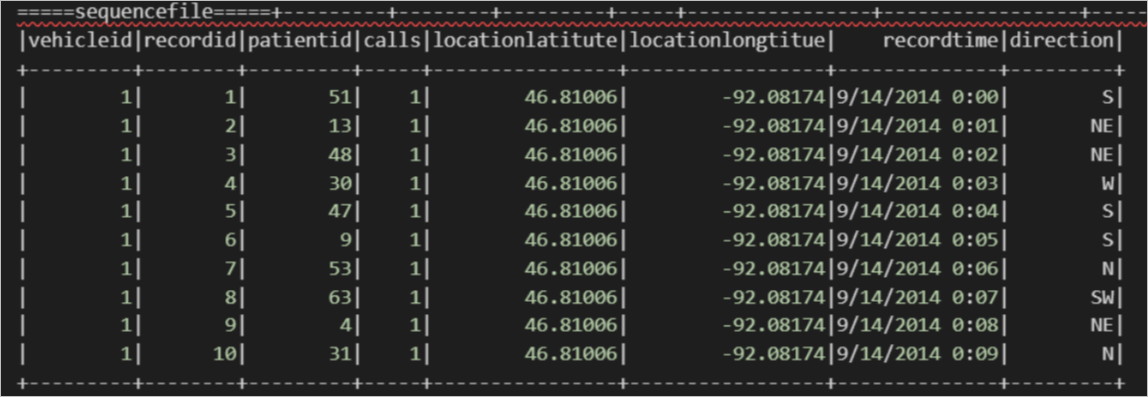
spark.sql("select * from <project_name>.mc_oss_sequencfile_external").show(1000)
  }
}
The following result is returned.
Parameter descriptions
Parameter
Description
oss_location
The path of the OSS data file. The format is
oss://<oss_endpoint>/<BucketName>/<OSSFolderName>/. MaxCompute reads all data files in this path by default.oss_endpoint: The OSS domain name. We recommend that you use an internal endpoint provided by OSS. Otherwise, you are charged for OSS traffic. For more information about OSS internal endpoints, see Regions and endpoints.
NoteWe recommend that you store data files in an OSS bucket that is in the same region as your MaxCompute project. Cross-region data connectivity may fail because MaxCompute is deployed only in some regions.
Bucket name: The name of the OSS bucket. For more information about how to view bucket names, see List buckets.
Folder name: The name of the OSS folder. You do not need to specify a file name after the folder name.
-- Correct format.
oss://oss-cn-shanghai-internal.aliyuncs.com/oss-mc-test/Demo1/
-- Incorrect formats.
http://oss-cn-shanghai-internal.aliyuncs.com/oss-mc-test/Demo1/                -- HTTP connections are not supported.
https://oss-cn-shanghai-internal.aliyuncs.com/oss-mc-test/Demo1/               -- HTTPS connections are not supported.
oss://oss-cn-shanghai-internal.aliyuncs.com/Demo1                              -- The endpoint is incorrect.
oss://oss-cn-shanghai-internal.aliyuncs.com/oss-mc-test/Demo1/vehicle.csv     -- You do not need to specify a file name.
project_name
The name of the MaxCompute project where the OSS external table is created.
Read Hologres external tables
Prerequisites
Ensure that an internal table has been created in the Hologres instance. For more information, see Create an internal table.
A Hologres foreign table is created in the MaxCompute instance. For more information, see Hologres foreign table.
NoteIf you use Spark 2.x, add the following parameters:
spark.sql.odps.enableExternalTable=true
spark.sql.odps.enableExternalProject=true
If you use Spark 3.x, add the following parameters:
spark.sql.catalog.odps.enableExternalTable=true
spark.sql.catalog.odps.enableExternalProject=true
Example
-- Configuration items
-- By default, access to external tables and external projects is disabled.
spark.sql.odps.enableExternalTable=true
-- Specify the Spark version.
spark.hadoop.odps.spark.version=spark-2.4.5-odps0.34.0
-- If garbled characters appear, add the following configurations.
spark.executor.extraJavaOptions=-Dfile.encoding=UTF-8 -Dsun.jnu.encoding=UTF-8
spark.driver.extraJavaOptions=-Dfile.encoding=UTF-8 -Dsun.jnu.encoding=UTF-8

-- Code
import org.apache.spark.sql.SparkSession

object externalTable_holo {
  def main(args: Array[String]): Unit = {
    val spark = SparkSession
      .builder()
      .appName("external_TableL-on-MaxCompute")
      .getOrCreate()

    // Access the Hologres external table;
    print("=====hologres=====")
    spark.sql("select * from <tablename_holo_ext>").show(1000)
  }
}
In this example, tablename_holo_ext is the name of the created Hologres external table.
Read HBase external tables
Prerequisites
You have created a table in HBase. For more information, see Introduction to HBase Shell.
You have created an HBase foreign table in the MaxCompute instance. For more information, see HBase foreign tables (ApsaraDB for HBase Standard Edition or Enhanced Edition).
NoteIf you use Spark 2.x, add the following parameters:
spark.sql.odps.enableExternalTable=true
spark.sql.odps.enableExternalProject=true
If you use Spark 3.x, add the following parameters:
spark.sql.catalog.odps.enableExternalTable=true
spark.sql.catalog.odps.enableExternalProject=true
Example
-- Configuration items
-- By default, access to external tables and external projects is disabled.
spark.sql.odps.enableExternalTable=true
-- Specify the Spark version.
spark.hadoop.odps.spark.version=spark-2.4.5-odps0.34.0
-- If garbled characters appear, add the following configurations.
spark.executor.extraJavaOptions=-Dfile.encoding=UTF-8 -Dsun.jnu.encoding=UTF-8
spark.driver.extraJavaOptions=-Dfile.encoding=UTF-8 -Dsun.jnu.encoding=UTF-8

-- Code
import org.apache.spark.sql.SparkSession

object externalTable_hbase {
  def main(args: Array[String]): Unit = {
    val spark = SparkSession
      .builder()
      .appName("external_TableL-on-MaxCompute")
      .getOrCreate()

    // Access the HBase external table;
    print("=====HBase=====")
    spark.sql("select * from <tablename_hbase_ext>").show(1000)

  }
}
In this example, tablename_hbase_ext is the name of the created HBase external table.