SQL组件是一种带有多个输入参数和输出参数的SQL代码模板。使用SQL代码处理数据表时,通过过滤、连接和聚合数据源表,获取结果表。您可通过创建数据开发(DataStudio)的SQL组件节点使用组件,基于组件快速新建数据处理节点,提高开发效率。本文为您介绍如何引用组件。
前提条件
-
已准备所需使用的组件,详情请参见Create and manage a script template。
-
已创建SQL组件节点,详情请参见Create and manage MaxCompute nodes。
使用限制
-
仅DataWorks标准版及以上版本,才可使用SQL组件节点功能。详情请参见DataWorks: Features by edition。
-
本工作空间成员创建的组件在组件下。
-
租户成员创建的组件在公共组件下。
引用组件
您需在已创建的SQL组件节点的编辑页面引用组件: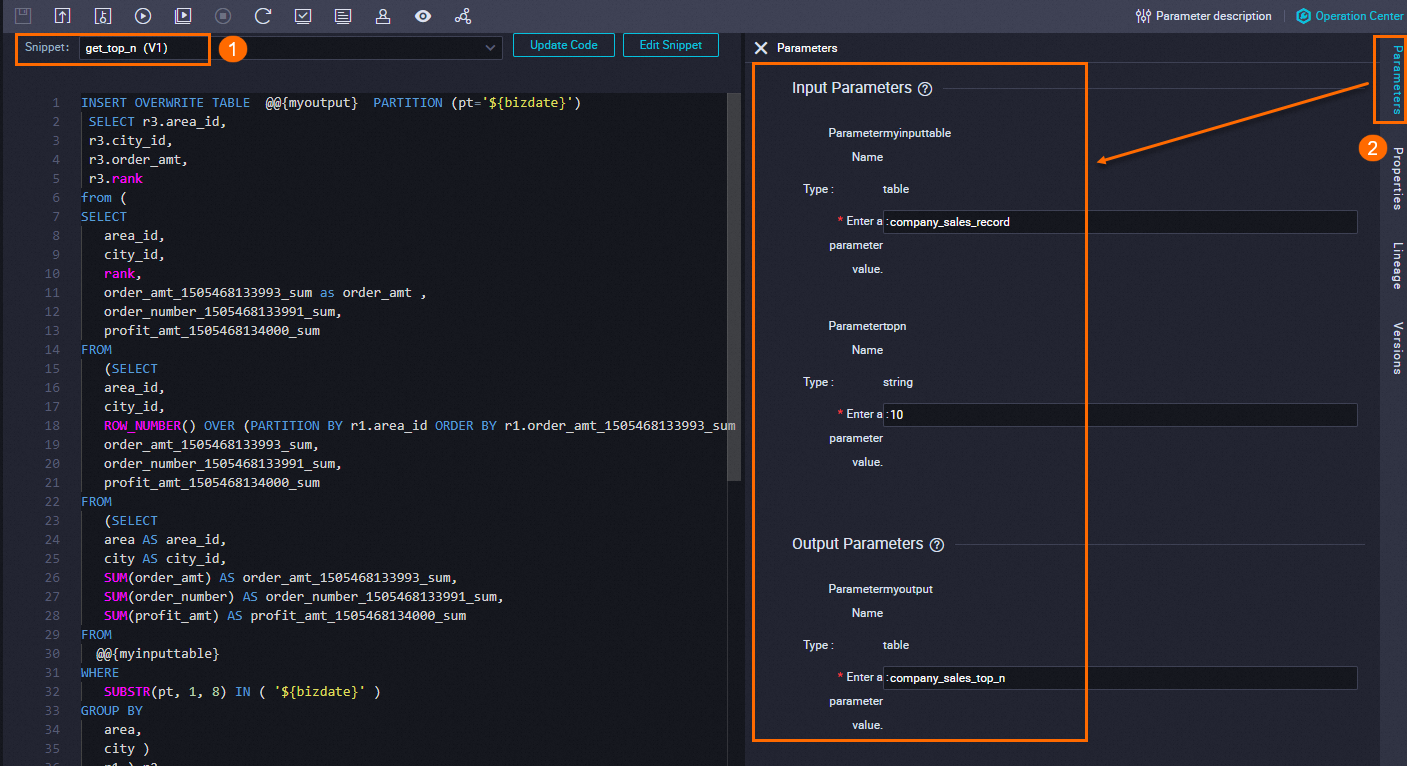
-
选择所需引用的组件。
如果没有可用组件,请参考Create and manage a script template创建。
-
若所选组件存在最新版本,您可根据业务需要选择是否更新代码版本,引用最新组件版本。
-
单击打开组件即可查看组件详情。
-
-
根据实际使用配置组件参数值。
Next steps
After development, proceed with the following operations:
-
Scheduling configuration: Configure periodic scheduling properties such as rerun settings and dependencies for tasks that run regularly. Overview of task scheduling configuration.
-
Task debugging: Test and run the node code to verify its logic. Task debugging process.
-
Task deployment: Deploy nodes to run them periodically based on their scheduling configurations. Deploy tasks.