Materialized view operations
A materialized view pre-computes and stores the results of time-consuming operations such as JOIN and AGGREGATE, so subsequent queries can read the stored results directly instead of recomputing them.
Background
A view is a virtual table defined by a query. A materialized view, by contrast, is a physical table that stores pre-computed query results and consumes storage resources. For billing details, see Billing rules.
Materialized views are suitable for the following scenarios:
Frequently executed queries with a fixed pattern.
Queries that involve time-consuming operations, such as aggregations and joins.
Queries that access only a small subset of data in a table.
The following table compares traditional queries with materialized view queries.
Item | Traditional query | Materialized view query |
Query statement | You query data directly by using SQL statements. | Create a materialized view and then query it. The following statement creates a materialized view: Query the materialized view: If query rewrite is enabled for the materialized view, the system automatically uses the materialized view when you run the following query: |
Query characteristics | The query reads tables, performs joins, and applies filters (WHERE clause). For large source tables, these operations are slow and resource-intensive. | The query reads the materialized view and applies filters. No joins are needed. MaxCompute automatically matches the query to the optimal materialized view and reads data directly from it, which significantly improves query performance. |
Commands
Type | Description | Permissions | Entry points |
Create a materialized view (supports partitioning and clustering) | Creates a materialized view based on a query statement. | Requires the CreateTable permission. | Run these commands using the following tools: |
Updates a materialized view. | Requires the Alter permission. | ||
Modifies the lifecycle of a materialized view. | Requires the Alter permission. | ||
Enables or disables the lifecycle of a materialized view. | Requires the Alter permission. | ||
Queries the basic information about a materialized view. | Requires the Describe permission. | ||
Checks whether a materialized view is valid or invalid. | Requires the Describe permission. | ||
Lists all materialized views in a project, or materialized views that match specific criteria. | Requires the List permission. | ||
Deletes a materialized view. | Requires the Drop permission. | ||
Deletes a partition from a materialized view. | Requires the Drop permission. | ||
Automatically retrieves data from the source partitioned table if the queried data is not in the materialized view. | Requires the Write and CreateTable permissions. | ||
Rewrites a query statement to use the materialized view. | Requires the Write and CreateTable permissions. | ||
Schedules periodic updates for a materialized view. | Requires the Alter permission. |
Limitations
Window functions, user-defined table-valued functions (UDTFs), and non-deterministic functions such as user-defined scalar functions (UDFs) and user-defined aggregate functions (UDAFs) are not supported.
If you must use a non-deterministic function, set this session-level property: set odps.sql.materialized.view.support.nondeterministic.function=true;.
Create a materialized view (partitioning and clustering)
Creates a materialized view from a query result. You can optionally partition and cluster the materialized view.
Limitations
The name of the materialized view must be unique within the project and cannot be the same as an existing table, view, or materialized view. You can run the
SHOW TABLES;command to view the names of all tables and materialized views in the project.You cannot create a materialized view based on an existing materialized view.
You cannot create a materialized view based on an external table.
Usage notes
If the defining query fails, the materialized view creation also fails.
A materialized view's partition key columns must be derived from a source table. The order and number of the partition key columns must match those of the source table, but their names can be different.
If you specify comments for only a subset of columns, the operation returns an error.
You can specify both partitioning and clustering. In this case, the data within each partition has the specified clustering properties.
If the defining query contains unsupported operators, the operation returns an error. For a list of supported operators, see Materialized view query rewrite.
By default, MaxCompute does not support creating a materialized view using non-deterministic functions, such as user-defined functions (UDFs) and user-defined aggregate functions (UDAFs). If your use case requires non-deterministic functions, run the
set odps.sql.materialized.view.support.nondeterministic.function=true;command at the session level.Materialized views support empty partitions. When a source table partition is empty, refreshing the materialized view automatically creates a corresponding empty partition.
Syntax
CREATE MATERIALIZED VIEW [IF NOT EXISTS] [project_name.]<mv_name>
[LIFECYCLE <days>]    --Specifies the lifecycle.
[BUILD DEFERRED]    --Creates the schema without populating data.
[(<col_name> [COMMENT <col_comment>], ...)]    --Column comments.
[DISABLE REWRITE]    --Specifies whether the materialized view can be used for query rewrite.
[COMMENT 'table comment']    --Table comment.
[PARTITIONED BY (<col_name> [, <col_name>, ...])]    --Creates the materialized view as a partitioned table.
[CLUSTERED BY | RANGE CLUSTERED BY (<col_name> [, <col_name>, ...])
  [SORTED BY (<col_name> [ASC | DESC] [, <col_name> [ASC | DESC] ...])]
    INTO <number_of_buckets> BUCKETS]    --Sets the shuffle and sort properties for a clustered table.
[REFRESH EVERY <num> {MINUTES | HOURS | DAYS}]
[TBLPROPERTIES("compressionstrategy"="{normal|high|extreme}",    --Specifies the data storage compression strategy for the table.
                "enable_auto_substitute"="true",    --Specifies whether to enable query passthrough to the source table when a partition does not exist.
                "enable_auto_refresh"="true",    --Specifies whether to enable automatic refresh.
                "refresh_interval_minutes"="120",    --Specifies the refresh interval.
                "only_refresh_max_pt"="true"    --For partitioned materialized views, automatically refreshes only the latest partition from the source table.
                )]
AS <select_statement>;
Parameters
Parameter
Required
Description
IF NOT EXISTS
No
If you do not specify IF NOT EXISTS and the materialized view already exists, the operation fails with an error.
project_name
No
The name of the MaxCompute project for the materialized view. If you omit this parameter, the current project is used.
Log in to the MaxCompute console and select a region in the upper-left corner.
In the left-side navigation pane, choose .
View your project name.
mv_name
Yes
The name of the materialized view.
days
No
The lifecycle of the materialized view in days. The value must be an integer from 1 to 37231.
BUILD DEFERRED
No
If specified, creates the materialized view's schema without populating it with data.
col_name
No
The name of a column in the materialized view.
col_comment
No
The comment for a column.
DISABLE REWRITE
No
Disables query rewrite for the materialized view. By default, query rewrite is enabled. You can run
ALTER MATERIALIZED VIEW [project_name.]<mv_name> DISABLE REWRITE;to disable query rewrite, and runALTER MATERIALIZED VIEW [project_name.]<mv_name> ENABLE REWRITE;to enable it.PARTITIONED BY
No
The partition key columns. Use this parameter to create a partitioned materialized view.
CLUSTERED BY|RANGE CLUSTERED BY
No
The shuffle property for creating a clustered table.
SORTED BY
No
The sort property for creating a clustered table.
REFRESH EVERY
No
The scheduled refresh interval for the materialized view. Valid units are MINUTES, HOURS, or DAYS.
number_of_buckets
No
The number of buckets when creating a clustered table.
TBLPROPERTIES
No
compressionstrategy: Specifies the data storage compression strategy. Valid values are
normal,high, andextreme. enable_auto_substitute: Specifies whether to enable query passthrough to the source partitioned table when a partition does not exist. For more information, see Materialized view query rewrite.enable_auto_refresh: Optional. Set this property to
trueto enable automatic data refresh.refresh_interval_minutes: This parameter is required only when
enable_auto_refreshis set totrue. It specifies the refresh interval in minutes.only_refresh_max_pt: Optional. This property applies only to partitioned materialized views. If set to
true, only the latest partition from the source table is refreshed.
select_statement
Yes
The SELECT statement that defines the materialized view. For more information, see SELECT Syntax.
Examples
Example 1: Create a materialized view
Create two tables,
mf_tandmf_t1, and insert data.CREATE TABLE IF NOT EXISTS mf_t( id bigint, value bigint, name string) PARTITIONED BY (ds STRING); ALTER TABLE mf_t ADD PARTITION (ds='1'); INSERT INTO mf_t PARTITION (ds='1') VALUES (1,10,'kyle'),(2,20,'xia'); SELECT * FROM mf_t WHERE ds ='1'; -- The following result is returned. +------------+------------+------------+------------+ | id | value | name | ds | +------------+------------+------------+------------+ | 1 | 10 | kyle | 1 | | 2 | 20 | xia | 1 | +------------+------------+------------+------------+ CREATE TABLE IF NOT EXISTS mf_t1( id bigint, value bigint, name string) PARTITIONED BY (ds STRING); ALTER TABLE mf_t1 ADD PARTITION (ds='1'); INSERT INTO mf_t1 PARTITION (ds='1') VALUES (1,10,'kyle'),(3,20,'john'); SELECT * FROM mf_t1 WHERE ds ='1'; -- The following result is returned. +------------+------------+------------+------------+ | id | value | name | ds | +------------+------------+------------+------------+ | 1 | 10 | kyle | 1 | | 3 | 20 | john | 1 | +------------+------------+------------+------------+Create a materialized view.
Sample 1: Create a partitioned materialized view with
dsas the partition key.CREATE MATERIALIZED VIEW mf_mv LIFECYCLE 7 ( key comment 'unique id', value comment 'input value', ds comment 'partition' ) PARTITIONED BY (ds) AS SELECT t1.id AS key, t1.value AS value, t1.ds AS ds FROM mf_t AS t1 JOIN mf_t1 AS t2 ON t1.id = t2.id AND t1.ds=t2.ds AND t1.ds='1'; --Query the materialized view. SELECT * FROM mf_mv WHERE ds =1; +------------+------------+------------+ | key | value | ds | +------------+------------+------------+ | 1 | 10 | 1 | +------------+------------+------------+Sample 2: Create a non-partitioned, clustered materialized view.
CREATE MATERIALIZED VIEW mf_mv2 LIFECYCLE 7
CLUSTERED BY (key) SORTED BY (value) INTO 1024 buckets
AS  SELECT t1.id AS key, t1.value AS value, t1.ds AS ds
      FROM mf_t AS t1 JOIN mf_t1 AS t2
        ON t1.id = t2.id AND t1.ds=t2.ds AND t1.ds='1';
Sample 3: Create a partitioned and clustered materialized view.
CREATE MATERIALIZED VIEW mf_mv3 LIFECYCLE 7
PARTITIONED BY (ds)
CLUSTERED BY (key) SORTED BY (value) INTO 1024 buckets
AS  SELECT t1.id AS key, t1.value AS value, t1.ds AS ds
      FROM mf_t AS t1 JOIN mf_t1 AS t2
        ON t1.id = t2.id AND t1.ds=t2.ds AND t1.ds='1';
Example 2: Create an empty partition by refreshing from an empty source partition.
CREATE TABLE mf_blank_pts(id bigint ,name string) PARTITIONED BY (ds bigint);
ALTER TABLE mf_blank_pts ADD PARTITION (ds = 1);
ALTER TABLE mf_blank_pts ADD PARTITION (ds = 2);
INSERT INTO TABLE mf_blank_pts PARTITION(ds=1) VALUES (1,"aba"),(2,"cbd");

CREATE MATERIALIZED VIEW IF NOT EXISTS mf_mv_blank_pts PARTITIONED BY (ds)
AS SELECT id,name,ds FROM mf_blank_pts;

ALTER MATERIALIZED VIEW mf_mv_blank_pts REBUILD PARTITION (ds>0);

SHOW PARTITIONS mf_mv_blank_pts;
--The partition ds=2 in the source table is empty. Refreshing partitions where ds > 0 creates a corresponding empty partition in the materialized view.
ds=1
ds=2

SELECT * FROM mf_mv_blank_pts WHERE ds>0;
--The result shows that only the partition ds=1 contains data.
+------------+------------+------------+
| id         | name       | ds         |
+------------+------------+------------+
| 1          | aba        | 1          |
| 2          | cbd        | 1          |
+------------+------------+------------+
Update a materialized view
When data in the source tables or partitions changes, the materialized view becomes invalid and cannot be used for query rewrite. Check the view's status and rebuild it if needed. For more information, see Query information about a materialized view.
Notes
The rebuild operation updates only the changed source tables or partitions.
You can enable scheduled refresh to update the data automatically. For more information, see Scheduled refresh for materialized views.
Syntax
ALTER MATERIALIZED VIEW [<project_name>.]<mv_name>
      REBUILD [PARTITION (<ds>=max_pt(<table_name>),<expression1>...)];
Parameters
Parameter
Required
Description
project_name
No
The name of the MaxCompute project for the materialized view. If you omit this parameter, the current project is used.
Log in to the MaxCompute console and select a region in the upper-left corner.
In the left-side navigation pane, choose .
View your project name.
mv_name
Yes
The name of the materialized view to update.
ds
No
The name of the partition field in the materialized view.
max_pt
No
Retrieves the maximum partition value from the specified table or materialized view (
table_name).expression
No
An expression specifying the partitions to rebuild. This is used for partitioned materialized views.
Examples
Example 1: Update a non-partitioned materialized view.
-- Create a non-partitioned table.
CREATE TABLE count_test(a BIGINT, b BIGINT);
-- Create a non-partitioned materialized view.
CREATE MATERIALIZED VIEW count_mv LIFECYCLE 7 AS SELECT COUNT(*) FROM count_test;
-- Update the non-partitioned materialized view.
ALTER MATERIALIZED VIEW count_mv rebuild;
Example 2: Update a materialized view partition.
ALTER MATERIALIZED VIEW mf_mv_blank_pts REBUILD PARTITION (ds='1');Example 3: Update partitions by condition.
ALTER MATERIALIZED VIEW mf_mv_blank_pts REBUILD PARTITION (ds>='1', ds<='2');Example 4: Update the latest partition.
-- Create a sample partitioned table.
CREATE TABLE IF NOT EXISTS sale_detail_jt
(shop_name STRING ,
customer_id STRING ,
total_price DOUBLE )
PARTITIONED BY (sale_date STRING ,region STRING );

ALTER TABLE  sale_detail_jt ADD PARTITION (sale_date='2013',region='china');

INSERT INTO  sale_detail_jt PARTITION (sale_date='2013',region='china') VALUES
    ('s1','c1',100.1),
    ('s2','c2',100.2),
    ('s3','c3',100.3);

ALTER TABLE  sale_detail_jt ADD PARTITION (sale_date='2013',region='en');
INSERT INTO  sale_detail_jt PARTITION (sale_date='2013',region='en') VALUES
    ('t1','c5',200.0),
    ('t2','c6',300.0);

-- View partition data.
SELECT * FROM sale_detail_jt WHERE sale_date='2013' AND region='china';
+-----------+-------------+-------------+-----------+--------+
| shop_name | customer_id | total_price | sale_date | region |
+-----------+-------------+-------------+-----------+--------+
| s1        | c1          | 100.1       | 2013      | china  |
| s2        | c2          | 100.2       | 2013      | china  |
| s5        | c2          | 100.2       | 2013      | china  |
+-----------+-------------+-------------+-----------+--------+
-- View partition data.
SELECT * FROM sale_detail_jt WHERE sale_date='2013' AND region='en';
+-----------+-------------+-------------+-----------+--------+
| shop_name | customer_id | total_price | sale_date | region |
+-----------+-------------+-------------+-----------+--------+
| t1        | c5          | 200.0       | 2013      | en     |
| t2        | c6          | 300.0       | 2013      | en     |
+-----------+-------------+-------------+-----------+--------+

-- Create a materialized view.
CREATE MATERIALIZED VIEW mv_deferred BUILD DEFERRED AS SELECT * FROM sale_detail_jt;

-- Query the materialized view mv_deferred.
SELECT * FROM mv_deferred;
-- The following result is returned:
+-----------+-------------+-------------+-----------+--------+
| shop_name | customer_id | total_price | sale_date | region |
+-----------+-------------+-------------+-----------+--------+
+-----------+-------------+-------------+-----------+--------+

-- Create a partitioned table.
CREATE TABLE mf_part (id bigint,name string) PARTITIONED BY (dt string);
-- Insert data.
INSERT INTO mf_part PARTITION(dt='2013') VALUES(1,'name1'),(2,'name2');
-- Query data.
SELECT * FROM mf_part WHERE dt='2013';
-- The following result is returned:
+------------+------+----+
| id         | name | dt |
+------------+------+----+
| 1          | name1 | 2013 |
| 2          | name2 | 2013 |
+------------+------+----+

-- Create a partitioned materialized view.
CREATE MATERIALIZED VIEW mv_rebuild BUILD DEFERRED PARTITIONED BY (dt) AS SELECT * FROM mf_part;

-- Query data from the materialized view.
SELECT * FROM mv_rebuild WHERE dt='2013';
-- The following result is returned:
+------------+------+----+
| id         | name | dt |
+------------+------+----+
+------------+------+----+
-- Refresh the latest partition data.
ALTER MATERIALIZED VIEW mv_rebuild REBUILD PARTITION(dt=max_pt('mf_part'));

-- Query data from the materialized view.
SELECT * FROM mv_rebuild WHERE dt='2013';
-- The following result is returned:
+------------+------+----+
| id         | name | dt |
+------------+------+----+
| 1          | name1 | 2013 |
| 2          | name2 | 2013 |
+------------+------+----+
Modify materialized view lifecycle
Modifies the lifecycle of an existing materialized view.
Syntax
ALTER MATERIALIZED VIEW [<project_name>.]<mv_name> SET LIFECYCLE <days>;Parameters
Parameter
Required
Description
project_name
No
The name of the MaxCompute project for the materialized view. If you omit this parameter, the current project is used.
Log in to the MaxCompute console and select a region in the upper-left corner.
In the left-side navigation pane, choose .
View your project name.
mv_name
Yes
The name of the materialized view to modify.
days
Yes
The new lifecycle for the materialized view, in days.
Example
-- Set the lifecycle of the materialized view to 10 days.
ALTER MATERIALIZED VIEW count_mv SET LIFECYCLE 10;
Enable or disable materialized view lifecycle
Enables or disables lifecycle management for a materialized view.
Syntax
ALTER MATERIALIZED VIEW [<project_name>.]<mv_name> [<pt_spec>] {enable|disable} LIFECYCLE;Parameters
Parameter
Required
Description
project_name
No
The name of the MaxCompute project for the materialized view. If you omit this parameter, the current project is used.
Log in to the MaxCompute console and select a region in the upper-left corner.
In the left-side navigation pane, choose .
View your project name.
mv_name
Yes
The name of the materialized view to modify.
pt_spec
No
The partition to modify. The format is
(partition_col1 = partition_col_value1, partition_col2 = partition_col_value2, ...). where partition_col is a partition column and partition_col_value is its value.enable|disable
Yes
enablemeans enabled, anddisablemeans disabled. If disabled, the partition or table is not subject to lifecycle management.Examples
Example 1: Enable lifecycle management for a partition of a materialized view.
ALTER MATERIALIZED VIEW mf_mv_blank_pts PARTITION (ds='1') enable LIFECYCLE;Example 2: Disable lifecycle management for a partition of a materialized view.
ALTER MATERIALIZED VIEW mf_mv_blank_pts PARTITION (ds='1') disable LIFECYCLE;
Materialized view information
Views the details of a materialized view, such as its schema and modification time.
Syntax
DESC EXTENDED [<project_name>.]<mv_name>;Parameters
Parameter
Required
Description
project_name
No
The name of the MaxCompute project for the materialized view. If you omit this parameter, the current project is used.
Log in to the MaxCompute console and select a region in the upper-left corner.
In the left-side navigation pane, choose .
View your project name.
mv_name
Yes
The name of the materialized view to query.
Example
DESC EXTENDED mv;The command returns the following output:
NoteThis sample output is available only in MaxCompute client v0.43 or later. For more information, see Connect to MaxCompute by using odpscmd.
+------------------------------------------------------------------------------------+
| Owner:                    ALIYUN$$****@***.aliyunid.com                       |
| Project:                  m****                                                |
| TableComment:                                                                      |
+------------------------------------------------------------------------------------+
| CreateTime:               2023-05-30 13:16:07                                      |
| LastDDLTime:              2023-05-30 13:16:07                                      |
| LastModifiedTime:         2023-05-30 13:16:07                                      |
+------------------------------------------------------------------------------------+
| MaterializedView: YES                                                              |
| ViewText: select id,name from mf_refresh                                           |
| Rewrite Enabled: true                                                              |
| AutoRefresh Enabled: true                                                          |
| Refresh Interval Minutes: 10                                                       |
+------------------------------------------------------------------------------------+
| Native Columns:                                                                    |
+------------------------------------------------------------------------------------+
| Field    | Type   | Label | ExtendedLabel | Nullable | DefaultValue | Comment      |
+------------------------------------------------------------------------------------+
| id       | bigint |       |               | true     | NULL         |              |
| name     | string |       |               | true     | NULL         |              |
+------------------------------------------------------------------------------------+
| Extended Info:                                                                     |
+------------------------------------------------------------------------------------+
| IsOutdated:               false                                                    |
| TableID:                  569ec712873e44b3868e79b7a8beabab                         |
| IsArchived:               false                                                    |
| PhysicalSize:             1875                                                     |
| FileNum:                  2                                                        |
| StoredAs:                 CFile                                                    |
| CompressionStrategy:      normal                                                   |
| odps.timemachine.retention.days: 1                                                        |
| ColdStorageStatus:        N/A                                                      |
| encryption_enable:        false                                                    |
+------------------------------------------------------------------------------------+
| AutoRefresh History:                                                               |
+------------------------------------------------------------------------------------+
| InstanceId                | Status     | StartTime           | EndTime             |
+------------------------------------------------------------------------------------+
| 20230619070546735ghwl1****** | TERMINATED | 2023-06-19 15:05:46 | 2023-06-19 15:05:47 |
| 20230619065545586gwllc****** | TERMINATED | 2023-06-19 14:55:45 | 2023-06-19 14:55:46 |
| 20230619064544463gcjgom****** | TERMINATED | 2023-06-19 14:45:44 | 2023-06-19 14:45:45 |
| 20230619063543334gzxs2d****** | TERMINATED | 2023-06-19 14:35:43 | 2023-06-19 14:35:44 |
| 2023061906254257gi21w2****** | TERMINATED | 2023-06-19 14:25:42 | 2023-06-19 14:25:43 |
| 20230619061540813giacg8****** | TERMINATED | 2023-06-19 14:15:41 | 2023-06-19 14:15:41 |
| 20230619060539674gswjq9****** | TERMINATED | 2023-06-19 14:05:39 | 2023-06-19 14:05:40 |
| 20230619055538578gvdjk****** | TERMINATED | 2023-06-19 13:55:38 | 2023-06-19 13:55:40 |
| 20230619054537356glqdne****** | TERMINATED | 2023-06-19 13:45:37 | 2023-06-19 13:45:38 |
| 2023061905353687gcc5pl****** | TERMINATED | 2023-06-19 13:35:36 | 2023-06-19 13:35:37 |
+------------------------------------------------------------------------------------+
Query materialized view status
Query the status of a materialized view to check whether it is valid. A materialized view has one of the following states:
Valid
MaxCompute reads data directly from the materialized view instead of the source table.
Invalid
MaxCompute cannot read data from the materialized view. Queries fall back to the source table without performance acceleration.
Use the following function to check whether the data in a materialized view is valid.
Syntax
boolean materialized_view_is_valid(<mv_name>,<partition_value>);Examples
Checks whether the data in a materialized view is consistent with the latest data in the source table. The function returns
trueif the data is consistent andfalseotherwise.SELECT materialized_view_is_valid("count_mv");SELECT materialized_view_is_valid("mf_mv_blank_pts","1");
List materialized views
Lists all materialized views in a project, or only those matching a specific pattern.
The SHOW MATERIALIZED VIEWS command requires MaxCompute client (odpscmd) v0.43.0 or later.
Syntax
-- Lists all materialized views in the project.
SHOW MATERIALIZED VIEWS;
-- Lists materialized views in the project that match the <materialized_view> pattern.
SHOW MATERIALIZED VIEWS LIKE '<materialized_view>';
Example
-- Lists materialized views that start with 'test'. The asterisk (*) is a wildcard.
SHOW MATERIALIZED VIEWS LIKE 'test*';
The command returns the following result:
ALIYUN$account_name:test_two_mv
ALIYUN$account_name:test_create_one_mv
Drop a materialized view
Drops a materialized view.
Syntax
DROP MATERIALIZED VIEW [IF EXISTS] [<project_name>.]<mv_name> [purge];Parameters
Parameter
Required
Description
IF EXISTS
No
If you do not specify IF EXISTS, the operation returns an error if the materialized view does not exist.
project_name
No
The name of the MaxCompute project for the materialized view. If you omit this parameter, the current project is used.
Log in to the MaxCompute console and select a region in the upper-left corner.
In the left-side navigation pane, choose .
View your project name.
mv_name
Yes
The name of the materialized view to drop.
purge
No
If you specify
purge, the operation immediately deletes the materialized view's data.Examples
Drop the materialized view
count_mv.DROP MATERIALIZED VIEW count_mv;Drop the materialized view
count_mvand immediately delete its data.DROP MATERIALIZED VIEW count_mv purge;
Drop partitions from a materialized view
Drops one or more partitions from an existing materialized view.
Syntax
ALTER MATERIALIZED VIEW [<project_name>.]<mv_name> DROP [IF EXISTS] PARTITION <pt_spec> [PARTITION <pt_spec>, PARTITION <pt_spec>....];Parameters
Parameter
Required
Description
project_name
No
The name of the MaxCompute project for the materialized view. If you omit this parameter, the current project is used.
Log in to the MaxCompute console and select a region in the upper-left corner.
In the left-side navigation pane, choose .
View your project name.
mv_name
Yes
The name of the partitioned materialized view from which to drop partitions.
IF EXISTS
No
If you omit IF EXISTS and the materialized view does not exist, an error is returned.
pt_spec
Yes
The partitions to drop. You must specify at least one partition. The format is
(partition_col1 = partition_col_value1, partition_col2 = partition_col_value2, ...). partition_col specifies the partition column, and partition_col_value specifies the partition value.Examples
Example 1: Drop a partition from a partitioned materialized view.
ALTER MATERIALIZED VIEW mf_mv_blank_pts DROP PARTITION (ds='1');Example 2: Drop partitions that meet a specified condition from a partitioned materialized view.
ALTER MATERIALIZED VIEW mf_mv_blank_pts DROP PARTITION (ds>='1' AND ds<='2');
Materialized view query penetration
A partitioned materialized view may not contain data for all partitions — for example, if you refresh only the most recent ones. When a query targets a partition that lacks data in the materialized view, the system automatically falls back to the source partitioned table. The following figure illustrates this process.
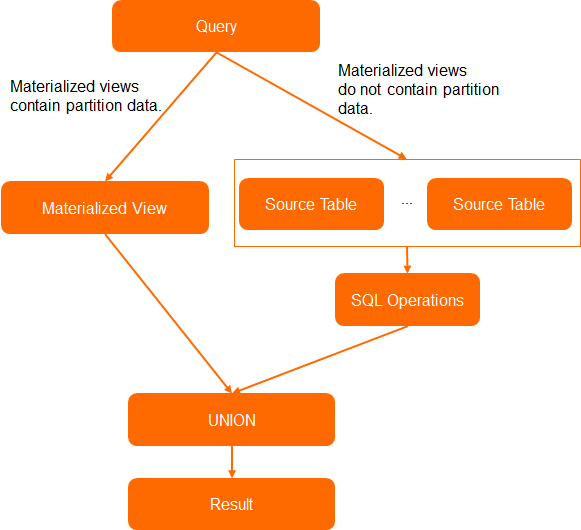
To enable the penetration query feature for a materialized view, set the following parameter:
When you create the materialized view, add the "enable_auto_substitute"="true" configuration to tblproperties.
The following example demonstrates how to use a materialized view that supports penetration queries.
Create a partitioned materialized view that supports penetration queries.
-- Create a source table named src.
CREATE TABLE src(id bigint,name string) PARTITIONED BY (dt string);
-- Insert data.
INSERT INTO src PARTITION(dt='20210101') VALUES(1,'Alex');
INSERT INTO src PARTITION(dt='20210102') VALUES(2,'Flink');

-- Create a partitioned materialized view that supports penetration query.
CREATE MATERIALIZED VIEW IF NOT EXISTS mv LIFECYCLE 7
PARTITIONED BY (dt)
tblproperties("enable_auto_substitute"="true")
AS SELECT id, name, dt FROM src;
Query data from the
20210101partition in the materialized viewmv.SELECT * FROM mv WHERE dt='20210101';Query data from the
20210102partition in the materialized viewmv. The system automatically performs a penetration query on the source table because this partition is not materialized.SELECT * FROM mv WHERE dt = '20210102'; -- Because the data for the 20210102 partition is not materialized, the query is rewritten to access the source table. This is equivalent to: SELECT * FROM (SELECT id, name, dt FROM src WHERE dt='20210102') t;Query data from a range of partitions in the materialized view
mv. The system automatically performs a penetration query on the source table for the non-materialized data and combines it with the materialized data using aUNIONoperation before returning the result.SELECT * FROM mv WHERE dt >= '20201230' AND dt<='20210102' AND id=5; -- Because data for partitions 20201230 and 20210102 is not materialized, the query is rewritten to access the source table. This is equivalent to: SELECT * FROM (SELECT id, name, dt FROM src WHERE dt='20201230' OR dt='20210102' UNION ALL SELECT * FROM mv WHERE dt='20210101' ) t WHERE id = 5;
Billing rules
Materialized view costs consist of two components:
Storage fees
Materialized views consume physical storage and incur storage fees.
If your MaxCompute project is on a Standard subscription or Standard pay-as-you-go plan, storage fees are charged on a pay-as-you-go basis. For more information, see Storage.
Computing costs
Creating, updating, and querying a materialized view — including query rewrites when the view is valid — consume computing resources and incur computing costs.
If your MaxCompute project is on a Standard subscription plan, no separate fees are charged.
If your MaxCompute project is on a Standard pay-as-you-go plan, MaxCompute calculates costs based on SQL complexity and input data volume. For more information, see Pay-as-you-go for SQL jobs. Note the following:
The SQL statement used to refresh a materialized view is the same as its defining query. If the project is bound to a subscription computing resource group, the operation uses your purchased resources at no extra cost. If the project uses a pay-as-you-go resource group, the cost depends on input data volume and SQL complexity. After a refresh, storage fees are charged based on the actual size of the materialized view.
When a materialized view is valid, query rewrite reads data from the view. The input data volume depends on the materialized view, not the source table. If the view is invalid, query rewrite is unavailable and queries read from the source table directly. For more information, see Query materialized view status.
When a materialized view is built from multi-table joins, data bloat can occur. Reading from the materialized view does not always reduce costs compared to reading from the source tables.
References
For information about materialized view query rewrites, see Materialized view query rewrite.
For information about scheduled refreshes of materialized views, see Scheduled refresh of materialized views.