Ecosystem connections
This topic describes the business intelligence (BI) tools, database management tools, and extract, transform, load (ETL) tools that you can connect to MaxCompute.
MaxCompute integrates with a range of business intelligence (BI), database management, and extract, transform, load (ETL) tools. The following diagram shows the ecosystem architecture.
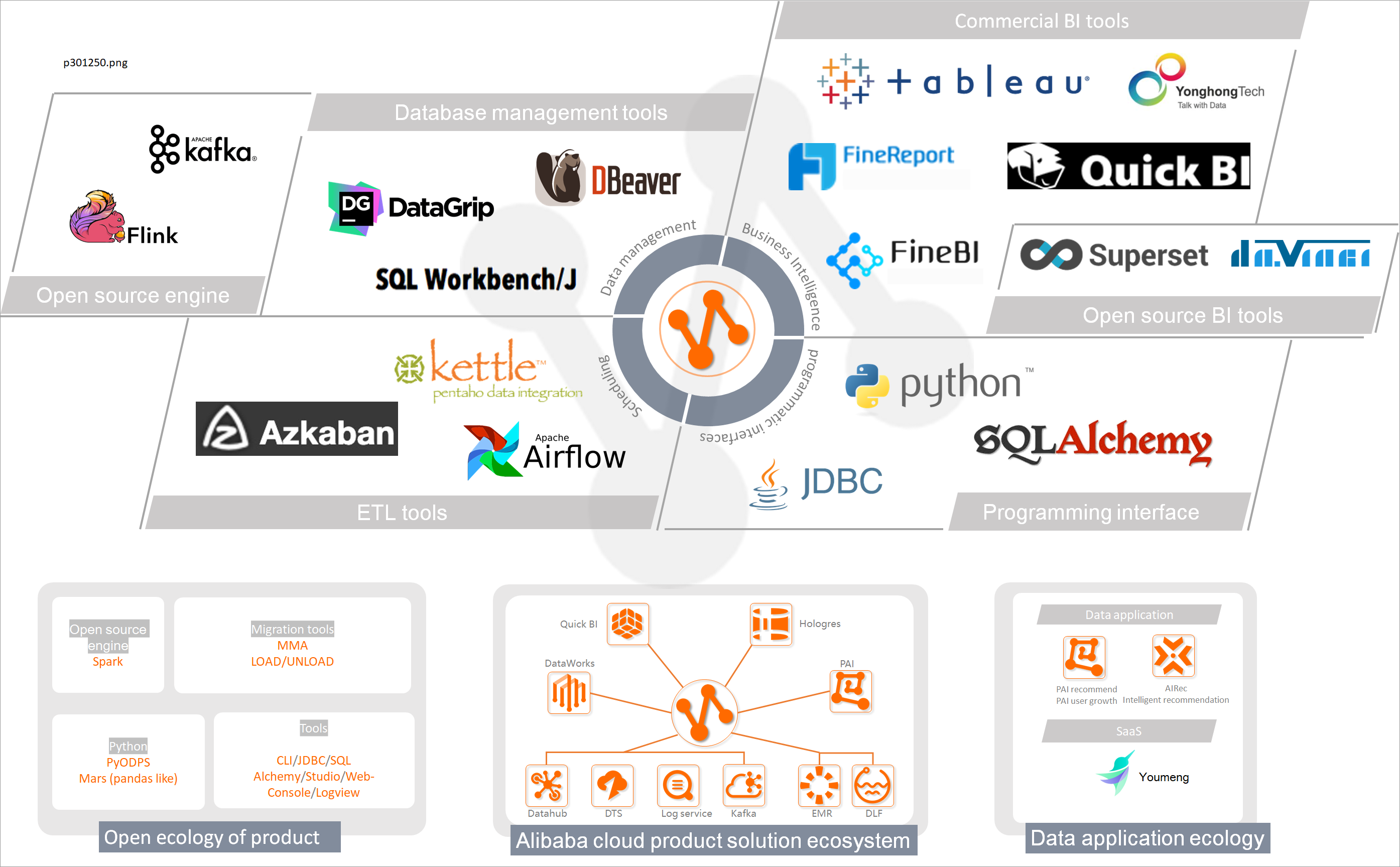
BI tools
BI tools let you visualize MaxCompute data through dashboards, charts, and other graphical representations, helping teams make informed business decisions.
| Tool | Version requirements | Steps to connect | References |
|---|---|---|---|
| Tableau | Tableau: Desktop 2019.4 or later<br>MaxCompute JDBC driver: v3.0.1 or later | Connect Tableau to MaxCompute |
Manage Data Sources (Tableau documentation) |
|
NetEase YouShu BI |
No Special Requirements |
||
|
Davinci |
|
||
|
FineBI |
|
||
|
FineReport |
|
||
| Yonghong BI | Yonghong Desktop: v8.6 or later | Connect Yonghong BI to MaxCompute | Add MaxCompute data source (Yonghong documentation) |
| Quick BI | No special requirements | Connect Quick BI to MaxCompute | Add a cloud data source MaxCompute (Alibaba Cloud documentation) |
|
Guanyuan BI |
No Special Requirements |
Database management tools
Database management tools provide a graphical interface for querying and managing MaxCompute data.
| Tool | Version requirements | Steps to connect | References |
|---|---|---|---|
| DBeaver | DBeaver: No special requirements<br>MaxCompute JDBC driver: v3.2.8 or later | Connect DBeaver to MaxCompute | Create connection (GitHub) |
| DataGrip | DataGrip: No special requirements<br>MaxCompute JDBC driver: v3.2.8 or later | Connect DataGrip to MaxCompute | Database connection (JetBrains documentation) |
| SQL Workbench/J | SQL Workbench/J: No special requirements<br>MaxCompute JDBC driver: v3.0.1 or later | Connect SQL Workbench/J to MaxCompute | JDBC (Alibaba Cloud documentation) |
ETL tools
ETL tools move and transform data between systems. Use the following tools to schedule MaxCompute jobs as part of your data pipelines.
| Tool | Steps to connect |
|---|---|
| Kettle | Use Kettle to schedule MaxCompute jobs |
| Apache Airflow | Use Apache Airflow to schedule MaxCompute jobs |
| Azkaban | Use Azkaban to schedule MaxCompute jobs |