MaxFrame AI function
This document describes how to use the MaxFrame AI function in Alibaba Cloud MaxCompute and provides use cases for getting started with large language model offline inference applications.
Overview
The MaxFrame AI function is an end-to-end solution for large language model (LLM) offline inference on the Alibaba Cloud MaxCompute platform. It seamlessly integrates data processing with AI capabilities, simplifying the adoption of enterprise-level large language models.
Design philosophy: "Data in, results out." This allows you to use the MaxFrame Python framework and pandas-style APIs to complete the entire workflow—from data preparation and processing to model inference and result storage—all within the MaxCompute ecosystem.
Use cases: This function is ideal for processing massive volumes of structured data, such as for log analysis and user behavior logs, and unstructured data for tasks such as text translation, document summarization, and vectorization. It can process petabyte-scale data in a single job and achieves low latency and linear scalability through its distributed computing architecture. You can use it to extract structured information from text, organize and summarize content, generate abstracts, translate languages, assess text quality, and classify sentiment. This greatly simplifies data processing for large language models and improves the quality of the results.
Architecture
The MaxFrame AI function provides a flexible, general-purpose
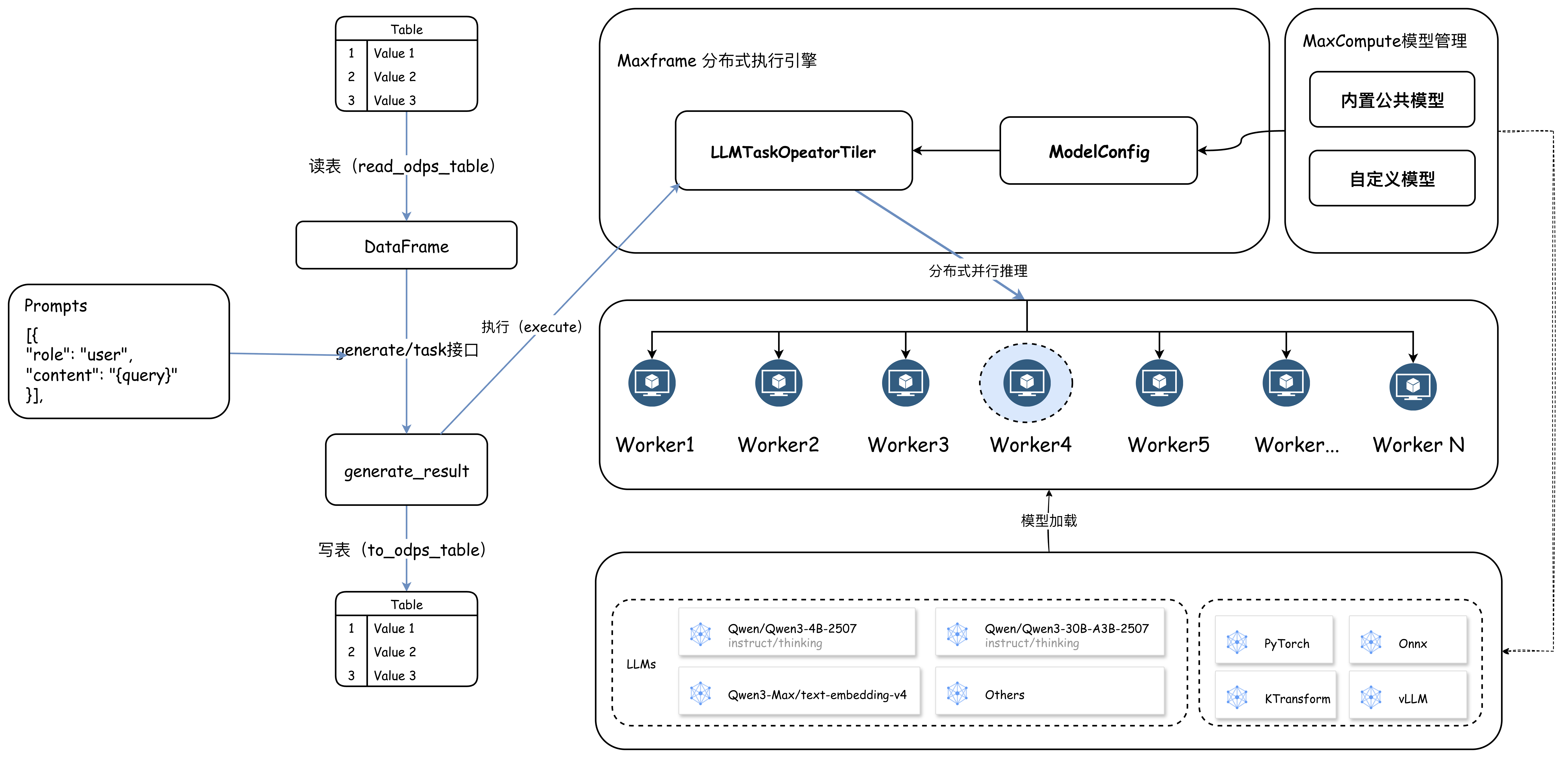
generateinterface and concise, task-specifictaskinterfaces for scenarios such as text translation, structured data extraction, and vectorization. You select a model and provide a MaxCompute table and prompts as input.When you call an interface, MaxFrame first performs data sharding on the input table. You can set an appropriate level of concurrency based on the data volume and launch a group of workers to execute the computing job. Each worker uses the provided prompt template to render and construct model inputs from the data rows, runs the inference job, and writes the results and success status back to MaxCompute.
The following figure shows the architecture and workflow.
Key advantages:
Ease of use: Familiar Python APIs, an out-of-the-box model library, and zero deployment cost.
Scalability: Leverages MaxCompute CU quota, GU quota, and Inference Quota resources to support large-scale parallel processing and improve overall token throughput.
Data and AI integration: Complete your entire workflow, from data reading and processing to AI inference and result storage, on a single platform. This reduces data migration costs and improves development efficiency.
Broad scenario coverage: Covers more than 10 common use cases, including translation, structured data extraction, and vectorization.
Requirements
Supported regions:
China (Hangzhou), China (Shanghai), China (Beijing), China (Ulanqab), China (Shenzhen), China (Chengdu), China (Hong Kong), China (Hangzhou) Finance Cloud, and China (Shanghai) Finance Cloud.
Supported Python version: 3.11.
Supported SDK version: Ensure that your MaxFrame SDK version is 2.7.1 or later. You can check the version by running one of the following commands:
// For Windows
pip list | findstr maxframe

// For Linux
pip list | grep maxframe
If your version is outdated, run
pip install --upgrade maxframeto upgrade to the latest version.
Supported models
MaxFrame provides out-of-the-box support for a series of built-in large language models, includingQwen 3,DeepSeek-R1-Distill-Qwen, andQwen3-embedding. It also allows you to call commercial flagship models from Model Studio, such as the multimodal modelsqwen3.7-max,qwen3.6-plus,qwen3.6-flash,deepseek-v4-pro,deepseek-v4-flash, andqwen3-vl-embedding, and the text modeltext-embedding-v4. All models are hosted offline within the MaxCompute platform. This eliminates the need to manage model downloads, distribution, or API concurrency limits. You can use the models by making simple API calls, which allows you to leverage the massive computing resources of MaxCompute to complete offline inference tasks with high overall token throughput and concurrency.
Supported models
Model type | Model name | Quota |
Model Studio commercial models |
|
|
Qwen 3 series open-source models |
|
|
Qwen Embedding open-source models |
|
|
Deepseek-R1-Distill-Qwen series open-source models |
|
|
Deepseek-R1-0528-Qwen3 open-source models |
|
|
Quota resource types
MaxFrame supports three resource types, allowing you to choose the best fit for your model size and business requirements.
CU quota resources
A Compute Unit (CU) is a general-purpose CPU computing resource (1 vCPU and 4 GB of memory) suitable for small models and small-scale inference tasks.
Configuration:
# Use CU quota compute resources.
options.session.quota_name = "mf_cpu_quota"
GU quota resources
A GPU Unit (GU) is a GPU computing resource optimized for LLM inference. It supports larger models and is suitable for inference tasks with models of 8B parameters or more.
Configuration:
# Use GU quota compute resources.
options.session.gu_quota_name = "mf_gpu_quota"
Inference Quota resources (token-based billing)
This option allows you to call commercial large language models from Model Studio, such asqwen3-max andtext-embedding-v4. Billing is based on actual token consumption. This approach eliminates the need to provision CU or GU resources and manage the underlying infrastructure, offering a flexible, convenient, and cost-effective solution.
API reference
The MaxFrame AI function provides two interfaces to balance flexibility with ease of use: the general-purposegenerate interface and the task-specifictask interfaces.
General: generate
The generate interface
Key parameters
Parameter | Required | Description |
model_name | Yes | The name of the model to use. |
df | Yes | The text or data to analyze, encapsulated in a DataFrame. |
prompt_template | Yes | A list of messages compatible with the OpenAI chat message format. You can use |
Task-specific: task
Scenario-specific interface: Task
Preset, standardized task interfaces simplify development for common use cases. Currently supportedtask interfaces includetranslate,extract, andembed.
Key parameters
Parameter
Required
Description
model_name
Yes
The name of the model to use.
df
Yes
The text or data to analyze, encapsulated in a DataFrame.
task interface
Yes
translate: performs language translation.extract: performs structured data extraction.embed: performs vectorization.
Usage example
from maxframe.learn.contrib.llm.models.managed import ManagedTextLLM

llm = ManagedTextLLM(name="<model_name>")

# Translate text.
translated_df = llm.translate(
    df["english_column"],
    source_language="english",
    target_language="Chinese",
    examples=[("Hello", "你好"), ("Goodbye", "再见")],
)

translated_df.execute()
Use cases
GU quota
GU quota scenarios
Language translation
Scenario: A multinational corporation needs to translate 100,000 English contracts into Chinese and annotate key clauses.
import os
import maxframe.dataframe as md
from maxframe import new_session
from maxframe.config import options
from maxframe.udf import with_running_options
from odps import ODPS

options.dag.settings = {
    "engine_order": ["DPE", "MCSQL"]
}

o = ODPS(
    os.getenv('ALIBABA_CLOUD_ACCESS_KEY_ID'),
    os.getenv('ALIBABA_CLOUD_ACCESS_KEY_SECRET'),
    project='your-default-project',
    endpoint='your-end-point',
)

# Initialize the MaxFrame session.
session = new_session(o)

# Print the Logview URL for the job.
print(session.get_logview_address())

# 1. Use GU quota compute resources.
options.session.gu_quota_name = "mf_gu_quota"

# 2. Use the Qwen3-1.7B model.
from maxframe.learn.contrib.llm.models.managed import ManagedTextLLM

llm = ManagedTextLLM(name="Qwen3-1.7B")

# 3. Prepare the data. You can skip this step if you already have data.
# o.execute_sql("""
#   CREATE TABLE IF NOT EXISTS raw_contracts (
#       en STRING
#   );
#   """)
#
# o.execute_sql("""
#   INSERT INTO raw_contracts VALUES
#   ('This agreement is governed by the laws of the State of California.'),
#   ('The tenant shall pay rent on the first day of each month.'),
#   ('Either party may terminate this contract with 30 days written notice.'),
#   ('All intellectual property rights shall remain with the original owner.'),
#   ('The warranty period for this product is twelve months from the date of purchase.');
#   """)

df = md.read_odps_table("raw_contracts")

# 4. Define the prompt template.
messages = [
    {
        "role": "system",
        "content": "You are a document translation expert who can fluently translate English text into Chinese.",
    },
    {
        "role": "user",
        "content": "Translate the following English text into Chinese. Output only the translated text, with no other content.\n\n Example:\nInput: Hi\nOutput: 你好。\n\n Text to translate:\n\n{en}",
    },
]

# 5. Call the `generate` interface, define the prompt, and reference the corresponding data column.
result_df = llm.generate(
    df,
    prompt_template=messages,
    params={
        "temperature": 0.7,
        "top_p": 0.8,
    },
).execute()

# 6. Write the results to a MaxCompute table.
result_df.to_odps_table("raw_contracts_result")
Keyword extraction
Scenario: This use case demonstrates how the MaxFrame AI function processes unstructured data. A large portion of unstructured data consists of text and images, which pose significant challenges for big data analytics. The following example shows how to use the AI function to simplify this process.
The following code demonstrates how to use the AI function to extract a candidate's work experience from a resume. The example uses randomly generated resume text as input. For detailed development practices and demos, see AI Function on GU Development Practices.
import maxframe.dataframe as md
from maxframe import new_session
from maxframe.config import options
from maxframe.udf import with_running_options
from odps import ODPS

options.dag.settings = {
    "engine_order": ["DPE", "MCSQL"]
}

o = ODPS(
    os.getenv('ALIBABA_CLOUD_ACCESS_KEY_ID'),
    os.getenv('ALIBABA_CLOUD_ACCESS_KEY_SECRET'),
    project='your-default-project',
    endpoint='your-end-point',
)

# Initialize the MaxFrame session.
session = new_session(o)

# Print the Logview URL for the job.
print(session.get_logview_address())

# 1. Use GU quota compute resources.
options.session.gu_quota_name = "mf_gu_quota"

# 2. Use the Qwen3-4B model.
from maxframe.learn.contrib.llm.models.managed import ManagedTextLLM

llm = ManagedTextLLM(name="Qwen3-4B-Instruct-2507-FP8")

df = md.read_odps_table("traditional_chinese_medicine", index_col="index")

# Specify four concurrent partitions.
parallel_partitions = 4
df = df.mf.rebalance(num_partitions=parallel_partitions)

# 3. Use the preset `extract` task interface.
result_df = llm.extract(
    df["text"],
    description="Please extract structured data from the following medical record in order. Return the final output in strict JSON format according to the schema.",
    schema=MedicalRecord,
    examples=[(example_input, example_output)],
)
result_df.execute()
Inference quota
Inference quota scenarios
Text vectorization: text-embedding-v4
Scenario: Use the Model Studio commercial modeltext-embedding-v4 to perform vectorization tasks. Billing is based on token consumption, eliminating the need to manage underlying computing resources. This scenario is suitable for complex text analysis and high-quality inference tasks that require large models or commercial large language models from Model Studio.
Image understanding: qwen3.6-plus
Scenario: This scenario is suitable for high-quality inference and complex text analysis or multimodal data processing tasks that require large models or commercial large language models from Model Studio. Resources are consumed on demand, helping you control costs.
Performance optimization
Parallel inference
MaxFrame usesparallel computing to run offline inference at scale:
Data sharding: The
rebalanceinterface distributes the input data table evenly across multiple worker nodes based on the specified number of partitions (num_partitions).Parallel model loading: Each worker loads and pre-warms the model independently. This avoids cold start latency from model loading.
Result aggregation: The output results are written to a MaxCompute table by partition, which supports subsequent data analysis.
Tuning recommendations
Switching heterogeneous computing resources
For large models (8B parameters or more), CPU inference is inefficient. We recommend switching to GU quota or Inference Quota resources for inference.
Processing data partitions in parallel
For large-scale inference jobs, use the
rebalanceinterface to shard data for parallel processing based on your data distribution.