Overview
This topic describes how to develop SQL scripts in MaxCompute Studio, set the SQL editor style, and configure compilation parameters.
The process for developing SQL scripts in MaxCompute Studio is as follows:
- Create a MaxCompute Script Module.
- Write an SQL script and submit it to the MaxCompute server. For more information, see Develop and submit SQL scripts.
Editor settings
MaxCompute Studio provides syntax highlighting, intelligent suggestions, and error prompts. It also supports the following features:
- schema annotator: Displays the schema when you hover over a table.
- Displays the type when you hover over a column.
- Displays the signature when you hover over a function.
- code folding: Collapses subqueries to make SQL scripts easier to read.
- brace matching: Highlights the matching right bracket when you click a left bracket, and vice versa.
- go to declaration: Hold down Ctrl and click a table to view its details. Click a function to display its source code.
- code formatting: Formats the current script. You can press Ctrl+Alt+L to open the configuration page. On this page, you can customize formatting rules, such as keyword case and line breaks.
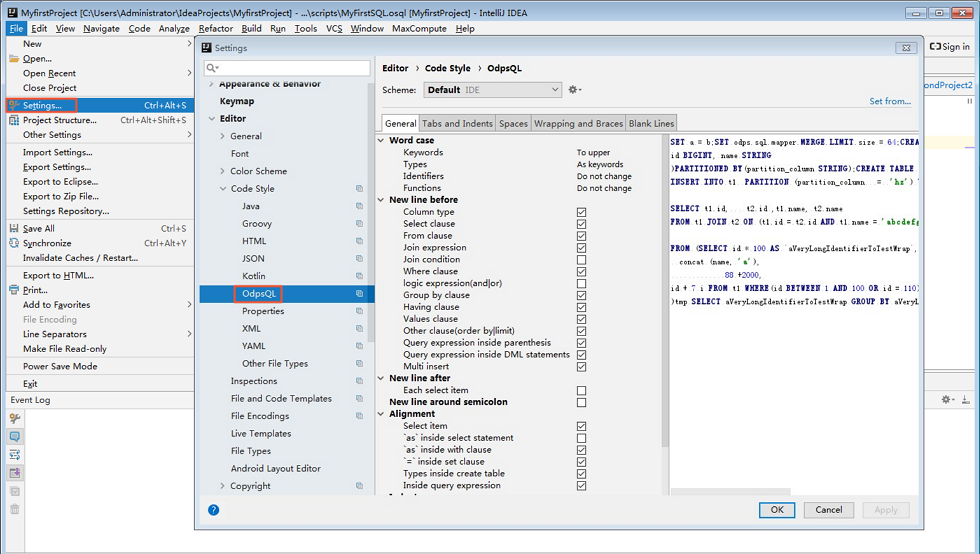
- code inspect: Inspects the code in the current script. Some inspections also support quick fixes, which you can apply by pressing Alt+Enter.
- find usages: Right-click a table or function and select Find Usages to find all scripts that use it within the current project.
- live template: MaxCompute Studio provides built-in SQL templates. You can press Ctrl+J in the editor to view the templates.
- builtin documentation: You can press Ctrl+Q on a built-in function to view its help document.
- Sql History: All execution records for jobs submitted through MaxCompute Studio are saved locally. You can click the
 icon in the toolbar to view previously executed SQL statements in the Sql History window.
Compiler settings
Before you submit an SQL script, you can configure compilation parameters as needed. MaxCompute Studio provides various settings that you can quickly configure from the toolbar above the editor.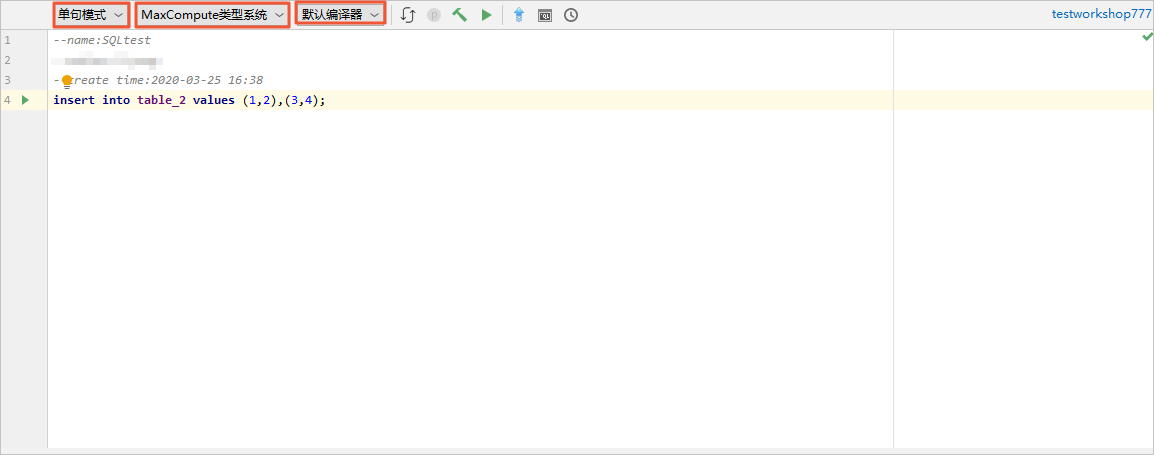
There are three main types of settings:
- Editor mode:
- Single statement mode: Splits the script by semicolons (;) and submits each statement to the MaxCompute server for execution.
- Script mode: Submits the entire script to the MaxCompute server at once. The server optimizes the script as a whole. This mode is recommended for higher efficiency.
- System type: Manages the data type compatibility for SQL statements. The following three system types are available:
- Legacy type system: The data type system for MaxCompute 1.0.
- MaxCompute type system: The data type system for MaxCompute V2.0.
- Hive type system: The Hive-compatible data type system.
Execution mode
Default: The default compiler used by MaxCompute Studio.
Query acceleration: A compiler that provides query acceleration.
Rerun on acceleration failure: A compiler that can rerun a job if query acceleration fails.