Project-level Information Schema (deprecated)
This topic covers the basic concepts, usage, and limitations of the Information Schema service for MaxCompute.
MaxCompute's Information Schema provides project metadata and usage history. It extends the ANSI SQL-92 Information Schema with fields and views specific to the MaxCompute service. You can query the read-only views in the public project Information Schema to retrieve metadata and usage history for your projects.
Limitations
Information Schema provides a metadata view that is scoped to the current project and does not support cross-project metadata access. To query and analyze metadata from multiple projects, retrieve the metadata from each project and then consolidate it.
The metadata system tables provide a near-real-time view. For applications that require highly up-to-date metadata, use the SDK or CLI to directly retrieve the metadata of specific objects.
Metadata and job history are stored in Information Schema. To create snapshot backups or retain job history beyond 14 days, periodically back up data from Information Schema to a project.
Enable Information Schema
Starting March 1, 2024, MaxCompute no longer automatically installs the project-level Information Schema for new projects. If you need to query metadata, you can query the tenant-level Information Schema to obtain more comprehensive information. For more information about how to use the tenant-level Information Schema, see Tenant-level Information Schema.
For existing MaxCompute projects, a Project Owner or a RAM user with the Super_Administrator role must install the Information Schema permission package to access the project's metadata. For more information about how to grant a management role to a user, see Grant a role to a user. You can install the package in one of the following ways:
Log on to the MaxCompute client and run the following command:
install package Information_Schema.systables;Log on to the DataWorks console and go to the Ad Hoc Query page. For more information, see Use an ad-hoc query to run SQL statements (optional). Run the following command:
install package Information_Schema.systables;
Installing the package grants the current project permission to query its metadata using Information Schema. This data is stored in the Information Schema project, and there is no charge for its storage.
Run the following command to list the views provided by Information Schema.
odps@myproject1> describe package Information_Schema.systables;The following figure shows the query result.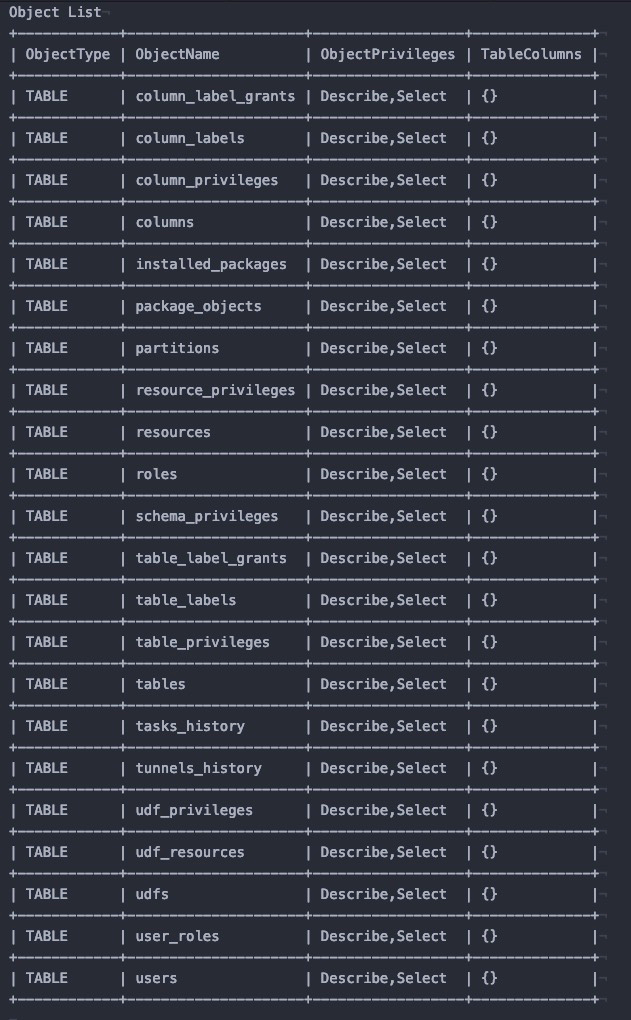
Query metadata views
To query a metadata view, prefix the view name with the project's Information Schema, for example, Information_Schema.view_name.
For example, to query metadata for all tables in project myproject1, run the following command.
odps@myproject1>select * from Information_Schema.tables;Information Schema also includes job history views for querying job history in the current project. You can add a date partition to filter the results.
odps@myproject1>select * from Information_Schema.tasks_history where ds='yyyymmdd' limit 100;Authorization
The views in Information Schema contain all user data at the project level. By default, the project owner can view this data. If other users or roles need access, they must be authorized. For more information, see Access resources across projects by using a Package.
The syntax for granting authorization is as follows:
grant <actions> on package Information_Schema.systables to user <user_name>;
grant <actions> on package Information_Schema.systables to role <role_name>;actions: The permission to grant. The value must be read.
user_name: An Alibaba Cloud account or a RAM user in the project.
You can run the
list users;command in the MaxCompute client to list the user accounts.role_name: A role in the project.
You can run the
list roles;command in the MaxCompute client to list the role names.
Example:
grant read on package Information_Schema.systables to user RAM$Bob@aliyun.com:user01;Metadata views
Use the Information_Schema metadata views to query metadata.
Use information views from Information_Schema to analyze metrics such as resource consumption, runtime duration, and the amount of data processed to optimize jobs or plan resource capacity.
Each view has a specific retention period, after which its data becomes inaccessible. To retain historical data for a longer period, periodically export it from Information_Schema to a local table.
The following billing rules apply:
For projects that use pay-as-you-go compute resources, queries on Information Schema views incur charges based on the amount of data scanned. To improve query performance, these views are optimized with
range clustered tablesto reduce the amount of data scanned. To minimize scanned data and reduce charges when you query the TASKS_HISTORY and TUNNELS_HISTORY views, query the previous day's data after 06:00:00 and avoid querying the current day's data.For projects using subscription compute resources, queries on Information Schema views consume your purchased CUs.
Information Schema views do not incur storage fees.
When exporting data, explicitly select the column names from the view. Avoid using insert into select * from information_schema.*** to prevent backup failures when new columns are added.
This table lists the metadata views.
Category | View | Timeliness and retention | Latency |
Metadata information | Near real-time view | The data in these views lags behind the online data by approximately 3 hours. | |
Near real-time view | |||
Near real-time view | |||
Near real-time view | |||
Near real-time view | |||
Near real-time view | |||
Near real-time view | |||
Near real-time view | |||
Near real-time view | |||
Near real-time view | |||
Near real-time view | |||
Near real-time view | |||
Near real-time view | |||
Near real-time view | |||
Near real-time view | |||
Near real-time view | |||
Near real-time view | |||
Near real-time view | |||
Near real-time view | |||
Near real-time view | |||
Usage information | A real-time snapshot of running jobs. | This view has a seconds-level latency. As a Preview feature, it is not covered by an SLA and is being rolled out gradually. | |
A near real-time partitioned table that retains details for the last 14 days. | The data in these views has a latency of approximately 15 minutes. | ||
A near real-time partitioned table that retains details for the last 14 days. |
Tables
Provides details about the tables in a project.
Column | Data type | Description |
table_catalog | STRING | The value is fixed at |
table_schema | STRING | The project name. |
table_name | STRING | The table name. |
table_type | STRING | The table type. Valid values are:
|
is_partitioned | BOOLEAN | Indicates whether the table is a partitioned table. |
owner_id | STRING | The ID of the table owner. |
owner_name | STRING | Optional. The Alibaba Cloud account name of the table owner. |
create_time | DATETIME | The time when the table was created. |
last_modified_time | DATETIME | The time when the table data was last modified. |
data_length | BIGINT | For a non-partitioned table, this is the data size of the table. For a partitioned table, this value is NULL because MaxCompute does not calculate the total table size. You can find the data size for each partition in the PARTITIONS view. Unit: byte. |
table_comment | STRING | The table comment. |
life_cycle | BIGINT | Optional. The lifecycle of the table. |
is_archived | BOOLEAN | Reserved for future use. |
table_exstore_type | STRING | Reserved for future use. |
cluster_type | STRING | The clustering type of the MaxCompute table. Valid values are HASH or RANGE. |
number_buckets | BIGINT | Optional. The number of buckets in a clustered table. A value of 0 means MaxCompute determines the number of buckets at runtime. |
view_original_text | STRING | For tables of type VIRTUAL_VIEW, this column contains the SQL statement that defines the view. |
The MaxCompute console does not support sorting tables by size. To query and sort tables by size or manage storage space, run SQL queries against the Information Schema. Before running the queries, enable schema support with the following command:
SET odps.namespace.schema=true;Query the size of non-partitioned tables and sort them in descending order:
SELECT * FROM SYSTEM_CATALOG.INFORMATION_SCHEMA.Tables ORDER by data_length DESC;Query the size of partitions in partitioned tables and sort them in descending order:
SELECT * FROM SYSTEM_CATALOG.INFORMATION_SCHEMA.PARTITIONS ORDER by data_length DESC;
Use the query results to identify large tables or partitions and delete unneeded data to free up storage space.
A permission error while running these SQL statements indicates that the Information Schema is not installed in your project or that you lack the necessary project-level permissions. To resolve this, refer to the Enable the Information Schema service section for instructions on installation and granting permissions. For more comprehensive metadata or to avoid such permission issues, you can also configure the tenant-level Information Schema.
Partitions
Describes the table partitions in a project.
Parameter | Type | Value |
table_catalog | STRING | The value is always |
table_schema | STRING | The project name. |
table_name | STRING | The table name. |
partition_name | STRING | The partition name. For example, |
create_time | DATETIME | The creation time of the partition. |
last_modified_time | DATETIME | The last modified time of the partition. |
data_length | BIGINT | The data size of the partition, in bytes. |
is_archived | BOOLEAN | Reserved for future use. |
is_exstore | BOOLEAN | Reserved for future use. |
cluster_type | STRING | Optional. The bucketing type of a MaxCompute table. Valid values: HASH and RANGE. |
number_buckets | BIGINT | Optional. The number of buckets in a clustered table. If this value is 0, the number of buckets is determined dynamically when a job runs. |
Columns
Describes the columns of tables in a project space.
Parameter | Type | Value |
table_catalog | STRING | A fixed value of |
table_schema | STRING | The project name. |
table_name | STRING | The table name. |
column_name | STRING | The column name. |
ordinal_position | BIGINT | The ordinal position of the column. |
column_default | STRING | The default value of the column. |
is_nullable | BOOLEAN | Specifies whether the column can contain NULL values; the value is always YES. |
data_type | STRING | The data type of the column. |
column_comment | STRING | The column comment. |
is_partition_key | BOOLEAN | Specifies whether the column is a partition key. |
UDFs
Information about the UDFs in the project.
Parameter | Type | Value |
udf_catalog | STRING | The fixed value is |
udf_schema | STRING | Project name. |
udf_name | STRING | UDF name. |
owner_id | STRING | The UDF owner's ID. |
owner_name | STRING | Optional. Name of the UDF owner's cloud account. |
create_time | DATETIME | The time when the UDF was created. |
last_modified_time | DATETIME | The time when the UDF was last modified. |
Resources
Describes the attributes of resources in the project.
Field | Type | Value |
resource_catalog | STRING | Always |
resource_schema | STRING | The name of the project. |
resource_name | STRING | The name of the resource. |
resource_type | STRING | Possible values: Py or Jar. |
owner_id | STRING | The ID of the resource owner. |
owner_name | STRING | Optional. The name of the resource owner's cloud account. |
create_time | DATETIME | The time when the resource was created. |
last_modified_time | DATETIME | The time when the resource was last modified. |
size | BIGINT | The storage space used by the resource. |
comment | STRING | A comment about the resource. |
is_temp_resource | BOOLEAN | Indicates whether the resource is temporary. |
UDF_RESOURCES
Lists the resource dependencies for UDFs in a project.
Parameter | Type | Value |
udf_catalog | STRING | Always |
udf_schema | STRING | The project name. |
udf_name | STRING | The UDF name. |
resource_schema | STRING | The name of the project that contains the resource. |
resource_name | STRING | The resource name. |
Users
A list of users in the project space.
Parameter | Type | Value |
user_catalog | STRING | The value can be Alibaba Cloud or RAM. |
user_schema | STRING | The project name. |
user_name | STRING | Optional. The username. |
user_id | STRING | The user ID. |
user_label | STRING | The user label. |
Roles
The following fields define a role in the project.
Parameter | Type | Value |
role_catalog | STRING | Always |
role_schema | STRING | The project name. |
role_name | STRING | The role name. |
role_label | STRING | The role label. |
comment | STRING | A comment for the role. |
USER_ROLES
Describes the roles assigned to users in the project.
Parameter | Type | Value |
user_role_catalog | STRING | The fixed value is |
user_role_schema | STRING | The name of the project. |
role_name | STRING | The name of the role. |
user_name | STRING | The name of the user. |
user_id | STRING | The user ID. |
PACKAGE_OBJECTS
Describes the objects in a Package within a project.
Parameter | Type | Value |
package_catalog | STRING | The value is fixed at |
package_schema | STRING | The name of the project. |
package_name | STRING | The name of the Package. |
object_type | STRING | The type of the object within the Package. |
object_name | STRING | The name of the object within the Package. |
column_name | STRING | The column name. This field applies only if the object is a table. |
allowed_privileges | VECTOR<STRING> | The allowed privileges for the object. |
allowed_label | STRING | The allowed security label. |
INSTALLED_PACKAGES
Lists packages installed in the project.
Field | Type | Value |
installed_package_catalog | STRING | The value is always |
installed_package_schema | STRING | The name of the project where the package is installed. |
package_project | STRING | The name of the project where the package is created. |
package_name | STRING | The package name. |
installed_time | DATETIME | Installation time (reserved field). |
allowed_label | STRING | The label for sharing. |
SCHEMA_PRIVILEGES
Lists the privileges on schemas in a project.
Parameter | Type | Value |
user_catalog | STRING | A fixed value of |
user_schema | STRING | The name of the project. |
grantee | STRING | The name of the user. |
user_id | STRING | The account ID. |
grantor | STRING | The grantor's account. This value is currently NULL. |
privilege_type | STRING | The privilege type. |
TABLE_PRIVILEGES
Describes the privileges on tables in a project.
Parameter | Type | Value |
table_catalog | STRING | A fixed value of |
table_schema | STRING | The name of the project containing the table. |
table_name | STRING | The table name. |
grantee | STRING | The user name. |
user_id | STRING | The account ID. |
grantor | STRING | The grantor. The current value is NULL. |
privilege_type | STRING | The privilege type. |
user_schema | STRING | The name of the user's project. |
COLUMN_PRIVILEGES
Lists column-level privileges for tables in a project.
Parameter | Type | Value |
table_catalog | STRING | Always |
table_schema | STRING | The name of the project that contains the table. |
table_name | STRING | The table name. |
column_name | STRING | The column name. |
grantee | STRING | The user name. |
user_id | STRING | The account ID. |
grantor | STRING | The user who granted the privilege. This field is optional and is currently NULL. |
privilege_type | STRING | The privilege type. |
user_schema | STRING | The project to which the user belongs. |
UDF_PRIVILEGES
Provides information about the privileges on UDFs in a project.
Parameter | Type | Value |
udf_catalog | STRING | The fixed value |
udf_schema | STRING | The project name. |
udf_name | STRING | The UDF name. |
user_schema | STRING | The user's project name. |
grantee | STRING | The username. |
user_id | STRING | The account ID. |
grantor | STRING | The grantor. The value is currently NULL. |
privilege_type | STRING | The privilege type. |
Resource privileges
Lists the privileges for resources in the project.
Parameter | Type | Value |
resource_catalog | STRING | The value is always |
resource_schema | STRING | The project name. |
resource_name | STRING | The resource name. |
user_schema | STRING | The project that contains the user. |
grantee | STRING | The user name. |
user_id | STRING | The account ID. |
grantor | STRING | The grantor's account. Its value is currently NULL. |
privilege_type | STRING | The privilege type. |
Table labels
Lists the labels for tables in the project.
Parameter | Type | Value |
table_catalog | STRING | Always |
table_schema | STRING | The project name. |
table_name | STRING | The table name. |
label_type | STRING | Always NULL. |
label_level | STRING | The label level. |
COLUMN_LABELS
Provides information about column labels for tables in a project.
Column | Type | Value |
table_catalog | STRING | The value is always |
table_schema | STRING | The project name. |
table_name | STRING | The table name. |
column_name | STRING | The column name. |
label_type | STRING | The label type. This value is always NULL. |
label_level | STRING | The label level. |
TABLE_LABEL_GRANTS
The TABLE_LABEL_GRANTS view describes label authorizations on tables in the project.
Parameter | Type | Value |
table_label_grant_catalog | STRING | Always |
table_label_grant_schema | STRING | The name of the project to which the user belongs. |
user | STRING | The user name. |
user_id | STRING | The user ID. |
table_schema | STRING | The name of the project that contains the table. |
table_name | STRING | The table name. |
grantor | STRING | The grantor's account, which is currently NULL. |
label_level | STRING | The granted label level. |
expired | DATETIME | The expiration time. |
COLUMN_LABEL_GRANTS
Lists label grants for table columns in a project.
Parameter | Type | Value |
column_label_grant_catalog | STRING | The value is always |
column_label_grant_schema | STRING | The name of the user's project. |
user | STRING | The user name. |
user_id | STRING | The user ID. |
table_schema | STRING | The name of the table's project. |
table_name | STRING | The table name. |
column_name | STRING | The column name. |
grantor | STRING | The grantor's account. This value is currently always NULL. |
label_level | STRING | The granted label level. |
expired | DATETIME | The expiration time. |
Tasks
This view provides real-time snapshots of jobs for live monitoring.
The TASKS view is currently in private preview. The fields and their content are subject to change. This view is not covered by a Service Level Agreement (SLA). Use with caution. For updates on its release status, refer to the Announcements.
Field | Type | Description |
project_name | STRING | The name of the project. |
task_name | STRING | The name of the job. |
task_type | STRING | The type of the job. Valid values:
|
inst_id | STRING | The instance ID. |
status | STRING | The status of the job when the snapshot was taken. Valid values are |
owner_id | STRING | The ID of the cloud account that submitted the job. |
owner_name | STRING | The name of the cloud account that submitted the job. |
start_time | DATETIME | The start time of the job. |
priority | BIGINT | The priority of the job. This applies only to jobs that use subscription resources. |
signature | STRING | The signature of the job. |
queue_name | STRING | The name of the computing queue. |
cpu_usage | BIGINT | The current CPU usage. The value is |
mem_usage | BIGINT | The current memory usage, in MB. |
gpu_usage | BIGINT | The current GPU usage. The value is |
total_cpu_usage | BIGINT | The cumulative CPU usage. The value is |
total_mem_usage | BIGINT | The cumulative memory usage. The value is |
total_gpu_usage | BIGINT | The cumulative GPU usage. The value is |
cpu_min_ratio | BIGINT | The ratio of the job's current CPU usage to the computing queue's guaranteed resource level. This applies only to jobs that use subscription resources. |
mem_min_ratio | BIGINT | The ratio of the job's current memory usage to the computing queue's guaranteed resource level. This applies only to jobs that use subscription resources. |
gpu_min_ratio | BIGINT | The ratio of the job's current GPU usage to the computing queue's guaranteed resource level. This applies only to jobs that use subscription resources. |
cpu_max_ratio | BIGINT | The ratio of the job's current CPU usage to the computing queue's maximum elastic resource level. This applies only to jobs that use subscription resources. |
mem_max_ratio | BIGINT | The ratio of the job's current memory usage to the computing queue's maximum elastic resource level. This applies only to jobs that use subscription resources. |
gpu_max_ratio | BIGINT | The ratio of the job's current GPU usage to the computing queue's maximum elastic resource level. This applies only to jobs that use subscription resources. |
settings | STRING | Custom scheduling settings from higher-level services such as DataWorks. |
additional_info | STRING | Additional information. This is a reserved field. |
TASKS_HISTORY
Contains a 14-day history of completed jobs in a MaxCompute project.
Field | Type | Value |
task_catalog | STRING | A fixed value of |
task_schema | STRING | The project name. |
task_name | STRING | The job name. |
task_type | STRING | The job type. Valid values:
|
inst_id | STRING | The instance ID. |
status | STRING | The job status at the time of data collection (not real-time). Possible values:
|
owner_id | STRING | The account ID. |
owner_name | STRING | The cloud account name. |
result | STRING | Populated with the error message only when an SQL job fails. |
start_time | DATETIME | The job start time. |
end_time | DATETIME | The job end time. This value is NULL if the job was still running during data collection. |
input_records | BIGINT | The number of records read by the job. |
output_records | BIGINT | The number of records written by the job. |
input_bytes | BIGINT | The amount of data scanned. This value matches the one shown in Logview. |
output_bytes | BIGINT | The amount of data written. |
input_tables | STRING | The input tables for the job, in [project.table1, project.table2] format. This information might be unavailable for certain job types, such as SQLCost. |
output_tables | STRING | The output tables for the job, in [project.table1, project.table2] format. |
operation_text | STRING | The source_xml of the query statement. This field is NULL if its size exceeds 256 KB. |
signature | STRING | Optional. The job signature. |
complexity | DOUBLE | Optional. The job complexity. This field is available only for SQL jobs. |
cost_cpu | DOUBLE | The CPU cost of the job, where 100 represents 1 core-second. For example, if a job uses 10 cores for 5 seconds, the cost_cpu is 10 × 100 × 5 = 5000. |
cost_mem | DOUBLE | The memory cost of the job, in MB-seconds. |
settings | STRING | User-provided or scheduler-passed settings in JSON format. Can include fields such as: USERAGENT, BIZID, SKYNET_ID, and SKYNET_NODENAME. |
ds | STRING | The data collection date. For example, 20190101. |
TUNNELS_HISTORY
This view contains historical data for bulk upload and download operations that use Tunnel. Data is retained for 14 days.
Parameter | Type | Value |
tunnel_catalog | STRING | Fixed to |
tunnel_schema | STRING | The project name. |
session_id | STRING | The session ID. The format is |
operate_type | STRING | The operation type. Valid values:
|
tunnel_type | STRING | The tunnel type. Valid values are |
request_id | STRING | The request ID. |
object_type | STRING | The object type. Valid values are |
object_name | STRING | The table name or instance ID. |
partition_spec | STRING | The partition specification. For example, |
data_size | BIGINT | The data size in bytes. |
block_id | BIGINT | The block ID for a Tunnel upload. This field is valid only when the operation type is |
offset | BIGINT | The 0-based offset indicating the starting record for a download. |
length | BIGINT | The number of records uploaded or downloaded (equivalent to record count). For downloads, the user specifies this value. |
owner_id | STRING | The Alibaba Cloud account ID. |
owner_name | STRING | The Alibaba Cloud account name. |
start_time | DATETIME | The request start time. |
end_time | DATETIME | The request end time. |
client_ip | STRING | The client IP address that initiated the Tunnel request. |
user_agent | STRING | The User-Agent string of the client that initiated the Tunnel request. For example, this string can include the Java version and operating system. |
columns | STRING | The columns specified for a Tunnel download. |
ds | STRING | The data collection date. For example, |
FAQ
Access count in TABLE_ACCESS_INFO
No. The access count in TABLE_ACCESS_INFO is the total count of a job's access operations, such as reads and writes. This count does not distinguish between specific operation types, so you cannot view the query count separately.