The Python Software Foundation will soon stop maintaining Python 2. MaxCompute now supports Python 3, specifically CPython-3.7.3. This topic describes how to write a user-defined aggregate function (UDAF) in Python 3.
UDAF code structure
You can use MaxCompute Studio to write user-defined aggregate function (UDAF) code in Python 3. The code must contain the following information:
- Import modules: Required.
You must import at least
from odps.udf import annotateandfrom odps.udf import BaseUDAF. Thefrom odps.udf import annotatestatement imports the function signature module, which allows MaxCompute to recognize the function signature defined in the code.from odps.udf import BaseUDAFimports the base class for Python UDAFs. You must implement methods such asiterate,merge, andterminatein the derived class.If the UDAF code needs to reference file or table resources, include
from odps.distcache import get_cache_filefor file resources orfrom odps.distcache import get_cache_tablefor table resources. Function signature: Required.
The format is
@annotate(<signature>). Thesignaturedefines the data types of the function's input parameters and return value. For more information about function signatures, see Function signature and data types.Custom Python class (derived class): Required.
This class is the organizational unit for the UDAF code. It defines the variables and methods that implement your business logic. You can also reference built-in third-party libraries, files, or table resources in your code. For more information, see Third-party libraries or Reference resources.
- Implement Python class methods: Required.
The Python class implementation includes the following methods. You can implement the methods as needed.
Method definition Description BaseUDAF.new_buffer()Returns a buffer for the intermediate value of the aggregate function. The buffermust be a Marshal object, such as a LIST or DICT. The size of thebuffermust not increase with the data volume. In extreme cases, the size of thebufferafter object serialization must not exceed 2 MB.BaseUDAF.iterate(buffer[, args, ...])Aggregates argsinto the intermediate valuebuffer.BaseUDAF.merge(buffer, pbuffer)Merges the intermediate values bufferandpbufferand stores the result inbuffer.BaseUDAF.terminate(buffer)Converts the bufferto a primitive data type of MaxCompute SQL.
The following code provides a UDAF example.
# Import the function signature module and the base class.
from odps.udf import annotate
from odps.udf import BaseUDAF
# Function signature.
@annotate('double->double')
# Custom Python class.
class Average(BaseUDAF):
# Implement the methods of the Python class.
    def new_buffer(self):
        return [0, 0]
    def iterate(self, buffer, number):
        if number is not None:
            buffer[0] += number
            buffer[1] += 1
    def merge(self, buffer, pbuffer):
        buffer[0] += pbuffer[0]
        buffer[1] += pbuffer[1]
    def terminate(self, buffer):
        if buffer[1] == 0:
            return 0.0
return buffer[0] / buffer[1]avg).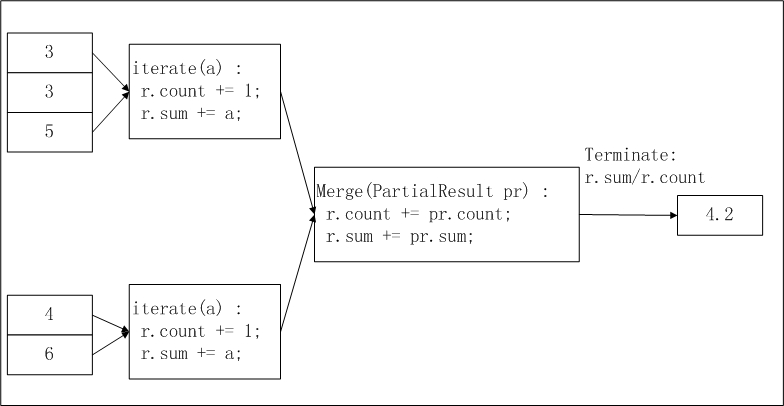
pbuffer corresponds to pr in the figure, and buffer corresponds to r.The difference between Python 2 UDAFs and Python 3 UDAFs is the underlying Python version. You must write your UDAF based on the capabilities of the corresponding Python version.
Precautions
Python 3 is not compatible with Python 2. You cannot use both Python 2 and Python 3 code in the same SQL statement.
The Python Software Foundation announced the end of life (EOL) for Python 2 in early 2020. We recommend that you migrate your UDFs based on your project requirements.
Python 2 UDAF migration
The Python Software Foundation will soon stop maintaining Python 2. We recommend that you migrate your projects based on the project type:
New projects: This applies to new MaxCompute projects or MaxCompute projects in which you are writing a Python UDAF for the first time. We recommend that you write all Python UDAFs in Python 3.
Existing projects: This applies to MaxCompute projects that have many existing Python 2 UDAFs. Enable Python 3 with caution. If you plan to gradually migrate all Python 2 UDAFs to Python 3, use the following methods:
New jobs and new UDAFs: Write them in Python 3 and enable Python 3 at the session level. For more information about how to enable Python 3, see Enable Python 3.
Python 2 UDAFs: Rewrite the Python 2 UDAFs to be compatible with both Python 2 and Python 3. For more information about how to rewrite the code, see Porting Python 2 Code to Python 3.
NoteIf you want to write a public UDAF and grant permissions to multiple MaxCompute projects to use it, we recommend that you make the UDAF compatible with both Python 2 and Python 3.
Enable Python 3
By default, Python 2 is used to write UDFs in a MaxCompute project. If you want to write UDFs in Python 3, add the following command before the SQL statement that you want to execute. Then, commit and execute the statement.
set odps.sql.python.version=cp37;Third-party libraries
The built-in Python 3 runtime environment in MaxCompute does not have the third-party library NumPy installed. To use a UDAF that requires NumPy, you must manually upload the NumPy WHEEL package. When you download the NumPy package from PyPI or a mirror, the package file name is numpy-<version_number>-cp37-cp37m-manylinux1_x86_64.whl. For more information about how to upload a package, see Resource operations or UDF example: Use a third-party package in a Python UDF.
Function signature and data types
@annotate(<signature>)signature is a string that identifies the data types of the input parameters and the return value. When you run a UDAF, the data types of its input parameters and return value must match the types specified in the function signature. During the query parsing phase, the system validates the function call against the function signature. If a type mismatch is found, an error is reported. The specific format is as follows.'arg_type_list -> type'arg_type_list: specifies the data types of input parameters. If multiple input parameters are used, specify multiple data types and separate them with commas (,). The following data types are supported: BIGINT, STRING, DOUBLE, BOOLEAN, DATETIME, DECIMAL, FLOAT, BINARY, DATE, DECIMAL(precision,scale), CHAR, VARCHAR, complex data types (ARRAY, MAP, and STRUCT), and nested complex data types.arg_type_listcan be represented by an asterisk (*) or left empty ('').If
arg_type_listis represented by an asterisk (*), a random number of input parameters are allowed.If
arg_type_listis left empty (''), no input parameters are used.
For more information about the syntax extension of the @Resolve annotation, see Dynamic parameters of UDAFs and UDTFs.
type: Specifies the data type of the return value. A UDAF returns only one column. Supported data types include the following: BIGINT, STRING, DOUBLE, BOOLEAN, DATETIME, DECIMAL, FLOAT, BINARY, DATE, DECIMAL(precision,scale), complex data types (ARRAY, MAP, STRUCT), and nested complex data types.
The following are valid function signatures.
| Function signature example | Description |
@annotate('bigint,double->string') | The input parameter types are BIGINT and DOUBLE, and the return value type is STRING. |
@annotate('*->string') | The function accepts any number of input parameters, and the return value type is STRING. |
@annotate('->double') | The function has no input parameters, and the return value type is DOUBLE. |
@annotate('array<bigint>->struct<x:string, y:int>') | The input parameter type is ARRAY<BIGINT>, and the return value type is STRUCT<x:STRING, y:INT>. |
To ensure that the data types in your Python UDAF are consistent with the data types supported by MaxCompute, you must use the correct data type mappings. The following table describes these mappings.
MaxCompute SQL Type | Python 3 Type |
BIGINT | INT |
STRING | UNICODE |
DOUBLE | FLOAT |
BOOLEAN | BOOL |
DATETIME | DATETIME.DATETIME |
FLOAT | FLOAT |
CHAR | UNICODE |
VARCHAR | UNICODE |
BINARY | BYTES |
DATE | DATETIME.DATE |
DECIMAL | DECIMAL.DECIMAL |
ARRAY | LIST |
MAP | DICT |
STRUCT | COLLECTIONS.NAMEDTUPLE |
Reference resources
Python UDAFs can reference file and table resources using the odps.distcache module.
odps.distcache.get_cache_file(resource_name): Returns a file-like object for the specified file resource.resource_nameis of the STRING type and corresponds to the name of an existing file resource in the current MaxCompute project. If the file resource name is invalid or the resource does not exist, an exception is raised.Note To access a resource from a UDAF, you must declare the referenced resource when you create the UDAF. Otherwise, an error is reported.- The return value is a file-like object. After you finish using this object, call the
closemethod to release the open resource file.
odps.distcache.get_cache_table(resource_name): Returns a generator object for the specified table resource.resource_nameis of the STRING type and corresponds to the name of an existing table resource in the current MaxCompute project. If the table resource name is invalid or the resource does not exist, an exception is raised.- The return value is of the GENERATOR type. The caller traverses the generator to retrieve the table content. Each iteration returns a record from the table as an array.
For more information about the usage, see Reference resources (Python 3 UDF) and Reference resources (Python 3 UDTF).
Usage notes
After you develop a Python 3 UDAF by following the development flow, you can call it in a MaxCompute SQL statement. The call methods are as follows:
Use a UDF in a MaxCompute project: The method is similar to that of using built-in functions.
Use a UDF across projects: Use a UDF of Project B in Project A. The following statement shows an example:
select B:udf_in_other_project(arg0, arg1) as res from table_t;. For more information about cross-project sharing, see Access resources across projects using packages.
For the complete procedure of developing and calling a Python 3 UDAF using MaxCompute Studio, see Develop a Python UDF.
Dynamic parameters for UDAFs
Function signature
For more information about the format of a Python UDAF function signature, see Function signature and data types.
You can use an asterisk (
*) in the parameter list to accept input parameters of any number and any type. For example,@annotate('double,*->string')indicates that the first parameter is of the DOUBLE type, followed by a list of parameters of any number and any type. In this case, you must write code to determine the number and types of the input parameters and then perform the corresponding operations on them. This is similar to theprintffunction in the C language.NoteAn asterisk (
*) has a different meaning when used in the return value list.You can use an asterisk (
*) in the return value of a UDTF to indicate any number of STRING-type return values. The number of return values depends on the number of aliases that are set when the function is called. For example, for@annotate("bigint,string->double,*"), the call method isUDTF(x, y) as (a, b, c). In this example, three aliases are set afteras:a,b, andc. The editor considersato be of the DOUBLE type because the type of the first column in the return value is specified in the annotation, and considersbandcto be of the STRING type. Because three return values are specified, when the UDTF callsforward,forwardmust be an array of length 3. Otherwise, a runtime error occurs.NoteThis type of error cannot be reported at compile-time. Therefore, when the UDTF caller sets the number of aliases in the SQL statement, they must follow the rules that are defined by the UDTF. Because the number of return values for an aggregate function is fixed at 1, this feature is not applicable to a UDAF.
UDAF example
from odps.udf import annotate
from odps.udf import BaseUDAF
@annotate('bigint,*->string')
class MultiColSum(BaseUDAF):
    def new_buffer(self):
        return [0]
    def iterate(self, buffer, *args):
        for arg in args:
            buffer[0] += int(arg)
    def merge(self, buffer, pbuffer):
        buffer[0] += pbuffer[0]
    def terminate(self, buffer):
        return str(buffer[0])
A UDAF can have only one return value. In the preceding UDAF example, the return value is the sum of multiple input parameters, which is then aggregated and summed across multiple rows. The following code provides a usage example.
-- Sums multiple input parameters.
SELECT my_multi_col_sum(a,b,c,d,e) from values (1,"2","3","4","5"), (6,"7","8","9","10") t(a,b,c,d,e);
-- The return value is 55.