Resource request issues
MaxCompute Spark jobs require careful resource configuration. This topic covers resource parameters, recommended settings, and how to troubleshoot resource waiting issues.
Resource parameters
When you submit a Spark job, pay attention to the following resources:
Executor count
Executor memory
Executor Core
Driver memory
Driver Core
Local disk
Executor parameters
spark.executor.instances:The total number of executors to request. A value of 10 to several dozen is sufficient for regular jobs. For large-scale data processing, you can request 100 to 2,000 or more.
spark.executor.cores:The number of cores per executor, which determines how many tasks can run concurrently within each executor.
Maximum parallelism of a Spark job = number of executors × cores per executor.
spark.executor.memory:The heap memory of each executor, equivalent to the
-XmxJVM parameter.spark.executor.memoryOverhead:The off-heap memory of each executor, in MB by default. This memory is used for JVM overhead, string internals, NIO buffers, and similar allocations.
Default value:
executor.memory × 0.1, with a minimum of 384 MB.If you encounter a
Cannot allocate memoryerror, off-heap memory is likely insufficient. Increasespark.executor.memoryOverheadaccordingly. Total memory per executor =spark.executor.memory+spark.executor.memoryOverhead.
Driver parameters
spark.driver.cores: The number of cores allocated to the driver.spark.driver.memory: The heap memory of the driver.spark.driver.memoryOverhead: The off-heap memory of the driver.spark.driver.maxResultSize: Default value: 1 GB. Controls the maximum size of data that workers can send back to the driver. The driver terminates the job if this limit is exceeded.
Local disk parameters
spark.hadoop.odps.cupid.disk.driver.device_size:The local disk size. Default value: 20 GB. This parameter must be set in the
spark-defaults.conffile or in the DataWorks configuration. It cannot be set in code.Spark uses local disks for storage. Each driver and executor has its own disk. Shuffle data and BlockManager spill data are stored on these disks.
If a
No space left on deviceerror occurs, increase this value. The maximum supported size is 100 GB. If the error persists at 100 GB, investigate the root cause:Data skew: data is concentrated in certain blocks during shuffle or cache operations.
Reduce concurrency per executor (
spark.executor.cores).Increase the number of executors (
spark.executor.instances).
Configure resource parameters
Allocate resources at a memory-to-CPU ratio of 4:1 (4 GB memory per core). Keep the number of cores per worker to 8 or fewer.
Check runtime memory and CPU usage by viewing the Sensor data for the master or workers in LogView.
Expand the target Fuxi task (for example, worker-0), and then click the icon in the Sensor column of the instance list.
Monitor the
mem_rssmetric, which shows the actual memory usage curve of each executor or driver. Use this metric to determine whether to increase or decrease memory allocation.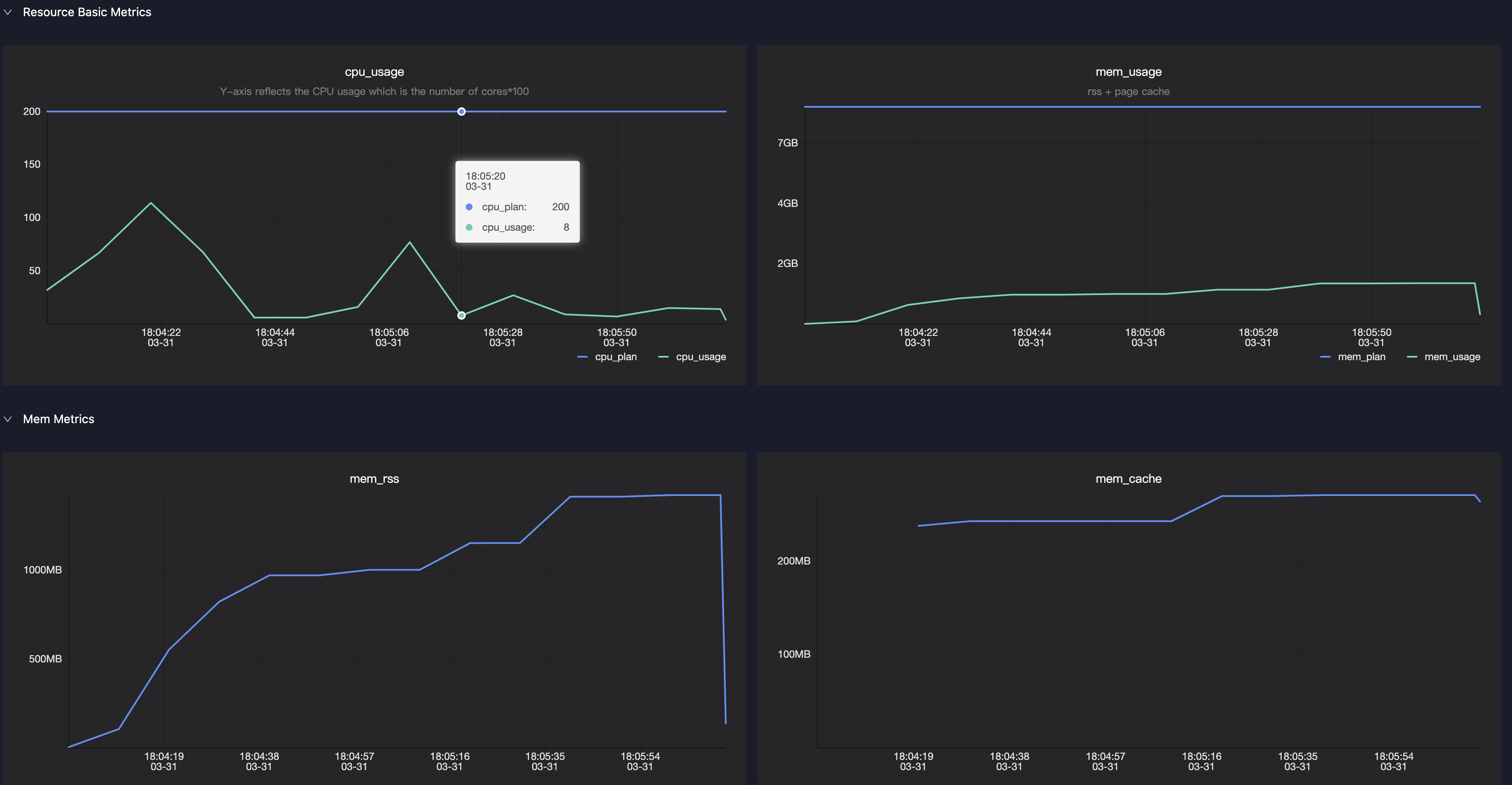
Resource waiting
Do not set spark.master in your code. After local-mode debugging, remove the spark.master=local configuration from your code.
Submit a job after resources are allocated
Resource allocation is an ongoing process, and the allocated resources may not meet the requested amount. Spark does not wait until all executors are available before running tasks. Use the following parameters to control when Spark starts task execution:
spark.scheduler.maxRegisteredResourcesWaitingTime: The maximum time to wait for resource allocation before execution starts. Default value: 30 seconds.spark.scheduler.minRegisteredResourcesRatio: The ratio of actually registered resources to the expected resources. Default value: 0.8.
Possible causes of resource allocation failure
For subscription users, the requested resources typically exceed the purchased quota.
For pay-as-you-go users, resources must be acquired through preemption.
Solutions for resource allocation failure
Adjust job resources: reduce the total number of executors or the resources per executor (typically memory).
Schedule jobs during off-peak hours.
Symptoms of resource allocation failure
The following log message appears on the driver:
WARN YarnClusterScheduler: Initial job has not accepted any resources; check your cluster UI to ensure that workers are registered and have sufficient resourcesLogView shows only the driver, with a worker count of 0.
Spark UI shows only the driver, with a worker count of 0.