SKEWJOIN HINT
When a JOIN operation performs poorly due to hot key values, you can improve its efficiency by isolating these keys. The SKEWJOIN HINT splits the data into two parts—one for hot key values and one for the remaining data—processes them separately, and then merges the results. The hint can automatically detect or let you manually specify the hot key values to accelerate the join.
Usage
To use this feature, add the SKEWJOIN HINT in the format /*+ skewJoin(<table_name>[(<column1_name>[,<column2_name>,...])][((<value11>,<value12>)[,(<value21>,<value22>)...])]*/ to your select statement. In the hint, table_name specifies the skewed table, column_name specifies the skewed column, and value specifies the skewed key value.
-- Method 1: Specify the table name (note that you must hint the table alias).
select /*+ skewjoin(a) */ * from T0 a join T1 b on a.c0 = b.c0 and a.c1 = b.c1;
-- Method 2: Specify the table and the columns that you suspect are skewed. For example, columns c0 and c1 in table 'a' are skewed.
select /*+ skewjoin(a(c0, c1)) */ * from T0 a join T1 b on a.c0 = b.c0 and a.c1 = b.c1 and a.c2 = b.c2;
-- Method 3: Specify the table, columns, and the exact skewed key values. If a value is a STRING type, enclose it in double quotation marks. For example, the values in (a.c0=1 and a.c1="2") and (a.c0=3 and a.c1="4") cause data skew.
select /*+ skewjoin(a(c0, c1)((1, "2"), (3, "4"))) */ * from T0 a join T1 b on a.c0 = b.c0 and a.c1 = b.c1 and a.c2 = b.c2;Method 3, where you explicitly specify the skewed key values, is more efficient than Method 1 and Method 2.
How it works
A hot key value is a key that appears very frequently. For example, in the following figure, the red section shows 10,000 rows where a.c0=1 and a.c1=2 and 9,000 rows where a.c0=3 and a.c1 = 4.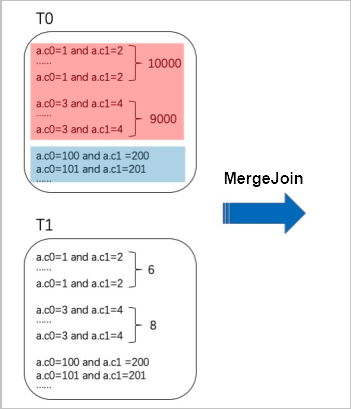
Without the SKEWJOIN HINT, joining the large tables T0 and T1 requires a MERGE JOIN. This process shuffles all identical hot key values to a single node, which causes data skew. When you add the SKEWJOIN HINT, the optimizer runs an aggregate operation to dynamically identify the top 20 hot key values based on frequency. It then splits table T0 into two datasets: one with the hot key values (Data A) and one with the remaining values (Data B). Similarly, it splits table T1 into rows that match the hot key values from T0 (Data C) and the remaining rows (Data D). Next, it performs a MAP JOIN on Data A and Data C. Because the dataset for Data C is small, a MAP JOIN is efficient. It then performs a MERGE JOIN on Data B and Data D. Finally, it combines the results of the MAP JOIN and MERGE JOIN using a UNION ALL operation to produce the final result, as shown in the following figure.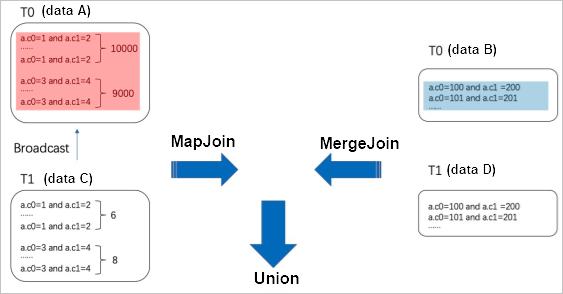
Notes
-
SKEWJOIN HINT supports the following JOIN types:
-
INNER JOIN: You can apply the hint to either table in the join.
-
LEFT JOIN, SEMI JOIN, and ANTI JOIN: You can only apply the hint to the left table.
-
RIGHT JOIN: You can only apply the hint to the right table.
-
FULL JOIN: This join type is not supported.
-
-
Add the hint only to joins that you know will cause data skew. The hint initiates an aggregate operation, which introduces some overhead. Additionally, for a query like
A JOIN B, adding a SKEWJOIN HINT to table A forces a physical execution plan that resemblesMAP JOIN UNION ALL MERGE JOIN. The MAP JOIN subplan expands to a plan similar toTop 20(A) MAP JOIN (B SEMI JOIN Top20(A)). If table B is large, and the filtered result from table B is still large, the MAP JOIN operation may cause an out-of-memory (OOM) error when building the hash table. -
For the hinted join, the data types of the join keys on the left and right sides must match. Otherwise, the SKEWJOIN HINT is ineffective. You can use a CAST function within a subquery to ensure data type consistency, as shown in the following examples:
create table T0(c0 int, c1 int, c2 int, c3 int); create table T1(c0 string, c1 int, c2 int); --Method 1: select /*+ skewjoin(a) */ * from T0 a join T1 b on cast(a.c0 as string) = cast(b.c0 as string) and a.c1 = b.c1; --Method 2: select /*+ skewjoin(b) */ * from (select cast(a.c0 as string) as c00 from T0 a) b join T1 c on b.c00 = c.c0; -
After you add the SKEWJOIN HINT, the optimizer runs an aggregate operation to identify the top 20 hot key values. The value 20 is the default. You can change this default by running the command
set odps.optimizer.skew.join.topk.num = xx;. -
You can apply the SKEWJOIN HINT to only one table in a join.
-
The hinted join must be an equijoin that includes a
left key = right keycondition. CARTESIAN JOIN operations are not supported. -
You can use SKEWJOIN HINT with other hints as shown in the following example. However, you cannot add a SKEWJOIN HINT to a join that already includes a MAP JOIN hint.
select /*+ mapjoin(c), skewjoin(a) */ * from T0 a join T1 b on a.c0 = b.c3 join T2 c on a.c0 = c.c7; -
You can verify that the SKEWJOIN HINT is active by searching for the topk_agg field in the Json Summary tab of Logview.