You can use Data Integration in DataWorks to synchronize data from various data sources to MaxCompute. Data Integration supports three types of tasks: batch synchronization, real-time synchronization, and synchronization solutions. This topic describes how to transfer data to MaxCompute by using Data Integration.
Batch synchronization
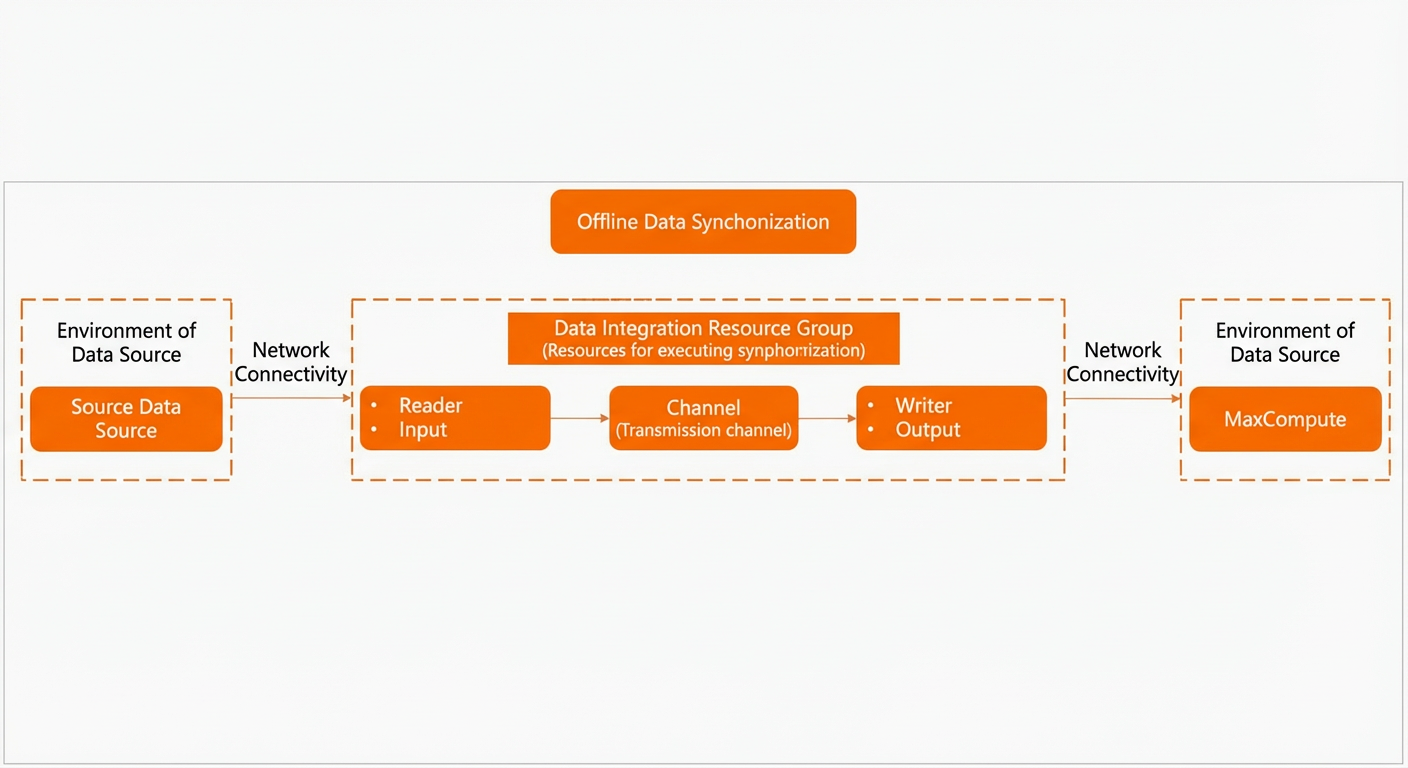
Batch synchronization provides an abstract framework of readers and writers. This framework uses a simplified intermediate data format to transfer structured and semi-structured data from any supported data source to MaxCompute after you define the source and destination.
-
To configure a batch synchronization task, see Configure a batch synchronization node by using the codeless UI and Configure a batch synchronization node by using the code editor.
-
Notes
-
Batch synchronization supports synchronizing data from a single table or from sharded tables to a single MaxCompute table.
-
Before configuring a synchronization task, add a MaxCompute data source on the DataWorks Data Sources page. For more information, see Add a MaxCompute data source.
-
Before configuring the synchronization task, ensure the resource group for Data Integration can connect to your data source network. For more information, see Network connectivity solutions.
-
Real-time synchronization
Real-time synchronization in DataWorks keeps your MaxCompute tables updated with the latest changes from a source database. A single real-time synchronization task can use multiple transformation plug-ins for data cleansing and multiple writers for multi-path output. Real-time synchronization supports synchronizing incremental data from a single table to a single MaxCompute table, from sharded tables to a single MaxCompute table, and from an entire database (multiple tables) to multiple MaxCompute tables.
-
To configure a real-time synchronization task, see Create a real-time synchronization node to synchronize incremental data from a single table and Configure a real-time synchronization task in DataStudio.
-
Notes
-
Before configuring a synchronization task, add a MaxCompute data source on the DataWorks Data Sources page. For more information, see Add a MaxCompute data source.
-
Purchase an exclusive resource group for Data Integration with appropriate specifications. For more information, see Use an exclusive resource group for Data Integration.
NoteThere is no single optimal concurrency value for tasks that run on an exclusive resource group for Data Integration. You must set the value based on the instance data volume and your desired synchronization time. To reduce the synchronization time, you can purchase resources that support a higher maximum number of concurrent threads. For recommendations on resource specifications for a single task, see Billing of exclusive resource groups for Data Integration.
-
Before configuring the synchronization task, ensure the resource group for Data Integration can connect to your data source network. For more information, see Network connectivity solutions.
-
Before running a real-time synchronization task, prepare the MaxCompute environment. For more information, see Prepare a MaxCompute environment.
-
Synchronization solution
In many business scenarios, data synchronization cannot be completed by a single task. It often requires a complex combination of batch synchronization, real-time synchronization, and data processing tasks, making the configuration highly complex.
-
To simplify this process, DataWorks provides configurable, scenario-based synchronization solutions that support one-click synchronization to MaxCompute: Configure a full and incremental full-database synchronization task and Create a batch synchronization solution to synchronize all data in a database to MaxCompute.
-
Notes
-
Before configuring a synchronization task, add a MaxCompute data source on the DataWorks Data Sources page. For more information, see Add a MaxCompute data source.
-
Purchase an exclusive resource group for Data Integration with appropriate specifications. For more information, see Use an exclusive resource group for Data Integration.
NoteThere is no single optimal concurrency value for tasks that run on an exclusive resource group for Data Integration. You must set the value based on the instance data volume and your desired synchronization time. To reduce the synchronization time, you can purchase resources that support a higher maximum number of concurrent threads. For recommendations on resource specifications for a single task, see Billing of exclusive resource groups for Data Integration.
-
Before configuring the synchronization task, ensure the resource group for Data Integration can connect to your data source network. For more information, see Network connectivity solutions.
-
Before running a real-time synchronization task, prepare the MaxCompute environment. For more information, see Prepare a MaxCompute environment.
-