Change row data in a Table component
Updated at:
Modifies rows in a table.
Prerequisites
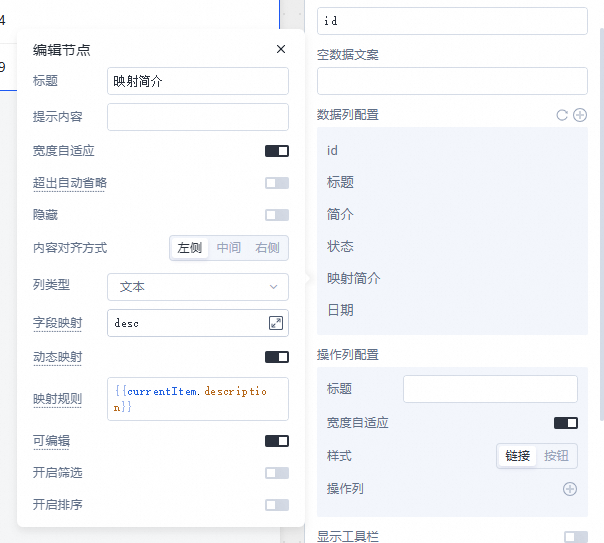
Configure Field mapping.
Enable the Editable option.
Procedure
Create a dynamic SQL integration named
sql_run.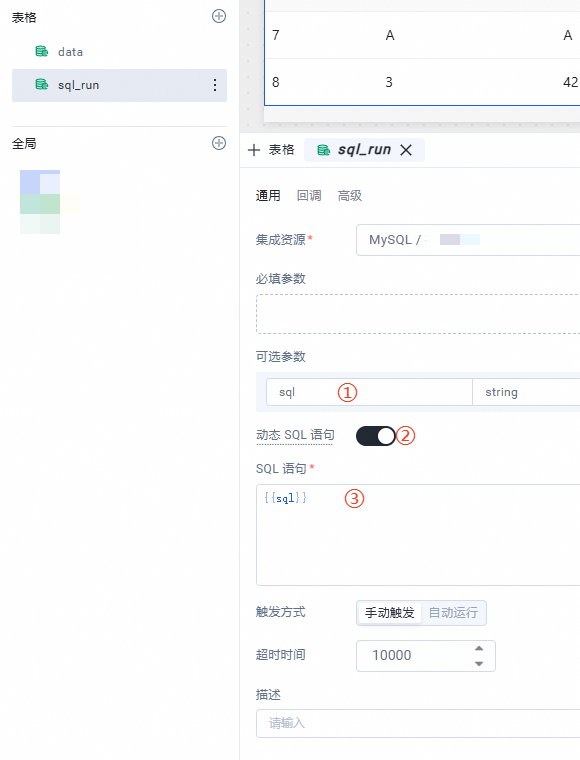
Configure the data columns of the table to be editable.
Configure the save event for the Table component.
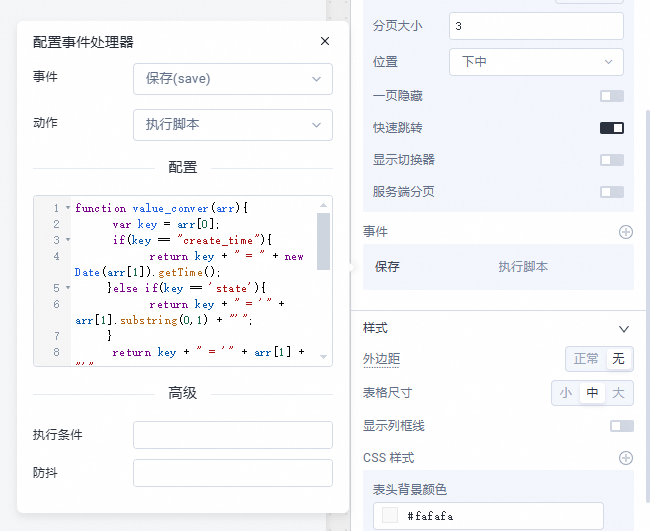
// Custom data transform class
function value_convert(arr) {
    let key = arr[0];
    if (key == "create_time") {
        // Convert the time field to a long integer. The database requires this format for create_time.
        return key + " = " + new Date(arr[1]).getTime();
    } else if (key == 'state') {
        // The state field is a single character in the database.
        return key + " = '" + arr[1].substring(0, 1) + "'";
    }
    // Process other fields as strings by default.
    return key + " = '" + arr[1] + "'";
}

// Batch SQL commands
var sqls = [];
table1.changedArray.forEach((a) => {
    // Build the field update string.
    let change = Object.entries(a).filter((a) => a[0] != 'key').map(value_convert).join(" ,");
    sqls.push("UPDATE todo SET " + change + " WHERE id = " + a.key);
});
sql_run.trigger({
    "sql": sqls.join(";")
})
Is this page helpful?