For data security reasons, some customers do not grant Alibaba Cloud services access to their databases. Xiyan GBI offers an unmanaged database connection solution that uses virtual data sources. This solution ensures that database operations are performed locally, while still allowing customers to use the SQL generation capabilities of the cloud service.
Prerequisites
-
You have activated Alibaba Cloud Model Studio.
-
You have obtained a Workspace ID. For more information, see Obtain a Workspace ID.
-
You have obtained an AccessKey ID and AccessKey secret. For more information, see Obtain an AccessKey and AgentKey.
-
The
AliyunDataAnalysisGBIFullAccessaccess policy is attached to the Resource Access Management (RAM) user. For more information, see Grant permissions in the RAM console. -
You have installed the Java SDK for Xiyan GBI. For more information, see Install the Java SDK for Xiyan GBI.
Introduction to database connection methods
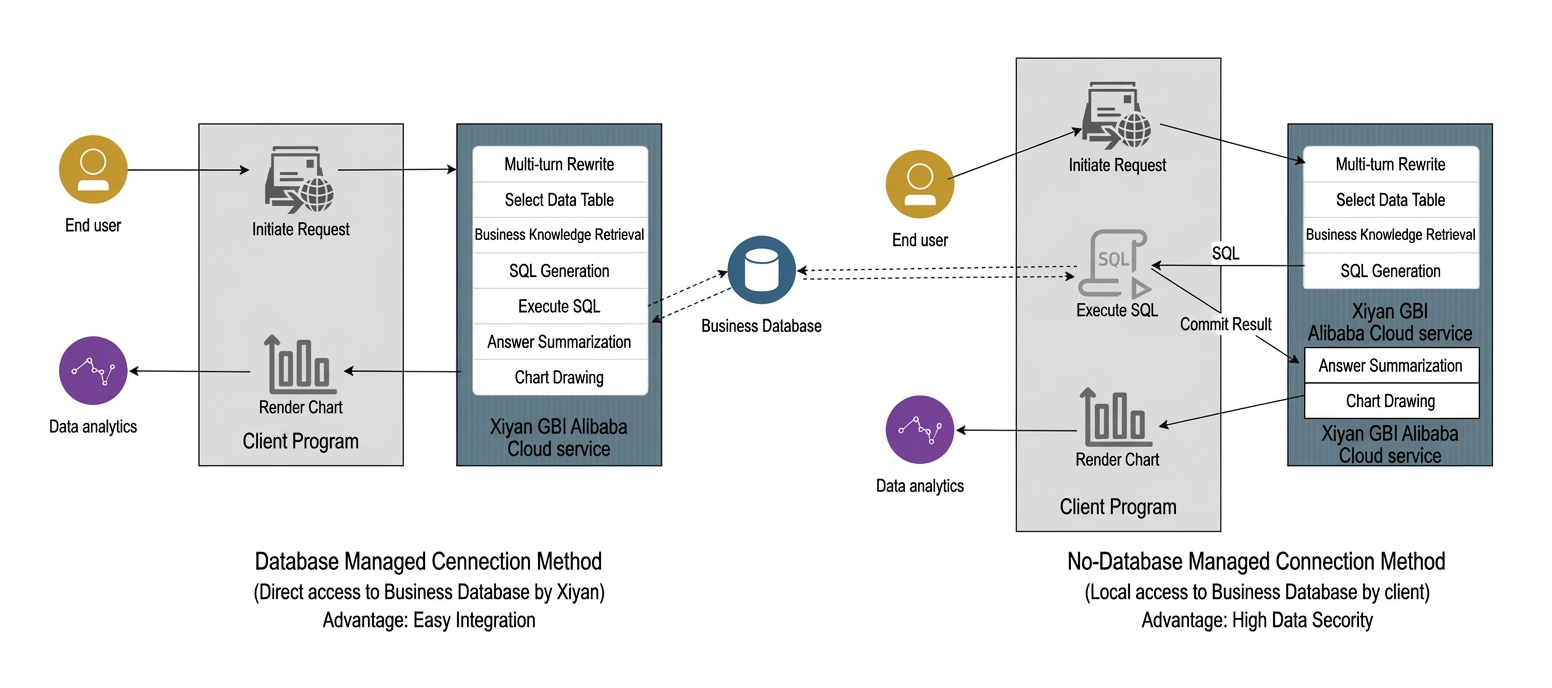
-
The standard managed database connection method offers easy integration with the Xiyan GBI cloud service. You can simply authorize and associate your data source on the product page. Xiyan GBI can then directly access your business database to retrieve SQL query results.
-
The unmanaged database connection method provides enhanced data security. However, it requires you to execute SQL statements and retrieve query results on your local client. The virtual data source is the Xiyan GBI solution that simplifies this process and reduces associated costs.
Introduction to the virtual data source solution
Xiyan GBI offers the virtual data source solution for users who cannot use a managed database connection because of data security concerns. You can use the Xiyan GBI SDK to create a virtual data source that mirrors the structure of your business database. Then, you can associate this virtual data source with a workspace in Xiyan GBI. This process lets you generate SQL queries without directly accessing your business database.
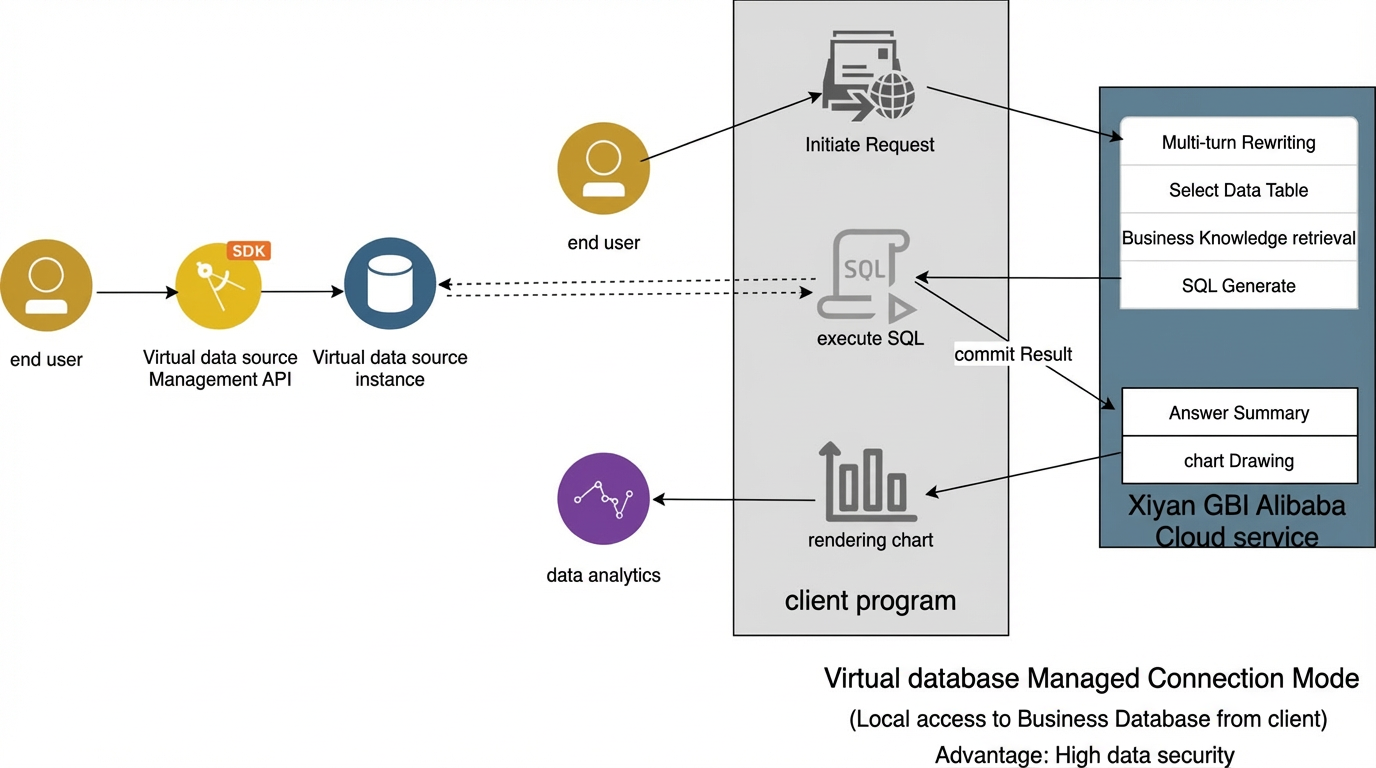
Create, associate, and authorize a virtual data source
Step 1: Create a virtual data source instance
Use the `createVirtualDatasourceInstance` API to create up to ten virtual data source instances per workspace. Each instance is an empty database instance, similar to an ApsaraDB RDS instance.
/**
     * Create a virtual data source instance
     *
     * @param client
     */
    public void create(AsyncClient client) {
        CreateVirtualDatasourceInstanceRequest createVirtualDatasourceInstanceRequest = CreateVirtualDatasourceInstanceRequest.builder()
                // The ID of the workspace where the virtual data source instance will be created.
                .workspaceId("workspaceId")
                // The name of the virtual data source instance.
                .name("name")
                // The description of the virtual data source instance.
                .description("description")
                // The dialect type of the virtual data source instance. 51: MySQL. 52: PostgreSQL.
                .type(51)
                .build();
        CompletableFuture<CreateVirtualDatasourceInstanceResponse> virtualDatasourceInstance = client.createVirtualDatasourceInstance(createVirtualDatasourceInstanceRequest);
        CreateVirtualDatasourceInstanceResponse createVirtualDatasourceInstanceResponse = virtualDatasourceInstance.join();
        System.out.println(createVirtualDatasourceInstanceResponse.getBody().getData());
}def create_virtual_datasource_instance(
args: List[str],
) -> None:
client = Sample.create_client()
create_virtual_datasource_instance_request = data_analysis_gbi20240823_models.CreateVirtualDatasourceInstanceRequest()
runtime = util_models.RuntimeOptions()
headers = {}
try:
# When you copy the code to run, print the API return value.
client.create_virtual_datasource_instance_with_options(create_virtual_datasource_instance_request, headers, runtime)
except Exception as error:
# This is for demonstration only. Handle exceptions carefully in your project and do not ignore them.
# Error message
print(error.message)
# Diagnostic address
print(error.data.get("Recommend"))
UtilClient.assert_as_string(error.message)Step 2: View the list of virtual data source instances
Use the `listVirtualDatasourceInstanceRequest` API to view all virtual data source instances in the current workspace. This lets you obtain the unique identifier (`vdbId`) for each virtual data source.
    /**
     * Get the list of virtual data source instances
     *
     * @param client
     */
    public void list(AsyncClient client) {
        ListVirtualDatasourceInstanceRequest listVirtualDatasourceInstanceRequest = ListVirtualDatasourceInstanceRequest.builder()
                // The ID of the workspace whose data source instance list you want to retrieve.
                .workspaceId("")
                .build();
        ListVirtualDatasourceInstanceResponse listVirtualDatasourceInstanceResponse = client.listVirtualDatasourceInstance(listVirtualDatasourceInstanceRequest).join();
        Gson gson = new Gson();
        String jsonString = gson.toJson(listVirtualDatasourceInstanceResponse.getBody().getData());
        System.out.println(jsonString);
}def list_virtual_datasource_instance(
args: List[str],
) -> None:
client = Sample.create_client()
list_virtual_datasource_instance_request = data_analysis_gbi20240823_models.ListVirtualDatasourceInstanceRequest()
runtime = util_models.RuntimeOptions()
headers = {}
try:
# When you copy the code to run, print the API return value.
client.list_virtual_datasource_instance_with_options(list_virtual_datasource_instance_request, headers, runtime)
except Exception as error:
# This is for demonstration only. Handle exceptions carefully in your project and do not ignore them.
# Error message
print(error.message)
# Diagnostic address
print(error.data.get("Recommend"))
UtilClient.assert_as_string(error.message)
Step 3: Add DDL statements to the virtual data source instance
Use the `saveVirtualDatasourceDdl` API to add DDL statements to a specified virtual data source instance (`vdbId`). The Xiyan GBI cloud service parses these DDL statements to generate and maintain structured information for the corresponding data tables and columns.
/**
     * Add DDL statements to the virtual data source
     * @param client
     */
    public void addDdlForVirtualDatasource(AsyncClient client){
        SaveVirtualDatasourceDdlRequest saveVirtualDatasourceDdlRequest = SaveVirtualDatasourceDdlRequest.builder()
                // The workspace to which the virtual data source instance belongs.
                .workspaceId("workspaceId")
                // The unique identifier (ID) of the virtual data source instance.
                .vdbId("vdb-id")
                // The DDL statements to add. You can add multiple statements separated by semicolons (;).
                .ddl("CREATE TABLE user (id int NOT NULL AUTO_INCREMENT comment 'ID',name varchar(10) NOT NULL comment 'Name', dept_id int NOT NULL comment 'Department ID', salary bigint NULL DEFAULT 0 comment 'Salary',  PRIMARY KEY (`id`),   KEY `idx_name` (`name`),   KEY `d_id` (`dept_id`),    CONSTRAINT `d_id` FOREIGN KEY (`dept_id`) REFERENCES `department` (`id`)) COMMENT='User table' ENGINE=InnoDB DEFAULT CHARSET=utf8mb4;")
                .build();
        SaveVirtualDatasourceDdlResponse  saveVirtualDatasourceDdlResponse = client.saveVirtualDatasourceDdl(saveVirtualDatasourceDdlRequest).join();
        System.out.println(saveVirtualDatasourceDdlResponse.getBody().getData());
}def save_virtual_datasource_ddl(self):
save_virtual_datasource_ddl_request = data_analysis_gbi20240823_models.SaveVirtualDatasourceDdlRequest(
workspace_id= workspace_id,
# The unique identifier (ID) of the virtual data source instance.
vdb_id='vdb_id',
# The DDL statements to add. You can add multiple statements separated by semicolons (;).
ddl="CREATE TABLE user (id int NOT NULL AUTO_INCREMENT comment 'ID',name varchar(10) NOT NULL comment 'Name', dept_id int NOT NULL comment 'Department ID', salary bigint NULL DEFAULT 0 comment 'Salary', PRIMARY KEY (`id`), KEY `idx_name` (`name`), KEY `d_id` (`dept_id`), CONSTRAINT `d_id` FOREIGN KEY (`dept_id`) REFERENCES `department` (`id`)) COMMENT='User table' ENGINE=InnoDB DEFAULT CHARSET=utf8mb4;"
)
runtime = util_models.RuntimeOptions()
headers = {}
try:
# When you copy the code to run, print the API return value.
self._client.save_virtual_datasource_ddl_with_options(save_virtual_datasource_ddl_request, headers, runtime)
except Exception as error:
# This is for demonstration only. Handle exceptions carefully in your project and do not ignore them.
# Error message
print(error.message)
# Diagnostic address
print(error.data.get("Recommend"))
UtilClient.assert_as_string(error.message)Step 4: Attach the virtual data source instance to your workspace
Use the `createDatasourceAuthorization` API to associate a specified virtual data source instance (`vdbId`) with a workspace.
/**
* Authorize and associate the data source instance with the workspace
* @param client
*/
public void createAuthorize(Client client){
CreateDatasourceAuthorizationRequest createAuthorizeRequest = new CreateDatasourceAuthorizationRequest();
// The type of the associated data source instance. For details, see the SDK documentation. When associating a virtual data source instance, the type specified during creation is used by default.
createAuthorizeRequest.setType(51);
// The ID of the associated workspace.
createAuthorizeRequest.setWorkspaceId("workspaceId");
// If you are associating a virtual data source, add the virtual data source instance ID.
createAuthorizeRequest.setVdbId("vdb-id");
try {
CreateDatasourceAuthorizationResponse createDatasourceAuthorizationResponse = client.createDatasourceAuthorization(createAuthorizeRequest);
System.out.println(createDatasourceAuthorizationResponse.getBody().getData());
} catch (Exception e) {
e.printStackTrace();
}
}def create_datasource_authorization(
args: List[str],
) -> None:
client = Sample.create_client()
create_datasource_authorization_request = data_analysis_gbi20240823_models.CreateDatasourceAuthorizationRequest()
runtime = util_models.RuntimeOptions()
headers = {}
try:
# When you copy the code to run, print the API return value.
client.create_datasource_authorization_with_options(create_datasource_authorization_request, headers, runtime)
except Exception as error:
# This is for demonstration only. Handle exceptions carefully in your project and do not ignore them.
# Error message
print(error.message)
# Diagnostic address
print(error.data.get("Recommend"))
UtilClient.assert_as_string(error.message)Step 5: Select the required data tables in your virtual data source
Use the `syncRemoteTables` API to synchronize information about specified data tables with the Xiyan GBI cloud service. Subsequent intelligent Q&A and SQL generation operations will be based on the data tables you select.
/**
* Associate data tables from the data source with the specified workspace. Intelligent Q&A will be based on the associated data tables.
* @param client
*/
public void syncRemoteTables(AsyncClient client){
ArrayList<String> tableNames = new ArrayList<>();
tableNames.add("user");
SyncRemoteTablesRequest syncRemoteTablesRequest = SyncRemoteTablesRequest
.builder()
// The workspace for the data tables to be associated.
.workspaceId("workspaceId")
.tableNames(tableNames)
.build();
SyncRemoteTablesResponse syncRemoteTablesResponse = client.syncRemoteTables(syncRemoteTablesRequest).join();
System.out.println(syncRemoteTablesResponse.getBody().getData());
}def sync_remote_tables(
args: List[str],
) -> None:
client = Sample.create_client()
sync_remote_tables_request = data_analysis_gbi20240823_models.SyncRemoteTablesRequest()
runtime = util_models.RuntimeOptions()
headers = {}
try:
# When you copy the code to run, print the API return value.
client.sync_remote_tables_with_options(sync_remote_tables_request, headers, runtime)
except Exception as error:
# This is for demonstration only. Handle exceptions carefully in your project and do not ignore them.
# Error message
print(error.message)
# Diagnostic address
print(error.data.get("Recommend"))
UtilClient.assert_as_string(error.message)
Code example for using a virtual data source instance
This code example uses the Xiyan GBI SDK to demonstrate an end-to-end scenario that includes creating, associating, and authorizing a virtual data source. This example is designed to help you become familiar with the API. Before you run the code, replace the accessKeyId, accessKeySecret, and workspaceId placeholders with your actual values.
The following code example demonstrates how to manage a virtual data source instance, including operations such as creating, modifying, deleting, and viewing the instance. The example also shows how to authorize and associate the instance with a workspace and link specific tables from the instance to Xiyan GBI.
package com.alibaba.iic.llmsolution.gbi.util;
import com.aliyun.auth.credentials.Credential;
import com.aliyun.auth.credentials.provider.StaticCredentialProvider;
import com.aliyun.sdk.gateway.pop.Configuration;
import com.aliyun.sdk.gateway.pop.auth.SignatureVersion;
import com.aliyun.sdk.service.dataanalysisgbi20240823.AsyncClient;
import com.aliyun.sdk.service.dataanalysisgbi20240823.models.*;
import com.google.gson.Gson;
import darabonba.core.client.ClientOverrideConfiguration;
import java.util.ArrayList;
import java.util.concurrent.CompletableFuture;
public class VirtualDatasourceTest {
public static void main(String[] args) {
StaticCredentialProvider provider = StaticCredentialProvider.create(
Credential.builder()
.accessKeyId("")
.accessKeySecret("")
.build()
);
AsyncClient client = AsyncClient.builder()
.region("cn-beijing")
.credentialsProvider(provider)
.serviceConfiguration(Configuration.create()
.setSignatureVersion(SignatureVersion.V3)
)
.overrideConfiguration(
ClientOverrideConfiguration.create()
.setProtocol("HTTPS")
.setEndpointOverride("dataanalysisgbi.cn-beijing.aliyuncs.com")
)
.build();
}
/**
* Create a virtual data source instance
*
* @param client
*/
public void create(AsyncClient client) {
CreateVirtualDatasourceInstanceRequest createVirtualDatasourceInstanceRequest = CreateVirtualDatasourceInstanceRequest.builder()
// The ID of the workspace where the virtual data source instance will be created.
.workspaceId("workspaceId")
// The name of the virtual data source instance.
.name("name")
// The description of the virtual data source instance.
.description("description")
// The dialect type of the virtual data source instance. 51: MySQL. 52: PostgreSQL.
.type(51)
.build();
CompletableFuture<CreateVirtualDatasourceInstanceResponse> virtualDatasourceInstance = client.createVirtualDatasourceInstance(createVirtualDatasourceInstanceRequest);
CreateVirtualDatasourceInstanceResponse createVirtualDatasourceInstanceResponse = virtualDatasourceInstance.join();
System.out.println(createVirtualDatasourceInstanceResponse.getBody().getData());
}
/**
* Get the list of virtual data source instances
*
* @param client
*/
public void list(AsyncClient client) {
ListVirtualDatasourceInstanceRequest listVirtualDatasourceInstanceRequest = ListVirtualDatasourceInstanceRequest.builder()
// The ID of the workspace whose data source instance list you want to retrieve.
.workspaceId("")
.build();
ListVirtualDatasourceInstanceResponse listVirtualDatasourceInstanceResponse = client.listVirtualDatasourceInstance(listVirtualDatasourceInstanceRequest).join();
Gson gson = new Gson();
String jsonString = gson.toJson(listVirtualDatasourceInstanceResponse.getBody().getData());
System.out.println(jsonString);
}
/**
* Modify the information of a virtual data source instance
* @param client
*/
public void update(AsyncClient client) {
UpdateVirtualDatasourceInstanceRequest virtualDatasourceInstanceRequest = UpdateVirtualDatasourceInstanceRequest.builder()
// The ID of the workspace where the virtual data source instance was created.
.workspaceId("")
// The name of the virtual data source instance.
.name("name")
// The description of the virtual data source instance.
.description("description")
// The unique identifier (ID) of the virtual data source instance. You can obtain this from the virtual data source instance list.
.vdbId("vdb-id")
.build();
UpdateVirtualDatasourceInstanceResponse updateVirtualDatasourceInstanceResponse = client.updateVirtualDatasourceInstance(virtualDatasourceInstanceRequest).join();
System.out.println(updateVirtualDatasourceInstanceResponse.getBody().getData());
}
/**
* Delete a virtual data source instance
* @param client
*/
public void delete(AsyncClient client){
DeleteVirtualDatasourceInstanceRequest deleteVirtualDatasourceInstanceRequest = DeleteVirtualDatasourceInstanceRequest.builder()
// The workspace to which the virtual data source instance to be deleted belongs.
.workspaceId("workspaceId")
// The unique identifier (ID) of the virtual data source instance to be deleted.
.vdbId("vdb-id")
.build();
DeleteVirtualDatasourceInstanceResponse deleteVirtualDatasourceInstanceResponse = client.deleteVirtualDatasourceInstance(deleteVirtualDatasourceInstanceRequest).join();
System.out.println(deleteVirtualDatasourceInstanceResponse.getBody().getData());
}
/**
* Add DDL statements to the virtual data source
* @param client
*/
public void addDdlForVirtualDatasource(AsyncClient client){
SaveVirtualDatasourceDdlRequest saveVirtualDatasourceDdlRequest = SaveVirtualDatasourceDdlRequest.builder()
// The workspace to which the virtual data source instance belongs.
.workspaceId("workspaceId")
// The unique identifier (ID) of the virtual data source instance.
.vdbId("vdb-id")
// The DDL statements to add. You can add multiple statements separated by semicolons (;).
.ddl("CREATE TABLE user (id int NOT NULL AUTO_INCREMENT comment 'ID',name varchar(10) NOT NULL comment 'Name', dept_id int NOT NULL comment 'Department ID', salary bigint NULL DEFAULT 0 comment 'Salary', PRIMARY KEY (`id`), KEY `idx_name` (`name`), KEY `d_id` (`dept_id`), CONSTRAINT `d_id` FOREIGN KEY (`dept_id`) REFERENCES `department` (`id`)) COMMENT='User table' ENGINE=InnoDB DEFAULT CHARSET=utf8mb4;")
.build();
SaveVirtualDatasourceDdlResponse saveVirtualDatasourceDdlResponse = client.saveVirtualDatasourceDdl(saveVirtualDatasourceDdlRequest).join();
System.out.println(saveVirtualDatasourceDdlResponse.getBody().getData());
}
/**
* Authorize and associate the data source instance with the workspace
* @param client
*/
public void createAuthorize(Client client){
CreateDatasourceAuthorizationRequest createAuthorizeRequest = new CreateDatasourceAuthorizationRequest();
// The type of the associated data source instance. For details, see the SDK documentation. When associating a virtual data source instance, the type specified during creation is used by default.
createAuthorizeRequest.setType(51);
// The ID of the associated workspace.
createAuthorizeRequest.setWorkspaceId("workspaceId");
// If you are associating a virtual data source, add the virtual data source instance ID.
createAuthorizeRequest.setVdbId("vdb-id");
try {
CreateDatasourceAuthorizationResponse createDatasourceAuthorizationResponse = client.createDatasourceAuthorization(createAuthorizeRequest);
System.out.println(createDatasourceAuthorizationResponse.getBody().getData());
} catch (Exception e) {
e.printStackTrace();
}
}
/**
* Associate data tables from the data source with the specified workspace. Intelligent Q&A will be based on the associated data tables.
* @param client
*/
public void syncRemoteTables(AsyncClient client){
ArrayList<String> tableNames = new ArrayList<>();
tableNames.add("user");
SyncRemoteTablesRequest syncRemoteTablesRequest = SyncRemoteTablesRequest
.builder()
// The workspace for the data tables to be associated.
.workspaceId("workspaceId")
.tableNames(tableNames)
.build();
SyncRemoteTablesResponse syncRemoteTablesResponse = client.syncRemoteTables(syncRemoteTablesRequest).join();
System.out.println(syncRemoteTablesResponse.getBody().getData());
}
}
# -*- coding: utf-8 -*-
# This file is auto-generated, don't edit it. Thanks.
import os
import sys
from typing import List
from alibabacloud_dataanalysisgbi20240823.client import Client as DataAnalysisGBI20240823Client
from alibabacloud_tea_openapi import models as open_api_models
from alibabacloud_dataanalysisgbi20240823 import models as data_analysis_gbi20240823_models
from alibabacloud_tea_util import models as util_models
from alibabacloud_tea_util.client import Client as UtilClient
workspace_id = 'ws_xxxxx'
class XiyanGbiService:
def __init__(self) -> None:
self._client = None
self.create_client()
def create_client(self) -> None:
"""
Initialize the client with an AccessKey ID and AccessKey secret.
@return: Client
@throws Exception
"""
# Leaking project code may expose the AccessKey and compromise the security of all resources in your account. The following code is for reference only.
# We recommend that you use a more secure method, such as Security Token Service (STS). For more information about authentication methods, see https://www.alibabacloud.com/help/en/sdk/developer-reference/v2-manage-python-access-credentials
config = open_api_models.Config(
# Required. Make sure that the ALIBABA_CLOUD_ACCESS_KEY_ID environment variable is set.
access_key_id=os.environ['ALIBABA_CLOUD_ACCESS_KEY_ID'],
# Required. Make sure that the ALIBABA_CLOUD_ACCESS_KEY_SECRET environment variable is set.
access_key_secret=os.environ['ALIBABA_CLOUD_ACCESS_KEY_SECRET']
)
# For the endpoint, see https://api.aliyun.com/product/DataAnalysisGBI
config.endpoint = f'dataanalysisgbi.cn-beijing.aliyuncs.com'
self._client = DataAnalysisGBI20240823Client(config)
def create_virtual_datasource_instance(self):
create_virtual_datasource_instance_request = data_analysis_gbi20240823_models.CreateVirtualDatasourceInstanceRequest(
workspace_id=workspace_id,
name='name',
description='description',
type=51
)
runtime = util_models.RuntimeOptions()
headers = {}
try:
# When you copy the code to run, print the API return value.
self._client.create_virtual_datasource_instance_with_options(create_virtual_datasource_instance_request, headers, runtime)
except Exception as error:
# This is for demonstration only. Handle exceptions carefully in your project and do not ignore them.
# Error message
print(error.message)
# Diagnostic address
print(error.data.get("Recommend"))
UtilClient.assert_as_string(error.message)
def list_virtual_datasource_instance(self):
list_virtual_datasource_instance_request = data_analysis_gbi20240823_models.ListVirtualDatasourceInstanceRequest(
workspace_id= workspace_id
)
runtime = util_models.RuntimeOptions()
headers = {}
try:
# When you copy the code to run, print the API return value.
self._client.list_virtual_datasource_instance_with_options(list_virtual_datasource_instance_request, headers, runtime)
except Exception as error:
# This is for demonstration only. Handle exceptions carefully in your project and do not ignore them.
# Error message
print(error.message)
# Diagnostic address
print(error.data.get("Recommend"))
UtilClient.assert_as_string(error.message)
def update_virtual_datasource_instance(self):
update_virtual_datasource_instance_request = data_analysis_gbi20240823_models.UpdateVirtualDatasourceInstanceRequest(
workspace_id= workspace_id,
name='name',
description='description',
vdb_id='vdb_id',
type=51
)
runtime = util_models.RuntimeOptions()
headers = {}
try:
# When you copy the code to run, print the API return value.
self._client.update_virtual_datasource_instance_with_options(update_virtual_datasource_instance_request, headers, runtime)
except Exception as error:
# This is for demonstration only. Handle exceptions carefully in your project and do not ignore them.
# Error message
print(error.message)
# Diagnostic address
print(error.data.get("Recommend"))
UtilClient.assert_as_string(error.message)
def delete_virtual_datasource_instance(self):
delete_virtual_datasource_instance_request = data_analysis_gbi20240823_models.DeleteVirtualDatasourceInstanceRequest(
workspace_id= workspace_id,
# The unique identifier (ID) of the virtual data source instance.
vdb_id='vdb_id',
)
runtime = util_models.RuntimeOptions()
headers = {}
try:
# When you copy the code to run, print the API return value.
self._client.delete_virtual_datasource_instance_with_options(delete_virtual_datasource_instance_request, headers, runtime)
except Exception as error:
# This is for demonstration only. Handle exceptions carefully in your project and do not ignore them.
# Error message
print(error.message)
# Diagnostic address
print(error.data.get("Recommend"))
UtilClient.assert_as_string(error.message)
def save_virtual_datasource_ddl(self):
    save_virtual_datasource_ddl_request = data_analysis_gbi20240823_models.SaveVirtualDatasourceDdlRequest(
        workspace_id= workspace_id,
        # The unique identifier (ID) of the virtual data source instance.
        vdb_id='vdb_id',
        # The DDL statements to add. You can add multiple statements separated by semicolons (;).
        ddl="CREATE TABLE user (id int NOT NULL AUTO_INCREMENT comment 'ID',name varchar(10) NOT NULL comment 'Name', dept_id int NOT NULL comment 'Department ID', salary bigint NULL DEFAULT 0 comment 'Salary',  PRIMARY KEY (`id`),   KEY `idx_name` (`name`),   KEY `d_id` (`dept_id`),    CONSTRAINT `d_id` FOREIGN KEY (`dept_id`) REFERENCES `department` (`id`)) COMMENT='User table' ENGINE=InnoDB DEFAULT CHARSET=utf8mb4;"
    )
    runtime = util_models.RuntimeOptions()
    headers = {}
    try:
        # When you copy the code to run, print the API return value.
        self._client.save_virtual_datasource_ddl_with_options(save_virtual_datasource_ddl_request, headers, runtime)
    except Exception as error:
        # This is for demonstration only. Handle exceptions carefully in your project and do not ignore them.
        # Error message
        print(error.message)
        # Diagnostic address
        print(error.data.get("Recommend"))
        UtilClient.assert_as_string(error.message)
def create_datasource_authorization(self):
create_datasource_authorization_request = data_analysis_gbi20240823_models.CreateDatasourceAuthorizationRequest(
workspace_id=workspace_id,
# The unique identifier (ID) of the virtual data source instance.
vdb_id='vdb_id',
type=51
)
runtime = util_models.RuntimeOptions()
headers = {}
try:
# When you copy the code to run, print the API return value.
self._client.create_datasource_authorization_with_options(create_datasource_authorization_request, headers, runtime)
except Exception as error:
# This is for demonstration only. Handle exceptions carefully in your project and do not ignore them.
# Error message
print(error.message)
# Diagnostic address
print(error.data.get("Recommend"))
UtilClient.assert_as_string(error.message)
def sync_remote_tables(self):
sync_remote_tables_request = data_analysis_gbi20240823_models.SyncRemoteTablesRequest(
workspace_id= workspace_id,
table_names=['table_1']
)
runtime = util_models.RuntimeOptions()
headers = {}
try:
# When you copy the code to run, print the API return value.
self._client.sync_remote_tables_with_options(sync_remote_tables_request, headers, runtime)
except Exception as error:
# This is for demonstration only. Handle exceptions carefully in your project and do not ignore them.
# Error message
print(error.message)
# Diagnostic address
print(error.data.get("Recommend"))
UtilClient.assert_as_string(error.message)
if __name__ == '__main__':
xiyanGbiService = XiyanGbiService()
xiyanGbiService.create_virtual_datasource_instance()