This topic provides best practice examples for AMB Search APIs. You can use these examples to get started and develop your applications.
Function overview
1.1. Brief description
AMB Search includes a built-in web search feature that generates intelligent search results from general knowledge and information. For searches across more specific domains and enterprise knowledge, AMB Search also lets you import data sources through APIs or by uploading files. You can use the following APIs to configure and manage your enterprise knowledge. Go to the console:

1.2. Product page display

1.2.1. Data source management
Console entrance
This feature is located in the Data Source Management menu. This menu provides instructions for data ingestion and lets you use Platform as a Service (PaaS) APIs to maintain data sources and the knowledge within datasets.
Function description
You can maintain one or more data sources from which the intelligent search module can retrieve knowledge. Three types of data sources are currently supported:
-
Built-in data source: This is a built-in data source that cannot be modified. It currently includes web search, which supports searching for website data that is publicly available on the Internet.
-
Import data source through API: If your company provides a search API, AMB Search can integrate it with its Large Language Model (LLM) capabilities. This option currently requires you to contact our technical support team for maintenance because it is not yet available for custom configuration.
-
Upload files as a data source: If your company provides the knowledge, AMB Search provides the search and LLM capabilities. You can use the dataset-related APIs under Data Source Management to maintain indexes and the knowledge they contain.
API: Data source management
1.2.2. System configuration -> General/Media asset search source
Console entrance
This feature is located on the General Search Source and Media Asset Search Source tabs in the System Configuration menu.
Function description
You can enable or disable indexes and configure the number of retrieved articles and chunks (segments) for the two tabs in the intelligent search module.
API: System configuration - Data source management
1.2.3. Intelligent search
Console entrance
-
The multimodal search box on the AMB Search home page.

-
Search Materials in the upper-right corner of the AMB Search home page.

Function description
This feature provides in-depth multimodal search for general fields and industries, such as film and television, media, and marketing.
API: Intelligent search
You can configure the data source in the `chatconfig.SearchSource` field.
Overall PaaS API integration plan
2.1. Plan overview
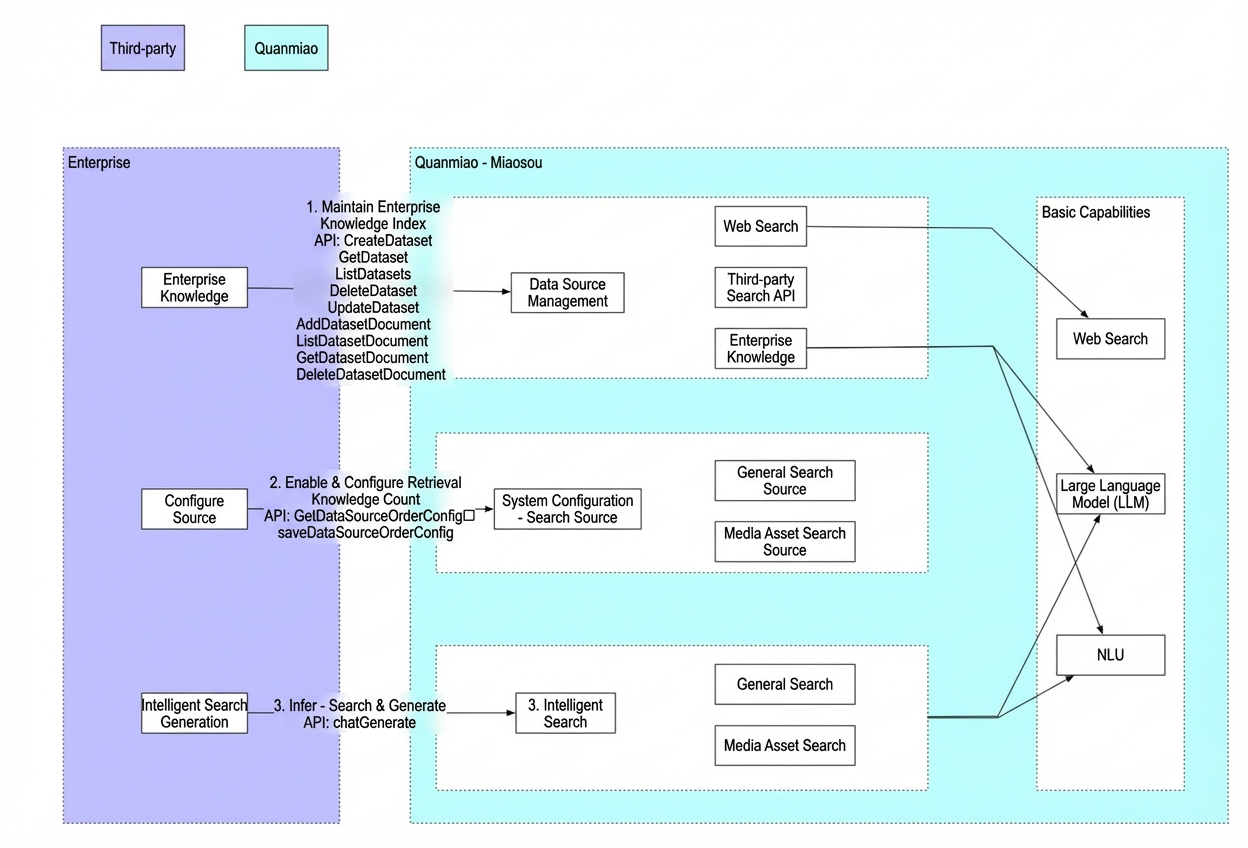
2.2. API details
-
AMB Search - Data Source: Used to maintain enterprise knowledge.
-
System configuration - Data source management: Used to configure data sources. You can perform this configuration in the console.
-
RunSearchGeneration - AMB Search - Intelligent search: Provides end-to-end intelligent search generation and inference capabilities.
PaaS API integration examples
3.1. Prerequisites
-
You have activated this product for your Alibaba Cloud account.
-
Obtain an AgentKey, AccessKeyId, and AccessKeySecret. For more information, see Obtain an AccessKey and AgentKey.
-
Obtain a WorkspaceId. For more information, see Obtain a Workspace ID.
-
Import the AMB software development kit (SDK). Make sure to obtain the latest SDK version.
<dependency>
  <groupId>com.aliyun</groupId>
  <artifactId>alibabacloud-aimiaobi20230801</artifactId>
  <version>1.0.30</version>
</dependency>-
Import third-party dependencies: The Server-Sent Events (SSE) example in this topic uses the open source OkHttp component. If you use the example code, you must import the following POM dependency.
<dependency>
    <groupId>com.squareup.okhttp3</groupId>
    <artifactId>okhttp</artifactId>
    <version>4.9.1</version>
</dependency>

<dependency>
    <groupId>com.squareup.okhttp3</groupId>
    <artifactId>okhttp-sse</artifactId>
    <version>4.9.1</version>
</dependency>
3.2. Management API (HTTP) - ListDatasets
Preparation:
-
You have activated the product on your Alibaba Cloud account.
-
Obtain an AccessKey. This corresponds to ALIBABA_CLOUD_ACCESS_KEY_ID in the example.
-
Obtain an AccessKeySecret. This corresponds to ALIBABA_CLOUD_ACCESS_KEY_SECRET in the example.
-
Obtain a WorkspaceId. This corresponds to WorkspaceId in the example.
API description
-
Miaosou - Data Source List API
API documentation
Online debugging
ListDatasets_AMB_API Debugging-Alibaba Cloud OpenAPI Developer Portal.
Example call
-
Java SDK:
// This file is auto-generated, don't edit it. Thanks.
package demo;

import com.aliyun.auth.credentials.Credential;
import com.aliyun.auth.credentials.provider.StaticCredentialProvider;
import com.aliyun.core.http.HttpClient;
import com.aliyun.core.http.HttpMethod;
import com.aliyun.core.http.ProxyOptions;
import com.aliyun.httpcomponent.httpclient.ApacheAsyncHttpClientBuilder;
import com.aliyun.sdk.service.aimiaobi20230801.models.*;
import com.aliyun.sdk.service.aimiaobi20230801.*;
import com.google.gson.Gson;
import darabonba.core.RequestConfiguration;
import darabonba.core.client.ClientOverrideConfiguration;
import darabonba.core.utils.CommonUtil;
import darabonba.core.TeaPair;

//import javax.net.ssl.KeyManager;
//import javax.net.ssl.X509TrustManager;
import java.net.InetSocketAddress;
import java.time.Duration;
import java.util.*;
import java.util.concurrent.CompletableFuture;
import java.io.*;

public class ListDatasets {
    public static void main(String[] args) throws Exception {

        // HttpClient Configuration
        /*HttpClient httpClient = new ApacheAsyncHttpClientBuilder()
                .connectionTimeout(Duration.ofSeconds(10)) // Set the connection timeout time, the default is 10 seconds
                .responseTimeout(Duration.ofSeconds(10)) // Set the response timeout time, the default is 20 seconds
                .maxConnections(128) // Set the connection pool size
                .maxIdleTimeOut(Duration.ofSeconds(50)) // Set the connection pool timeout, the default is 30 seconds
                // Configure the proxy
                .proxy(new ProxyOptions(ProxyOptions.Type.HTTP, new InetSocketAddress("<YOUR-PROXY-HOSTNAME>", 9001))
                        .setCredentials("<YOUR-PROXY-USERNAME>", "<YOUR-PROXY-PASSWORD>"))
                // If it is an https connection, you need to configure the certificate, or ignore the certificate(.ignoreSSL(true))
                .x509TrustManagers(new X509TrustManager[]{})
                .keyManagers(new KeyManager[]{})
                .ignoreSSL(false)
                .build();*/

        // Configure Credentials authentication information, including ak, secret, token
        StaticCredentialProvider provider = StaticCredentialProvider.create(Credential.builder()
                // Please ensure that the environment variables ALIBABA_CLOUD_ACCESS_KEY_ID and ALIBABA_CLOUD_ACCESS_KEY_SECRET are set.
                .accessKeyId(System.getenv("ALIBABA_CLOUD_ACCESS_KEY_ID"))
                .accessKeySecret(System.getenv("ALIBABA_CLOUD_ACCESS_KEY_SECRET"))
                //.securityToken(System.getenv("ALIBABA_CLOUD_SECURITY_TOKEN")) // use STS token
                .build());

        // Configure the Client
        AsyncClient client = AsyncClient.builder()
                .region("cn-beijing") // Region ID
                //.httpClient(httpClient) // Use the configured HttpClient, otherwise use the default HttpClient (Apache HttpClient)
                .credentialsProvider(provider)
                //.serviceConfiguration(Configuration.create()) // Service-level configuration
                // Client-level configuration rewrite, can set Endpoint, Http request parameters, etc.
                .overrideConfiguration(
                        ClientOverrideConfiguration.create()
                                  // For the endpoint, see https://api.aliyun.com/product/AiMiaoBi
                                .setEndpointOverride("aimiaobi.cn-beijing.aliyuncs.com")
                        //.setConnectTimeout(Duration.ofSeconds(30))
                )
                .build();

        // Parameter settings for API request
        ListDatasetsRequest listDatasetsRequest = ListDatasetsRequest.builder()
                .workspaceId(workspaceId)
                // Request-level configuration rewrite, can set Http request parameters, etc.
                // .requestConfiguration(RequestConfiguration.create().setHttpHeaders(new HttpHeaders()))
                .build();

        // Asynchronously get the return value of the API request
        CompletableFuture<ListDatasetsResponse> response = client.listDatasets(listDatasetsRequest);
        // Synchronously get the return value of the API request
        ListDatasetsResponse resp = response.get();
        System.out.println(new Gson().toJson(resp));
        // Asynchronous processing of return values
        /*response.thenAccept(resp -> {
            System.out.println(new Gson().toJson(resp));
        }).exceptionally(throwable -> { // Handling exceptions
            System.out.println(throwable.getMessage());
            return null;
        });*/

        // Finally, close the client
        client.close();
    }

}
3.3. Inference API (HTTP-SSE)-RunSearchGeneration
Preparation
-
The product has been activated for your Alibaba Cloud account.
-
Obtain an AccessKey. This corresponds to ALIBABA_CLOUD_ACCESS_KEY_ID in the example.
-
Obtain an AccessKeySecret. This corresponds to ALIBABA_CLOUD_ACCESS_KEY_SECRET in the example.
-
Obtain a WorkspaceId. This corresponds to WorkspaceId in the example.
API description
-
Miao Sou is an intelligent search API.
API documentation
Example call
-
Java SDK:
package com.aliyun.sdk.service.demo;

import com.aliyun.auth.credentials.Credential;
import com.aliyun.auth.credentials.provider.StaticCredentialProvider;
import com.aliyun.sdk.gateway.pop.Configuration;
import com.aliyun.sdk.gateway.pop.auth.SignatureVersion;
import com.aliyun.sdk.service.aimiaobi20230801.AsyncClient;
import com.aliyun.sdk.service.aimiaobi20230801.models.RunSearchGenerationRequest;
import com.aliyun.sdk.service.aimiaobi20230801.models.RunSearchGenerationResponseBody;
import com.google.gson.Gson;
import darabonba.core.ResponseIterable;
import darabonba.core.ResponseIterator;
import darabonba.core.client.ClientOverrideConfiguration;
import org.junit.Test;
import java.util.Arrays;

public class RunSearchGenerationTest {

    //accessKeyId
    String accessKeyId = System.getenv("accessKeyId");

    //accessKeySecret
    String accessKeySecret = System.getenv("accessKeySecret");
    String workspaceId = System.getenv("workspaceId");

    public AsyncClient getAsyncClient() {
        return AsyncClient.builder().region("cn-beijing")
                .credentialsProvider(StaticCredentialProvider.create(Credential.builder().accessKeyId(accessKeyId).accessKeySecret(accessKeySecret).build()))
                .serviceConfiguration(Configuration.create().setSignatureVersion(SignatureVersion.V3))
                .overrideConfiguration(ClientOverrideConfiguration.create().setProtocol("HTTPS").setEndpointOverride("aimiaobi.cn-beijing.aliyuncs.com"))
                .build();
    }

    @Test
    public void testRunSearchGeneration() {
        AsyncClient client = getAsyncClient();
        RunSearchGenerationRequest request = RunSearchGenerationRequest.builder()
                .workspaceId(workspaceId)
                .prompt("Hangzhou Asian Games")
                .chatConfig(RunSearchGenerationRequest.ChatConfig.builder()
                        .searchParam(RunSearchGenerationRequest.SearchParam.builder()
                                .searchSources(Arrays.asList(
                                        RunSearchGenerationRequest.SearchSources.builder()
                                                .code("SystemSearch")
                                                .datasetName("QuarkCommonNews")
                                                .build()
                                        )
                                ).build())
                        .build())
                .build();
        ResponseIterable<RunSearchGenerationResponseBody> responseIterable = client.runSearchGenerationWithResponseIterable(request);
        ResponseIterator<RunSearchGenerationResponseBody> iterator = responseIterable.iterator();
        while (iterator.hasNext()) {
            RunSearchGenerationResponseBody event = iterator.next();
            System.out.println("data:\n" + new Gson().toJson(event));
        }

        System.out.println("Successful request headers:");
        System.out.println("code: " + responseIterable.getStatusCode());
        System.out.println("headers: " + responseIterable.getHeaders());
    }
}
-
Python:
# Prerequisites:
# 1. Python version: 3.7+
# 2. Install dependency: pip3 install alibabacloud-tea-openapi-sse==1.0.2
import os

from alibabacloud_tea_openapi_sse.client import Client as OpenApiClient
from alibabacloud_tea_openapi_sse import models as open_api_models
from alibabacloud_tea_util_sse import models as util_models
import asyncio
import json

biz_param = ('{"WorkspaceId":"${llm-xxx}","Prompt":"Test","AgentContext": {"BizContext": {"SkipCurrentSupplement":true}}}')


class AiMiaoBi:
    def __init__(self) -> None:
        # Leaking project code may expose the AccessKey and threaten the security of all resources under the account. The following code example is for reference only.
        # We recommend using the more secure STS method. For more information about authentication methods, see https://www.alibabacloud.com/help/en/sdk/developer-reference/v2-manage-python-access-credentials
        self.access_key_id = os.environ['ALIBABA_CLOUD_ACCESS_KEY_ID']
        self.access_key_secret = os.environ['ALIBABA_CLOUD_ACCESS_KEY_SECRET']
        # Replace the preceding fields with your actual values.
        self.endpoint = 'aimiaobi.cn-beijing.aliyuncs.com'
        self._client = None
        self._api_info = self._create_api_info()
        self._runtime = util_models.RuntimeOptions(read_timeout=1000 * 100)
        self._client = self._create_client(self.access_key_id, self.access_key_secret, self.endpoint)

    def _create_client(
            self,
            access_key_id: str,
            access_key_secret: str,
            endpoint: str,
    ) -> OpenApiClient:
        config = open_api_models.Config(
            access_key_id=access_key_id,
            access_key_secret=access_key_secret,
            endpoint=endpoint
        )
        return OpenApiClient(config)

    def _create_api_info(self) -> open_api_models.Params:
        """
        API related
        @param path: params
        @return: OpenApi.Params
        """
        params = open_api_models.Params(
            # API name
            action='RunSearchGeneration',
            # API version
            version='2023-08-01',
            # API protocol
            protocol='HTTPS',
            # API HTTP method
            method='POST',
            auth_type='AK',
            style='RPC',
            # API PATH,
            pathname='/quanmiao/aimiaosou/runSearchGeneration',
            # API request body content format,
            req_body_type='json',
            # API response body content format,
            body_type='sse'
        )
        return params

    async def do_sse_query(self):
        if biz_param == '':
            param = {}
        else:
            param: dict = json.loads(biz_param)

        request = open_api_models.OpenApiRequest(
            body=param
        )
        sse_receiver = self._client.call_sse_api_async(params=self._api_info, request=request, runtime=self._runtime)
        return sse_receiver


# API call
async def run():
    aiMiaoBi = AiMiaoBi()
    async for res in await aiMiaoBi.do_sse_query():
        try:
            data = json.loads(res.get('event').data)
            print(data)
        except json.JSONDecodeError:
            print('------json.JSONDecodeError--------')
            print(res.get('headers'))
            print(res.get('event').data)
            print('------json.JSONDecodeError-end--------')
            continue
    print('------end--------')


if __name__ == '__main__':
    asyncio.run(run())
Response example
id:32c02e8e-3498-4765-878e-2125fd5e7caa
event:task-finished
data:{
    "payload": {
        "output": {
            "agentContext": {
                "bizContext": {
                    "prompt": "Hangzhou Asian Games mascot",
                    "currentStep": "search",
                    "nextStep": "generate",
                    "searchKeywords": [
                        "Hangzhou",
                        "Asian Games",
                        "mascot"
                    ],
                    "supplementEnable": false,
                    "supplementDataType": "searchQuery",
                    "searchQueryList": [
                        "Hangzhou Asian Games mascot"
                    ],
                    "multimodalMediaSelection": {},
                    "generatedContent": {
                        "textSearchResult": {
                            "total": 10,
                            "searchQuery": "Hangzhou Asian Games mascot",
                            "searchResult": [
                                {
                                    "docUuid": "53558a72452efbe881f41e81bd6138fe",
                                    "chunks": [
                                        "Intelligent analysis of web content: The mascots of the 19th Asian Games in Hangzhou are three lively and energetic robot figures: Congcong, Lianlian, and Chenchen.\n1. \nCongcong: Represents the Archaeological Ruins of Liangzhu City, located in Pingyao Town, Yuhang District, Hangzhou, Zhejiang Province. Its name comes from the representative cultural relic, the jade cong, unearthed from the Liangzhu site. It symbolizes strength, kindness, physical fitness, and enthusiasm.\n2. \nLianlian: Represents West Lake, a landmark of Hangzhou. The main color of the mascot brings to mind the endless lotus leaves on West Lake. This mascot symbolizes purity, kindness, liveliness, hospitality, and beauty, and also embodies the noble and pure qualities of the lotus flower.\n3. Chenchen: Represents the Beijing-Hangzhou Grand Canal, the world's longest and largest ancient canal. The name Chenchen comes from the famous Gongchen Bridge on the canal. It symbolizes intelligence, bravery, cleverness, optimism, and proactiveness.\n",
                                        "2. \nLianlian: Represents West Lake, a landmark of Hangzhou. The main color of the mascot brings to mind the endless lotus leaves on West Lake. This mascot symbolizes purity, kindness, liveliness, hospitality, and beauty, and also embodies the noble and pure qualities of the lotus flower.\n3. Chenchen: Represents the Beijing-Hangzhou Grand Canal, the world's longest and largest ancient canal. The name Chenchen comes from the famous Gongchen Bridge on the canal. It symbolizes intelligence, bravery, cleverness, optimism, and proactiveness.",
                                        "3. Chenchen: Represents the Beijing-Hangzhou Grand Canal, the world's longest and largest ancient canal. The name Chenchen comes from the famous Gongchen Bridge on the canal. It symbolizes intelligence, bravery, cleverness, optimism, and proactiveness.\nReferences[1]Congcong (Mascot of the 19th Asian Games in Hangzhou)_Baidu Baike[2]What do the Hangzhou Asian Games mascots represent? A detailed explanation of the beautiful meanings of the 2022 Asian Games mascots qtx.com\nThe mascots of the 19th Asian Games in Hangzhou are three lively and energetic robot figures: Congcong, Lianlian, and Chenchen.\n1. \nCongcong: Represents the Archaeological Ruins of Liangzhu City, located in Pingyao Town, Yuhang District, Hangzhou, Zhejiang Province. Its name comes from the representative cultural relic, the jade cong, unearthed from the Liangzhu site. It symbolizes strength, kindness, physical fitness, and enthusiasm.\n2. \nLianlian: Represents West Lake, a landmark of Hangzhou. The main color of the mascot brings to mind the endless lotus leaves on West Lake. This mascot symbolizes purity, kindness, liveliness, hospitality, and beauty, and also embodies the noble and pure qualities of the lotus flower.\n"
                                    ],
                                    "searchSourceType": "SystemSearch",
                                    "searchSource": "QuarkCommonNews",
                                    "searchSourceName": "Web search",
                                    "pubTime": "2024-08-09 05:48:52",
                                    "source": "Baidu Baike",
                                    "title": "The mascots of the 19th Asian Games in Hangzhou are three lively and energetic robot figures: Congcong, Lianlian, and Chenchen.<",
                                    "content": "Intelligent analysis of web content: The mascots of the 19th Asian Games in Hangzhou are three lively and energetic robot figures: Congcong, Lianlian, and Chenchen.\n1. \nCongcong: Represents the Archaeological Ruins of Liangzhu City, located in Pingyao Town, Yuhang District, Hangzhou, Zhejiang Province. Its name comes from the representative cultural relic, the jade cong, unearthed from the Liangzhu site. It symbolizes strength, kindness, physical fitness, and enthusiasm.\n2. \nLianlian: Represents West Lake, a landmark of Hangzhou. The main color of the mascot brings to mind the endless lotus leaves on West Lake. This mascot symbolizes purity, kindness, liveliness, hospitality, and beauty, and also embodies the noble and pure qualities of the lotus flower.\n3. Chenchen: Represents the Beijing-Hangzhou Grand Canal, the world's longest and largest ancient canal. The name Chenchen comes from the famous Gongchen Bridge on the canal. It symbolizes intelligence, bravery, cleverness, optimism, and proactiveness.\nReferences[1]Congcong (Mascot of the 19th Asian Games in Hangzhou)_Baidu Baike[2]What do the Hangzhou Asian Games mascots represent? A detailed explanation of the beautiful meanings of the 2022 Asian Games mascots qtx.com\nThe mascots of the 19th Asian Games in Hangzhou are three lively and energetic robot figures: Congcong, Lianlian, and Chenchen.\n1. \nCongcong: Represents the Archaeological Ruins of Liangzhu City, located in Pingyao Town, Yuhang District, Hangzhou, Zhejiang Province. Its name comes from the representative cultural relic, the jade cong, unearthed from the Liangzhu site. It symbolizes strength, kindness, physical fitness, and enthusiasm.\n2. \nLianlian: Represents West Lake, a landmark of Hangzhou. The main color of the mascot brings to mind the endless lotus leaves on West Lake. This mascot symbolizes purity, kindness, liveliness, hospitality, and beauty, and also embodies the noble and pure qualities of the lotus flower.\n3. Chenchen: Represents the Beijing-Hangzhou Grand Canal, the world's longest and largest ancient canal. The name Chenchen comes from the famous Gongchen Bridge on the canal. It symbolizes intelligence, bravery, cleverness, optimism, and proactiveness.",
                                    "url": "https://page.sm.cn/blm/midpage-317/index?h=v7.wenda_llm.quark.cn&id=24_bef1416cd6f6aedf89355fa42e67cb20&from=kkframenew",
                                    "summary": "The mascots of the 19th Asian Games in Hangzhou are three lively and energetic robot figures, Congcong, Lianlian, and Chenchen.<br>1. Congcong: Represents the Archaeological Ruins of Liangzhu City, located in Pingyao Town, Yuhang District, Hangzhou, Zhejiang Province. Its name comes from the representative cultural relic, the jade cong, unearthed from the Liangzhu site. It symbolizes strength, kindness, physical fitness, and enthusiasm.<br>2. Lianlian: Represents West Lake, a landmark of Hangzhou. The main color of the mascot brings to mind the endless lotus leaves on West Lake. This mascot symbolizes purity, kindness, liveliness, hospitality, and beauty, and also embodies the noble and pure qualities of the lotus flower.<br",
                                    "select": true
                                }
                            ]
                        }
                    }
                },
                "agentName": "PlannerAgent"
            }
        },
        "usage": {
            "totalTokens": 693
        }
    },
    "header": {
        "sessionId": "32c02e8e-3498-4765-878e-2125fd5e7caa",
        "taskId": "67a91c00-54aa-4684-8eb3-cb9951cb8382",
        "event": "task-finished",
        "eventInfo": "Generation complete"
    }
}The `event:task-finished` message indicates that the search generation task is complete.
Simple demo examples
The following demo examples are designed for different scenarios. You can use these examples directly.
Summarize and generate answer + Data source - Web search
{
    "prompt": "What are the mascots of the Hangzhou Asian Games"
}


- Explicitly specify: Summarize and generate answer + Data source - Web search
{
    "prompt": "What are the mascots of the Hangzhou Asian Games",
    "chatConfig": {
        "generateTechnology": "copilotReference",
        "searchModels": [
            "TextGenerate"
        ],
        "searchParam": {
            "searchSources": [
                {
                    "code": "SystemSearch",
                    "datasetName": "QuarkCommonNews"
                }
            ]
        }
    }
}
Summarize and generate answer + Data source - Web search + Skip follow-up question
{
    "prompt": "What are the mascots of the Hangzhou Asian Games",
    "chatConfig": {
        "generateTechnology": "copilotReference",
        "searchModels": [
            "TextGenerate"
        ],
        "searchParam": {
            "searchSources": [
                {
                    "code": "SystemSearch",
                    "datasetName": "QuarkCommonNews"
                }
            ]
        }
    },
    "AgentContext": {
    	"BizContext": {
    		"SkipCurrentSupplement": true
    	}
    }
}
Answer with original sentences + Data source - Web search
{
    "prompt": "What are the mascots of the Hangzhou Asian Games",
    "chatConfig": {
        "generateTechnology": "copilotReference",
        "searchModels": [
            "ExcerptGenerate"
        ],
        "searchParam": {
            "searchSources": [
                {
                    "code": "SystemSearch",
                    "datasetName": "QuarkCommonNews"
                }
            ]
        }
    }
}
Summarize by timeline + Data source - Web search
{
    "prompt": "What are the mascots of the Hangzhou Asian Games",
    "chatConfig": {
        "generateTechnology": "copilotReference",
        "searchModels": [
            "TimelineGenerate"
        ],
        "searchParam": {
            "searchSources": [
                {
                    "code": "SystemSearch",
                    "datasetName": "QuarkCommonNews"
                }
            ]
        }
    }
}
Media asset search + Exact search + Data source - Web search
{
    "prompt": "What are the mascots of the Hangzhou Asian Games",
    "chatConfig": {
        "generateTechnology": "copilotPrecise",
        "searchModels": [
            "PreciseSearch"
        ],
        "searchParam": {
            "searchSources": [
                {
                    "code": "SystemSearch",
                    "datasetName": "QuarkCommonNews"
                }
            ]
        }
    }
}
Best practices for business scenarios
4.1. Scenario 1: Intelligent web search
Scenario description
You can use general knowledge from the Internet for intelligent search generation when no enterprise-specific knowledge is available.
Technical integration steps
-
Configure the data source:
-
In the 1.2.2. System configuration: General/Media asset search source section, enable web search and configure the number of items to retrieve.
-
-
Integrate with the intelligent search API:
-
Call the API described in the 1.2.3. Intelligent search section and specify the web search dataset as the search source.
-
4.2. Scenario 2: Intelligent search with an enterprise search API
Scenario description
If your company has its own search capabilities, such as an enterprise knowledge base search or a third-party general domain search, you can integrate its search API. By leveraging the AMB Search LLM, you can achieve flexible, enterprise-grade intelligent search generation.
Technical integration steps:
-
Prepare the third-party enterprise search API:
-
You must provide the API according to the recommended API template. Non-standard APIs or unsupported authentication methods require custom development. For more information, see Third-party search API specifications.
-
-
Configure the third-party enterprise search API:
-
You must provide the account and API definition to the technical team for backend maintenance. The ability to customize third-party APIs will be available in a future release.
-
-
Configure the data source:
-
In the 1.2.2. System configuration: General/Media asset search source section, enable the corresponding index and configure the number of items to retrieve.
-
-
Integrate with the intelligent search API:
-
Call the API described in the 1.2.3. Intelligent search section and specify the corresponding dataset as the search source.
-
4.3. Scenario 3: Upload files as a data source
Scenario description:
If your enterprise knowledge requires semantic indexing, or if your existing enterprise knowledge search capabilities are not effective, you can use AMB Search to build a semantic index for your enterprise knowledge base. This index can then be used for intelligent search generation.
Technical integration steps:
-
Data integration: You can maintain the enterprise knowledge semantic index using the features in the 1.2.1. Data source management section.
-
For a proof of concept (POC) or to build a temporary, fixed dataset, you can contact the technical team for a batch import.
-
-
Build using an API:
-
Dataset - Add interface: Initializes a new dataset. This is a one-time global operation that you can perform in advance, for example, using curl.
-
Dataset - Add document data interface: Adds enterprise knowledge to the dataset that you created in the previous step.
-
-
Configure the data source:
-
In the 1.2.2. System configuration: General/Media asset search source section, enable the corresponding index and configure the number of items to retrieve.
-
-
Integrate with the intelligent search API:
-
Call the API described in the 1.2.3. Intelligent search section and specify the corresponding dataset as the search source.
-