Use Alibaba Cloud Model Studio to quickly build an intelligent shopping guide assistant with a multi-agent architecture. The assistant interacts with users over multiple rounds to understand their specific needs. After gathering the required information, it uses the retrieval-augmented generation (RAG) feature of Alibaba Cloud Model Studio or your existing database to search for and recommend the most suitable products.
Solution overview
|
When a customer comes to your store to buy a refrigerator, the typical process is as follows:
Similarly, use the Assistant API of Alibaba Cloud Model Studio to build a Large Language Model (LLM) application with a multi-agent architecture. This application acts as an intelligent shopping guide that proactively asks questions to gather necessary information from the user. 
|
|

Quick start
You can use our pre-configured Function Compute application template to quickly set up and test a website with an integrated intelligent shopping guide.
The Function Compute and Alibaba Cloud Model Studio services required for this solution offer a free quota for new users. This quota is sufficient to cover the resource consumption for the trial and simple debugging. After the free quota is used up, you will be charged for the services. For the web services and Large Language Model (LLM) services involved in this tutorial, charges are incurred only when they are accessed. For more information, see Function Compute Free Trial and Model Studio Free Trial.
The procedure is as follows:
1. Create a Function Compute application
You can access our pre-configured Function Compute application template to quickly build a website with an integrated intelligent shopping guide. The guide interacts with customers over multiple rounds to gather information about their desired products. By default, it supports mobile phones, TVs, and refrigerators.
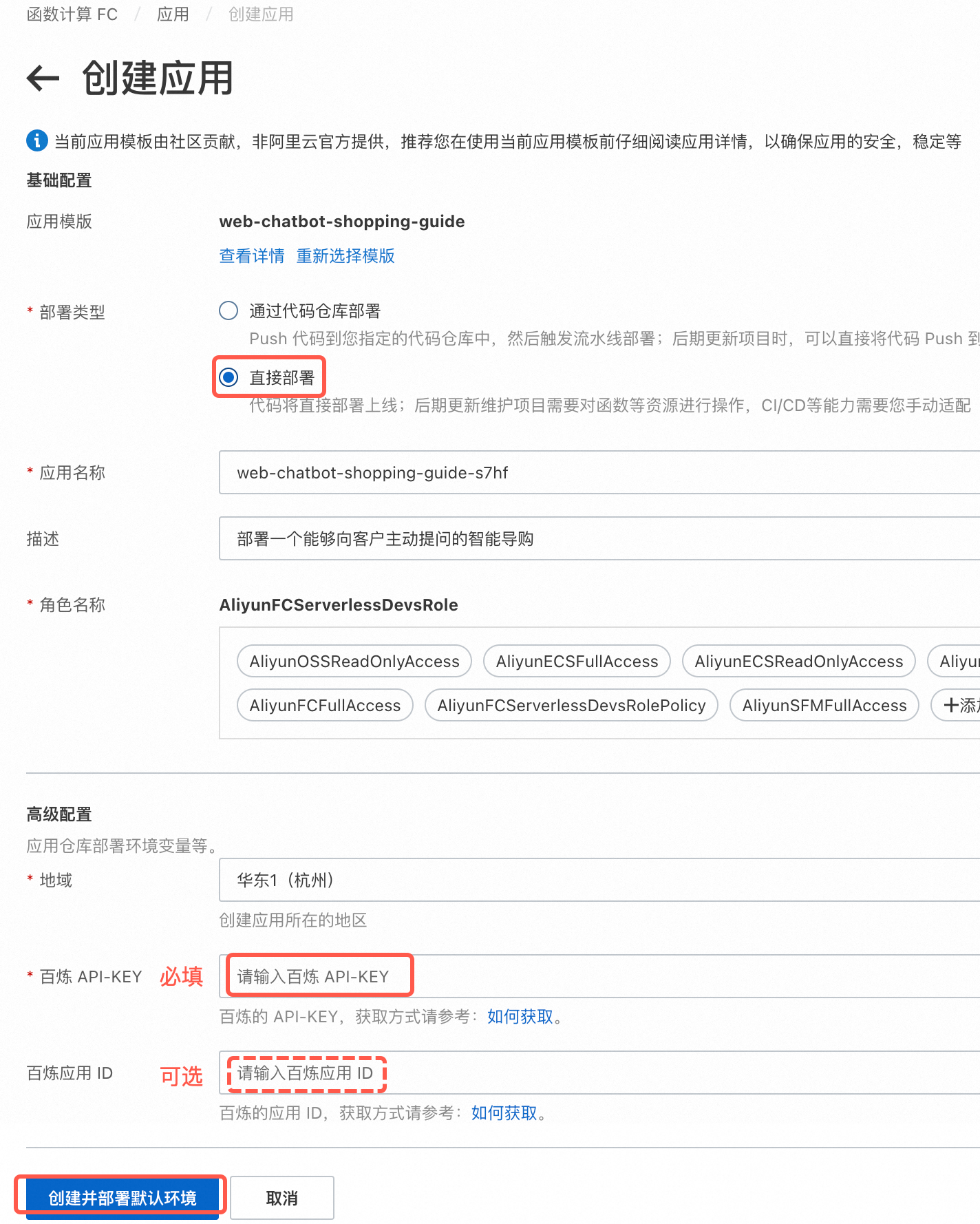
As shown in the following figure, select Deploy Now and enter your API key. To obtain your API key, go to My API-KEY. Leave the other form fields at their default settings. Click Create and Deploy Default Environment at the bottom left of the page. Wait for the project to finish deploying. This takes about 1 minute.
Alibaba Cloud Model Studio Application ID (Optional): If you plan to use an Alibaba Cloud Model Studio application for intelligent product search, provide the Model Studio application ID when you create the application. For information on how to obtain the ID, see Create an Alibaba Cloud Model Studio product retrieval application and integrate it into the intelligent shopping guide (Optional). If you plan to use a product database for retrieval, you can leave this field empty. If you decide to integrate a Model Studio application later, you can add your Alibaba Cloud Model Studio application ID by configuring environment variables after the Function Compute application is created.
2. Access the website
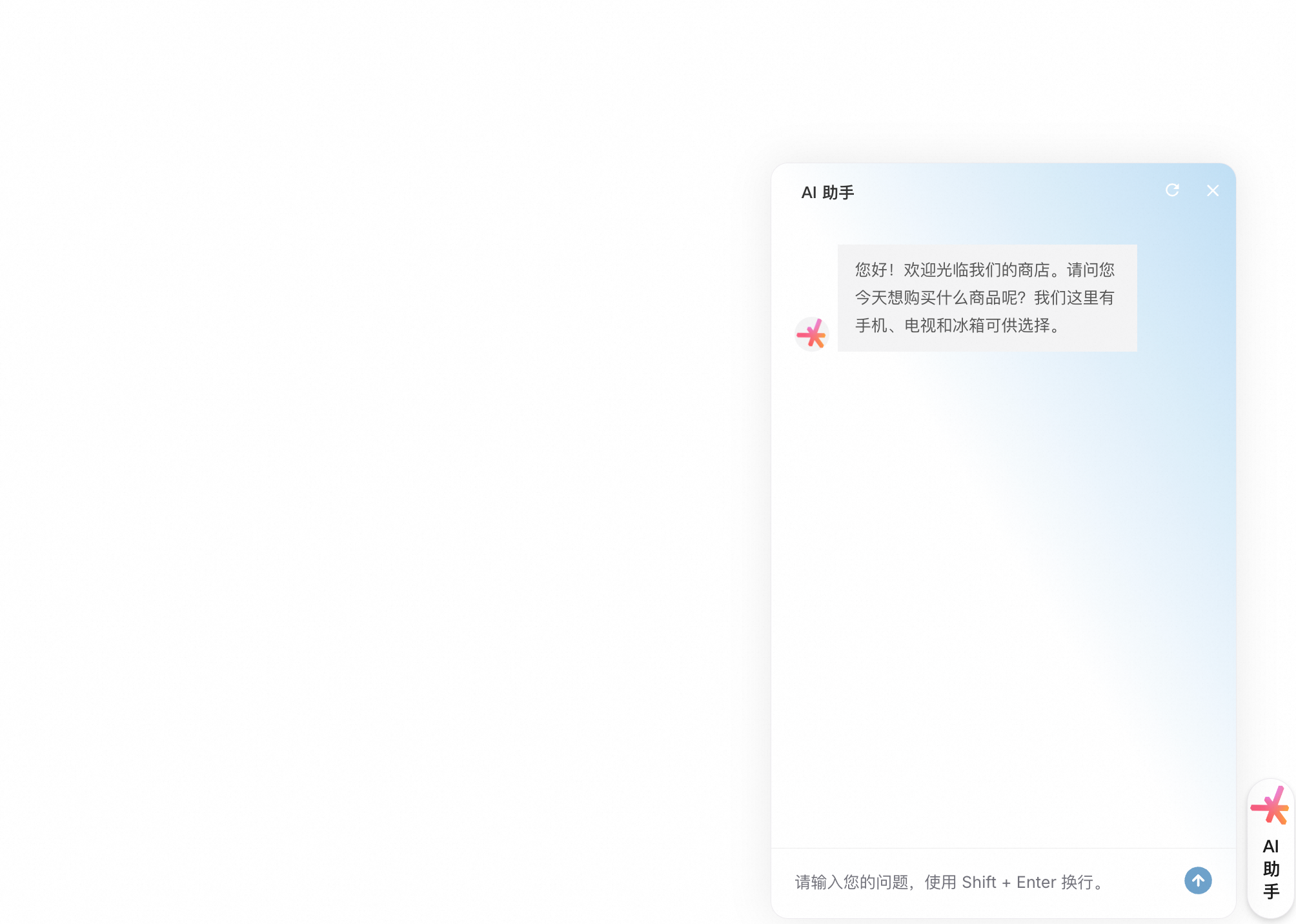
After the Function Compute application is deployed, go to the Environment Information section on the page that appears. Find the Endpoint for the sample website and click it to confirm that the website has been deployed successfully.
3. Verify the intelligent shopping guide
The intelligent shopping guide proactively asks for and collects the required product parameters. After it collects the parameters, it prints the parameter information.
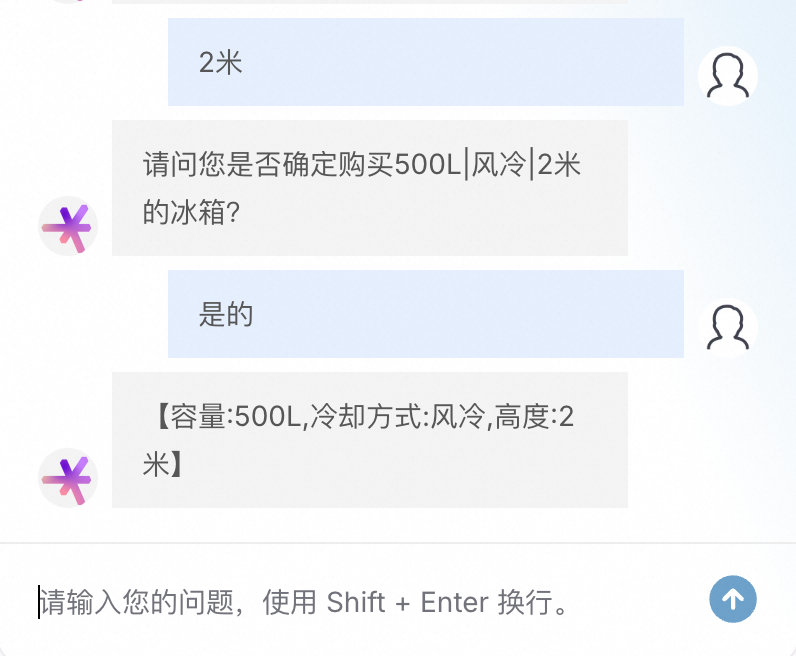
After the guide collects the customer's product parameter preferences, you can query the product database to retrieve products. If you want to use an Alibaba Cloud Model Studio application for intelligent product search, see Create an Alibaba Cloud Model Studio product retrieval application and integrate it into the intelligent shopping guide (Optional).
Key code explanation
Planning Assistant (Router Agent)
In the sample program, the module used for intent recognition is the Planning Assistant (Router Agent). The Planning Assistant classifies the user's intent and then passes the user's query to the appropriate product guide agent as needed.
ROUTER_AGENT_INSTRUCTION = """You are a query classifier.
Based on the user's query and the context, determine the specific type of product the user is interested in.

Note that your output must be one of the items from the list below and must not contain any other information:
- Mobile Phone (The user mentioned buying a mobile phone in the current input, or is in the process of collecting mobile phone parameters)
- TV (The user mentioned buying a TV in the current input, or is in the process of collecting TV parameters)
- Refrigerator (The user mentioned buying a refrigerator in the current input, or is in the process of collecting refrigerator parameters)
- Other (For example, if the user wants to buy a product other than the three listed above, or wants to buy more than one product)

Output example:
Mobile Phone
"""
router_agent = Assistants.create(
    model="qwen-plus",  # For a list of models, see https://www.alibabacloud.com/help/en/model-studio/getting-started/models
    name='Guide, Router',
    description='You are a shopping guide for a store, responsible for routing user queries to different sales guides.',
    instructions=ROUTER_AGENT_INSTRUCTION
)
Mobile Phone Guide Assistant
TV Guide Assistant
Refrigerator Guide Assistant
Select different agents to respond
import json
from dashscope import Assistants

# Note: The get_agent_response and parse_streaming_response functions need to be implemented based on the actual project.
# The following is a sample implementation. Adjust it according to your project structure for actual use.
# def get_agent_response(agent_name, input_prompt, thread_id):
#     # Get the corresponding agent_id from agent_map based on agent_name
#     # Call the Assistants API to get the response
#     pass
#
# def parse_streaming_response(response):
#     # Parse the streaming response to extract the classification result
#     pass

agent_map = {
    "Intent Classification": router_agent.id,
    "Mobile Phone": mobilephone_guide_agent.id,
    "Refrigerator": fridge_guide_agent.id,
    "TV": tv_guide_agent.id
}

def chat(input_prompt, thread_id):
    # First, identify the user's intent based on their query and the conversation history stored in the thread
    router_agent_response = get_agent_response(agent_name="Intent Classification", input_prompt=input_prompt, thread_id=thread_id)
    classification_result = parse_streaming_response(router_agent_response)

    response_json = {
        "content": "",
    }
    # If the classification is "Other", guide the user to rephrase the question
    if classification_result == "Other":
        response_json["content"] = "I'm sorry, I didn't understand your question. Could you please rephrase it?"
        response_json['current_agent'] = classification_result
        response_json['thread_id'] = thread_id
        yield f"{json.dumps(response_json)}\n\n"
    # If the classification is "Mobile Phone", "TV", or "Refrigerator", let the corresponding agent respond
    else:
        agent_response = get_agent_response(agent_name=classification_result, input_prompt=input_prompt, thread_id=thread_id)
        for chunk in agent_response:
            response_json["content"] = chunk
            response_json['current_agent'] = classification_result
            response_json['thread_id'] = thread_id
            yield f"{json.dumps(response_json)}\n\n"
Create an Alibaba Cloud Model Studio product retrieval application and integrate it into the intelligent shopping guide (Optional)
After you collect the customer's purchase requirements, you can use these descriptions to retrieve and recommend products.
In your production environment, you can also retrieve products from your existing database.
Step 1: Create an Alibaba Cloud Model Studio product retrieval application
-
Create a knowledge base
Alibaba Cloud Model Studio lets you upload spreadsheet files to a knowledge base. The shopping guide scenario in this case includes information for three types of products: mobile_phone_info.xlsx, tv_info.xlsx, and refrigerator_info.xlsx. The following steps use the mobile phone product as an example to show you how to create a knowledge base from spreadsheet data in Alibaba Cloud Model Studio.
-
Add a data table
Click Add Data Table. Set Table Name to Alibaba Cloud Model Studio Mobile Phones. Set the Column Name to: Series, Screen size, Pixel value, Storage, RAM size, Battery life, and Price.
The column names for the TV dataset are: Brand, Screen size, Refresh rate, Resolution, Price (CNY). The column names for the refrigerator dataset are: Series, Capacity, Cooling method, Height, Energy consumption, Price (CNY).
-
Import data
On the data table management page, find the Alibaba Cloud Model Studio Mobile Phones data table and click Import Data. On the Import Data page, upload the mobile_phone_info.xlsx file.
-
Create a knowledge base
Click Create Knowledge Base. Set the Name to Alibaba Cloud Model Studio Mobile Phone Knowledge Base and the Data Type to Structured Data. Keep the other parameters at their default settings and click Next Step. On the next page, select the data table that you created and click Imported.
-
Create TV and refrigerator knowledge bases
Repeat the steps above to create the Alibaba Cloud Model Studio TV Knowledge Base and the Alibaba Cloud Model Studio Refrigerator Knowledge Base.
-
-
Create an Alibaba Cloud Model Studio application
-
Add an application
Go to Application Management and click Create Application. Set the application name to Product Information Storage Bot and select the Qwen-Plus model. Keep all other model parameters at their default values. Turn on the Knowledge Retrieval Augmentation toggle. For Select Knowledge Base, select the Alibaba Cloud Model Studio Mobile Knowledge Base, Alibaba Cloud Model Studio TV Knowledge Base, and Alibaba Cloud Model Studio Refrigerator Knowledge Base. Set the Retrieved Chunks to 10. Modify the content in the Prompt field. The updated prompt is as follows:
# Knowledge Base Please remember the following materials. They may be helpful for answering questions. ${documents} Please select the three most similar products. -
Obtain the Alibaba Cloud Model Studio application ID
Click Publish in the upper-right corner to make the product_info_storage_bot callable using an API. You can view the Alibaba Cloud Model Studio application ID of the product_info_storage_bot in Application Management.

-

Step 2: Integrate the product retrieval application into the intelligent shopping guide
-
Modify the code and environment variables of the Function Compute application
Return to the Function Compute application details page. At the bottom of the Environment Details section, find Function Resources. Click the function name to go to the Function Details page.
-
In the code view, find and modify the
agents.pyfile. Uncomment the following content: -
If you did not enter the Alibaba Cloud Model Studio Application ID when you created the Function Compute application, go to the Function Details page and click Edit Environment Variables. Enter your Alibaba Cloud Model Studio application ID for BAILIAN_APP_ID and click Deploy.
-
Click Deploy Code and wait for the deployment to complete.
-
-
Testing Retrieval Effectiveness
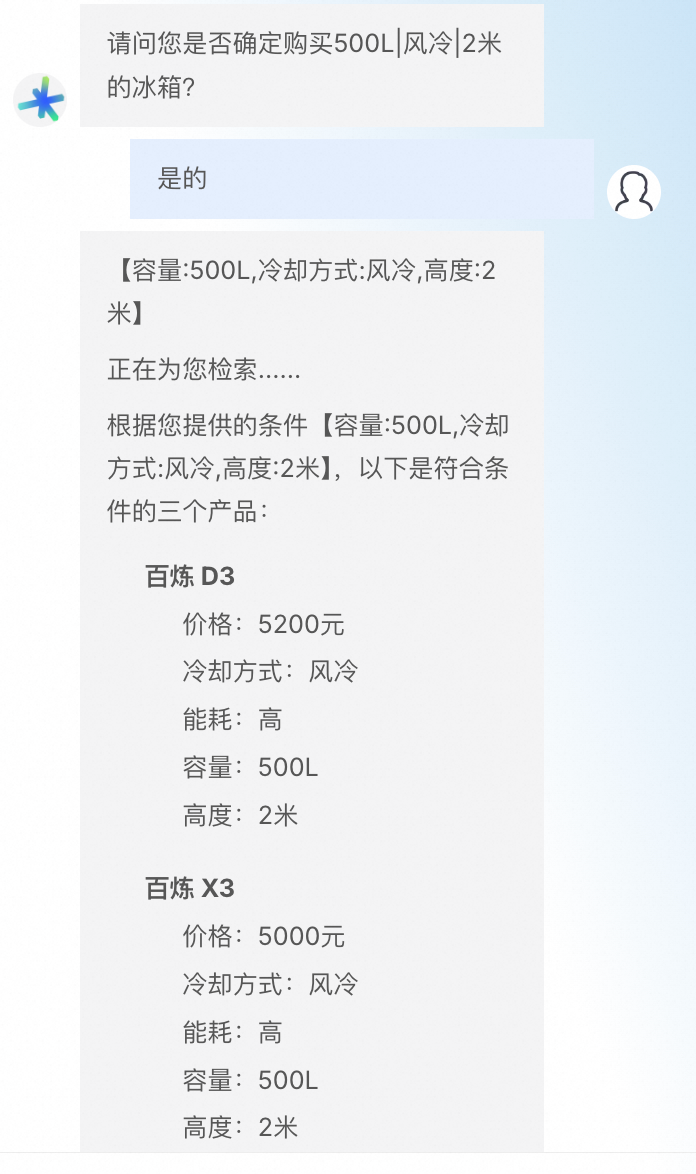
Refresh the website and test the intelligent shopping guide. The guide outputs the retrieved product information.


Summary
By following these steps, you have built a website with an integrated intelligent shopping guide that can provide product recommendations to customers 24/7. The architecture in this solution is also applicable to other scenarios, such as intelligent medical consultations and job recommendations.
Going live
To adapt the intelligent shopping guide for your products and deploy it to a production environment, complete the following steps:
-
Modify the knowledge base to use your own product information. You can add links to product pages or order pages in the product parameters to make it easier for customers to browse and place orders. You can also retrieve products from your existing database or other services.
-
Modify the prompts in the source code to adapt them to your products. The steps to modify the source code are as follows:
-
Return to the application details page. At the bottom of the Environment Details section, find Function Resources. Click the function name to go to the Function Details page.
-
On the function details page, find and modify the
prompt.pyandagents.pyfiles in the code view.prompt.pydefines the agent's functions and the order in which to ask for parameters.agents.pycreates the agent and the function that generates responses. -
Click Deploy Code and wait for the deployment to complete.
-
-
See the Going live section in Add an AI assistant to your website in 10 minutes to integrate the intelligent shopping guide into your website.
Large Language Model course
You can always improve the system experience. Consider taking the free course to obtain the Alibaba Cloud Large Model ACA Certification. This certification will help you better understand the capabilities and application scenarios of LLMs and how to optimize the performance of applications that use them.
FAQ
Why can't I access the sample website after creating the Function Compute application?
Check that the API key you entered is correct and that your Alibaba Cloud account does not have an overdue payment.