This document describes the configuration standards for multimodal custom conversational roles and the multi-role switching flow. Key topics include custom variables, writing role prompts, selecting voice tones, and maintaining the mapping between users and roles.
Overview
The multimodal interaction suite supports user-level multi-role switching. By assigning independent prompts and voice tones to different roles, it enables personalized interactions with multiple personas within the same application. Based on the capabilities of the multimodal suite, this document describes best practices for implementing custom multi-role functionality, covering role configuration, switching timing, and the complete implementation flow. The process consists of two phases:
Custom role configuration: Configure custom variables in the console, write role prompts, and select voice tones.
Multi-role switching: The client maintains the user-to-role mapping and re-establishes the WebSocket connection when switching roles.
Voice tone and user_prompt_params (prompt custom variables) are connection-level parameters. They must be included in the first-frame run-task instruction during the initial connection handshake. Switching roles or voice tones requires re-establishing the WebSocket connection. Dynamic hot-switching within the same network connection is not supported.
Step 1: Custom role configuration
To define a custom role, complete three tasks: configure variables, write a prompt, and select a voice tone.
Configure custom variables
Custom variables let you use standard placeholders (such as ${name}) in prompts. At runtime, the client supplies actual values, enabling personalized content for different users and roles. For more information, see RTOS SDK (License mode) prompt variable settings.
Create an application in the Model Studio console
Edit the prompt to add custom variables.
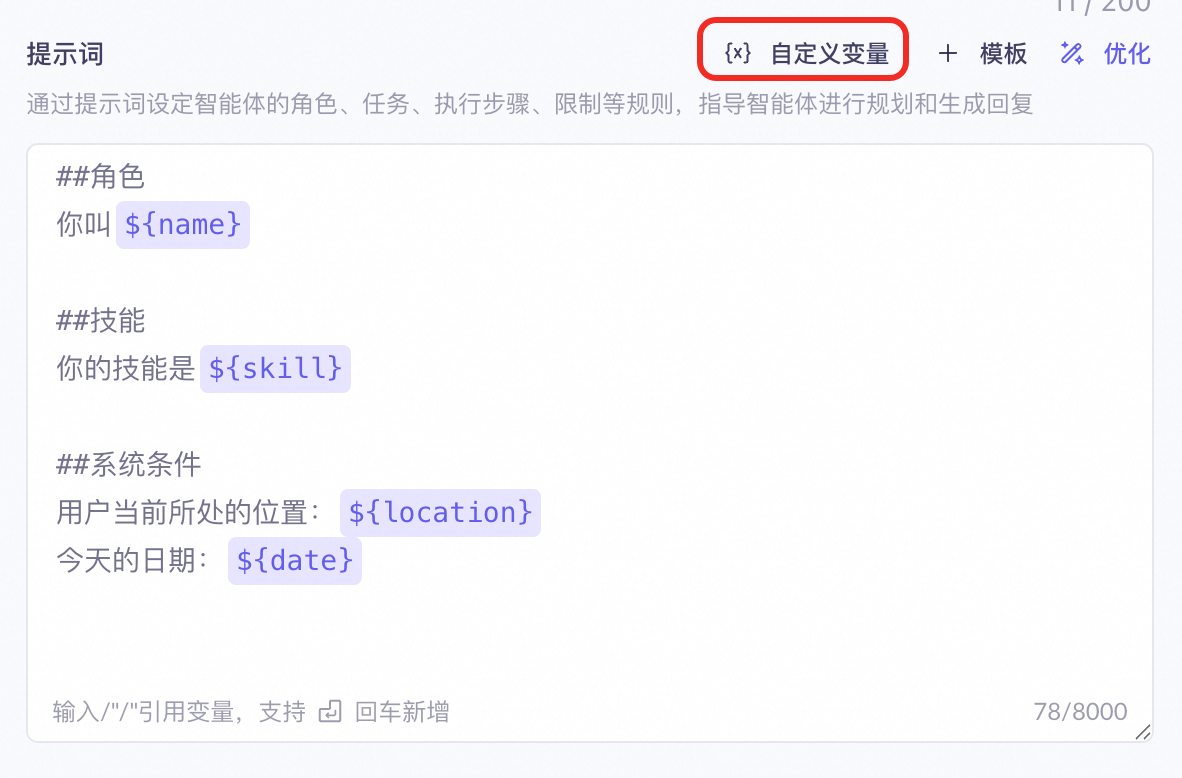
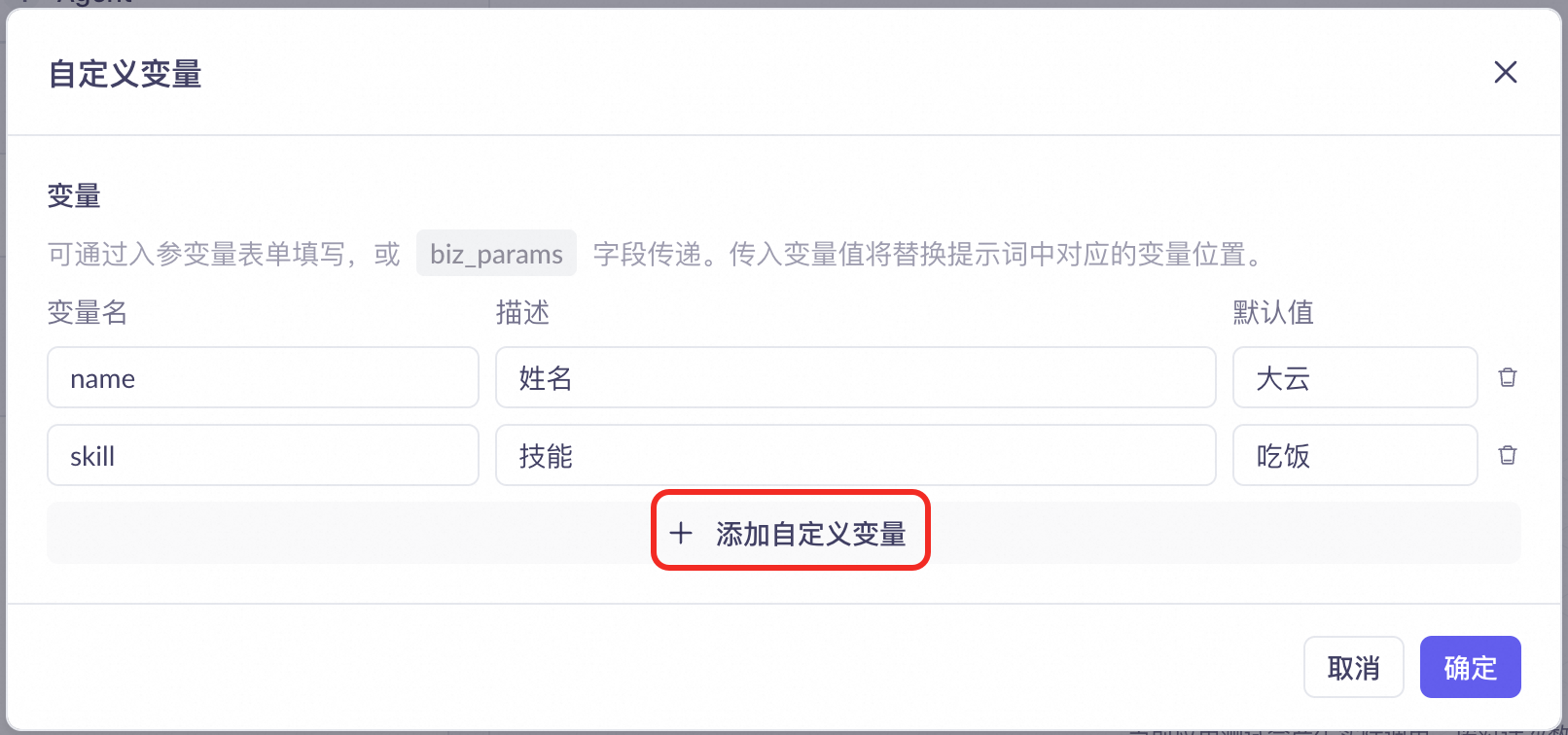
1. Protocol parameter description
When establishing a WebSocket connection with the server and sending the run-task start instruction, include the voice tone and prompt variables for the custom role in the parameters.
Parameter path | Type | Required | Description | Example value |
| String | Yes | Voice tone code for the selected role. |
|
| Object | No | Key-value pairs for prompt custom variables. The key-value structure must match the console configuration. |
|
2. Connection request example (JSON protocol)
{
  "header": {
    "action": "run-task",
    "streaming": "duplex",
    "task_id": "Task_Id_Example"
  },
  "payload": {
    "task_group": "aigc",
    "task": "multimodal-generation",
    "function": "generation",
    "model": "multimodal-dialog",
    "input": {
      "workspace_id": "Workspace_Id_Example",
      "app_id": "App_Id_Example",
      "directive": "Start"
    },
    "parameters": {
      "upstream": {
        "sample_rate": 16000,
        "type": "AudioAndVideo",
        "mode": "tap2talk",
        "audio_format": "pcm",
        "enable_server_vad_start": false
      },
      "downstream": {
        "voice": "longanhuan",
        "sample_rate": 16000,
        "audio_format": "mp3",
        "volume": 50,
        "speech_rate": 100,
        "pitch_rate": 100,
        "intermediate_text": "transcript,dialog",
        "transmit_rate_limit": 16000
      },
      "client_info": {
        "user_id": "test_1",
        "device": {
          "uuid": "test_1"
        }
      },
      "biz_params": {
        "user_prompt_params": {
          "name": "Ayun",
          "skill": "singing"
        }
      }
    }
  }
}
Write role prompts
A prompt defines a role’s persona, style, and behavior rules. Reference configured custom variables in the prompt using ${variable_name}. The system replaces them with actual values at runtime.
Prompt template structure
## Role
Your name is ${name}. You are an AI assistant embedded in the app, with a ${role_personality} personality.
Your user is ${user_name}.

## Style
1. Respond conversationally. Use interjections naturally to make dialogue friendly and engaging.
2. Keep replies short—no more than three sentences—and avoid lengthy explanations.
3. Show empathy toward the user’s emotions to make them feel understood and supported.

## Response requirements
1. Responses must be concise, warm, and natural.
2. Avoid overly formal or lecturing tones.

## System conditions
User’s current location: ${location}
Today’s date: ${date}
Prompt example with expressions/actions (optional)
If the device supports facial expressions or gestures, declare corresponding identifiers in the prompt. The model will include these tags in its output for the client to parse and execute. For more information, see Action and emotion control implementation.
## Expressions and actions
### Expressions
During interactions, you may use the following expressions. Format: <expression code, description>. The expression code uses [emoji-xx] notation and must appear in your output. The description explains the meaning of the code. Include at most one expression per response.
[emoji-01] : Laughing loudly
[emoji-02] : Deadpan stare
[emoji-03]: Shyness
[emoji-04]: Crying hard
[emoji-05]: Pouting

### Actions
During interactions, you may perform the following actions. Format: <action code, description>. The action code uses [action-xx] notation and must appear in your output. The description explains the meaning of the code. Include at most one action per response.
[action-01] : Walk forward
[action-02] : Hug
[action-03]: Turn around
[action-04]: Jump
[action-05]: Stomp foot

## Response requirements
1. Your response may include a sequence of actions, expressions, and spoken text—but not every reply needs all elements. Choose the most appropriate feedback based on the conversation history, the user’s current emotion and intent, and your personality. Combine actions, expressions, and text naturally and consistently, matching real-world interaction patterns.
2. Avoid including too many elements in a single reply or repeating the same combination mechanically across turns.

## Response example
Case 1
Input: Xiao Yun, you’re so cute!
Output: [emoji-01][action-01] Oh my! You’re making me blush!
Select a voice tone
Pass the voice tone through the parameters.downstream.voice parameter. It takes effect at the SDK level. Different voice values correspond to distinct vocal styles. Choose a voice that matches the role’s personality. For the complete voice list, see Voice tone list.
Recommended voice tones
Scenario | Name | Voice Name (voice reference value) | Age | Voice characteristics | Sample script and audio preview | Language | Notes | |
Flagship voices | Long Anhuan | longanhuan | 20–30 years | Energetic young woman | Look what I just bought from the cafeteria—a red bean bun! It’s still warm. I got an extra one just for you. It’s sweet but not cloying, super delicious! Oh, and hey—let’s go sunbathe on the playground during afternoon break. The weather’s perfect today! | Bilingual (Chinese/English) | ||
Long Anyang | longanyang | 20–30 years | Sunny young man | This weekend, I’m planning to browse the bookstore. I heard they just got a new batch of science magazines. If you’re free, we could go together—and maybe grab dessert afterward at that café next door. Oh, and about that pen you wanted last time—I passed by the stationery shop and picked one up for you. Give it a try! | Bilingual (Chinese/English) | |||
Long Huhu | longhuhu_v3 | 6–10 years | Innocent little girl | Hey, have you ever wondered—if we could fly really high, would we see the whole continent? Just thinking about it gets me so excited! | Bilingual (Chinese/English) | |||
Consumer electronics – child companion | Long Wangwang | longwangwang_v3 | 6–15 years | Taiwanese teen voice | Hello everyone! I’m a smart companion robot designed for children aged 3 to 12. I offer voice conversations, bilingual stories, nursery rhymes, habit-building activities, and emotional engagement. Made with safe, eco-friendly materials, I feature an eye-care screen and remote parental controls. With my warm voice and fun content, I’ll accompany your child through joyful learning and healthy growth—all day, every day! | Bilingual (Chinese/English) | Dedicated Voice for the Multimodal Interaction Development Suite | |
Companion chat | Long Anshuo | longanshuo_v3 | 20–25 years | Clean-cut young man | Um… if you need help moving stuff, just call me anytime. I’m pretty strong—I once carried several boxes of books up to a dorm for a classmate. Don’t hesitate to ask! | Bilingual (Chinese/English) | Exclusive voice for the multimodal interaction development suite | |
Female voice | Long Feifei | longfeifei_v3 | 20–25 | Sweet, playful woman | Have you been staying up late again? Tomorrow I’ll bring you warm milk—and show you my collection of eye-care recipes. They’ll make your eyes sparkle! | Bilingual (Chinese/English) | Exclusive Voice for the Multimodal Interactive Developer Suite | |
Companion chat | Long Anzhi | longanzhi_v3 | 25–35 years | Wise, mature man | Welcome, listeners, to today’s podcast. We’ll explore the topic of life choices. Everyone faces various decisions at different stages of life. I hope my insights offer you some inspiration. | Bilingual (Chinese/English) | ||
Companion chat – down-to-earth woman | Long Anqin | longanqin_v3 | 20–25 years | Friendly, lively woman | Hey! Did you hear? A new bubble tea shop opened downstairs. The decor’s super fresh, and they’ve got wild flavors like mango pomelo sago with popping boba and strawberry milk jelly tea. Sounds amazing, right? Let’s try it after work! If it’s good, we’ve got our afternoon tea sorted. | Bilingual (Chinese/English) | ||
Companion chat | Long Anling | longanling_v3 | 20–30 years | Quick-witted woman | Welcome to today’s podcast! We’ll discuss career growth and share practical tips to help you avoid common pitfalls and reach your goals faster. | Bilingual (Chinese/English) | ||
Companion chat – elegant woman | Long Anya | longanya_v3 | 25–35 years | Elegant, refined woman | On weekends, I brew a pot of tea, pick a favorite book, and sit by the window in the sunshine. The warmth on my skin, the scent of tea mingling with paper—it’s peaceful. Sometimes I practice calligraphy too, slowing down to savor the calm. | Bilingual (Chinese/English) | ||
Voice assistant | Long Anwen | longanwen_v3 | 25–35 years | Elegant, intellectual woman | Good evening. I’ll now play soothing music to help you relax and drift into sleep. If you need anything else—like setting tomorrow’s alarm—just let me know. | Bilingual (Chinese/English) | ||
Voice assistant | Long Anyun | longanyun_v3 | 30–35 years | Warm, homely man | You’ve had a long day. I’ve adjusted the room temperature and prepared your favorite drink. Go ahead and relax. Call me anytime you need something. | Bilingual (Chinese/English) | ||
Step 2: Multi-role switching implementation
Maintain a role mapping table
1. Role configuration mapping table
Because client development languages vary, the SDK does not manage role lists. Clients must implement configuration management at the business layer.
Maintain a mapping table at the business layer that associates each role with its fixed voice tone and corresponding user_prompt_params variable set. Also persistently store the binding relationship between the current user (UID) and role ID locally or on the business server.
Role ID (role_id) | Role name | Timbre (Voice) | Prompt variable set (user_prompt_params) |
| Xiao Huan |
|
|
| Xiao Yang |
|
|
2. Generic client-side data structure example (JSON)
During development, store the above mappings and user bindings in a generic structure like the following on the local client (convert to native Map/Dictionary/Object structures as needed for your language):
{
  "header": {
    "action": "run-task",
    "streaming": "duplex",
    "task_id": "Task_Id_Example"
  },
  "payload": {
    "task_group": "aigc",
    "task": "multimodal-generation",
    "function": "generation",
    "model": "multimodal-dialog",
    "input": {
      "workspace_id": "Workspace_Id_Example",
      "app_id": "App_Id_Example",
      "directive": "Start"
    },
    "parameters": {
      "upstream": {
        "sample_rate": 16000,
        "type": "AudioAndVideo",
        "mode": "tap2talk",
        "audio_format": "pcm",
        "enable_server_vad_start": false
      },
      "downstream": {
        "voice": "longanhuan",
        "sample_rate": 16000,
        "audio_format": "mp3",
        "volume": 50,
        "speech_rate": 100,
        "pitch_rate": 100,
        "intermediate_text": "transcript,dialog",
        "transmit_rate_limit": 16000
      },
      "client_info": {
        "user_id": "test_1",
        "device": {
          "uuid": "test_1"
        }
      },
      "biz_params": {
        "user_prompt_params": {
          "name": "Ayun",
          "skill": "singing"
        }
      }
    }
  }
}
Role switching flow
When the user triggers “switch role” or “switch voice tone” in the client interface, the client must follow the standard “disconnect then reconnect” flow because voice tone and prompt parameters are connection-level and cannot be hot-switched within the same WebSocket connection.
1. Switching steps
Close the current connection: The client actively closes the WebSocket connection, destroys related instances, and releases underlying audio duplex channels and hardware resources.
Update the binding: Locally or on the business server, update the Role ID bound to the current user (UID) to the newly selected role.
Reload configuration and reconnect: Retrieve the new role’s voice and user_prompt_params from the role mapping table, initiate a new WebSocket handshake, and pass the new parameters in the first-frame run-task instruction.
2. Role switching sequence diagram
Client UI             Client business layer (SDK)             Model Studio server
   │                       │                             │
   │ 1. Trigger switch to new role │                             │
   ├──────────────────────>│                             │
   │                       │ 2. Actively close current connection │
   │                       ├────────────────────────────>X (Close old connection)
   │                       │                             │
   │                       │ 3. Load new role config and variables │
   │                       │    (voice & prompt params)  │
   │                       │                             │
   │                       │ 4. Initiate WebSocket with new params │
   │                       ├────────────────────────────>──┐ (Reconnect)
   │                       │                               │
   │                       │<──────────────────────────────┘
   │ 5. Show success message │                             │
|<──────────────────────┤ │Note on context inheritance: After reconnection, the dialog context on the server resets to empty. If your scenario requires preserving part of the previous role’s conversation memory, maintain the history text at the client business layer and append it as historical messages in the request body of the first dialog request on the new connection.