Description of the extra_info field in multimodal conversation results
Get LLM results using an SDK or API
RespondingContent
The server-side sends the results of large language model (LLM) conversations, agents, and plugins using the RespondingContent type.
Top-level parameter | Second-level parameter | Type | Required | Description |
|---|---|---|---|---|
output | event | string | Yes | Event name: RespondingContent |
dialog_id | string | Yes | Conversation ID | |
round_id | string | Yes | ID of the current interaction round | |
llm_request_id | string | Yes | The request_id for the LLM call | |
text | string | Yes | The text output by the system. This is a full stream output. | |
spoken | string | Yes | The text used for speech synthesis. This is a full stream output. | |
finished | bool | Yes | Indicates whether the output is complete. | |
extra_info | object | No | Other extension information. The following are supported:
Omit this field if there is no extension information to submit. |
1.1 extra_info.commands
This field contains commands sent by the multimodal application.
{
    "commands": [
        {
            "name": "VOLUME_SET",
            "params": [
                {
                    "name": "series",
                    "normValue": "70",
                    "value": "70"
                }
            ]
        }
    ]
}
Parameter | Type | Other | Description | ||
command | name | String | Command name | ||
params[] | Array | Sent if available | Parameters sent by the skill or agent | ||
name | String | Parameter name | |||
value | String | Value | |||
command_request_id | String | Optional | A unique ID generated by the agent or skill. This ID is required when you return the execution result. See the section below. | ||
intent_infos[] | Array | Optional | |||
domain | String | The domain for semantic understanding | |||
intent | String | The intent for voice understanding |
1.2 extra_info.agent_info
{
    "agent_info": {
        "intent_infos": [
            {
                "domain": "67f3ad7d6496475483db4a184c926e77",
                "intent": "open_agent_67f3ad7d6496475483db4a184c926e77"
            }
        ],
        "device": {
            "device_id": "uuid_12345"
        },
        "round": 1
    }
}
Parameter | Type | Other | Description | ||
agent_info | device | ||||
device_id | String | Device ID | |||
round | int | The conversation round after entering the agent | |||
intent_infos[] | Array | ||||
domain | String | The domain of the Agent, which is its ID in Bailian Agent. | |||
intent | String | A business-defined intent. This is passed through the protocol. |
1.3 extra_info.tool_calls
The results of skill calls from plugins and voice applications are returned in this field.
{
    "tool_calls": [
        {
            "function": {
                "name": "INCREASE_DEFAULT_volume",
                "arguments": "{}"
            },
            "type": "FUNCTION"
        }
    ]
}
Parameter | Type | Other | Description | ||
tool_calls[] | type | String | The field name is typically fixed as "FUNCTION". This represents a function call. | ||
function | |||||
name | String | The field is a custom tool function name, similar to the domain of a multimodal application. | |||
arguments | list | The list of parameters sent by the plugin or skill. |
Response for skill execution results
Configure skill responses
In the console, you can configure the skill's response based on its execution status.
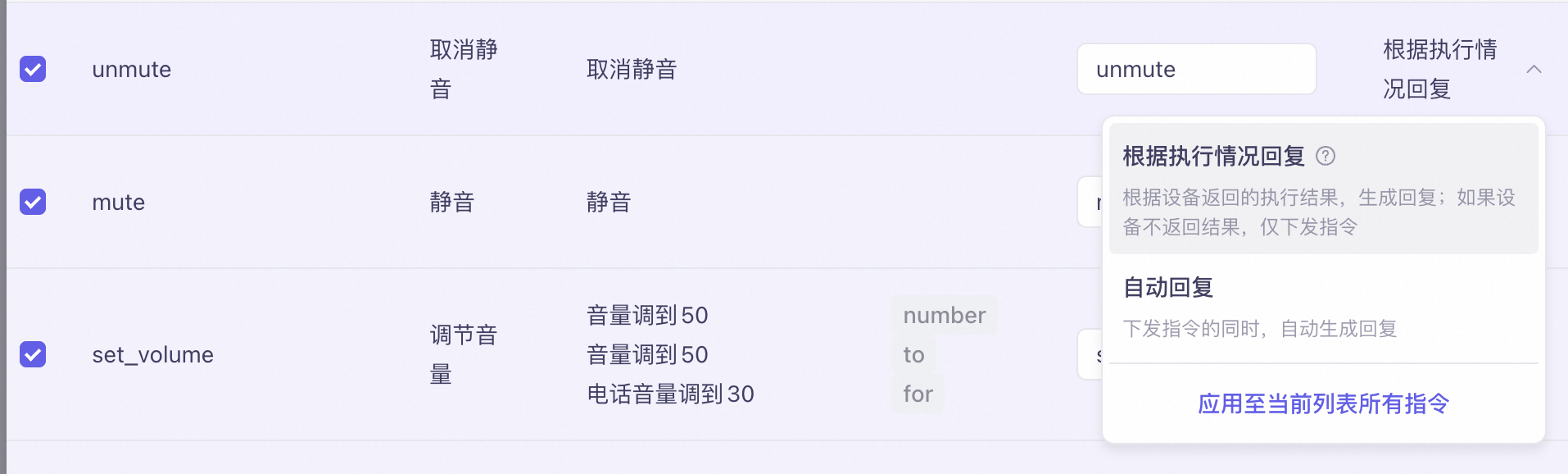
The result sent for the "unmute" voice command is as follows:
{
    "payload": {
        "output": {
            "event": "RespondingContent",
            "text": "",
            "spoken": "",
            "finished": true,
            "finish_reason": "stop",
            "extra_info": {
                "tool_infos": [

                ],
                "agent_info": {
                    "intent_infos": [
                        {
                            "domain": "general_command",
                            "intent": "unmute"
                        }
                    ],
                    "round": 1
                },
                "commands": "[{\"intent_info\":{\"domain\":\"general_command\",\"intent\":\"unmute\"},\"command_request_id\":\"35b635f3-6511-450e-8fa1-6955d5279367\",\"name\":\"unmute\",\"params\":[]}]",
                "query": "unmute"
            },
            "dialog_id": "56fe9300-d80c-471a-80bd-20c0296acd93",
            "round_id": "70f636e1d0284bc8a8bac2767e61b4b5",
            "llm_request_id": "1d8f3469274e4d13bbc3b28460eabb76"
        }
    }
}
In the result, payload.output.extra_info.commands is the command execution result.
If you configure the skill to respond based on the execution status, the returned result includes a command_request_id. You must use this ID as the key when you reply with the execution result.
Device-side reply parameters
After you receive a command or an agent result, execute it on the device. Then, sync the execution result (success or failure) with the server-side by submitting it through the following interface:
Parameter | Top-level parameter | Second-level parameter | Third-level parameter | Fourth-level parameter | Description |
Skill response/Third-party agent callback execution result | |||||
biz_params | command_results[] | command_request_id | string | Request ID | |
invoke_result | Execution result | ||||
content | Object | Varies based on the result. For more information, see the device-side unified return specifications. | |||
structuredContent | JSON object | Structured return information | |||
structuredContent.success | Boolean | Indicates whether the operation was successful. | |||
Example result:
[
    {
        "command_request_id": "xxxx",
        "invoke_result": {
            "content": {
                "type": "text",
                "text": "Successfully opened"
            },
            "structuredContent": {
                "success": true
            }
        }
    }
]
Request code: Device-side callback for execution result (Java example)
public static HashMap<String,Object> getAgentOrCommandResult() {

  HashMap<String,Object> commandResult = new HashMap<>();
  commandResult.put("command_request_id", "35b635f3-6511-450e-8fa1-6955d5279367");
  commandResult.put("invoke_result", new Object<>());
    // invoke_result.structuredContent.success = true/false execution result

  ArrayList<Object> commandResults = new ArrayList<>();
  commandResults.add(commandResult);

  HashMap<String,Object> passThroughParams = new HashMap<>();
  passThroughParams.put("command_results", commandResults);
  return passThroughParams;
}

// Initiate a request to open the agent
MultiModalRequestParam.UpdateParams updateParams = MultiModalRequestParam.UpdateParams.builder()
    .bizParams(MultiModalRequestParam.BizParams.builder()
        .passThroughParams(getAgentOrCommandResult())
        .build())
    .build();
conversation.requestToRespond("prompt", "", updateParams);