HarmonyOS SDK for real-time multimodal interaction
Download and integrate the HarmonyOS SDK for real-time multimodal interaction in Alibaba Cloud Model Studio, and learn its key APIs through code examples.
The MultiModalDialog SDK from the Alibaba Cloud Qwen team supports end-to-end, real-time multimodal audio and video interaction. It connects to Qwen models and backend agents to provide voice conversations, weather queries, music, news, and other capabilities, and supports video and images in model conversations.
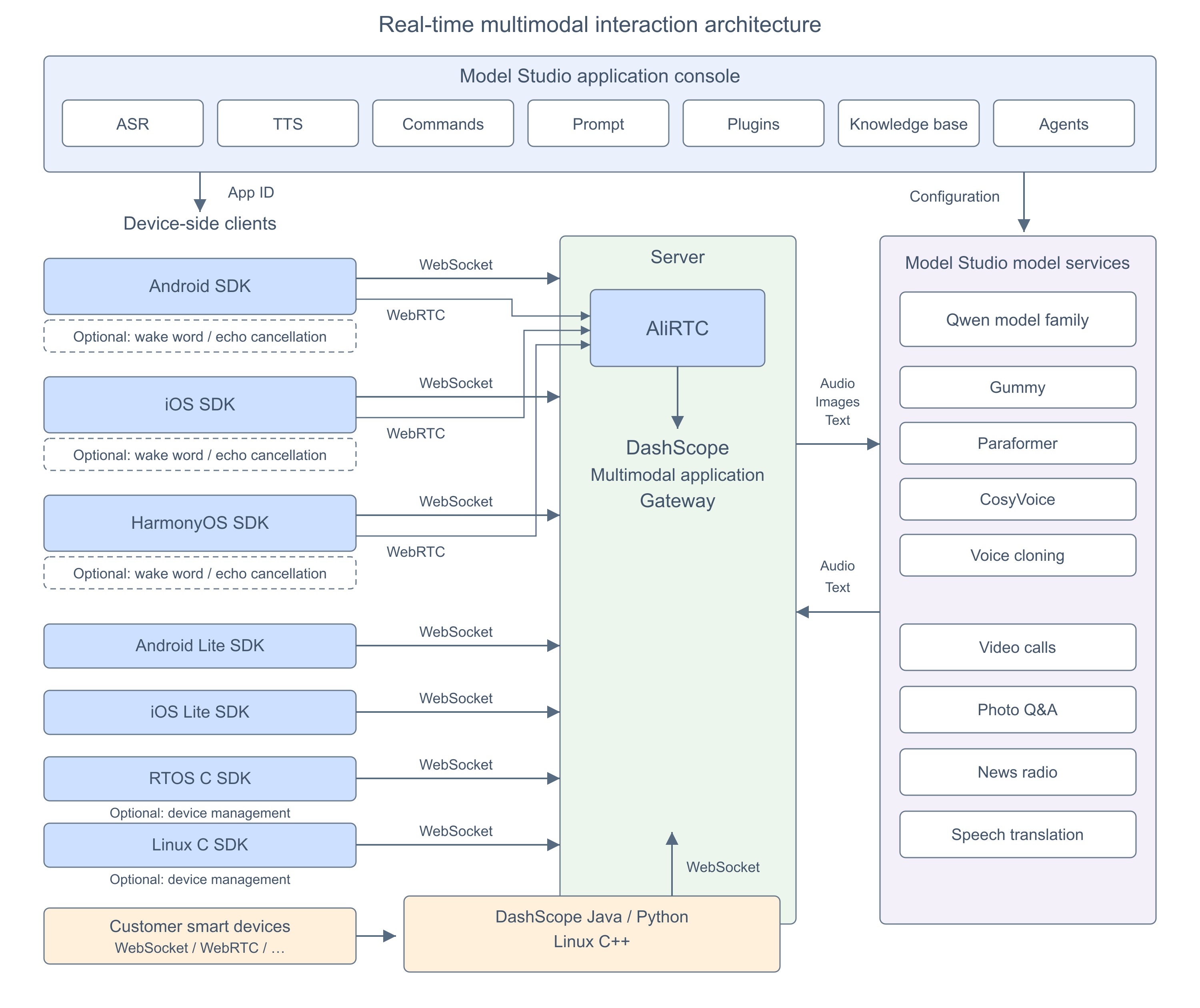
Service architecture
Prerequisites
- To use real-time multimodal interaction in Alibaba Cloud Model Studio:
- Enable a real-time multimodal interaction application and obtain a workspace ID, app ID, and API key.
- Download the HarmonyOS SDK and demo, and configure the required environment and dependencies.
- Import the sample code and follow the API call sequence to integrate the SDK.
- To test the SDK, run the HAP test application in the
entrymodule of the release project (multimodal-dialog-harmony-V1.4.9-V1.0.0) and enter the three parameters above.
| Package | Version |
|---|---|
| multimodal-dialog-harmony-V1.4.9-V1.0.0.tar.gz | V1.4.9-V1.0.0 |
SDK integration
Interaction data links
The SDK communicates with the server over WebSocket and supports AudioOnly and AudioAndVideo modes:
- Audio interaction: Supports audio and text conversations only.
- Audio and video interaction: A command switches the conversation to video call mode. The client continuously sends video frames to the server for end-to-end multimodal audio and video interaction.
Interaction modes
The SDK supports Push2Talk, Tap2Talk, and Duplex (full-duplex):
- Push2Talk: Press and hold to speak, and release to finish.
- Tap2Talk: Tap to start speaking. The end of speech is detected automatically.
- Duplex: Start speaking at any time after connection, with support for voice interruptions.
API usage
SDK dependencies
The HarmonyOS SDK is integrated as a HAR (Harmony Archive). The release project has the following SDK dependencies:
// Release project: entry/oh-package.json5
"dependencies": {
  "@ali/convsdk": "file:./libs/convsdk.har",             // Voice conversation SDK
  "@ali/mmsdk": "file:./libs/multimodal_sdk.har"         // Multimodal conversation SDK
}
The HarmonyOS SDK supports two links:
- WebSocket (
ChainMode.WEBSOCKET): Supports AudioOnly and AudioAndVideo. - RTC (
ChainMode.RTC): An audio and video link for LiveAI video calls.
Key parameters
Connection and authentication parameters:
Pass url, chainMode, workspaceId, appId, and dialogMode to the MultiModalDialog constructor. Pass apiKey to start or startTwo. These are not parameters of MultiModalRequestParam.
| Parameter | Subparameter | Type | Required | Description |
|---|---|---|---|---|
| url | string | Yes | Server URL. For WebSocket, use wss://dashscope.aliyuncs.com/api-ws/v1/inference. For RTC audio and video, pass the RTC URL. | |
| apiKey | string | Yes | Model Studio API key for server authentication. | |
| workspaceId | string | Yes | Workspace ID in the Model Studio console. | |
| appId | string | Yes | ID of the application created in the Model Studio console. | |
| dialogMode | DialogMode | Yes | Interaction mode: PUSH2TALK, TAP2TALK, or DUPLEX. | |
| chainMode | ChainMode | Yes | Link mode: WEBSOCKET or RTC. |
Demo overview
The release project (multimodal-dialog-harmony-V1.4.9-V1.0.0) includes these pages:
- ConfigPage: The entry page for configuring url, api_key, workspace_id, app_id, and other settings.
- MultimodalSessionPage: A multimodal session page for real-time multimodal interaction and VQA (image-to-text). It supports VQA requests such as "take a photo to identify xxx":
- After taking a photo, send its URL or base64 data (image ≤ 180 KB) to trigger recognition and conversation for a single image.
- In audio and video mode, the demo accepts externally captured image sequences to facilitate capture and video conversation integration for IoT devices such as smart glasses.
API design
MultiModalDialog entry class
MultiModalDialog
Initialize the dialog class with the required global parameters.
/**
  * Initialize the dialog class
  * @param url: Server URL
  * @param chainMode: Link mode
  * @param workspaceId: Workspace ID
  * @param appId: Application ID
  * @param dialogMode: Interaction mode
  */
constructor(url: string, chainMode: ChainMode, workspaceId: string, appId: string, dialogMode: DialogMode)
- setContext
Set the application context. HarmonyOS SDK initialization requires UIAbilityContext. Call this method before createConversation.
/**
 * Set the application context for NativeConversation resource copying and other operations.
 * Call this method before createConversation.
 * @param context Application context
 */
setContext(context: common.UIAbilityContext): void
- createConversation
Create a conversation.
/**
  * Create a conversation
  * @param requestParam Request parameters
  * @param chatCallback Conversation callback
  */
async createConversation(params: MultiModalRequestParam, chatCallback: IDialogCallback): Promise<void>
- start
Start a conversation. WebSocket connects directly. RTC requests authentication first and then joins the RTC channel.
/**
 * Connect and start the conversation
 * @param apiKey   API Key
 * @param dialogId Dialog ID; pass an empty string for a new conversation
 * @param taskId   Task ID
 */
start(apiKey: string, dialogId: string, taskId: string): void

// Convenience method without taskId (equivalent to start(apiKey, dialogId, ""))
startTwo(apiKey: string, dialogId: string): void
- stop
End the conversation.
/**
  * Disconnect and end the conversation
  */
stop(): void
- destroy
Destroy the dialog instance.
/**
  * Destroy the instance
  */
destroy(): void
- setDialogTimeout
Set the conversation timeout.
/**
  * Set the timeout; a timeout event is reported if no speech is detected within this period
  * @param timeout Timeout in milliseconds
  */
setDialogTimeout(timeout: number): void
- interrupt
Interrupt the AI's speech.
/**
  * Interrupt the AI's speech
  */
interrupt(): void
- startSpeech / stopSpeech / cancelSpeech
Notify the server to start, stop, or cancel audio uploads. Call these methods only in Push2Talk mode.
/**
 * Notify the server to start audio uploads. Call only in the Listening state.
 * Call only in Push2Talk mode.
 */
startSpeech(): void

/**
 * Notify the server to stop audio uploads.Call only in Push2Talk mode.
 * The user finishes speaking in Push2Talk mode.
 */
stopSpeech(): void

/**
 * The user cancels speech in Push2Talk mode
 */
cancelSpeech(): void
- sendAudioData
Upload audio.
/**
  * Upload audio.
  * @param audioData Audio frame data
  */
sendAudioData(audioData: Uint8Array | null): void
- sendRefData
Send reference audio for acoustic echo cancellation (AEC). Send the downstream TTS playback data as the AEC reference, which is required to cancel speaker echoes in full-duplex mode.
/**
 * Send reference audio for acoustic echo cancellation (AEC)
 * @param audioData Reference audio data (must match playback data)
 */
sendRefData(audioData: Uint8Array | null): void
- requestToRespond
Ask the server to answer a specified question or synthesize speech using TTS.
/**
 * Ask the server to answer a question or synthesize speech
 * @param type   transcript converts text to speech; prompt sends text to the model for an answer;
 *               visual_qa recognizes an image
 * @param text   Text; for visual_qa, an image URL or base64 data (image <= 180 KB)
 * @param params Additional parameters
 */
requestToRespond(type: string, text: string, params: Record<string, Object>): void
- sendVideoFrame
Push a video frame for a LiveAI video call.
/**
 * Push a video frame
 * @param videoFrame Video frame data
 * @param callback   Frame push result callback
 */
sendVideoFrame(videoFrame: TYVideoFrame, callback: IVideoChatPushFrameCallback): void
- sendResponseStarted / sendResponseEnded
Notify the start or end of a spoken response.
/**
 * Notify the start of a spoken response
 */
sendResponseStarted(): void

/**
 * Notify the end of a spoken response
 */
sendResponseEnded(): void
- Other APIs
/**
 * Whether the current configuration uses duplex mode
 */
isDuplexMode(): boolean

/**
 * Whether the current mode is Push2Talk (true only in Push2Talk)
 */
isPush2TalkMode(): boolean

/**
 * Whether the current mode is Tap2Talk (true only in Tap2Talk)
 */
isTap2TalkMode(): boolean

/**
 * Get the current conversation state
 */
getDialogState(): DialogState

/**
 * Get the current network quality
 */
getNetworkQuality(): number

/**
 * Resume interaction
 */
beginInteraction(): void

/**
 * Update conversation information
 * @param paramValue Updated parameters
 */
updateInfo(paramValue: Record<string, Object>): void

/**
 * Send a heartbeat
 */
sendHearBeat(): void
- Static configuration APIs (RTC audio and video capture switches)
/**
 * Whether to use RTC internal audio capture (default: true)
 */
static isRtcUseInternalAudio(): boolean
static setRtcUseInternalAudio(useInternal: boolean): void

/**
 * Whether to use RTC internal video capture (default: true)
 */
static isRtcUseInternalVideo(): boolean
static setRtcUseInternalVideo(useInternal: boolean): void
Key enumerations
| Parameter | Value | Description |
|---|---|---|
| ChainMode | WEBSOCKET | WebSocket link supporting AudioOnly and AudioAndVideo |
| RTC | RTC audio and video link | |
| DialogMode | PUSH2TALK | Start and stop manually |
| TAP2TALK | Start manually and detect the end of speech automatically | |
| DUPLEX | Full-duplex interaction |
Request protocol fields:
The following table describes the requests sent by the SDK to the server, not the methods of MultiModalRequestParam.builder(). Configure upstream, downstream, client information, and business parameters through upStream, downStream, clientInfo, and bizParams, respectively. Upstream and downstream protocol parameters without dedicated setters can be passed through passThroughParams on the corresponding object.
| Field path | Type | Required | Description |
|---|---|---|---|
| header.action | string | Yes | Request action, fixed to "run-task" |
| header.task_id | string | Yes | Task ID in UUID format |
| header.streaming | string | Yes | Streaming mode, fixed to duplex |
| payload.task_group | string | Yes | Task group, fixed to "aigc" |
| payload.task | string | Yes | Task name, fixed to "multimodal-generation" |
| payload.function | string | Yes | Function, fixed to "generation" |
| payload.model | string | Yes | Model name, fixed to "multimodal-dialog" |
| payload.input.directive | string | Yes | Request directive |
| payload.input.workspace_id | string | Yes | Workspace ID |
| payload.input.app_id | string | Yes | Application ID |
| payload.input.dialog_id | string | No | Dialog ID |
| payload.parameters.upstream | object | Yes | Upstream parameters |
| payload.parameters.downstream | object | No | Downstream parameters |
| payload.parameters.client_info | object | Yes | Client information |
| payload.parameters.biz_params | object | No | Business parameters |
parameters.upstream:
| Parameter | Type | Required | Description |
|---|---|---|---|
| type | string | Yes | Upstream type: AudioOnly for audio calls only, or AudioAndVideo for audio and video |
| mode | string | No | Client mode: push2talk, tap2talk, or duplex. Default: tap2talk. |
| audio_format | string | No | Audio format: pcm or raw-opus. Default: pcm. |
| sample_rate | int | No | ASR sample rate: 8000, 16000, 24000, or 48000. Default: 16000. |
| vocabulary_id | string | No | Hotword vocabulary ID. Overrides the hotword configuration in the console. |
| language | string | No | ASR language. Defaults to the console setting. |
parameters.downstream:
| Parameter | Type | Required | Description |
|---|---|---|---|
| voice | string | No | TTS voice. Available voices depend on the TTS model selected in the console. |
| sample_rate | int | No | TTS sample rate: 8000, 16000, 24000, or 48000. The SDK's DownStream default is 24000. Qwen TTS models support only 24000. |
| audio_format | string | No | Audio format: pcm, opus, or raw-opus. Default: pcm. Qwen TTS models support only pcm. |
| frame_size | int | No | TTS audio frame size: 10, 20, 40, 60, 100, or 120. Default: 60 ms. Applies only to opus or raw-opus. |
| volume | int | No | TTS volume, from 0 to 100. Default: 50. |
| speech_rate | int | No | TTS speech rate, from 50 to 200. Default: 100. |
| pitch_rate | int | No | TTS pitch, from 50 to 200. Default: 100. |
| bit_rate | int | No | TTS bitrate, from 6 to 510 kbps. Default: 32. Applies only to mp3, opus, or raw-opus. |
| intermediate_text | string | No | Intermediate text to return: transcript for the user's ASR result, or dialog for intermediate conversation responses. Separate multiple values with commas. Default: transcript. |
| word_timestamp_enabled | boolean | No | Whether to return timestamps for synthesized speech. Default: false. Returned in RespondingContent.extra_info. |
| transmit_rate_limit | int | No | Downstream audio transmission rate limit, in bytes per second. |
| incremental_response | boolean | No | Whether to return incremental model output. Default: false, which returns the full output. |
| instruction | string | No | Instructions to control synthesis effects such as dialect and emotion. |
| language | string | No | TTS language. Defaults to the console setting. |
parameters.client_info:
| Parameter | Subparameter | Type | Required | Description |
|---|---|---|---|---|
| user_id | string | Yes | End-user ID generated according to your business rules. Up to 36 characters. | |
| device | uuid | string | No | Globally unique client ID, up to 40 characters. A user can have multiple devices with different uuid values and the same user_id. |
| network | ip | string | No | Caller's public IP address. |
| location | latitude | string | No | Caller's latitude. |
| longitude | string | No | Caller's longitude. | |
| city_name | string | No | Caller's city. |
parameters.biz_params:
| Parameter | Subparameter | Type | Required | Description |
|---|---|---|---|---|
| user_defined_params | json object | No | Parameters passed through to agent and MCP services. In the extra_config child node, set enable_web_search to control web search, and agent_timeout to set the agent connection timeout (10–120 seconds, default: 10). | |
| user_prompt_params | json object | No | Custom prompt variables, with JSON keys and values defined by you. | |
| user_query_params | json object | No | Custom conversation variables, with JSON keys and values defined by you. |
IDialogCallback interface
The HarmonyOS conversation callback interface is IDialogCallback. Pass it to createConversation to receive conversation states and events.
/**
 * Conversation callback interface
 */
export interface IDialogCallback {
  /**
   * Conversation start result
   */
  onStartResult(isSuccess: boolean, errorInfo: TYError | null): void;

  /**
   * Interruption result
   */
  onInterruptResult(isSuccess: boolean, errorInfo: TYError | null): void;

  /**
   * Conversation ready after clients join the channel; business APIs may then be called
   * @param dialogId Dialog ID
   */
  onReadyToSpeech(dialogId: string): void;

  /**
   * State change callback: DIALOG_IDLE / DIALOG_LISTENING / DIALOG_THINKING / DIALOG_RESPONDING
   */
  onConvStateChangedCallback(state: DialogState): void;

  /**
   * Volume level callback, 0-100
   * @param audioLevel Volume level, 0-100
   * @param audioType  Volume source: MIC for local capture / PLAYER for remote TTS
   */
  onConvSoundLevelCallback(audioLevel: number, audioType: TYVolumeSourceType): void;

  /**
   * Conversation timeout callback
   * @param timeout Timeout in milliseconds
   */
  onSpeechTimeout(timeout: number): void;

  /**
   * Playback audio data callback
   */
  onPlaybackAudioData(bytes: Uint8Array): void;

  /**
   * Errors during the conversation
   */
  onErrorReceived(errorInfo: TYError): void;

  /**
   * Conversation event callback
   */
  onConvEventCallback(var1: ConvEvent | null): void;

  /**
   * Debug information callback
   */
  onDebugInfoTrack(level: number, type: TYDebugInfoType, debugInfo: string): void;

  /**
   * Downstream synthesized speech callback
   */
  onSynthesizedSpeech(bytes: Uint8Array): void;

  /**
   * Wake word detection callback
   */
  onKeyWordSpotted(word: string, type: KeyWordsType): void;
}
onConvEventCallback response details
- EVENT_HUMAN_SPEAKING_DETAIL
The user's speech recognition result. Example:
{
  "header": { "request_id": "9B32878****************3D053", "status_code": 200 },
  "payload": {
    "output": {
      "event": "SpeechContent",
      "dialog_id": "b39398c9dd8147***35cdea81f7",
      "text": "一二三",
      "finished": false
    }
  }
}
- EVENT_RESPONDING_DETAIL
Model response details. The AI response text is returned in payload.output.text. Example:
{
  "header": { "request_id": "9B32878****************3D053", "status_code": 200 },
  "payload": {
    "output": {
      "event": "AIResponse",
      "dialog_id": "b39398c9dd8147***35cdea81f7",
      "text": "好的,这是一个测试。",
      "finished": true
    }
  }
}
Error handling
onErrorReceived - response
Conversation errors are reported through the onErrorReceived callback:
/**
  * Conversation error
  * @param errorInfo: Error information
  */
onErrorReceived(errorInfo: TYError): void;
Common error codes
For troubleshooting HarmonyOS SDK errors, see Multimodal real-time interaction error codes.
Call sequences
Full-duplex interaction
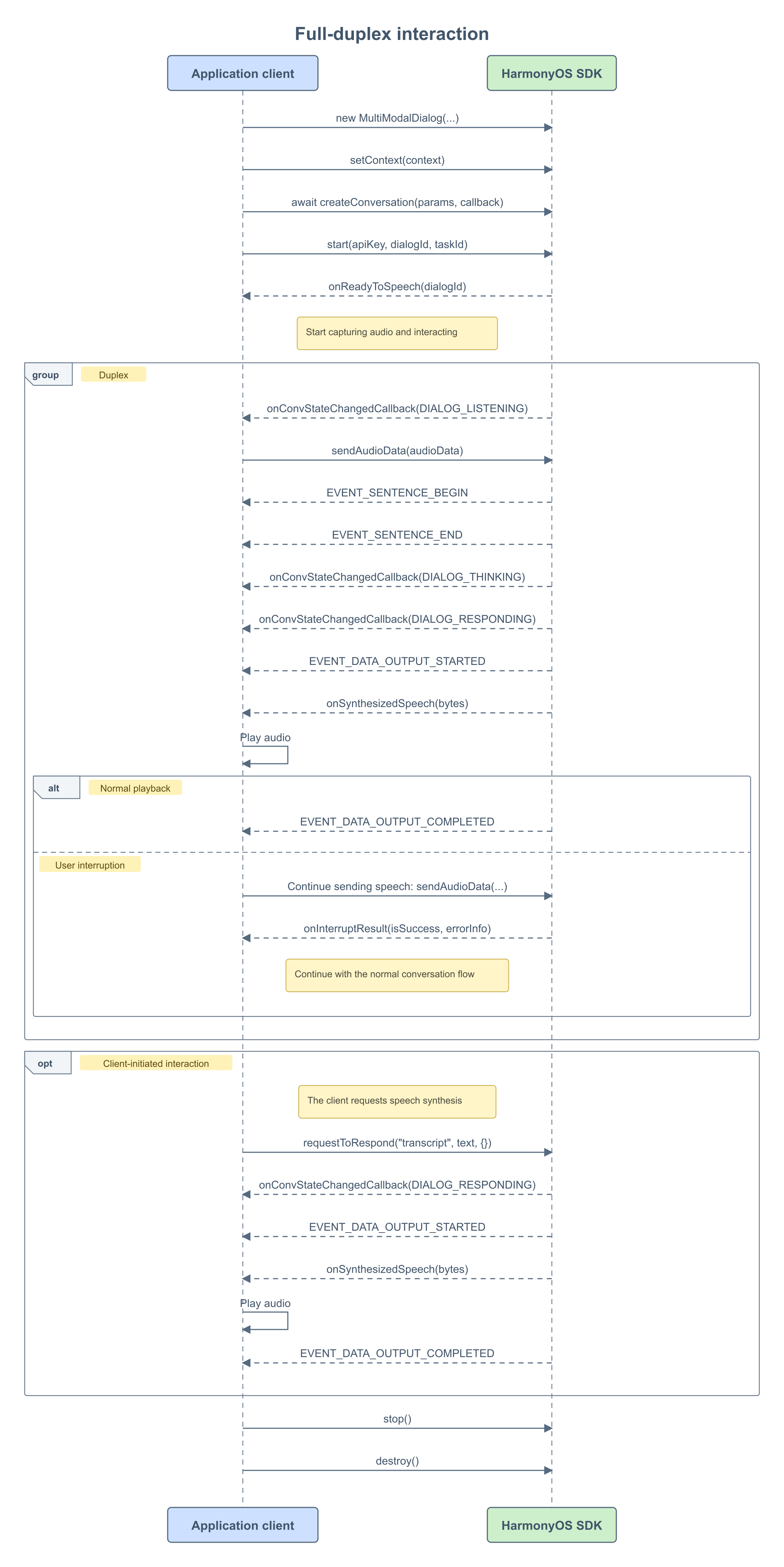
Full-duplex (Duplex): Over WebSocket, the application captures microphone audio and continuously sends it through sendAudioData. Downstream synthesized audio is passed to the application for playback through onSynthesizedSpeech. Keep sending recorded audio during playback to support voice interruptions at any time.
Half-duplex interaction
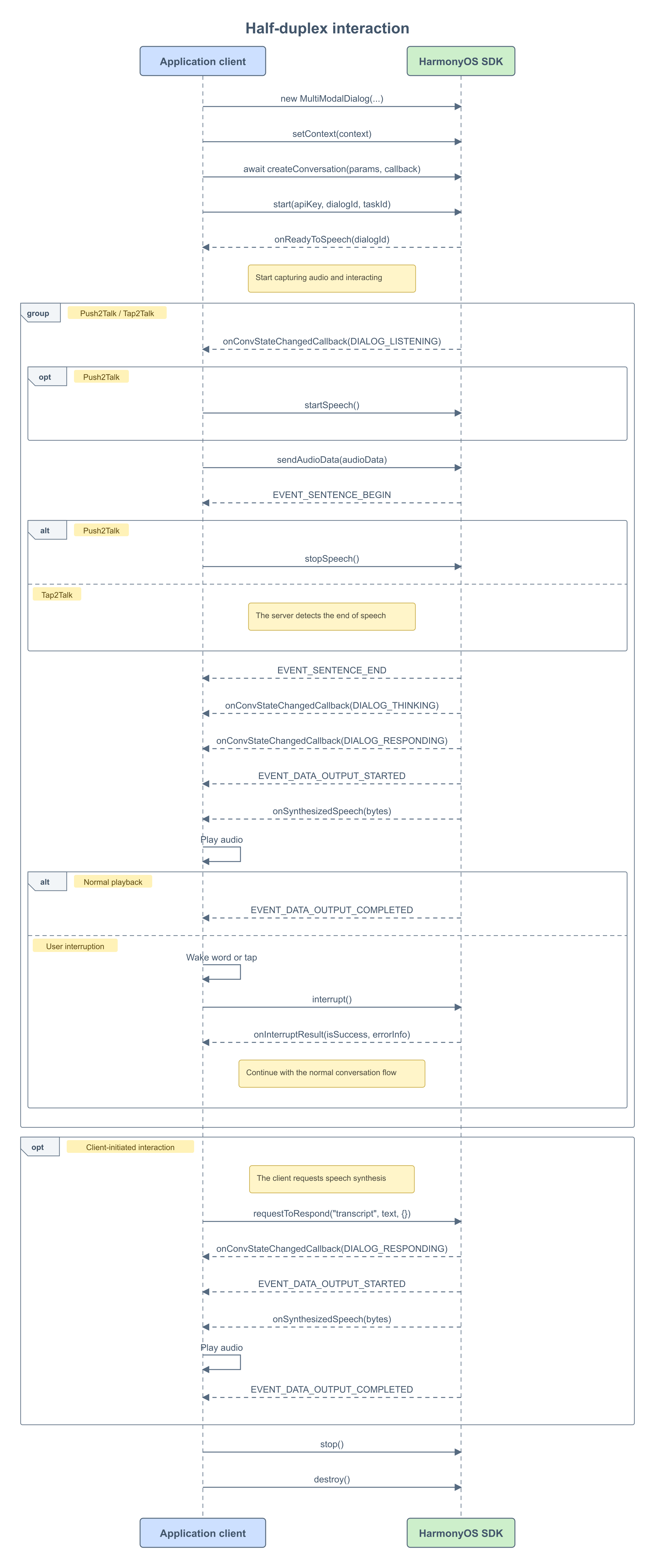
Half-duplex (Push2Talk / Tap2Talk): In Push2Talk, press and hold to speak, and release to finish. In Tap2Talk, tap to start, and the server automatically detects the end of speech.
Additional SDK API usage
Duplex interaction
The HarmonyOS SDK supports Duplex full-duplex interaction. In WebSocket duplex mode, the application continuously captures and sends recorded audio while playing the AI's spoken response, allowing voice interruptions at any time.
- For audio interaction, pass
DialogMode.DUPLEXto theMultiModalDialogconstructor to enable full-duplex mode. - Duplex interaction requires acoustic echo cancellation (AEC). The HarmonyOS SDK integrates internal AEC, which is disabled by default. Explicitly enable it by setting
MultiModalDialog.wsUseInternalAEC = true. When internal AEC is disabled, external AEC is used. The application must send downstream TTS playback data throughsendRefDataas the echo reference.
// Enable duplex mode
let dialog = new MultiModalDialog(url, ChainMode.WEBSOCKET, workspaceId, appId, DialogMode.DUPLEX)
dialog.setContext(context)
MultiModalDialog.wsUseInternalAEC = true
let requestParam = MultiModalRequestParam.builder().build()
await dialog.createConversation(requestParam, this)
In duplex mode:
// Send microphone audio (16 kHz PCM for server recognition)
dialog.sendAudioData(audioData)

// In onSynthesizedSpeech, send downstream TTS data as the AEC reference
// bytes is the callback data; also pass it to the application player
dialog.sendRefData(bytes)

// The application player must use the downstream TTS sample rate
VQA interaction
VQA enables multimodal image-and-voice interaction by sending images during a conversation.
A spoken request to take a photo triggers a "visual_qa" command. When the client receives this command through onConvEventCallback, it sends an image URL or base64 data (images smaller than 180 KB) to enable image understanding in the conversation.
// On receiving the "visual_qa" command
private handleVisualQaCommand() {
  // 1. Take a photo or select an image from the gallery
  let imageUrl = uploadImageToOSS()      // Generate a public image URL
  // 2. Send the image URL for image recognition
  dialog.requestToRespond("visual_qa", imageUrl, {})

  // 3. Alternatively, send base64 image data (image <= 180 KB)
  let imageBase64 = getLocalImageBase64()
  dialog.requestToRespond("visual_qa", imageBase64, {})
}
Call LiveAI over WebSocket
LiveAI (video calling) is the official agent for Model Studio multimodal real-time interaction. When calling LiveAI over WebSocket, the SDK continuously sends video frames using the AudioAndVideo upstream type.
// 1. Set the interaction type to AudioAndVideo
let dialog = new MultiModalDialog(url, ChainMode.WEBSOCKET, workspaceId, appId, DialogMode.DUPLEX);
// Set UpStream.type to AudioAndVideo
// UpStream defaults to AudioOnly; explicitly set AudioAndVideo for LiveAI video calls
let requestParam = MultiModalRequestParam.builder()
  .upStream(UpStream.builder().type('AudioAndVideo').build())
  .build()

// 2. After the conversation starts, send a video frame every 500 ms
// sendVideoFrame requires a frame push result callback (IVideoChatPushFrameCallback)
class VideoFramePushCb implements IVideoChatPushFrameCallback {
  onFinishPushFrame(isSuccess: boolean, errorMsg: string): void {
    //Handle the result, for example by logging and retrying on failure
  }
}
setInterval(() => {
  dialog.sendVideoFrame(getNextVideoFrame(), new VideoFramePushCb())   // LiveAI video frame
}, 500)
Note: In the current version, the external video frame push interfaces (sendVideoFrame / PushExternalVideoFrame) support only base64-encoded images for image interaction over WebSocket. Each image must be smaller than 180 KB. For real-time video calls, use the RTC link (ChainMode.RTC), where the SDK captures camera video and streams it using its built-in camera capture functionality.
Text-to-speech synthesis
TTS converts text into speech. The HarmonyOS SDK uses requestToRespond to request synthesized audio from the server.
// Request TTS synthesis in the Listening state
dialog.requestToRespond("transcript", "幸福是一种技能,是你摒弃了外在多余欲望后的内心平和。", {})
Custom prompt variables and values
- Configure custom prompt variables in the project's Prompt settings in the console.
For example, define user_name for a user's nickname and insert it into the prompt as ${user_name}.
- Set the values in code:
// Set custom prompt variables
let requestParam = MultiModalRequestParam.builder()
  .bizParams(BizParams.builder()
    .userPromptParams({ user_name: "大米" })
    .build())
  .build()
Real-time ASR correction
ASR results may contain errors or unexpected text during a conversation. In addition to configuring hotwords, you can upload a correction vocabulary through the real-time correction API.
Parameters:
| Parameter | Level 1 | Level 2 | Type | Description |
|---|---|---|---|---|
| asrPostProcessing | ReplaceWord[] | ASR correction vocabulary in the SDK upstream parameters | ||
| ReplaceWord | Object | Each ReplaceWord defines a text replacement rule | ||
| source | String | Text to replace | ||
| target | String | Replacement text | ||
| matchMode | String | Matching mode: exact for an exact sentence match, or partial for a partial match. Default: exact. |
// Set the ASR correction vocabulary
let requestParam = MultiModalRequestParam.builder()
  .upStream(UpStream.builder()
    .asrPostProcessing([
      ReplaceWord.builder()
        .source("1加1")
        .target("一加一")
        .matchMode("partial")
        .build()
    ])
    .build())
  .build()