This document explains how to use the real-time multimodal interactive iOS SDK from the Alibaba Cloud Model Studio large model service, covering SDK download and installation, key interfaces, and code samples.
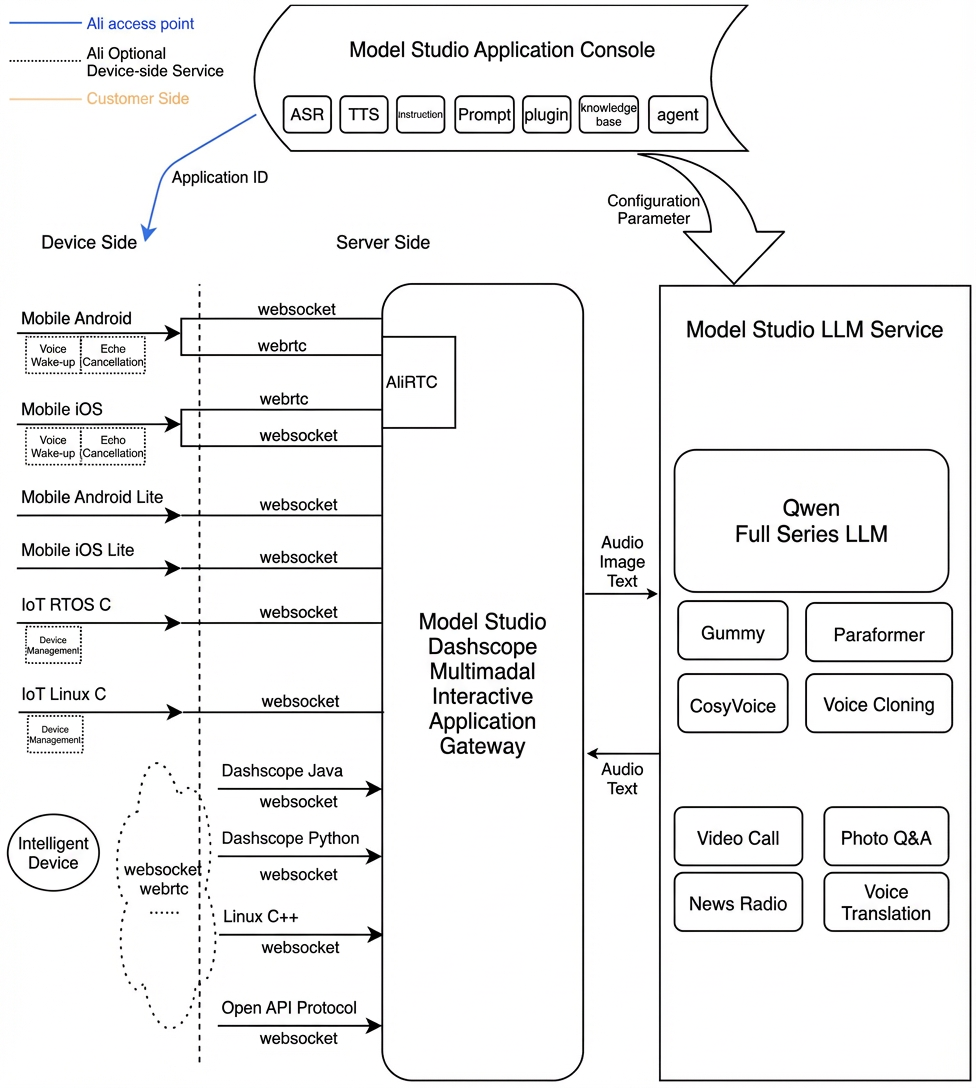
The MultiModalDialog SDK from the Alibaba Cloud Tongyi team enables end-to-end, multimodal, real-time interaction with audio and video. By integrating with the Qwen large model and various backend agents, the SDK offers features such as voice chat, weather, music, and news. It also supports using video and images in conversations with the large model.
Multimodal real-time interactive service architecture
Prerequisites
Enable an Alibaba Cloud Model Studio real-time multimodal interaction application to get your workspace ID, app ID, and API key.
Interactive data links
The SDK enables multi-modal interaction with the server over WebSocket and RTC in two modes: AudioOnly and AudioAndVideo.
For audio interaction, a WebSocket connection is recommended because it provides faster connections and requires fewer resources.
Audio formats for the WebSocket link:
Upstream: Send pcm and opus audio formats for speech recognition.
Downstream: Receive pcm and mp3 audio streams.
For video interaction, use a WebSocket link. See Request LiveAI through a WebSocket link.
Interaction modes
The SDK supports three interaction modes: Push2Talk, Tap2Talk, and Duplex (full-duplex).
Push2Talk: Press and hold to speak, and release to stop (or tap to start and tap to stop).
Tap2Talk: Tap to start speaking; the SDK then automatically detects the end of speech.
Duplex: Enables full-duplex interaction, allowing you to speak at any time once connected. This mode supports barge-in and is recommended for video interaction.
Environment and dependencies
Import the SDK (multimodal-dialog-ios-1.0.7.zip)
multimodal_dialog.framework: The Model Studio multimodal dialog SDK.MultimodalDialogTongyiMetathings.framework: SDK for license mode.
Connect to Model Studio
The multimodal dialog service is built on Model Studio, Alibaba Cloud's large model service platform. It uses a Model Studio API key for authentication. Create an API key in Model Studio. To enhance mobile client security, you can also generate a short-lived token on the server side and pass it to the client.
API
MultimodalDialog
Endpoint Types
1 MultiModalDialog
Initialize the service object with the conversation parameters and callback.
/// Initializes the multimodal conversation manager.
    /// - Parameters:
    ///   - url: The service URL.
    ///   - chainMode: The chain mode (RTC/WebSocket).
    ///   - workSpaceId: The workspace ID. Found in the Model Studio console.
    ///   - appId: The application ID. Configured in the multimodal dialog console.
    ///   - mode: The dialog mode (tap2talk/push2talk/duplex).
public init(url: String?, chainMode: ChainMode, workSpaceId: String, appId:String ,mode: DialogMode)
Step 2: Start
Starting the dialog service triggers the on_started callback, which receives the dialog_id.
/// Starts a dialog request by connecting to the dialog service.
    /// - Parameters:
    ///   - apiKey: The API key for authentication.
    ///   - params: The multimodal request parameters.
    ///   - completion: A completion callback that receives a boolean indicating success and an optional error.
    public func start(apiKey: String, params: MultiModalRequestParam, completion: @escaping (Bool, TYError?) -> Void )
3 startSpeech
Notifies the server to start an audio upload. This method applies only to push2talk and tap2talk modes and must be called in the Listening state.
/// Starts speech (Push-to-Talk).
    public func startSpeech()
4 sendAudioData
Instructs the server to upload the audio file.
/// Sends audio data.
    /// - Parameters:
    ///   - data: The pointer to the audio data.
    ///   - length: The length of the audio data.
    /// - Returns: A status code.
    public func sendAudioData(data: UnsafeMutablePointer<UInt8>, length: Int32) -> Int32?
5 stopSpeech
Stops the server-side audio upload. This method should only be called in push-to-talk mode.
/// Stops speech in push-to-talk mode.
    public func stopSpeech()
6 Interrupt
Notifies the server that the client will interrupt the current interaction to begin speaking. It returns RequestAccepted.
// Interrupts the current conversation.
    /// - Parameter completion: A completion handler called with a Boolean value indicating whether the interruption succeeded.
    public func interrupt(completion: ((Bool) -> Void)? = nil)
7 sendLocalRespondingStarted
Notifies the server that the client has started playing tts audio.
/// Sends a signal that a local response has started.
    public func sendLocalRespondingStarted()
8 sendLocalRespondingEnded
Notifies the server when the client finishes playing the TTS audio.
    /// Sends an end-of-response signal.
    public func sendLocalRespondingEnded()
9. Stop
Ends the dialogue turn and closes the server-side connection.
/// Disconnects from the service.
    public func stop()
10 Request to respond
The client sends text-to-speech (TTS) requests or other requests, such as for images, to the server.
/// Sends a request.
    /// - Parameters:
    ///   - type: The request type.
    ///   - text: The request text.
    ///   - params: Additional parameters.
    public func requestToRespond(type:String, text:String, params:[String : Any])
11 UpdateInfo
Update parameters and more.
/// Updates the information.
    /// - Parameter params: The update parameters.
    public func updateInfo(params:[String : Any])
Callback
This is the callback function for the user layer.
    /// Occurs when a connection to the server is established.
    public var onConnected: (() -> Void)?

    /// Occurs when the conversation is ready for you to start speaking.
    public var onConversationStarted: (() -> Void)?

    /// Occurs when a dialog event is triggered. Events include SpeechStarted, SpeechEnded, RespondingStarted, and RespondingEnded.
    public var onConversationEvent: ((DialogEvent) -> Void)?

    /// Occurs when the conversation state changes. States include Idle, Listening, Thinking, and Responding.
    public var onConversationStateChanged: ((DialogState) -> Void)?

    /// Occurs when a conversation message is received, containing the user's transcribed speech or the large model's response.
    public var onMessageReceived: (([String: Any]?, ResponsetMessageType) -> Void)?

    /// Occurs when an error is received.
    public var onErrorReceived: ((TYError) -> Void)?

    /// Occurs when the audio volume changes. Supported over the RTC link.
    public var onVolumeChanged: ((Float, TYVolumeSourceType) -> Void)?

    /// Occurs when the first video frame is sent in video mode. Supported over the RTC link.
    public var onFirstVideoPacketSent: (() -> Void)?

    /// Occurs when performance data is received.
    public var onPerformanceDataReceived: ((TYChatPerformace) -> Void)?

    /// Occurs when the connection status changes. Supported over the RTC link.
    public var onConnectionStatusChanged: ((RTCConnectionStatus) -> Void)?

    /// Occurs when recorded audio data is available. Supported over the RTC link.
    public var onRecorderData:  ((UnsafeMutablePointer<UInt8>, Int32) -> Void)?

    /// Occurs when synthesized audio data (Text-to-Speech) is available.
    public var onSynthesizedData:  ((UnsafeMutablePointer<UInt8>, Int32) -> Void)?
MultiModalRequestParam
request parameter class
You can set all request parameters using the builder pattern. The required and optional client parameters are described below.
Start connection parameters
Parameter level 1 | Parameter level 2 | Parameter level 3 | Parameter level 4 | Type | Required | Description |
input | workspace_id | string | Yes | The workspace ID. | ||
app_id | string | Yes | The application ID. It is created in the console and is used to determine which dialog system to use. | |||
dialog_id | string | No | The dialog ID. If specified, this continues the existing conversation. | |||
parameters | upstream | type | string | Yes | The upstream type:
| |
mode | string | No | The client interaction mode. Valid values are:
The default is | |||
audio_format | string | No | The audio format for the upstream data. Supported formats are | |||
downstream | voice | string | No | The voice for the synthesized speech. | ||
sample_rate | int | No | The sample rate of the synthesized speech. The default is 24,000 Hz. | |||
intermediate_text | string | No | Controls which intermediate text results are returned to the client:
This parameter accepts multiple comma-separated values. The default is | |||
audio_format | string | No | The audio format of the synthesized speech. Supported formats are | |||
client_info | user_id | string | Yes | The end user's ID, used for user-specific processing. | ||
device | uuid | string | No | A universally unique identifier (UUID) for the client device. The client must generate this ID and pass it to the SDK. | ||
network | ip | string | No | The public IP address of the client. | ||
location | latitude | string | No | The client's latitude. | ||
longitude | string | No | The client's longitude. | |||
city_name | string | No | The city where the client is located. | |||
biz_params | user_defined_params | object | No | Additional parameters to pass through to the agent. | ||
user_defined_tokens | object | No | Authentication information to pass through to the agent. | |||
tool_prompts | object | No | Prompts to pass through to the agent. |
RequestToRespond parameters
Level 1 parameter | Level 2 parameter | Level 3 parameter | Type | Required | Description |
input | type | string | Yes | Specifies the interaction type:
| |
text | string | Yes | The text to process. It can be an empty string, but it cannot be | ||
parameters | images | list[] | No | The images to analyze. | |
biz_params | object | No | Passes custom parameters to the dialogue system, similar to the |
UpdateInfo parameters
Level 1 parameter | Level 2 parameter | Level 3 parameter | Type | Required | Description |
parameters | images | list[] | No | A list of image data. | |
client_info | status | object | No | Current client status. | |
biz_params | object | No | Specifies custom parameters for the dialogue system. Same as |
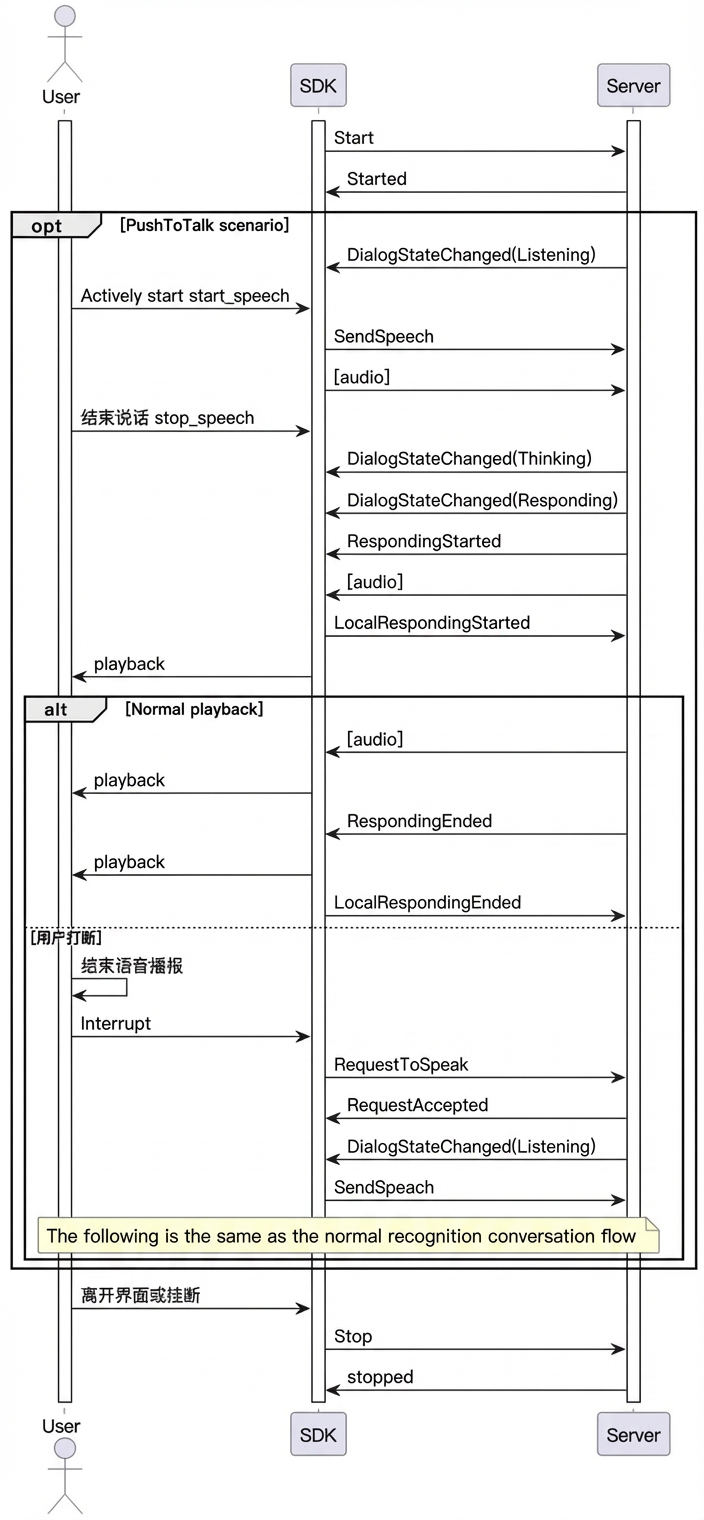
Dialog state (DialogState)
The voice chat service has three states: LISTENING, THINKING, and RESPONDING.
IDLE("Idle"), The bot is not connected.
LISTENING("Listening"), The bot is listening for audio input from the user.
THINKING("Thinking"), The bot is processing user input.
RESPONDING("Responding"), The bot is generating or playing an audio response.
LLM dialog response
The onMessageReceived callback returns the dialog result in the following format.
Parameter level 1 | Parameter level 2 | Parameter level 3 | Type | Required | Description |
output | event | string | Yes | The event name, such as | |
dialog_id | string | Yes | A unique identifier for the dialog. | ||
round_id | string | Yes | A unique identifier for the current interaction. | ||
llm_request_id | string | Yes | The request ID for the LLM call. | ||
text | string | Yes | The user-facing text, provided as a full streaming output. | ||
spoken | string | Yes | The text for speech synthesis, provided as a full streaming output. | ||
finished | bool | Yes | Indicates whether the output is complete. | ||
extra_info | object | No | Extended information. Supported fields include:
|
Sequence diagram
Example
Conversation parameters
Call the builder methods on the MultiModalRequestParam subclasses to build the parameters.
var params = MultiModalRequestParam{ multiBuilder in
            multiBuilder.upStream = MultiModalRequestParam.UpStream(builder: { upstreamBuilder in
                upstreamBuilder.mode = DialogMode.duplex.rawValue
                upstreamBuilder.type = "AudioOnly"
            })
            multiBuilder.clientInfo = MultiModalRequestParam.ClientInfo(builder: {
                clientInfoBuilder in
                clientInfoBuilder.userId = "test-ios-user"
                clientInfoBuilder.device = MultiModalRequestParam.ClientInfo.Device(uuid: "12345")
            })
            multiBuilder.downStream = MultiModalRequestParam.DownStream(builder: {
                downStreamBuilder in
                downStreamBuilder.sampleRate = 48000
            })
        }
Create MultiModalDialog
self.conversation = MultiModalDialog(url: self.HOST, chainMode: self.chain, workSpaceId:self.WORKSPACE_ID ,appId: self.APP_ID, mode: DialogMode.duplex)Complete example
//
//  ChatViewController.swift
//  ChatViewController
//
//  Created by songsong.sss on 2025/3/24.
//

import UIKit
import multimodal_dialog
import SnapKit
import AVFoundation


class ChatViewController: UIViewController {
    let videoView = UIView() // Video preview stream window
    var HOST = ""
    var API_KEY = ""
    var WORKSPACE_ID = ""
    var APP_ID = ""
    var chain = ChainMode.WebSocket
    var isconnected : Bool
    var conversation:MultiModalDialog?
    var isInDialog = false
    var audioRecorder: TYAudioRecorder?
    var audioPlayer: AudioPlayer?
    var image_url: String?


    lazy var titleLabel1: UILabel = createLabel(text: "User:")
    lazy var titleLabel2: UILabel = createLabel(text: "AI:")
    lazy var titleLabel3: UILabel = createLabel(text: "")

    lazy var textView1: UITextView = createTextField()
    lazy var textView2: UITextView = createTextField()
    lazy var textView3: UITextView = createTextField()

    private let buttonStack: UIStackView = {
            let stack = UIStackView()
            stack.axis = .horizontal
            stack.spacing = 20
            stack.distribution = .fillEqually
            return stack
        }()

    private let refreshButton: UIButton = {
            let btn = UIButton(type: .system)
            btn.setTitle("Refresh Content", for: .normal)
            btn.backgroundColor = .systemBlue
            btn.tintColor = .white
            btn.layer.cornerRadius = 8
            return btn
        }()

    private let submitButton: UIButton = {
            let btn = UIButton(type: .system)
            btn.setTitle("Submit Content", for: .normal)
            btn.backgroundColor = .systemGreen
            btn.tintColor = .white
            btn.layer.cornerRadius = 8
            return btn
        }()


    init(){
        self.isconnected = false
        super.init(nibName: nil, bundle: nil)
    }

    public func updateParam(url: String, apiKey: String , workSpaceId: String, appId: String, chain: String ,image_url:String){
        self.HOST = url
        self.API_KEY = apiKey
        self.image_url = image_url
        self.WORKSPACE_ID = workSpaceId
        self.APP_ID = appId
        if chain.lowercased() == "websocket" {
            self.chain = ChainMode.WebSocket
            self.audioRecorder = TYAudioRecorder()
            self.audioRecorder?.setup(sampleRate: 16000, numOfChannels: 1, bitsPerChannel: 16)
            self.audioRecorder?.delegate = self

            self.audioPlayer = AudioPlayer()
            self.audioPlayer?.delegate = self
        }else{
            self.chain = ChainMode.RTC
        }
        self.conversation = MultiModalDialog(url: self.HOST, chainMode: self.chain,  workSpaceId:self.WORKSPACE_ID ,
                                             appId: self.APP_ID, mode: DialogMode.duplex)
    }
    override func viewDidLoad() {
        super.viewDidLoad()
        print("==================viewDidLoad")
        setupDialogCallbacks()

        // Configure the UI for video mode
        if self.chain == ChainMode.RTC {
            view.addSubview(videoView)
            videoView.backgroundColor = .white

            videoView.snp.makeConstraints { make in
                make.edges.equalToSuperview()
            }

            videoView.addGestureRecognizer(UITapGestureRecognizer(target: self, action: #selector(videoViewTapped)))
        }else {
        // Configure the UI for audio mode
            setupUI()
        }
        // Start the connection
        connect()
    }

    override func viewWillDisappear(_ animated: Bool) {
        TYLogger.shared.debug("==========viewWillDisappear")
        self.isInDialog = false
        self.audioPlayer?.stop()
        self.audioRecorder?.stopRecorder(shouldNotify: false)
        self.conversation?.stop()
    }

    override func viewDidDisappear(_ animated: Bool) {
        TYLogger.shared.debug("==========viewDidDisappear")
    }

    func connect(){
        self.conversation?.stop()
        isInDialog = false

        var params = MultiModalRequestParam{ multiBuilder in
            multiBuilder.upStream = MultiModalRequestParam.UpStream(builder: { upstreamBuilder in
                upstreamBuilder.mode = DialogMode.duplex.rawValue
                upstreamBuilder.type = "AudioAndVideo"
            })
            multiBuilder.clientInfo = MultiModalRequestParam.ClientInfo(builder: {
                clientInfoBuilder in
                clientInfoBuilder.userId = "test-ios-user"
                clientInfoBuilder.device = MultiModalRequestParam.ClientInfo.Device(uuid: "12345")
            })
            multiBuilder.downStream = MultiModalRequestParam.DownStream(builder: {
                downStreamBuilder in
                downStreamBuilder.sampleRate = 48000
            })
        }

        self.conversation?.start(apiKey:self.API_KEY, params: params, completion: { success, error in
            if success {
                print("success")
                self.isconnected = true
            }else {
                self.isconnected = false
                if let e = error {
                    print("Connection failed. Error: \(String(describing: error))")
                } else {
                    print("Connection failed. No error message.")
                }
            }})
    }

    required init?(coder: NSCoder) {
        fatalError("init(coder:) has not been implemented")
    }


    // The @objc attribute is required because this method must be exposed to the Objective-C runtime.
    @objc func videoViewTapped() {
        TYLogger.shared.debug("videoViewTapped")
    }

    deinit{
        self.conversation?.stop()
    }


    private func setupDialogCallbacks() {
        self.conversation?.onConnected = {
            print("callback: onConnectionReady ")
        }

        self.conversation?.onVolumeChanged = { volume , type in
        }

        self.conversation?.onConversationStarted = {
            TYLogger.shared.debug("callback: onConversationStarted")
            // Enter video mode for RTC.
            if self.chain == ChainMode.RTC {
                self.conversation?.requestToRespond(type: "prompt", text: "", params: self.createVideoChatParams())
            }
        }

        self.conversation?.onConversationEvent = { event in
            switch event{
            case .RespondingStarted:
                self.conversation?.sendLocalRespondingStarted()
                break
            case .RespondingEnded:
                // Stop sending TTS data.
                self.audioPlayer?.finishFeed(true)
                break
            case .SpeechStarted:
                break
            case .SpeechEnded:
                if self.chain != ChainMode.RTC {
                    self.audioRecorder?.stopRecorder(shouldNotify: false)
                }
                break
            default:
                break
            }
            print("callback: onConversationEvent ",event)
        }

        self.conversation?.onMessageReceived = { message, type in
            let payload = message?["payload"] as? [String: Any]
            let output = payload?["output"] as? [String: Any]


            let dialogId = output?["dialog_id"] as? String
            var debug_info = ("dialog_id:").appending(dialogId ?? "")
            if type == ResponsetMessageType.speaking {
                let text = output?["text"] as? String
                DispatchQueue.main.async {
                    self.textView1.text = text
                }

            }else{
                let spoken = output?["spoken"] as? String
                let llm_request_id = output?["llm_request_id"] as? String
                let round_id = output?["round_id"] as? String

                DispatchQueue.main.async {
                    self.textView2.text = spoken
                }
                self.handleCommand(output: output)
                debug_info = debug_info.appending("\n llm_request_id:").appending(llm_request_id ?? "")
                debug_info = debug_info.appending("\n round_id:").appending(round_id ?? "")
            }
            DispatchQueue.main.async {
                self.textView3.text = debug_info
            }
        }

        self.conversation?.onConversationStatechanged = {state in
            DispatchQueue.main.async {
                self.titleLabel3.text = state.rawValue
            }

            switch state {
            case .idle:
                break
            case .listening:
                print("camera::::", self.conversation?.getCurrentCameraDirection())
                if self.chain != ChainMode.RTC {
                    self.audioRecorder?.startRecorder()
                }
                break
            case .responding:
                break
            case .thinking:
                break
            }
            print("callback: onConversationStatechanged ",state)
        }
        self.conversation?.onErrorReceived = { err in
            print("callback: onErrorReceived: ",err.key, err.message )
            if(err.key.hasPrefix("RTCException.")) {
            }
        }

        self.conversation?.onFirstVideoPacketSent = {
            print("callback: onFirstVideoPacketSent")
        }

        self.conversation?.onConnectionStatusChanged = {
            state in
            print("onConnectionStatusChanged ::::::" ,state)
            switch state{
            case .failed :
                self.conversation?.stop()
                break
            case .inited:
                break
            case .disconnected:
                break
            case .connected:
                print("==================connected")
                self.isInDialog = true
                // Set up the video display.
                if self.chain == ChainMode.RTC {
                    DispatchQueue.main.async {
                        self.conversation?.setupLocalView(self.videoView, config: TYVideoConfig(fps: 24, width: 480, height: 640, bitrate: 0))
                        self.conversation?.publishLocalVideo()
                    }
                }

                break
            case .connecting:
                break
            case .reconnecting:
                break
            @unknown default:
                break
            }

        }

        self.conversation?.onSynthesizedData = { data, len in
            let audio = Data(bytes: UnsafeRawPointer(data), count: Int(len))
            TYLogger.shared.info("process \(len)")
            self.audioPlayer?.process(audioByte:data, length:Int(len))
        }

    }

    //RTC only
    private func createVideoChatParams() -> [String: Any]{
        var video:[String: Any] = [
            "action":"connect",
            "type" : "voicechat_video_channel"
        ]
        var videos = [video]

        var updateParam = MultiModalRequestParam{ multiBuilder in
            multiBuilder.bizParams = MultiModalRequestParam.BizParams(builder: {
                bizBuilder in
                bizBuilder.videos = videos
            })
        }
        return updateParam.parameters

    }

    // For VQA
    private func createImageParams() -> [String: Any]{
        var imageObject:[String: Any] = [
            "type":"url",
            "value":self.image_url ?? ""
        ]
        var images = [imageObject]

        var updateParam = MultiModalRequestParam{ multiBuilder in
            multiBuilder.clientInfo = MultiModalRequestParam.ClientInfo(builder: {
                clientInfoBuilder in
                clientInfoBuilder.userId = "test-ios-user"
                clientInfoBuilder.device = MultiModalRequestParam.ClientInfo.Device(uuid: "12345")
            })
            multiBuilder.images = images
        }
        return updateParam.parameters

    }

    // Handle command
    private func handleCommand(output: [String: Any]?)-> Void {

    }


    // Helper method for creating a label
    private func createLabel(text: String) -> UILabel {
        let label = UILabel()
        label.text = text
        label.font = UIFont.systemFont(ofSize: 16, weight: .medium)
        label.textAlignment = .right
        label.setContentHuggingPriority(.defaultHigh, for: .horizontal)
        label.translatesAutoresizingMaskIntoConstraints = false
        return label
    }

    // Helper method for creating a text view
    private func createTextField() -> UITextView {
        let tv = UITextView()
        tv.layer.cornerRadius = 8
        tv.layer.borderColor = UIColor.systemGray4.cgColor
        tv.layer.borderWidth = 1
        tv.font = UIFont.systemFont(ofSize: 14)
        tv.isScrollEnabled = false
        tv.autocorrectionType = .no
        return tv
    }

    private func setupUI() {
            view.backgroundColor = .white
            view.addSubview(titleLabel1)
            view.addSubview(textView1)
            view.addSubview(titleLabel2)
            view.addSubview(textView2)
            view.addSubview(textView3)
            view.addSubview(titleLabel3)
            view.addSubview(buttonStack)

            buttonStack.addArrangedSubview(refreshButton)
            buttonStack.addArrangedSubview(submitButton)

            // AutoLayout constraints
            let safeArea = view.safeAreaLayoutGuide
            let padding: CGFloat = 20

            titleLabel1.translatesAutoresizingMaskIntoConstraints = false
            textView1.translatesAutoresizingMaskIntoConstraints = false
            titleLabel2.translatesAutoresizingMaskIntoConstraints = false
            textView2.translatesAutoresizingMaskIntoConstraints = false
            textView3.translatesAutoresizingMaskIntoConstraints = false
            titleLabel3.translatesAutoresizingMaskIntoConstraints = false
            buttonStack.translatesAutoresizingMaskIntoConstraints = false

            NSLayoutConstraint.activate([
                titleLabel1.topAnchor.constraint(equalTo: safeArea.topAnchor, constant: padding),
                titleLabel1.leadingAnchor.constraint(equalTo: safeArea.leadingAnchor, constant: padding),
                titleLabel1.trailingAnchor.constraint(equalTo: safeArea.trailingAnchor, constant: -padding),

                textView1.topAnchor.constraint(equalTo: titleLabel1.bottomAnchor, constant: 8),
                textView1.leadingAnchor.constraint(equalTo: safeArea.leadingAnchor, constant: padding),
                textView1.trailingAnchor.constraint(equalTo: safeArea.trailingAnchor, constant: -padding),
                textView1.heightAnchor.constraint(greaterThanOrEqualToConstant: 100),

                titleLabel2.topAnchor.constraint(equalTo: textView1.bottomAnchor, constant: padding),
                titleLabel2.leadingAnchor.constraint(equalTo: safeArea.leadingAnchor, constant: padding),
                titleLabel2.trailingAnchor.constraint(equalTo: safeArea.trailingAnchor, constant: -padding),

                textView2.topAnchor.constraint(equalTo: titleLabel2.bottomAnchor, constant: 8),
                textView2.leadingAnchor.constraint(equalTo: safeArea.leadingAnchor, constant: padding),
                textView2.trailingAnchor.constraint(equalTo: safeArea.trailingAnchor, constant: -padding),
                textView2.heightAnchor.constraint(greaterThanOrEqualToConstant: 100),

                textView3.topAnchor.constraint(equalTo: textView2.bottomAnchor, constant: 8),
                textView3.leadingAnchor.constraint(equalTo: safeArea.leadingAnchor, constant: padding),
                textView3.trailingAnchor.constraint(equalTo: safeArea.trailingAnchor, constant: -padding),
                textView3.heightAnchor.constraint(greaterThanOrEqualToConstant: 100),

                titleLabel3.topAnchor.constraint(equalTo: textView3.bottomAnchor, constant: padding),
                titleLabel3.leadingAnchor.constraint(equalTo: safeArea.leadingAnchor, constant: padding),
                titleLabel3.trailingAnchor.constraint(equalTo: safeArea.trailingAnchor, constant: -padding),


                buttonStack.bottomAnchor.constraint(equalTo: safeArea.bottomAnchor, constant: -padding),
                buttonStack.leadingAnchor.constraint(equalTo: safeArea.leadingAnchor, constant: padding),
                buttonStack.trailingAnchor.constraint(equalTo: safeArea.trailingAnchor, constant: -padding),
                buttonStack.heightAnchor.constraint(equalToConstant: 50)
            ])
        }

}


extension [String: Any] {
    func toUTF8String() -> String? {
        do {
            let data = try JSONSerialization.data(withJSONObject: self, options: .prettyPrinted)
            return String(data: data, encoding: .utf8)
        } catch {
            return nil
        }
    }
}

extension ChatViewController: TYAudioRecorderDelegate {
    /// Callback for when the recorder starts. This is called on the main thread.
    func recorderDidStart(){
        TYLogger.shared.info("recorderDidStart")
    }

    /// Callback for when the recorder stops. This is called on the main thread.
    func recorderDidStop(){
        TYLogger.shared.info("recorderDidStop")
    }

    /// Called when the recorder captures audio data. This method is called on an AudioQueue thread to avoid blocking the main thread
    /// because it typically involves operations such as VAD and compression. Ensure thread safety.
    func voiceRecorded(_ buffer: UnsafeMutablePointer<UInt8>, length: Int32){
//        TYLogger.shared.debug("voiceRecorded \(length)")
        self.conversation?.sendAudioData(data: buffer, length: length)

    }

    /// This callback is triggered when the recorder fails to open or another error occurs.
    func recorderDidFail(_ error: Error?){
        TYLogger.shared.error("recorderDidFail")
    }
}

// Player callbacks
extension ChatViewController:AudioPlayerDelegate {
    func playDone() {
        self.conversation?.sendLocalRespondingEnded()

    }
}
Exception handling
Server-Side Errors
The error code is a string with the prefix "VoiceChat.", such as "VoiceChat.40000000".
Error code | Parameter | Description |
40000000 | ClientError | Indicates a general client-side error. |
40000001 | InvalidParameter | A required parameter is missing or a parameter value is invalid. |
40000002 | DirectiveNotSupported | The directive is not supported, for example, due to an incorrect name. |
40000003 | MessageInvalid | The message is invalid, for example, due to an incorrect format. |
40000004 | ConnectError | Indicates a connection error, for example, when the client or digital human disconnects from the RTC channel. |
40010000 | AccessDenied | Access to the requested resource is denied. |
40010001 | UNAUTHORIZED | The request is not authorized. Ensure that you have the required permissions. |
40020000 | DataInspectionFailed | The input or output text triggered Content Moderation. |
50000000 | InternalError | An internal server error occurred. Contact support for assistance. |
50000001 | UnknownError | An unknown internal server error occurred. Contact support for assistance. |
50010000 | InternalAsrError | An internal error occurred in the Automatic Speech Recognition (ASR) service. |
50020000 | InternalLLMError | An internal error occurred in the Large Language Model (LLM) service. |
50030000 | InternalSynthesizerError | An internal error occurred in the Text-to-Speech (TTS) service. |
Client-Side Errors
Error code | Description |
PermissionFailed | Could not obtain permissions for audio and video recording. |
RTC.AuthFailed | RTC channel authentication failed. |
RTC.JoinChannelFailed | Failed to join the RTC channel. |
VoiceChat.ConversationFailed | The request to the conversation service failed. |
Further SDK API usage
Duplex interaction
The mobile client iOS SDK supports duplex interaction mode. In this mode, the SDK accepts recorded audio data during speech synthesis playback. If a user speaks during playback, the service automatically interrupts the current playback stream (your application must clear the client-side player's buffer) and starts a new response.
Duplex interaction requires Acoustic Echo Cancellation (AEC). The iOS SDK has a built-in echo cancellation algorithm. However, you must configure it before using duplex interaction.
Send microphone audio
Use the following method to send real-time audio data from the microphone to the SDK.
self.conversation?.sendAudioData(data: data, length: length)Send reference audio
Use the following method to send the real-time playback audio data to the SDK. Ensure that this data is identical to the currently playing audio.
self.conversation?.sendRefData(data: data, length: length)Request LiveAI over the RTC link
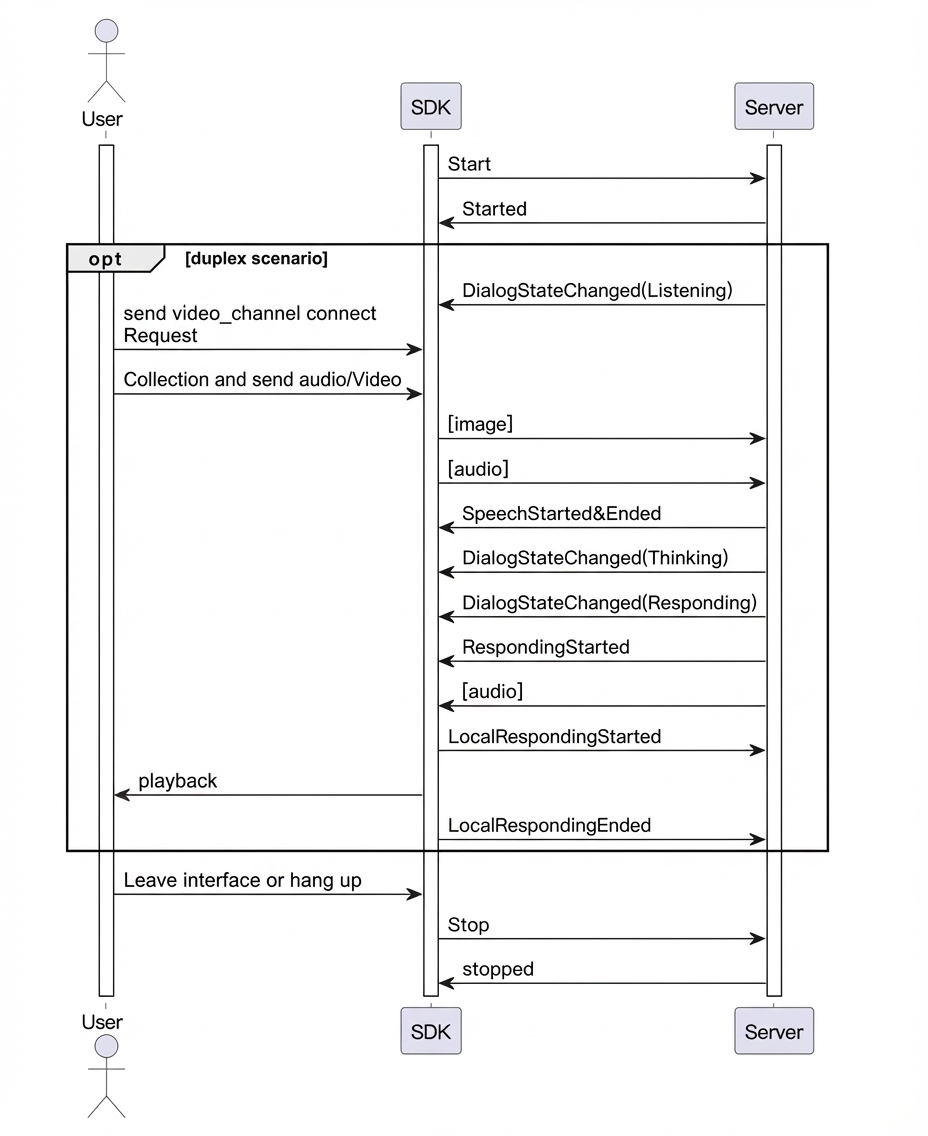
LiveAI (video call) is the Model Studio agent for multimodal interaction. With the full-featured iOS SDK, you can add video calling to your app. This SDK includes a built-in RTC protocol for real-time, full-duplex audio and video interaction.
LiveAI call sequence
Key code examples
For the complete code, refer to the iOS demo available for download in the "Environment and dependencies" section.
When you start the interaction over the RTC link, the SDK enables its built-in video capture by default and establishes a video call with the server.
// 1. Set the interaction type to AudioAndVideo.
multiBuilder.upStream = MultiModalRequestParam.UpStream(builder: { upstreamBuilder in
                upstreamBuilder.mode = mode.rawValue
                upstreamBuilder.type = "AudioAndVideo"
            })
// 2. Initialize a MultiModalDialog instance and select the RTC link by setting chainMode to ChainMode.RTC.
self.conversation = MultiModalDialog(url: self.HOST, chainMode: self.chain,  workSpaceId:self.WORKSPACE_ID ,
                                             appId: self.APP_ID, mode: mode)

// 3. After the connection is established, send a voicechat_video_channel request.
private func createVideoChatParams() -> [String: Any]{
        var video:[String: Any] = [
            "action":"connect",
            "type" : "voicechat_video_channel"
        ]
        var videos = [video]

        var updateParam = MultiModalRequestParam{ multiBuilder in
            multiBuilder.bizParams = MultiModalRequestParam.BizParams(builder: {
                bizBuilder in
                bizBuilder.videos = videos
            })
        }
        return updateParam.parameters
}

// 4. Start the audio and video interaction. See the sample code for the complete flow, including special handling for ChainMode.RTC.
LiveAI over WebSocket
LiveAI is the official video call agent from Model Studio. The full-featured iOS SDK also allows you to implement the video call feature over a WebSocket link by capturing and sending video frames from your application.
Note: Images sent to LiveAI over a WebSocket link must be base64-encoded and smaller than 180 KB.
LiveAI call sequence
Key code examples
Follow the procedure below to call LiveAI over a WebSocket link.
// 1. Set the interaction type to "AudioAndVideo".
multiBuilder.upStream = MultiModalRequestParam.UpStream(builder: { upstreamBuilder in
                upstreamBuilder.mode = mode.rawValue
                upstreamBuilder.type = "AudioAndVideo"
            })
// 2. Initialize a MultiModalDialog instance. Select the WebSocket link by setting chainMode to ChainMode.WebSocket.
self.conversation = MultiModalDialog(url: self.HOST, chainMode: self.chain,  workSpaceId:self.WORKSPACE_ID ,
                                             appId: self.APP_ID, mode: mode)

// 3. After the connection is established, send a 'voicechat_video_channel' request.
// Alternatively, use the 'open_videochat' command to trigger createVideoChatParams. The service returns this command in response to the "Open video call" voice command.
private func createVideoChatParams() -> [String: Any]{
        var video:[String: Any] = [
            "action":"connect",
            "type" : "voicechat_video_channel"
        ]
        var videos = [video]

        var updateParam = MultiModalRequestParam{ multiBuilder in
            multiBuilder.bizParams = MultiModalRequestParam.BizParams(builder: {
                bizBuilder in
                bizBuilder.videos = videos
            })
        }
        return updateParam.parameters
}

// 4. Submit a video frame every 500 ms. The image size must be less than 180 KB.
/**
 * This demo shows how to use LiveAI over a WebSocket link by sending a local image.
 * In your application, you must implement the logic to capture and send a video frame every 500 ms.
 */
// Start the background execution to send images.
func startPeriodicExecution() {
    timer = DispatchSource.makeTimerSource(queue: queue)
    timer?.schedule(deadline: .now(), repeating: .milliseconds(500))
    timer?.setEventHandler { [weak self] in
        self?.sendLocalImageBase64()
    }
    timer?.resume()
}

// Send a base64-encoded image to update the conversation.
private func sendLocalImageBase64() {
    print("send_local_image_base64() called : \(Thread.current)")
    var imageObjectBase64:[String: Any] = [
                "type":"base64",
                "value":getImageAsBase64FromAssets(imageName:"bridge") // Implement the base64 encoding for the image.
    ]
    var images = [imageObjectBase64]

    var updateParam = MultiModalRequestParam{ multiBuilder in
        multiBuilder.images = images
    }

    self.conversation?.updateInfo(params: updateParam.parameters)

}
VQA interaction
Visual Question Answering (VQA) enables multi-modal interaction, combining images with voice or text in a conversation.
The core process begins when a voice or text request triggers the "visual_qa" capture instruction.
After you receive the capture instruction, send an image URL or base64 data smaller than 180 KB.
Once a connection is established, send the capture request.
    // Create image request parameters.
    private func createImageParams() -> [String: Any]{
        var imageObject:[String: Any] = [
            "type":"url",
            "value":self.image_url ?? ""
        ]
        // Or, upload the image directly as base64 data (must be < 180 KB).
        var imageObjectBase64:[String: Any] = [
                    "type":"base64",
                    "value":"imagebase64"
        ]
        var images = [imageObject]

        var updateParam = MultiModalRequestParam{ multiBuilder in
            multiBuilder.images = images
        }
        return updateParam.parameters
    }
// Send the request.
self.conversation?.requestToRespond(type: "prompt", text: "", params: self.createImageParams())
Text-to-speech
self.conversation?.requestToRespond(type: "prompt", text: "Happiness is a skill: the inner peace that comes from letting go of excessive external desires.", params:[:])Custom prompt variables and value passing
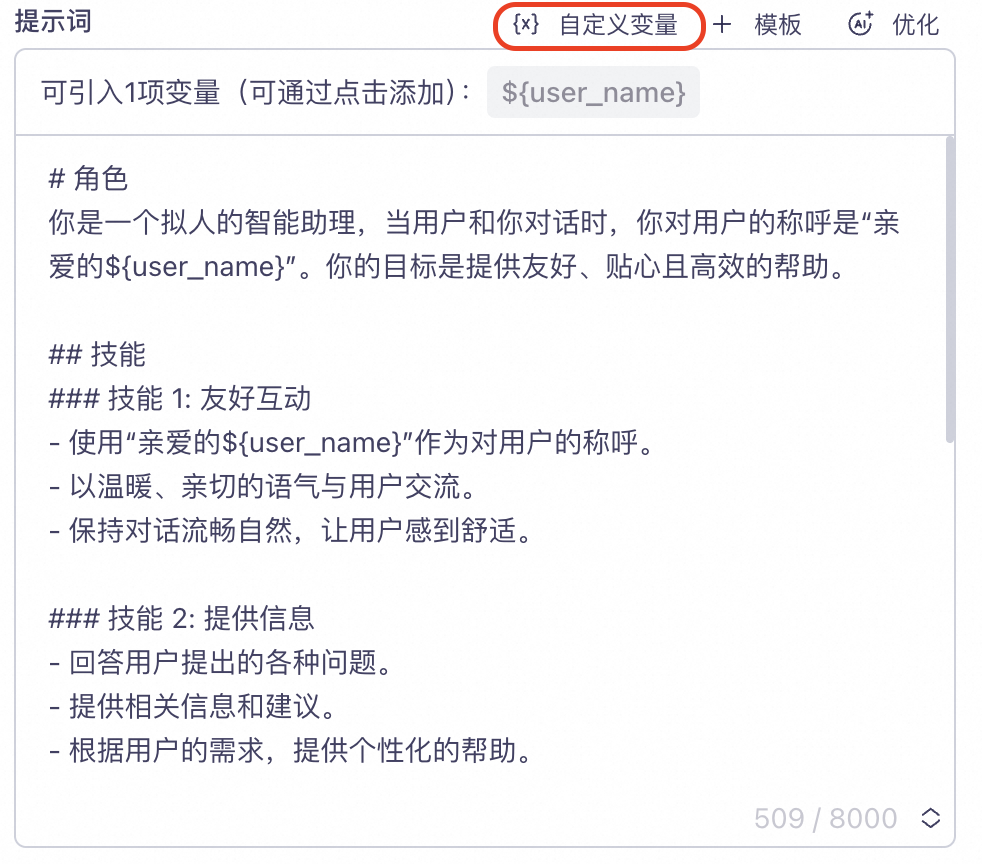
In the console, configure a custom variable in your project's "Prompt" section.
As shown in the following example, a user_name field is defined to represent the user nickname. The user_name variable is inserted into the Prompt as the placeholder ${user_name}.
Set the variable in your code.
For example, set "user_name" = "Jack".
// Pass biz_params.user_prompt_params when building the request parameters.
var promptParam = ["user_name" : "Rice"]
var params = MultiModalRequestParam{ multiBuilder in
            multiBuilder.bizParams = MultiModalRequestParam.BizParams(builder: {
                bizBuilder in
                bizBuilder.userPromptParams = promptParam
            })
}
Example request and response