Custom application parameter pass-through
Pass custom parameters, primarily to custom plugins and custom nodes, when calling Alibaba Cloud Model Studio's Agent Application and Workflow Application (which replace agent orchestration applications).
Obtain an API key and export the API key as an environment variable. If you use an SDK to make calls, install the DashScope SDK.
Custom plugin parameters
This article uses the dormitory convention query tool to demonstrate how to pass parameters to a custom plugin using an API.
NoteParameters for custom plugins are passed via an associated Agent Application or a Workflow Application's plugin node.
The following example shows how to pass custom plugin parameters for an Agent Application.
Usage
Step 1: Create a custom plugin
If you have already created a plugin tool or imported a plugin, skip this step.
-
Create a custom plugin: Go to the Plugins page in the Model Studio console and click Add Custom Plug-in. Enter the plugin information. If authentication is required, turn on the Enable Authentication switch and configure the settings.
Example Plugin Description: Queries dormitory conventions and looks up specific entries by numeric index.
Example Plugin URL: https://domitorgreement-plugin-example-icohrkdjxy.cn-beijing.fcapp.run
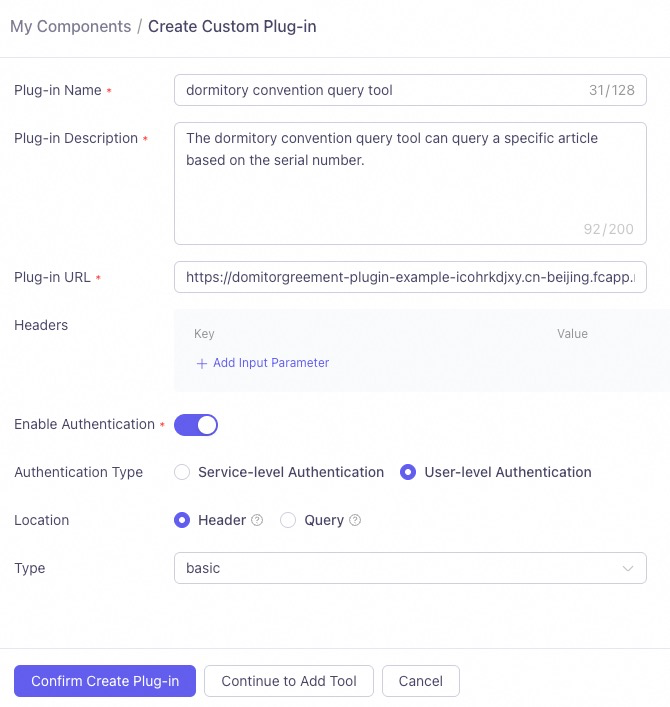
Note: The Plug-in Description briefly summarizes the plugin's purpose. This helps the large model decide whether to call the plugin for a given task. Describe it in natural language.
-
Create a tool: Fill in the tool information and configure the input and output parameters. Note:
- The Tool Description helps the large model better understand the tool's functions and use cases. Use natural language and provide examples if possible.
- A descriptive Parameter Name helps the large model understand the information it represents.
- The Parameter Description explains the function of the input parameter. It should be concise and accurate to help the large model determine the correct value to use.
- You must select Business Pass-through for the input parameter's Passing Method.
In this example, the dormitory convention content index,
article_index, is set as a passthrough parameter.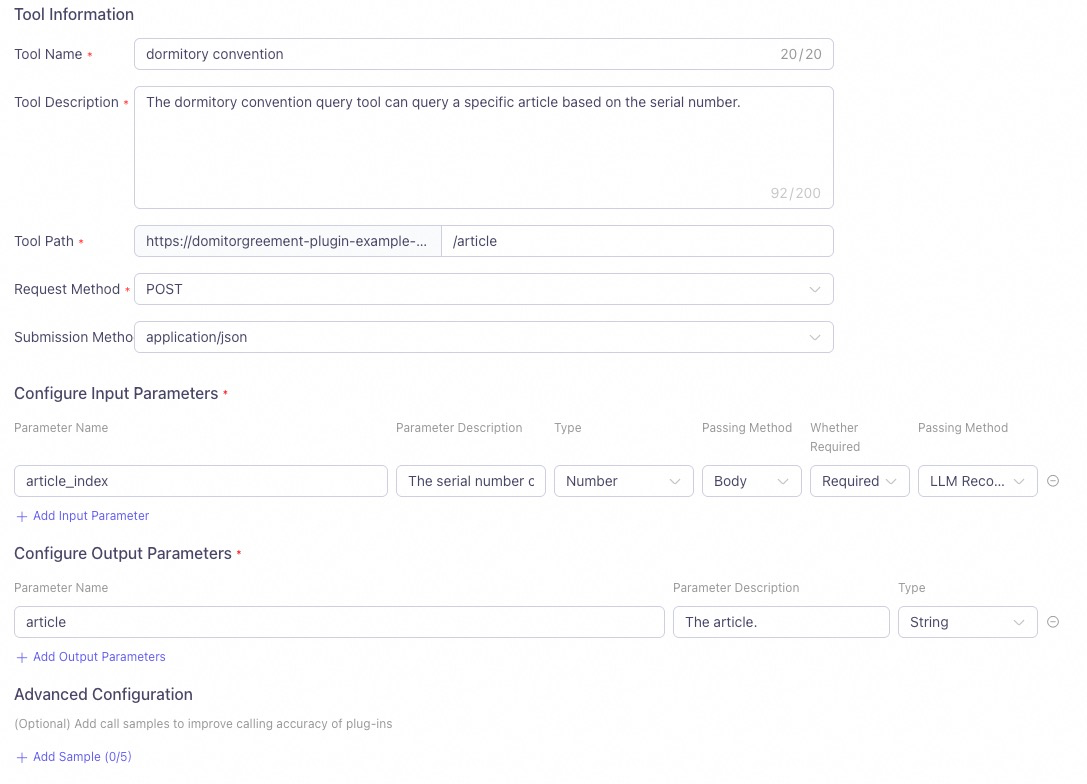
-
Click Test Tool. After the test passes, Publish the plugin.
Step 2: Associate a plugin with an agent
You can only associate plugins with Agent Application that are in the same workspace.
- On a published plugin's card, click Add to Agent and select an agent application.
- Alternatively, click + Plugin within an application to associate a custom plugin.
- Finally, Publish the application.
Step 3: API call
-
When authentication is not required: To call a custom plugin via an API, use the
user_defined_paramsparameter ofbiz_paramsto pass the custom plugin information, replaceyour_plugin_codewith the actual plugin ID, and pass the key-value pairs of the input parameters configured in the plugin.You can find the plugin ID on the plugin card.
In this example, passing a value of 2 to the
article_indexparameter queries the content of the second dormitory convention and returns the correct result.Python
Sample request
Sample responseimport os from http import HTTPStatus # We recommend using DashScope SDK v1.14.0 or later. from dashscope import Application biz_params = { # Pass the input parameters for the agent application's custom plugin. Replace `your_plugin_code` with your plugin ID. "user_defined_params": { "your_plugin_code": { "article_index": 2}}} response = Application.call( # If the environment variable is not set, you can use your Model Studio API key by replacing the following line with api_key="sk-xxx". We recommend using an environment variable in production to avoid leaking your API key. api_key=os.getenv("DASHSCOPE_API_KEY"), app_id='YOUR_APP_ID', prompt='Dormitory convention content', biz_params=biz_params) if response.status_code != HTTPStatus.OK: print(f'request_id={response.request_id}') print(f'code={response.status_code}') print(f'message={response.message}') print(f'For more information, see: https://help.aliyun.com/en/model-studio/developer-reference/error-code') else: print('%s\n' % (response.output.text)) # Process and output only the text. # print('%s\n' % (response.usage))The second article of the dormitory convention is as follows: "Roommates must help, care for, and learn from each other to achieve mutual improvement. They must be tolerant, forgiving, respectful, and sincere." This suggests that roommates should foster a positive living and learning environment by supporting and helping each other, while also learning to understand and respect others. If you want to learn about other articles of the convention, just ask!Java
Sample request
Sample responseimport com.alibaba.dashscope.app.*; import com.alibaba.dashscope.exception.ApiException; import com.alibaba.dashscope.exception.InputRequiredException; import com.alibaba.dashscope.exception.NoApiKeyException; import com.alibaba.dashscope.utils.JsonUtils; public class Main { public static void appCall() throws NoApiKeyException, InputRequiredException { String bizParams = // Pass the input parameters for the agent application's custom plugin. Replace `{your_plugin_code}` with your plugin ID. "{\"user_defined_params\":{\"{your_plugin_code}\":{\"article_index\":2}}}"; ApplicationParam param = ApplicationParam.builder() // If the environment variable is not set, you can use your Model Studio API key by replacing the following line with .apiKey("sk-xxx"). We recommend using an environment variable in production to avoid leaking your API key. .apiKey(System.getenv("DASHSCOPE_API_KEY")) .appId("YOUR_APP_ID") .prompt("Dormitory convention content") .bizParams(JsonUtils.parse(bizParams)) .build(); Application application = new Application(); ApplicationResult result = application.call(param); System.out.printf("%s\n", result.getOutput().getText()); } public static void main(String[] args) { try { appCall(); } catch (ApiException | NoApiKeyException | InputRequiredException e) { System.out.printf("Exception: %s", e.getMessage()); System.out.println("For more information, see: https://help.aliyun.com/en/model-studio/error-code"); } System.exit(0); } }The second article of the dormitory convention is as follows: Article 2: Roommates must help, care for, and learn from each other to achieve mutual improvement. They must be tolerant, forgiving, respectful, and sincere. This emphasizes that in a shared living environment, roommates should maintain a positive and supportive relationship to create a harmonious atmosphere for living and learning. If you need to learn about any other specific articles, please let me know.HTTP
curl
Sample requestcurl -X POST https://dashscope.aliyuncs.com/api/v1/apps/YOUR_APP_ID/completion \ --header "Authorization: Bearer $DASHSCOPE_API_KEY" \ --header 'Content-Type: application/json' \ --data '{ "input": { "prompt": "Dormitory convention content", "biz_params": { "user_defined_params": { "{your_plugin_code}": { "article_index": 2 } } } }, "parameters": {}, "debug":{} }'
Sample responseReplace
YOUR_APP_IDwith your app ID.{"output": {"finish_reason":"stop", "session_id":"e151267ffded4fbdb13d91439011d31e", "text":"The second article of the dormitory convention is: \"Roommates must help, care for, and learn from each other to achieve mutual improvement. They must be tolerant, forgiving, respectful, and sincere.\" This means that in dormitory life, everyone must support each other to create a harmonious and positive living environment."}, "usage":{"models":[{"output_tokens":94,"model_id":"qwen-max","input_tokens":453}]}, "request_id":"a39fd2b5-7e2c-983e-84a1-1039f726f18a"}%PHP
Sample request
Sample response<?php # If the environment variable is not set, you can use your Model Studio API key by replacing the following line with $api_key="sk-xxx". We recommend using an environment variable in production to avoid leaking your API key. $api_key = getenv("DASHSCOPE_API_KEY"); $application_id = 'YOUR_APP_ID'; // Replace with your app ID. $url = "https://dashscope.aliyuncs.com/api/v1/apps/$application_id/completion"; // Replace `{your_plugin_code}` with your plugin ID. // Construct the request data. $data = [ "input" => [ 'prompt' => 'Dormitory convention content', 'biz_params' => [ 'user_defined_params' => [ '{your_plugin_code}' => [ 'article_index' => 2 ] ] ] ], ]; // Encode the data as JSON. $dataString = json_encode($data); // Check if json_encode was successful. if (json_last_error() !== JSON_ERROR_NONE) { die("JSON encoding failed with error: " . json_last_error_msg()); } // Initialize a cURL session. $ch = curl_init($url); // Set the cURL options. curl_setopt($ch, CURLOPT_CUSTOMREQUEST, "POST"); curl_setopt($ch, CURLOPT_POSTFIELDS, $dataString); curl_setopt($ch, CURLOPT_RETURNTRANSFER, true); curl_setopt($ch, CURLOPT_HTTPHEADER, [ 'Content-Type: application/json', 'Authorization: Bearer ' . $api_key ]); // Execute the request. $response = curl_exec($ch); // Check if the cURL execution was successful. if ($response === false) { die("cURL Error: " . curl_error($ch)); } // Get the HTTP status code. $status_code = curl_getinfo($ch, CURLINFO_HTTP_CODE); // Close the cURL session. curl_close($ch); // Decode the response data. $response_data = json_decode($response, true); // Process the response. if ($status_code == 200) { if (isset($response_data['output']['text'])) { echo "{$response_data['output']['text']}\n"; } else { echo "No text in response.\n"; } }else { if (isset($response_data['request_id'])) { echo "request_id={$response_data['request_id']}\n";} echo "code={$status_code}\n"; if (isset($response_data['message'])) { echo "message={$response_data['message']}\n";} else { echo "message=Unknown error\n";} } ?>The second article of the dormitory convention states: Roommates must help, care for, and learn from each other to achieve mutual improvement. They must be tolerant, forgiving, respectful, and sincere. This is to ensure that everyone can live and study in a harmonious and friendly environment. If you want to learn about other specific articles or have other questions, feel free to ask.Node.js
Dependencies:
Sample requestnpm install axios
Sample responseconst axios = require('axios'); async function callDashScope() { // If the environment variable is not set, you can use your Model Studio API key by replacing the following line with apiKey='sk-xxx'. We recommend using an environment variable in production to avoid leaking your API key. const apiKey = process.env.DASHSCOPE_API_KEY; const appId = 'YOUR_APP_ID';// Replace with your app ID. const pluginCode = 'YOUR_PLUGIN_CODE';// Replace with your plugin ID. const url = `https://dashscope.aliyuncs.com/api/v1/apps/${appId}/completion`; const data = { input: { prompt: "Dormitory convention content", biz_params: { user_defined_params: { [pluginCode]: { // 'article_index' is an example of a custom plugin parameter. 'article_index': 2 } } } }, parameters: {}, debug: {} }; try { console.log("Sending request to DashScope API..."); const response = await axios.post(url, data, { headers: { 'Authorization': `Bearer ${apiKey}`, 'Content-Type': 'application/json' } }); if (response.status === 200) { if (response.data.output && response.data.output.text) { console.log(`${response.data.output.text}`); } } else { console.log("Request failed:"); if (response.data.request_id) { console.log(`request_id=${response.data.request_id}`); } console.log(`code=${response.status}`); if (response.data.message) { console.log(`message=${response.data.message}`); } else { console.log('message=Unknown error'); } } } catch (error) { console.error(`Error calling DashScope: ${error.message}`); if (error.response) { console.error(`Response status: ${error.response.status}`); console.error(`Response data: ${JSON.stringify(error.response.data, null, 2)}`); } } } callDashScope();The second article of the dormitory convention states: Roommates must help, care for, and learn from each other to achieve mutual improvement. They must be tolerant, forgiving, respectful, and sincere. This is to ensure that everyone can live and study in a harmonious and friendly environment. If you want to learn about other specific articles or have other questions, feel free to ask.C#
Sample request
Sample responseusing System.Text; class Program { static async Task Main(string[] args) { // If the environment variable is not set, you can use your Model Studio API key by replacing the following line with apiKey="sk-xxx". We recommend using an environment variable in production to avoid leaking your API key. string apiKey = Environment.GetEnvironmentVariable("DASHSCOPE_API_KEY")?? throw new InvalidOperationException("DASHSCOPE_API_KEY environment variable is not set.");; string appId = "YOUR_APP_ID";// Replace with your app ID. if (string.IsNullOrEmpty(apiKey)) { Console.WriteLine("Please ensure that the DASHSCOPE_API_KEY environment variable is set."); return; } string url = $"https://dashscope.aliyuncs.com/api/v1/apps/{appId}/completion"; using (HttpClient client = new HttpClient()) { client.DefaultRequestHeaders.Add("Authorization", $"Bearer {apiKey}"); string pluginCode = "{your_plugin_code}"; // Replace `{your_plugin_code}` with your plugin ID. string jsonContent = $@"{{ ""input"": {{ ""prompt"": ""Dormitory convention content"", ""biz_params"": {{ ""user_defined_params"": {{ ""{pluginCode}"": {{ ""article_index"": 2 }} }} }} }}, ""parameters"": {{}}, ""debug"": {{}} }}"; HttpContent content = new StringContent(jsonContent, Encoding.UTF8, "application/json"); try { HttpResponseMessage response = await client.PostAsync(url, content); if (response.IsSuccessStatusCode) { string responseBody = await response.Content.ReadAsStringAsync(); Console.WriteLine("Request successful:"); Console.WriteLine(responseBody); } else { Console.WriteLine($"Request failed with status code: {response.StatusCode}"); string responseBody = await response.Content.ReadAsStringAsync(); Console.WriteLine(responseBody); } } catch (Exception ex) { Console.WriteLine($"Error calling DashScope: {ex.Message}"); } } } }{ "output": { "finish_reason": "stop", "session_id": "237ca6187c814f3b9e7461090a5f8b74", "text": "The second article of the dormitory convention is as follows:\n\n\"Roommates must help, care for, and learn from each other to achieve mutual improvement. They must be tolerant, forgiving, respectful, and sincere.\"\n\nThis indicates that in the dormitory, roommates need to establish a positive relationship, creating a harmonious living and learning environment by helping, caring for, and supporting each other. They should also learn to understand and accept differences between roommates and communicate with sincerity. If you want to learn about other articles or specific content, please let me know!" }, "usage": { "models": [ { "output_tokens": 133, "model_id": "qwen-max", "input_tokens": 829 } ] }, "request_id": "64e8c359-d071-9d2e-bb94-187e86cc3a79" }Go
Sample request
Sample responsepackage main import ( "bytes" "encoding/json" "fmt" "io" "net/http" "os" ) func main() { // If the environment variable is not set, you can use your Model Studio API key by replacing the following line with apiKey := "sk-xxx". We recommend using an environment variable in production to avoid leaking your API key. apiKey := os.Getenv("DASHSCOPE_API_KEY") appId := "YOUR_APP_ID" // Replace with your app ID. pluginCode := "YOUR_PLUGIN_CODE" // Replace with your plugin ID. if apiKey == "" { fmt.Println("Please ensure that the DASHSCOPE_API_KEY environment variable is set.") return } url := fmt.Sprintf("https://dashscope.aliyuncs.com/api/v1/apps/%s/completion", appId) // Create the request body. requestBody := map[string]interface{}{ "input": map[string]interface{}{ "prompt": "Dormitory convention content", "biz_params": map[string]interface{}{ "user_defined_params": map[string]interface{}{ pluginCode: map[string]interface{}{ "article_index": 2, }, }, }, }, "parameters": map[string]interface{}{}, "debug": map[string]interface{}{}, } jsonData, err := json.Marshal(requestBody) if err != nil { fmt.Printf("Failed to marshal JSON: %v\n", err) return } // Create an HTTP POST request. req, err := http.NewRequest("POST", url, bytes.NewBuffer(jsonData)) if err != nil { fmt.Printf("Failed to create request: %v\n", err) return } // Set the request headers. req.Header.Set("Authorization", "Bearer "+apiKey) req.Header.Set("Content-Type", "application/json") // Send the request. client := &http.Client{} resp, err := client.Do(req) if err != nil { fmt.Printf("Failed to send request: %v\n", err) return } defer resp.Body.Close() // Read the response. body, err := io.ReadAll(resp.Body) if err != nil { fmt.Printf("Failed to read response: %v\n", err) return } // Process the response. if resp.StatusCode == http.StatusOK { fmt.Println("Request successful:") fmt.Println(string(body)) } else { fmt.Printf("Request failed with status code: %d\n", resp.StatusCode) fmt.Println(string(body)) } }{ "output": { "finish_reason": "stop", "session_id": "860d2a4c1f3649ac880298537993cb51", "text": "The second article of the dormitory convention is as follows:\n\nRoommates must help, care for, and learn from each other to achieve mutual improvement. They must be tolerant, forgiving, respectful, and sincere.\n\nThis emphasizes that in dormitory life, roommates should maintain a supportive relationship and respect each other. Would you like to learn about the content of other articles?" }, "usage": { "models": [ { "output_tokens": 84, "model_id": "qwen-max", "input_tokens": 876 } ] }, "request_id": "0a250055-90a4-992d-9276-e268ad35d1ab" } -
When authentication is required: This scenario describes how to call a custom plugin that has Authentication enabled and is configured with User-level Authentication.
You can find the plugin ID on the plugin card.
- Use
user_defined_paramsin thebiz_paramsfield to pass custom plugin information. Replaceyour_plugin_codewith your plugin ID, and provide the input parameters as key-value pairs. - Use
user_defined_tokensin thebiz_paramsfield to pass authentication credentials. Replaceyour_plugin_codewith your plugin ID, and set theuser_tokenvalue to your authentication token, such as a DashScope API key. - After successful authentication, the service queries the specified item based on the provided index parameter and returns the correct result.
In this example, the
article_indexparameter is set to 2, and the value ofuser_token,YOUR_TOKEN, is replaced with the actual DASHSCOPE_API_KEY. After authentication succeeds, the content of the second dormitory rule is queried, and the correct result is returned.Python
Request sample
Response samplefrom http import HTTPStatus import os # We recommend using DashScope SDK v1.14.0 or later. from dashscope import Application biz_params = { # Pass authentication credentials for the agent application's custom plugin. # Replace your_plugin_code with your plugin ID and YOUR_TOKEN with your authentication token, such as an API key. "user_defined_params": { "your_plugin_code": { "article_index": 2}}, "user_defined_tokens": { "your_plugin_code": { "user_token": "YOUR_TOKEN"}}} response = Application.call( # If the environment variable is not configured, you can use a DashScope API key by replacing the next line with: api_key="sk-xxx". # However, we do not recommend hardcoding the API key in a production environment to reduce the risk of key leakage. api_key=os.getenv("DASHSCOPE_API_KEY"), app_id='YOUR_APP_ID', prompt='Dormitory convention content', biz_params=biz_params) if response.status_code != HTTPStatus.OK: print(f'request_id={response.request_id}') print(f'code={response.status_code}') print(f'message={response.message}') print(f'For more information, refer to: https://help.aliyun.com/en/model-studio/developer-reference/error-code') else: print('%s\n' % (response.output.text)) # Process and output only the text. # print('%s\n' % (response.usage))The second article of the dormitory convention is as follows: Roommates must help, care for, and learn from each other to achieve mutual improvement. They must be tolerant, forgiving, respectful, and sincere. If you need to know about other articles of the convention, please let me know.Java
Request sample
Response sampleimport com.alibaba.dashscope.app.*; import com.alibaba.dashscope.exception.ApiException; import com.alibaba.dashscope.exception.InputRequiredException; import com.alibaba.dashscope.exception.NoApiKeyException; import com.alibaba.dashscope.utils.JsonUtils; public class Main { public static void appCall() throws NoApiKeyException, InputRequiredException { String bizParams = // Replace {your_plugin_code} with your plugin ID, and YOUR_TOKEN with your token, such as an API key. "{\"user_defined_params\":{\"{your_plugin_code}\":{\"article_index\":2}}," + "\"user_defined_tokens\":{\"{your_plugin_code}\":{\"user_token\":\"YOUR_TOKEN\"}}}"; ApplicationParam param = ApplicationParam.builder() // If the environment variable is not configured, you can use a DashScope API key by replacing the next line with: .apiKey("sk-xxx"). // However, we do not recommend hardcoding the API key in a production environment to reduce the risk of key leakage. .apiKey(System.getenv("DASHSCOPE_API_KEY")) .appId("YOUR_APP_ID") .prompt("Dormitory convention content") .bizParams(JsonUtils.parse(bizParams)) .build(); Application application = new Application(); ApplicationResult result = application.call(param); System.out.printf("%s\n", result.getOutput().getText()); } public static void main(String[] args) { try { appCall(); } catch (ApiException | NoApiKeyException | InputRequiredException e) { System.out.printf("Exception: %s", e.getMessage()); System.out.println("For more information, refer to: https://help.aliyun.com/en/model-studio/error-code"); } System.exit(0); } }The second article of the dormitory convention is as follows: Roommates must help, care for, and learn from each other to achieve mutual improvement. They must be tolerant, forgiving, respectful, and sincere. If you need to query for more articles, please let me know.Replace YOUR_APP_ID with your application ID, your_plugin_code with your custom plugin ID, and YOUR_TOKEN with your authentication token.
HTTP
curl
Request samplecurl -X POST https://dashscope.aliyuncs.com/api/v1/apps/YOUR_APP_ID/completion \ --header "Authorization: Bearer $DASHSCOPE_API_KEY" \ --header 'Content-Type: application/json' \ --data '{ "input": { "prompt": "Dormitory convention content", "biz_params": { "user_defined_params": { "{your_plugin_code}": { "article_index": 2 } }, "user_defined_tokens": { "{your_plugin_code}": { "user_token": "YOUR_TOKEN" } } } }, "parameters": {}, "debug":{} }'
Response sampleReplace YOUR_APP_ID with your application ID, {your_plugin_code} with your custom plugin ID, and YOUR_TOKEN with your authentication token.
{"output":{"finish_reason":"stop",
"session_id":"d3b5c3e269dc40479255a7a02df5c630",
"text":"The second article of the dormitory convention is: \"Roommates must help, care for, and learn from each other to achieve mutual improvement. They must be tolerant, forgiving, respectful, and sincere.\" This emphasizes the importance of harmonious coexistence and mutual progress among members in dormitory life."},
"usage":{"models":[{"output_tokens":80,"model_id":"qwen-max","input_tokens":432}]},
"request_id":"1f77154c-edc3-9003-b622-816fa2f849cf"}%
PHP
Request sample
Response sample<?php # If the environment variable is not configured, you can use a DashScope API key by replacing the next line with: $api_key="sk-xxx". # However, we do not recommend hardcoding the API key in a production environment to reduce the risk of key leakage. $api_key = getenv("DASHSCOPE_API_KEY"); $application_id = 'YOUR_APP_ID'; // Replace with your application ID. $url = "https://dashscope.aliyuncs.com/api/v1/apps/$application_id/completion"; // Construct the request data. $data = [ "input" => [ 'prompt' => 'Dormitory convention content', 'biz_params' => [ 'user_defined_params' => [ '{your_plugin_code}' => [//Replace {your_plugin_code} with your plugin ID. 'article_index' => 2 ] ], 'user_defined_tokens' => [ '{your_plugin_code}' => [//Replace {your_plugin_code} with your plugin ID. 'user_token' => 'YOUR_TOKEN'//Replace with your token, such as an API key. ] ] ] ], ]; // Encode the data as JSON. $dataString = json_encode($data); // Check if json_encode was successful. if (json_last_error() !== JSON_ERROR_NONE) { die("JSON encoding failed with error: " . json_last_error_msg()); } // Initialize a cURL session. $ch = curl_init($url); // Set cURL options. curl_setopt($ch, CURLOPT_CUSTOMREQUEST, "POST"); curl_setopt($ch, CURLOPT_POSTFIELDS, $dataString); curl_setopt($ch, CURLOPT_RETURNTRANSFER, true); curl_setopt($ch, CURLOPT_HTTPHEADER, [ 'Content-Type: application/json', 'Authorization: Bearer ' . $api_key ]); // Execute the request. $response = curl_exec($ch); // Check if the cURL execution was successful. if ($response === false) { die("cURL Error: " . curl_error($ch)); } // Get the HTTP status code. $status_code = curl_getinfo($ch, CURLINFO_HTTP_CODE); // Close the cURL session. curl_close($ch); // Decode the response data. $response_data = json_decode($response, true); // Process the response. if ($status_code == 200) { if (isset($response_data['output']['text'])) { echo "{$response_data['output']['text']}\n"; } else { echo "No text in response.\n"; } }else { if (isset($response_data['request_id'])) { echo "request_id={$response_data['request_id']}\n";} echo "code={$status_code}\n"; if (isset($response_data['message'])) { echo "message={$response_data['message']}\n";} else { echo "message=Unknown error\n";} } ?>The second article of the dormitory convention is as follows: > Roommates must help, care for, and learn from each other to achieve mutual improvement. They must be tolerant, forgiving, respectful, and sincere. If you need to know more about the convention or other information, please feel free to ask.Node.js
Dependencies:
Request samplenpm install axios
Response sampleconst axios = require('axios'); async function callDashScope() { // If the environment variable is not configured, you can use a DashScope API key by replacing the next line with: apiKey='sk-xxx'. // However, we do not recommend hardcoding the API key in a production environment to reduce the risk of key leakage. const apiKey = process.env.DASHSCOPE_API_KEY; const appId = 'YOUR_APP_ID';// Replace with your application ID. const pluginCode = 'YOUR_PLUGIN_CODE';// Replace with your plugin ID. const url = `https://dashscope.aliyuncs.com/api/v1/apps/${appId}/completion`; const data = { input: { prompt: "Dormitory convention content", biz_params: { user_defined_params: { [pluginCode]: { // `article_index` is a sample parameter for the custom plugin. Replace it with your parameter. 'article_index': 6 } }, user_defined_tokens: { [pluginCode]: { // Replace YOUR_TOKEN with your authentication token, such as an API key. user_token: 'YOUR_TOKEN' } } } }, parameters: {}, debug: {} }; try { console.log("Sending request to DashScope API..."); const response = await axios.post(url, data, { headers: { 'Authorization': `Bearer ${apiKey}`, 'Content-Type': 'application/json' } }); if (response.status === 200) { if (response.data.output && response.data.output.text) { console.log(`${response.data.output.text}`); } } else { console.log("Request failed:"); if (response.data.request_id) { console.log(`request_id=${response.data.request_id}`); } console.log(`code=${response.status}`); if (response.data.message) { console.log(`message=${response.data.message}`); } else { console.log('message=Unknown error'); } } } catch (error) { console.error(`Error calling DashScope: ${error.message}`); if (error.response) { console.error(`Response status: ${error.response.status}`); console.error(`Response data: ${JSON.stringify(error.response.data, null, 2)}`); } } } callDashScope();The sixth article of the dormitory convention states: Develop good sleep habits. Every roommate has the right to rest and the responsibility to ensure others' right to rest. If you need to know more about the regulations, please provide more details.C#
Request sample
Response sampleusing System.Text; class Program { static async Task Main(string[] args) { // If the environment variable is not configured, you can use a DashScope API key by replacing the next line with: apiKey="sk-xxx". // However, we do not recommend hardcoding the API key in a production environment to reduce the risk of key leakage. string apiKey = Environment.GetEnvironmentVariable("DASHSCOPE_API_KEY")?? throw new InvalidOperationException("DASHSCOPE_API_KEY environment variable is not set.");; string appId = "YOUR_APP_ID";// Replace with your application ID. if (string.IsNullOrEmpty(apiKey)) { Console.WriteLine("Please make sure the DASHSCOPE_API_KEY environment variable is set."); return; } string url = $"https://dashscope.aliyuncs.com/api/v1/apps/{appId}/completion"; using (HttpClient client = new HttpClient()) { client.DefaultRequestHeaders.Add("Authorization", $"Bearer {apiKey}"); string pluginCode = "your_plugin_code"; // Replace your_plugin_code with your plugin ID. // Replace YOUR_TOKEN with your token, such as an API key. string jsonContent = $@"{{ ""input"": {{ ""prompt"": ""Dormitory convention content"", ""biz_params"": {{ ""user_defined_params"": {{ ""{pluginCode}"": {{ ""article_index"": 2 }} }}, ""user_defined_tokens"": {{ ""{pluginCode}"": {{ ""user_token"": ""YOUR_TOKEN"" }} }} }} }}, ""parameters"": {{}}, ""debug"": {{}} }}"; HttpContent content = new StringContent(jsonContent, Encoding.UTF8, "application/json"); try { HttpResponseMessage response = await client.PostAsync(url, content); if (response.IsSuccessStatusCode) { string responseBody = await response.Content.ReadAsStringAsync(); Console.WriteLine("Request successful:"); Console.WriteLine(responseBody); } else { Console.WriteLine($"Request failed with status code: {response.StatusCode}"); string responseBody = await response.Content.ReadAsStringAsync(); Console.WriteLine(responseBody); } } catch (Exception ex) { Console.WriteLine($"Error calling DashScope: {ex.Message}"); } } } }{ "output": { "finish_reason": "stop", "session_id": "1a1913a9922a401f8eba36df8ea1a062", "text": "The second article of the dormitory convention is as follows:\n\nRoommates must help, care for, and learn from each other to achieve mutual improvement. They must be tolerant, forgiving, respectful, and sincere.\n\nIf you need more details about the convention, please specify." }, "usage": { "models": [ { "output_tokens": 66, "model_id": "qwen-max", "input_tokens": 802 } ] }, "request_id": "04bac806-c5e6-9fab-a846-a66641862be9" }Go
Request sample
Response samplepackage main import ( "bytes" "encoding/json" "fmt" "io" "net/http" "os" ) func main() { // If the environment variable is not configured, you can use a DashScope API key by replacing the next line with: apiKey := "sk-xxx". // However, we do not recommend hardcoding the API key in a production environment to reduce the risk of key leakage. apiKey := os.Getenv("DASHSCOPE_API_KEY") appId := "YOUR_APP_ID" // Replace with your application ID. pluginCode := "YOUR_PLUGIN_CODE" // Replace with your plugin ID. if apiKey == "" { fmt.Println("Please make sure the DASHSCOPE_API_KEY environment variable is set.") return } url := fmt.Sprintf("https://dashscope.aliyuncs.com/api/v1/apps/%s/completion", appId) // Create the request body. requestBody := map[string]interface{}{ "input": map[string]interface{}{ "prompt": "Dormitory convention content", "biz_params": map[string]interface{}{ "user_defined_params": map[string]interface{}{ pluginCode: map[string]interface{}{ "article_index": 10, }, }, "user_defined_tokens": map[string]interface{}{ pluginCode: map[string]interface{}{ "user_token": "YOUR_TOKEN", // Replace with your authentication token, such as an API key. }, }, }, }, "parameters": map[string]interface{}{}, "debug": map[string]interface{}{}, } jsonData, err := json.Marshal(requestBody) if err != nil { fmt.Printf("Failed to marshal JSON: %v\n", err) return } // Create an HTTP POST request. req, err := http.NewRequest("POST", url, bytes.NewBuffer(jsonData)) if err != nil { fmt.Printf("Failed to create request: %v\n", err) return } // Set request headers. req.Header.Set("Authorization", "Bearer "+apiKey) req.Header.Set("Content-Type", "application/json") // Send the request. client := &http.Client{} resp, err := client.Do(req) if err != nil { fmt.Printf("Failed to send request: %v\n", err) return } defer resp.Body.Close() // Read the response. body, err := io.ReadAll(resp.Body) if err != nil { fmt.Printf("Failed to read response: %v\n", err) return } // Process the response. if resp.StatusCode == http.StatusOK { fmt.Println("Request successful:") fmt.Println(string(body)) } else { fmt.Printf("Request failed with status code: %d\n", resp.StatusCode) fmt.Println(string(body)) } }{ "output": { "finish_reason": "stop", "session_id": "b8e051ba7e954ff8919208e7b84430fa", "text": "The tenth article of the dormitory convention states that roommates should work together to create and maintain a clean, tidy, aesthetically pleasing, and culturally rich dormitory environment. To understand the full content of the dormitory convention, you may need to view other articles or directly consult the dormitory management department. Is there any other specific content you would like to know about?" }, "usage": { "models": [ { "output_tokens": 70, "model_id": "qwen-max", "input_tokens": 855 } ] }, "request_id": "0921ee34-2754-9616-a826-cea33a0e0a14" } - Use
Pass custom node parameters
This topic uses the Querying administrative divisions by city name example to demonstrate how to pass custom node parameters to an application through an API call.
NoteCustom node parameters for an application are passed through the start node of a Workflow Application.
The following example shows how to pass custom parameters to the start node in a Workflow Application.
Usage
Step 1: Configure custom node parameters
Go to the My Applications page in the Model Studio console. Select a Workflow Application and define custom parameters for its start node. For this example, create a String variable named city. Then, insert the city and query variables into the prompt and Publish the application.
Step 2: Make an API call
When you make the API call, pass the city value in the biz_params field and the query value in the prompt field.
Python
sample requestimport os
from http import HTTPStatus
from dashscope import Application
# Pass custom parameters for a workflow application.
biz_params = {"city": "Hangzhou"}
response = Application.call(
# If you have not configured an environment variable, you can use your Model Studio API key by replacing the following line with: api_key="sk-xxx".
# We recommend that you do not hardcode the API key in your code in a production environment to reduce the risk of API key leaks.
api_key=os.getenv("DASHSCOPE_API_KEY"),
app_id='YOUR_APP_ID', # Replace with your actual application ID.
prompt='Query the administrative divisions of this city',
biz_params=biz_params # Pass business parameters.
)
if response.status_code != HTTPStatus.OK:
print(f'request_id={response.request_id}')
print(f'code={response.status_code}')
print(f'message={response.message}')
print(f'For more information, see: https://help.aliyun.com/en/model-studio/developer-reference/error-code')
else:
print(f'{response.output.text}') # Process and output only the text.
Hangzhou, as the capital city of Zhejiang Province, has the following 10 municipal districts: Shangcheng, Gongshu, Xihu, Binjiang, Xiaoshan, Yuhang, Linping, Qiantang, Fuyang, and Lin'an. Each district has unique characteristics and development priorities.

- Shangcheng District: Located in the center of Hangzhou, it is one of the city's political, economic, and cultural centers.
- Gongshu District: Characterized by its canal culture, it hosts numerous historical and cultural heritage sites.
- Xihu District: Home to the famous West Lake Scenic Area, it is a major tourist destination.
- Binjiang District: A hub for high-tech industries, where well-known companies like Alibaba are located.
- Xiaoshan District: An administrative district in the southeast that has experienced rapid economic growth, especially in the manufacturing sector.
- Yuhang District: Has developed rapidly in recent years, particularly in the internet economy sector. (Note: Alibaba's headquarters is actually in Binjiang District).
- Linping District: A newly established district aimed at promoting comprehensive economic and social development in the area.
- Qiantang District: Also a result of recent administrative restructuring, it emphasizes the combination of innovative development and ecological protection.
- Fuyang District: Located to the southwest of Hangzhou, it is known for its rich natural landscapes and long history and culture.
- Lin'an District: Situated in the west of Hangzhou, it is famous for its excellent ecological environment and profound cultural heritage.

Please note that specific city planning may change over time. Refer to the latest official information.
Java
sample requestimport com.alibaba.dashscope.app.*;
import com.alibaba.dashscope.exception.ApiException;
import com.alibaba.dashscope.exception.InputRequiredException;
import com.alibaba.dashscope.exception.NoApiKeyException;
import com.alibaba.dashscope.utils.JsonUtils;
import io.reactivex.Flowable;
public class Main {
public static void appCall() throws NoApiKeyException, InputRequiredException {
String bizParams =
"{\"city\":\"Hangzhou\"}";
ApplicationParam param = ApplicationParam.builder()
// If you have not configured an environment variable, you can use your Model Studio API key by replacing the following line with: .apiKey("sk-xxx").
// We recommend that you do not hardcode the API key in your code in a production environment to reduce the risk of API key leaks.
.apiKey(System.getenv("DASHSCOPE_API_KEY"))
.appId("YOUR_APP_ID")
.prompt("Query the administrative divisions of this city")
.bizParams(JsonUtils.parse(bizParams))
.build();
Application application = new Application();
ApplicationResult result = application.call(param);
System.out.printf("%s\n",
result.getOutput().getText());
}
public static void main(String[] args) {
try {
appCall();
} catch (ApiException | NoApiKeyException | InputRequiredException e) {
System.out.printf("Exception: %s", e.getMessage());
System.out.println("For more information, see: https://help.aliyun.com/en/model-studio/error-code");
}
System.exit(0);
}
}
Hangzhou is the capital city of Zhejiang Province, and its administrative divisions primarily include 10 municipal districts: Shangcheng, Gongshu, Xihu, Binjiang, Xiaoshan, Yuhang, Linping, Qiantang, Fuyang, and Lin'an. Each district has its own characteristics and development focus.

- Shangcheng District: Located in the center of Hangzhou, it has many historical and cultural heritage sites.
- Gongshu District: Famous for its Grand Canal culture, it is also an important commercial and residential area.
- Xihu District: Known for its beautiful natural scenery, including the famous West Lake Scenic Area.
- Binjiang District: A high-tech industry cluster where the Hangzhou National High-Tech Industry Development Zone is located.
- Xiaoshan District: Has experienced rapid economic growth, with particularly outstanding performance in manufacturing.
- Yuhang District: Has grown rapidly in recent years with the development of high-tech companies such as Alibaba. (Note: Alibaba's headquarters is actually in Binjiang District).
- Linping District: Formed in 2021 from parts of the original Yuhang District, it focuses on ecological development and technological innovation.
- Qiantang District: Also a new district established in 2021, it is positioned as a new hub for transportation and industrial development in eastern Hangzhou.
- Fuyang District: A historic and cultural city, and also one of the major centers for the papermaking industry.
- Lin'an District: Located in western Hangzhou, it has a high forest coverage rate and an excellent ecological environment.

These areas collectively form the unique geographic layout and socio-economic structure of Hangzhou. If you are interested in a specific area or need more detailed information, please let me know!
HTTP
curl
sample requestcurl -X POST https://dashscope.aliyuncs.com/api/v1/apps/YOUR_APP_ID/completion \
--header "Authorization: Bearer $DASHSCOPE_API_KEY" \
--header 'Content-Type: application/json' \
--data '{
"input": {
"prompt": "Query the administrative divisions of this city",
"biz_params": {
"city": "Hangzhou"}
},
"parameters": {}
}'
sample responseReplace YOUR_APP_ID with your actual application ID.
{"output":{"finish_reason":"stop","session_id":"c211219896004b50a1f6f66f2ec5413e",
"text":"Hangzhou administers 10 districts, 1 county, and 2 county-level cities, which are:\nShangcheng District, Gongshu District, Xihu District, Binjiang District, Xiaoshan District, Yuhang District, Linping District, Qiantang District, Fuyang District, Lin'an District, Tonglu County, Chun'an County, Jiande City, and Zhuji City.\nNote: Zhuji City is directly administered by Zhejiang Province and jointly managed by Hangzhou and Shaoxing cities."},"usage":{},
"request_id":"02c3c9e1-7912-9505-91aa-248d04fb1f5d"}
PHP
sample request<?php
# If you have not configured an environment variable, you can use your Model Studio API key by replacing the following line with: $api_key="sk-xxx".
# We recommend that you do not hardcode the API key in your code in a production environment to reduce the risk of API key leaks.
$api_key = getenv("DASHSCOPE_API_KEY");
$application_id = 'YOUR_APP_ID'; // Replace with your actual application ID.
$url = "https://dashscope.aliyuncs.com/api/v1/apps/$application_id/completion";
// Construct the request data.
$data = [
"input" => [
'prompt' => 'Query the administrative divisions of this city',
'biz_params' => [
'city' => 'Hangzhou'
]
],
];
// Encode the data as JSON.
$dataString = json_encode($data);
// Check if json_encode was successful.
if (json_last_error() !== JSON_ERROR_NONE) {
die("JSON encoding failed with error: " . json_last_error_msg());
}
// Initialize a cURL session.
$ch = curl_init($url);
// Set the cURL options.
curl_setopt($ch, CURLOPT_CUSTOMREQUEST, "POST");
curl_setopt($ch, CURLOPT_POSTFIELDS, $dataString);
curl_setopt($ch, CURLOPT_RETURNTRANSFER, true);
curl_setopt($ch, CURLOPT_HTTPHEADER, [
'Content-Type: application/json',
'Authorization: Bearer ' . $api_key
]);
// Execute the request.
$response = curl_exec($ch);
// Check if the cURL execution was successful.
if ($response === false) {
die("cURL Error: " . curl_error($ch));
}
// Get the HTTP status code.
$status_code = curl_getinfo($ch, CURLINFO_HTTP_CODE);
// Close the cURL session.
curl_close($ch);
// Process the response.
$response_data = json_decode($response, true);
// Process the response.
if ($status_code == 200) {
if (isset($response_data['output']['text'])) {
echo "{$response_data['output']['text']}\n";
} else {
echo "No text in response.\n";
}
} else {
if (isset($response_data['request_id'])) {
echo "request_id={$response_data['request_id']}\n";
}
echo "code={$status_code}\n";
if (isset($response_data['message'])) {
echo "message={$response_data['message']}\n";
} else {
echo "message=Unknown error\n";
}
}
Hangzhou is the capital city of Zhejiang Province, and its administrative divisions mainly include 10 municipal districts: Shangcheng, Gongshu, Xihu, Binjiang, Xiaoshan, Yuhang, Linping, Qiantang, Fuyang, and Lin'an.

- Shangcheng and Gongshu districts are located in the center of Hangzhou, with bustling commerce and a long history.
- Xihu District is famous for the beautiful West Lake and is also an important scientific and cultural area.
- Binjiang District is known for its high-tech industry development.
- Xiaoshan, Yuhang, and other districts are new urban areas or economic development zones that have grown rapidly in recent years.
- Lin'an and Fuyang districts have largely preserved their natural landscapes and rural character.

Please note that administrative divisions in China may be adjusted according to national policies. Obtain the latest information from official channels.
Node.js
Install the required dependency:npm install axios
const axios = require('axios');

async function callDashScope() {
    // If you have not configured an environment variable, you can use your Model Studio API key by replacing the following line with: apiKey='sk-xxx'.
    // We recommend that you do not hardcode the API key in your code in a production environment to reduce the risk of API key leaks.
    const apiKey = process.env.DASHSCOPE_API_KEY;
    const appId = 'YOUR_APP_ID'; // Replace with your actual application ID.

    const url = `https://dashscope.aliyuncs.com/api/v1/apps/${appId}/completion`;

    const data = {
        input: {
            prompt: "Query the administrative divisions of this city",
            biz_params: {
                'city': 'Hangzhou',
            },
        },
        parameters: {},
        debug: {},
    };

    try {
        console.log("Sending request to DashScope API...");

        const response = await axios.post(url, data, {
            headers: {
                'Authorization': `Bearer ${apiKey}`,
                'Content-Type': 'application/json'
            }
        });

        if (response.status === 200) {
            if (response.data.output && response.data.output.text) {
                console.log(`${response.data.output.text}`);
            }
        } else {
            console.log("Request failed:");
            if (response.data.request_id) {
                console.log(`request_id=${response.data.request_id}`);
            }
            console.log(`code=${response.status}`);
            if (response.data.message) {
                console.log(`message=${response.data.message}`);
            } else {
                console.log('message=Unknown error');
            }
        }
    } catch (error) {
        console.error(`Error calling DashScope: ${error.message}`);
        if (error.response) {
            console.error(`Response status: ${error.response.status}`);
            console.error(`Response data: ${JSON.stringify(error.response.data, null, 2)}`);
        }
    }
}

callDashScope();
Hangzhou is the capital of Zhejiang Province, and its administrative divisions include 10 municipal districts. They are as follows:

1. Shangcheng District (Shàngchéng Qū): Located in the south-central part of Hangzhou, it is one of the oldest areas with the richest cultural heritage.
2. Gongshu District (Gǒngshù Qū): A new district formed by the merger of the former Xiacheng and Gongshu districts, located in the northern part of Hangzhou.
3. Xihu District (Xīhú Qū): Famous for the West Lake, a UNESCO World Heritage site, it boasts rich natural and cultural landscapes.
4. Binjiang District (Bīnjiāng Qū): Situated on the south bank of the Qiantang River, it is a hub for high-tech industries.
5. Xiaoshan District (Xiāoshān Qū): Located in the eastern part of Hangzhou, it is one of China's major manufacturing bases.
6. Yuhang District (Yúháng Qū): Once home to Linping, one of China's four famous ancient towns, it has now become a key economic development zone in Hangzhou.
7. Fuyang District (Fùyáng Qū): Located in the southwest of Hangzhou, named after the Fuchun River that flows through it.
8. Lin'an District (Lín'ān Qū): Situated in the mountainous area west of Hangzhou, it is known for its beautiful natural scenery.
9. Qiantang District (Qiántáng Qū): Established in 2021 from the former Dajiangdong Industrial Cluster and parts of Xiaoshan District, it aims to promote development in eastern Hangzhou.
10. Linping District (Lín Píng Qū): A new administrative district separated from Yuhang, primarily covering the area of the former Linping Sub-district.

This information reflects the situation as of my last update. Please note that administrative divisions may be adjusted, and refer to the latest official announcements for the most accurate information.
C#
sample requestusing System.Text;
class Program
{
static async Task Main(string[] args)
{
//If you have not configured an environment variable, you can use your Model Studio API key by replacing the following line with: apiKey="sk-xxx".
//We recommend that you do not hardcode the API key in your code in a production environment to reduce the risk of API key leaks.
string apiKey = Environment.GetEnvironmentVariable("DASHSCOPE_API_KEY") ?? throw new InvalidOperationException("DASHSCOPE_API_KEY environment variable is not set.");
string appId = "YOUR_APP_ID"; // Replace with your actual application ID.
string url = $"https://dashscope.aliyuncs.com/api/v1/apps/{appId}/completion";
using (HttpClient client = new HttpClient())
{
client.DefaultRequestHeaders.Add("Authorization", $"Bearer {apiKey}");
string jsonContent = @"{
""input"": {
""prompt"": ""Query the administrative divisions of this city"",
""biz_params"":{
""city"":""Hangzhou""
}
},
""parameters"": {},
""debug"": {}
}";
HttpContent content = new StringContent(jsonContent, Encoding.UTF8, "application/json");
try
{
HttpResponseMessage response = await client.PostAsync(url, content);
if (response.IsSuccessStatusCode)
{
string responseBody = await response.Content.ReadAsStringAsync();
Console.WriteLine("Request successful:");
Console.WriteLine(responseBody);
}
else
{
Console.WriteLine($"Request failed with status code: {response.StatusCode}");
string responseBody = await response.Content.ReadAsStringAsync();
Console.WriteLine(responseBody);
}
}
catch (Exception ex)
{
Console.WriteLine($"Error calling DashScope: {ex.Message}");
}
}
}
}
{
    "output": {
        "finish_reason": "stop",
        "session_id": "7a9ff57eec7d475fa5d487de5f5178d2",
        "text": "Hangzhou is the capital of Zhejiang Province, and it has 10 municipal districts: Shangcheng, Gongshu, Xihu, Binjiang, Xiaoshan, Yuhang, Linping, Qiantang, Fuyang, and Lin'an. Each district has its unique geographical location and development characteristics. For example, Xihu District is known for its beautiful natural scenery, especially the famous West Lake located there, while Binjiang District is better known for its high-tech industries. Additionally, as the city develops, administrative divisions may be adjusted. Please refer to the latest information released by official sources."
    },
    "usage": {

    },
    "request_id": "d2c2fcc9-f821-98c9-9430-8704a2a41225"
}
Go
sample requestpackage main
import (
"bytes"
"encoding/json"
"fmt"
"io"
"net/http"
"os"
)
func main() {
// If you have not configured an environment variable, you can use your Model Studio API key by replacing the following line with: apiKey := "sk-xxx".
// We recommend that you do not hardcode the API key in your code in a production environment to reduce the risk of API key leaks.
apiKey := os.Getenv("DASHSCOPE_API_KEY")
appId := "YOUR_APP_ID" // Replace with your actual application ID.
if apiKey == "" {
fmt.Println("Ensure that the DASHSCOPE_API_KEY environment variable is set.")
return
}
url := fmt.Sprintf("https://dashscope.aliyuncs.com/api/v1/apps/%s/completion", appId)
// Create the request body.
requestBody := map[string]interface{}{
"input": map[string]interface{}{
"prompt": "Query the administrative divisions of this city",
"biz_params": map[string]interface{}{
"city": "Hangzhou",
},
},
"parameters": map[string]interface{}{},
"debug": map[string]interface{}{},
}
jsonData, err := json.Marshal(requestBody)
if err != nil {
fmt.Printf("Failed to marshal JSON: %v\n", err)
return
}
// Create an HTTP POST request.
req, err := http.NewRequest("POST", url, bytes.NewBuffer(jsonData))
if err != nil {
fmt.Printf("Failed to create request: %v\n", err)
return
}
// Set the request headers.
req.Header.Set("Authorization", "Bearer "+apiKey)
req.Header.Set("Content-Type", "application/json")
// Send the request.
client := &http.Client{}
resp, err := client.Do(req)
if err != nil {
fmt.Printf("Failed to send request: %v\n", err)
return
}
defer resp.Body.Close()
// Read the response.
body, err := io.ReadAll(resp.Body)
if err != nil {
fmt.Printf("Failed to read response: %v\n", err)
return
}
// Process the response.
if resp.StatusCode == http.StatusOK {
fmt.Println("Request successful:")
fmt.Println(string(body))
} else {
fmt.Printf("Request failed with status code: %d\n", resp.StatusCode)
fmt.Println(string(body))
}
}
{
    "output": {
        "finish_reason": "stop",
        "session_id": "2dc3e1a9dcd248c6bb9ca92bffc3e745",
        "text": "Hangzhou, abbreviated as 'Hang', is the capital city of Zhejiang Province. According to the latest administrative division adjustments, Hangzhou now governs 10 municipal districts, 2 county-level cities, and 1 county, as follows:\n\n- Municipal districts (10): Shangcheng, Gongshu, Xihu, Binjiang, Xiaoshan, Yuhang, Linping, Qiantang, Fuyang, and Lin'an.\n- County-level cities (2): Jiande City, Tonglu County (Note that Tonglu is treated as a county-level city here, but it is technically a county).\n- County (1): Chun'an County.\n\nPlease note that administrative divisions may be adjusted over time. Refer to the latest official announcements for the most accurate information. The information above is compiled from recent data. For the latest changes, please consult the official government website for the most accurate information."
    },
    "usage": {

    },
    "request_id": "d3c8f368-b645-9446-bfe4-20ca51821a02"
}
Related documentation
Custom plugin: Learn how to create a custom plugin.
Invoke an agent application, Invoke a workflow application: Learn how to invoke applications and explore more use cases.
Application invocation API: Reference the complete parameter list and invocation examples.