Sketch-to-Image
Easily create sketch-to-image artwork using the Wanx Sketch-to-Image model. Provide a hand-drawn sketch and any text description.
ImportantThis document applies only to the China (Beijing) region. Use an API key from this region.
Basic Introduction
Wanx Sketch-to-Image generates exquisite artwork from hand-drawn sketches and text descriptions. The generated artwork references the hand-drawn lines while maintaining creativity and visual appeal. Sketch-to-Image supports five styles: flat illustration, oil painting, anime, 3D cartoon, and watercolor. You can use it for creative entertainment, auxiliary design, and children's education.
Scenarios
- Creative greeting card design: Use the Sketch-to-Image feature to create a warm scene, such as Santa Claus and reindeer in the snow, combining holiday themes with personal creativity. This adds personalization and emotional expression to greeting cards, making recipients feel a more sincere and special blessing.
- Children's picture book creation: Educators or parents can create educational and engaging illustrated picture books based on children's interests and stories. This enhances children's reading interest and fosters imagination and creativity.
- Personalized product design: E-commerce platforms or designers can quickly generate product designs with unique artistic styles, such as doodle patterns on T-shirts, phone cases, or mugs. This meets consumer demand for personalized and customized products.
- Social media content creation: Bloggers and content creators can use Sketch-to-Image to create original doodle illustrations that match their content themes. This increases visual appeal, helps establish a unique personal brand, and attracts and retains followers.
- Interior decoration design: Interior designers can customize personalized wall art or decorative patterns for clients, such as creating doodle artwork in a style that matches the room. This enables personalized space customization and enhances the artistic atmosphere of living or office environments.
Key Features
- Knowledge Reorganization & Variable-Dimension Diffusion Model: This large AI model, designed for localized painting creation, is based on the in-house developed Composer compositional generation framework. It leverages knowledge reorganization and a variable-dimension diffusion model to generate images in diverse styles that conform to semantic descriptions.
- Industry-leading results: Generated images have more precise semantic consistency. AI art creations feature natural layouts, rich details, delicate visuals, and realistic outcomes. The artwork references hand-drawn lines while maintaining creativity and visual appeal.
- Diverse doodle styles: Supports five styles: flat illustration, oil painting, anime, 3D cartoon, and watercolor.
- Stable, easy-to-use platform service: Provides stable image generation responses under high concurrency and heavy traffic, with 99.99% reliability. It offers simple training and inference API interfaces that are easy to invoke, integrate, and highly compatible.
Model Overview
Model Name | Model Description | Free Quota(View) | Unit Price | Rate Limits (Includes Alibaba Cloud accounts and RAM users) | |
Task Submission API QPS Limit | Number of Simultaneous Processing Tasks | ||||
wanx-sketch-to-image-lite | Wanx Sketch-to-Image generates exquisite sketch artwork from hand-drawn content and text descriptions. The artwork references hand-drawn lines while maintaining creativity and appeal. | 500 images | CNY 0.06/image | 2 | 1 |
Getting Started
Input key image parameters:
- Hand-drawn sketch: The aspect ratio of the input sketch must match the output resolution to avoid image stretching and distortion. You must use a white background with black lines.
- Image format: Common bitmap formats such as JPG, PNG, TIFF, and WEBP.
- Image size: Up to 10 MB.
- Image resolution: The longer side of the resolution must not exceed 2048 pixels.
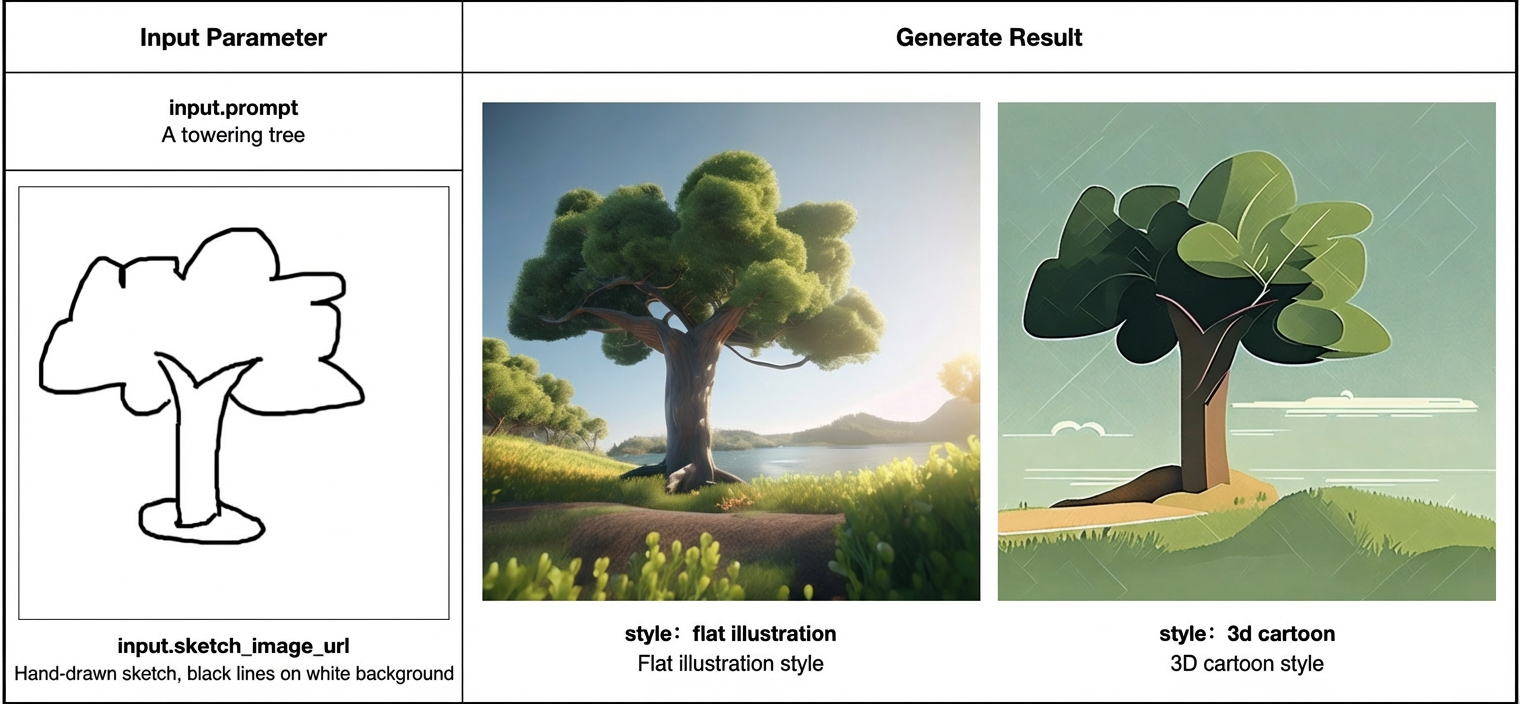
Because model computation takes a long time, the example code demonstrates asynchronous invocation to prevent request timeouts.
Obtain an API key and export the API key as an environment variable. If you use an SDK to make calls, install the DashScope SDK.
curl
1. Create a Sketch-to-Image taskThe API returns a task ID. Use this task ID to query the image generation results.
curl --location 'https://dashscope.aliyuncs.com/api/v1/services/aigc/image2image/image-synthesis' \
--header 'X-DashScope-Async: enable' \
--header "Authorization: Bearer $DASHSCOPE_API_KEY" \
--header 'Content-Type: application/json' \
--data '{
    "model": "wanx-sketch-to-image-lite",
    "input": {
        "sketch_image_url": "https://help-static-aliyun-doc.aliyuncs.com/assets/img/zh-CN/6609471071/p743851.jpg",
        "prompt": "A towering tree"
    },
    "parameters": {
        "size": "768*768",
        "n": 2,
        "sketch_weight": 3,
        "style": "<watercolor>"
    }
}'
curl -X GET \
--header "Authorization: Bearer $DASHSCOPE_API_KEY" \
https://dashscope.aliyuncs.com/api/v1/tasks/{your_task_id}
Python
from http import HTTPStatus
from urllib.parse import urlparse, unquote
from pathlib import PurePosixPath
import requests
from dashscope import ImageSynthesis

prompt = "A towering tree"
sketch_image_url = "https://help-static-aliyun-doc.aliyuncs.com/assets/img/zh-CN/6609471071/p743851.jpg"
model = "wanx-sketch-to-image-lite"
task = "image2image"

# Asynchronous invocation
def async_call():
    print('----create task----')
    task_info = create_async_task()
    print('----wait task done then save image----')
    wait_async_task(task_info)

# Create an asynchronous task
def create_async_task():
    rsp = ImageSynthesis.async_call(model=model,
                                    prompt=prompt,
                                    n=1,
                                    style='<watercolor>',
                                    size='768*768',
                                    sketch_image_url=sketch_image_url,
                                    task=task)
    print(rsp)
    if rsp.status_code == HTTPStatus.OK:
        print(rsp.output)
    else:
        print('create_async_task Failed, status_code: %s, code: %s, message: %s' %
              (rsp.status_code, rsp.code, rsp.message))
    return rsp

# Wait for the asynchronous task to complete
def wait_async_task(task):
    rsp = ImageSynthesis.wait(task)
    print(rsp)
    if rsp.status_code == HTTPStatus.OK:
        print(rsp.output.task_status)
        # save file to current directory
        for result in rsp.output.results:
            file_name = PurePosixPath(unquote(urlparse(result.url).path)).parts[-1]
            with open('./%s' % file_name, 'wb+') as f:
                f.write(requests.get(result.url).content)
    else:
        print('Failed, status_code: %s, code: %s, message: %s' %
              (rsp.status_code, rsp.code, rsp.message))

if __name__ == '__main__':
    async_call()
Java
import com.alibaba.dashscope.aigc.imagesynthesis.ImageSynthesis;
import com.alibaba.dashscope.aigc.imagesynthesis.ImageSynthesisParam;
import com.alibaba.dashscope.aigc.imagesynthesis.ImageSynthesisResult;
import com.alibaba.dashscope.exception.ApiException;
import com.alibaba.dashscope.exception.NoApiKeyException;
import com.alibaba.dashscope.utils.JsonUtils;

public class Main {

    public void asyncCall() {
        System.out.println("---create task----");
        String taskId = this.createAsyncTask();
        System.out.println("---wait task done then return image url----");
        this.waitAsyncTask(taskId);
    }

    /**
     * Create an asynchronous task
     * @return taskId
     */
    public String createAsyncTask() {
        String prompt = "A towering tree";
        String sketchImageUrl = "https://help-static-aliyun-doc.aliyuncs.com/assets/img/zh-CN/6609471071/p743851.jpg";
        String model = "wanx-sketch-to-image-lite";
        ImageSynthesisParam param = ImageSynthesisParam.builder()
                .model(model)
                .prompt(prompt)
                .n(1)
                .size("768*768")
                .sketchImageUrl(sketchImageUrl)
                .style("<watercolor>")
                .build();

        String task = "image2image";
        ImageSynthesis imageSynthesis = new ImageSynthesis(task);
        ImageSynthesisResult result = null;
        try {
            result = imageSynthesis.asyncCall(param);
        } catch (Exception e){
            throw new RuntimeException(e.getMessage());
        }
        String taskId = result.getOutput().getTaskId();
        System.out.println("taskId=" + taskId);
        return taskId;
    }

    /**
     * Wait for the asynchronous task to complete
     * @param taskId task ID
     * */
    public void waitAsyncTask(String taskId) {
        ImageSynthesis imageSynthesis = new ImageSynthesis();
        ImageSynthesisResult result = null;
        try {
            // If you have set the DASHSCOPE_API_KEY in the system environment variable, the apiKey can be null.
            result = imageSynthesis.wait(taskId, null);
        } catch (ApiException | NoApiKeyException e){
            throw new RuntimeException(e.getMessage());
        }

        System.out.println(JsonUtils.toJson(result.getOutput()));
        System.out.println(JsonUtils.toJson(result.getUsage()));
    }

    public static void main(String[] args){
        Main text2Image = new Main();
         text2Image.asyncCall();
    }

}
API reference
For the API request and response parameters, see Wanxiang (Scribble-to-Image).