3D CAD modeling · output STEP/STL files
Describe a part in one sentence, the model generates a modeling script, and the local CAD kernel executes it and outputs STEP/STL files.
Note
Disclaimer: The content shown on this page is generated by an AI model and is for reference only. It does not constitute any guarantee of results. Actual output and Credits consumption are subject to "Usage Details" in the console.This playbook runs through "a 40×30×8 mm base plate + a central Ø10 mm through-hole": qwen3.8-max turns a one-sentence requirement into a cadquery modeling script, the local kernel executes it and exports STEP/STL, and prints a volume check—the model volume matches the analytical value with zero error, turning modeling from clicking a mouse into writing requirements.
Call chain: qwen3.8-max (requirement → cadquery parametric modeling script) → local open-source CAD kernel (cadquery) executes → exports STEP/STL (local execution does not consume Credits).
Real output
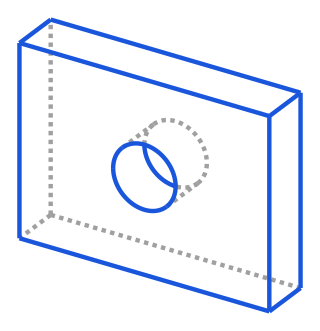
Ran through "a 40×30×8 mm base plate + a central Ø10 mm through-hole"; the 3D projection exported by cadquery and the volume check:
Model volume(mm³): 8971.681469
Analytical volume(mm³): 8971.681469
Difference(mm³): 0.000000
Relative error: 0.000000%
(Exported files: bracket.step 20KB · bracket.stl 26KB)
Step: one-sentence modeling
Send the prompt below to qwen3.8-max:
Write a Python cadquery script: build a 40×30×8 mm base plate, drill a Ø10 mm through-hole in the center;
export bracket.step and bracket.stl; and print the model volume and the analytical volume
(40*30*8 − π*5²*8) for comparison.
Only output complete, directly runnable Python code.
Notes
- Consumption: This playbook involves text generation (
qwen3.8-max, generating a cadquery modeling script); the local script execution that exports STEP/STL does not consume Credits. - Precision: In real testing the model volume matches the analytical value with zero error (0.000000%), geometrically exact and directly usable for downstream manufacturing.
- Division of labor and prerequisites: The model is only responsible for generating the script; export is done by the local kernel. Before running, install the kernel first (
pip install cadquery, a standalone virtual environment with Python 3.10+ is recommended). This example uses the open-source kernel cadquery; for similar use you can swap in Blender / FreeCAD MCP.