Time-image letter · turn thoughts into a moving letter
Polish scattered heartfelt words into a letter, read them aloud as speech, pair them with moving storyboard shots, and compose a short film.
Note
Disclaimer: The content shown on this page is all generated by AI models and is for reference only; it does not constitute any guarantee of results. Actual output and Credits consumption are subject to "Usage Details" in the console.This playbook walks through the full chain with a passage of spoken-from-the-heart words to Mom, composing a 23-second short film with built-in female-voice narration and line-by-line subtitles. Some things are hard to say face to face and feel too dry in text — if you want to tell faraway parents, a partner, or a child that you miss them or wish them a happy birthday, just hand your scattered heartfelt words to the model for polishing, voiceover, and visuals, and turn them into an image letter you can send straight over.
Call chain: qwen3.8-max (polish into a letter) → qwen-audio-3.0-tts-plus (read aloud as speech) → wan2.7-image (produce 5 storyboard images) + happyhorse-1.1-i2v (turn each into 5 seconds of footage) → local ffmpeg composition (consumes no Credits).
Actual output
The composed 23-second finished film (5 storyboard shots change with the sentences, with built-in female-voice narration + line-by-line subtitles; remember to turn on the sound):
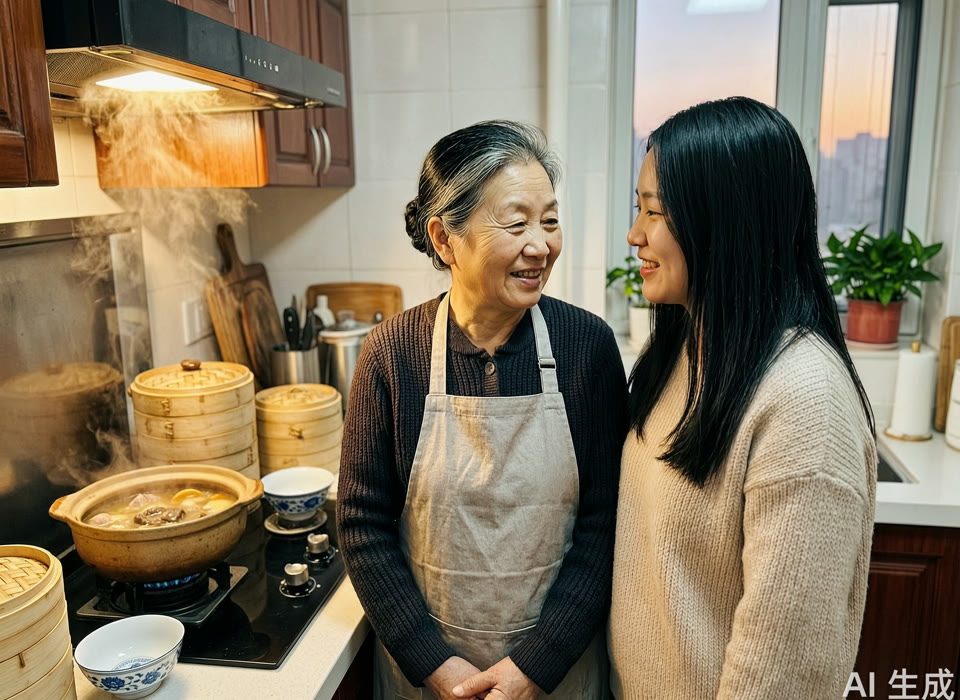
The starting material is one of the storyboard images generated by wan2.7-image (in real use, swap in a real photo of you and your family):
Steps: polish your heartfelt words into a letter that can be read aloud
First send the spoken heartfelt words to qwen3.8-max to polish into a letter:
Help me polish the following spoken, scattered heartfelt words into a warm, sincere letter that can be read aloud. Address it to my mom.
Requirements:
1. Keep all the real details I mentioned (dumplings, the nagging to wear more, three years away, the birthday); don't make up things I didn't say
2. Conversational, like a real person talking; no ornate rhetoric or piling up parallelisms; plain is better
3. Keep it under 200 characters; since it will be read aloud as speech, too long gets tiring to listen to
4. End on "happy birthday" and the one thing I most want to say
5. Only output the body of the letter
My heartfelt words: [paste what you want to say to your family; it's fine if it's scattered and spoken]
Once the letter is polished, use qwen-audio-3.0-tts-plus to read it aloud as speech, wan2.7-image + happyhorse-1.1-i2v to produce the storyboards, and finally local ffmpeg to splice by the subtitle timeline, mix audio, and add subtitles.
View actual output · The polished letter (qwen3.8-max original)
Mom, I've been working out of town for three years, and I only make it back once or twice a year. Every time we video call, you say everything at home is fine and tell me not to worry, but I know you're on your own. I really miss you. The dumplings you made, you nagging me to wear more — I remember it all. Thank you. Your birthday is coming up — happy birthday. What I most want to say is: Mom, I love you.

(The input was just a scattered, spoken passage: "I'm not great at expressing myself… been out of town for three years… the dumplings she made, her nagging me to wear more, I remember it all… Mom's birthday is coming up and I want to say thank you and happy birthday." The model kept all the real details, made nothing up, compressed it to 105 characters, conversational, and suited to being read aloud.)
Notes
- Consumption: This playbook strings together three modalities — text (
qwen3.8-max) 1 time → speech (qwen-audio-3.0-tts-plus) 1 time → image generation (wan2.7-image) 5 times + image-to-video (happyhorse-1.1-i2v) 5 times. Video generation consumes noticeably more than text and speech; the more storyboards, the more expensive, and async tasks are settled together once complete — start by running one storyboard at 5 seconds, 720P, then fill in the rest. Composition (aligning duration, adding subtitles, mixing audio) is done with local ffmpeg and consumes no Credits. - How to assemble the pieces into a film: The TTS speech is 23.5 seconds, while i2v only produces 5 seconds at a time. Don't loop one clip forward and backward to fill the whole duration — the footage will visibly repeat and won't match the sentence being read. The approach is to cut by subtitle storyboard: first slice the letter into 7 sentences, lay out a timeline proportional to character count, then have every 1–2 sentences pair with one storyboard (a daughter by the window far away → a mother alone on a video call → hands making dumplings → birthday candles → mother and daughter smiling at each other), and finally use local ffmpeg to splice the 5 clips along the timeline (any clip that comes up short gets a slight slow-mo to make up the duration) → mix in the speech → overlay line-by-line subtitles → fade in/out at the head and tail. Editing is done on your machine and consumes no Credits.
- Image generation: Write the people clearly in the image-generation prompt; if you only write "mother and daughter", the model tends to give Western faces. Write "Chinese mother and daughter, East Asian faces, Chinese-style kitchen (clay pot/steamer/blue-and-white porcelain bowls)" into the prompt, and use a negative prompt to exclude "Western faces", and the resulting photo will look like your own family.
- Voice:
qwen-audio-3.0-tts-plushas no built-in system voice; you must first create a voice ID via the cloning or voice design interface and then pass it in. If you want a ready-to-use system voice, switch tocosyvoice-v3-flash(e.g.longanyang, verified to produce audio directly). For a longer film, just write the letter longer, and the subtitle timeline will automatically spread out accordingly. - Privacy: In real use, replace the demo image with a real photo of you and your family (i2v takes your photo directly); photos are private, so be careful to process them only in an environment you control.