This topic describes how to build a multi-agent system that queries Alibaba Cloud resource information. Using the Assistant API of Alibaba Cloud Model Studio, this system can automatically plan and orchestrate workflows without predefined task flows.
The Assistant API is being deprecated. We recommend migrating to the Responses API, which offers built-in tools and supports multi-turn context management.
A multi-agent system consists of agents collaborating to complete tasks. Typically, these systems achieve higher accuracy than a single agent. Assigning clear and professional role names and responsibility descriptions to each agent defines their areas of expertise and improves coordination. A multi-agent system is flexible by design. You can adapt the design and sample code in this example for your business.
Demonstration
This tutorial shows you how to build a multi-agent system for querying Alibaba Cloud resource information. When a user asks a question, the system automatically plans a collaboration workflow for multiple agents. After executing the tasks, the system provides a final answer.
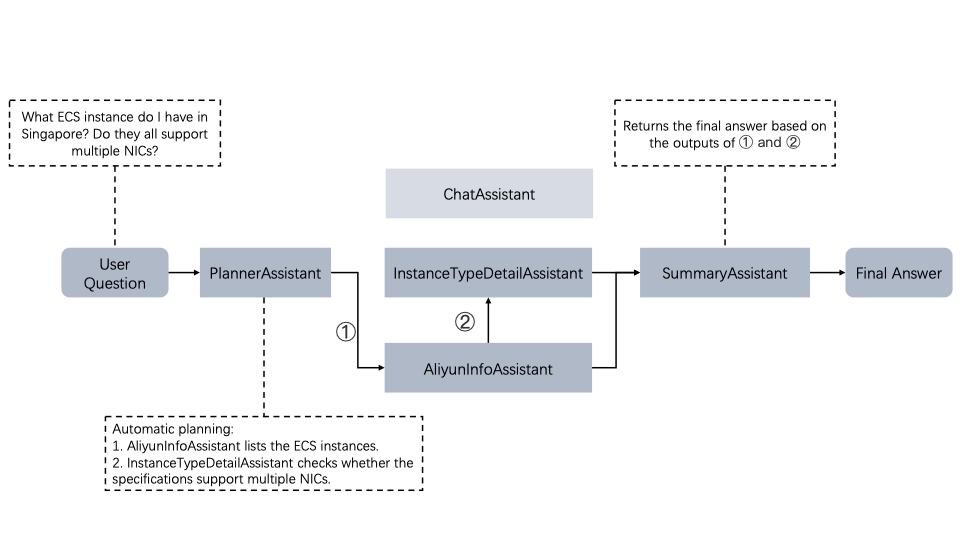
Detailed workflow:
A user asks a question.
The
PlannerAssistantreceives the user's question, selects other agents, and orchestrates their execution.The
ChatAssistant,AliyunInfoAssistant, andInstanceTypeDetailAssistantare agents with distinct capabilities, orchestrated by thePlannerAssistant. They collaborate to answer the user's question by following the interaction logic defined in the program.The
SummaryAssistantaggregates output from the other agents and summarizes it based on the user's question, providing the final response.
Prerequisites
Obtain your
ACCESS_KEY_IDandACCESS_KEY_SECRET. For more information, see Create an AccessKey.Activate the Model Studio service and obtain an API key.
Set
ALIBABA_CLOUD_ACCESS_KEY_ID,ALIBABA_CLOUD_ACCESS_KEY_SECRET, andDASHSCOPE_API_KEYas environment variables to prevent credential leakage. For more information, see Configure an API key as an environment variable. Run the appropriate command for your operating system:# Replace the placeholders with your API key and AccessKey information. export DASHSCOPE_API_KEY="YOUR_DASHSCOPE_API_KEY" export ALIBABA_CLOUD_ACCESS_KEY_ID="YOUR_ALIBABA_CLOUD_ACCESS_KEY_ID" export ALIBABA_CLOUD_ACCESS_KEY_SECRET="YOUR_ALIBABA_CLOUD_ACCESS_KEY_SECRET"# Replace the placeholders with your API key and AccessKey information. $env:DASHSCOPE_API_KEY = "YOUR_DASHSCOPE_API_KEY" $env:ALIBABA_CLOUD_ACCESS_KEY_ID="YOUR_ALIBABA_CLOUD_ACCESS_KEY_ID" $env:ALIBABA_CLOUD_ACCESS_KEY_SECRET="YOUR_ALIBABA_CLOUD_ACCESS_KEY_SECRET"If you do not have an ECS instance, go to the ECS console to create a pay-as-you-go instance.
NoteIf you no longer need the ECS instance after completing this tutorial, release the ECS resource to avoid charges.
Ensure that Python is installed in your computing environment. Create a
requirements.txtfile and copy the following content into it.alibabacloud_tea_openapi alibabacloud_tea_util alibabacloud_openapi_util alibabacloud_ecs20140526 alibabacloud_bssopenapi20171214 dashscope gradioAfter you save the
requirements.txtfile, run the following command in the directory ofrequirements.txtto install the dependencies:pip install -r requirements.txtCreate a RAG application in Model Studio. For instructions, see Build a Q&A application with zero code. Use the official Alibaba Cloud ECS document instance_family.pdf as your knowledge base. After the application is created, find and copy the application ID from the application card on the My Applications page.
Code implementation
Create two .py files, tools.py and main.py, in the same directory.
Project files
Download and decompress multi_agent.zip.
tools.py
tools.py mainly defines the tool functions used by the agent. The full code for tools.py can be found in Full code of tools.py.
Import dependencies
from alibabacloud_tea_util import models as util_models
from alibabacloud_ecs20140526.client import Client as Ecs20140526Client
from alibabacloud_ecs20140526 import models as ecs_20140526_models
from alibabacloud_tea_openapi import models as open_api_models
from alibabacloud_bssopenapi20171214.client import Client as BssOpenApi20171214Client
from dashscope import Application
import os
Define tools
The tools.py file contains two primary utility classes: ECS and Billing. The ECS class contains the query_source and call_agent_app class methods. The Billing class contains the get_balance class method. You can refer to the following code to add utility classes and tool functions that meet your business needs.
ECS
The ECS class has two class methods: query_source and call_agent_app.
The query_source method queries ECS instance information in a specified region using the Alibaba Cloud OpenAPI service. It takes a region ID, such as cn-hangzhou, cn-beijing, cn-shanghai, or ap-southeast-1, as input and returns the instance ID, instance type, and pricing information.
The call_agent_app method retrieves detailed information about instance types, such as the number of vCPUs and memory size, using an Alibaba Cloud Model Studio RAG application. This application is integrated with a knowledge base built from the official Alibaba Cloud ECS document Instance_Families.pdf. You must obtain the app_id of the application you created in Alibaba Cloud Model Studio and replace the placeholder in the code. This method takes a list of ECS instance types, such as ['ecs.e-c1m1.large', 'ecs.u1-c1m4.xlarge'], as input and returns the response from the RAG application. Note that RAG applications, similar to agents, are driven by a Large Language Model (LLM). Therefore, the call_agent_app method may take a long time to run.
The following code defines the ECS class:
Replace the app_id placeholder in the code with the ID (app_id) of the RAG application that you created in Alibaba Cloud Model Studio.
class ECS:
    @classmethod
    # Input: region ID, such as cn-hangzhou or cn-beijing.
    # Output: Information about ECS instances, including instance ID, instance type, and hourly price. (The system disk defaults to cloud_auto, 40 GiB).
    def query_source(cls,RegionID):
        config = open_api_models.Config(
                # Obtain the AccessKey pair for your Alibaba Cloud account from environment variables.
                access_key_id=os.getenv("ALIBABA_CLOUD_ACCESS_KEY_ID"),
                access_key_secret=os.getenv("ALIBABA_CLOUD_ACCESS_KEY_SECRET")
            )
        # Set the endpoint for the specified region.
        if RegionID != 'cn-hangzhou':
            config.endpoint = f'ecs.{RegionID}.aliyuncs.com'
        else:
            config.endpoint = f'ecs-{RegionID}.aliyuncs.com'
        client = Ecs20140526Client(config)
        describe_instances_request = ecs_20140526_models.DescribeInstancesRequest(region_id=RegionID)
        runtime = util_models.RuntimeOptions()
        # Get ECS instance information.
        response_source = client.describe_instances_with_options(describe_instances_request, runtime).body
        if len(response_source.instances.instance) == 0:
            return "You have no ECS instances in this region."
        # Initialize the result string.
        result = ""
        # Iterate through all instances for the account.
        for i in range(len(response_source.instances.instance)):
            # Set the system disk type to cloud_auto and size to 40 GiB.
            system_disk = ecs_20140526_models.DescribePriceRequestSystemDisk(
                category='cloud_auto',
                size=40
            )
            describe_price_request = ecs_20140526_models.DescribePriceRequest(
                region_id=RegionID,
                resource_type='instance',
                instance_type=response_source.instances.instance[i].instance_type,
                system_disk=system_disk
            )
            response = client.describe_price_with_options(describe_price_request, runtime).body
            cur_result = f"""The instance {response_source.instances.instance[i].instance_id} is of type {response_source.instances.instance[i].instance_type}, and the hourly price is {response.price_info.price.trade_price} CNY.\n"""
            # Append the information of the current instance to the result.
            result += cur_result
        return result
    @classmethod
    # Call the RAG application.
    def call_agent_app(cls,InstanceType):
        if len(InstanceType) == 0:
            return "You have no ECS instances in this region."
        result = ""
        for i in range(len(InstanceType)):
            response = Application.call(
                # Enter the app_id of your RAG application here.
                app_id='xxx',
                prompt=f'Tell me about {InstanceType[i]}',
                # Obtain the Dashscope API key from an environment variable.
                api_key=os.getenv("DASHSCOPE_API_KEY"))
            result += response.output.text
        return result
Billing
The Billing class has one class method: get_balance.
The get_balance method queries your Alibaba Cloud account balance using the OpenAPI service.
class Billing:
    # No input is required. Returns the Alibaba Cloud account balance.
    @classmethod
    def get_balance(cls):
        # Create a client.
        config = open_api_models.Config(
            # Required. Make sure the ALIBABA_CLOUD_ACCESS_KEY_ID environment variable is set in the runtime environment.
            access_key_id=os.environ['ALIBABA_CLOUD_ACCESS_KEY_ID'],
            # Required. Make sure the ALIBABA_CLOUD_ACCESS_KEY_SECRET environment variable is set in the runtime environment.
            access_key_secret=os.environ['ALIBABA_CLOUD_ACCESS_KEY_SECRET']
        )
        # For more information about the endpoint, see https://api.aliyun.com/product/BssOpenApi.
        config.endpoint = f'business.aliyuncs.com'
        runtime = util_models.RuntimeOptions()
        client = BssOpenApi20171214Client(config)
        balance_info = client.query_account_balance_with_options(runtime).body.data
        return f"""Currency: {balance_info.currency}, Available Amount: {balance_info.available_amount}, Credit Amount: {balance_info.credit_amount},
        Mybank Credit Amount: {balance_info.mybank_credit_amount}, Cash Amount: {balance_info.available_cash_amount}, Quota Limit: {balance_info.quota_limit}."""
Complete tools.py code
The following is the complete code for the tools.py file:
from alibabacloud_tea_util import models as util_models
from alibabacloud_ecs20140526.client import Client as Ecs20140526Client
from alibabacloud_ecs20140526 import models as ecs_20140526_models
from alibabacloud_tea_openapi import models as open_api_models
from alibabacloud_bssopenapi20171214.client import Client as BssOpenApi20171214Client
from dashscope import Application
import os
class ECS:
    @classmethod
    # Input: region ID, such as cn-hangzhou or cn-beijing.
    # Output: Information about ECS instances, including instance ID, instance type, and hourly price. (The system disk defaults to cloud_auto, 40 GiB).
    def query_source(cls,RegionID):
        config = open_api_models.Config(
                # Obtain the AccessKey pair for your Alibaba Cloud account from environment variables.
                access_key_id=os.getenv("ALIBABA_CLOUD_ACCESS_KEY_ID"),
                access_key_secret=os.getenv("ALIBABA_CLOUD_ACCESS_KEY_SECRET")
            )
        # Set the endpoint for the specified region.
        if RegionID != 'cn-hangzhou':
            config.endpoint = f'ecs.{RegionID}.aliyuncs.com'
        else:
            config.endpoint = f'ecs-{RegionID}.aliyuncs.com'
        client = Ecs20140526Client(config)
        describe_instances_request = ecs_20140526_models.DescribeInstancesRequest(region_id=RegionID)
        runtime = util_models.RuntimeOptions()
        # Get ECS instance information.
        response_source = client.describe_instances_with_options(describe_instances_request, runtime).body
        if len(response_source.instances.instance) == 0:
            return "You have no ECS instances in this region."
        # Initialize the result string.
        result = ""
        # Iterate through all instances for the account.
        for i in range(len(response_source.instances.instance)):
            # Set the system disk type to cloud_auto and size to 40 GiB.
            system_disk = ecs_20140526_models.DescribePriceRequestSystemDisk(
                category='cloud_auto',
                size=40
            )
            describe_price_request = ecs_20140526_models.DescribePriceRequest(
                region_id=RegionID,
                resource_type='instance',
                instance_type=response_source.instances.instance[i].instance_type,
                system_disk=system_disk
            )
            response = client.describe_price_with_options(describe_price_request, runtime).body
            cur_result = f"""The instance {response_source.instances.instance[i].instance_id} is of type {response_source.instances.instance[i].instance_type}, and the hourly price is {response.price_info.price.trade_price} CNY.\n"""
            # Append the information of the current instance to the result.
            result += cur_result
        return result
    @classmethod
    # Call the RAG application.
    def call_agent_app(cls,InstanceType):
        if len(InstanceType) == 0:
            return "You have no ECS instances in this region."
        result = ""
        for i in range(len(InstanceType)):
            response = Application.call(
                # Enter the app_id of your RAG application here.
                app_id='xxx',
                prompt=f'Tell me about {InstanceType[i]}',
                # Obtain the Dashscope API key from an environment variable.
                api_key=os.getenv("DASHSCOPE_API_KEY"))
            result += response.output.text
        return result
class Billing:
    # No input is required. Returns the Alibaba Cloud account balance.
    @classmethod
    def get_balance(cls):
        # Create a client.
        config = open_api_models.Config(
            # Required. Make sure the ALIBABA_CLOUD_ACCESS_KEY_ID environment variable is set in the runtime environment.
            access_key_id=os.environ['ALIBABA_CLOUD_ACCESS_KEY_ID'],
            # Required. Make sure the ALIBABA_CLOUD_ACCESS_KEY_SECRET environment variable is set in the runtime environment.
            access_key_secret=os.environ['ALIBABA_CLOUD_ACCESS_KEY_SECRET']
        )
        # For more information about the endpoint, see https://api.aliyun.com/product/BssOpenApi.
        config.endpoint = f'business.aliyuncs.com'
        runtime = util_models.RuntimeOptions()
        client = BssOpenApi20171214Client(config)
        balance_info = client.query_account_balance_with_options(runtime).body.data
        return f"""Currency: {balance_info.currency}, Available Amount: {balance_info.available_amount}, Credit Amount: {balance_info.credit_amount},
        Mybank Credit Amount: {balance_info.mybank_credit_amount}, Cash Amount: {balance_info.available_cash_amount}, Quota Limit: {balance_info.quota_limit}."""
if __name__ == '__main__':
    print(ECS.query_source('cn-hangzhou'))
main.py (Agent creation and interaction)
The primary purpose of the main.py file is to:
For the complete code, see main.py Complete Code.
Import dependencies
from dashscope import Assistants, Messages, Runs, Threads
import json
# 从tools.py导入工具函数
from tools import ECS,Billing
# 引入前端界面展示依赖
import gradio as gr
# 将列表形式的字符串解析为列表形式的数据,例如:"['a','b']"-->['a','b']。
# 用于将plannerassistant的输出解析为元素为assistant的列表
import ast
Create agents
This tutorial includes five agents. The following table describes their tool functions and capabilities.
Agent name | Tool function | Capability |
None | Handles multi-agent orchestration. | |
None | Answers questions that do not require tool functions. | |
| Queries Alibaba Cloud resources, including ECS instances and the account balance. | |
| Queries metrics, such as vCPU count and memory size, for a specified instance type. | |
None | Summarizes outputs from previous agents to provide a comprehensive response to the user's query. |
Details about the five agents are provided below.
The LLM in an Agent is defined by the model parameter of the Assistants.create method. The functionality of the Agent is defined by the tools parameter in the Assistants.create method. You can use the instructions in Assistants.create to guide how the Agent uses tools and its output format, such as instructing the Agent to output a string in JSON format. For the specific code implementation, see the code implementations for the following five Agents.
PlannerAssistant
PlannerAssistant orchestrates the multi-agent workflow based on user input and the capabilities of other agents, making it the core of the multi-agent system. After receiving the output from PlannerAssistant, you must parse the output string into a list. The following code shows this implementation.
# 决策级别的agent,决定使用哪些agent,以及它们的运行顺序
PlannerAssistant = Assistants.create(
    # 因为该Agent作用比较重要,因此建议选择性能较强的大模型:qwen-plus。模型列表:https://help.aliyun.com/zh/model-studio/getting-started/models
    model="qwen-plus",
    # 定义Agent的名称
    name='流程编排机器人',
    # 定义Agent的功能描述
    description='你是团队的leader,你的手下有很多assistant,你需要根据用户的输入,决定要以怎样的顺序去使用这些assistant',
    # 定义对Agent的指示语句,Agent会按照指示语句进行工具的调用并返回结果。
    instructions="""你的团队中有以下assistant。AliyunInfoAssistant:可以查询用户指定区域的阿里云ecs实例信息,或者查询用户的阿里云余额;InstanceTypeDetailAssistant:可以查询指定阿里云ecs实例规格的详细信息,比如cpu核数、内存大小等,可以一次查询多个实例规格信息,因此无需多次调用;
    ChatAssistant:如果用户的问题无需以上两个assistant,则调用该assistant。你需要根据用户的问题,判断要以什么顺序使用这些assistant,你的返回形式是一个列表,不能返回其它信息。比如:["AliyunInfoAssistant", "AliyunInfoAssistant","InstanceTypeDetailAssistant"]或者["ChatAssistant"],列表中的元素只能为上述的assistant"""
)
ChatAssistant
Since this agent answers general questions, you can use a more cost-effective base model, such as qwen-flash.
# Answers general questions. For such questions, a more cost-effective model can be used as the agent's base model.
ChatAssistant = Assistants.create(
    # Since this agent does not require high LLM performance, the cost-effective qwen-flash model is used.
    model="qwen-flash",
    name='GeneralQABot',
    description='An intelligent agent that answers user questions.',
    instructions='Politely answer the user\'s questions.'
)
AliyunInfoAssistant
AliyunInfoAssistant queries Alibaba Cloud resources. It currently provides two capabilities: querying ECS instances and querying the Alibaba Cloud account balance.
# 功能是查询阿里云的资源信息。目前有ecs实例查询与阿里云余额查询两个功能
AliyunInfoAssistant = Assistants.create(
    model="qwen-plus", # 模型列表:https://help.aliyun.com/zh/model-studio/getting-started/models
    name='阿里云资源信息查询机器人',
    description='一个智能助手,根据用户的查询去调用工具并返回查询到的阿里云资源结果',
    instructions='你是一个智能助手,你有两个功能,分别是阿里云ecs实例信息查询和阿里云余额查询。请准确判断调用哪个工具,并礼貌地回答用户的问题。',
    # 定义Agent使用的工具,您可以根据您的业务场景在tools列表中定义一个或多个Agent可能会使用的工具。
    tools=[
        {
            'type': 'function',
            'function': {
                # 工具函数的名称,可通过下文代码中的function_mapper将name映射到函数本体
                'name': 'ecs实例信息查询',
                # 工具函数的描述
                'description': '当需要查询阿里云ecs实例信息时非常有用,比如实例id,实例规格,收费信息等',
                # 工具函数的入参
                'parameters': {
                    'type': 'object',
                    'properties': {
                        # 该工具需要用户输入地域信息
                        'RegionID': {
                            'type': 'str',
                            # 参数的描述信息
                            'description': '用户想要查询实例所属的地域id,如果是杭州,则为cn-hangzhou,如果是上海,则为cn-shanghai,如果是北京,则为cn-beijing'
                        },
                    },
                    'required': ['RegionID']},
            }
        },
        {
            'type': 'function',
            'function': {
                'name': '阿里云余额查询',
                # 工具函数的描述
                'description': '当需要查询阿里云账户信息时非常有用',
                # 工具函数的入参,余额查询无需入参,因此为空
                'parameters': {}
            }
        }
    ]
)
InstanceTypeDetailAssistant
The InstanceTypeDetailAssistant receives a list of instance types, uses the call_agent_app function to query the RAG application for each instance type, and aggregates the returned metrics, such as the number of vCPUs and memory size, as the output.
# 功能是通过在阿里云百炼平台创建的RAG应用查询实例规格的详细信息
InstanceTypeDetailAssistant = Assistants.create(
    model="qwen-plus", # 模型列表:https://help.aliyun.com/zh/model-studio/getting-started/models
    name='ecs实例规格介绍机器人',
    description='一个智能助手,可以通过用户提供的实例规格,调用已有的插件能力给用户介绍实例规格信息。',
    instructions='你是一个智能助手,你需要从输入中精确提取出实例规格信息,如[ecs.e-c1m1.large],或[ecs.u1-c1m4.xlarge,ecs.e-c1m1.large]。将实例规格列表输入工具中,获得它们的详细信息',
    tools=[
        {
            'type': 'function',
            'function': {
                'name': 'ecs实例规格介绍',
                'description': '返回客户查询指定ecs实例规格的信息',
                'parameters': {
                    'type': 'object',
                    'properties': {
                        'InstanceType': {
                            'type': 'list',
                            'InstanceType': '用户想要查询的实例规格,有可能是一个,有可能是多个,如:[ecs.e-c1m1.large],或[ecs.u1-c1m4.xlarge,ecs.e-c1m1.large]'
                        },
                    },
                    'required': ['InstanceType']},
            }
        }
    ]
)
SummaryAssistant
Each agent produces an output. Therefore, a summary agent is needed to consolidate the outputs from the other agents and provide a comprehensive response to the user's query.
# 在Multi Agent场景下,定义一个用于总结的Agent,该Agent会根据用户的问题与之前Agent输出的参考信息,全面、完整地回答用户问题
SummaryAssistant = Assistants.create(
    model="qwen-plus", # 模型列表:https://help.aliyun.com/zh/model-studio/getting-started/models
    name='总结机器人',
    description='一个智能助手,根据用户的问题与参考信息,全面、完整地回答用户问题',
    instructions='你是一个智能助手,根据用户的问题与参考信息,全面、完整地回答用户问题'
)
Map strings to functions and agents
Because the large language model returns results as strings, you must parse and map these strings in your program to enable interaction with external services.
# Map tool function names to their corresponding functions.
function_mapper = {
    "query_ecs_instance_info": ECS.query_source,
    "get_ecs_instance_type_details":ECS.call_agent_app,
    "query_account_balance":Billing.get_balance
}
# Map agent names to the agent objects.
assistant_mapper = {
    "ChatAssistant": ChatAssistant,
    "AliyunInfoAssistant":AliyunInfoAssistant,
    "InstanceTypeDetailAssistant":InstanceTypeDetailAssistant
}
Define the response function
The message passing function get_agent_response receives two parameters, assistant and message, to obtain the output of the specified agent for the input message.
# Get the response from a specified agent for a given message.
def get_agent_response(assistant, message=''):
    # Print the query message.
    print(f"Query: {message}")
    thread = Threads.create()
    message = Messages.create(thread.id, content=message)
    run = Runs.create(thread.id, assistant_id=assistant.id)
    run_status = Runs.wait(run.id, thread_id=thread.id)
    # Print a failure message if the run fails.
    if run_status.status == 'failed':
        print('run failed:')
    # If the run requires a tool call, execute the following steps.
    if run_status.required_action:
        f = run_status.required_action.submit_tool_outputs.tool_calls[0].function
        # Get the function name.
        func_name = f['name']
        # Get the function's input parameters.
        param = json.loads(f['arguments'])
        # Print the tool information.
        print("function is",f)
        # Map the function name to the corresponding function in function_mapper, pass the parameters, and retrieve the output.
        if func_name in function_mapper:
            output = function_mapper[func_name](**param)
        else:
            output = ""
        tool_outputs = [{
            'output':
                output
        }]
        run = Runs.submit_tool_outputs(run.id,
                                       thread_id=thread.id,
                                       tool_outputs=tool_outputs)
        run_status = Runs.wait(run.id, thread_id=thread.id)
    run_status = Runs.get(run.id, thread_id=thread.id)
    msgs = Messages.list(thread.id)
    # Return the agent's output.
    return msgs['data'][0]['content'][0]['text']['value']
Agent interaction
The PlannerAssistant orchestrates interactions between agents. To ensure compatibility with Gradio, your input and output parameters must match its components. For example:
Use the yield keyword instead of return to generate intermediate results iteratively. This lets you stream them to the frontend interface for real-time display, rather than waiting for the operation to complete.
# Get the response from the multi-agent system. Input and output parameters must align with the Gradio frontend interface.
def get_multi_agent_response(query,history):
    # Handle empty input.
    if len(query) == 0:
        return "",history+[("","")],"",""
    # Get the agent execution order.
    assistant_order = get_agent_response(PlannerAssistant,query)
    try:
        order_stk = ast.literal_eval(assistant_order)
        cur_query = query
        Agent_Message = ""
        # Run the agents in sequence.
        for i in range(len(order_stk)):
            yield "----->".join(order_stk),history+[(query,"The multi-agent system is working...")],Agent_Message+'\n'+f"*{order_stk[i]}* is processing...",""
            cur_assistant = assistant_mapper[order_stk[i]]
            response = get_agent_response(cur_assistant,cur_query)
            Agent_Message += f"Response from *{order_stk[i]}*: {response}\n\n"
            yield "----->".join(order_stk),history+[(query,"The multi-agent system is working...")],Agent_Message,""
            # The output of the last agent becomes the final output of the multi-agent system.
            if i == len(order_stk)-1:
                prompt = f"Based on the following information: {Agent_Message}, answer the user's question: {query}."
                multi_agent_response = get_agent_response(SummaryAssistant,prompt)
                yield "----->".join(order_stk),history+[(query,multi_agent_response)],Agent_Message,""
            # For intermediate agents, their response is added to the next query as reference information.
            else:
                # Wrap the reference information with special identifiers to help the LLM distinguish it from the user's question.
                cur_query = f"You can refer to the following information: {response}. You must provide a complete answer to the user's question. The question is: {query}."
    # Fallback policy: On exception, call ChatAssistant directly.
    except Exception as e:
        yield "ChatAssistant",[(query,get_agent_response(ChatAssistant,query))],"",""
The input parameters are query (the user's question, as a string) and history (the conversation history with the multi-agent system, as a list).
The first output parameter is the agent orchestration information (string), the second is the conversation history with the multi-agent system (list), and the third is the current agent's status (string). A fourth parameter, the user's input box (string), accommodates the Gradio component and is set to "" to clear the input box after a user submits a question.
Frontend console
This tutorial uses Gradio for the front-end UI. Gradio lets machine learning practitioners quickly build a UI to demonstrate model performance. The following code shows how:
# Frontend UI
with gr.Blocks() as demo:
    # Display the title in the center of the interface
    gr.HTML('<center><h1>Welcome to Alibaba Cloud Resource Query Bot</h1></center>')
    gr.HTML('<center><h3>Query ECS instances by region, check your account balance, and look up instance type details. You can extend this bot by adding tools to <code>tools.py</code> and configuring their agents in <code>main.py</code>.</h3></center>')
    with gr.Row():
        with gr.Column(scale=10):
            chatbot = gr.Chatbot(value=[["hello","Hello! How can I help you with your Alibaba Cloud resources?"]],height=600)
        with gr.Column(scale=4):
            text1 = gr.Textbox(label="Assistant selection")
            text2 = gr.Textbox(label="Current assistant status",lines=22)
    with gr.Row():
        msg = gr.Textbox(label="Input",placeholder="What would you like to know?")
    # Some example questions
    with gr.Row():
        examples = gr.Examples(examples=[
            'What is my Alibaba Cloud account balance?',
            'Tell me about my ECS instances in the China (Hangzhou) region, including their instance IDs, price, and instance type details.',
            'I want to know the metrics for ecs.u1-c1m4.xlarge and ecs.gn6i-c4g1.xlarge.'],inputs=[msg])
    clear = gr.ClearButton([text1,chatbot,text2,msg])
    msg.submit(get_multi_agent_response, [msg,chatbot], [text1,chatbot,text2,msg])
main.py complete code
from dashscope import Assistants, Messages, Runs, Threads
import json
# Import tool functions from tools.py
from tools import ECS,Billing
# Import dependencies for the frontend UI
import gradio as gr
import ast
# A decision-making agent that decides which agents to use and their execution order
PlannerAssistant = Assistants.create(
    # We recommend that you select a high-performance LLM, such as qwen-plus, for this important agent. For a list of models, see https://help.aliyun.com/en/model-studio/getting-started/models
    model="qwen-plus",
    # Define the agent's name
    name='Process Orchestration Bot',
    # Define the agent's functional description
    description='You are the team leader. You have many assistants under your command. You need to decide the order in which to use these assistants based on the user\'s input.',
    # Define the instructions for the agent. The agent will call tools and return results according to the instructions.
    instructions="""Your team has the following assistants: AliyunInfoAssistant, which can query Alibaba Cloud ECS instance information in a user-specified region or query the user's Alibaba Cloud account balance; InstanceTypeDetailAssistant, which can query detailed information for specified Alibaba Cloud ECS instance types, such as the number of CPU cores and memory size. It can query multiple instance types at once, so multiple calls are not needed.
    If the user's question does not require the two assistants above, call ChatAssistant. You need to determine the order in which to use these assistants based on the user's question. Your response must be a list and cannot contain any other information. For example: ["AliyunInfoAssistant", "AliyunInfoAssistant","InstanceTypeDetailAssistant"] or ["ChatAssistant"]. The elements in the list can only be the names of the assistants mentioned above."""
)
# This agent's function is to answer general questions. For general questions, a more cost-effective model can be used as the agent's base model.
ChatAssistant = Assistants.create(
    # Because this agent does not have high performance requirements for the LLM, the more cost-effective qwen-flash model is used. For a list of models, see https://help.aliyun.com/en/model-studio/getting-started/models
    model="qwen-flash",
    name='General Q&A Bot',
    description='An intelligent assistant that answers user questions.',
    instructions='Please answer the user\'s questions politely.'
)
# This agent's function is to query Alibaba Cloud resource information. It currently has two functions: ECS instance query and Alibaba Cloud balance query.
AliyunInfoAssistant = Assistants.create(
    model="qwen-plus",  # For a list of models, see https://help.aliyun.com/en/model-studio/getting-started/models
    name='Alibaba Cloud Resource Info Query Bot',
    description='An intelligent assistant that calls tools based on user queries and returns the queried Alibaba Cloud resource results.',
    instructions='You are an intelligent assistant with two functions: querying Alibaba Cloud ECS instance information and querying your Alibaba Cloud account balance. Please accurately determine which tool to call and answer the user\'s questions politely.',
    # Define the tools used by the agent. You can define one or more tools that the agent might use in the tools list based on your business scenarios.
    tools=[
        {
            'type': 'function',
            'function': {
                # The name of the tool function. The name can be mapped to the function body by using the function_mapper in the code below.
                'name': 'query_ecs_instance_info',
                # Description of the tool function.
                'description': 'This is useful when you need to query Alibaba Cloud ECS instance information, such as instance IDs, instance types, and billing information.',
                # The input parameters of the tool function.
                'parameters': {
                    'type': 'object',
                    'properties': {
                        # This tool requires the user to input region information.
                        'RegionID': {
                            'type': 'str',
                            # Description of the parameter.
                            'description': 'The ID of the region where the instance is located. For example, use cn-hangzhou for China (Hangzhou), cn-shanghai for China (Shanghai), and cn-beijing for China (Beijing).'
                        },
                    },
                    'required': ['RegionID']},
            }
        },
        {
            'type': 'function',
            'function': {
                'name': 'query_alibaba_cloud_balance',
                # Description of the tool function.
                'description': 'This is useful when you need to query Alibaba Cloud account information.',
                # The balance query function requires no input parameters, so this is empty.
                'parameters': {}
            }
        }
    ]
)
# This agent's function is to query detailed information about instance types by using a RAG application created on the Alibaba Cloud Model Studio platform.
InstanceTypeDetailAssistant = Assistants.create(
    model="qwen-plus",  # For a list of models, see https://help.aliyun.com/en/model-studio/getting-started/models
    name='ECS Instance Type Introduction Bot',
    description='An intelligent assistant that can accurately identify the mentioned instance types from the user\'s input. It calls existing plug-in capabilities to provide users with information about the instance types.',
    instructions='You are an intelligent assistant. You need to accurately identify and extract Alibaba Cloud instance type information, such as [ecs.e-c1m1.large] or [ecs.u1-c1m4.xlarge,ecs.e-c1m1.large], from the user\'s input. Input the list of instance types into the tool to obtain their detailed information.',
    tools=[
        {
            'type': 'function',
            'function': {
                'name': 'describe_ecs_instance_type',
                'description': 'Returns information about the specified ECS instance types queried by the customer.',
                'parameters': {
                    'type': 'object',
                    'properties': {
                        'InstanceType': {
                            'type': 'list',
                            'InstanceType': 'The instance type or types that the user wants to query, such as [ecs.e-c1m1.large] or [ecs.u1-c1m4.xlarge,ecs.e-c1m1.large].'
                        },
                    },
                    'required': ['InstanceType']},
            }
        }
    ]
)
# In a multi-agent scenario, define a summary agent. This agent provides a comprehensive and complete answer to the user's question based on the question and the reference information output by previous agents.
SummaryAssistant = Assistants.create(
    model="qwen-plus",  # For a list of models, see https://help.aliyun.com/en/model-studio/getting-started/models
    name='Summary Bot',
    description='An intelligent assistant that provides a comprehensive and complete answer to the user\'s question based on the question and the reference information.',
    instructions='You are an intelligent assistant. Provide a comprehensive and complete answer to the user\'s question based on the question and the reference information.'
)
# Map the name of the tool function to the function body.
function_mapper = {
    "query_ecs_instance_info": ECS.query_source,
    "describe_ecs_instance_type":ECS.call_agent_app,
    "query_alibaba_cloud_balance":Billing.get_balance
}
# Map the agent's name to the agent object.
assistant_mapper = {
    "ChatAssistant": ChatAssistant,
    "AliyunInfoAssistant":AliyunInfoAssistant,
    "InstanceTypeDetailAssistant":InstanceTypeDetailAssistant
}
# Input a message and output the reply from the specified agent.
def get_agent_response(assistant, message=''):
    # Print the information of the input agent.
    print(f"Query: {message}")
    thread = Threads.create()
    message = Messages.create(thread.id, content=message)
    run = Runs.create(thread.id, assistant_id=assistant.id)
    run_status = Runs.wait(run.id, thread_id=thread.id)
    # If the run fails, it prints 'run failed'.
    if run_status.status == 'failed':
        print('run failed:')
    # If a tool is required to assist the LLM's output, the following process is performed.
    if run_status.required_action:
        f = run_status.required_action.submit_tool_outputs.tool_calls[0].function
        # Get the function name.
        func_name = f['name']
        # Get the function's input parameters.
        param = json.loads(f['arguments'])
        # Print the tool information.
        print("function is",f)
        # Map the function name to a function by using function_mapper, and pass the parameters to the tool function to get the output.
        if func_name in function_mapper:
            output = function_mapper[func_name](**param)
        else:
            output = ""
        tool_outputs = [{
            'output':
                output
        }]
        run = Runs.submit_tool_outputs(run.id,
                                       thread_id=thread.id,
                                       tool_outputs=tool_outputs)
        run_status = Runs.wait(run.id, thread_id=thread.id)
    run_status = Runs.get(run.id, thread_id=thread.id)
    msgs = Messages.list(thread.id)
    # Return the agent's output.
    return msgs['data'][0]['content'][0]['text']['value']
# Get the multi-agent response. The input and output must align with the parameters of the Gradio frontend UI.
def get_multi_agent_response(query,history):
    # Handle the case where the input is empty.
    if len(query) == 0:
        return "",history+[("","")],"",""
    # Get the agent execution order.
    assistant_order = get_agent_response(PlannerAssistant,query)
    try:
        order_stk = ast.literal_eval(assistant_order)
        cur_query = query
        Agent_Message = ""
        # Run the agents sequentially.
        for i in range(len(order_stk)):
            yield "----->".join(order_stk),history+[(query,"The multi-agent system is working...")],Agent_Message+'\n'+f"{order_stk[i]} is processing...",""
            cur_assistant = assistant_mapper[order_stk[i]]
            response = get_agent_response(cur_assistant,cur_query)
            Agent_Message += f"Reply from {order_stk[i]}: {response}\n\n"
            yield "----->".join(order_stk),history+[(query,"The multi-agent system is working...")],Agent_Message,""
            # If the current agent is the last one, its output is used as the multi-agent output.
            if i == len(order_stk)-1:
                prompt = f"Please refer to the known information: {Agent_Message}, and answer the user's question: {query}."
                multi_agent_response = get_agent_response(SummaryAssistant,prompt)
                yield "----->".join(order_stk),history+[(query,multi_agent_response)],Agent_Message,""
            # If the current agent is not the last one, add the output 'response' from the previous agent to the next round's query as reference information.
            else:
                # Add special identifiers before and after the reference information to prevent the LLM from confusing the reference information with the question.
                cur_query = f"You can refer to the known information: {response}. You need to provide a complete answer to the user's question. The question is: {query}."
    # Fallback policy: If the preceding program fails, call ChatAssistant directly.
    except Exception as e:
        yield "ChatAssistant",[(query,get_agent_response(ChatAssistant,query))],"",""
# Frontend UI display
with gr.Blocks() as demo:
    # Display the title in the center of the interface.
    gr.HTML('<center><h1>Welcome to the Alibaba Cloud Resource Query Bot</h1></center>')
    gr.HTML('<center><h3>Supported functions include querying ECS instances in a specified region, querying account balance, and querying instance type details. You can add the tools you need in tools.py and configure the relevant agents in main.py</h3></center>')
    with gr.Row():
        with gr.Column(scale=10):
            chatbot = gr.Chatbot(value=[["hello","Nice to meet you! What questions do you have about Alibaba Cloud resources?"]],height=600)
        with gr.Column(scale=4):
            text1 = gr.Textbox(label="Assistant Selection")
            text2 = gr.Textbox(label="Current Assistant Status",lines=22)
    with gr.Row():
        msg = gr.Textbox(label="Input",placeholder="What would you like to know?")
    # Example questions
    with gr.Row():
        examples = gr.Examples(examples=[
            'What is my Alibaba Cloud account balance?',
            'What ECS instances do I have in China (Hangzhou)? Tell me their instance IDs, prices, and instance type details.',
            'I want to know the metrics for ecs.u1-c1m4.xlarge and ecs.gn6i-c4g1.xlarge'],inputs=[msg])
    clear = gr.ClearButton([text1,chatbot,text2,msg])
    msg.submit(get_multi_agent_response, [msg,chatbot], [text1,chatbot,text2,msg])
if __name__ == '__main__':
    demo.launch()
Result
After setting the ALIBABA_CLOUD_ACCESS_KEY_ID, ALIBABA_CLOUD_ACCESS_KEY_SECRET, and DASHSCOPE_API_KEY environment variables, run the main.py file. The terminal displays Running on local URL:. Open the URL in your browser to access the interactive interface. Enter a query, such as I want to know about my ECS instances in China (Hangzhou) and my Alibaba Cloud account balance, or click an example question in the Examples section to add it to the input box. Then, press Enter and wait for the response. Monitor the Current Assistant Status box for the agent's real-time status.
Conclusion
In this tutorial, you learned how to integrate an Alibaba Cloud Model Studio RAG application with Alibaba Cloud OpenAPI capabilities into an agent, develop a multi-agent system using the Alibaba Cloud Model Studio Assistant API, and present the final application on a Gradio-based frontend.
You can adapt this multi-agent system for your business by tuning the agent prompts, refining how agents interact, and updating the tool functions.