Add a web search tool to Token Plan supported programming tools so the model can retrieve real-time information.
Availability
Applies to tools that extend web search through Model Context Protocol (MCP), such as Qwen Code and Claude Code. Some tools, such as Cursor, have built-in web search and don't require a separate service.
Prerequisites
-
You have subscribed to Token Plan. See Getting started.
-
You have set up a Token Plan supported tool (such as Claude Code or Qwen Code) and can chat normally. See Clients and Developer Tools.
-
You have obtained an Model Studio API Key. This is the general-purpose Model Studio API Key (format: sk-xxx) for calling the MCP service. It is different from the Token Plan-specific API Key (format: sk-sp-xxx).
Enable or upgrade web search MCP
The web search MCP has been upgraded from the legacy Server-Sent Events (SSE) protocol to the new Streamable HTTP protocol. Choose your scenario:
First-time activation (new users)
-
Go to the MCP Marketplace in Model Studio and locate the Web Search MCP service.
-
Click .
-
The web search MCP offers a free quota of 2,000 calls for all users. After the free quota is used up, the service is billed at CNY 29 per 1,000 calls. If you use a third-party MCP service, it may have its own charges. See the service description.
-
Some MCP services support Deploy with Private FC Resources, billed based on invocation duration and count, suitable for scenarios requiring dedicated resources and specific resource regions.
-
-
After the service is enabled, get the following configuration:
-
Streamable HTTP endpoint: The MCP service connection address. The web search MCP endpoint is
https://dashscope.aliyuncs.com/api/v1/mcps/WebSearch/mcp. -
API key: The Model Studio API key for authenticating with the MCP service.
-
Upgrade protocol (existing users)
-
Go to the MCP Marketplace in Model Studio and find the Web Search MCP service.
-
Click Cancel activation, then click Enable Now.
-
The web search MCP offers a free quota of 2,000 calls for all users. After the free quota is used up, the service is billed at CNY 29 per 1,000 calls. If you use a third-party MCP service, it may have its own charges. For more information, see the service description.
-
Some MCP services support Deploy with Private FC Resources, billed based on invocation duration and count, suitable for scenarios requiring dedicated resources and specific resource regions.
-
-
After you re-enable the service, the protocol is upgraded. Get the following configuration:
-
Streamable HTTP endpoint: The MCP service connection address. The web search MCP endpoint is
https://dashscope.aliyuncs.com/api/v1/mcps/WebSearch/mcp. -
API Key: The Model Studio API key. This key is used for authentication with the MCP service.
-
Integrate with tools
Add the MCP service to your AI programming tool.
OpenClaw
-
Install MCPorter.
npm install -g mcporter -
Enable MCPorter.
openclaw config set skills.entries.mcporter.enabled true -
In the
~/.openclaw/workspacedirectory, run the following command. Before you run the command, replace YOUR_API_KEY with the Alibaba Cloud Model Studio API key that you obtained when you enabled or upgraded the web search MCP.mcporter config add WebSearch https://dashscope.aliyuncs.com/api/v1/mcps/WebSearch/mcp --transport http --header "Authorization=Bearer YOUR_API_KEY" --scope home -
In the
~/.openclaw/workspacedirectory, run the following command to confirm that the MCP is installed.mcporter listmcporter 0.7.3 — Listing 1 server(s) (per-server timeout: 30s) - websearch (1 tool, 2.4s) [ok] Listed 1 server (1 healthy). -
Run the following command to apply the configuration.
openclaw gateway restart -
Send the prompt
Use mcporter to search for news about Alibaba Cloudto see the search results.The system returns cards containing Alibaba Cloud news, each showing a title, source, and publication time. A prompt at the bottom asks whether you want to fetch the full content of any article.
OpenCode
-
In the OpenCode configuration file
~/.config/opencode/opencode.json, add the MCP configuration information. ReplaceYOUR_API_KEYwith the API key that you obtained in the previous step.{ "mcp": { "WebSearch": { "type": "remote", "url": "https://dashscope.aliyuncs.com/api/v1/mcps/WebSearch/mcp", "headers": { "Authorization": "Bearer YOUR_API_KEY" } } } }If the
opencode.jsonfile already contains other configurations, such as provider, merge the mcp field into the existing configuration. After the configuration is complete, save the file. -
Run the following command in the terminal to start OpenCode.
opencode -
In the dialog box, run
/mcpsto confirm that the status ofwebsearchis Enabled. After you confirm the status, press Esc to exit. -
Send the prompt
Use the websearch MCP to search for news about Alibaba Cloudto see the search results.Mention the websearch MCP explicitly to avoid confusion with other tools.
Search results returned. Here is a summary of the latest Alibaba Cloud news:

Key News Summary
1. Alibaba Cloud 2026 Strategic Goals
Alibaba Cloud aims to capture 80% of incremental AI cloud market share in China in 2026,
focusing on MaaS (Model as a Service) and GPU computing services.
70% of customers calling large model APIs on Alibaba Cloud also use its GPU computing services.

2. Alibaba Cloud Server 2026 Promotions
- Cheapest server: 38 CNY/year (2-core 2G, 200M peak bandwidth)
- 99 CNY/year ECS server (same price for new and existing users, same renewal price)
- 199 CNY/year enterprise-exclusive server (2-core 4G, 5M bandwidth)

3. AI Automation Tool Ecosystem
Alibaba Cloud launched OpenClaw (formerly Clawdbot) AI automated agent tool
deployment solution, supporting one-click deployment to lightweight application
servers with seamless integration with Alibaba Cloud Model Studio.
Claude Code
-
Add the web search MCP service.
-
Copy the following command to the terminal:
claude mcp add WebSearch https://dashscope.aliyuncs.com/api/v1/mcps/WebSearch/mcp -t http -H "Authorization: Bearer YOUR_API_KEY" -
Replace YOUR_API_KEY in the command with the Alibaba Cloud Model Studio API key that you obtained when you enabled or upgraded the web search MCP.
-
Run the updated command in the terminal.
NoteThe terminal returns
Added HTTP MCP server WebSearch with URL: ... to local config. Confirm the connection status in the next steps.
-
-
Run the following command in the terminal to start Claude Code.
claude -
In the dialog box, run the
/mcpcommand and confirm thatwebsearchstatus is connected. Wait for the status to change from connecting to connected.If the connection status is failed, select the MCP and choose Reconnect. If the connection fails after retrying, check your configuration.
/mcp WebSearch MCP Server Status: [ok] connected Auth: [ok] authenticated URL: https://dashscope.aliyuncs.com/api/v1/mcps/WebSearch/mcp xxx Capabilities: tools Tools: 1 tools 1. View tools 2. Re-authenticate 3. Clear authentication > 4. Reconnect 5. Disable -
Press Esc to exit the MCP list, then send the prompt
Use the websearch MCP to search for news about Alibaba Cloudto see the search results.Mention the websearch MCP explicitly to avoid confusion with other tools.
> Use the websearch MCP to search for news about Alibaba Cloud
* websearch – bailian_web_search (MCP)(query: "Alibaba Cloud news", count: 10)
  └ {
      "status": 0,
      "pages": [
    … +51 lines (ctrl+o to expand)
    ]
  }
* Search results returned. Here is the latest news about Alibaba Cloud:

  Alibaba Cloud Recent News

  1. Coding Plan subscription service launched (February 25, 2026)
  Alibaba Cloud Model Studio launched the Coding Plan subscription service,
  featuring four open-source model APIs:
  - Qwen3.5, GLM-5, MiniMax M2.5, Kimi K2.5
  - Users can seamlessly switch between models in Qwen Code, Claude Code, Cline, etc.
  - Reduces model selection and integration costs for developers

  2. Qwen 3.5 new models open-sourced (February 25, 2026)
  Alibaba released three medium-sized Qwen 3.5 models:
  - Qwen3.5-35B-A3B, Qwen3.5-122B-A10B, Qwen3.5-27B
  - The hosted model Qwen3.5-Flash based on Qwen3.5-35B-A3B is available on
    Alibaba Cloud Model Studio
  - Input as low as 0.2 CNY per million tokens

  3. Strong market performance
  - Qwen large model API call share jumped to 32.1%, ranking first among
    enterprise-grade large models in China
  - FY2026 Q2 revenue of 39.824 billion CNY, up 34% year-over-year
  - AI-related product revenue achieved triple-digit growth for the ninth
    consecutive quarter
Qwen Code
-
Add the web search MCP.
-
Copy the following command to the terminal.
qwen mcp add WebSearch \ -t http \ "https://dashscope.aliyuncs.com/api/v1/mcps/WebSearch/mcp" \ -H "Authorization: Bearer YOUR_API_KEY" -
Replace YOUR_API_KEY in the command with the Alibaba Cloud Model Studio API key that you obtained when you enabled or upgraded the web search MCP.
-
Run the updated command in the terminal.
NoteThe terminal returns
MCP server "WebSearch" added to user settings. (http). Confirm the connection status in the next steps.
-
-
Run the following command in the terminal to start Qwen Code.
qwen -
In the
Qwen Codedialog box, run the/mcpcommand to confirm the MCP connection status.> /mcp Configured MCP servers: * WebSearch – Ready (1 tool) Tools: – mcp__WebSearch__bailian_web_search [tip] Tips: – Use /mcp desc to show server and tool descriptions – Use /mcp schema to show tool parameter schemas – Use /mcp nodesc to hide descriptions – Use /mcp auth <server-name> to authenticate with OAuth-enabled servers – Press Ctrl+T to toggle tool descriptions on/off -
Send the prompt
Use the websearch MCP to search for news about Alibaba Cloudto see the search results.Mention the
websearch MCPexplicitly to avoid confusion with other tools.* Search results returned. Organizing and summarizing the Alibaba Cloud news for the user. * Here is the latest news about Alibaba Cloud: Alibaba Cloud Latest Updates 1. Qwen Large Model Performance - In H2 2025, Alibaba Cloud Qwen's market share jumped to 32.1%, nearly doubling from 17.7% in H1, ranking first - ByteDance Doubao at 21.3% ranked second, DeepSeek at 18.4% ranked third 2. AI Strategy Investment - Alibaba invested 380 billion CNY in AI infrastructure - 2026: AI-related revenue growth target raised to 200% - February 2026: Launched 3 billion CNY "Spring Festival Treat" program 3. Coding Plan Service Updates - Alibaba Cloud Coding Plan subscription added support for Qwen 3.5-Plus, GLM-4.7, Kimi-K2.5 programming models - New users enjoy 80% off for the first month 4. Technical Progress - Open-sourced Qwen3.5-Plus on Chinese New Year's Eve with hybrid attention mechanism and sparse MoE architecture - 397 billion total parameters, only 17 billion activated, inference speed 2x that of mainstream models Need me to search for more specific Alibaba Cloud news topics? > Type your message or @ file path Press ? for keyboard shortcuts 1.8% context used
Cline
-
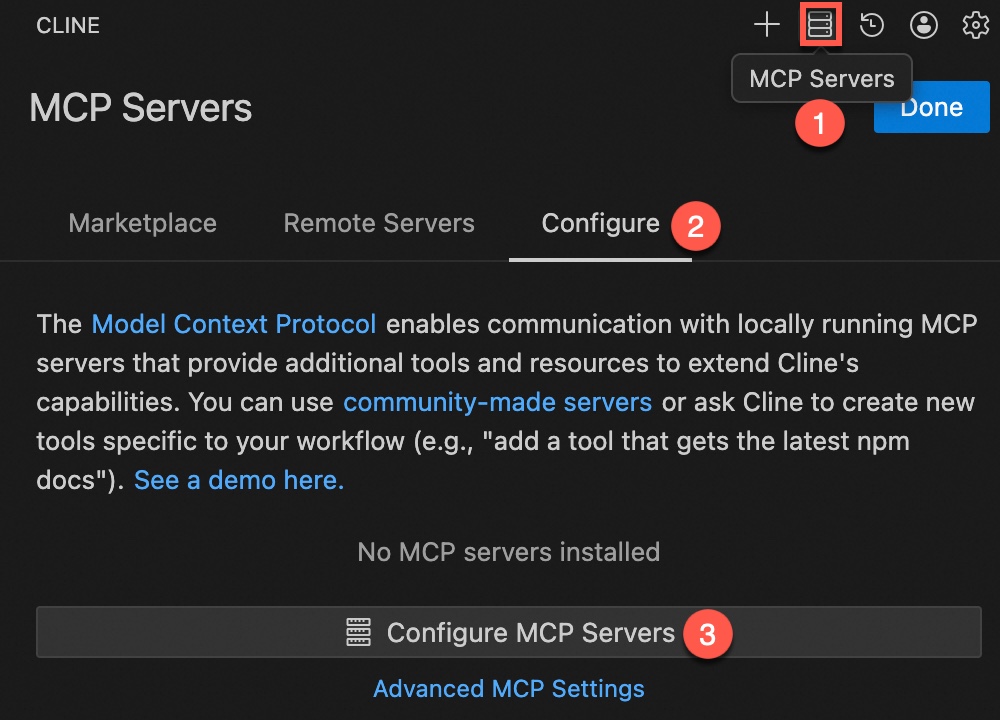
Click MCP Servers, go to the Configure page, and click Configure MCP Servers.
-
In the
cline_mcp_settings.jsonconfiguration file, add the MCP configuration information. ReplaceYOUR_API_KEYwith the API key that you obtained in the previous step. After the configuration is complete, save the file.{ "mcpServers": { "websearch": { "type": "http", "url": "https://dashscope.aliyuncs.com/api/v1/mcps/WebSearch/mcp", "headers": { "Authorization": "Bearer YOUR_API_KEY" }, "disabled": false } } } -
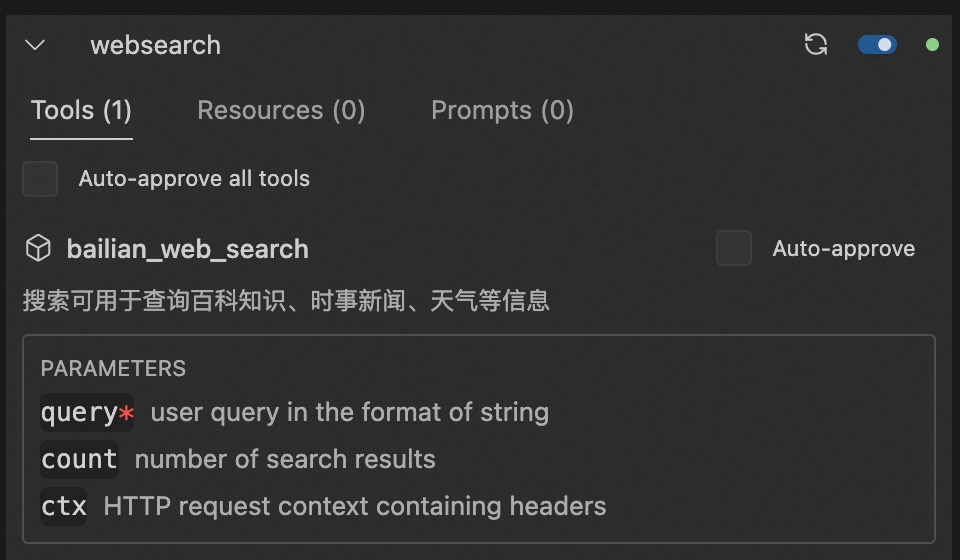
After the configuration is complete, you can view the MCP information on the Configure page.
-
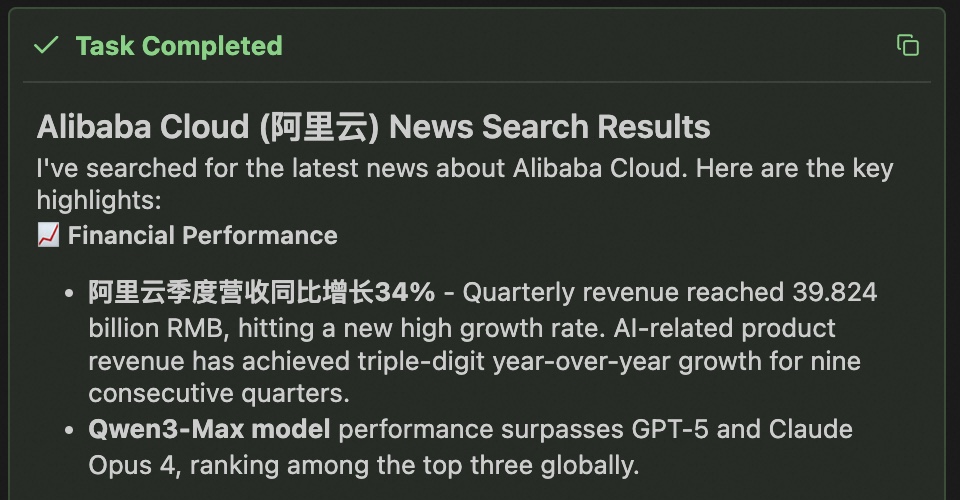
Start a new conversation and send the prompt
Use the websearch MCP to search for news about Alibaba Cloudto see the search results.Mention the websearch MCP explicitly to avoid confusion with other tools.
Kilo CLI
-
In the
~/.config/kilo/opencode.jsonconfiguration file, add the MCP configuration information. ReplaceYOUR_API_KEYwith the API key that you obtained in the previous step. After the configuration is complete, save the file.{ "mcp": { "websearch": { "type": "remote", "url": "https://dashscope.aliyuncs.com/api/v1/mcps/WebSearch/mcp", "headers": { "Authorization": "Bearer YOUR_API_KEY" } } } }If the
opencode.jsonfile already contains other configurations, such as provider, merge the mcp field into the existing configuration. After the configuration is complete, save the file. -
Run the following command in the terminal to view the MCP status. A Connected status indicates a successful connection.
kilocode mcp listMCP Servers │ * [ok] websearch connected │ https://dashscope.aliyuncs.com/api/v1/mcps/WebSearch/mcp │ └ 1 server(s) -
Run the following command in the terminal to start Kilo CLI.
kilo -
Send the prompt
Use the websearch MCP to search for news about Alibaba Cloudto see the search results.Mention the websearch MCP explicitly to avoid confusion with other tools.
Here is the latest Alibaba Cloud news:

Alibaba Cloud Qwen Large Model Ranks First in Market Share
- Market share doubled: According to Sullivan's February 2026 report, Alibaba Cloud
  Qwen's share jumped to 32.1%, nearly doubling from 17.7% in H1 2025, surpassing
  ByteDance Doubao (21.3%) and DeepSeek (18.4%) to rank first in the enterprise
  large model market
- Daily call volume surged: In H2 2025, daily enterprise-grade large model calls in
  China reached 37.0 trillion tokens, up 263% from H1

AI Infrastructure Investment Strategy
- 380 billion CNY investment: Alibaba committed 380 billion CNY to AI infrastructure
- Revenue target: 2026 AI-related revenue growth target raised to 200%
- Market goal: Alibaba Cloud aims to capture 80% of China's AI cloud market growth

Qwen Model Technical Progress
- Open-sourced Qwen3.5-Plus: Released on Chinese New Year's Eve with hybrid attention
  mechanism and sparse MoE architecture
- Efficient design: 397 billion total parameters, only 17 billion activated, inference
  speed 2x that of mainstream models
- Spring Festival program: Qwen launched 3 billion CNY "Spring Festival Treat" program

Other Updates
- Coding Plan updates: Added support for Qwen 3.5, GLM-4.7, Kimi-K2.5 programming
  models, new users get 80% off for first month
- Server promotions: Lightweight application servers starting at 38 CNY/year, 200M
  bandwidth with unlimited traffic
Code · kimi-k2.5 · 49.8s
Kilo Code IDE plugin
-
Open the Kilo Code IDE plugin to configure the web search MCP information. Replace
YOUR_API_KEYwith the API key that you obtained in the previous step. After the configuration is complete, save the file.Click the gear icon in the upper left corner, select Agent Behaviour in the sidebar, click the MCP Servers tab, and then click the Edit Global MCP button at the bottom to open the
mcp_settings.jsonconfiguration file. Paste and save the following JSON content.{ "mcpServers": { "websearch": { "type": "streamable-http", "url": "https://dashscope.aliyuncs.com/api/v1/mcps/WebSearch/mcp", "headers": { "Authorization": "Bearer YOUR_API_KEY" } } } }When the status of the web search MCP turns green, the service is added successfully.
-
Return to the conversation interface and send the prompt
Use the websearch MCP to search for news about Alibaba Cloudto see the search results.Mention the websearch MCP explicitly to avoid confusion with other tools.
FAQ
What do I do if I cannot connect to the web search MCP service?
Common causes and troubleshooting methods:
-
Web search MCP service not enabled or upgraded: Confirm that you have enabled or upgraded the web search MCP service in the Model Studio MCP Marketplace. See Enable or upgrade web search MCP.
-
Incorrect Streamable HTTP endpoint address:
-
Check whether the URL is spelled correctly. The complete URL is
https://dashscope.aliyuncs.com/api/v1/mcps/WebSearch/mcp. -
If you are using the URL
https://dashscope.aliyuncs.com/api/v1/mcps/WebSearch/sse, it means you have enabled the legacy SSE protocol. Upgrade the protocol to Streamable HTTP.
-
-
Incorrect API key: Confirm that you are using a valid general-purpose Model Studio API Key (format: sk-xxx, not the Token Plan-specific API Key), and have correctly replaced YOUR_API_KEY in the command.
-
Free quota exhausted: The web search MCP offers a free quota of 2,000 calls for all users. After the free quota is used up, the service is billed at CNY 29 per 1,000 calls. Make sure your account balance is sufficient.
-
Network connection failure: Confirm that your current network has access.
What do I do if the model doesn't call web search during a conversation?
-
Make sure the web search MCP service is connected and available.
-
Mention the tool name explicitly in the conversation, for example:
Use the websearch MCP to search for news about Alibaba Cloud.