Asynchronous task processing
Asynchronous media processing tasks return their results in the background, and the time from submission to result depends on both scheduling and processing. This topic explains what determines the timeline of an asynchronous task, how to interpret task status and progress, and how to integrate asynchronous tasks so that variable completion times do not block your business workflows.
What is an asynchronous task?
An asynchronous task is a media processing task that the service accepts at submission and then runs in the background. The result becomes available only after processing is complete. Alibaba Cloud ApsaraVideo VOD, Intelligent Media Services, and Media Processing provide a variety of asynchronous media processing capabilities.
A successful submission means only that the task is accepted. It does not mean that the task starts immediately, and it does not mean that the task finishes within a fixed period of time.
An asynchronous task is an offline processing task by nature. Unlike a synchronous API, the time at which an asynchronous task produces its result is affected by task scheduling, fluctuations in task volume, task complexity, source file characteristics, and parameter settings. The total task duration can be significantly longer than the actual processing time.
Asynchronous tasks are therefore not suitable as blocking conditions in latency-sensitive business workflows. Do not use the processing speed reference values in this topic to estimate delivery times in a production environment.
Scope
This topic applies to media processing tasks that are initiated and run asynchronously in ApsaraVideo VOD, Intelligent Media Services, and Media Processing, including but not limited to:
Media transcoding tasks.
Media editing tasks.
Snapshot and image sprite tasks.
Media asset analysis tasks.
AI-assisted asynchronous media processing tasks.
Other media processing tasks that are submitted and whose results are retrieved through an asynchronous mechanism.
Task types can differ in processing pipeline, duration characteristics, task status, progress fields, query methods, and result notification mechanisms. If the documentation of a specific capability provides separate information, follow that product documentation.
General timeline
Read this section in full before you initiate a task, and design your business workflow accordingly. The total duration of an asynchronous task usually consists of two parts:
Total task duration = Wait time + Actual processing time
Wait time — the time that a task spends after submission and before it enters the actual processing stage.
Actual processing time — the time that is consumed to run the task itself after the task enters the actual processing stage.
A returned task ID means only that the task is created.
The completion time that you actually experience is the total task duration, not only the actual processing time.
The task duration descriptions, processing speed reference values, examples, and FAQ answers in this topic describe processing characteristics in typical scenarios only. They do not constitute a service commitment, an SLA metric, a delivery guarantee, or a basis for service or business compensation.
Even if the specifications of a task are close to those of a reference example, the total task duration can still be significantly longer because of increased wait time.
If your business has strict requirements on the completion time, reserve buffer time and use asynchronous decoupling, timeout fallback, and business degradation designs.
Total task duration compared with actual processing time
This distinction is the key to understanding the timeline of asynchronous tasks. The processing speeds, speed multipliers, and example durations in this topic describe only how fast a task runs after it enters the actual processing stage.
How soon you can get the result depends on two factors:
How long the task waits before it enters the actual processing stage.
How long the task itself is actually processed.
Therefore:
A processing speed reference value describes actual processing time only. It is not the total task duration.
You cannot derive the delivery time of a task from a processing speed reference value.
Tasks with the same specifications that are submitted in different periods can have significantly different total task durations.
Wait time
After a task is submitted, the service schedules the task into the actual processing stage based on the task type, the task volume, and processing policies.
The wait time may increase in the following situations:
A large number of tasks are submitted in a short period of time.
The task volume fluctuates significantly in the same period.
Highly complex tasks account for a large proportion of the queue.
A successful submission does not mean that the task has entered the actual processing stage.
The wait time can vary with the submission period, the task type, the task scale, and differences between processing pipelines.
Do not resubmit the same task while it is waiting. Resubmission can cause duplicate processing and further increase the overall wait time.
Use asynchronous callbacks to get task results instead of high-frequency polling.
Note the following points about the service status:
The wait time is affected by many factors, such as the task volume and task characteristics. An increase in wait time alone cannot be used as a basis for determining a service issue.
If a service issue with a wide impact occurs, Alibaba Cloud notifies affected users by internal message, SMS, or other channels.
Actual processing time
The actual processing time is closely related to the task type, the source file characteristics, and the task configuration. The duration model is not the same for every capability.
Common influencing factors
| Factor | Pattern | Description |
| Source file duration | Longer duration usually means longer actual processing time | One of the main factors for most media processing tasks. |
| Output specifications | Higher specifications usually mean longer actual processing time | For example, a higher resolution or a more complex output format. |
| Processing algorithm complexity | More complex algorithms usually mean longer actual processing time | For example, advanced transcoding or complex analysis. |
| Custom parameters | More complex parameters usually mean longer actual processing time | For example, enhancement parameters or multi-stage processing. |
| Source file characteristics | More complex characteristics usually mean greater fluctuation in duration | For example, bitrate, frame rate, container format, or stream structure. |
| Task type | Different task types have different duration models | Transcoding, editing, snapshot and image sprite, and media asset analysis tasks cannot be compared with each other directly. |
Differences between task types
Transcoding tasks: the actual processing time usually depends on the video duration, the resolution, the encoding format, the transcoding algorithm, and the template parameters.
Editing tasks: the actual processing time is also affected by the number of clips, whether re-encoding is required, whether clipping crosses keyframes, and multi-clip stitching.
Snapshot, image sprite, and media asset analysis tasks: the way to interpret the actual processing time may differ from transcoding tasks, and progress fields, status fields, and stage divisions are not always available.
Task status and progress
Status fields, progress fields, query methods, and result return mechanisms can differ between asynchronous tasks. The status logic in this topic describes the common processing stages of asynchronous tasks only. It does not mean that all asynchronous tasks use the same status model.
From a general perspective, an asynchronous task moves from submission to a wait stage, then to the actual processing stage, and finally to a succeeded or failed end state.
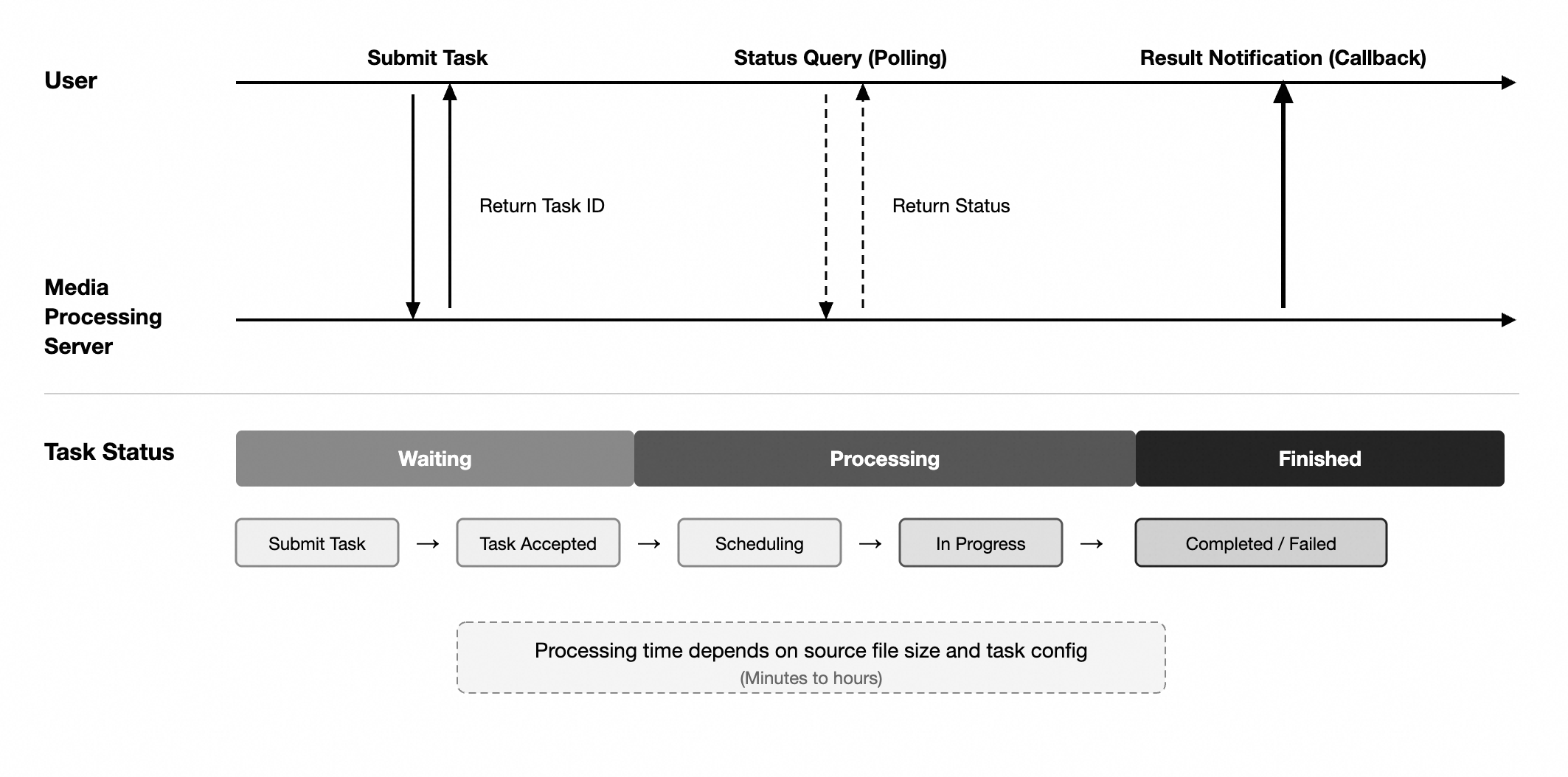
Note the following points:
Some tasks provide a progress field that you can query.
Some tasks return only a few statuses, such as
Processing,Succeeded, orFailed.For some tasks,
Waitingis not a standalone status. You must interpret it by combining the status field with other fields.For specific status definitions, progress fields, and query methods, refer to the actual API responses and to the documentation of the corresponding product.
Example: transcoding tasks
The following content describes how to interpret the status and the duration of transcoding tasks only. It does not mean that other asynchronous tasks use the same mechanism.
Transcoding task status
After you submit a transcoding task, the task status in the query result may be Transcoding. A Transcoding status means that the task has entered the transcoding workflow, but not necessarily that actual transcoding has started. Use the TranscodeProgress field to further determine the stage of the task.
| Task status | TranscodeProgress | Description | Recommended interpretation |
Transcoding or Submitted | 0 | The task has not entered the actual transcoding stage. | Waiting |
Transcoding or Running | Greater than 0 | The task has entered the actual transcoding stage. | Transcoding |
Succeeded | 100 | Transcoding ended successfully. | Succeeded |
Failed | Not applicable | Transcoding terminated abnormally. | Failed |
For transcoding tasks, waiting is usually not a standalone status enumeration. It is a stage that you determine by combining the task status with the transcoding progress.
Transcoding processing speed reference
The following reference values describe the processing speed of transcoding tasks after they enter the actual processing stage under typical test conditions. They exclude the wait time and do not represent the total task duration.
Speed multiplier
Speed multiplier — the multiple of video duration that can be processed per unit of processing time.
For example, 3x speed means that about 3 minutes of video content can be processed per 1 minute of processing time. For a 30-minute video, the theoretical actual processing time is about 10 minutes, excluding the wait time.
Reference values by transcoding algorithm
The following table uses a typical H.264 720p transcoding scenario as a reference and describes the processing speed characteristics of different transcoding algorithms.
| Transcoding algorithm | Processing speed reference | Description |
| Standard transcoding | About 3x speed | Reflects only the processing-stage speed under typical conditions. |
| Narrowband HD 1.0 | About 1.5x speed | The actual processing time is usually longer than that of standard transcoding. |
| Narrowband HD 2.0 | Usually much lower than 1x speed | The actual processing time is usually longer than the duration of the source video. The actual time depends on the specific task. |
The preceding reference values apply only to typical H.264 720p transcoding scenarios.
For higher resolutions, more complex encoding, and heavier parameters, the processing speed is usually lower than the preceding reference values.
Differences in the bitrate, frame rate, container format, and stream structure of source videos can significantly affect the actual processing time.
The processing complexity of Narrowband HD 2.0 is usually significantly higher than that of standard transcoding and Narrowband HD 1.0.
For the actual duration of a specific task, refer to the task status query result or to the completion notification.
Task lifecycle and result retrieval
Task submission
After you submit an asynchronous task through an API, the service returns a task ID. The task ID is the unique identifier that is used to query the status, correlate result notifications, and troubleshoot issues. Record the task ID in your own system.
Result notification
After a task is processed, the service can push a result notification if a callback URL is configured. You can rely on the callback to detect task completion automatically, without continuous polling.
Using callbacks
If the callback URL is unreachable, the service retries automatically according to a predefined policy.
If delivery still fails after several retries, use the query API to confirm the final status of the task.
Callback notifications may be delayed or delivered more than once because of network fluctuations or exceptions on your side.
Your callback handling logic must perform an idempotence check based on the task ID.
For the final task status, refer to the result that is returned by the query API.
For details about the callback settings and the retry mechanism, see Callback configuration.
Task queries
You can use a task ID to query the current status and the processing result of a task. The query API mainly returns the task status, the progress, and the result information.
Query a task in the following scenarios:
No callback notification is configured.
A callback is configured, but you need to check the current progress.
The total task duration exceeds your business expectations.
A fallback is needed when a callback notification is not received.
General troubleshooting
Set your expectation baseline from the total task duration model: the actual processing time that the task type and the task specifications typically require, plus buffer time for the wait stage. If the total task duration exceeds that baseline, examine the task status changes, the submission time, and the task configuration, and then perform the following steps.
Step 1: Confirm whether the task is complete
Use the task ID to query the current status or the result of the task:
If the task is complete, get the result and evaluate the total task duration. No further steps are required.
If the task failed, check the error code and the error message, and then fix the issue as prompted.
If the task is not complete, continue to Step 2 to determine whether the task is in the wait stage or in the actual processing stage.
Step 2: Determine the current stage based on the task type
For transcoding tasks: use the
Transcodingstatus together withTranscodeProgressto determine whether the task has entered the actual transcoding stage.For other asynchronous tasks: refer to the fields that are returned by the query API of the corresponding task and to its documentation. Do not apply the interpretation method for transcoding tasks directly.
If the task has not entered the actual processing stage, it is still waiting to be scheduled. Wait for the service to schedule the task and do not resubmit it. If the task is already in the actual processing stage, continue to Step 3.
Step 3: Identify possible causes based on task characteristics
| Symptom | Possible cause | Recommended action |
| No result is returned for a long time | Task volume fluctuation, increased wait time, a service issue, or high task complexity | Confirm whether the task is still waiting to be scheduled. An increase in wait time alone does not indicate a service issue. |
| The actual processing time is significantly longer than for common tasks | A complex source file, heavy parameters, or high task complexity | Check the source file and the configuration against the factors in Actual processing time. |
| The task failed | An abnormal source file, a parameter error, or a processing error | Check the error code description and fix the issue as prompted. |
| The query returns no result | An incorrect task ID, or the task was not submitted successfully | Verify the submission result and the task ID. |
If none of the preceding actions resolves the issue, continue to Step 4.
Step 4: Collect information for technical support
To get help from technical support, provide the following information whenever possible:
The task ID.
The task submission time.
The task type, such as transcoding, editing, snapshot and image sprite, or media asset analysis.
The duration, resolution, and encoding format of the source file.
The template configuration or the processing parameters.
Whether the tasks are submitted in a batch.
The symptoms of the issue and the scope of impact.
Recommended integration methods
| Method | Description | Scenarios |
| Asynchronous callback (Recommended) | The service pushes the result after the task is complete. | Production environments and formal business scenarios. |
| Polling | Query the task status and the result periodically. | Debugging, testing, and as a fallback when callbacks fail. |
Integration recommendations
To reduce the impact of asynchronous task latency fluctuations on your business, follow these recommendations:
Use asynchronous decoupling to process media tasks in your system design.
Detect task results through asynchronous callbacks or status queries instead of waiting synchronously, and use asynchronous callbacks in production environments.
Avoid high-frequency polling to reduce invalid requests.
Implement idempotence control when you submit tasks to avoid duplicate submissions.
Stagger the submission of batch tasks to avoid a large queue in a short period of time.
Set up task timeout monitoring, alerting, manual intervention, and business fallback mechanisms.
For critical business scenarios, and for peak hours, batch tasks, and complex tasks, reserve enough buffer time and design a business degradation plan.
FAQ
Will a 10-minute 720p transcoding task always finish within 3 to 4 minutes?
Not necessarily. The reference value of about 3x speed describes the processing speed of a transcoding task after it enters the actual processing stage under typical test conditions. It excludes the wait time before the task enters the actual processing stage, and it does not represent the total task duration in a production environment.
The time at which the result becomes available is determined by the total task duration. Do not derive the delivery time of a task from the processing speed reference values.
If the total task duration exceeds your business expectations, follow the steps in General troubleshooting.
Why does the status of my transcoding task show Transcoding while TranscodeProgress stays 0?
For transcoding tasks, a Transcoding status indicates that the task has entered the transcoding workflow, which is not equivalent to the start of actual transcoding. When TranscodeProgress is 0, the task is still in the wait stage. When TranscodeProgress is greater than 0, the task has entered the actual transcoding stage.
My task specifications are close to the reference scenario. Why is the total task duration significantly longer?
Possible reasons include but are not limited to:
The task waited for a long time before it entered the actual processing stage.
The actual characteristics of the source file differ from the typical reference scenario.
The task parameters or the template configuration are more complex than usual.
Fluctuations in the task volume in the same period increased the total task duration.
To further confirm the cause, request assistance from technical support and provide the task ID.
Does an increase in wait time always indicate a service issue?
Not necessarily. The wait time is affected by many factors, such as the task volume and task characteristics. An increase in wait time alone cannot be used as a basis for determining a service issue. To confirm the current service status, request assistance from technical support.
Can I use the processing speed reference values to commit to my business delivery time?
No. The processing speed reference values only help you understand the processing characteristics of tasks. Do not use them as a basis for production delivery times, business SLAs, or commitments to your end users.
For business scenarios with strict timeline requirements, reserve buffer time in your business architecture and set up timeout fallback and degradation mechanisms.
Can I interpret the status of other asynchronous tasks in the same way as transcoding tasks?
Not necessarily. The Transcoding status and the TranscodeProgress field in the transcoding example are specific to transcoding tasks.
For editing, snapshot and image sprite, media asset analysis, and other asynchronous tasks, the status fields, the progress fields, and the interpretation methods may differ from those of transcoding tasks. Refer to the query API of the specific task and to the corresponding product documentation.
SLA and scope of responsibility
If you suspect that a task processing delay is caused by a service issue, request assistance from technical support and provide the task ID and related information.
Service availability, liability, and the scope of compensation are governed by the official Terms of Service and the SLA.
For more information about a specific asynchronous capability, refer to the documentation of the corresponding product.