Configure service authentication
In a microservices model, if a service has specific security requirements and you want to prevent it from being called by just any service, you can implement an authentication mechanism. This ensures that only authenticated services that meet predefined permission standards can call the protected service. This process secures the system and improves its reliability.
Background information
The following example shows a scenario for service authentication in Spring Cloud. The process for Dubbo service authentication is similar.
No service authentication is configured
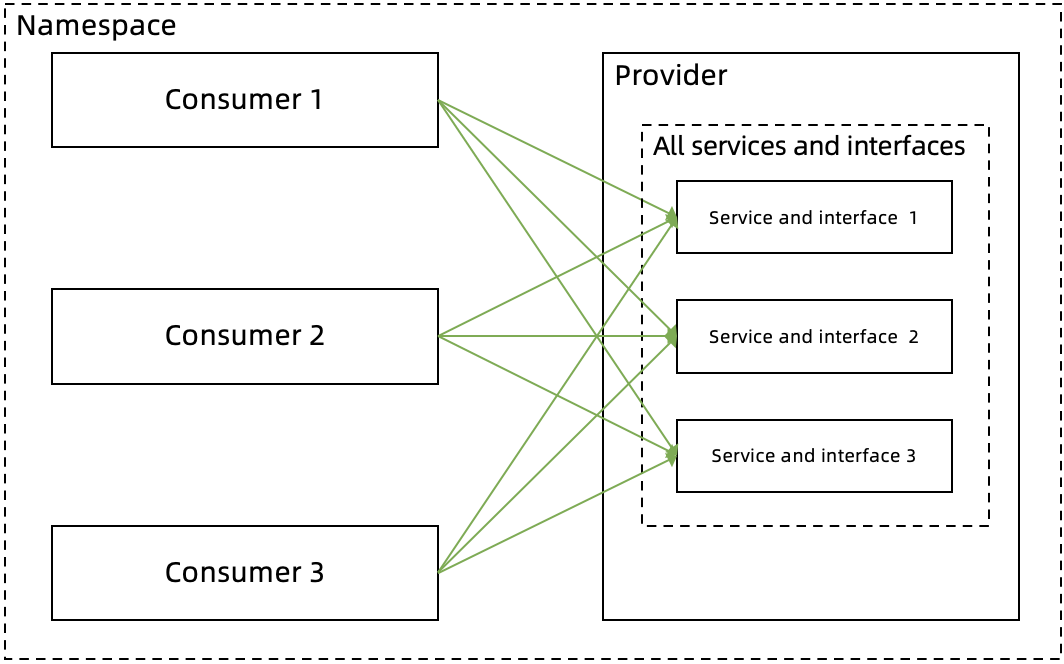
Consumers 1, 2, and 3 and the Provider are in the same namespace. By default, Consumers 1, 2, and 3 can call all paths of the Provider (Path 1, 2, and 3).
Service authentication is configured
Set authentication for all paths
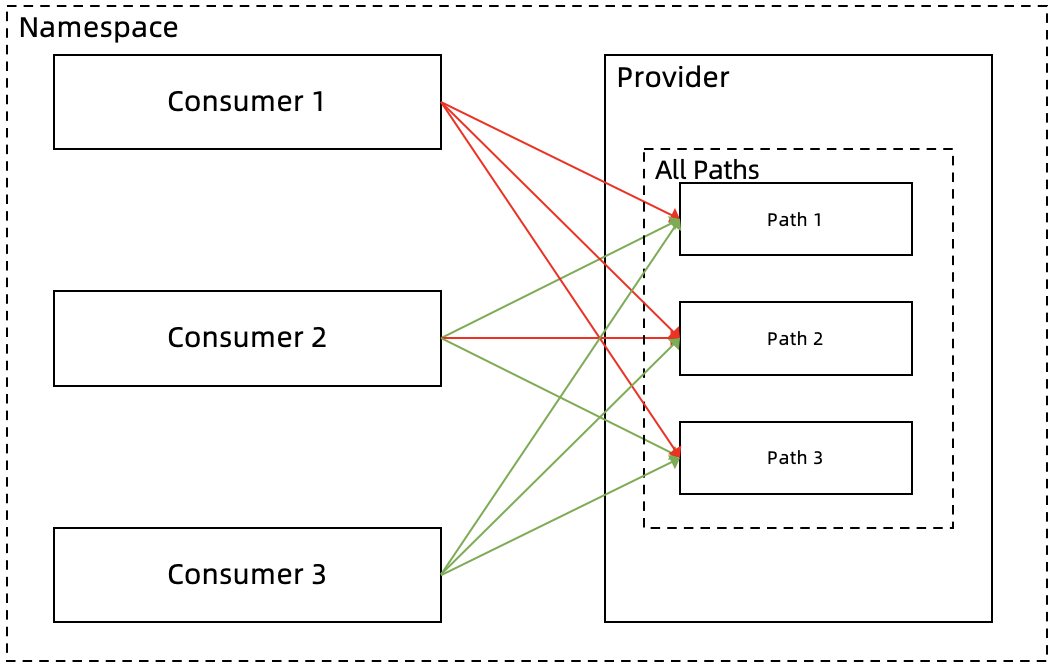
You can set an authentication rule for all paths of the Provider. For example, you can set a rule for all paths of the Provider to deny calls from Consumer 1 (blacklist). This allows calls from Consumers 2 and 3 (whitelist).
Set authentication for a specific path
In addition to the rule for all paths, you can also set rules for specific paths. For example, with the rule for all paths, Consumers 2 and 3 can access all paths of the Provider. However, if Path 2 of the Provider involves core business or data, you might not want Consumer 2 to call it. You can set the authentication for Path 2 to a blacklist for Consumer 2 to deny the call. Then, Consumer 2 can only access Path 1 and Path 3 of the Provider.
The following figure shows the call relationship after you set the authentication rules.
Video tutorials
Procedure
Log on to the MSE console, and select a region in the top navigation bar.
In the left-side navigation pane, choose Microservices Governance > Service Authentication.
On the Service Authentication page, click Create Rule.
On the Create Rule page, set the service authentication parameters, and then click OK.
Parameter
Description
Rule name
The name of the authentication rule. The name can be up to 64 characters long and can contain uppercase and lowercase letters, digits, underscores (_), and hyphens (-).
Called party type
Select Application or Kubernetes namespace as needed.
Callee (Application)
If you set Called party type to Application, select the application to be called.
Callee (K8s Namespace)
If you set Called party type to Kubernetes namespace, select the cluster and namespace where the called application resides.
Called framework
The framework that the called application uses. Select Spring Cloud or Dubbo as needed.
Add All Interface Rules
ImportantYou can add a general rule for all interfaces only once.
Path of Callee
The default value is All Paths and cannot be changed.
NoteThis parameter applies only to Spring Cloud.
Callee Interface
The default value is All services/All interfaces and cannot be changed.
NoteThis parameter applies only to Dubbo.
Authentication method
The authentication method. Options include Whitelist (Allow calls) and Blacklist (Deny calls). Select an option as needed.
Caller
The caller applications to authenticate. Click Add Caller to add multiple caller applications.
Add rule for a specific interface
ImportantRules for specific interfaces overwrite the general rule for all interfaces. These rules are not appended. Configure these rules with caution.
Path of Callee
The path of the called application.
NoteThis parameter applies only to Spring Cloud.
Callee Interface
The service and interface of the called application.
NoteThis parameter applies only to Dubbo.
Authentication method
The authentication method. Options include Whitelist (Allow calls) and Blacklist (Deny calls). Select an option as needed.
Caller
The caller applications to authenticate. Click Add Caller to add multiple caller applications.
Default status
The switch to enable the rule.
On: The rule is enabled after it is created. This is the default setting.
Off: The rule is disabled after it is created. To enable the rule, find it on the Service Authentication page and click Enable in the Actions column.
Verify the result
After you configure and enable the service authentication rule, verify that the rule works as expected.
Related operations
After you create a service authentication rule, you can also edit, enable, or disable it. If a rule is no longer needed, you can delete it.