This topic helps you diagnose and resolve common access issues with Task Scheduling (XXL-JOB) instances in Microservices Engine (MSE).
DNS and domain name resolution
Domain name resolution fails with java.net.UnknownHostException
Symptoms
The XXL-JOB instance throws a java.net.UnknownHostException error during connection.
Cause
XXL-JOB uses Alibaba Cloud DNS PrivateZone for domain name resolution, which relies on the DNS servers at 100.100.2.136 and 100.100.2.138. If custom routing or DNS configuration overrides these addresses, PrivateZone cannot resolve the domain name.
Diagnose the issue
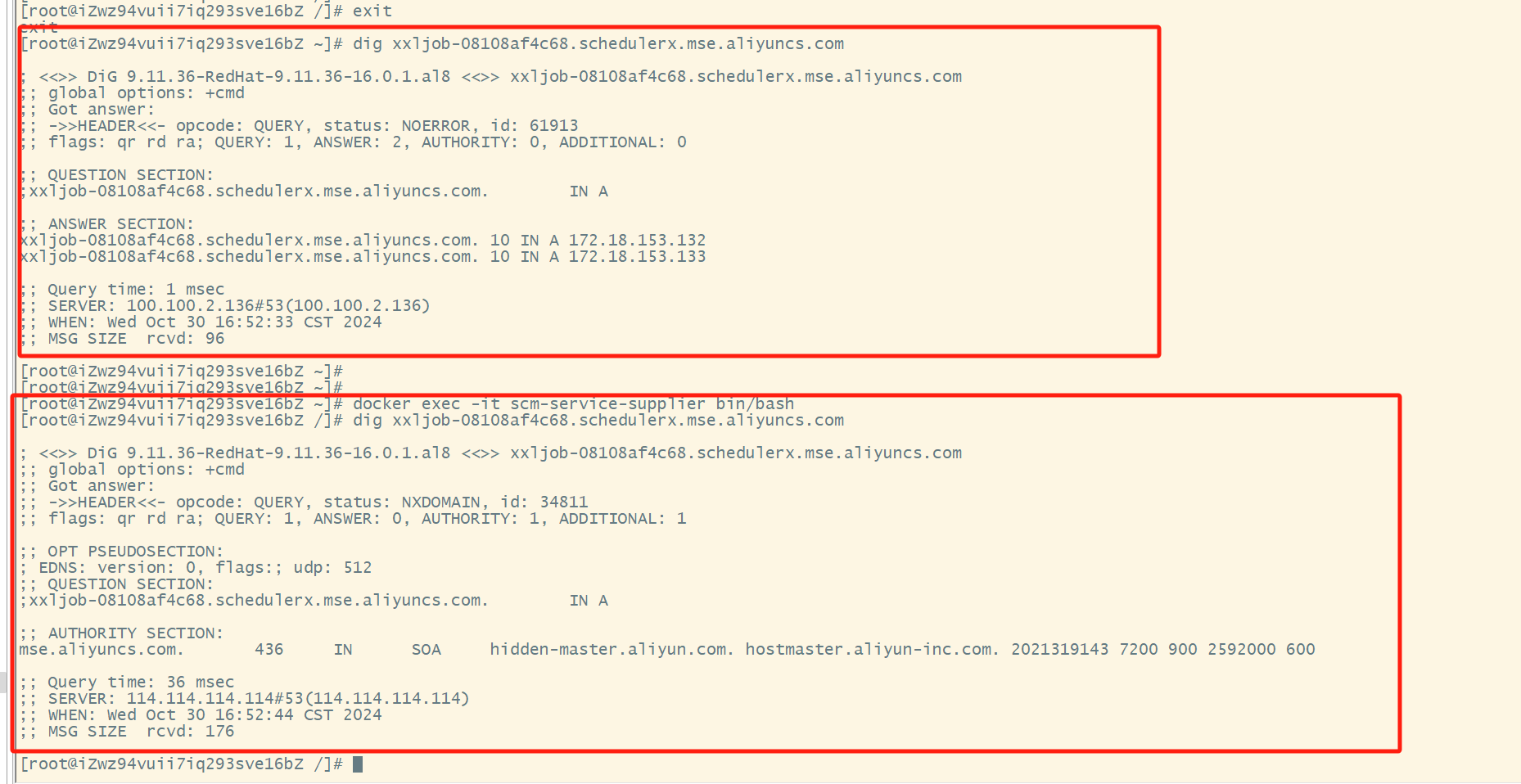
Run the dig command to check which DNS server is being used:
dig <your-xxl-job-domain>If the output shows a third-party DNS server such as 114.114.114.114 instead of 100.100.2.136 or 100.100.2.138, a custom DNS configuration is overriding PrivateZone.
Solution
Remove any custom routing rules that redirect traffic away from 100.100.2.136 and 100.100.2.138. After you remove these rules, PrivateZone automatically handles domain name resolution.
VPC cannot resolve a domain name over CEN
Symptoms
A Virtual Private Cloud (VPC) connected through Cloud Enterprise Network (CEN) cannot resolve the XXL-JOB domain name.
Cause
PrivateZone is not mapped to the VPC where the domain name resolution request originates.
Solution
Submit a ticket to the development team to map PrivateZone to other VPCs.
Domain name cannot be resolved in a self-managed IDC or office network over a leased line
Symptoms
A self-managed IDC or office network connected to Alibaba Cloud through a carrier's leased line cannot resolve the XXL-JOB domain name.
Cause
DNS queries from the self-managed network are not forwarded to PrivateZone.
Solution
Configure DNS forwarding to route resolution requests to PrivateZone. For details, see Forwarding management.
SDK compatibility
Duplicate executors after upgrading from SDK 2.0.x
Symptoms
After you upgrade xxl-job-core from version 2.0.x or earlier, two executors with the same IP address appear in the executor list.

Cause
The initialization logic for XxlJobExecutor changed in newer SDK versions. If the @Bean annotation still includes initMethod = "start" and destroyMethod = "destroy", XxlJobSpringExecutor calls the start method twice, which registers the executor twice.
Solution
Remove the initMethod and destroyMethod attributes from the @Bean annotation.
Before (incorrect):
@Bean(initMethod = "start", destroyMethod = "destroy")
public XxlJobSpringExecutor xxlJobExecutor() {
    logger.info(">>>>>>>>>>> xxl-job config init.");
    XxlJobSpringExecutor xxlJobSpringExecutor = new XxlJobSpringExecutor();
    xxlJobSpringExecutor.setAdminAddresses(adminAddresses);
    xxlJobSpringExecutor.setAppName(appName);
    xxlJobSpringExecutor.setIp(ip);
    xxlJobSpringExecutor.setAccessToken(accessToken);
    xxlJobSpringExecutor.setLogPath(logPath);
    xxlJobSpringExecutor.setLogRetentionDays(logRetentionDays);

    return xxlJobSpringExecutor;
}
After (correct):
@Bean
public XxlJobSpringExecutor xxlJobExecutor() {
    logger.info(">>>>>>>>>>> xxl-job config init.");
    XxlJobSpringExecutor xxlJobSpringExecutor = new XxlJobSpringExecutor();
    xxlJobSpringExecutor.setAdminAddresses(adminAddresses);
    xxlJobSpringExecutor.setAppName(appName);
    xxlJobSpringExecutor.setIp(ip);
    xxlJobSpringExecutor.setAccessToken(accessToken);
    xxlJobSpringExecutor.setLogPath(logPath);
    xxlJobSpringExecutor.setLogRetentionDays(logRetentionDays);

    return xxlJobSpringExecutor;
}
Node.js SDK does not receive acknowledgements
Symptoms
The Node.js executor fails to return acknowledgements to the XXL-JOB admin server. Tasks appear stuck or unacknowledged.
Cause
XXL-JOB uses logId values that can exceed JavaScript's Number.MAX_SAFE_INTEGER (2^53 - 1). The default JSON.parse() silently loses precision on these large integers, which corrupts the logId and breaks the acknowledgement flow.
Solution
Replace the default JSON parser with json-bigint to preserve large integer values. The following Express middleware handles this:
// Step 1: Import dependencies
import type { Request, Response, NextFunction } from 'express'
const JSONbig = require('json-bigint');

// Step 2: Define safe JSON parsing middleware
/**
 * Preserves large integers as strings to prevent precision loss
 * for logId values that exceed Number.MAX_SAFE_INTEGER.
 */
const safeJsonMiddleware = function () {
  return (req: Request, res: Response, next: NextFunction) => {
    if (req.is('application/json')) {
      let body = ''
      req.setEncoding('utf8')

      req.on('data', (chunk) => {
        body += chunk
      })

      req.on('end', () => {
        try {
          // Use JSONbig.parse() instead of JSON.parse().
          // 'storeAsString: true' parses large numbers as strings.
          // To parse them as BigInt, use 'useNativeBigInt: true'.
          req.body = JSONbig({ storeAsString: true }).parse(body);
          next();
        } catch (e) {
          // If parsing fails, return an error.
          res.status(400).send('Invalid JSON');
        }
      })

      req.on('error', next)
    } else {
      next()
    }
  }
}

// Step 3: Register the middleware
app.use(safeJsonMiddleware())| Placeholder | Description | Example |
|---|---|---|
app | Your Express application instance | const app = express() |
Executor connectivity and compatibility
How do I troubleshoot task execution failures or "connect timed out" errors?
Symptoms
Tasks fail to execute, and the executor logs show error messages such as connect timed out, xxl-rpc remoting error, or "connection to server port timed out". The executor cannot register with the SchedulerX server.
Cause
The executor cannot establish a connection with the SchedulerX server. Common causes include:
Incorrect executor configuration parameters (
xxl.job.admin.addresses,xxl.job.executor.appname, orxxl.job.accessToken).Network connectivity issues: security group rules, VPC settings, or ACL configurations block the required port.
The SchedulerX server instance is unavailable.
Solution
Verify the following executor configuration parameters:
Parameter
Description
How to verify
xxl.job.admin.addressesSchedulerX server access endpoint
Go to the XXL-JOB instance Basic Information page and check the Network Access Information table for the VPC or public network endpoint.
xxl.job.executor.appnameUnique identifier for the application
Go to the Applications page and confirm that the AppName value matches exactly.
xxl.job.accessTokenAuthentication token for executor registration
Go to the Applications page, click Edit for the application, and verify that the AccessToken matches the executor configuration.
Check network connectivity:
Ensure that security group rules, VPC settings, and ACL configurations allow inbound and outbound traffic on the port used by the executor.
Review executor logs to confirm whether a successful registration message appears.
Manually verify connectivity. In a network environment that can reach the target IP, run the following command:
curl -X POST http://<executor-IP>:<port>/runIf the above checks pass but the error persists, check the status of your SchedulerX server instance for any service disruptions.
What should I do if XXL-JOB type tasks fail in SchedulerX while Java type tasks work normally?
Symptoms
In SchedulerX, XXL-JOB type tasks fail to execute or return invocation errors, while Java type tasks using the same application run normally.
Cause
This issue is typically caused by dependency conflicts or incompatibilities in the XXL-JOB plugin. SchedulerX requires the Alibaba Cloud XXL-JOB plugin dependency for XXL-JOB type tasks — Java type tasks do not have this requirement. Specific causes include:
The official open-source XXL-JOB dependency is used instead of the Alibaba Cloud plugin.
The Alibaba Cloud XXL-JOB plugin version is incompatible with your runtime environment.
Tasks are registered using the annotation-based method, which may not be supported in all configurations.
The package name has changed in the code, causing task lookup failures.
Solution
Confirm that you have added the Alibaba Cloud XXL-JOB plugin dependency to your project, and that you are not relying solely on the official open-source XXL-JOB dependency.
Check the Alibaba Cloud XXL-JOB plugin dependency version for compatibility. Refer to the official plugin version documentation to verify that your version is supported.
Review your task definition method. Instead of using annotation-based registration, try invoking the task using the full class path directly.
Check whether the package name has changed in your code. Compare the logs of successfully executed Java type tasks with the configuration of the failing XXL-JOB type tasks to identify any discrepancies.
If XXL-JOB is your primary executor and you continue to experience compatibility issues, consider migrating to a dedicated XXL-JOB instance, or adjust the dependency reference location in your project.