The Host request header and Server Name Indication (SNI) are common components of network communications. This topic explains the difference between them and provides solutions for scenarios where the SNI and Host header do not match.
What is a Host?
The Host header is an HTTP header with the format `Host: `. Other common HTTP headers include Location, User-Agent, and Connection. The Host header is defined in RFC 7230 and specifies the hostname for an HTTP request. You can view this header in the Network tab of a web browser's developer tools.
In HTTP/1.x, the Host header specifies the host and port number of the request target. You might not see a port number in the Host header for standard HTTP or HTTPS requests. This is because HTTP uses the default port 80 and HTTPS uses the default port 443. If you use a custom port, you must add the port to the request, for example, `https://my.example.com:8443/get`.
HTTP/2 uses the :authority pseudo-header field to specify the host and port number of the request target, which is similar to the Host header in HTTP/1.x. HTTP/2 replaces the Host header with :authority to identify the request target. Other important pseudo-header fields in HTTP/2 include :method for the HTTP method, :path for the resource path, and :scheme for the protocol, such as HTTP or HTTPS.
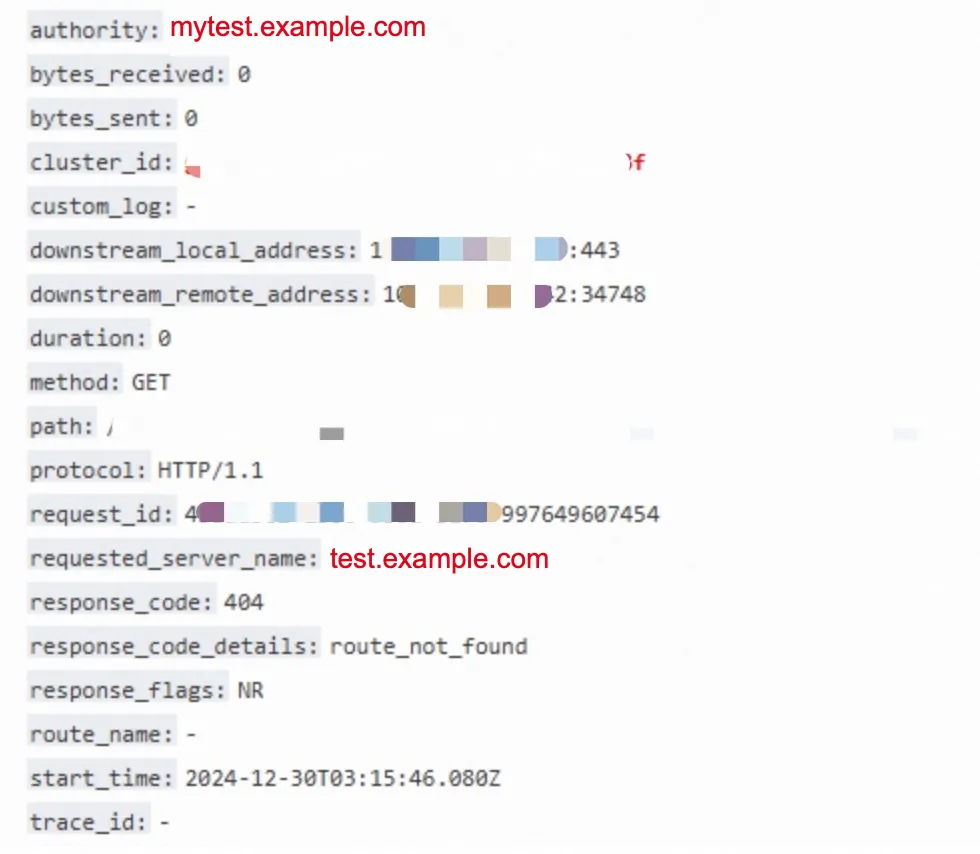
Cloud-native gateway access logs use the :authority field to record the hostname of a request, as shown in the following figure.

What is SNI?
SNI is a TLS extension defined in RFC 6066. It allows the client to indicate the fully qualified domain name (FQDN) it is attempting to connect to during the TLS handshake. A TLS handshake is similar to a TCP three-way handshake. However, a TCP handshake establishes a TCP connection, whereas a TLS handshake begins after the TCP connection is established. This places TLS at a higher layer in the OSI model. You must use a packet capture tool to view the SNI. You cannot find it in a browser's developer tools.
The following image shows a packet capture from a client accessing Microsoft documentation. After the TCP three-way handshake (highlighted in blue), the client sends a Client Hello packet (highlighted in red). This packet includes the Server Name Indication extension, which contains the value `docs.microsoft.com` (highlighted in green).
The web server uses the SNI to check the FQDN against its certificates. It then selects the correct certificate to perform the TLS handshake. After the TLS handshake is complete, encrypted communication can begin.
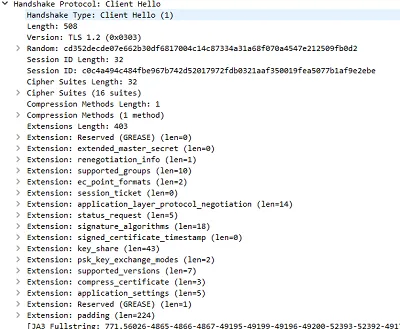
If a request does not include an SNI, the Client Hello packet will not have a `server_name` extension, as shown in the following figure.
How does SNI work in an HTTPS request?
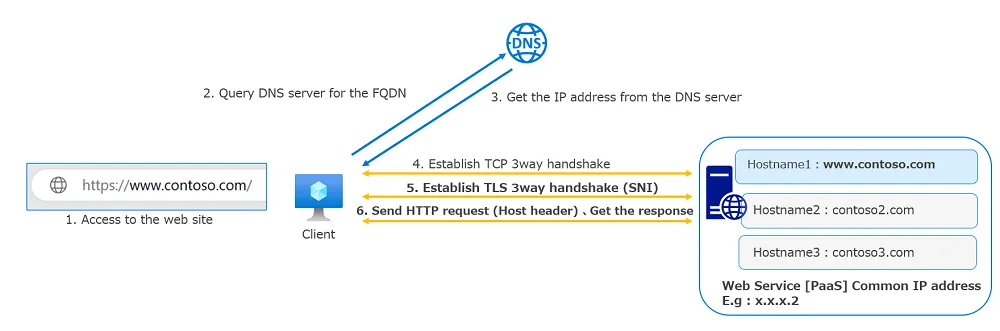
The following figure shows the process of opening a website in a browser.
In step 5, the client sends the Server Name Indication (SNI).
In step 6, the client sends the Host header and retrieves the webpage. In this figure,
www.contoso.comis used as both the SNI and the Host header, and the web service responds with the webpage that matches the FQDN.
The figure shows that during an HTTPS transaction, the SNI is used first to establish a secure TLS connection. Then, the HTTP request, which includes the Host header, is sent.
Must the SNI and Host header be the same in an HTTPS request?
In an HTTPS request, the Server Name Indication (SNI) and the Host header should usually match, but they are not required to be identical.
Server Name Indication (SNI): The client sends the SNI during the TLS handshake to tell the server which hostname the client wants to access. SNI is an extension at the TLS layer that indicates which domain name the server must process. It is crucial for environments where multiple virtual hosts share one IP address because it allows the server to select the correct certificate during the handshake.
Host header: This is a header field in an HTTP request that specifies the hostname the client wants to access. This field is used in the HTTP protocol to tell the server which virtual host must handle the request.
In most cases, the SNI and Host header are the same, especially in virtual host environments. Browsers and clients typically use the same hostname for both fields. However, they are not technically required to be identical and might differ in special cases, such as in a staging environment or during a migration.
If the SNI and Host header do not match, it can cause security risks and other problems, including the following:
Incorrect server response: The server may select a certificate and configuration based on the SNI. If the SNI and Host header do not match, the server might return the wrong certificate. This can cause the client to establish an invalid HTTPS connection due to a certificate mismatch.
Increased risk of man-in-the-middle attacks: A mismatch can be the result of a malicious attack. For example, an attacker might intentionally create a mismatch between the SNI and Host header to trick the server or client into behaving incorrectly.
Privacy leaks: If the SNI is exposed and does not match the expected Host header, it can leak information about the service type or destination that the user is trying to access.
Server configuration errors: A mismatch between the SNI and Host header can cause the server to select the wrong virtual host, which can expose sensitive information or cause application errors.
To ensure a secure and correct connection, make sure the SNI and Host header values match in your configurations and requests.
What problems occur in a cloud-native gateway when the SNI and Host header do not match?
A 404 error appears in the gateway access log. You can query for this error using response_code:404, as shown in the following figure:
In which scenarios do the SNI and Host header typically not match?
Mismatch between SNI and Host (:authority) in HTTP/2 scenarios due to connection reuse
Connection multiplexing is a core feature of HTTP/2 that differentiates it from HTTP/1. Reusing connections, especially in browsers, can significantly improve page load time when TLS is enabled. This does not account for head-of-line blocking. The HTTP/2 RFC describes connection reuse as follows:
Connections that are made to an origin server, either directly or
through a tunnel created using the CONNECT method (Section 8.3), MAY
be reused for requests with multiple different URI authority
components. A connection can be reused as long as the origin server
is authoritative (Section 10.1). For TCP connections without TLS,
this depends on the host having resolved to the same IP address.
A browser such as Chrome reuses the HTTP/2 connection established with domain name A for a request to domain name B if the following conditions are met:
Domain name B and domain name A resolve to the same IP address.
The certificate's Common Name is a wildcard that matches domain name B, or the Subject Alternative Name (SAN) contains domain name B. This certificate is obtained when communicating with domain name A. When a request for domain name B is sent over the connection established with domain name A, a mismatch occurs between the SNI and the :authority header in the gateway log.
Solutions
If your HTTPS certificate is a wildcard certificate, such as *.example.com, and your service requests use subdomains, such as a.example.com and b.example.com, you can resolve the SNI and Host header mismatch by adjusting the configuration as follows:
Create a wildcard domain name in the gateway, such as *.example.com, as shown in the following figure:
The following example shows how to create a route in the gateway for a.example.com:
In the same way, create a route for the domain name b.example.com in the gateway.
Upgrade the cloud-native gateway to version 2.0.8 or later. The cloud-native gateway is optimized to handle this mismatch between the Host header and SNI. For more information about how the gateway handles this scenario, see How to resolve Envoy HTTP/2 404 errors.
If your service does not require the HTTP/2 protocol, you can disable HTTP/2. To do this, set `EnableHttp2` to `false` in the gateway parameter settings.
If your client is new enough to be compatible with the HTTP 421 status code, you can enable the http2-misdirect plugin from the marketplace. The 421 status code is the RFC-recommended solution for connection reuse issues. The RFC specifies the following:
In some deployments, reusing a connection for multiple origins can
result in requests being directed to the wrong origin server. For
example, TLS termination might be performed by a middlebox that uses
the TLS Server Name Indication (SNI) [TLS-EXT] extension to select an
origin server. This means that it is possible for clients to send
confidential information to servers that might not be the intended
target for the request, even though the server is otherwise
authoritative.
A server that does not want clients to reuse connections can indicate
that it is not authoritative for a request by sending a 421
(Misdirected Request) status code in response to the request (see
Section 9.1.2).
Mismatch between SNI and Host header in HTTP/1.x scenarios
In HTTP/1.x, this issue is not related to the protocol itself. It is typically caused by one of the following:
The HTTP client has a bug. We have seen this issue with a custom HTTP client developed in C.
If an Nginx proxy is in front of the gateway, the request path is Client > Nginx > Cloud-native gateway > Server. When Nginx forwards an HTTPS request, you must set the SNI. See the following sample configuration. The `server_name` directive sets the SNI:
upstream backend {
    server backend1.example.com server_name backend1.example.com;
    server backend2.example.com server_name backend2.example.com;
}
If CDN or DCDN is in front of the gateway, the request path is Client > CDN/DCDN > Cloud-native gateway > Server. If the back-to-origin request uses HTTPS, you must set the origin SNI in the DCDN back-to-origin configuration. The origin SNI and Host header must match.
If WAF is in front of the gateway, the request path is Client > WAF > Cloud-native gateway > Server. If the back-to-origin request uses HTTPS and WAF is accessed using a canonical name (CNAME), you must modify the domain name configuration. In the forwarding configuration, select Enable Origin SNI. The origin SNI and Host header must match.
TLS connection failure in HTTP/1.x scenarios because the client request does not carry an SNI
In HTTP/1.x, this issue is not related to the protocol itself. It is typically caused by one of the following:
The HTTP client has a bug. We have seen this issue with a custom HTTP client developed in C.
The HTTP client is an old version that was released before the SNI specification was published. These old versions do not include an SNI when sending HTTPS requests.
How can you use gateway access logs to identify failures caused by a client not using TLS? The following is an example of an abnormal access log:
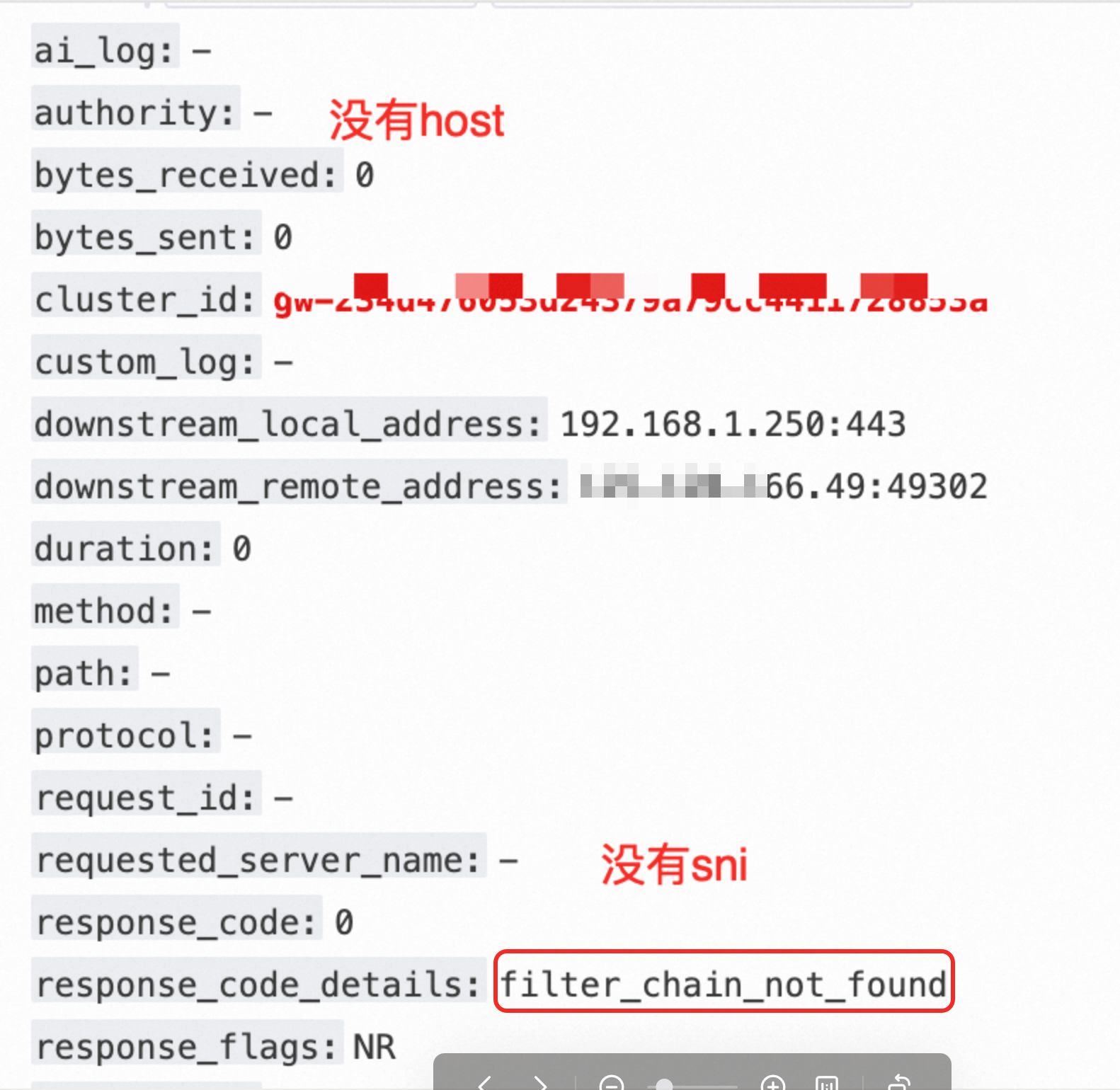
The `response_code_details` field contains filter_chain_not_found. The authority and requested_server_name fields are empty.
Solutions
First, you should upgrade the HTTP client. In modern network environments, SNI is a default configuration. Most modern proxy software and gateways require SNI. Requests that do not include an SNI can pose security risks.
If you cannot upgrade the HTTP client, and requests without an SNI are for a single exact-match domain name or wildcard domain name, you can configure a certificate for the default `*` domain name in the gateway and add a corresponding route, as follows:
If you cannot upgrade the HTTP client, and requests without an SNI are for multiple exact-match domain names, you can configure a certificate for the default `*` domain name in the gateway and add a corresponding route. Note: The certificate for the `*` domain name must be a multi-domain certificate (SAN certificate). A SAN certificate can include multiple domain names, such as
example.com,example.net, andsub.example.org.