Graceful Start and Shutdown FAQ
Frequently asked questions about graceful start and shutdown in MSE Microservices Governance.
Advanced features
This section does not apply if you are connecting your application to Microservices Governance for the first time.
The previous console version provided advanced features for graceful start and shutdown. Because these features involve complex microservices concepts, they are hidden in the new interface for simplicity. The previous advanced features included two sub-features:
-
Service registration before readiness
This feature is still available and enabled by default. If it was previously disabled, it is automatically enabled when you enable graceful start on the Graceful Online/Offline page in the console. If you have already enabled this feature, we do not recommend disabling it. When enabled by default, this feature has no negative impact and helps prevent traffic from dropping to zero during releases. For more information, see What does 55199/readiness do, and why is there a risk of traffic dropping to zero without it?.
-
Service prefetching before readiness
This feature is no longer available for new configurations. Its original purpose was to ensure that service prefetching achieves the expected result and to prevent sudden spikes in the QPS curve. It worked by delaying the Kubernetes readiness probe to extend the overall release time, giving new nodes sufficient time for prefetching while old nodes continue handling traffic. This ensures a gradual QPS increase. If old nodes go offline while new nodes are still prefetching, the new nodes must handle all incoming traffic, which defeats the purpose of low-traffic service prefetching. Applications that previously enabled this feature are not affected, but it cannot be enabled for new applications. If you previously enabled this feature, we do not recommend disabling it, as it has no negative impact. For best results with low-traffic service prefetching in the new version, see Best practices for low-traffic service prefetching.
Low-traffic service prefetching principles
When a consumer calls a service, it selects a provider. If the provider has low-traffic service prefetching enabled, Microservices Governance enhances this selection process by calculating a weight from 0% to 100% for each provider. The higher the weight, the higher the probability of selection. When a provider with low-traffic service prefetching starts, consumers assign it a low weight, giving the new node a lower probability of being selected. Over time, the weight increases until it reaches 100%, at which point prefetching is complete and the node receives traffic normally. The provider includes its startup time in the service registration metadata, which consumers use for weight calculation. Both the provider and the consumer must have Microservices Governance enabled for this process to work.
-
Low-traffic service prefetching starts after the application receives its first request. The process ends after the configured prefetching duration, which is 120 seconds by default. If the application receives no external traffic, the prefetching process does not start.
-
Low-traffic service prefetching requires incoming external traffic, which means the service must already be registered. If you observe that prefetching starts before service registration (that is, the prefetch start event appears in the console before the service registration event), see Why do prefetching events appear before service registration events? to resolve the issue.
Unexpected prefetching QPS curves
Before you read this section, we recommend that you understand how low-traffic service prefetching works.
Under normal circumstances, the QPS curve for an application during low-traffic service prefetching appears as follows:
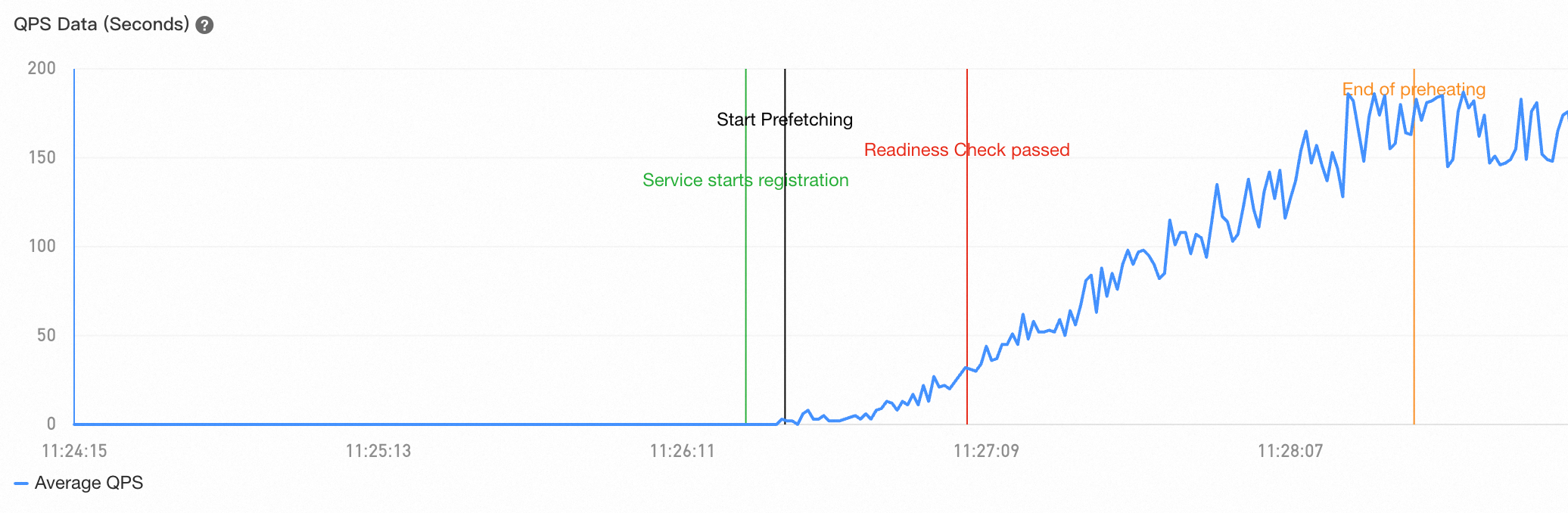
However, in some unsupported use cases or with incorrect configurations, the QPS curve may not show a gradual increase. The following are two common unexpected patterns:
-
Sudden spike in QPS curve
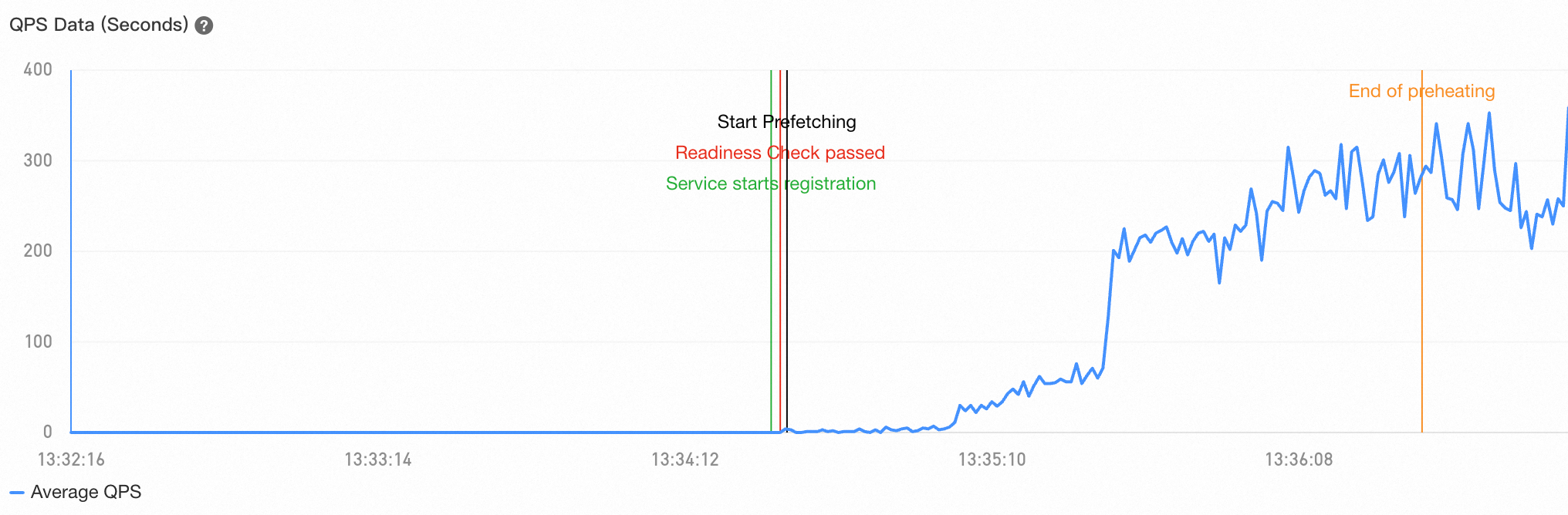
This typically occurs during a service deployment. If old nodes go offline before new nodes complete prefetching, consumers can no longer apply low-probability routing to the new nodes. As a result, the QPS curve shows a gradual increase initially but spikes after all old nodes go offline. To resolve this issue, see Best practices for low-traffic service prefetching.
-
Lack of gradual QPS increase
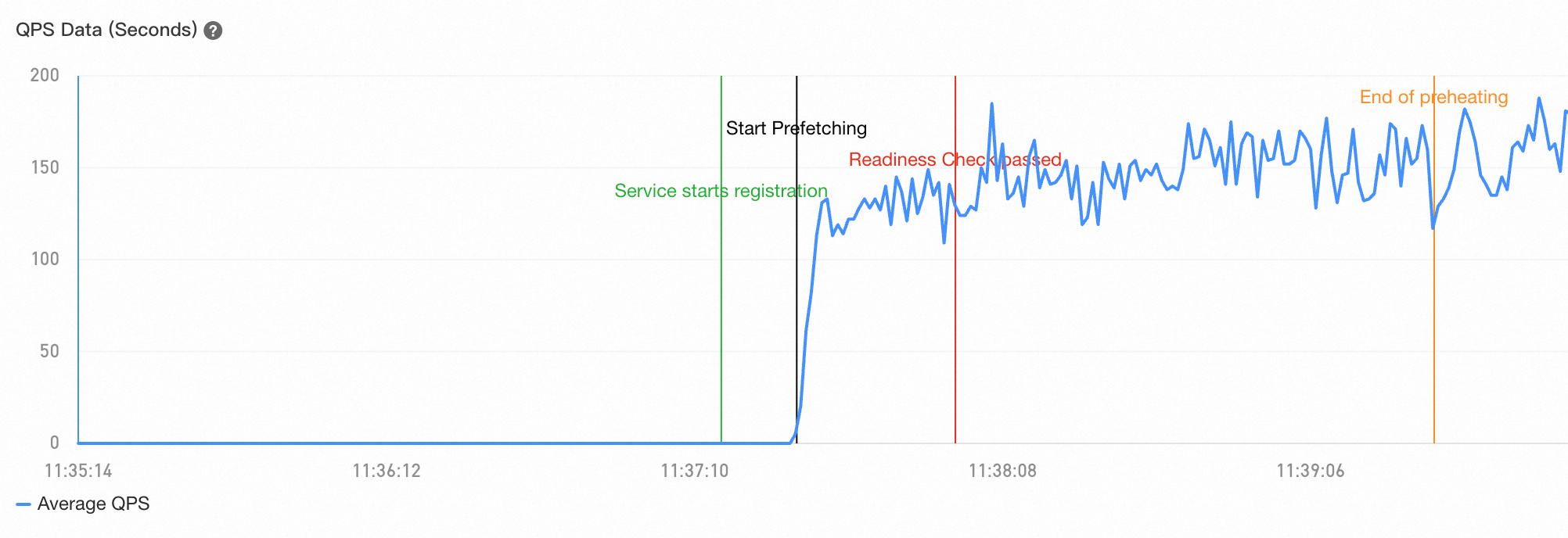
This issue indicates that the consumer application is not connected to Microservices Governance. Connect the consumer to resolve this. Low-traffic service prefetching is unsupported for traffic from external sources such as Java gateways, because they are not connected consumers.
Best practices for low-traffic service prefetching
During a rolling deployment, service prefetching is often incomplete. Follow these practices to ensure that prefetching achieves the expected results:
-
Configure minReadySeconds (Recommended): Configure the
.spec.minReadySecondsparameter for your workload to control the interval between when a pod becomes ready and when it is considered available. Set this parameter to a value greater than the pod's low-traffic service prefetching duration. This ensures that Kubernetes waits for the pod to complete prefetching before proceeding with the rolling deployment. If you use ACK, set this parameter by finding your application on the container platform and navigating to More > Upgrade Policy > Rolling Upgrade > Minimum Ready Time (minReadySeconds). Setting minReadySeconds ensures that a new pod remains in the ready state for the specified duration before Kubernetes continues the rolling deployment. -
Use batch deployment (Recommended): Use tools like OpenKruise to implement batch deployment for your workload. Set the interval between each batch to be longer than the low-traffic service prefetching duration to ensure that new nodes in a batch are fully prefetched before the next batch is deployed.
Increase the initial delay for the readiness probe (Not recommended): Alternatively, increase the initial probe delay (initialDelaySeconds) for the workload's readiness probe to a value greater than the sum of the low-traffic service prefetching duration, the registration delay, and the application startup time. You must determine the application startup time by observing log output, and this value can change as your business evolves. Additionally, delaying the readiness probe can prevent newly started nodes from being added promptly to the Kubernetes service endpoint. Therefore, this method is not recommended.
If the prefetching QPS curve still does not meet expectations after following these practices, check whether all traffic comes from consumer applications connected to Microservices Governance. Traffic from unconnected consumers or external load balancers will cause the QPS curve to deviate from the expected pattern.
The 55199/readiness endpoint
The 55199/readiness endpoint is a built-in HTTP readiness probe port provided by MSE Microservices Governance. When an application's Kubernetes readiness probe is configured to use 55199/readiness, the probe returns 500 if the new node has not completed service registration, and 200 if it has.
Under the default Kubernetes deployment strategy, old nodes are not terminated until new nodes are ready. With the readiness probe configured to use 55199/readiness, a new node becomes ready only after completing service registration. This ensures that old nodes are terminated only after new nodes have registered, guaranteeing available nodes in the service registry at all times. Without 55199/readiness, old nodes may be terminated before new nodes register during a deployment, leaving no available nodes in the registry and causing all consumer calls to fail with traffic dropping to zero. Therefore, we strongly recommend that you enable graceful start and configure the 55199/readiness readiness probe for your application.
If your application uses a probe version earlier than 4.1.10, you need to configure the readiness probe path as /health instead of /readiness. To check the probe version, go to the MSE console, navigate to Administration Center > Application Governance, click the target application, and then click Node Details. The probe version is displayed on the right.
Prefetching events before service registration
In the current version, the prefetching process starts and a prefetch start event is reported when the service receives its first external request. However, the first request may not be a microservice call and therefore may not trigger prefetching in the business logic. For example, if a workload has a Kubernetes liveness probe configured, the prefetching process starts as soon as Kubernetes performs a liveness check, even if service registration has not yet occurred.
To avoid this, configure the following parameter in the environment variables of the provider application's workload to make the prefetching logic ignore these requests:
# Exclude requests to paths /xxx and /yyy/zz from triggering the prefetching process
profile_micro_service_record_warmup_ignored_path="/xxx,/yyy/zz"-
This parameter can also be configured as a JVM startup parameter.
-
The parameter value does not support regular expressions.
Proactive notification
Proactive notification is an advanced feature of the graceful shutdown module. It allows a Spring Cloud provider to send a network request to its consumers during shutdown, informing them that it is going offline. After receiving the notification, consumers stop calling that node. Typically, when both the provider and consumer use the Spring Cloud framework, the consumer caches a list of provider nodes locally. In some scenarios, even after receiving a notification from the service registry, the consumer may not refresh its local cache in time, leading to calls to offline nodes. Proactive notification solves this problem.
Proactive notification is disabled by default. With Microservices Governance enabled, the default graceful shutdown solution has the shutting-down provider add a special header to its responses. When a consumer receives a response with this header, it stops calling that provider node. As long as the consumer sends traffic to the shutting-down provider, the consumer detects the shutdown and automatically blacklists the node. However, if the consumer does not send any requests to the provider during the shutdown period (typically around 30 seconds), it may not detect the shutdown. A request might arrive just as the provider shuts down, causing an error. In this scenario, enable proactive notification. In other words, if your consumer traffic is very sparse, we recommend enabling proactive notification for the provider.
Delayed traffic drop after shutdown
Typically, traffic drops to zero shortly after a graceful shutdown event. If it does not, consider the following possible causes and solutions:
-
Non-microservice calls
Graceful start and shutdown only manages traffic from internal microservice calls. Non-microservice traffic is outside the scope of this feature. We recommend that you create custom solutions based on the graceful shutdown features provided by your infrastructure and frameworks.
-
Proactive notification not enabled
We recommend that you enable proactive notification and then check if the shutdown curve meets expectations.
-
Unsupported framework version
If you find that your application is using an unsupported framework version, consider upgrading it.
Long release times
Follow these steps to check if the application has the Complete service prefetching before passing the readiness probe feature enabled.
-
Log on to the MSE console and select a region in the top menu bar.
-
In the left-side navigation pane, choose Microservices Governance > Application Governance.
-
On the Applications page, click the target application and go to the Traffic Governance > Graceful Start and Shutdown tab.
-
On the Graceful Online/Offline tab, press F12 to open your browser's developer tools. In the Network tab, search for the
GetLosslessRuleByApprequest. If you do not see it, refresh the page. In the response body, check if the value of the Related field under Data is true. If it is, the application previously had the Complete service prefetching before passing the readiness probe feature enabled. This feature is now deprecated and can cause longer release times. We recommend that you submit a ticket to disable this feature.
The 55199/readiness endpoint and probe failures
Kubernetes provides three optional probes: the startup probe, the liveness probe, and the readiness probe.
-
startup probe: Checks if an application has started successfully. It runs only during the pod startup phase. If the probe fails multiple times and reaches the configured failure threshold during startup, it triggers a pod restart.
-
liveness probe: Checks if an application is currently alive. It starts probing after the startup probe succeeds and continues throughout the pod's lifecycle. If the probe fails multiple times and reaches the configured failure threshold, it triggers a pod restart.
-
readiness probe: Checks if an application is ready to accept traffic. It starts probing after the startup probe succeeds and continues throughout the pod's lifecycle. If the probe fails multiple times and reaches the configured failure threshold, Kubernetes sets the pod's status to not ready, but does not restart the pod. During a deployment, the readiness probe can also control the deployment pace. According to the default deployment strategy, if a new pod does not become ready, Kubernetes pauses the deployment process until it does.
After your service is connected to MSE Microservices Governance, you can use the built-in 55199/readiness endpoint for your readiness probe configuration. With this configuration, the Kubernetes readiness probe passes only after the application completes service registration. This ensures that during a deployment, new pods are registered with the microservice registry before old pods are terminated and deregistered. This guarantees that callers always have available nodes, preventing "no available service" exceptions. For more information about why you need to configure the MSE readiness probe, see Service registration status check.
If your MSE readiness probe consistently fails, there are three likely reasons:
-
Graceful start is not enabled for the current service. If graceful start is disabled, the MSE 55199/readiness API is not exposed, and the readiness probe will not pass.
-
The application is not connected to Microservices Governance. Check whether probe logs exist in the microservices governance probe directory. In a Kubernetes environment, the default probe directory is
/home/admin/.opt/AliyunJavaAgentor/home/admin/.opt/ArmsAgent. If the logs directory does not exist, the application failed to connect to Microservices Governance. Submit a ticket to contact us. -
The application is continuously restarting because the startup or liveness probe has reached its failure threshold. Because the application fails to start, the MSE readiness probe does not pass. Check the pod's Kubernetes events for startup or liveness probe failures.