The ai-security-guard plug-in integrates your cloud-native gateway with Alibaba Cloud Content Moderation to check LLM inputs and outputs for compliance.
Prerequisites
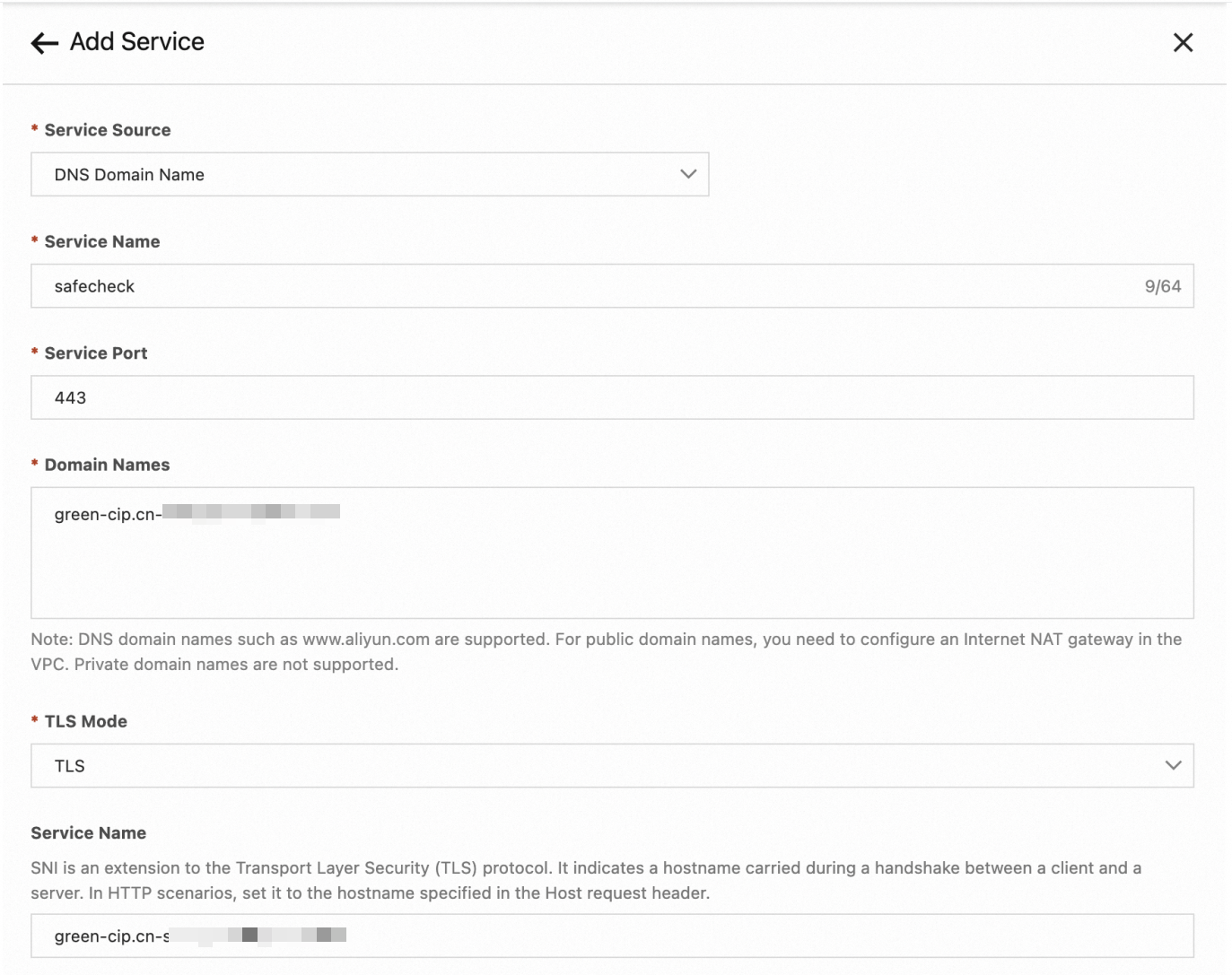
Create a DNS-type service in the gateway so that the plug-in can call Alibaba Cloud Content Moderation. The following figure shows the required service parameters.
Running attributes
| Attribute | Value |
|---|---|
| Execution stage | default stage |
| Execution priority | 300 |
Configuration parameters
Required parameters
| Parameter | Type | Description |
|---|---|---|
serviceName |
string | Name of the DNS-type service created for Content Moderation. |
servicePort |
string | Port of the Content Moderation service. Typically 443. |
serviceHost |
string | Endpoint of Alibaba Cloud Content Moderation (for example, green-cip.cn-shanghai.aliyuncs.com). |
accessKey |
string | AccessKey ID of your Alibaba Cloud account. |
secretKey |
string | AccessKey secret of your Alibaba Cloud account. |
Optional parameters
| Parameter | Type | Default | Description |
|---|---|---|---|
checkRequest |
bool | false |
Check user input for compliance before forwarding to the LLM. |
checkResponse |
bool | false |
Check LLM output for compliance before returning to the client. When true, streaming responses are converted to non-streaming. |
requestCheckService |
string | llm_query_moderation |
Content Moderation service used to check LLM inputs. |
responseCheckService |
string | llm_response_moderation |
Content Moderation service used to check LLM outputs. |
requestContentJsonPath |
string | messages.@reverse.0.content |
JSON path that locates the content to check in the request body. |
responseContentJsonPath |
string | choices.0.message.content |
JSON path that locates the content to check in the response body. |
responseStreamContentJsonPath |
string | choices.0.delta.content |
JSON path that locates the content to check in a streaming response body. |
denyCode |
int | 200 |
HTTP status code returned when content is non-compliant. |
denyMessage |
string | *(OpenAI-compatible response recommended by Content Moderation)* | Response body returned when content is non-compliant. |
The default JSON paths assume the OpenAI chat completions format. For services that use a different protocol, override these paths to match your request and response schema.
Configuration examples
Check user input only
serviceName: safecheck.dns
servicePort: 443
serviceHost: "green-cip.cn-shanghai.aliyuncs.com"
accessKey: "XXXXXXXXX"
secretKey: "XXXXXXXXXXXXXXX"
checkRequest: true
Check both input and output
serviceName: safecheck.dns
servicePort: 443
serviceHost: green-cip.cn-shanghai.aliyuncs.com
accessKey: "XXXXXXXXX"
secretKey: "XXXXXXXXXXXXXXX"
checkRequest: true
checkResponse: true
Use a custom Content Moderation service
You can assign different content moderation services to individual endpoints, routes, or services. In the following example, the service llm_query_moderation_01 is created with modified check rules based on llm_query_moderation.
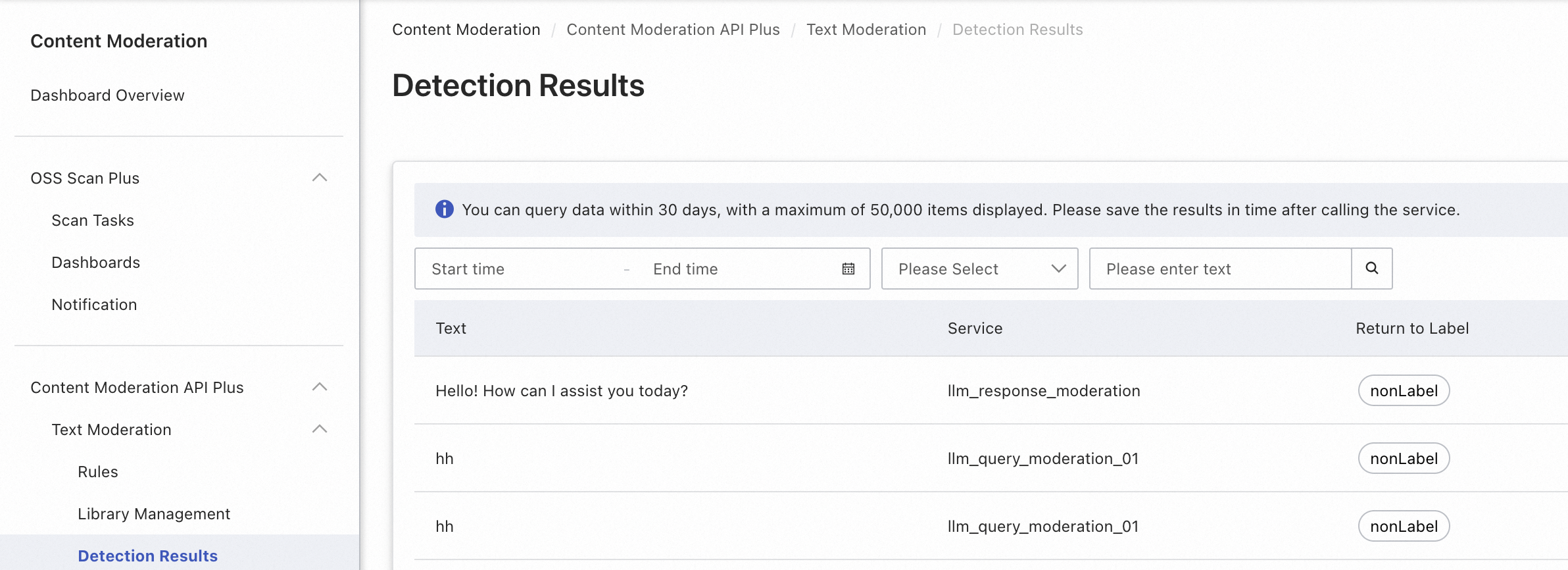
Apply the following configuration at the endpoint, route, or service level to use llm_query_moderation_01 for content checking:
serviceName: safecheck.dns
servicePort: 443
serviceHost: "green-cip.cn-shanghai.aliyuncs.com"
accessKey: "XXXXXXXXX"
secretKey: "XXXXXXXXXXXXXXX"
checkRequest: true
requestCheckService: llm_query_moderation_01
Configure for non-OpenAI protocols
For services that do not follow the OpenAI protocol, such as Alibaba Cloud Model Studio, specify custom JSON paths and a custom deny message:
serviceName: safecheck.dns
servicePort: 443
serviceHost: "green-cip.cn-shanghai.aliyuncs.com"
accessKey: "XXXXXXXXX"
secretKey: "XXXXXXXXXXXXXXX"
checkRequest: true
checkResponse: true
requestContentJsonPath: "input.prompt"
responseContentJsonPath: "output.text"
denyCode: 200
denyMessage: "Sorry, I cannot answer your question."
Test the plug-in
Send a request to the gateway to verify that the plug-in works:
curl http://localhost/v1/chat/completions \
  -H "Content-Type: application/json" \
  -d '{
    "model": "gpt-4o-mini",
    "messages": [
      {
        "role": "user",
        "content": "A non-compliant question."
      }
    ]
  }'
If the content violates a policy, the gateway returns a response similar to:
{
    "id": "chatcmpl-123",
    "object": "chat.completion",
    "created": 1677652288,
    "model": "gpt-4o-mini",
    "system_fingerprint": "fp_44709d6fcb",
    "choices": [
        {
            "index": 0,
            "message": {
                "role": "assistant",
                "content": "As an AI assistant, I cannot provide content on sensitive topics such as pornography, violence, and politics. You are welcome to ask other questions."
            },
            "logprobs": null,
            "finish_reason": "stop"
        }
    ]
}
Observability
Metrics
The plug-in exposes the following metrics:
| Metric | Description |
|---|---|
ai_sec_request_deny |
Number of user inputs that failed content moderation. |
ai_sec_response_deny |
Number of LLM responses that failed content moderation. |
Tracing analysis
When tracing analysis is enabled, the plug-in adds the following attributes to each query span:
| Attribute | Description |
|---|---|
ai_sec_risklabel |
Type of risk detected in the query. |
ai_sec_deny_phase |
Stage at which the risk was detected. Valid values: request, response. |