Configure a retry policy
A route retry policy on a cloud-native gateway automatically retries failed requests based on configurable conditions. Configure retry conditions for HTTP or gRPC protocols to handle connection failures, backend service errors, or specific status codes.
Prerequisites
-
A cloud-native gateway instance is created.
-
At least one route is configured for the gateway.
Route retry conditions
When a request to a backend service fails, the cloud-native gateway can automatically retry the request based on conditions that you configure. Retry conditions are protocol-specific. The following list describes the available conditions for HTTP and gRPC protocols.
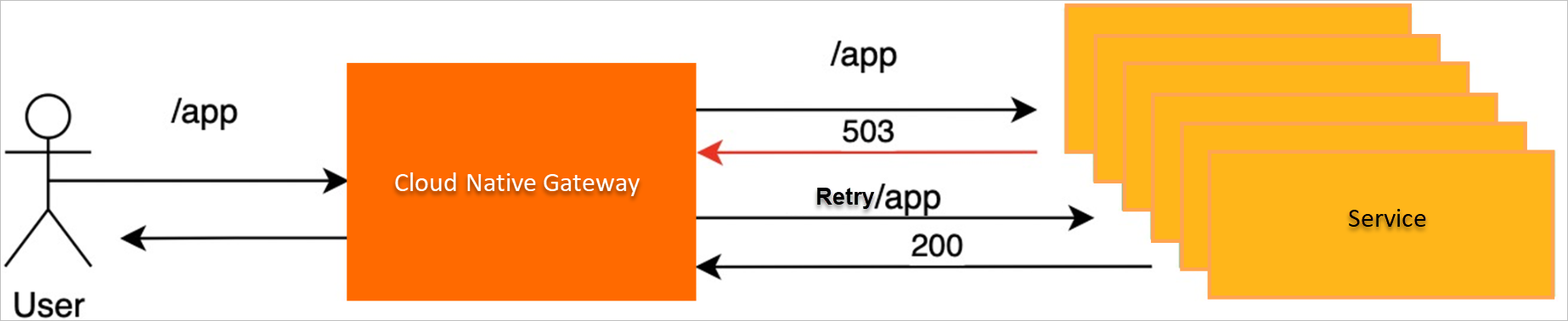
-
The following retry conditions are available for the HTTP protocol:
-
5xx: The cloud-native gateway retries the failed request if the backend service returns any
5xxresponse, or if a disconnection, reset, or read timeout occurs.NoteThe
5xxcondition includes theconnect-failureandrefused-streamconditions. -
reset: The cloud-native gateway retries the failed request if a disconnection, reset, or read timeout occurs.
-
connect-failure: The cloud-native gateway retries the failed request if the request fails because of a disconnection.
-
refused-stream: The cloud-native gateway retries the failed request if the backend service resets the stream with the
REFUSED_STREAMerror code. -
retriable-status-codes: The cloud-native gateway retries the request if the HTTP status code in the response from the backend service matches a retry status code that you specified.
NoteYou can use retry status codes only if you specify
retriable-status-codesas a retry condition.
-
-
The following retry conditions are available for the gRPC protocol:
-
cancelled: The cloud-native gateway retries the request if the gRPC status code in the response header of the backend gRPC service is
cancelled. -
deadline-exceeded: The cloud-native gateway retries the request if the gRPC status code in the response header of the backend gRPC service is
deadline-exceeded. -
internal: The cloud-native gateway retries the request if the gRPC status code in the response header of the backend gRPC service is
internal. -
resource-exhausted: The cloud-native gateway retries the request if the gRPC status code in the response header of the backend gRPC service is
resource-exhausted. -
unavailable: The cloud-native gateway retries the request if the gRPC status code in the response header of the backend gRPC service is
unavailable.
-
Configure a route retry policy
-
Log on to the MSE console. In the top navigation bar, select a region.
-
In the left-side navigation pane, choose Cloud-native Gateway > Gateways. On the Gateways page, click the ID of the gateway.
-
In the left-side navigation pane, click Routes. Then, click the Routes tab.
-
Find the route that you want to modify and click Policies in the Actions column.
-
On the Policies tab, click Retry.
-
Configure the parameters in the Retry rule and then click Save.
Parameter
Description
Retry Times
The maximum number of times a failed request is retried. Valid values: 0 to 10. A value of no more than 2 is recommended.
NoteA value of 0 disables retries.
Retry Condition
Select the retry conditions that suit your workload. You can select multiple conditions, which are described in Route retry conditions.
Retry Status Code
Specify the HTTP status codes whose responses are retried. You can configure multiple HTTP status codes.
NoteYou must specify
retriable-status-codesfor the Retry Condition before you can configure the Retry Status Code.Enable
The enable/disable toggle of the route retry policy.
-
Enable: The route retry policy of the gateway takes effect.
-
Disable: The custom route retry policy does not take effect.
NoteAfter you disable the custom retry policy, the gateway falls back to its internal default retry configuration. The default number of retries is 2, and the default retry conditions are
connect-failure,refused-stream,unavailable,cancelled, andretriable-status-codes.After you configure and enable the retry policy, send test requests to the route and verify that failed requests are retried according to the configured conditions and retry count.
-