Marketplace FAQ
This topic answers frequently asked questions about Alibaba Cloud OCR on Marketplace.
Product features
Image format and size
The Alibaba Cloud text recognition service requires a single image to be no larger than 10 MB. The longest side of the image cannot exceed 4096 pixels, and the shortest side must be at least 15 pixels. If the longest side exceeds 1024 pixels, the aspect ratio must not exceed 10:1. For customers who require fast response times, we recommend keeping the image size under 1.5 MB.
There are no specific requirements for pixel dimensions, but recognition is most effective when a single character is between 10 and 50 pixels in size. For best results, use clear images without glare or reflections. Use original (uncompressed) images instead of compressed ones to improve recognition accuracy. Avoid images that are blurry or distorted. The algorithm automatically corrects for image rotation. The overall recognition accuracy depends heavily on image quality.
Photocopy recognition
Currently, the APIs for ID cards, bank cards, and business licenses can detect if an image is a photocopy. However, they cannot verify authenticity, for example, whether the image was altered with photo editing software. If you have specific requirements for other document types, join our DingTalk support group (ID: 21734896) to discuss your needs.
Multi-document recognition
Typically, Alibaba Cloud text recognition APIs are designed to recognize a single document in a single image. If you need to recognize multiple types of documents, consider the following products:
-
Purchase the card and certificate collection API. This API supports the recognition of multiple types of cards and certificates, but you must submit each document in a separate API call.https://market.aliyun.com/products/57124001/cmapi031271.html#sku=yuncode2527100001
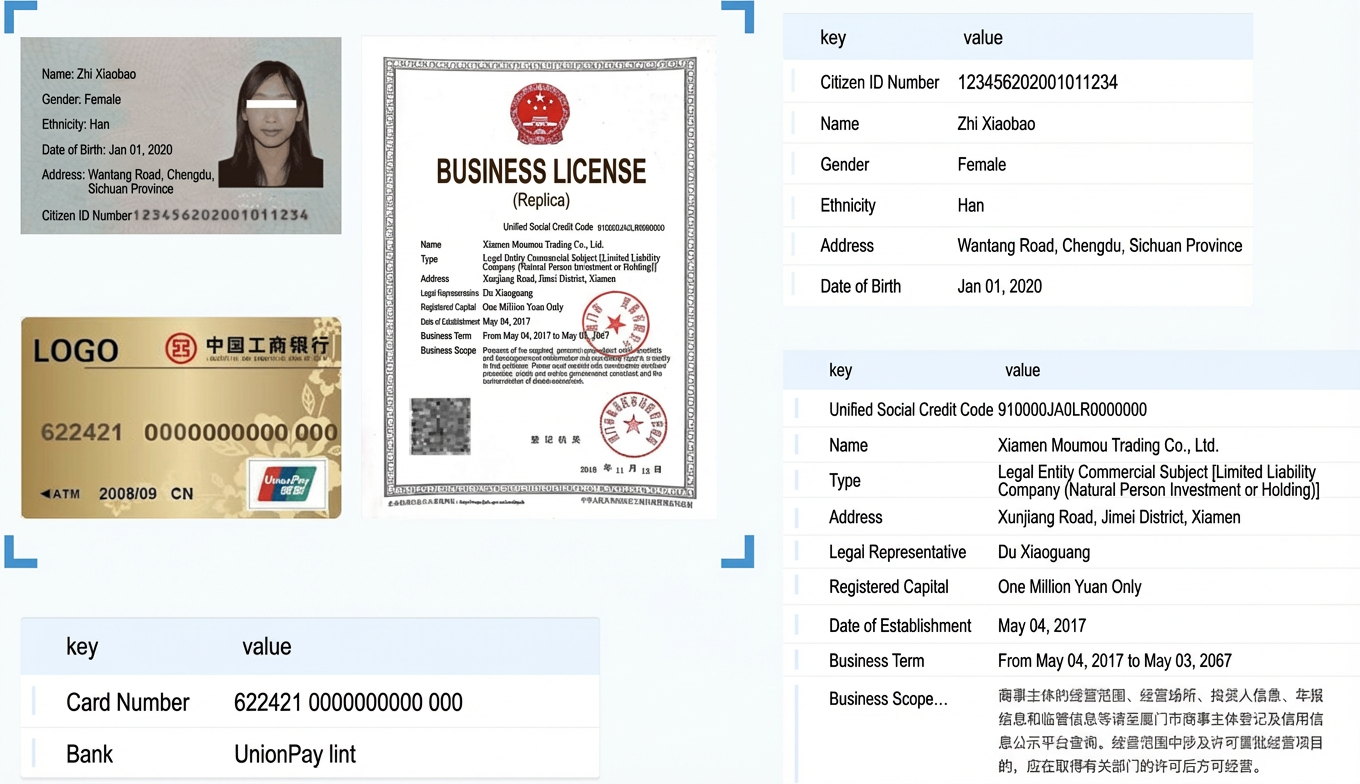
-
Purchase the mixed-invoice and receipt recognition API. This API can process a single image that contains multiple mixed documents. The system automatically partitions, classifies, and extracts structured data from each document.
https://market.aliyun.com/products/57124001/cmapi00034969.html
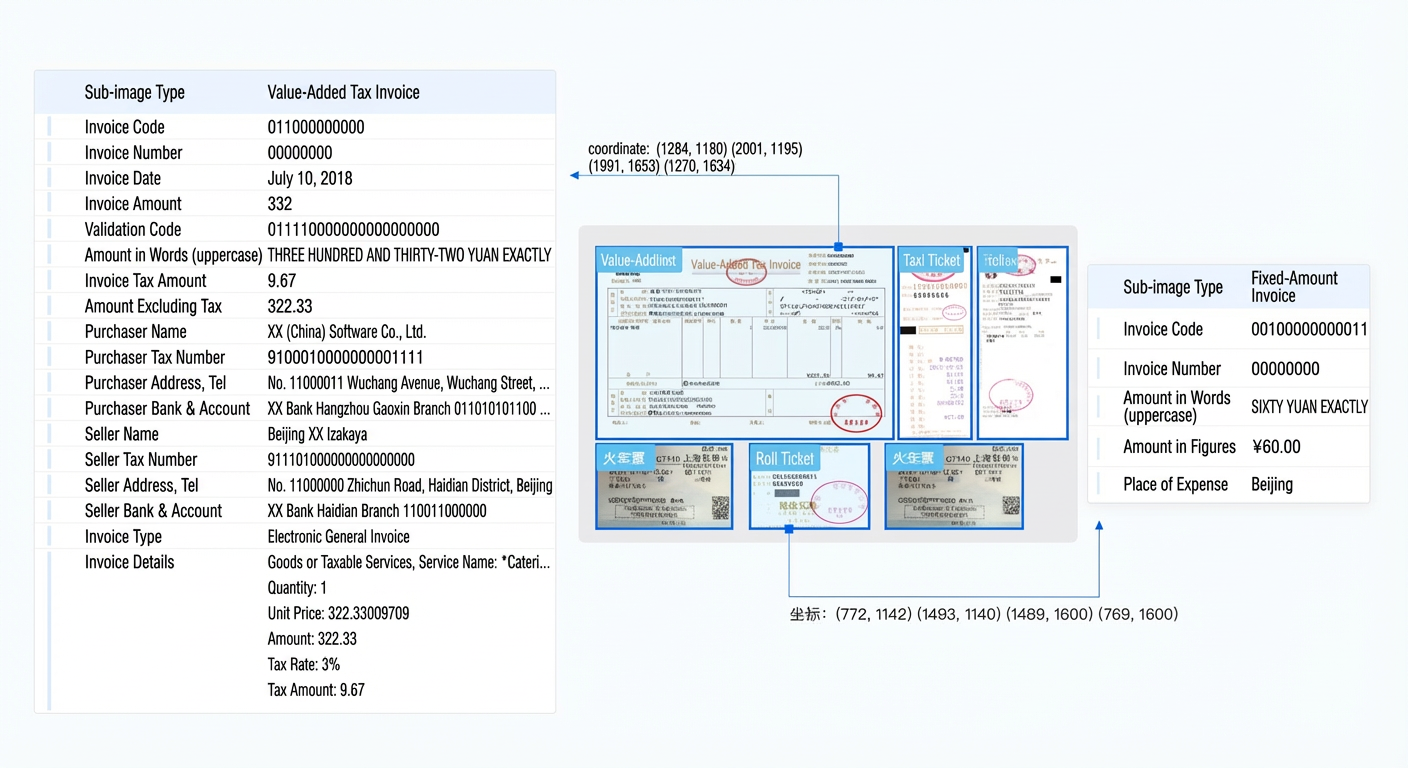
-
Purchase the multi-card smart classification API. This API can automatically classify and extract structured data from images of unknown card types.
https://market.aliyun.com/products/57124001/cmapi00034972.html
Real estate certificate types
The real estate certificate API currently supports the following types: House Property Ownership Certificate, House and Land Ownership Certificate, Guangdong Real Estate Certificate, Shanghai Real Estate Certificate, Anhui Real Estate Certificate, and Zhejiang Taizhou Real Estate Certificate.
Because multiple certificates have been consolidated into one, we recommend using the Immovable Property Certificate Recognition API. It is compatible with legacy real estate certificates and supports real estate certificate types nationwide.
Insufficient QPS limit
Marketplace provides a default limit of 10 queries per second (QPS) per account, which supports a concurrency of up to 10 requests. We recommend implementing rate limiting in your application to prevent batch requests from triggering throttling errors.
Additionally, Alibaba Cloud offers QPS add-on packages that you can purchase to increase your capacity. For more information, refer to our product updates.
Does OCR general recognition support restricting the character recognition range or correcting character recognition errors?
OCR general recognition does not currently support restricting the character recognition range. If you need to restrict the recognition range, resolve character recognition errors (for example, "一粒" being recognized as "-粒"), or improve recognition accuracy for rare characters, we recommend using the Qwen-OCR model on Alibaba Cloud Model Studio (Bailian). This model is updated frequently and is highly versatile, providing superior recognition performance for rare characters and complex scenarios.
Billing
Refund for incorrect purchase
As a general rule, API products on Marketplace are non-refundable. Ensure you purchase the correct product. You can use the OCR Experience Center to verify that the product meets your needs before purchasing.
If you purchased the wrong product due to an error in the product description and the resource plan has not been used, you can apply for a refund by submitting a ticket. Approval takes approximately 3 to 4 business days, and the refund is returned to your original payment method. If you need to use a different product urgently, you can purchase the correct resource plan while the refund is being processed.
To submit a ticket, click Submit Ticket on the product details page in Marketplace and describe your issue. A support representative will contact you. In the plan section of the product details page, you can view and select different pricing tiers (such as a free trial, 500 calls for CNY 0.01, or 10,000 calls for CNY 550). Before purchasing, carefully verify that the selected plan and its quota meet your requirements.
Refund for expiring resource plan
No. Refunds are not available for resource plans on Marketplace once they have been used for successful API calls. Resource plans are prepaid products. We recommend that you estimate your usage accurately before purchasing a plan to avoid wasting your quota.
Resource plans on Marketplace are valid for one year from the date of purchase. Plan your usage accordingly. To check your usage, go to the Marketplace console > Purchased Services. Find the relevant order, click Package List, locate your plan, and then click Usage Details. The system updates usage details every 10 minutes.
If you cannot estimate your usage, you can choose the pay-as-you-go billing model. This postpaid option charges you based on your actual API calls.
Call deduction and error handling
You are only charged for successful recognition calls. If an API call results in an error, it is not deducted from your plan. Each recognized image counts as one call.
If your image contains multiple documents, the corresponding API might return an error. You can resolve this in one of the following ways:
1. Split the image into multiple single-document images before calling the API.
2. Use the multi-document recognition API. This API supports multiple documents in a single image but is limited to the card and certificate types supported by Alibaba Cloud OCR.
Checking usage and remaining quota
To view usage details, go to the Marketplace console > Purchased Services. Find your order, click Package List, locate your plan, and then click Usage Details. Usage details are updated every 10 minutes.
To check your remaining quota, go to the Marketplace console: https://market.console.aliyun.com/imageconsole/index.htm
Account security
IP allowlist configuration
No, IP allowlisting is not currently supported for this API service. To protect your credentials, you must call the service from your back-end server. This prevents your AppCode, AppKey, and AppSecret from being exposed in front-end requests.
Data encryption in transit
Yes. Alibaba Cloud text recognition uses the standard Marketplace gateway, which ensures end-to-end security during data transmission. After passing through the gateway, data is transmitted only on our internal network, never over the public internet. To ensure data security between your server and the gateway, you must call our APIs using HTTPS, not HTTP.
If your data is subject to strict security regulations, such as a requirement that it cannot leave your internal network, consider a private deployment. Alibaba Cloud OCR supports both private deployment and offline SDK options for enhanced security.
Image data storage
No. The public cloud text recognition service does not save your data. Your original images and recognition results are not retained and are deleted immediately after the service returns a result. For more details, see the Alibaba Cloud Terms of Service.
Marketplace also offers an API Service Experience Improvement Program. If you explicitly consent, some of your data may be used for targeted model optimization and training. Participation is voluntary. If you do not opt-in to this program when placing your order, your data will not be saved.
Troubleshooting
Resolving error 460
This error code typically indicates that a parameter in the request body does not conform to the JSON specification. To resolve this, check the body parameters. You can also try converting the body parameters to a JSON object, and then converting the {"image":"base64_image_string"} string into a byte array before sending the request. The product page for each API on Marketplace provides SDK examples in various languages, including cURL, Java, C#, PHP, Python, and Objective-C. Ensure your implementation works with one of the provided examples.
Resolving error 503
This error indicates an algorithm timeout. This can happen if the submitted image is too large or its content is too complex, preventing the service from responding in time. In this case, we recommend splitting the image into several smaller images and calling the API for each one separately.
If you consistently receive 503 errors for normal images, the service might be experiencing high overall request volumes. The service cluster capacity is provisioned based on the peak traffic from the last 30 days plus a buffer, so capacity shortages are rare. However, unexpected spikes in QPS from multiple customers can sometimes cause temporary congestion. If this occurs, please contact us. Our operations team also receives automatic error alerts and will resolve the issue by scaling up the service capacity.
Resolving error 464
This error code usually means the algorithm service cannot process your image. For example, if you submit an image of a different document type to the ID card API, the service might fail to classify it correctly and return a 464 error. You are not charged for calls that result in this error.
OCR is an AI product based on deep learning. Neither classification nor text recognition can achieve 100% accuracy. Manually review any images that the service cannot process correctly.
Handling incorrect recognition results
OCR is an AI product based on deep learning, and neither its classification nor text recognition is 100% accurate. You should include a manual review step in your business process to verify the recognition results. For a small number of errors, manual correction is sufficient. If you encounter a large number of similar errors, report them to us for targeted optimization.
Other questions
Applying for a contract
You can apply for an official contract only after your payment is complete. If you have a special requirement to obtain a contract before purchase, contact your CBM or our telesales team. To apply for a contract, go to the Marketplace console > Order List > Apply for Contract.
A contract preview generated before payment is valid for only one day because it is a temporary document. The official contract, generated after payment, is valid for one year. Inform your legal and finance departments of this policy to avoid confusion.
Private deployment
Yes, the OCR product supports private deployment in your own environment. It is deployed as a Docker image and requires you to provide your own server resources, typically GPU servers. If you are interested in a private deployment, contact us for more information.
Offline SDKs
Yes, OCR supports offline SDKs for specific use cases, including an ID card recognition SDK, bank card recognition SDK, phone number extraction SDK, fingertip detection SDK, image correction SDK, and a scan-and-read SDK. If you need an offline SDK, contact us for more information.