Run commands in batches on multiple ECS instances
Batch run commands on multiple ECS instances by using CloudOps Orchestration Service (OOS) and Cloud Assistant, without exposing SSH ports or managing jump servers.
Background
Running commands remotely on Elastic Compute Service (ECS) instances is a common O&M task, such as installing or uninstalling software and starting or stopping processes. In many cases, you need to run the same command across multiple ECS instances and collect the results.
For business applications, batch commands enable rolling upgrades for runtimes and code, which significantly improves deployment reliability.
You can use SSH to connect to ECS instances and run commands, but exposing the SSH port to the internet poses a security risk. A jump server provides indirect access, but adds complexity and cost.
Ansible is a popular open source O&M tool, but its authentication system is separate from Alibaba Cloud. This means you cannot use Alibaba Cloud tools for access control or audit operations on the platform.
For Windows ECS instances, PowerShell supports remote command execution, but configuration and maintenance can be complex.
The recommended approach is to use CloudOps Orchestration Service and Cloud Assistant. Cloud Assistant provides the core capability to run commands on ECS instances. CloudOps Orchestration Service (OOS) extends this with batch execution, scheduled execution, event-driven execution, and custom templates, making ECS O&M secure, simple, and efficient.
Preparations
Install and configure the Alibaba Cloud CLI on your local terminal. Version 3.0.19 or later is required. Download the CLI from GitHub. For configuration details, see Interactive logon (quick configuration).
Start execution
To run the shell command "echo 123" on two remote Linux ECS instances, `i-id45678zxcvb` and `i-id45679zxcvb`, in the China (Beijing) region, run the following command in your local shell terminal:
aliyun oos StartExecution --region cn-hangzhou --TemplateName ACS-ECS-BulkyRunCommand --Parameters '{"commandType":"RunShellScript", "commandContent":"echo 123", "targets":{"Type":"ResourceIds", "ResourceIds":["i-id45678zxcvb","i-id45679zxcvb"]}, "rateControl":{"maxErrors":0,"mode":"Concurrency"}, "OOSAssumeRole":"" }'This command calls the OOS StartExecution API to run the public template ACS-ECS-BulkyRunCommand with the specified ECS instances (`ResourceIds`) and command (`commandContent`). If the response contains an `ExecutionId`, the command has started running on the remote instances. Record the `ExecutionId` and use it in the following `ListExecutions` command to check the execution status and results:
aliyun oos ListExecutions --region cn-hangzhou --ExecutionId "exec-id123456zxcvb"While the command is running, the `Status` in the output is `Running`. `TotalTasks` indicates the total number of tasks, and `SuccessTasks` indicates the number completed successfully. The remaining tasks equal the difference between these two values.
{
	"Execution": {
		"Outputs": {},
		"TemplateName": "ACS-ECS-BulkyRunCommand",
		"Parameters": {
			"commandType": "RunShellScript",
			"OOSAssumeRole": "",
			"rateControl": {
				"maxErrors": 0,
				"mode": "Concurrency"
			},
			"targets": {
				"ResourceIds": [
					"i-id45678zxcvb","i-id45679zxcvb"
				],
				"Type": "ResourceIds"
			},
			"commandContent": "echo 123"
		},
		"Counters": {
			"Failed": 0,
			"Success": 0,
			"Total": 0
		},
		"ExecutedBy": "aliyun-account1",
		"LoopMode": "Automatic",
		"Mode": "Automatic",
		"TemplateId": "t-123456zxcvb",
		"Status": "Running",
		"TemplateVersion": "v2",
		"SafetyCheck": "Skip",
		"StartDate": "2019-10-15T07:22:03Z",
		"ExecutionId": "exec-id123456zxcvb",
		"CurrentTasks": []
	},
	"RequestId": "1A9B1817-0530-470C-8640-BADADADB220BD"
}
Run the `ListExecutions` command again until the `Outputs` field is returned. This field displays the final result. In this example, the field contains the standard output from both ECS instances.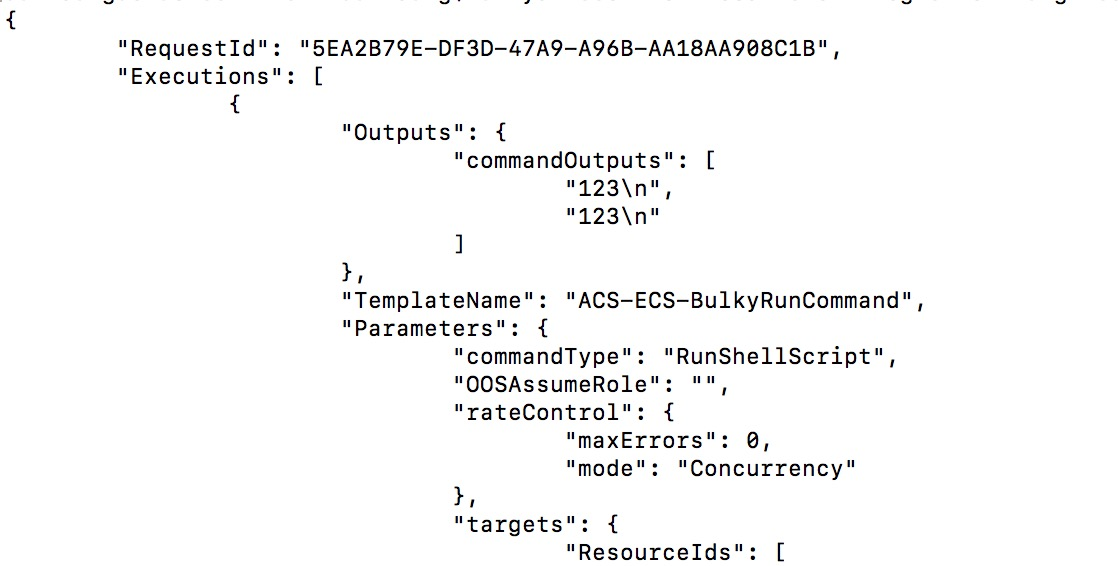
Advanced: Use a custom template
The parameters in the preceding example are complex. You can simplify the command by creating a custom template with fixed parameters:
aliyun oos CreateTemplate --region cn-hangzhou --TemplateName sample123 --Content '{
"FormatVersion": "OOS-2019-06-01",
"Tasks": [
{
"Name": "runCommand",
"Action": "ACS::ECS::RunCommand",
"Properties": {
"commandContent": "echo 1234",
"instanceId": "{{ ACS::TaskLoopItem }}",
"commandType": "RunShellScript"
},
"Loop": {
"Items": ["i-id45678zxcvb","i-id45679zxcvb"],
"Outputs": {
"commandOutputs": {
"AggregateType": "Fn::ListJoin",
"AggregateField": "commandOutput"
}
}
},
"Outputs": {
"commandOutput": {
"Type": "String",
"ValueSelector": "invocationOutput"
}
}
}
],
"Outputs": {
"commandOutputs": {
"Type": "List",
"Value": "{{ runCommand.commandOutputs }}"
}
}
}'
After you create the custom template, run the following command to achieve the same result.
aliyun oos StartExecution --region cn-hangzhou --TemplateName sample123 --Parameters '{}' This command runs the custom template `sample123` without additional parameters. All CLI operations can also be performed in the OOS console.
Learn more
CloudOps Orchestration Service (OOS) is an automated O&M platform from Alibaba Cloud, ideal for batch, scheduled, event-driven, or cross-region O&M operations. Beyond running commands, OOS can create, release, start, and stop ECS instances, upgrade or downgrade instance configurations, upgrade network bandwidth, and attach cloud disks. For more information, join the DingTalk group "CloudOps Orchestration Service (OOS) Support Group" with the group number 23330931. Support staff are available online to assist you.
OOS console: https://oos.console.aliyun.com