State transition diagram
The initial state of an Execution is Started. It transitions through various states until it reaches a final state. The following diagram illustrates this process.
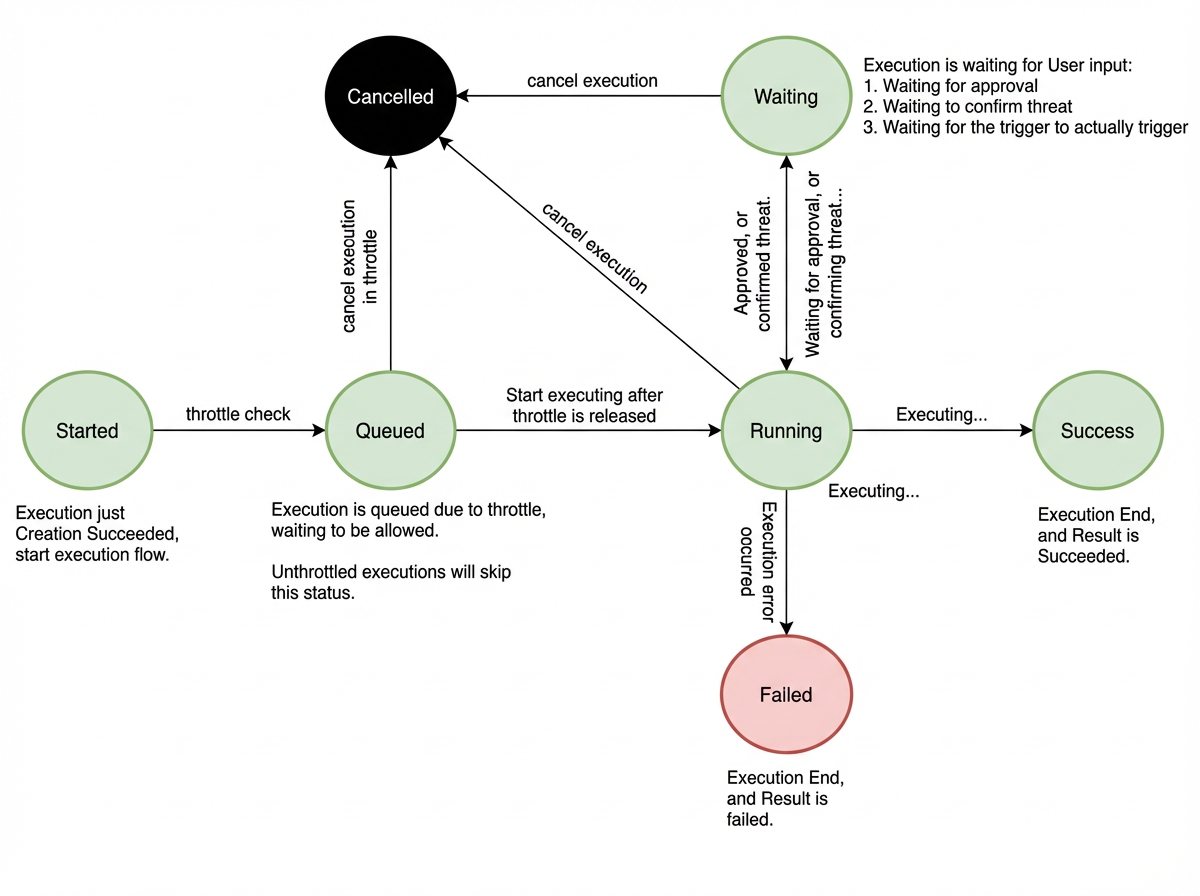
States
|
Status |
Status |
Description |
|---|---|---|
|
Started |
Started |
An Execution enters this state immediately after a user creates it. This is the initial state. |
|
Queued |
Queued |
The Execution is queued due to flow control. In most cases, it skips this state and transitions directly to Running. |
|
Running |
Running |
The Execution is running. |
|
Success |
Success |
The Execution completed successfully. |
|
Failed |
Failed |
The Execution has failed. |
|
Cancelled |
Cancelled |
The Execution was cancelled. |
|
Waiting |
Waiting |
The Execution is paused and waiting for a specific condition to be met before it can continue. Examples include:
|
A final state, such as Success, Failed, or Cancelled, indicates that an Execution is complete and no further actions are performed.