Enhance OpenClaw long-term memory with the Agentic Memory API
The native memory component of OpenClaw is based on local storage and does not support cross-device synchronization or cross-session memory. By integrating the Agentic Memory API as a cloud memory backend, you can provide OpenClaw with persistent long-term memory, semantic retrieval, and skill management capabilities. Supported OpenClaw versions: version>=v2026.3.22.
Solution overview
This solution uses Agentic Memory to enhance the long-term memory capabilities of OpenClaw and builds a multi-layer memory system that covers long-term and short-term memory, episodic memory, and semantic memory. Hybrid vector cloud storage enables cross-session information persistence and intelligent retrieval and consolidation. This breaks through context limits, gives agents long-term personalized memory, and significantly improves interaction coherence and the depth of user understanding.
Quick deployment
In the chat box of OpenClaw (or a compatible agent product such as Alibaba Cloud JVSClaw), enter the following prompt to install the plugin:
Install the plugin by following the document at https://help.aliyun.com/zh/open-search/search-platform/use-cases/best-practice-agentic-memory-openclawSolution architecture
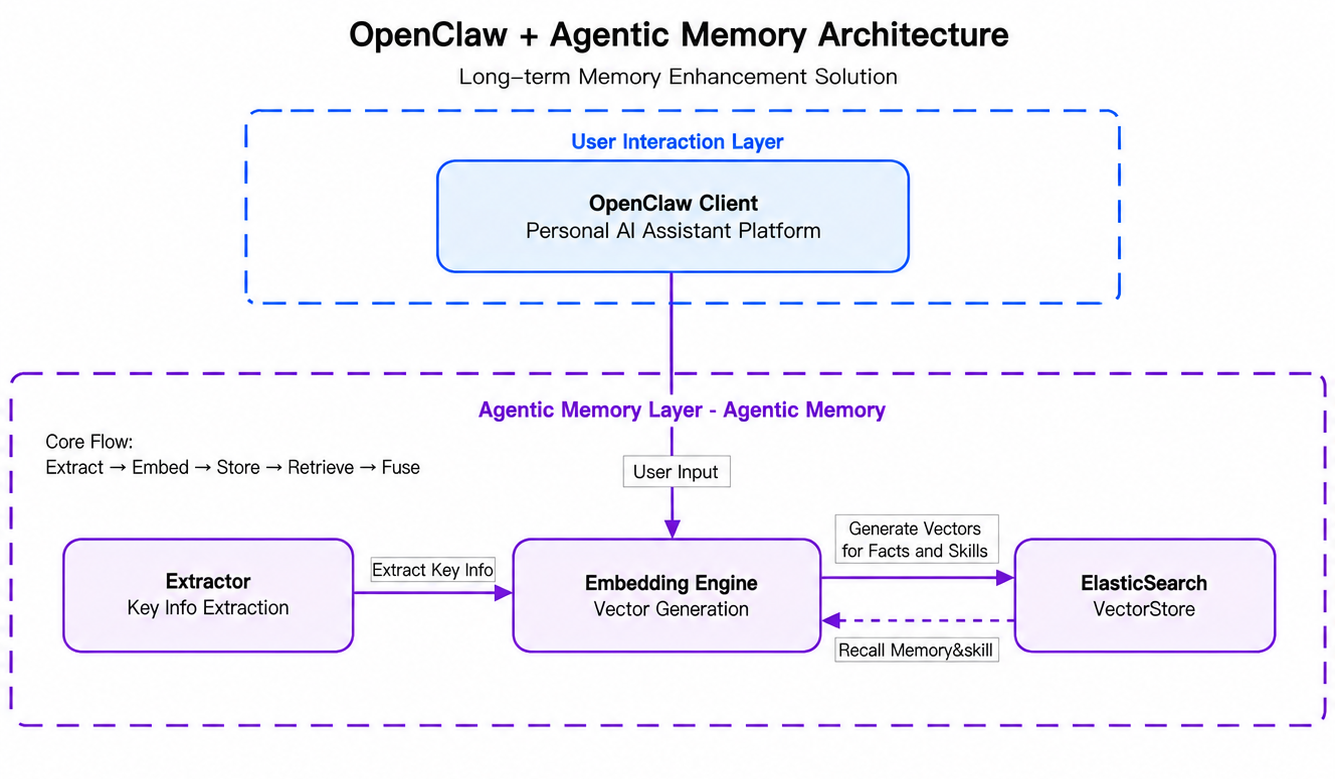
The overall solution architecture includes the following core processes:
-
Extract: Agentic Memory extracts key information from user input and identifies the content that needs to be memorized (Facts, Skills).
-
Embed: A text embedding model converts the extracted information into high-dimensional vectors.
-
Store: The vector data and text information are written to Elasticsearch.
-
Retrieve: When a user initiates a new request, relevant Facts and Skills are recalled from Elasticsearch.
-
Fuse: The retrieved memories are fused with the current context to improve the response quality of the LLM.
Solution comparison
|
Dimension |
OpenClaw native solution |
Agentic Memory solution |
|
Storage backend |
Local SQLite/LanceDB |
Agentic Memory API cloud service |
|
Data persistence |
Local files |
Cloud persistence |
|
Cross-device synchronization |
Not supported |
Supported |
|
Cross-session memory |
Not supported |
Supported |
|
Fact extraction |
Requires local LLM processing |
Automatically extracted on the server side |
|
Vectorization and retrieval |
Requires a local embedding model |
Automatically completed on the server side |
|
Skill management |
Not supported |
Supports search, retrieval, upload, and update |
|
Asynchronous storage |
Not supported |
Supports asynchronous tasks with queryable status |
|
Local dependencies |
Requires native dependencies |
Requires only the built-in fetch of Node.js |
Procedure
Workflow
Step 1: Activate the Agentic Memory API service and obtain connection information
-
Log on to the AI Search Open Platform console and activate the Agentic Memory API service (it is automatically activated when you activate AI Search Open Platform).
-
In the left-side navigation pane of the AI Search Open Platform console, select API Keys and obtain the following information:
-
API endpoint (baseUrl): The format is
http://<workspace-id>.platform-cn-shanghai.opensearch.aliyuncs.com, where<workspace-id>is the workspace identifier (such asdefault-xxx). You can view it on the API Key management page of the console. -
API Key: the Bearer Token used for API authentication.
-
Workspace Name: used for API authentication. Obtain it from workspace management in the upper-right corner.
-
-
Verify the service status by using the health check API:
curl -H "Authorization: Bearer <YOUR_API_KEY>" http://<baseUrl>/v3/openapi/workspaces/<workspace_name>/memory/agentic-memory/healthExpected response:
{
  "request_id": "...",
  "latency": 0,
  "status": "OK",
  "result": {
    "status": "healthy"
  }
}
Step 2: Install the plugin
Run the following command to install the OpenClaw memory plugin. OpenClaw must be installed and the Node.js version must be >= 18.
openclaw plugins install @alicloud-ai-search/openclaw-memoryStep 3: Configure plugin parameters
Edit ~/.openclaw/openclaw.json. You need to complete two parts of the configuration:
-
Add
openclaw-memoryunderplugins.entriesto configure behaviors such as automatic recall and capture, as well as access credentials. -
Add
agentic-memoryundermcp.serversto connect memory, skill, and knowledge base tools as an MCP Server.
{
  "plugins": {
    "entries": {
      "openclaw-memory": {
        "enabled": true,
        "config": {
          "baseUrl": "YOUR_BASE_URL_HERE",
          "workspaceName": "YOUR_WORKSPACE_NAME_HERE",
          "apiKey": "YOUR_API_KEY_HERE",
          "autoRecallMemory": true,
          "autoCaptureMemory": true
        },
        "hooks": {
          "allowConversationAccess": true
        }
      }
    }
  },
  "mcp": {
    "servers": {
      "agentic-memory": {
        "url": "YOUR_BASE_URL_HERE/v1/agentic-memory/mcp",
        "transport": "streamable-http",
        "headers": {
          "Authorization": "Bearer YOUR_API_KEY_HERE"
        }
      }
    }
  }
}
Replace YOUR_BASE_URL_HERE, YOUR_WORKSPACE_NAME_HERE, and YOUR_API_KEY_HERE with your actual service endpoint, workspace name, and API Key.
Plugin configuration parameters:
|
Parameter |
Type |
Default value |
Required |
Description |
|
|
string |
Yes |
The endpoint of the Agentic Memory API service. Obtain it from the AI Search Open Platform console. |
|
|
|
string |
Yes |
The workspace name. |
|
|
|
string |
Yes |
The API Key used for API authentication. |
|
|
|
string |
|
No |
The Service ID of the memory service. |
|
|
string |
If this parameter is not configured, a UUID is automatically generated and saved to ~/.openclaw/autogen-userid.txt. If it is configured, the automatically generated userid value is overridden. |
No |
The user identifier, used to distinguish the memories of different users. |
|
|
string |
|
No |
The agent identifier, used to associate memories and skills with a specific agent. |
|
|
boolean |
|
No |
Specifies whether to automatically recall relevant memories before the agent runs. |
|
|
boolean |
|
No |
Specifies whether to automatically capture the conversation and store it as memories after the agent runs. |
|
|
boolean |
|
No |
Specifies whether to also retrieve skills during automatic recall. |
|
|
boolean |
|
No |
Specifies whether to automatically capture skills from conversations (coming soon). |
|
|
number |
|
No |
The maximum number of memories recalled in each automatic recall. |
|
|
boolean |
No |
Rules for this configuration item:
|
MCP Server configuration (mcp.servers.agentic-memory):
|
Parameter |
Type |
Required |
Description |
|
|
string |
Yes |
The MCP Server endpoint, in the format |
|
|
string |
Yes |
The transport method. Fixed to |
|
|
string |
Yes |
The authentication header, in the format |
Step 4: Start or restart the Gateway
After the configuration is complete, start (or restart) the OpenClaw Gateway for the configuration to take effect.
If the Gateway is already running, run the restart command:
openclaw gateway restartIf you are configuring the Gateway for the first time (it has never been started), set the Gateway mode first and then start it:
openclaw config set gateway.mode local
openclaw gateway --port 18789
After a successful start, the following information in the logs indicates that the plugin is registered:
[openclaw-memory] Plugin registered (autoRecallMemory=true, autoCaptureMemory=true, autoRecallSkill=false, autoCaptureSkill=false, ...)Verify the memory feature
Conversation test
Send messages in OpenClaw to test the long-term memory feature:
-
Send:
My name is Xiao Ming. Please remember that I have a meeting at 10:00 AM next Monday. -
Wait for the reply to confirm that the message has been processed.
-
Send a new message:
Please introduce me. -
Verify whether OpenClaw remembers the name and the meeting information.
CLI commands
Use CLI commands to interact directly with the memory service:
# Search memories
openclaw mem search "project architecture"

# Search memories and include skill results
openclaw mem search "project architecture" --limit 10 --skill

# Get memory details by ID
openclaw mem get <memory_id>

# Delete a specified memory
openclaw mem forget <memory_id>

# Query the status of an asynchronous storage task
openclaw mem task <task_id>

# Update a memory
openclaw mem update <id> "new memory content"
MCP tools
In the new version of the plugin, memory, skill, and knowledge base tools are all provided through the agentic-memory MCP Server, so you do not need to register agent tools separately. After the Gateway starts, OpenClaw automatically pulls the tool list from the configured MCP Server. In conversations, you can directly call tools for memory search, storage, update, and deletion, as well as skill and knowledge base tools.
How it works
Automatic recall process
When autoRecallMemory is enabled, the plugin automatically performs the following operations in the before_agent_start event:
-
Uses the user input as the search query.
-
Sends a search request to the Agentic Memory API to retrieve up to
recallLimitrelevant memories. IfautoRecallSkillis enabled, relevant skills are also retrieved. -
Injects the retrieval results in XML format at the beginning of the agent context:
<relevant-memories>
Relevant facts from long-term memory:
- The user's name is Xiao Ming
- The user has a meeting at 10:00 AM next Monday

Relevant skills:
- skill-name: description of the skill
</relevant-memories>
Temporary sessions (whose session key starts with temp:) and startup prompts are automatically skipped.
Automatic capture process
When autoCaptureMemory is enabled, the plugin automatically performs the following operations in the agent_end event:
-
Extracts the user and assistant messages from the conversation.
-
Filters out the following content:
-
Messages that contain
<relevant-memories>(to prevent feedback loops) -
Startup prompts (starting with
A new session was started via) -
Messages from temporary sessions
-
-
Sends the filtered messages to the Agentic Memory API for fact extraction and asynchronous storage.
REST API operations
The plugin communicates with the Agentic Memory API through the following REST operations:
|
Method |
Path |
Description |
|
GET |
|
Health check |
|
POST |
|
Search memories and skills |
|
POST |
|
Store memories (asynchronous) |
|
PUT |
|
Update a memory |
|
GET |
|
Get a memory or skill by ID |
|
DELETE |
|
Delete a memory or skill |
|
GET |
|
Query the status of an asynchronous task |
|
PUT |
|
Update a skill |
{prefix} = {baseUrl}/v3/openapi/workspaces/{workspace_name}/memory/{serviceId}
FAQ
The plugin cannot be found during installation
If the default npm registry is not the official registry, the plugin may not be found. You can specify the registry before the installation command:
npm_config_registry=https://registry.npmjs.org \
openclaw plugins install @alicloud-ai-search/openclaw-memory
No log output after the plugin is registered
Check whether plugins.slots.memory in ~/.openclaw/openclaw.json correctly points to openclaw-memory, and confirm that enabled is true. plugins.slots.memory is usually set automatically when the plugin is installed. If it is missing, you can add it manually:
{
  "plugins": {
    "slots": {
      "memory": "openclaw-memory"
    }
  }
}
Search returns empty results
-
Confirm that the Agentic Memory API service is running properly (verify it by using the health check API).
-
Confirm that memories have been stored (automatically captured by
autoCaptureMemoryor manually stored by using the memory storage tool provided by the MCP Server). -
Check the entries that start with
[openclaw-memory]in the OpenClaw logs, which contain all API request logs.
Memories cannot be retrieved immediately after storage
Memory storage is an asynchronous operation. After a storage request is submitted, a task_id is returned. Run openclaw mem task <task_id> to query the task status, and perform retrieval only after confirming that the storage task is complete.
Automatic recall is not triggered
-
Confirm that
autoRecallMemoryis set totrue. -
Confirm that the current session is not a temporary session (the session key does not start with
temp:). -
Confirm that the user input is not empty.
The Gateway fails to start for the first time
If running openclaw gateway restart returns the "Gateway service not loaded" error, the Gateway has not been initialized. Perform the following steps:
openclaw config set gateway.mode local
openclaw gateway --port 18789
MCP tools do not take effect
-
Confirm that
mcp.servers.agentic-memoryis configured in~/.openclaw/openclaw.json, thaturlis{baseUrl}/v1/agentic-memory/mcp, and thattransportisstreamable-http. -
Confirm that
headers.Authorizationuses theBearer {apiKey}format and that the API Key matches the one in the plugin configuration. -
After the configuration is complete, run
openclaw gateway restartfor the MCP Server configuration to take effect. -
Run
curl -X POST -H "Authorization: Bearer <YOUR_API_KEY>" -H "Content-Type: application/json" -H "Accept: application/json, text/event-stream" {baseUrl}/v1/agentic-memory/mcp -d '{"jsonrpc":"2.0","id":1,"method":"initialize","params":{"protocolVersion":"2024-11-05","capabilities":{},"clientInfo":{"name":"test","version":"1.0"}}}'to verify the connectivity of the MCP endpoint.