Text analyzers
Tokenization is a basic yet important component of a search engine, and its results directly affect search performance. This topic describes various types of analyzers and provides brief examples to help you understand them.
Analyzer descriptions
Keyword analyzer
Description: This analyzer does not tokenize content. It is suitable for scenarios that require exact matches, such as tags and keywords, where untokenized string or numeric content is used.
Note: This analyzer applies to the LITERAL, INT, LITERAL_ARRAY, and INT_ARRAY field types.
Example:
Example: If the document field content is "chrysanthemum tea", the document can be retrieved only when you search for "chrysanthemum tea".Chinese - general analyzer
Description: This analyzer tokenizes content by retrieval unit based on Chinese semantics. It is suitable for general-purpose scenarios across all industries and belongs to the industry analysis type.
Note: This analyzer applies to the TEXT and SHORT_TEXT field types.
Example:
Example: If the document field content is "\u83ca\u82b1\u8336" (chrysanthemum tea), the document can be retrieved when you search for "\u83ca\u82b1\u8336", "\u83ca\u82b1", "\u8336", "\u82b1\u8336", and so on.
(The \uXXXX sequences represent Chinese characters. Decode them before you enter the actual characters.)
Chinese - e-commerce analyzer
Description: This analyzer is suitable for the e-commerce industry.
Note: This analyzer applies to the TEXT and SHORT_TEXT field types.
Example:
Example: If the document field content is "\u5927\u5b9dSOD\u871c" (a skin care product name), the document can be retrieved when you search for "\u5927\u5b9d", "sod", "sod\u871c", "SOD\u871c", "\u871c", and so on.
(The \uXXXX sequences represent Chinese characters. Decode them before you enter the actual characters.)
Chinese - single character analyzer
Description: This analyzer tokenizes content into single characters or single words. It is suitable for non-semantic Chinese search scenarios, such as searches for novel author names and store names.
Note: This analyzer applies to the TEXT and SHORT_TEXT field types.
Example:
Example: If the document field content is "\u83ca\u82b1\u8336" (chrysanthemum tea), the document can be retrieved when you search for "\u83ca\u82b1\u8336", "\u83ca\u82b1", "\u8336", "\u82b1\u8336", "\u83ca", "\u82b1", "\u83ca\u8336", and so on.
(The \uXXXX sequences represent Chinese characters. Decode them before you enter the actual characters.)
Fuzzy analyzer
Description: This analyzer supports pinyin search, prefix and suffix search for numbers (prefix and suffix matching is not supported for Chinese characters but is supported for letters, numbers, and pinyin), and single-character or single-letter search. A field can be up to 100 bytes in length. For more information and usage notes, see Fuzzy search.
Note: This analyzer applies only to the SHORT_TEXT field type.
Example:
Example: If the document field content is "\u83ca\u82b1\u8336" (chrysanthemum tea, pinyin: juhuacha), the document can be retrieved when you search for "\u83ca\u82b1\u8336", "\u83ca\u82b1", "\u8336", "\u82b1\u8336", "\u83ca", "\u82b1", "\u83ca\u8336", "ju", "juhua", "juhuacha", "j", "jh", "jhc", and so on.
(The \uXXXX sequences represent Chinese characters. Decode them before you enter the actual characters.)
Example: If the document field content is the mobile phone number "138****5678", you can search for "^138" to find mobile phone numbers that start with "138", and search for "5678$" to find mobile phone numbers that end with "5678".
Example: If the document field content is "OpenSearch", the document can be retrieved by searching for a single letter or a combination of letters.
English - stemming analyzer
Description: This analyzer is suitable for English semantic search scenarios. By default, stemming and singular/plural conversion are performed on each English word after tokenization.
Note: This analyzer applies to the TEXT and SHORT_TEXT field types.
Example:
Example: If the document field content is "\u82f1\u6587\u5206\u8bcd\u5668 english analyzer" (the Chinese part means "English tokenizer"), the document can be retrieved when you search for "\u82f1\u6587\u5206\u8bcd\u5668", "english", "analyz", "analyzer", "analyzers", "analyze", "analyzed", "analyzing", and so on.
(Note: In the English analyzer, consecutive Chinese characters are treated as one token.)
(The \uXXXX sequences represent Chinese characters. Decode them before you enter the actual characters.)
English - non-stemming analyzer
Description: This analyzer is used in search scenarios such as English book titles and personal names. It tokenizes content based on spaces and punctuation marks.
Note: This analyzer applies to the TEXT and SHORT_TEXT field types.
Example:
Example: If the document field content is "\u82f1\u6587\u5206\u8bcd\u5668 english analyzer" (the Chinese part means "English tokenizer"), the document can be retrieved when you search for "\u82f1\u6587\u5206\u8bcd\u5668", "english", "analyzer", and so on.
(Note: In the English analyzer, consecutive Chinese characters are treated as one token.)
(The \uXXXX sequences represent Chinese characters. Decode them before you enter the actual characters.)
English - fine-grained analysis
Description: This analyzer tokenizes content by English retrieval unit based on English semantics. It is suitable for general-purpose English scenarios across industries.
Note: This analyzer applies only to the TEXT and SHORT_TEXT field types and is available only for exclusive applications.
Example:
If the document field content is "dataprocess" and the tokenization result is "data process", the document can be retrieved when you search for "dataprocess", "data process", "data", "process", and so on.Pinyin full spelling analyzer
Description: This analyzer allows you to search for Chinese characters in short text by initial letters and full pinyin spelling. It is suitable for scenarios that require abbreviated and full pinyin search, such as personal names and movie titles. For full pinyin search, you must enter the complete pinyin of a Chinese character, not a part of it.
Note: This analyzer applies only to the SHORT_TEXT field type.
Example:
Example: If the document field content is "\u5927\u5185\u5bc6\u63a2007" (a movie title, pinyin: da nei mi tan 007), the document can be retrieved when you search for "d", "dn", "dnm", "dnmt", "dnmt007", "da", "danei", "daneimi", "daneimitan", and so on. The document cannot be retrieved when you search for "an", "anei", and so on.
(The \uXXXX sequences represent Chinese characters. Decode them before you enter the actual characters.)
Pinyin initials analyzer
Description: This analyzer allows you to search for Chinese characters in short text by initial letters. It is suitable for scenarios that require abbreviated pinyin search, such as personal names and movie titles.
Note: This analyzer applies only to the SHORT_TEXT field type.
Example:
Example: If the document field content is "\u5927\u5185\u5bc6\u63a2007" (a movie title, pinyin: da nei mi tan 007), the document can be retrieved when you search for "d", "dn", "dnm", "dnmt", "dnmt0", "dnmt007", "m", "mt", "mt007", "007", and so on.
(The \uXXXX sequences represent Chinese characters. Decode them before you enter the actual characters.)
Simple analyzer
Description: This analyzer is suitable for special search scenarios that the built-in analyzers cannot handle, and gives users full control over tokenization. When you push documents and perform searches, use the tab character "\t" to separate the field content (or query terms). Make sure that the tokenization of both is consistent. Otherwise, documents cannot be retrieved.
Note: This analyzer applies to the TEXT and SHORT_TEXT field types.
Example:
Example: If the field content is "\u83ca\t\u82b1\u8336\thao", the document can be retrieved only by the query terms "\u83ca", "\u82b1\u8336", "\u83ca\t\u82b1\u8336", "\u82b1\u8336\thao", "\u83ca\thao", and "\u83ca\t\u82b1\u8336\thao".
(The \uXXXX sequences other than \t represent Chinese characters. Decode them before you enter the actual characters.)
Numeric analyzer
Description: This analyzer is suitable for search scenarios that require time range queries and numeric range queries.
Note: This analyzer applies to the INT and timestamp field types.
Example:
Example: query=default:'open search' AND index:[number1,number2]
//In this example, index is the name of the index for which numeric analysis is configured.
Geolocation analyzer
Description: This analyzer is suitable for scenarios that require geographic range queries.
Note: This analyzer applies only to the geo_point field type.
Example:
Example: query=spatial_index:'circle(116.5806 39.99624, 1000)'
//Queries points within a circle. This can be used to query points within a specified number of kilometers nearby.
IT content analyzer
Description: This analyzer is suitable for technical content in the IT industry and belongs to industry-specific tokenization. Compared with the general analyzer, it produces different tokenization results for some IT-related terms.
Note: This analyzer applies only to the TEXT and SHORT_TEXT field types.
Example:
Example: Original content: c++\u6570\u7ec4\u4f7f\u7528\u6ce8\u610f\u4e8b\u9879 (notes on using C++ arrays)
General analysis: c ++\u6570\u7ec4\u4f7f\u7528\u6ce8\u610f\u4e8b\u9879
IT content analysis: c++\u6570\u7ec4\u4f7f\u7528\u6ce8\u610f\u4e8b\u9879
(The \uXXXX sequences represent Chinese characters. Decode them before you enter the actual characters.)
Industry - e-commerce general analysis
Description: This analyzer is suitable for e-commerce industry scenarios and belongs to industry-specific tokenization. Based on years of industry experience and the intelligent language processing technology of DAMO Academy, OpenSearch addresses industry pain points and requirements and provides query analysis capabilities dedicated to e-commerce.
Note: This analyzer applies only to the TEXT field type and is available only for exclusive applications with the e-commerce industry enhancement specification.
Example:
Example: Original content: \u5c0f\u91d1\u7ba1\u906e\u7455\u818f (a concealer product name)
General analysis: \u5c0f\u91d1\u7ba1 \u906e\u7455 \u818f
Industry - e-commerce general analysis: \u5c0f\u91d1\u7ba1 \u906e\u7455 \u818f
(The \uXXXX sequences represent Chinese characters. Decode them before you enter the actual characters.)
Thai - general analysis
Description: This analyzer tokenizes content by Thai retrieval unit. It is suitable for general-purpose Thai scenarios across industries.
Note: This analyzer applies only to the TEXT and SHORT_TEXT field types and is available only for exclusive applications.
Example:
If the document field content is "แหล่งดึงดูดนักท่องเที่ยว" and the tokenization result is "แหล่ง ดึง ดูด นักท่องเที่ยว", the document can be retrieved when you search for "นักท่องเที่ยว", "แหล่งดึงดูดนักท่องเที่ยว", and so on.Thai - e-commerce analysis
Description: This analyzer is suitable for the Thai e-commerce industry.
Note: This analyzer applies only to the TEXT and SHORT_TEXT field types and is available only for exclusive applications.
Example:
If the document field content is "หน้าจอโทรศัพท์" and the tokenization result is "หน้าจอ โทรศัพท์", the document can be retrieved when you search for "หน้าจอโทรศัพท์", "หน้าจอ", or "โทรศัพท์".Vietnamese - general analysis
Description: This analyzer is suitable for general-purpose Vietnamese scenarios across industries.
Note: This analyzer applies only to the TEXT and SHORT_TEXT field types and is available only for exclusive applications.
Industry - gaming general analysis
Description: This analyzer is suitable for the gaming industry.
Note: This analyzer applies only to the TEXT and SHORT_TEXT field types and is available only for exclusive applications with the gaming industry enhancement specification.
Example:
If the document field content is "\u539f\u795e\u88c5\u5907" (Genshin Impact equipment) and the tokenization result is "\u539f\u795e \u88c5\u5907", the document can be retrieved when you search for "\u539f\u795e\u88c5\u5907", "\u539f\u795e", "\u88c5\u5907", and so on.
(The \uXXXX sequences represent Chinese characters. Decode them before you enter the actual characters.)
Industry - English e-commerce general analysis
Description: This analyzer is suitable for the e-commerce industry in English scenarios.
Note: This analyzer applies only to the TEXT field type and is available only for exclusive applications with the e-commerce industry enhancement specification.
Chinese - character analysis
Description: This analyzer tokenizes content into single Chinese characters, digits, English letters, and punctuation marks. It is suitable for non-semantic search scenarios.
Note: This analyzer applies only to the TEXT and SHORT_TEXT field types and is available only for exclusive applications.
Example:
Example: If the document field content is "\u5f00\u653e\u641c\u7d22OpenSearch123.", the document can be retrieved when you search for "\u5f00", "\u653e", "\u641c", "\u7d22", "O", "p", "e", "n", "S", "e", "a", "r", "c", "h", or ".".
(The \uXXXX sequences represent Chinese characters. Decode them before you enter the actual characters.)
Text - custom analyzer
Description: An industry analyzer (general analysis, e-commerce analysis, or personal name analysis) plus custom intervention entries. For more information about how to use this analyzer, see Text - custom analyzers.
Note: This analyzer applies only to the TEXT and SHORT_TEXT field types.
Analysis test
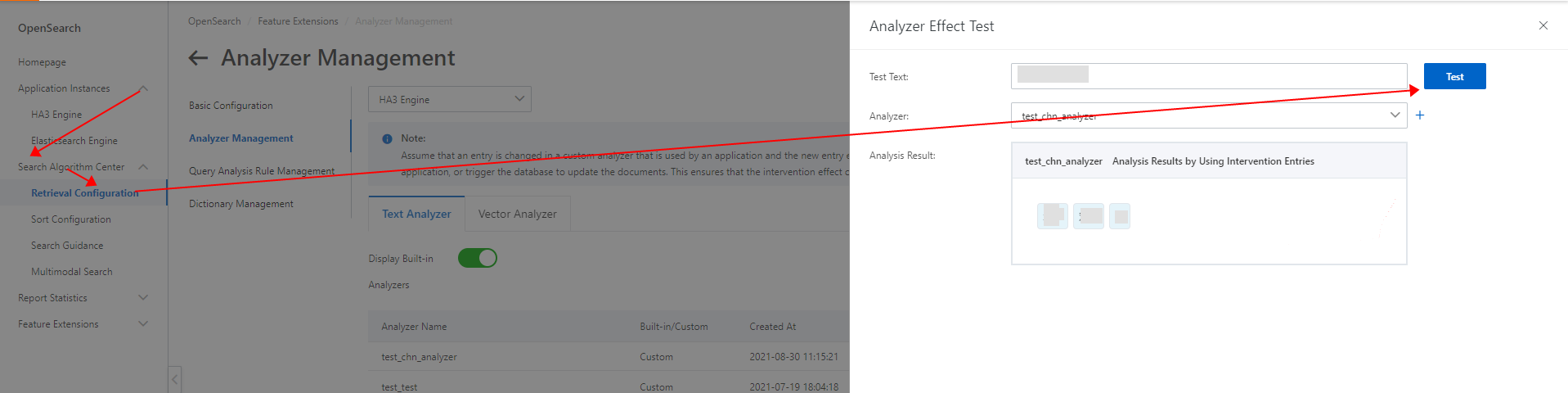
You can use the analysis test feature to test the analysis results of industry analyzers and custom analyzers. In the application console, go to the application list page -> Search Algorithm Center -> Retrieval Configuration -> Analyzer Management -> Tokenization Test to test the analysis results of an analyzer. (See the following figure.)
Scenarios
For Chinese searches with semantic context, we recommend that you use the Chinese semantic analyzer.
For Chinese searches on short text or without semantic context (with few requirements on sorting), we recommend that you use the Chinese single character analyzer to expand retrieval.
For pinyin searches, use the fuzzy analyzer.
For English scenarios, use the English stemming analyzer.
In some scenarios, you can use the Chinese semantic analyzer together with the single character analyzer to achieve excellent search results. For example, use the query query=title_index:'\u83ca\u82b1\u8336' OR sws_title_index:'\u83ca\u82b1\u8336' and the fine sort expression text_relevance(title)*5+field_proximity(sws_title). In this case, documents that contain "xx\u83caxx\u82b1xx\u8336xx" can be retrieved, and documents that contain "\u83ca\u82b1\u8336" (chrysanthemum tea) are ranked higher. (The \uXXXX sequences represent Chinese characters. Decode them before you enter the actual characters.)
Usage notes
Field types that can be used to create index fields
INT, INT_ARRAY, TEXT, SHORT_TEXT, LITERAL, LITERAL_ARRAY, TIMESTAMP, GEO_POINT
Field types that cannot be used to create index fields
FLOAT, FLOAT_ARRAY, DOUBLE, DOUBLE_ARRAY
If search result summaries are configured for a TEXT field, the extended retrieval unit phrases (such as "\u82b1\u8336" in the preceding example) are not highlighted.
The Chinese single character analyzer treats a number or a word as one token. For example, if the content is "hello word", searching for "hello" can retrieve the document, but searching for "he" cannot. If you need to retrieve documents by part of a word, use the fuzzy analyzer.
The primary key of the primary table in the application schema is set as an index field by default, and the name of the index field is "id" by default. This configuration cannot be modified.