Feature configuration attributes for custom sorting models
Custom sorting models use features as inputs for ranking. Each feature extracts a signal from your data — such as a raw field value, a term overlap score, or a cross-product of user and item attributes — and feeds it into the model. This page describes all available feature types and their configuration parameters.
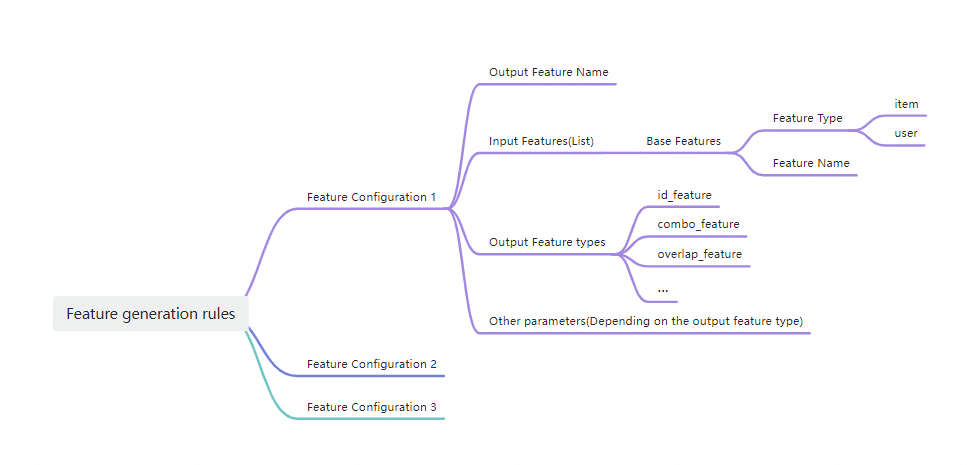
Every feature requires two common fields:
| Field | Required | Description |
|---|---|---|
feature_name | Yes | Name of the feature. Used as the prefix of the output feature. |
feature_type | Yes | Type of the feature. |
Choose a feature type
| Feature type | Category | Applicable data types | Use when |
|---|---|---|---|
id_feature | Sparse | STRING, INTEGER | Combining a field value with a feature name to create a discrete ID signal |
raw_feature | Dense | Floating-point, INTEGER | Passing a numeric field value directly to the model |
combo_feature | Sparse | STRING, INTEGER | Crossing multiple fields to capture interaction signals |
lookup_feature | — | Any (key), STRING (map) | Looking up a value from a key-value map field |
overlap_feature | — | STRING | Measuring term overlap between a query and a title field |
Feature type reference
id_feature
id_feature is a sparse feature and the simplest discrete feature type. It combines the value of a field with a user-specified feature name. Applicable to STRING and INTEGER data.
raw_feature
raw_feature is a dense feature that directly references the field value of the original feature. Applicable to floating-point and INTEGER data.
When using the -Embedding schema, specify value_dimension to set the number of dimensions. Values are concatenated into a single string separated by ASCII character 29 (the non-printable group separator, \u001D in Unicode).
| Field | Required | Type | Example | Description |
|---|---|---|---|---|
value_dimension | No | int | 128 | Dimension of the output field. Default value: 1. |
combo_feature
combo_feature generates a combination from the Cartesian product of multiple fields or expressions. Applicable to STRING and INTEGER data only — do not use floating-point fields as input.
id_feature is a special case of combo_feature where only one field is involved in the cross. Typical usage crosses fields from different tables, such as a user feature and an item feature.
lookup_feature
lookup_feature extracts a value from a key-value map field. It takes the value of key, converts it to a string, then looks it up in the key-value pairs stored in map. Multiple values of items are separated by ASCII character 29 (\u001D).
| Field | Required | Type | Description |
|---|---|---|---|
map | Yes | string | A multi-value STRING field where each entry is in k1:v2 format. Example: system_query_ctr_decay (a built-in feature). |
key | Yes | string | A field of any type. Its value is converted to a string and matched against the keys in map. Example: system_raw_q_ultra (a built-in feature). |
combiner | No | string | Aggregation method when multiple map entries match the same key. Valid values: sum, mean, max, min. Default: sum. |
overlap_feature
overlap_feature measures term-level matching between a query field and a title field. Both fields are multi-value STRING fields where values are separated by ASCII character 29 (\u001D).
| Field | Required | Type | Description |
|---|---|---|---|
query | Yes | string | The query-side multi-value STRING field. Example: "user:attr1". |
title | Yes | string | The title-side multi-value STRING field. Example: "item:attr2". |
method | Yes | string | The overlap calculation method. See the methods below. |
Overlap methods:
common_word— Terms that appear in both the query and the title.diff_word— Terms that appear in one but not the other.query_common_ratio— Proportion of shared terms relative to all terms in the query.title_common_ratio— Proportion of shared terms relative to all terms in the title.is_contain— Whether the content of a query is included in a title. Returns1(true) or0(false).is_equal— Whether the query and title are identical. Returns1(true) or0(false).
Example
Query: high,high2,fiberglass,abc
Title: high,quality,fiberglass,tube,for,golf,bag
| Method | Separator | Result |
|---|---|---|
common_word | — | high_fiberglass |
diff_word | " " (space) | high2 abc |
query_common_ratio | — | 5 |
title_common_ratio | — | 28 |
is_contain | — | 0 |
is_equal | — | 0 |
Feature generation
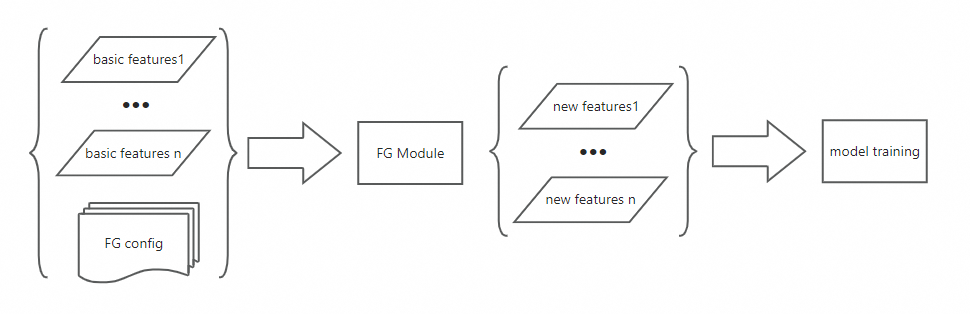
In practice, model training requires more complex features than basic field values. Feature generation lets you intersect multiple basic features to create new training features. Configure feature generation rules in your sorting model to produce the training features your model needs.
The following diagram shows how feature generation works.
Feature generation rules: