Data collection 2.0
What are the benefits of reporting behavioral data?
You can learn how end users respond to search results, such as viewing, clicking, staying, liking, sharing, adding to favorites, and purchasing. This provides direction for optimizing search performance.
You can view various search reports generated for an application, such as page views (PV), item page views (IPV), and click-through rate (CTR), in the data statistics feature of the search application. These reports help you with your operations work.
You can use the algorithm platform that OpenSearch provides to apply the search behavior feedback data to the training of search ranking algorithm models, which continuously improves search performance.
Precautions
The data collection feature is automatically enabled after an instance application is created.
Data currently refers mainly to the behavioral feedback data of end users on search results.
Collection currently refers mainly to reporting search behavior data by using the OpenSearch SDK (server side). App-side and web-side collection is not supported yet. Stay tuned.
Compared with the earlier data collection feature, data collection 2.0 uses simpler and easier-to-understand parameters, and the SDK is more convenient to use. If you are a new user and need this feature, pass parameters by using the behavioral data reporting fields described in this topic. (Note: Data collection 2.0 is supported.)
Report behavioral data
Description: After you enable behavior collection in the OpenSearch console, we recommend that you manually upload behavioral data by using the SDK. The following sections describe the types and meanings of the fields contained in behavioral data. Steps:
SDK reporting requires eight fields: imei or user_id (Note: the two cannot both be empty), biz_id, trace_id, rn, bhv_type, bhv_time, item_id, and item_type
API reporting: In addition to the required fields above, reach_time is also required.
To view demos of reporting behavioral data by using the SDK or API, click here.
Behavioral data field definitions
ID | Field name | Field type | Description | Field value | Required |
1 | app_version | STRING | The version number of the website or mobile app on the business side. | No | |
2 | sdk_type | STRING | The type of SDK used to report data. OpenSearch uses this field to distinguish between SDKs for server-side reporting and SDKs for mobile-side collection. | No. If you report data by using the OpenSearch SDK, this value is set to "opensearch_sdk" by default. | |
3 | sdk_version | STRING | The version number of the SDK used to report data. | No. If you report data by using the OpenSearch SDK, this value is set by default. | |
4 | login | STRING | Specifies whether the end user is logged on to the website or mobile app on the business side. | Valid values: 0 and 1. 0 indicates not logged on. 1 indicates logged on. | No |
5 | user_id | STRING | An ID that uniquely identifies an end user. | No. However, imei and user_id cannot both be empty. | |
6 | imei | STRING | The device ID of the end user. Valid values: imei, device_id, and idfa. | No. However, imei and user_id cannot both be empty. | |
7 | biz_id | STRING | A numeric ID used on the business side to distinguish between different businesses. It usually represents a search entry. For example, if you have web, iOS, and Android entries, you can use multiple biz_id values. You can later use biz_id to split traffic statistics or run experiments. | If you do not distinguish between business scenarios, we recommend that you specify default. If you distinguish between business scenarios, you can specify values such as pc, ios, and android. | Yes |
8 | trace_id | STRING | Identifies which search service provider returned the doc that the behavior targets. | If the result comes from OpenSearch, set this field to Alibaba. If the result comes from another service provider, the business side can specify its own name. | Yes |
9 | trace_info | STRING | This value is the ops_request_misc value that OpenSearch returns in search results. Pass it back as is. | No Note: This field must be passed back when trace_id is Alibaba. It is used internally to verify that the result was returned by OpenSearch. | |
10 | rn | STRING | Identifies a search PV. This value is the request_id value that OpenSearch returns in search results. Pass it back as is. | Yes | |
11 | item_id | STRING | The primary key value of the doc. This value is the primary key value of the primary table in the OpenSearch application. | Yes | |
12 | item_type | STRING | The business type of the doc. | For valid values, see [item_type definitions] below. | Yes |
13 | bhv_type | STRING | The behavior type, such as exposure, stay, view, add to favorites, and download. | For valid values, see [Common behavior types] below. | Yes |
14 | bhv_value | STRING | The behavior quantity, such as the stay duration and the number of items purchased. | For valid values, see [Common behavior types] below. | No |
15 | bhv_time | STRING | The timestamp when the behavior occurred. Unit: seconds. | Yes | |
16 | bhv_detail | STRING | Detailed descriptions of the behavior. | Format: key=value{,key=value}, which indicates one or more key=value pairs. | No |
17 | ip | STRING | The IP address of the mobile phone or terminal on which the behavior occurred. | No. We recommend that you set this field. | |
18 | longitude | STRING | The longitude of the location where the behavior occurred. | No. We recommend that you set this field. | |
19 | latitude | STRING | The latitude of the location where the behavior occurred. | No. We recommend that you set this field. | |
20 | session_id | STRING | The ID of a user session. | No. We recommend that you set this field. | |
21 | spm | STRING | Allows the business side to track the position of the page module in which the behavior occurred. | The encoding format is a.b.c.d, which represents the site ID, page ID, module ID, and position ID respectively. | No |
22 | report_src | STRING | Distinguishes between reporting sources. | Valid values: 1, 2, 3, and patch_data. Meanings:
| No |
23 | mac | STRING | The MAC address of the network interface controller of the mobile phone or terminal device. | No | |
24 | brand | STRING | The brand of the mobile phone or terminal. | No. We recommend that you set this field. | |
25 | device_model | STRING | The model of the mobile phone or terminal. | No | |
26 | resolution | STRING | The screen resolution of the mobile phone or terminal. | No | |
27 | carrier | STRING | The mobile carrier of the mobile phone or terminal. | No | |
28 | access | STRING | The network to which the mobile phone or terminal is connected. | No | |
29 | access_subtype | STRING | The type of network to which the mobile phone or terminal is connected. | No | |
30 | os | STRING | The operating system of the mobile phone or terminal. | No | |
31 | os_version | STRING | The operating system version of the mobile phone or terminal. | No | |
32 | language | STRING | The language set on the mobile phone or terminal. | No | |
33 | phone_md5 | STRING | The MD5 value of the user's mobile phone number. | No | |
34 | reserve1 | STRING | Reserved field. | No | |
35 | reserve2 | STRING | Reserved field. When report_src is set to 'patch_data', reserve2 must be set to the corresponding raw_query value (required). | No | |
36 | reach_time | BIGINT | The time when the data arrives at the server. Format: timestamp. Unit: seconds. | Yes. If you report data by using the OpenSearch SDK, the SDK sets this field automatically. If you report data by using the OpenSearch API, you must set this field. |
item_type definitions
ID | item_type | Business meaning |
1 | goods | Items and products |
2 | article | Articles, blogs, and novels |
3 | ask | Questions and answers |
4 | bbs | Forum posts |
5 | download | Downloads |
6 | image | Images |
7 | media | Multimedia (including movies, TV, and music) |
8 | recipe | Food and recipes |
9 | news | News |
10 | institution | Organizations |
11 | other | Others |
Common behavior types
ID | bhv_type | Meaning | bhv_value | bhv_detail |
1 | expose | Exposure | Leave empty | Leave empty |
2 | stay | Stay | Stay duration (unit: seconds) | Leave empty |
3 | click | Click | Number of clicks. Default value: 1 | Leave empty |
4 | cart | Add to cart, add to bookshelf, or add to playlist | Leave empty | Leave empty |
5 | buy | Purchase | Number of items purchased. Default value: 1 | Example: buy_price=12,price_unit=RMB |
6 | collect | Add to favorites | Leave empty | Leave empty |
7 | like | Like | Number of likes. Default value: 1 | Leave empty |
8 | dislike | Dislike | Number of dislikes. Default value: 1 | Leave empty |
9 | comment | Comment | Number of comments. Default value: 1 | Leave empty |
10 | share | Share or forward | Number of shares or forwards. Default value: 1 | Leave empty |
11 | subscribe | Follow or subscribe | Leave empty | Leave empty |
12 | gift | Send a gift | Leave empty | Leave empty |
13 | download | Download | Leave empty | Leave empty |
14 | read | Read | Leave empty | Leave empty |
15 | tip | Tip | Leave empty | Leave empty |
16 | complain | Complaint | Leave empty | Leave empty |
View data reports
After the data collection service is enabled and a certain amount of behavioral data is uploaded, you can view the data status and data quality on the data collection page:
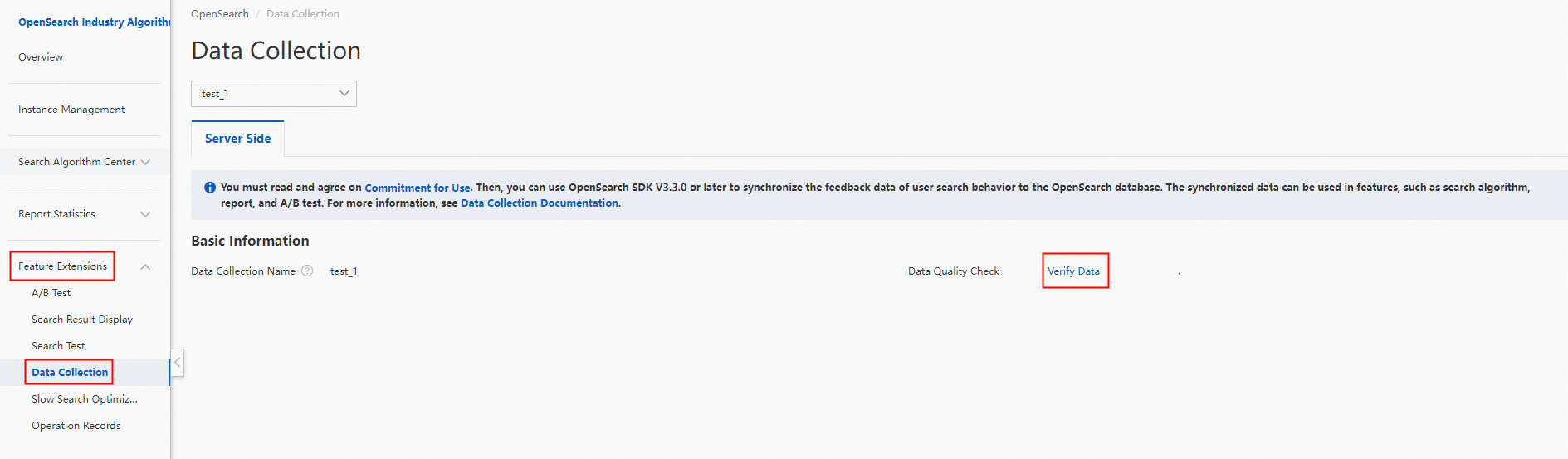
Data status
The data status can be "Normal, available" or "Abnormal, unavailable". Normal means that no errors are reported in the data quality section, that is, all checks pass. If errors are reported, the status is "Abnormal, unavailable".
When the data status is "Abnormal, unavailable", the creation and training of popularity models and category prediction may be affected.
Abnormal data status:
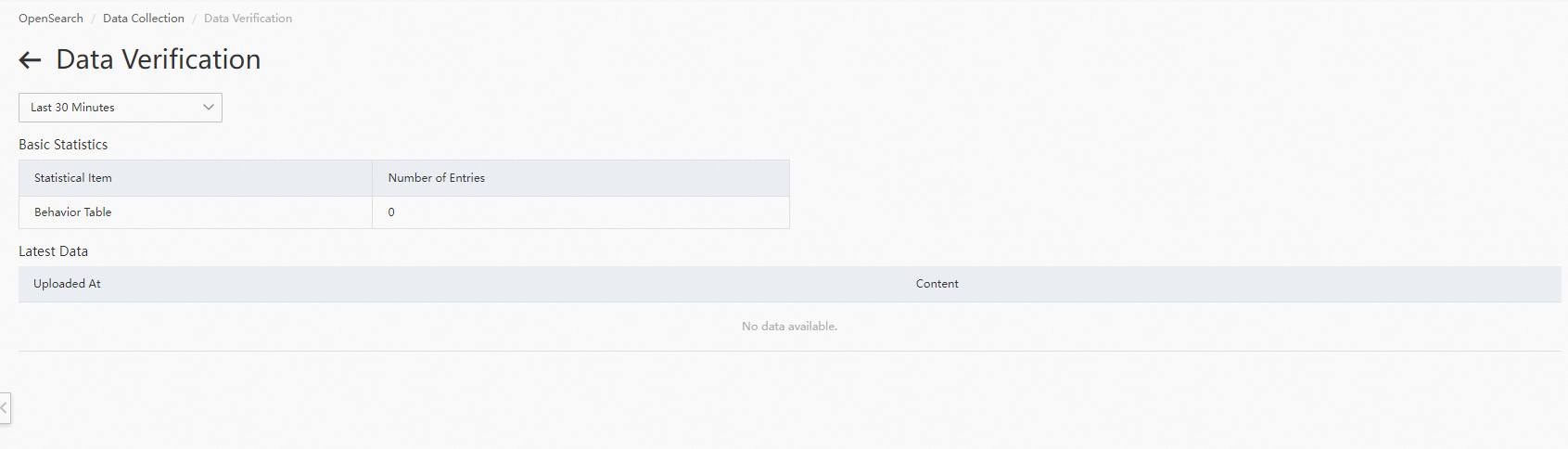
Normal data status:
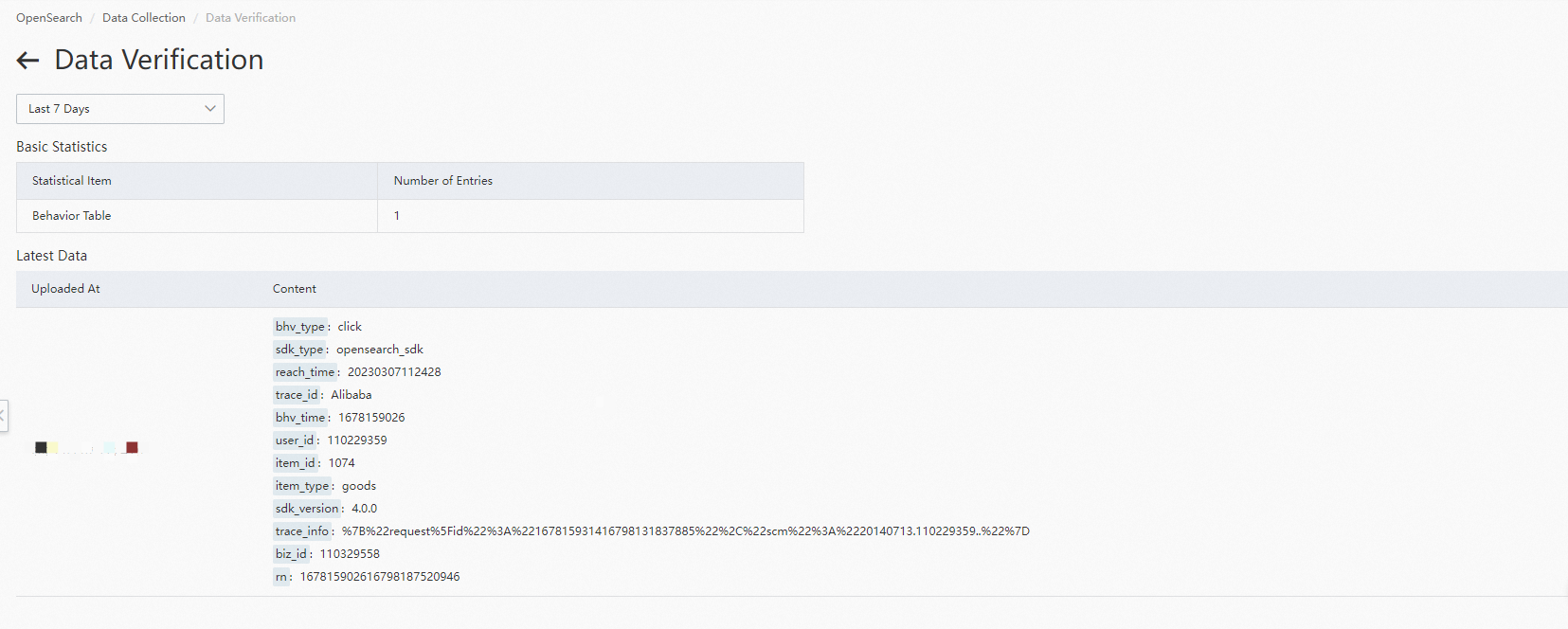
Data quality
Data quality verification is used to output errors from backend check items. When a check item has errors, the console displays the corresponding error information. When a check item has no errors, nothing is displayed in the console: 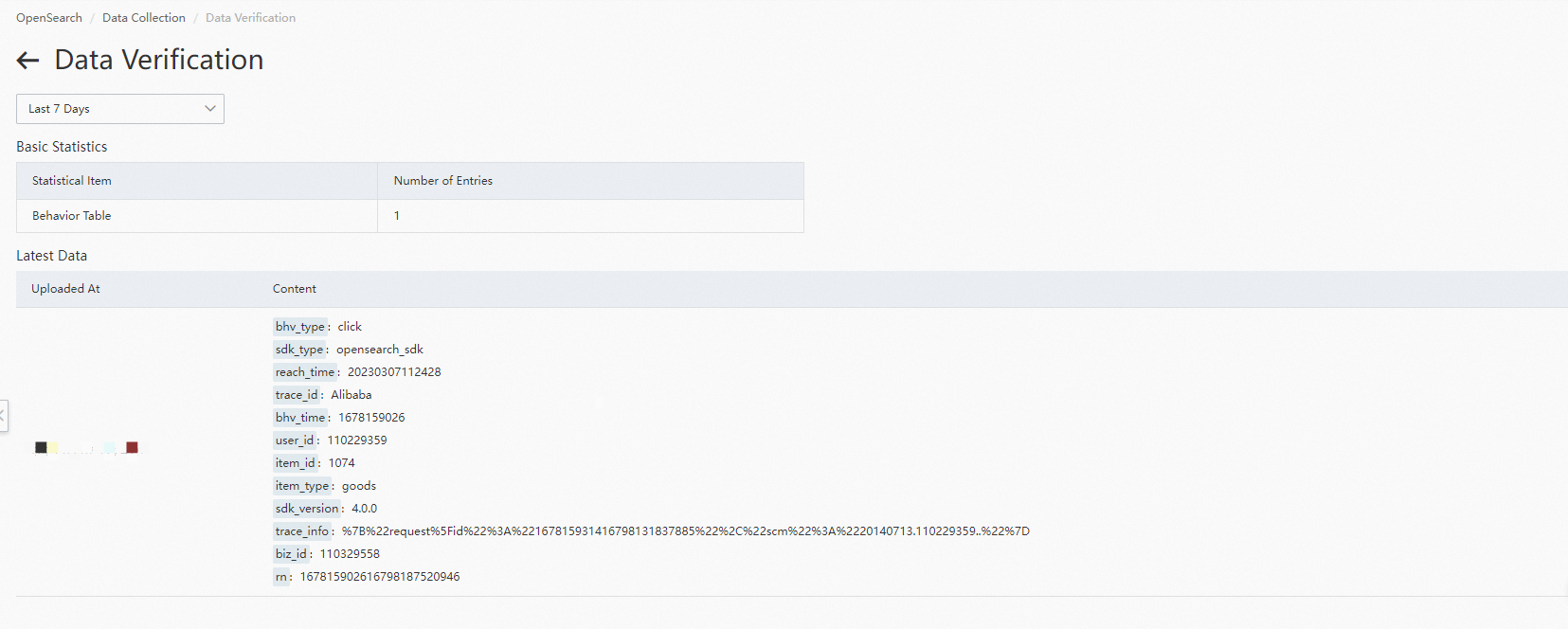 Note: The sampled data shown in the preceding figure is sampled on the hour and displays the behavioral data that the user synchronized during the previous hour.